

For a 5-person team on annual billing, Zoom Pro costs $849.60 a year ($14.16 per user per month), and Google Workspace Business Standard — which includes Meet — costs $840 a year ($14 per user per month). That is $9.60 a year less, and Standard also includes business email, 2 TB of Drive storage per user, Docs, Sheets, and Gemini AI notes in Meet. Zoom Pro gives you video only. If your team already pays for Google Workspace, Meet costs $0 extra — use it and skip Zoom. Recording and AI transcription are included in Zoom Pro and in Workspace Standard, but not in Workspace Starter ($420 a year for 5).
Your weekly team call is at minute 39. Everyone is mid-sentence, the client is finally nodding, and then — gone. The free plan just ended the meeting. If that scene feels familiar, you already know why this comparison matters: the cheapest video tool is the one that never interrupts you, and the most expensive is the one you pay for twice.
This guide prices both tools the way a small business actually buys them: five people, real plans, recording and AI notes included. Zoom is the video incumbent. Google Meet is the video arm of the Google Workspace bundle. One charges you per host; the other may already be sitting in a subscription you pay for.
Quick Answer Box
For a 5-person team on annual billing, Zoom Pro costs $849.60 a year ($14.16 per user per month), and Google Workspace Business Standard — which includes Meet — costs $840 a year ($14 per user per month). That is $9.60 a year less, and Standard also includes business email, 2 TB of Drive storage per user, Docs, Sheets, and Gemini AI notes in Meet. Zoom Pro gives you video only.
If your team already pays for Google Workspace, Meet costs $0 extra — use it and skip Zoom. Recording and AI transcription are included in Zoom Pro and in Workspace Standard, but not in Workspace Starter ($420 a year for 5).
In this article
- Why Small Teams Compare These Two
- The Tools at a Glance
- Zoom in Detail: The Video Incumbent
- Google Meet in Detail: The Bundle’s Video Arm
- The Bundle Maths: When Meet Costs $0 Extra
- Meetings and Video: The 40-Minute Wall vs the 60-Minute Wall
- Recording and Transcription: Who Pays Extra?
- AI: Zoom AI Companion vs Gemini in Meet
- Cost Maths: What a 5-Person Team Actually Pays
- The Hidden Costs and Gotchas
- Strategic Pivot: Work Out What the Video Stack Costs
- Pros and Cons
- Our Verdict: Zoom vs Google Meet
- Frequently Asked Questions
- Price Note
Why Small Teams Compare These Two
Zoom and Google Meet are the two video tools a small business is most likely to already have. Zoom became a verb during the pandemic; Meet comes free with every Google account and rides along inside Google Workspace. So the choice is rarely “which tool is better at video.” It is “am I about to pay for something I already own?”
Most comparisons list features and stop. They never do the per-seat maths for a team of five, never price recording and transcription, and never flag the bundle trick: Meet is not really a $7 or $14 product. It is one slice of a subscription that also replaces your email, your file storage, and your document apps.
Judge it alone and it looks thin. Judge it as part of the bundle and Zoom starts to look expensive.
The two tools also have different philosophies. Zoom sells meetings; everything else is an add-on around the meeting. Google sells a workplace, and Meet is one room inside it. Neither is wrong — but the wrong pick costs a five-person team hundreds of dollars a year.
The Tools at a Glance
| Zoom Workplace | Google Meet (via Google Workspace) | |
|---|---|---|
| Free plan | Basic: $0, 40-minute group meetings, 100 participants, local recording only | Personal Google account: $0, 60-minute group meetings, 100 participants, no recording |
| Cheapest paid plan | Pro: $14.16/user/mo annual, $16.99 monthly | Business Starter: $7/user/mo annual, $8.40 flexible |
| Mid plan | Business: $18.33/user/mo annual, $21.99 monthly | Business Standard: $14/user/mo annual, $16.80 flexible |
| Top business plan | Enterprise: custom pricing | Business Plus: $22/user/mo annual, $26.40 flexible |
| Meeting length (paid) | Up to 30 hours | Up to 24 hours |
| Participants | Pro 100, Business 300 | Starter 100, Standard 150, Plus 500 |
| Cloud recording | Pro and up (10 GB per user) | Standard and up (no recording on Starter) |
| AI meeting notes | AI Companion included on Pro and up | Gemini in Meet on Standard and up (not Starter) |
| Also included | Team Chat, Mail, Calendar, Whiteboard | Gmail, Drive, Docs, Sheets, Slides, Calendar, Chat |
| Best for | Video-first teams wanting the deepest meeting features | Teams already on Workspace, or needing email and files too |
Prices are in US dollars, per user per month, as shown on the official pricing pages on 21 November 2026. Annual billing means one yearly payment per user; monthly or flexible billing costs more.
Zoom in Detail: The Video Incumbent
Zoom is the tool people picture when they hear “video call.” It built its name on meetings that just work, and it still wins on meeting depth: breakout rooms, polling, co-host controls, waiting rooms, virtual backgrounds, live streaming, and telephone dial-in are all in the paid plans. For webinars, training sessions, or client workshops, Zoom’s meeting controls are the most complete of any tool at this price.
The free plan is genuinely usable. Zoom Basic costs $0 and gives you unlimited meetings with up to 100 participants, but every group meeting stops at 40 minutes. You also get Team Chat, a personal booking page, three whiteboards, and a taste of AI: three meeting summaries and 20 AI queries a month. Recording is local only — the file saves to your own computer, not to the cloud.
Zoom Pro is where most small businesses land. It costs $14.16 per user per month on annual billing, or $16.99 month to month. Meetings stretch to 30 hours — effectively no limit. Cloud recording arrives with 10 GB of storage per user, and the AI limits disappear: unlimited meeting summaries, in-meeting questions, custom summary templates, and transcripts of your cloud recordings. Polling, co-host, and live chat support are included. Pro covers 1 to 99 licences, so a five-person team fits comfortably.
Zoom Business costs $18.33 per user per month on annual billing, or $21.99 monthly. It raises the participant cap to 300 and adds single sign-on, managed domains, unlimited whiteboards and booking pages, device management, and data-loss prevention. It is built for companies that need admin control, not for a five-person team that wants longer meetings. One wrinkle: Zoom’s page lists Business for 1 to 250 licences, but community posts have long mentioned a 10-licence minimum, and other reports say it has been relaxed in some regions. Treat it as unconfirmed and ask Zoom at checkout.
Zoom Enterprise is custom pricing, with 500-plus participants, webinars for 500 attendees, a full phone system, and translated captions. A small business will never need it.
One thing Zoom never includes is business email. There is no you@yourcompany.com in Zoom Workplace. If your team needs that, you will pay for Google Workspace or Microsoft 365 as well, on top of Zoom — so Zoom’s headline price is never your total bill.
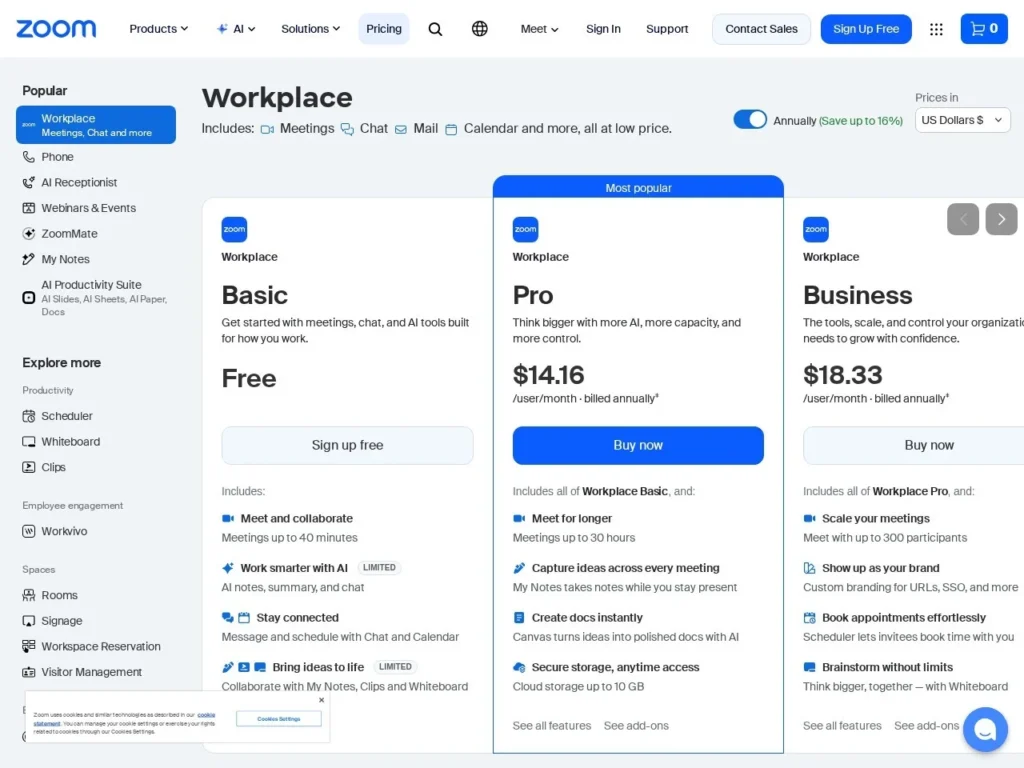
Zoom’s pricing page, 21 November 2026, annual billing: Basic free, Pro $14.16, Business $18.33 per user per month. Monthly billing is higher: $16.99 and $21.99.
Google Meet in Detail: The Bundle’s Video Arm
Google Meet is not sold on its own. You get it free with a personal Google account, or as part of Google Workspace, which also gives your business Gmail on your own domain, Drive storage, Docs, Sheets, Slides, Calendar, and Chat. That is the whole story of Meet: never the most powerful video tool in the room, but the one that is already there.
The free version beats Zoom’s in exactly one way: time. A free Google account hosts group meetings of three or more people for up to 60 minutes, with up to 100 participants, and one-on-one calls run up to 24 hours. That is 20 extra minutes over Zoom’s free plan — often the difference between finishing the call and rejoining it. The catch is recording: free Meet has none at all.
Google Workspace has three business plans, and Meet gets better as you climb them. Business Starter costs $7 per user per month on annual billing, or $8.40 on the flexible month-to-month plan. You get custom-domain Gmail, 30 GB of pooled storage per person, and Meet with up to 100 participants and 24-hour meetings. What you do not get is recording, or Gemini AI in Meet. Starter is email and files with video attached.
Business Standard costs $14 per user per month on annual billing, or $16.80 flexible. This is the plan that makes Meet a real Zoom competitor: meetings grow to 150 participants, and recording, noise cancellation, and Gemini in Meet arrive — AI notes, summaries, and translated captions. You also get 2 TB of pooled storage per person, appointment booking pages, eSignature, and Gemini across Gmail and Docs. For a small business, Standard is the sweet spot.
Business Plus costs $22 per user per month on annual billing, or $26.40 flexible. It raises meetings to 500 participants, adds attendance tracking, Vault retention and eDiscovery, and 5 TB of storage per person. Most five-person businesses will never touch its extra features.
Every Workspace plan comes with a 14-day free trial. On the day we checked, Google’s pricing page showed an introductory offer for new customers: 10% off for 12 months, dropping Starter to $6.30 and Standard to $12.60 per user per month on annual billing ($7.56 and $15.12 flexible). Plus has no discount. The list prices return after the first year — budget on them.
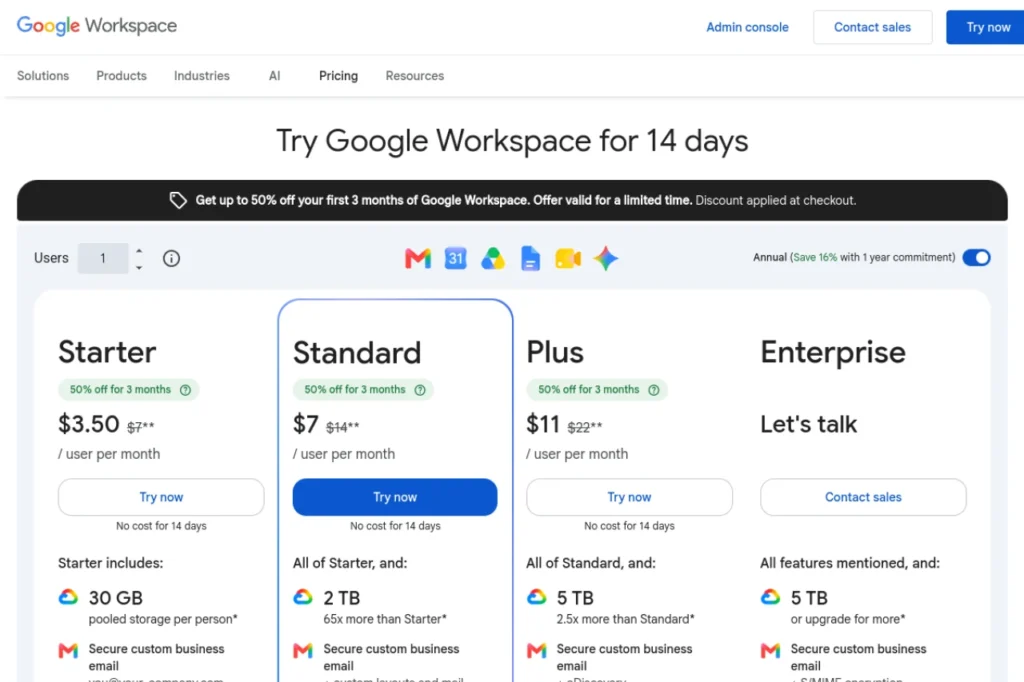
Google Workspace pricing, 21 November 2026, annual billing: Starter $7, Standard $14, Plus $22 per user per month. Flexible prices: $8.40, $16.80, $26.40. The screenshot’s introductory offer (50% off the first 3 months) has since changed — the live page now shows 10% off for 12 months for new customers.
The Bundle Maths: When Meet Costs $0 Extra
Here is the sentence that decides this comparison: if your team already pays for Google Workspace, Google Meet costs $0 extra. Not “cheap.” Zero. No separate Meet bill, no per-host licence, no add-on to buy. The video tool is already in the subscription that runs your email.
A five-person team on Workspace Standard pays $840 a year and gets email, files, documents, and video in one bill. The same team buying Zoom Pro pays $849.60 a year and gets video only — then still needs email, which means Workspace Starter at another $420 a year, or Microsoft 365. The “Zoom is cheaper” argument dies the moment email enters the picture.
Flip it around: if your team is not on Workspace and does not want to be — maybe you run Microsoft 365, or free Gmail is enough and you just need video — then Meet’s bundle value is worth nothing to you. You would pay $7 a head for email you do not need, just to get video. In that case Zoom Pro, at $849.60 a year for five, is the straightforward buy: one product, one job, no bundle attached.
The honest test is simple. Add up what you already pay for email, file storage, and documents. If that is already $7 or more per person per month, Meet is free video and this comparison is over. If it is $0, compare Zoom Pro against Workspace Starter as two separate purchases, and pick the one whose extras you will actually use.
One more bundle note: Workspace Business plans cap at 300 users, and Meet’s participant limits are per meeting, not per licence. Five licences on Standard means five people can host, and every guest joins free. The same is true of Zoom: only the host needs a paid licence. Neither tool charges you for the people you invite.
Meetings and Video: The 40-Minute Wall vs the 60-Minute Wall
Every free video plan has a wall. Zoom’s free wall is at 40 minutes for group meetings. Meet’s free wall is at 60 minutes. Both end the call when the clock runs out, and everyone has to rejoin. The difference is twenty minutes, and twenty minutes is a lot when a client call runs long.
On paid plans, the walls disappear. Zoom Pro and Business allow meetings up to 30 hours, and every paid Workspace plan allows Meet calls up to 24 hours, Enterprise included. Nobody holds a 24-hour meeting. Both tools are effectively unlimited once you pay — the wall only matters on the free plans, where Meet wins by twenty minutes.
Participant caps are where the paid tiers separate. Zoom Pro holds 100 people per meeting, the same as free — fine for internal calls, but a 120-person all-hands needs Business (300) or a Large Meetings add-on. Meet’s Starter also holds 100, Standard holds 150, and Plus holds 500. A five-person team that occasionally hosts a big room gets more headroom from Standard than from Pro, at almost exactly the same price.
Video quality is a wash. Both deliver HD video, screen sharing, virtual backgrounds, and live captions. Zoom’s edge is control: breakout rooms on every paid plan, polling, co-host, waiting rooms, and deeper host settings. Meet’s edge is simplicity: one click from Gmail or Calendar, no app for guests, and an interface non-technical clients figure out in seconds. If your meetings are stand-ups and check-ins, you will never feel Zoom’s extra controls. If you run training with breakout groups and polls, you will feel their absence.
Scheduling deserves a line of its own. Zoom Pro includes one personal booking page, and Business includes unlimited pages through Zoom Scheduler. Workspace Standard includes appointment booking pages too, built into Calendar. Neither replaces a dedicated scheduling tool for a business that lives on bookings — see our comparison of Calendly vs Cal.com — but both cover the basics: a link you send, a time your client picks, a meeting that creates itself.

Google Meet’s homepage leads with AI-enhanced video calls. Meet opens straight from Gmail and Calendar; guests join from a browser.
Recording and Transcription: Who Pays Extra?
Recording is the feature that quietly decides this comparison, because the two tools hide it on different tiers. Zoom puts cloud recording on Pro, its cheapest paid plan. Google puts recording on Standard, its middle plan. That one-tier difference is worth $420 a year to a five-person team.
Zoom Basic records locally only — the file saves to the host’s computer, and the host has to find it, rename it, and share it by hand. Zoom Pro adds cloud recording with 10 GB of storage per user, plus transcripts of every cloud recording. A five-person team gets 50 GB between them, which covers months of weekly calls.
Google Meet’s free plan records nothing at all. Workspace Starter also records nothing — no recording button, no add-on to buy, no upgrade path inside the plan. If your team is on Starter and a client asks for a recording, your only options are upgrading to Standard or running a separate recording tool. So the real price of “Meet with recording” is $14 per user per month, not $7.
Transcription follows the same split. Zoom Pro generates transcripts from cloud recordings at no extra charge — searchable, ready to paste into a follow-up email. Meet’s transcripts arrive through Gemini in Meet, a Standard-and-above feature; Starter users get no transcript and no AI notes. If your workflow is “record the call, send the notes,” Zoom Pro does it for $849.60 a year for five, and Meet does it for $840 a year on Standard. Almost the same money — but the Standard bill also covers your email.
One practical note: Zoom’s local recording works, but it depends on the host remembering to press record and having disk space. Meet’s free plan simply has no record button. If recording matters to your business — client calls, training, compliance — do not buy a plan without it and hope for the best. Buy Pro or Standard, and stop thinking about it.
AI: Zoom AI Companion vs Gemini in Meet
Both tools now ship an AI assistant, included in the paid plans at no extra charge. Neither charges a per-user AI add-on on the plans a small business buys. The difference is what the AI can actually do, and which tier unlocks it.
Zoom AI Companion is the more generous of the two on the cheaper plan. On Pro, you get unlimited meeting summaries, unlimited in-meeting questions (“what did I miss?”), custom summary templates, AI note-taking through My Notes, and agentic search across your meetings.
On the free Basic plan, the same features exist in miniature: three meeting summaries, 20 AI queries, and three note-taking uses a month. The summaries land in your inbox after the call, with action items pulled out. For a team that lives in meetings, this is the best reason to pick Zoom Pro over Meet on Starter — because Starter has no AI in Meet at all.
Gemini in Meet is Google’s answer, and it is good — but it starts one tier higher. Google’s own pricing page shows Gemini in Meet as “not supported” on Business Starter and available on Standard, Plus, and Enterprise. On Standard, Gemini takes notes during the call, writes the summary, and translates captions in real time. It also works across Gmail and Docs, which is where it quietly earns its keep: drafting follow-ups, summarising long threads, polishing proposals. Starter gets limited Gemini in Gmail only — not in Meet, and not in Docs.
So the AI scorecard reads like this. Zoom Pro ($14.16 per user per month) includes full AI meeting notes and summaries. Workspace Standard ($14) includes full AI meeting notes, plus AI across Gmail and Docs. Workspace Starter ($7) includes almost no meeting AI. If AI notes are what you want, the cheapest honest price is $14 a head on either side — Standard gives you the wider AI footprint, Zoom the deeper meeting AI. Pick based on where you spend your day: in meetings, or in email and documents.

Illustration: AI notes beside the meeting grid. Zoom Pro and Workspace Standard include AI meeting summaries at no extra charge; Starter does not include AI in Meet. (Zoom’s AI Companion page blocks screenshot tools, so this slot uses an illustration.)
Cost Maths: What a 5-Person Team Actually Pays
Here is what the per-user monthly figures become per year for a team of five, on annual billing, at list prices in US dollars, excluding tax.
| Setup (5 people, annual billing) | Per year |
|---|---|
| Zoom Pro | $849.60 |
| Zoom Business | $1,099.80 |
| Google Workspace Starter (Meet, no recording) | $420 |
| Google Workspace Standard (Meet + recording + AI notes) | $840 |
| Google Workspace Plus (Meet + 500 participants) | $1,320 |
| Zoom Pro + Workspace Starter (video + business email) | $1,269.60 |
The two numbers that matter most are $849.60 and $840. Zoom Pro and Workspace Standard cost almost exactly the same for five people — Standard is $9.60 a year cheaper — and Standard includes everything Zoom Pro includes for meetings, plus business email, 2 TB of Drive storage per person, Docs, Sheets, and Gemini across the suite. Zoom Pro includes video only.
The other number that matters is $1,269.60 — what a team pays when it buys Zoom Pro for video and Workspace Starter for email, because Zoom has no email of its own. It is $429.60 a year more than Standard alone, for a worse setup: two bills, two admin consoles. Buying both tools is the most expensive way to get the least.
Monthly billing makes everything worse. Zoom Pro on monthly billing costs $1,019.40 a year for five instead of $849.60 — $169.80 more. Workspace flexible billing costs $504 a year for Starter, $1,008 for Standard, and $1,584 for Plus. If your headcount is stable, annual billing is the easiest money this post will ever save you.
Google’s introductory offer softens the first year. At 10% off for 12 months, five people on Standard pay $756 for year one instead of $840, and Starter’s first year drops to $378. Plus stays at $1,320 with no discount. The discount ends after twelve months — budget on the list price.
For a ten-person team, the pattern holds: Zoom Pro $1,699.20 a year, Starter $840, Standard $1,680, Plus $2,640, and Zoom Business $2,199.60. Standard is still $19.20 a year cheaper than Zoom Pro, and still includes the whole office suite. Zoom only wins the price comparison against Starter — and Starter is not a fair comparison, because it has no recording and no meeting AI.
What does each setup have to earn back? At $840 a year, Standard costs $14 per person per month — one saved hour of admin work a month pays for the whole team. Zoom Pro needs the same. The real question is never whether video software pays for itself — it is whether you are paying for it twice.
The Hidden Costs and Gotchas
First, Zoom Business has a licence question to settle before you budget. Zoom’s page lists Business for 1 to 250 licences, but community posts have long reported a 10-licence minimum, and other reports say it has been relaxed in some regions. We could not confirm a minimum on Zoom’s own page. If you are five people planning on Business, ask Zoom at checkout.
Second, Zoom has no business email, and email is not optional. A team on Zoom Pro still needs you@yourcompany.com from somewhere — Workspace Starter at $420 a year for five people, or Microsoft 365 Business Basic at the same $7 per user per month. Zoom’s headline price is not your total bill. Meet’s, inside Workspace, is.
Third, the cheapest Meet plan cannot record, and there is no fix inside the plan. Starter buyers who discover this after a client asks for a recording face a jump from $420 to $840 a year for five people — or a separate recording subscription. If you record calls, start on Standard.
Fourth, Google’s 10%-off offer lasts twelve months, not forever. The pricing page shows Starter at $6.30 and Standard at $12.60 for the first year, then the list prices of $7 and $14 return — and Plus has no discount at all. Budget on the list price from day one.
Fifth, Zoom’s 10 GB of cloud recording per user fills up. A team that records every client call will hit the cap, and extra storage is a paid add-on whose price is not on the main pricing page. Meet’s recordings land in Drive, where Standard gives you 2 TB per person — so storage stops being a conversation.
Seventh, price the hosts, not the headcount. Only the person who schedules the meeting needs a paid licence on Zoom, and only the organiser needs a Workspace seat for Meet. If three people on your team host meetings and two only ever attend, you need three licences — not five.
Eighth, prices exclude tax, and Zoom’s annual price is one yearly payment. Pro at $14.16 per user per month means $169.92 per user up front — $849.60 for five people in a single charge. Cash-flow-conscious teams should know before they click buy.
Ninth, both tools change prices with little warning. Zoom’s Pro plan now lists at $16.99 monthly and $14.16 annually — higher than the $13.33 annual figure older guides still quote. Google raised Workspace prices in January 2025, from $6 to $7 on Starter and $12 to $14 on Standard. The figures here were checked on 21 November 2026. When you read this, check the official pricing page before you buy.
Strategic Pivot: Work Out What the Video Stack Costs
Pricing pages are designed to make every plan look reasonable. The way to see through them is to price your whole stack, not one tool. Add up video, email, file storage, and documents for your actual headcount, then compare the totals.
Our free AI Cost Calculator does exactly that: plug in your team size, your tools, and your billing period, and it shows the real yearly cost of the stack you are considering. Run Zoom Pro plus Workspace Starter through it, then run Workspace Standard alone. The gap is the money you save by not paying for video twice. If you are also weighing chat tools, our comparison of Slack vs Microsoft Teams runs the same bundle maths on team chat.
Pros and Cons
Zoom
Pros:
- The deepest meeting controls at this price: breakout rooms, polling, co-host, waiting rooms, live streaming.
- AI Companion included on Pro with unlimited summaries — the best meeting AI on the cheapest paid tier.
- Cloud recording and transcripts included from Pro, with 10 GB of storage per user.
- Free plan is genuinely usable, with unlimited meetings and Team Chat included.
- Guests join free from a browser, and only hosts need paid licences.
- 30-hour meetings on paid plans.
Cons:
- No business email at any price — you pay for Workspace or Microsoft 365 as well.
- Free plan cuts group meetings at 40 minutes, the shortest free limit here.
- Pro caps at 100 participants and 99 licences; bigger rooms force a Business upgrade.
- Business plan’s licence minimum is unclear — community posts mention 10 licences, Zoom’s page lists 1 to 250.
- Cloud recording storage fills up, and extra storage is a paid add-on.
Google Meet
Pros:
- Free with every Google account: 60-minute group calls, 100 participants, no app to install.
- Inside Workspace, Meet costs $0 extra — the bundle includes email, Drive, Docs, and Calendar.
- Standard costs $840 a year for five people and includes recording, AI notes, and 2 TB of storage per person.
- One click from Gmail and Calendar; the simplest experience for non-technical clients.
- 24-hour meetings on every paid plan, and up to 500 participants on Plus.
- Gemini AI works across Gmail, Docs, and Meet on Standard and above.
Cons:
- No recording or AI notes on Starter — the $7 plan is video only, and there is no recording add-on.
- Meeting controls are thinner than Zoom’s: no polling on lower tiers, weaker breakout rooms.
- You cannot buy Meet alone; it comes with Workspace, wanted or not.
- The 10%-off introductory price lasts twelve months, then the list price returns.
- The 24-hour meeting ceiling applies on every plan, Enterprise included.
Our Verdict: Zoom vs Google Meet
If your team already pays for Google Workspace, use Google Meet. It costs $0 extra, it is already in your email and calendar, and on Standard it records and takes AI notes. Buying Zoom on top of Workspace pays twice for the same meetings.
If your team is not on Workspace, buy Workspace Business Standard — not Zoom Pro. For five people, Standard costs $840 a year and Zoom Pro $849.60. Standard is cheaper, and it also replaces your email, file storage, and document apps. The only reason to pick Zoom Pro instead is if you actively do not want Google: you run Microsoft 365, or your clients demand Zoom links. Those are legitimate reasons. Price is not one of them.
If you only need video and nothing else, Zoom Pro is the honest buy. At $849.60 a year for five people, it is the deepest meeting tool at this price, with the best AI notes on the cheapest tier. Just remember to add the cost of business email to your budget, because Zoom will not provide it.
If you only need free video, Meet wins. Sixty minutes beats forty, and the extra twenty minutes is usually the difference between finishing the call and rejoining it. Neither free plan records, so the choice is purely about time.
If you host large meetings, check the caps before you pay. Standard holds 150 people and Plus holds 500, while Zoom Pro holds 100 and Business holds 300. A team that regularly hosts 120 people gets more room from Standard than from Pro.
Start with the free plans. Run a real week of meetings on both, then buy the one whose paid tier matches what you actually missed — and check the price on the official page on the day you buy.
Frequently Asked Questions
Is Google Meet really free?
Yes. A personal Google account hosts Meet calls free, with up to 100 participants, group calls of three or more people up to 60 minutes, and one-on-one calls up to 24 hours. There is no recording on the free plan, and no AI notes. Paid features — longer group calls, recording, more participants — come with Google Workspace, starting at $7 per user per month.
Is Zoom better than Google Meet?
Zoom is better at meetings themselves: deeper host controls, breakout rooms, polling, 30-hour meetings, and AI summaries included on its cheapest paid plan. Meet is better as a package: it costs $0 extra inside Google Workspace, opens straight from Gmail and Calendar, and on Standard it includes recording, AI notes, email, and 2 TB of storage per person. Pick Zoom for meeting depth, Meet for bundle value.
How much does Zoom cost for a 5-person team?
Zoom Pro costs $849.60 a year for five people on annual billing ($14.16 per user per month), or $1,019.40 a year on monthly billing ($16.99). Zoom Business costs $1,099.80 a year on annual billing ($18.33 per user per month). The free Basic plan costs $0 but cuts group meetings at 40 minutes and records locally only. Only hosts need paid licences; guests join free.
How much does Google Meet cost for a 5-person team?
Meet costs $0 extra if your team already pays for Google Workspace. Otherwise, Starter costs $420 a year for five people ($7 per user per month) with no recording, Standard $840 a year ($14) with recording and AI notes, and Plus $1,320 a year ($22) with 500-participant meetings. All plans include a 14-day free trial, and Google currently offers 10% off for 12 months for new customers.
Can I use Zoom and Google Meet together?
Yes. Many small businesses keep both: Zoom for client-facing workshops and webinars, Meet for quick internal calls inside Gmail and Calendar. Guests join free on both, and only the host needs a paid licence. But running both means paying for both — for most five-person teams, one tool plus its bundle is cheaper than two standalone bills.
Price Note
Price note — updated 21 November 2026: Prices in this post were checked on 21 November 2026. When you are reading this, the price may be lower or higher — vendors run promotions, change list prices, and raise them with little warning, as Google did in January 2025 when Business Starter rose from $6 to $7 and Standard from $12 to $14. Always check the official pricing page before you buy: Zoom at zoom.com/pricing and Google Workspace at workspace.google.com/pricing.
Pros
- Zoom: deepest meeting controls — breakout rooms, polling, co-host, waiting rooms, live streaming
- Zoom: AI Companion included on Pro with unlimited summaries
- Zoom: cloud recording and transcripts included from Pro, 10 GB per user
- Zoom: free plan genuinely usable, unlimited meetings and Team Chat
- Zoom: guests join free; only hosts need paid licences
- Zoom: 30-hour meetings on paid plans
- Google Meet: free with every Google account — 60-minute group calls, 100 participants
- Google Meet: inside Workspace, Meet costs $0 extra — email, Drive, Docs, Calendar included
- Google Meet: Standard $840/year for five, with recording, AI notes, 2 TB storage per person
- Google Meet: one click from Gmail and Calendar; simplest for non-technical clients
- Google Meet: 24-hour meetings on every paid plan; up to 500 participants on Plus
- Google Meet: Gemini AI across Gmail, Docs, and Meet on Standard and above
Cons
- Zoom: no business email at any price — you pay for Workspace or Microsoft 365 as well
- Zoom: free plan cuts group meetings at 40 minutes
- Zoom: Pro caps at 100 participants and 99 licences
- Zoom: Business licence minimum unclear — community posts mention 10 licences, page lists 1 to 250
- Zoom: cloud recording storage fills up; extra storage is a paid add-on
- Google Meet: no recording or AI notes on Starter — $7 plan is video only, no recording add-on
- Google Meet: meeting controls thinner than Zoom's — no polling on lower tiers, weaker breakout rooms
- Google Meet: cannot buy Meet alone; it comes with Workspace, wanted or not
- Google Meet: 10%-off introductory price lasts twelve months, then list price returns
- Google Meet: 24-hour meeting ceiling applies on every plan, Enterprise included
If your team already pays for Google Workspace, use Google Meet — it costs $0 extra. If your team is not on Workspace, buy Workspace Business Standard, not Zoom Pro: for five people Standard costs $840 a year vs Zoom Pro $849.60, and Standard also replaces email, file storage, and document apps. If you only need video and nothing else, Zoom Pro is the honest buy at $849.60 a year for five. If you only need free video, Meet wins — 60 minutes beats 40.