

The best scheduling tool for a three-person small business in 2026 is Cal.com Teams for most teams, and Calendly Teams for teams that want the most polished booking page with the least setup. Cal.com Teams costs $36 a month on annual billing for three people, or $432 a year, and includes round-robin routing, routing forms, and Stripe and PayPal payment collection. Calendly Teams costs $48 a month on annual billing for three people, or $576 a year, for the same job. The difference is $144 a year.A solo business pays $0 on Cal.com's free plan, which includes unlimited event types and payment collection, against $120 a year for Calendly Standard, which does not include round-robin at all. One warning: Cal.com's commercial product went closed source in April 2026, and the self-hosted version is now a separate community edition called Cal.diy, with the team features removed.
Calendly is the booking link everybody already knows. Cal.com is the booking link your developer friend keeps telling you about. One of them charges you per seat for the privilege of sharing a calendar, and the other gives away the solo version for free and then charges less per seat when you grow. The question is not which one books meetings better. Both book meetings fine. The question is what a three-person team pays for the two features that actually matter: round-robin routing and payment collection.
This post prices the switch properly: two tools, one fixed scenario, every fee shown. No roundup prices, no affiliate picks, and one big correction to the story most comparisons still tell about Cal.com being open source.
Quick Answer Box
The best scheduling tool for a three-person small business in 2026 is Cal.com Teams for most teams, and Calendly Teams for teams that want the most polished booking page with the least setup. Cal.com Teams costs $36 a month on annual billing for three people, or $432 a year, and includes round-robin routing, routing forms, and Stripe and PayPal payment collection. Calendly Teams costs $48 a month on annual billing for three people, or $576 a year, for the same job. The difference is $144 a year.
A solo business pays $0 on Cal.com’s free plan, which includes unlimited event types and payment collection, against $120 a year for Calendly Standard, which does not include round-robin at all. One warning: Cal.com’s commercial product went closed source in April 2026, and the self-hosted version is now a separate community edition called Cal.diy, with the team features removed.
In this article
- Quick Answer Box
- Why Small Teams Start Looking Beyond Calendly
- The Tools at a Glance
- Calendly in Detail: The Incumbent
- Cal.com in Detail: The Challenger
- Round-Robin: The Feature That Decides the Bill
- Payment Collection: What the Booking Fee Really Costs
- The Self-Hosted Question: Cal.diy in Plain English
- Cost Maths: What a 3-Person Team Actually Pays
- The Hidden Costs and Gotchas
- Strategic Pivot: Work Out What the Booking Stack Costs
- Pros and Cons
- Our Verdict: Calendly vs Cal.com
- Frequently Asked Questions
- Price Note
Why Small Teams Start Looking Beyond Calendly
Nobody leaves Calendly because the booking page stopped working. They leave because the free plan ran out of room. Calendly Free gives you one event type and one calendar connection, which is fine until you need a second kind of meeting. A coach who does discovery calls and paid sessions needs two event types. The moment you need a second kind of meeting, you are paying.
The second reason is the seat maths. Calendly charges per seat, and the plan most small teams actually need is not the cheapest paid plan. Standard costs $10 a seat a month on annual billing, but has no round-robin routing. The moment three people share one booking link and want the work spread fairly between them, you need Teams at $16 a seat a month. That is the jump that surprises people: $10 sounds like the price, and the feature you need costs $16.
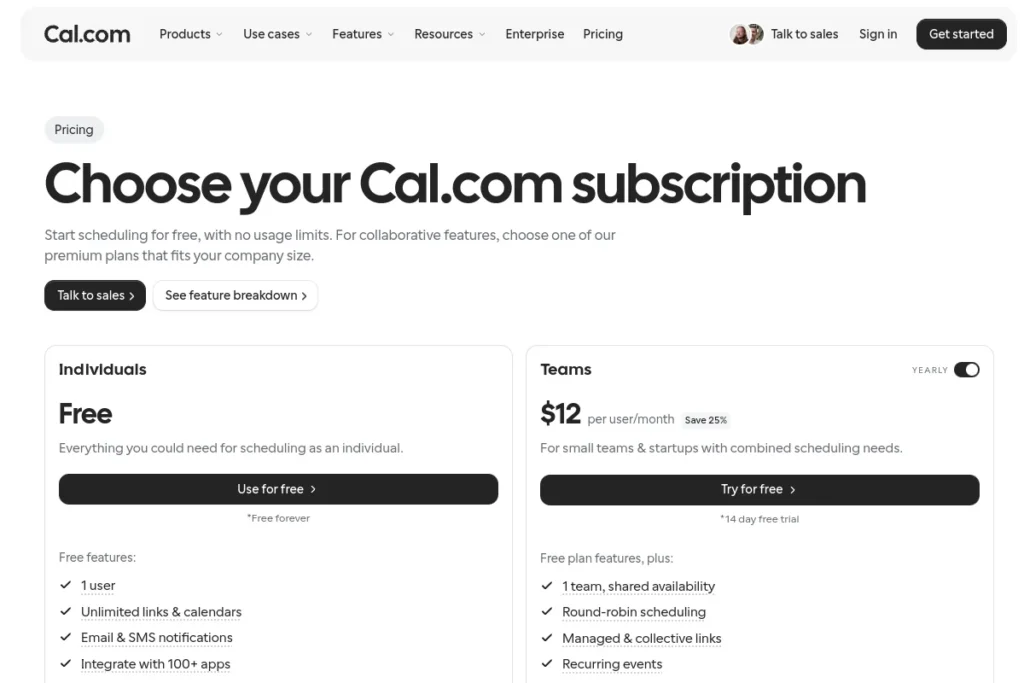
The third reason is the challenger. Cal.com gives a solo user unlimited event types, unlimited calendars, and payment collection for $0, and then charges $12 a user a month for the team plan with round-robin included. That is a free solo plan against a $120-a-year solo plan, and a $432-a-year team plan against a $576-a-year team plan. Small teams notice — and ask the question this post answers: is Cal.com a real Calendly replacement, or is the cheap price hiding a catch?
The Tools at a Glance
| Tool | Best for | Cost for 3 people (year one) | Free plan or trial | The catch in one line |
|---|---|---|---|---|
| Calendly | Teams that want the most polished booking page with the least setup | $576 a year on Teams, annual billing | Free plan, 14-day trial | Round-robin starts at $16 a seat, not $10 |
| Cal.com | Teams that want the cheapest real team plan and a free solo plan | $432 a year on Teams, annual billing | Free plan, no trial length printed | Commercial product went closed source in April 2026 |
Calendly in Detail: The Incumbent
Calendly is the default for a reason. It has been the scheduling tool since 2013, it has more than 20 million users, and its booking page is the one your clients already recognise. You share a link, they pick a time, the meeting lands on your calendar with a video link attached.
The free plan costs $0 and gives you one event type, one calendar connection, unlimited one-on-one meetings, and a customisable booking page, plus the mobile app and browser extension. One event type means one kind of meeting: a 30-minute discovery call, or a 60-minute consultation, but not both. One calendar connection means Calendly checks one calendar for conflicts. If your work and personal calendars are separate, the free plan only watches one of them.
Standard costs $10 per seat per month on annual billing, or $12 a seat a month billed monthly, which Calendly labels a 17 percent saving for paying yearly. It adds unlimited event types, up to six calendar connections, group and collective event types, automations and meeting reminders, and integrations with HubSpot, Mailchimp, and Zapier. Payment collection through Stripe and PayPal is included from Standard up. Standard is the plan a solo coach or consultant actually needs, and at $120 a year it is a fair price.
Standard Plus costs $18 per seat per month on annual billing, or $24 billed monthly. It adds Calendly’s AI features: Notetaker, which joins your Zoom, Google Meet, and Microsoft Teams calls and writes up recaps with transcripts, and Callie, an AI assistant that schedules over email. The AI step costs $8 a seat a month on top of Standard, and it is a separate plan, not an add-on you attach.
Teams costs $16 per seat per month on annual billing, or $20 billed monthly, a 20 percent saving for paying yearly. This is the plan that matters for this comparison, because round-robin routing lives here and nowhere cheaper. Teams adds round-robin meeting distribution, lead routing through Calendly, HubSpot, Pardot, or Marketo forms, centrally managed event types, Salesforce meeting sync, and admin tools. Calendly’s pricing is tiered on annual Teams subscriptions: the first 30 seats stay at $16, and the per-seat price falls as the team grows. A three-person team pays the full $16.
Teams Plus costs $24 per seat per month on annual billing, or $32 billed monthly, and adds the same Notetaker and Callie AI features on top of Teams. Enterprise starts at $15,000 a year, starts at 50 seats, and adds single sign-on, SCIM provisioning, domain control, audit logs, and dedicated support. Paid plans start with a 14-day free trial, and at the end of the trial you are downgraded to the free plan automatically.
Two details matter more than the headline prices. First, Calendly charges per seat, and every person who hosts meetings needs a seat. Second, the $10 Standard price is the one most roundups quote, and it is the wrong price for a team that needs round-robin. The real starting price for a team is $16 a seat.
See the current figures on the official page (https://calendly.com/pricing).

Cal.com in Detail: The Challenger
Cal.com started in 2021 as Calendso, an open-source Calendly alternative, and it built its name on a simple pitch: the same booking link, without the monthly bill, on code you could run yourself. The pitch has changed this year, and any comparison that still calls Cal.com open source is out of date. The free plan is still the most generous in scheduling, and the team plan is still cheaper than Calendly’s.
The free plan, called Individuals, costs $0 and covers one user with unlimited event types, unlimited calendar connections, email and SMS notifications, and integrations with more than 100 apps. Payment collection through Stripe and PayPal is included on the free plan, which is the detail that makes it remarkable. So is two-way sync with Salesforce and HubSpot, which Calendly keeps behind its paid plans. There is no usage limit stated on the free plan, and a one-click import moves your Calendly event types across. A solo business can run its whole booking operation on this plan and pay nothing.
Teams costs $12 per user per month on annual billing, with Cal.com labelling the yearly saving as 25 percent. Paying month to month costs about $16 per user per month, worked out from that 25 percent saving, because Cal.com’s pricing page prints only the yearly figure and does not publish a monthly one. Teams adds one team with shared availability, round-robin scheduling, managed and collective event types, recurring events, routing forms, customisable email and SMS notifications, booking analytics, removal of Cal.com branding, and custom APIs.
Organisations costs $28 per user per month on annual billing, or about $37 billed monthly by the same arithmetic. It adds unlimited sub-teams, routing by custom variables, a company subdomain on cal.com, SAML single sign-on and SCIM, SOC 2, HIPAA, and ISO 27001 compliance, instant meetings, and role-based permissions. Enterprise is custom priced and adds dedicated onboarding, uptime guarantees, and a dedicated database. No free-trial length is printed on Cal.com’s pricing page, so do not budget around a trial that is not stated there.
The trade-off is polish and setup. Cal.com’s booking page works well, but it does not feel as finished as Calendly’s, and the settings have more knobs than a non-technical owner will enjoy turning. The integrations are wide, the API is genuinely open, and the routing forms are stronger than Calendly’s at the same price. But a team that wants to sign up and be booking in ten minutes will find Calendly faster.
See the current figures on the official page (https://cal.com/pricing).
Round-Robin: The Feature That Decides the Bill
Round-robin is the feature that decides this comparison, because it is the feature that forces both tools onto their team plans. Round-robin means one booking link shared by the whole team, with each new booking handed to the next available person in turn. A clinic with three therapists, a sales team with three reps, or a tutoring centre with three tutors all need it. Without it, every person needs their own link, and the client has to guess who to book.
On Calendly, round-robin starts on the Teams plan at $16 a seat a month on annual billing. There is no way to buy it cheaper. Standard at $10 does not have it, and there is no add-on that unlocks it on Standard. A three-person team that needs round-robin pays $48 a month, or $576 a year, before it has booked a single meeting.
On Cal.com, round-robin starts on the Teams plan at $12 a user a month on annual billing. A three-person team pays $36 a month, or $432 a year. That is $12 a month less, or $144 a year less, for the same core job. The routing forms that qualify a lead before assigning it are also on Cal.com Teams, while Calendly puts lead routing on Teams too, so neither tool makes you pay extra for the qualifier.
There is one wrinkle worth knowing. Cal.com’s own routing page puts the deeper routing features, like routing by custom variables, on the Organisations plan at $28 a user a month. Basic round-robin and routing forms are on Teams, and that covers most small teams. But a team that needs to route by deal size or territory should confirm the plan with Cal.com before buying.
The honest summary is simple. If your team needs round-robin, Calendly’s cheapest route is $16 a seat and Cal.com’s cheapest route is $12 a user. Everything else in this comparison is detail around that $4-a-seat gap.

Payment Collection: What the Booking Fee Really Costs
Both tools collect payment at booking, and both do it the same way: through Stripe or PayPal, connected to your own account. Neither pricing page lists a platform fee on top of the subscription, which means the subscription is the whole software cost and the payment processor takes its own cut from each transaction.
Stripe’s standard US rate for an online card payment is 2.9 percent plus 30 cents per successful charge. On a $100 booking, Stripe takes $3.20 and you keep $96.80. PayPal’s fees are similar and vary by transaction type, so check your own PayPal account before quoting a number to a client. The important point is that the fee is identical on both tools, because both tools hand the money to the same processor. Switching from Calendly to Cal.com does not change what Stripe takes.
What changes is which plan you need before you can collect anything. On Cal.com, payment collection is on the free plan, so a solo coach charging $80 a session can take payment at booking and pay Cal.com nothing. On Calendly, payment collection starts on Standard at $10 a seat a month, so the same coach pays $120 a year before the first payment arrives. For a team, both tools include payments on the plans that include round-robin, so the payment question only changes the solo maths.
Calendly also lists meeting packages for prepaid sessions and invoicing for project work, features Cal.com’s pricing page does not list at the same level. A coach selling a six-session package will find those useful.
Do the volume maths before you decide the payment feature matters. Twenty paid bookings a month at $100 each is $2,000 of volume, and Stripe takes about $64 of it on either tool. The subscription gap of $12 a month between the two team plans is smaller than one month of Stripe fees on that volume.
The Self-Hosted Question: Cal.diy in Plain English
This is the section most Cal.com comparisons get wrong, because most of them were written before April 2026. Cal.com began as open source, and for five years that was its identity. On 14 April 2026, Cal.com announced that the commercial product was going closed source, and the public code was relaunched as a separate community edition called Cal.diy under the MIT licence.
Cal.diy is free, and you can run it on your own server. It includes the full scheduling engine, the app store framework, and the booking infrastructure, and all the free features remain in it. What it does not include is the commercial and enterprise features: no teams, no organisations, no SAML single sign-on, no SCIM, no workflows, no routing forms, no insights dashboard, and no admin panel. Cal.com’s own documentation recommends Cal.diy for personal, non-production use, and says to use it at your own risk, with no security or safety guarantee from the company.
That changes the maths for a team. A solo owner who wants a free booking page on their own server can still self-host Cal.diy and pay nothing but the server. A three-person team that wants round-robin and routing on its own infrastructure cannot get it from Cal.diy, because those features were removed. Self-hosting with team features now needs an enterprise agreement with Cal.com, which is a sales conversation, not a download.
The server is the smaller cost either way. A small virtual server costs a few dollars a month, and the real cost of self-hosting is your time: installing updates, keeping backups, and fixing it when it breaks. A team without anyone comfortable running a server should not self-host, and a team with someone technical should weigh the hours against the $36 a month the hosted Teams plan costs.
The honest way to say it is this. Cal.com is still free for one person, and still cheaper than Calendly for a team. It is no longer the open-source scheduling tool you can run yourself with the full feature set. If the open-source promise was the reason you were switching, check Cal.diy’s feature list before you move, because the team features you want are not in it.
Cost Maths: What a 3-Person Team Actually Pays
The scenario is a three-person small business, one year, standard prices, annual billing where the tool offers it, with round-robin routing and payment collection included. Both tools include payment collection on the plans below, and neither adds a platform fee on top of the subscription, so the subscription is the whole software cost.
| Tool | Plan for 3 people | Monthly cost | Year-one cost |
|---|---|---|---|
| Calendly Teams | Teams, annual billing | $48 | $576 |
| Cal.com Teams | Teams, annual billing | $36 | $432 |
| Calendly Teams, monthly billing | Teams, billed monthly | $60 | $720 |
| Cal.com Teams, monthly billing | Teams, billed monthly | $48 | $576 |
| Calendly Standard | Standard, annual billing | $30 | $360 |
| Cal.com Individuals | Free, 1 user only | $0 | $0 |
Cal.com Teams at $432 a year saves $144 a year against Calendly Teams at $576 a year, on annual billing. On monthly billing the gap is the same $144 a year: $576 against $720. Paying yearly saves $144 a year on Calendly Teams and $144 a year on Cal.com Teams, so the billing choice does not change which tool is cheaper.
The solo comparison is wider. Cal.com Individuals costs $0 a year and includes unlimited event types and payment collection. Calendly Standard costs $120 a year for one seat and does not include round-robin. A solo business that only needs one person saves the whole $120 by picking Cal.com, and gets more features for it.
The five-person comparison shows the gap growing with headcount. Five people on Calendly Teams costs $80 a month, or $960 a year. Five people on Cal.com Teams costs $60 a month, or $720 a year. The saving is $240 a year at five people, against $144 at three, because the gap is $4 per seat per month and it multiplies with every seat you add.
Add the payment processor to the picture and the gap shrinks in proportion. Twenty paid bookings a month at $100 each is $2,000 of volume, and Stripe takes about $64 a month, or $768 a year, on either tool. The all-in year-one cost for a three-person team doing that volume is about $1,344 on Calendly Teams and about $1,200 on Cal.com Teams, once the processor fees are counted.

The Hidden Costs and Gotchas
First, Calendly’s $10 price is not the team price. Standard at $10 a seat a month is the price most roundups quote, and it does not include round-robin. A team that buys Standard and then needs round-robin must move to Teams at $16 — a 60 percent jump per seat.
Second, Calendly’s free plan is one event type and one calendar. A business with two kinds of meeting, or two calendars that both matter, outgrows the free plan on the first day. Treat the free plan as a trial of the booking page, not as a working setup.
Third, Cal.com’s monthly prices are not printed on its pricing page. The page shows $12 a user a month for Teams on annual billing with a 25 percent saving note, and the $16 monthly figure is arithmetic from that note. It is not printed there, so confirm the monthly figure on the checkout page before you commit to monthly billing.
Fourth, Cal.com prints no free-trial length on its pricing page. Do not plan a test drive around a trial that is not stated there. The free Individuals plan is the trial: one user, unlimited event types, and the real product.
Fifth, the open-source story changed in April 2026. Cal.com’s commercial product is closed source, and Cal.diy is a separate community edition with the team features removed. A team that switches for the self-hosted promise will find it does not cover round-robin, routing forms, workflows, or single sign-on. Check the Cal.diy feature list before you move.
Sixth, both tools charge per seat, so the bill scales with headcount. Count part-timers and contractors who host meetings before you compare prices: a three-person team with two regular contractors is a five-seat bill on both tools.
Seventh, Calendly’s AI plans are separate plans, not add-ons. Standard Plus and Teams Plus cost $8 a seat a month more than Standard and Teams, and you cannot attach Notetaker to a cheaper plan. A team that wants meeting recaps pays the Plus price on every seat, not just the seats that use the feature.
Eighth, the payment processor takes its cut on every booking, and it is the same on both tools. Stripe’s standard US rate is 2.9 percent plus 30 cents per successful card payment. On $2,000 a month of bookings that is about $64 a month — more than the subscription on either tool.
Ninth, switching costs more than the subscription gap. Moving booking links, rebuilding routing forms, and reconnecting Stripe and PayPal takes days. The $144 a year you save is real, but it is less than a day of a consultant’s time — switch because the tool fits better, not only because it costs less.
Tenth, Calendly’s Enterprise plan starts at $15,000 a year and at 50 seats, so it is not a small-business plan at all. A team that outgrows Teams jumps straight to an enterprise conversation. Cal.com’s Organisations plan at $28 a user a month is the gentler next step.
Strategic Pivot: Work Out What the Booking Stack Costs
The scheduling tool is rarely the expensive line in a small business. The expensive line is the stack: the booking tool, the payment processor, the reminder texts, the CRM, and the follow-up emails, each billed per person per month. A team that prices one tool at a time ends up paying twice for the same job, usually because the booking tool sits on top of a CRM that already includes a meeting link.
Before you switch, price the whole stack. Our free AI Cost Calculator adds up the real starting price of the tools you already use, so you can see whether the $144 a year between Calendly and Cal.com is the number that matters, or whether the reminder texts and the CRM seat cost more than the booking tool itself.
Pros and Cons
Pros (Cal.com): Free solo plan with unlimited event types, unlimited calendars, and payment collection; Teams at $12 a user a month undercuts Calendly Teams by $4 a seat; routing forms and booking analytics included on Teams; two-way Salesforce and HubSpot sync on the free plan; open API and custom APIs on Teams.
Cons (Cal.com): Commercial product went closed source in April 2026, and Cal.diy has no team features; monthly prices are not printed on the pricing page, only derived from the yearly saving; no trial length printed on the pricing page; booking page feels less polished than Calendly’s, and setup has more knobs.
Pros (Calendly): Most polished booking page here, and the one clients already recognise; fastest setup, booking in ten minutes; 14-day free trial on paid plans; meeting packages and invoicing for paid sessions; Enterprise plan with single sign-on and audit logs for larger teams.
Cons (Calendly): Round-robin starts at $16 a seat, not the $10 most roundups quote; free plan allows only one event type and one calendar; AI features are separate Plus plans at $8 a seat more, not add-ons; Enterprise starts at $15,000 a year and 50 seats, so there is no gentle step up from Teams.
Our Verdict: Calendly vs Cal.com
Most three-person small businesses should pick Cal.com Teams. It costs $432 a year against $576 for Calendly Teams, it includes round-robin, routing forms, and payment collection, and the solo free plan means a one-person business pays nothing at all. The $144 a year saving is real, and the feature set at that price is at least as strong as Calendly’s.
The exceptions are clear. Pick Calendly Teams if your team wants the most polished booking page with the least setup, because it is the tool your clients already know, and the ten-minute setup is worth $12 a month to a team that bills by the hour. Pick Calendly if you sell prepaid session packages or send invoices from the booking tool, because Cal.com does not list those features at the same level.
Pick neither if the open-source promise was your reason for switching. Cal.com’s commercial product is closed source since April 2026, and Cal.diy, the community edition, has no team features and is recommended for personal use only. A team that needs round-robin on its own server needs an enterprise conversation with Cal.com, not a download.
Start with the free plan on either tool before you pay. Cal.com’s free plan is the real product for one person, and Calendly’s 14-day trial is the real product for a team. Run a week of real bookings on the free tier, count the no-shows, and then pay for the plan that matches the feature you actually used. And once the booking link is live, the next job is making sure people turn up: our guide to automating appointment reminders with AI shows the three-touch reminder sequence that cuts no-shows, and our guide to automating lead follow-up with AI shows what to do with the enquiries that book and then go quiet.
Frequently Asked Questions
Is Cal.com a real Calendly replacement?
Yes, for most small businesses. Cal.com’s free plan covers one user with unlimited event types, unlimited calendars, and Stripe and PayPal payment collection, and Teams at $12 a user a month includes round-robin, routing forms, and booking analytics. The booking page is less polished than Calendly’s, and the commercial product went closed source in April 2026, but for day-to-day scheduling it does the same job for less money.
Is Cal.com still open source?
No, not the commercial product. Cal.com moved its production code to a private repository on 14 April 2026, and the public code was relaunched as Cal.diy, a separate MIT-licensed community edition. Cal.diy is free to self-host, but it has no teams, organisations, single sign-on, workflows, routing forms, or insights dashboard, and Cal.com recommends it for personal, non-production use. Any guide that still calls the hosted Cal.com open source is out of date.
Which is cheaper for a 3-person team, Calendly or Cal.com?
Cal.com. Three people on Cal.com Teams costs $36 a month, or $432 a year, on annual billing. Three people on Calendly Teams costs $48 a month, or $576 a year. The difference is $144 a year. Both plans include round-robin routing and payment collection, and neither adds a platform fee on top of the subscription.
Can I collect payments with the free plan?
On Cal.com, yes. The free Individuals plan includes Stripe and PayPal payment collection for one user. On Calendly, no. Payment collection starts on Standard at $10 a seat a month, or $120 a year for one person. Both tools pass the payment to Stripe or PayPal, which take their own fee: Stripe’s standard US rate is 2.9 percent plus 30 cents per successful online card payment.
Do I need the Teams plan, or is Standard enough?
It depends on one feature: round-robin. If one booking link is shared by several people and the work should be spread between them, you need Calendly Teams at $16 a seat or Cal.com Teams at $12 a user, because neither tool puts round-robin on a cheaper plan. If every person has their own booking link and clients choose who to book, Calendly Standard at $10 or Cal.com Individuals at $0 is enough.
Price Note
Price note — updated 21 November 2026: Prices in this post were checked on 21 November 2026. When you are reading this, the price may be lower, the offer may have ended, or the plan may have changed, so check the official pricing page before you buy.
Calendly and Cal.com prices were read from their official pricing pages on 21 November 2026. Cal.com’s monthly prices are not printed on its pricing page and are worked out from the 25 percent yearly saving shown there, so confirm the monthly figure on the checkout page before you buy. Calendly’s Enterprise price is a starting figure for 50 seats and above. Stripe’s US online card rate is 2.9 percent plus 30 cents per successful charge. Cal.com’s closed-source change and the Cal.diy community edition are described in Cal.com’s own April 2026 announcement.
Pros
- Cal.com: Free solo plan with unlimited event types, unlimited calendars, and payment collection
- Cal.com: Teams at $12 a user a month undercuts Calendly Teams by $4 a seat
- Cal.com: Routing forms and booking analytics included on Teams
- Cal.com: Two-way Salesforce and HubSpot sync on the free plan
- Cal.com: Open API and custom APIs on Teams
- Calendly: Most polished booking page here, and the one clients already recognise
- Calendly: Fastest setup, booking in ten minutes
- Calendly: 14-day free trial on paid plans
- Calendly: Meeting packages and invoicing for paid sessions
- Calendly: Enterprise plan with single sign-on and audit logs for larger teams
Cons
- Cal.com: Commercial product went closed source in April 2026, and Cal.diy has no team features
- Cal.com: Monthly prices are not printed on the pricing page, only derived from the yearly saving
- Cal.com: No trial length printed on the pricing page
- Cal.com: Booking page feels less polished than Calendly's, and setup has more knobs
- Calendly: Round-robin starts at $16 a seat, not the $10 most roundups quote
- Calendly: Free plan allows only one event type and one calendar
- Calendly: AI features are separate Plus plans at $8 a seat more, not add-ons
- Calendly: Enterprise starts at $15,000 a year and 50 seats, so there is no gentle step up from Teams
Most three-person small businesses should pick Cal.com Teams. It costs $432 a year against $576 for Calendly Teams, it includes round-robin, routing forms, and payment collection, and the solo free plan means a one-person business pays nothing at all. The $144 a year saving is real, and the feature set at that price is at least as strong as Calendly's.The exceptions are clear. Pick Calendly Teams if your team wants the most polished booking page with the least setup, because it is the tool your clients already know, and the ten-minute setup is worth $12 a month to a team that bills by the hour. Pick Calendly if you sell prepaid session packages or send invoices from the booking tool, because Cal.com does not list those features at the same level.
1 thought on “Calendly vs Cal.com (2026): Which Scheduling Tool Is Cheaper for Small Business?”