

For a 5-person team on annual billing, Asana Starter costs $659.40 a year ($10.99 per user per month) and includes timeline views, Gantt charts, and unlimited automations. Monday.com Standard — the cheapest Monday plan with a timeline — costs $720 a year ($12 per seat per month) and caps automations at 250 actions a month. Asana is $60.60 a year cheaper at the timeline tier.One tier up, the order flips. Monday.com Pro costs $1,140 a year for five people ($19 per seat per month) and includes time tracking, private boards, and 25,000 automation actions a month. Asana Advanced costs $1,499.40 a year ($24.99 per user per month). Monday is $359.40 a year cheaper at the full-featured tier.
Your team has five people, fifteen open projects, and one shared spreadsheet nobody trusts anymore. Someone suggests Asana. Someone else swears by Monday.com. Both cost about ten dollars a head, both promise timelines and automations, and both look great in a demo. So which one actually costs less when a real five-person team buys it?
This guide prices both tools the way a small business actually buys them: five seats, with timelines, automations, and AI included. Asana is the list-first work manager. Monday.com is the board-first visual platform. One is cheaper at the tier most teams need — the other is cheaper at the tier above it. The trick is knowing which tier you are really buying.
Quick Answer Box
For a 5-person team on annual billing, Asana Starter costs $659.40 a year ($10.99 per user per month) and includes timeline views, Gantt charts, and unlimited automations. Monday.com Standard — the cheapest Monday plan with a timeline — costs $720 a year ($12 per seat per month) and caps automations at 250 actions a month. Asana is $60.60 a year cheaper at the timeline tier.
One tier up, the order flips. Monday.com Pro costs $1,140 a year for five people ($19 per seat per month) and includes time tracking, private boards, and 25,000 automation actions a month. Asana Advanced costs $1,499.40 a year ($24.99 per user per month). Monday is $359.40 a year cheaper at the full-featured tier.
In this article
- Why Small Teams Compare These Two
- The Tools at a Glance
- Asana in Detail: The List-First Work Manager
- Monday.com in Detail: The Board-First Visual Platform
- The Timeline Test: The Cheapest Plan That Actually Plans
- Automations and AI: Unlimited vs Metered
- Views and Ways of Working: Lists vs Boards
- Cost Maths: What a 5-Person Team Actually Pays
- The Hidden Costs and Gotchas
- Strategic Pivot: Work Out What the Project Stack Costs
- Pros and Cons
- Our Verdict: Asana vs Monday.com
- Frequently Asked Questions
- Price Note
Why Small Teams Compare These Two
Asana and Monday.com are the two project tools a small business is most likely to already know by name. Asana defined the category in the 2010s: tasks, lists, timelines, and a way for a team to see who is doing what by when. Monday.com arrived later with colour, boards, and a visual style that non-technical teams found easier to love. Today they compete for the same buyer: a team of three to ten people that has outgrown spreadsheets and needs real project management.
Most comparisons list features and stop. They never do the per-seat maths for a team of five, never price timelines and automations separately, and never flag the seat-bundle trap: both tools stop selling single seats once your team grows past five, so a six-person team pays for ten seats on both — and that changes the answer.
The two tools also have opposite philosophies about metering. Asana gives you unlimited automations on its cheapest paid plan and charges more for portfolios and time tracking. Monday.com gives you the visual board cheaply, then meters automations — but its top tier is much cheaper than Asana’s. Neither approach is wrong, but the wrong pick costs a five-person team hundreds of dollars a year, and the right pick depends on which tier you land on.
There is also a real question behind the keyword. Reddit threads in r/projectmanagement keep asking the same thing in different words: which one is cheaper for a small team, and which one will the team actually use? Price decides the budget; adoption decides whether the money was wasted. This guide answers both, with prices checked on the official pricing pages on 21 November 2026.
The Tools at a Glance
| Asana | Monday.com (work management) | |
|---|---|---|
| Free plan | Personal: $0, max 2 users, unlimited tasks and projects | Free: $0, up to 2 seats, 3 boards, 3 docs |
| Cheapest paid plan | Starter: $10.99/user/mo annual, $13.49 monthly | Basic: $9/seat/mo annual, $12 monthly |
| Mid plan | Advanced: $24.99/user/mo annual, $30.49 monthly | Standard: $12/seat/mo annual, $14 monthly |
| Top business plan | Enterprise: custom pricing | Pro: $19/seat/mo annual, $24 monthly (Enterprise: custom) |
| Timeline / Gantt | Starter and up | Standard and up (not on Basic) |
| Automations | Unlimited on Starter and up | None on Basic; 250 actions/mo on Standard; 25,000 on Pro |
| Native time tracking | Advanced only | Pro only |
| AI included | AI Teammates + Dash + AI Studio credits on all paid plans | AI credits: 1,000/mo Basic, 2,000 Standard, 3,000 Pro |
| Free guests / viewers | Unlimited free guests on Starter | Unlimited free viewers; guest editing from Standard |
| Free trial | Free trial of paid plans, no card (per Asana’s help pages) | 14-day free trial of Pro, no card |
| Best for | Teams that want timelines, automations, and structure at the lowest price | Visual, board-first teams that want time tracking without Asana’s top tier |
Prices are in US dollars, per user per month, as shown on the official pricing pages on 21 November 2026. Annual billing means one yearly payment per user; monthly billing costs more.
Asana in Detail: The List-First Work Manager
Asana is the tool people picture when they hear “project management.” Work lives in tasks, tasks live in projects, and projects can be viewed as a list, a board, a calendar, or a timeline. It built its name on structure: dependencies, due dates, custom fields, and a reporting dashboard that shows where every project stands. For a team that runs client work, launches, or operations with deadlines, Asana’s structure is the point.
The free plan is honest but small. Asana Personal costs $0 and gives you unlimited tasks and projects, list, board, and calendar views, unlimited storage with a 100 MB limit per file, and more than 100 free integrations. The catch is headcount: Personal is limited to two users. It used to allow ten, but Asana cut it to two for new accounts in November 2025, and older free accounts have been moved to the same limit. A five-person team cannot use it, and there is no timeline, automation, or AI on the free plan.
Asana Starter is where most small businesses land: $10.99 per user per month on annual billing, or $13.49 month to month. Timeline and Gantt views arrive here, along with reporting dashboards, forms, custom fields, custom templates, and unlimited free guests — clients and contractors can collaborate without taking a paid seat. The headline feature is automations: unlimited, on the cheapest paid plan. Rules that assign work, send alerts, and update statuses run as often as you like, with no monthly action cap.
Starter also includes Asana’s AI: AI Teammates and Asana Dash, with five AI requests per user per month up to 50 requests per account, plus AI Studio with 50,000 credits a month. That covers status summaries and task drafting at small-team scale, though heavy AI Studio use will burn through the credits.
Asana Advanced costs $24.99 per user per month on annual billing, or $30.49 monthly. It adds unlimited portfolios, Goals, resource management, approvals and proofing, time tracking that compares estimated and actual hours, form branching, and Salesforce, Tableau, and Power BI integrations. AI Meetings arrives here too, and the AI Studio allowance rises to 75,000 credits a month. Advanced is built for teams that manage many projects at once and need to see capacity across all of them.
Asana Enterprise is custom pricing, with single sign-on, user provisioning, view-only licences for stakeholders who only need to watch, and 200,000 AI Studio credits a month — a five-person business will never need it.
Two billing rules matter before you budget. First, paid plans have a two-seat minimum, so the smallest Starter subscription is $21.98 a month. Second, above five users Asana sells seats in blocks of five, up to thirty — a six-person team pays for ten seats. That rule is easy to miss and expensive to discover at checkout.
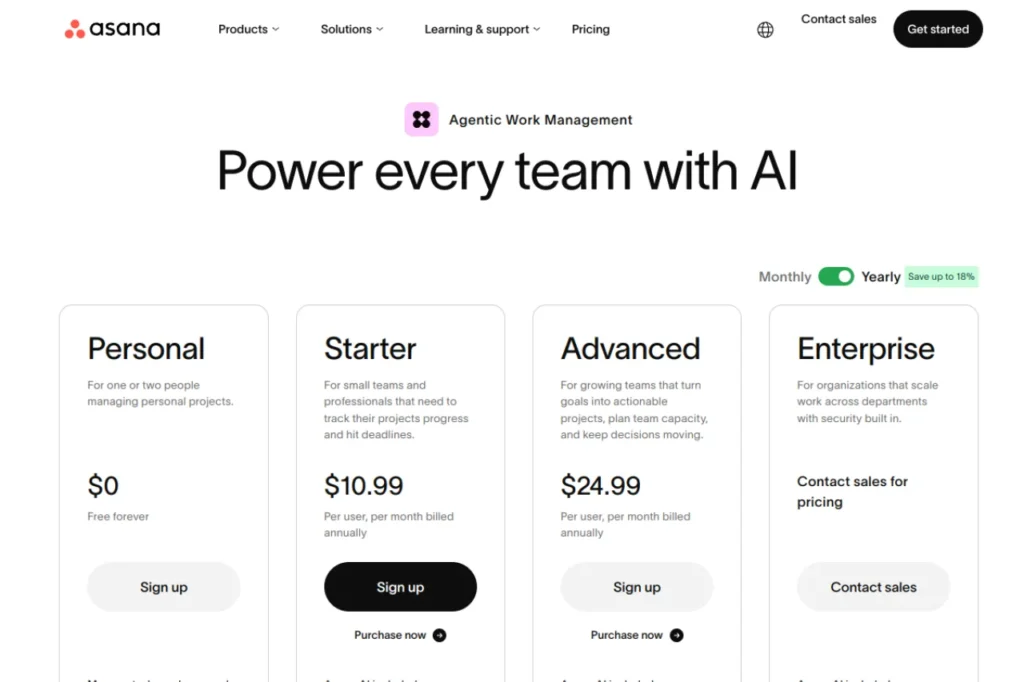
Asana’s pricing page, 21 November 2026, annual billing: Personal free for up to 2 users, Starter $10.99, Advanced $24.99. Monthly billing is higher: $13.49 and $30.49.
Monday.com in Detail: The Board-First Visual Platform
Monday.com is the colourful one. Work lives on boards: rows of items, columns of status, owners, dates, and numbers, all visible at a glance. It is built for teams that think in spreadsheets but want something prettier and more collaborative. For marketing and operations teams, Monday’s board is easier to read than Asana’s list — and easier to explain to a new hire in five minutes.
The free plan costs $0 and covers up to two seats, three boards, three docs, and more than 200 templates. Like Asana’s, it stops at two people, so a five-person team cannot use it. There are no automations and no timeline view.
Monday Basic costs $9 per seat per month on annual billing, or $12 month to month — the cheapest paid plan in this comparison, and the most misleading one. Basic gives you unlimited boards and items, unlimited free viewers with read-only access, and 5 GB of file storage. What it does not give you is a timeline or Gantt view, or any automations at all. A team that buys Basic to plan projects with deadlines is buying a tracker, not a planner. Basic also includes 1,000 AI credits a month, under Monday’s credit-based AI model for newer accounts.
Monday Standard costs $12 per seat per month on annual billing, or $14 monthly. It is the first plan that does the job most teams actually need: timeline and Gantt views, calendar view, guest access with editing rights, and integrations with Slack, Teams, Gmail, and Zoom. Automations arrive here too, but metered: 250 automation actions and 250 integration actions a month, plus 2,000 AI credits a month. That covers a small team’s routine rules, but a team that automates aggressively will feel the ceiling.
Monday Pro costs $19 per seat per month on annual billing, or $24 monthly. It adds private boards, native time tracking, formula and dependency columns, chart views, and a much bigger automation allowance: 25,000 automation and 25,000 integration actions a month, with 3,000 AI credits. Above Pro sits Enterprise, custom priced, which adds portfolio management, resource management, and 250,000 automation actions a month.
Monday’s billing has its own traps. Every paid plan has a three-seat minimum, so the smallest Basic subscription is $27 a month — a solo buyer pays for three seats. Seats are sold in bundles of 3, 5, 10, 15, and so on, so a seven-person team pays for ten seats. Yearly billing saves 18%, paid in one upfront installment. Every paid plan comes with a 14-day free trial of Pro, with no credit card required.
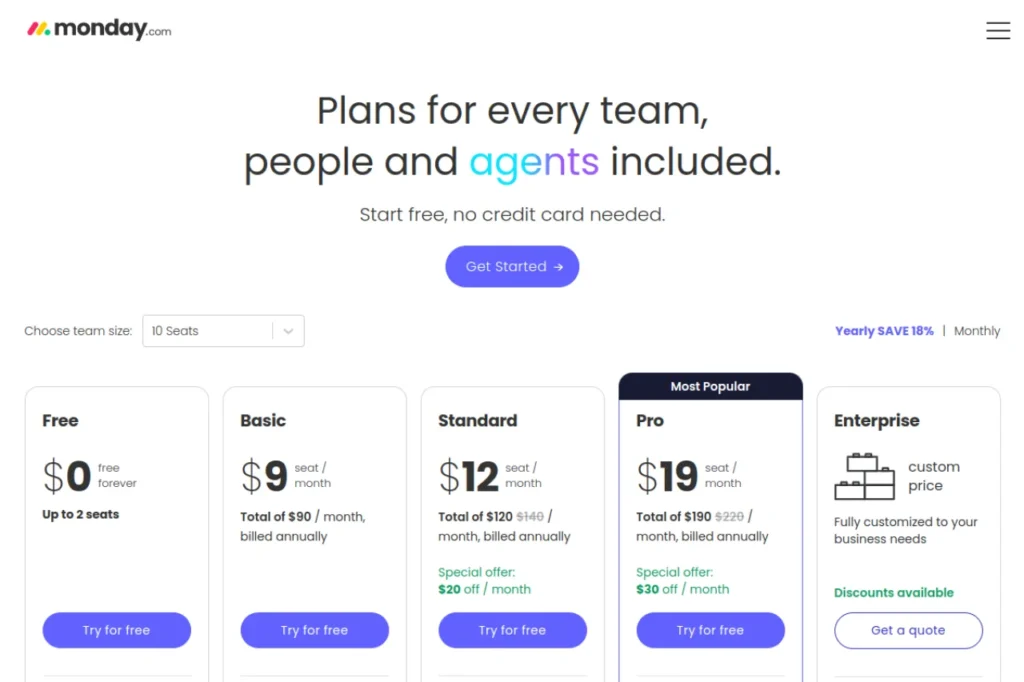
Monday.com’s pricing page, 21 November 2026, annual billing: Free for up to 2 seats, Basic $9, Standard $12, Pro $19 per seat per month. Monthly billing is higher: $12, $14, $24. Paid plans start at 3 seats. The page also shows a special offer ($20 off Standard, $30 off Pro per month — the screenshot shows 10 seats selected) — the maths in this post uses list prices.
The Timeline Test: The Cheapest Plan That Actually Plans
Here is the sentence that decides the entry-level comparison: Monday Basic is cheaper than Asana Starter, but it cannot show you a timeline. Asana Starter can. So the cheapest plan that actually plans a project costs $659.40 a year on Asana and $720 a year on Monday.
A timeline is not a nice-to-have for a team that runs projects with deadlines. It is the view that shows whether the launch slips when one task moves, which tasks depend on each other, and who is overloaded next week. A board shows what exists; a timeline shows what happens next. Teams that buy Basic and discover this after a month either upgrade to Standard — paying $720 a year anyway — or run their schedule in a spreadsheet next to the board they just paid for.
The same test applies to automations. Asana Starter includes unlimited automations: rules that assign work, nudge owners before a deadline, and move completed tasks on, running as often as the team needs. Monday Standard caps automations at 250 actions a month. For a five-person team running a handful of rules, 250 actions lasts the month. For a team that automates intake, approvals, and handoffs across five boards, it does not. The cap is the difference between “set it and forget it” and “check the usage meter every Friday.”
None of this makes Monday Basic a bad plan. It is a good plan for a team that wants one shared board to track simple work: a content calendar, a sales pipeline, a hiring tracker. Unlimited items and free viewers make it a cheap shared workspace. But a team buying a project management tool for deadline-driven work should compare Asana Starter against Monday Standard, not Basic. At that honest comparison, Asana is $60.60 a year cheaper for five people, and its automations are unlimited.
One more note: both tools sell the Gantt view in the same tier as the timeline, so there is no separate upgrade to buy. Both let guests and viewers in free — Asana with unlimited free guests who can edit their tasks, Monday with unlimited free viewers who can only watch, and guest editing from Standard. If your projects involve clients, Asana’s free guests save real money: five clients on Asana cost $0 extra, while five clients who need to edit on Monday need paid seats or a Standard plan.

Illustration: a generic project timeline. Asana’s timeline page blocks screenshot tools, so this slot uses an illustration — timeline and Gantt views are included on Starter.
Automations and AI: Unlimited vs Metered
Both tools now ship AI, and both meter it. The difference is what is metered, and how fast a small team hits the limit.
Asana’s approach is generous where it matters most. Unlimited automations on Starter means the workflow rules never stop, no matter how busy the team gets. The metering sits on AI instead: five AI Teammate and Dash requests per user per month, capped at 50 per account, and 50,000 AI Studio credits a month. A five-person team gets 25 requests a month, and the 50-request account cap is the real ceiling. That covers drafting tasks and summarising project status — not a team that wants AI to do heavy lifting every day.
Monday’s approach is the mirror image. Automations are metered — none on Basic, 250 actions a month on Standard, 25,000 on Pro — while AI runs on a credit allowance: 1,000 credits a month on Basic, 2,000 on Standard, 3,000 on Pro. Monday’s own guidance says a typical three-person team uses roughly 800 to 1,200 credits a month, so a five-person team on Standard’s 2,000 credits is comfortable at typical use, while Basic’s 1,000 credits are likely to run short. Extra credits can be bought when the allowance runs out, which means AI has a real marginal cost on Monday in a way it does not on Asana’s Starter plan.
The practical question is which meter your team hits first. A team that automates everything — status changes, assignments, deadline reminders, Slack notifications — will hit Monday Standard’s 250-action cap long before Asana’s AI limits. A team that leans on AI to draft, summarise, and categorise will hit both tools’ AI allowances eventually, and Monday’s pay-for-more-credits model is at least transparent about the cost. Either way, check the meter before you buy: the cheapest plan is only cheap if its limits match your habits.
Integrations follow the same pattern. Asana Starter ships with more than 100 free integrations, including Slack, Google Drive, and Zoom. Monday Standard integrates with Slack, Teams, Gmail, and Zoom too, and its integration actions share the same 250-a-month allowance as automations. A team whose workflow pings Slack every time a task moves should count those pings against the allowance. If your team lives in chat, our comparison of Slack vs Microsoft Teams runs the same per-seat maths on the tools your notifications will flow through.
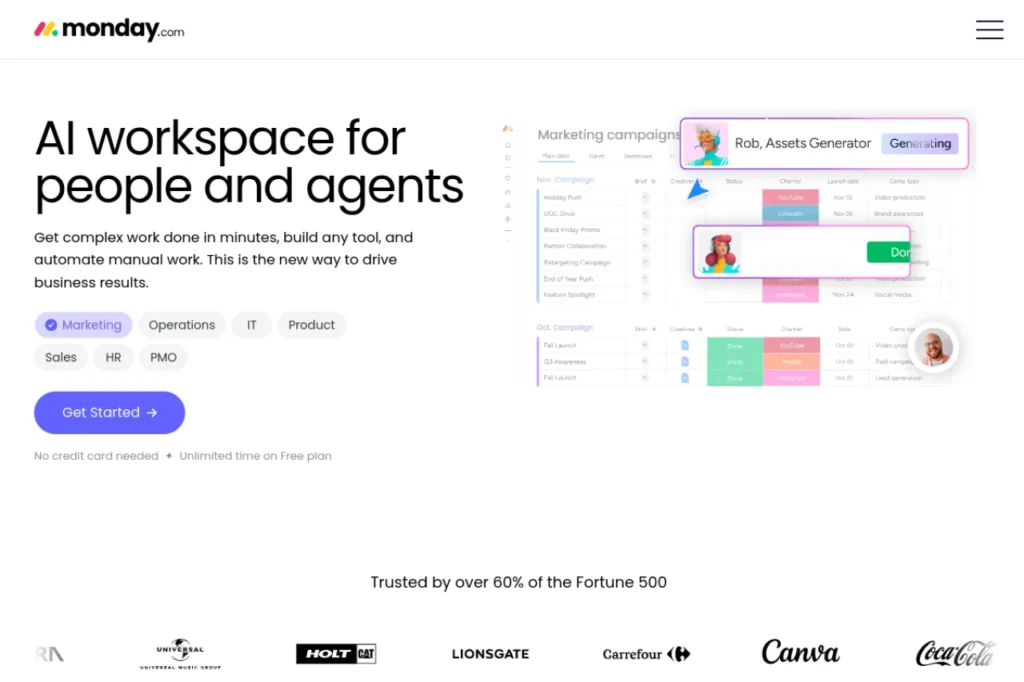
Monday.com’s board view: colour-coded status columns make project health visible at a glance. Timeline and Gantt views arrive on Standard, not Basic.
Views and Ways of Working: Lists vs Boards
The deepest difference between Asana and Monday.com is not price. It is how each tool wants your team to think about work — and that difference decides adoption, which decides whether the subscription survives its first renewal.
Asana thinks in tasks. The default view is a list: tasks with owners, due dates, and priorities, grouped into sections. Lists are fast for people who manage work by checking things off, and the timeline, board, and calendar views sit on top of the same tasks, so a team can switch views without rebuilding anything. A project manager who lives in dependencies and deadlines will feel at home in minutes; a non-technical teammate may find the list plain until the timeline shows them why it matters.
Monday.com thinks in boards. The default view is a table of items with colourful status columns, and the colour does real work: a glance tells you what is stuck, what is done, and what is overdue, without reading a single task name. Boards are easier to explain to a new hire and easier to show a client. The cost is structure: Monday’s boards are flexible to a fault, and teams without conventions end up with five boards that all mean slightly different things. Asana’s lists are stricter, which is a feature when five people share one system.
Both tools handle the basics well: mobile apps, file attachments, comments, notifications, and templates. Asana’s templates are more opinionated — project plans that mirror real workflows — while Monday’s 200-plus templates cover more use cases, from CRMs to content calendars. If your team already manages work in a kanban style, our comparison of Trello alternatives covers simpler board tools that compete with both at a lower price.
The adoption test is simple: show both tools to the two least technical people on your team and watch which one they understand without help. The tool they understand is the one that gets updated. The tool they do not understand becomes a second spreadsheet within a month — and the subscription becomes the most expensive filing cabinet your business owns.
Cost Maths: What a 5-Person Team Actually Pays
Here is what the per-user monthly figures become per year for a team of five, on annual billing, at list prices in US dollars, excluding tax.
| Setup (5 people, annual billing) | Per year |
|---|---|
| Asana Starter (timeline + unlimited automations) | $659.40 |
| Asana Advanced (portfolios + time tracking) | $1,499.40 |
| Monday.com Basic (no timeline, no automations) | $540 |
| Monday.com Standard (timeline + 250 automations/mo) | $720 |
| Monday.com Pro (time tracking + 25,000 automations/mo) | $1,140 |
| Asana Starter + a time-tracking integration | $659.40 + integration cost |
The two numbers that matter most are $659.40 and $720. Asana Starter and Monday Standard are the two plans that do the same job — timelines, automations, and AI for five people — and Asana is $60.60 a year cheaper, with unlimited automations against Monday’s 250 a month.
The other two numbers that matter are $1,499.40 and $1,140. Asana Advanced and Monday Pro are the two plans that add native time tracking and the full reporting set, and here Monday is $359.40 a year cheaper. A team that bills by the hour and needs time tracking built in saves real money on Monday Pro — unless it also needs Asana’s portfolios and goals, which Monday reserves for custom-priced Enterprise.
Monthly billing makes everything worse: Asana Starter on monthly billing costs $809.40 a year for five instead of $659.40 — $150 more. Asana Advanced costs $1,829.40. Monday Basic costs $720 a year monthly, Standard $840, and Pro $1,440. If your headcount is stable, annual billing is the easiest money this post will ever save you.
For a ten-person team, the pattern holds: Asana Starter $1,318.80 a year, Advanced $2,998.80; Monday Basic $1,080, Standard $1,440, Pro $2,280. Asana still wins the timeline tier by $121.20 a year, and Monday still wins the top tier by $718.80. But watch the seat bundles: a seven-person team pays for ten seats on both, so seven people on Asana Starter cost $1,318.80 a year — the same as ten — and seven on Monday Standard cost $1,440.
For one or two people, the maths flips again. Monday’s three-seat minimum means a solo buyer on Basic pays $27 a month ($324 a year) for three seats. Asana’s two-seat minimum means a solo buyer on Starter pays $21.98 a month ($263.76 a year). Small teams should price the minimum, not the per-seat rate.
What does each setup have to earn back? At $659.40 a year, Asana Starter costs $10.99 per person per month — one saved hour of chasing status updates a month pays for the whole team, and Monday Standard needs the same. The real question is never whether project software pays for itself. It is whether you are paying for the tier you need, or the tier the pricing page wanted you to buy.
The Hidden Costs and Gotchas
First, Monday Basic has no timeline and no automations, and the pricing page will not shout about it. The $9 headline buys a board, not a project plan. A team that buys Basic for project work discovers the gap within weeks and upgrades to Standard at $720 a year — budget on Standard from the start if your work has deadlines.
Second, both tools stop selling single seats above five users. Asana sells seats in blocks of five above five users, and Monday sells seats in bundles of 3, 5, 10, and 15. A six- or seven-person team pays for ten seats on both — price your real headcount, not the five in the headline example.
Third, Monday’s three-seat minimum punishes small teams. A solo operator or a two-person team on Basic pays $27 a month for three seats, while Asana’s two-seat minimum costs $21.98 a month on Starter. The per-seat price is not the bill — the minimum is.
Fourth, Asana Advanced is a steep jump for time tracking. Starter to Advanced is $10.99 to $24.99 per user per month — more than double — and time tracking is the feature most small teams want from the upgrade. Monday Pro gives you time tracking at $19. If time tracking is why you are upgrading, Monday Pro is $359.40 a year cheaper for five people.
Fifth, Monday Standard’s 250 automation actions a month is a real ceiling. A team with five boards, each running intake, assignment, and reminder rules, can burn through 250 actions in two busy weeks. Pro’s 25,000 actions cost $1,140 a year; Asana Starter’s automations are unlimited at $659.40. Count your rules before you pick a side.
Sixth, AI is metered on both tools, and heavy use costs extra. Asana Starter includes five AI requests per user per month up to 50 per account, plus 50,000 AI Studio credits a month. Monday Standard includes 2,000 AI credits a month — enough for a typical five-person team, per Monday’s own guidance — but extra credits are a paid add-on. Neither tool’s AI is truly unlimited, and neither pricing page makes the overage price easy to find.
Strategic Pivot: Work Out What the Project Stack Costs
Pricing pages are designed to make every plan look reasonable. The way to see through them is to price your whole stack, not one tool. Add up project management, chat, time tracking, and documents for your actual headcount, then compare the totals — and remember that seven people cost the same as ten on both tools.
Our free AI Cost Calculator does exactly that: plug in your team size, your tools, and your billing period, and it shows the real yearly cost of the stack you are considering. Run Asana Starter through it, then Monday Standard, then Monday Pro against Asana Advanced. The gaps are the money you save by buying the tier you need instead of the tier the pricing page wanted you to buy.
Pros and Cons
Asana
Pros:
- Timeline and Gantt views included on Starter, the cheapest paid plan.
- Unlimited automations on Starter — no monthly action cap to watch.
- Unlimited free guests on Starter, so clients collaborate without a paid seat.
- Reporting dashboards and custom fields from Starter.
- The most structured tool here: dependencies, portfolios, and goals for teams that run many projects.
- Free trial of paid plans, no card required.
Cons:
- Advanced costs $24.99 per user per month — more than double Starter — and time tracking lives only there.
- Portfolios and goals are locked behind Advanced; there is no mid-priced way to get them.
- Seats above five users are sold in blocks of five, so a six-person team pays for ten.
- Free plan caps at two users, down from ten in November 2025.
- AI requests are capped at 50 per account on Starter and Advanced.
Monday.com
Pros:
- The most visual, easiest-to-learn board in this comparison — non-technical teams adopt it fast.
- Pro costs $19 per seat per month and includes time tracking, private boards, and 25,000 automation actions.
- Free viewers are unlimited, and guest editing starts on Standard.
- 14-day free trial of Pro, no card required.
- Yearly billing saves 18%, and the per-seat price is simple to understand.
Cons:
- Basic has no timeline, no Gantt, and no automations — the $9 headline does not buy a project planner.
- Standard caps automations at 250 actions a month, which a busy team can hit in weeks.
- Three-seat minimum on every paid plan, so a solo buyer pays for three seats.
- Seats are sold in bundles, so a seven-person team pays for ten.
- Portfolio and resource management are reserved for custom-priced Enterprise.
Our Verdict: Asana vs Monday.com
If your team needs timelines and automations at the lowest price, buy Asana Starter. At $659.40 a year for five people, it is $60.60 cheaper than Monday Standard, and its automations are unlimited while Monday’s are capped at 250 actions a month. For a team that runs projects with deadlines and automates the busywork, Starter is the best value here.
If your team needs time tracking built in, buy Monday Pro. At $1,140 a year for five people, it is $359.40 cheaper than Asana Advanced, and it adds private boards, formula columns, and 25,000 automation actions a month. For a team that bills by the hour, Pro is the honest buy — unless you also need portfolios and goals, which only Asana Advanced and Monday Enterprise offer.
If your team is visual and non-technical, buy Monday Standard — and accept the $60.60 premium. The board your team actually opens beats the timeline they avoid. Adoption is worth more than sixty dollars a year. Just budget for the automation cap, and upgrade to Pro when the rules start failing.
If you are a solo operator or a two-person team, buy Asana Starter. The two-seat minimum costs $263.76 a year, against $324 for Monday Basic’s three-seat minimum — and Starter includes the timeline Basic does not.
If you only need a simple shared board, buy Monday Basic — but know what you are buying. At $540 a year for five people it is the cheapest paid plan here, and for simple work it is enough. The moment your work needs deadlines, dependencies, or automations, you will be on Standard at $720, and Asana Starter will have been cheaper all along.
Start with the trials. Run a real project on both — Asana’s free trial and Monday’s 14-day trial of Pro — then buy the one your team opens without being asked, and check the price on the official page before you buy.
Frequently Asked Questions
Is Asana cheaper than Monday.com?
It depends on the tier. At the timeline tier, Asana Starter costs $659.40 a year for five people and Monday Standard costs $720, so Asana is $60.60 cheaper — and its automations are unlimited. At the full-featured tier, Monday Pro costs $1,140 a year and Asana Advanced costs $1,499.40, so Monday is $359.40 cheaper. Monday Basic is cheapest at $540 a year, but it has no timeline and no automations.
Which is better for a small team?
Asana is better for teams that run deadline-driven projects and want timelines, automations, and structure at the lowest price. Monday is better for visual, non-technical teams that want an easy board and built-in time tracking without paying Asana’s top-tier price. The tool your team opens every day is the right one — run both trials with a real project before you decide.
Does Monday.com have a free plan?
Yes. Monday’s free plan costs $0 for up to two seats, with three boards, three docs, and more than 200 templates. There are no automations and no timeline view, and a five-person team cannot use it — it stops at two seats. The cheapest paid plan is Basic at $9 per seat per month on annual billing, with a three-seat minimum.
Does Asana have time tracking?
Asana has native time tracking only on Advanced, at $24.99 per user per month on annual billing. Starter tracks time through third-party integrations instead. Monday includes native time tracking on Pro, at $19 per seat per month. If time tracking is the feature you need, Monday Pro is $359.40 a year cheaper than Asana Advanced for five people.
Can I use Asana and Monday.com together?
Yes, but most five-person teams should not. Both tools do the same job, so running both means paying twice and keeping two systems in sync. The exception is a team that uses one for client work and the other for internal operations — Asana for project delivery, Monday for a sales pipeline. For most teams, one tool plus its integrations is cheaper than two.
Price Note
Price note — updated 21 November 2026: Prices in this post were checked on 21 November 2026. When you are reading this, the price may be lower or higher — vendors run promotions, change list prices, and raise them with little warning, as Asana did in November 2025 when its free plan dropped from ten users to two. Always check the official pricing page before you buy: Asana at asana.com/pricing and Monday.com at monday.com/pricing. Monday.com is showing a special offer of $20 off Standard and $30 off Pro per month at 5 seats; without it, Standard would be $960 a year and Pro $1,500 a year.
Pros
- Asana: Timeline and Gantt views included on Starter, the cheapest paid plan.
- Asana: Unlimited automations on Starter — no monthly action cap to watch.
- Asana: Unlimited free guests on Starter, so clients collaborate without a paid seat.
- Asana: Reporting dashboards and custom fields from Starter.
- Asana: The most structured tool here: dependencies, portfolios, and goals for teams that run many projects.
- Asana: Free trial of paid plans, no card required.
- Monday.com: The most visual, easiest-to-learn board in this comparison — non-technical teams adopt it fast.
- Monday.com: Pro costs $19 per seat per month and includes time tracking, private boards, and 25,000 automation actions.
- Monday.com: Free viewers are unlimited, and guest editing starts on Standard.
- Monday.com: 14-day free trial of Pro, no card required.
- Monday.com: Yearly billing saves 18%, and the per-seat price is simple to understand.
Cons
- Asana: Advanced costs $24.99 per user per month — more than double Starter — and time tracking lives only there.
- Asana: Portfolios and goals are locked behind Advanced; there is no mid-priced way to get them.
- Asana: Seats above five users are sold in blocks of five, so a six-person team pays for ten.
- Asana: Free plan caps at two users, down from ten in November 2025.
- Asana: AI requests are capped at 50 per account on Starter and Advanced.
- Monday.com: Basic has no timeline, no Gantt, and no automations — the $9 headline does not buy a project planner.
- Monday.com: Standard caps automations at 250 actions a month, which a busy team can hit in weeks.
- Monday.com: Three-seat minimum on every paid plan, so a solo buyer pays for three seats.
- Monday.com: Seats are sold in bundles, so a seven-person team pays for ten.
- Monday.com: Portfolio and resource management are reserved for custom-priced Enterprise.
If your team needs timelines and automations at the lowest price, buy Asana Starter. At $659.40 a year for five people, it is $60.60 cheaper than Monday Standard, and its automations are unlimited while Monday's are capped at 250 actions a month. For a team that runs projects with deadlines and automates the busywork, Starter is the best value here.If your team needs time tracking built in, buy Monday Pro. At $1,140 a year for five people, it is $359.40 cheaper than Asana Advanced, and it adds private boards, formula columns, and 25,000 automation actions a month. For a team that bills by the hour, Pro is the honest buy — unless you also need portfolios and goals, which only Asana Advanced and Monday Enterprise offer.If your team is visual and non-technical, buy Monday Standard — and accept the $60.60 premium. The board your team actually opens beats the timeline they avoid. Adoption is worth more than sixty dollars a year. Just budget for the automation cap, and upgrade to Pro when the rules start failing.If you are a solo operator or a two-person team, buy Asana Starter. The two-seat minimum costs $263.76 a year, against $324 for Monday Basic's three-seat minimum — and Starter includes the timeline Basic does not.If you only need a simple shared board, buy Monday Basic — but know what you are buying. At $540 a year for five people it is the cheapest paid plan here, and for simple work it is enough. The moment your work needs deadlines, dependencies, or automations, you will be on Standard at $720, and Asana Starter will have been cheaper all along.Start with the trials. Run a real project on both — Asana's free trial and Monday's 14-day trial of Pro — then buy the one your team opens without being asked, and check the price on the official page before you buy.