

The best Make alternatives depend on what is actually hurting you. If credits are the problem, n8n Starter costs $20 a month billed annually ($240 a year) and charges per finished workflow run, not per step, so a 10-step workflow running 1,000 times a month costs $240 a year instead of Make's $108 a year on CoreIf you want the easiest switch, Zapier Pro starts at $19.99 a month billed annually ($239.88 a year) for 750 tasks, connects to more than 10,000 apps.If you want the cheapest paid plan that actually runs a business, Pabbly Connect Standard costs $16 a month billed annually ($192 a year) for 10,000 tasks, and triggers plus internal steps do not count as tasks at all. If your automations are simple, IFTTT Pro costs $5.49 a month billed annually ($65.88 a year) for 20,000 credits, the cheapest option in this whole comparison.
Best Make Alternatives (2026): Escape the Credit Limits
You built the workflow. It works. Then the credits ran out on the 18th of the month, the scenarios stopped, and your “automated” business quietly went back to you doing everything by hand.
That is the Make moment most small businesses hit. Make is a genuinely good tool. The visual canvas is friendly, the builder is powerful, and the $9-a-month Core plan looks like a bargain. Then you learn what a credit is.
One credit per step. Not per workflow. Per step. Your ten-step workflow does not cost one credit when it runs. It costs ten. And the trigger that checks whether anything happened? That costs a credit too, even when the answer is nothing.
This post is for the Make user staring at that maths and wondering what else is out there. I compared five real alternatives with live prices from their official pricing pages, checked on 18 November 2026, and costed the same realistic workflow on each one.
Quick Answer Box
The best Make alternatives depend on what is actually hurting you. If credits are the problem, n8n Starter costs $20 a month billed annually ($240 a year) and charges per finished workflow run, not per step, so a 10-step workflow running 1,000 times a month costs $240 a year instead of Make’s $108 a year on Core
If you want the easiest switch, Zapier Pro starts at $19.99 a month billed annually ($239.88 a year) for 750 tasks, connects to more than 10,000 apps.
If you want the cheapest paid plan that actually runs a business, Pabbly Connect Standard costs $16 a month billed annually ($192 a year) for 10,000 tasks, and triggers plus internal steps do not count as tasks at all. If your automations are simple, IFTTT Pro costs $5.49 a month billed annually ($65.88 a year) for 20,000 credits, the cheapest option in this whole comparison.
There is no single winner. There is a right answer for your workflow shape, your technical comfort, and your budget. The rest of this post works out which one that is.
In This Article
- Quick Answer Box
- The Short Version: What You Are Actually Choosing Between
- How I Compared Them
- Make: The Baseline You Are Leaving, at $9 a Month
- Zapier: The Biggest App Library, at $19.99 a Month
- n8n: The Self-Hosted Power Tool, at $20 a Month
- Pabbly Connect: The Budget Pick, at $19 a Month
- IFTTT: The Simplest Switch, at $7.99 a Month
- Activepieces: The Open-Source Option, at $20 a Month
- Head-to-Head Comparison Table
- Cost Maths: What 1,000 Workflow Runs a Month Really Costs in Year One
- The Hidden Costs and Gotchas
- Who Is Each Tool Actually Best For?
- Work Out Your Own Number First
- Pros and Cons
- Our Verdict
- Frequently Asked Questions
- Price Note
The Short Version: What You Are Actually Choosing Between
Think of it this way. Make is a taxi with the meter running. Every turn, every stop, every time the driver circles the block to check whether your passenger is ready — the meter ticks. The ride is comfortable. The bill is a surprise.
Zapier is the taxi company with the flat-rate card. You pay by the trip, not by the turn, and the card covers more than 10,000 destinations. The catch is that the flat rate is set for short trips, and a long trip costs real money.
n8n is buying the car. You pay a monthly amount whether you drive it once or a thousand times, and the cost does not grow with the number of turns. The catch is that you maintain the car yourself.
Here is the sentence that decides it for most small teams. If your workflows are short, switch to Zapier or Pabbly. If they are long and complicated, switch to n8n.
How I Compared Them
I compared the five alternatives the way a small-business owner actually buys: real prices from the official pricing pages, checked on 18 November 2026, one realistic workflow costed out to the dollar.
The realistic workflow is the same one I use for every automation comparison on this site. A 10-step workflow that runs 1,000 times a month. A new lead comes in, the CRM updates, a row goes into a spreadsheet, a welcome email goes out, and the sales team gets a Slack ping. That is 10,000 steps a month.
Two honest disclosures before we start. First, n8n’s pricing page mixes currencies. The page captured today shows Pro at $50 a month and Business at 667 euros a month, billed annually, while the live dollar read puts Business at $800 a month billed annually. This post uses the dollar figures.
Make: The Baseline You Are Leaving, at $9 a Month
Make, formerly Integromat, is the tool you are comparing everything else against.
The free plan costs $0 and includes 1,000 credits a month, with no credit card required and no time limit. Core costs $9 a month billed annually ($108 a year), and includes 10,000 credits a month. Pro costs $16 a month billed annually ($192 a year), and also includes 10,000 credits. Teams costs $29 a month billed annually ($348 a year), and also includes 10,000 credits. Enterprise is custom pricing.
Read that again. Core, Pro, and Teams all include the same 10,000 credits. The higher plans buy features, not volume. None of them adds a single extra credit.
A credit is one action step. When your scenario reads a record, writes a row, or posts a message, each counts as one credit. Error handler modules and the router module are free. Everything else ticks the meter.
The two traps are polling and expiry. A polling trigger checks for new data on a schedule, and every check costs a credit whether or not anything new arrived. Check every 15 minutes and that is 2,880 credits a month spent on asking “anything new?” and hearing “no”. Credits expire at the end of the term, so an unused allowance does not roll over.
Make connects to more than 1,000 third-party apps, according to its own FAQ, and its visual canvas is still the friendliest builder in automation.
So why leave? Three reasons. The learning curve is real once workflows get complex. The app library, while large, is smaller than Zapier’s. And the credit model punishes exactly the users who automate the most: long workflows, frequent polling, and high volumes. If none of those three describes you, stay on Make. We priced Make in full in our Make.com pricing guide.
See the official pricing for yourself: Make pricing.
Zapier: The Biggest App Library, at $19.99 a Month
Zapier is the default answer to “what is the alternative to Make?” and the reason is simple: it connects to more than 10,000 apps, which is roughly ten times Make’s library.
The pricing works differently from Make. Zapier charges per task, and a task is one successful action step. Triggers do not count. Neither do Zapier’s built-in tools: Filter, Formatter, Paths, Delay, and Looping by Zapier all cost zero tasks. That matters, because the steps you use for logic and formatting are free, and only the steps that touch an outside app tick the meter.
The free plan costs $0 and includes 100 tasks a month, with two-step Zaps only, meaning one trigger and one action. Professional starts at $19.99 a month billed annually ($239.88 a year), for 750 tasks a month. The Team plan starts at $69 a month billed annually ($828 a year), for 2,000 tasks a month. Enterprise is custom pricing.
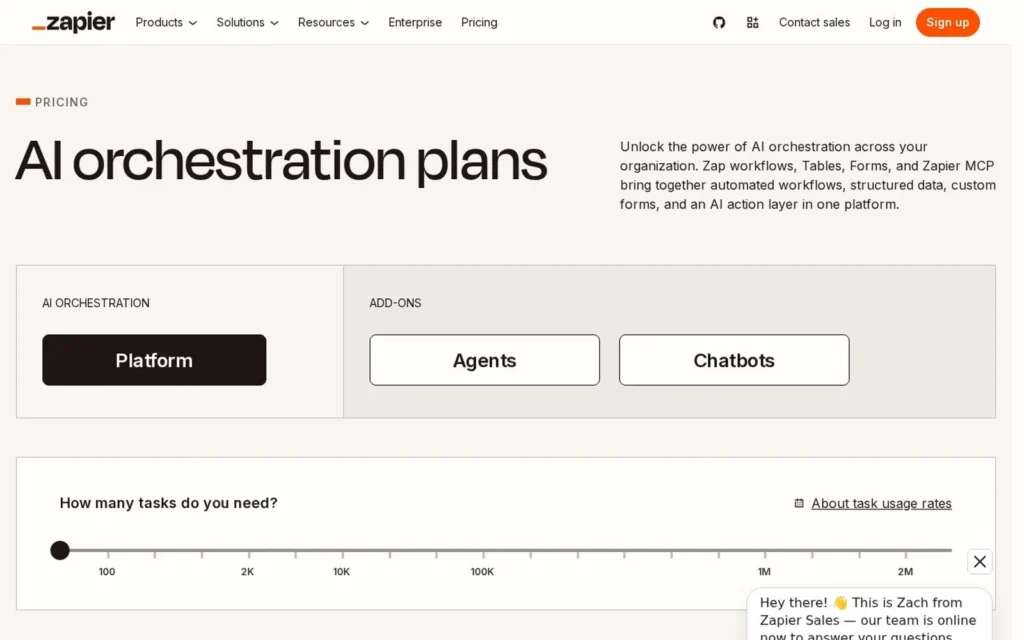
Both paid plans scale by task tier. Professional at 2,000 tasks costs $49 a month billed annually, and at 10,000 tasks it costs $129 a month billed annually ($1,548 a year). The plan sets the features; the tier sets the price.
Zapier’s newest advantage is the one its own guide leads with: you can build automations from your AI agent. Install Zapier in Claude, ChatGPT, or Cursor, describe what you want in plain language, and your agent drafts the Zap and deploys it to Zapier.
The AI pricing is worth understanding before you buy. Since June 2026, AI steps cost 1x, 3x, or 5x tasks depending on the model tier you pick, with Premium as the default for new steps on paid plans. MCP tool calls cost 2 tasks each. An AI step that summarizes every lead email can quietly cost five times what a plain step costs, so watch the model tier on any AI step you add.
On security, Zapier is SOC 2 Type II and SOC 3 certified, and GDPR and CCPA compliant, with encryption built in.
The honest weakness is price at volume. At our test workflow of 10,000 steps a month, Zapier Professional costs $1,548 a year, against $108 a year on Make Core. That is the trade you are making: the biggest app library and the easiest AI building, for roughly fourteen times the price at this volume.
See the official pricing for yourself: Zapier pricing.
n8n: The Self-Hosted Power Tool, at $20 a Month
n8n is the alternative for people who looked at Make’s credit meter and thought: I would rather pay for the machine than for every turn of the wheel.
The pricing is based on workflow executions, not steps. One execution is one finished run of a workflow, no matter how many steps are inside it. That single difference is the whole pitch.
Starter costs $20 a month billed annually ($240 a year) and includes 2,500 workflow executions a month. Pro costs $50 a month billed annually ($600 a year) and includes 10,000 executions a month. Business costs $800 a month billed annually ($9,600 a year) and includes 40,000 executions a month. Enterprise is custom pricing.
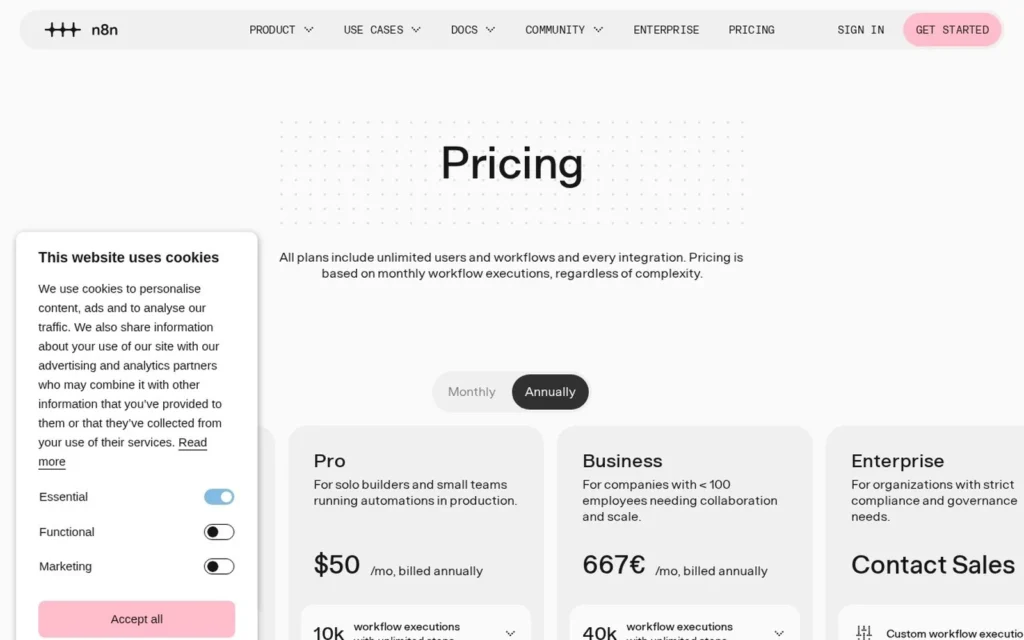
The jump from Pro to Business is a cliff: $600 a year to $9,600 a year, a sixteen-fold increase. If you outgrow Pro’s 10,000 executions, there is no gentle middle step. The Startup discount softens it to $4,800 a year, but only if you qualify.
What you get for the money is the strongest AI tooling in this comparison. Native AI nodes, LangChain support, self-hosted models, and RAG are built in.
The catch is the one Zapier’s guide states plainly: n8n is build-and-maintain, while Make is plug-and-play. The interface looks clean and simple, right up until it asks you to write an expression, and then you find out whether your team has a developer or not.
For our test workflow, the maths is kind. One thousand runs of a 10-step workflow is 1,000 executions, which fits inside Starter’s 2,500. Year one costs $240.
See the official pricing for yourself: n8n pricing.
Pabbly Connect: The Budget Pick, at $19 a Month
Pabbly Connect is the alternative nobody has heard of, and the one with the most aggressive pricing in this comparison.
The free plan costs $0 and includes 100 tasks a month, with two-step workflows and no credit card required. Standard costs $19 a month billed monthly, or $16 a month billed annually ($192 a year), and includes 10,000 tasks a month. Unlimited costs $79 a month billed monthly, or $69 a month billed annually ($828 a year), and includes unlimited tasks. Longer commitments drop the price further: Standard falls to $15 a month on a two-year term and $14 a month on a three-year term.

The billing unit is the task, like Zapier. But here is the detail that changes the maths: triggers do not count as tasks, and neither do internal steps. Filter, Router, and Text Formatter steps are free.
Pabbly also sells lifetime plans, which no other tool in this comparison offers. Standard Lifetime costs $349 one-time and includes 3,000 tasks a month. Ultimate Lifetime costs $799 one-time and includes 10,000 tasks a month. Ultimate Plus Lifetime costs $1,298 one-time and includes 20,000 tasks a month.
Read the lifetime fine print before you buy. The pricing page warns, in its own words, that you cannot upgrade a one-time plan in the future. Support is included for one year only.
The honest weaknesses are polish and ecosystem. The interface is functional rather than beautiful. The template library is smaller than Zapier’s.
For our test workflow, Pabbly is the value pick. Ten thousand steps a month needs roughly 8,000 action tasks, because the trigger and the internal logic steps are free. That fits inside Standard’s 10,000 tasks. Year one costs $192 on annual billing, or $228 on monthly billing. The lifetime Ultimate plan at $799 one-time breaks even against the annual subscription in just over four years.
See the official pricing for yourself: Pabbly Connect pricing.
IFTTT: The Simplest Switch, at $7.99 a Month
IFTTT is the oldest name in this comparison, and in October 2026 it changed more than it had in years. It renamed itself IFTTT.ai and replaced its old Applet limits with a credit system.
The new pricing is simple. The Free plan costs $0 and includes 1,000 credits a month, with unlimited Applets and all Applet features. Starter costs $2.09 a month billed annually ($25.08 a year), and includes 5,000 credits a month. Pro costs $5.49 a month billed annually ($65.88 a year), and includes 20,000 credits a month. Pro+ costs $13.99 a month billed annually ($167.88 a year), and includes 100,000 credits a month.
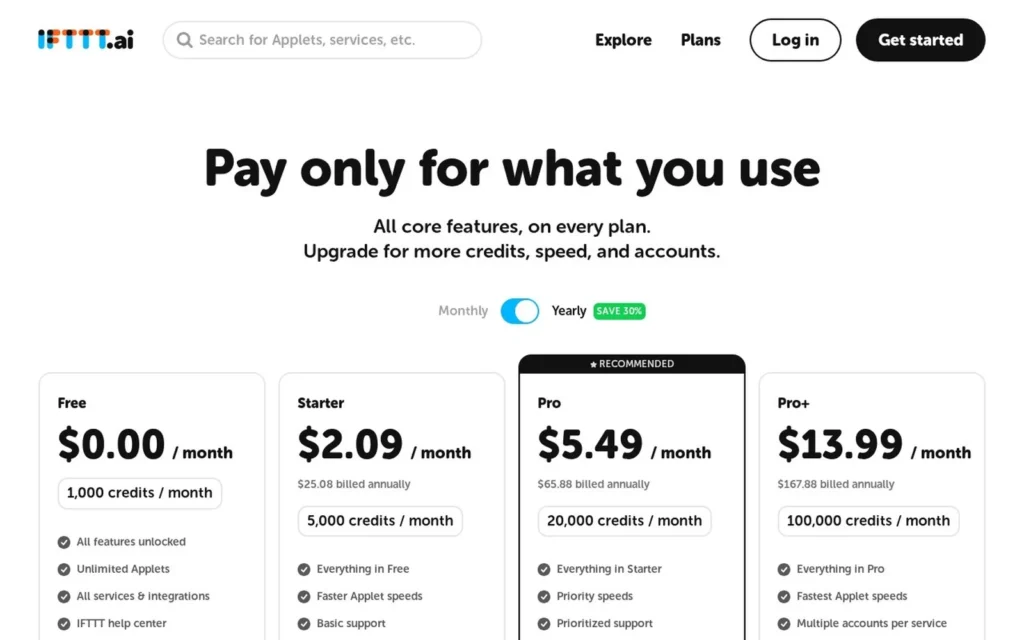
Every plan now gets unlimited Applets and every service. What the paid plans buy is more credits, faster polling, and support. Free polls every hour. Starter polls every 15 minutes. Pro and Pro+ poll every 5 minutes.
Credits measure steps, not completed Applets. A multi-step Applet with five steps costs five credits per run. Applet runs, AI features, and use through MCP all draw on the same allowance.
The honest limit is capability, not price. IFTTT has no branching logic, no error handling, and no team accounts, and no plan fixes that. It is brilliant at “when this happens, do that”, and it is the wrong tool the moment your workflow needs an if-then branch, a loop, or a second person to approve something.
For our test workflow, IFTTT is the cheapest option by a wide margin, and also the least capable. Ten thousand steps a month fits inside Pro’s 20,000 credits. Year one costs $65.88 on annual billing.
See the official pricing for yourself: IFTTT plans.
Activepieces: The Open-Source Option, at $20 a Month
Activepieces is the youngest tool in this comparison, and the only one that is open source at its core. The Community Edition is free under an MIT licence, with no cap on runs, users, or flows.
The hosted Cloud plans are credit-based. Free costs $0 and includes 1,000 credits a month, with unlimited flows and up to 5 users, and no card required. Plus costs $20 a month flat and includes 10,000 credits a month, with up to 5 users. Team costs $200 a month flat and includes 50,000 credits a month, with 25 users and SSO included. Going over your allowance costs $0.007 per credit on the paid plans. Ultimate is custom pricing, and Embed, which puts automation inside your own product, starts at $36,000 a year.
The price structure is flat, not tiered by volume in the Zapier sense. Plus is $20 a month whether you use 1,000 credits or 10,000. Team is $200 a month whether you use 10,000 or 50,000.
The gap between Plus and Team is $180 a month, and it is the steepest jump in this comparison after n8n’s Pro-to-Business cliff. There is no middle tier. If you need SSO, or more than 5 users, or more than 10,000 credits, you are paying $200 a month.
For our test workflow, Activepieces Plus costs $240 a year, the same as n8n Starter. Ten thousand credits cover 10,000 steps.
See the official pricing for yourself: Activepieces pricing.
Head-to-Head Comparison Table
| Tool | What you pay for | Cheapest paid plan (annual) | What you get for it | Best for |
|---|---|---|---|---|
| Make (baseline) | Per step (credit) | Core $9/mo ($108/yr) | 10,000 credits/mo, visual canvas, 1,000+ apps | Staying put if your workflows are short |
| Zapier | Per task | Pro $19.99/mo ($239.88/yr) | 750 tasks/mo, 10,000+ apps, AI agent building | Biggest app library, AI-built workflows |
| n8n | Per finished run | Starter $20/mo ($240/yr) | 2,500 executions/mo, unlimited users, AI nodes | Long workflows, technical teams |
| Pabbly Connect | Per action task | Standard $16/mo ($192/yr) | 10,000 tasks/mo, triggers and logic free | Best value per task |
| IFTTT | Per step (credit) | Pro $5.49/mo ($65.88/yr) | 20,000 credits/mo, unlimited Applets | Simple one-trigger automations |
| Activepieces | Per step (credit) | Plus $20/mo ($240/yr) | 10,000 credits/mo, open source, BYO AI keys | Open source with a cheap hosted option |
Cost Maths: What 1,000 Workflow Runs a Month Really Costs in Year One
Here is the workflow again: 10 steps, running 1,000 times a month, which is 10,000 steps a month. I am going to cost it on every tool, on annual billing, with the polling trap included where it applies.
On Make Core, the 10,000 steps fit exactly inside the 10,000-credit allowance. Year one costs $108. But that is the best case. Add a polling trigger that checks every 15 minutes, and you burn 2,880 extra credits a month on empty checks. That is 12,880 credits against a 10,000 allowance, so you are buying extra credits every month.
On Zapier Professional, 10,000 tasks a month needs the 10,000-task tier, which costs $129 a month billed annually. Year one costs $1,548. The entry Pro price of $19.99 a month only buys 750 tasks, which covers 75 runs of our workflow.
On n8n Starter, 1,000 runs is 1,000 executions, which fits inside the 2,500 allowance with room to spare. Year one costs $240.
On Pabbly Connect Standard, the trigger is free and the internal logic steps are free. If two of the ten steps are logic, only eight are action steps, so the workflow needs about 8,000 tasks a month. That fits inside Standard’s 10,000 tasks. Year one costs $192 on annual billing, or $228 on monthly billing. The lifetime Ultimate plan at $799 one-time breaks even against the annual subscription in just over four years.
On IFTTT Pro, 10,000 steps fit inside the 20,000-credit allowance with room to spare. Year one costs $65.88 on annual billing, or $95.88 on monthly billing. It is the cheapest option in this comparison, by a factor of three against the next cheapest.
On Activepieces Plus, 10,000 steps fit exactly inside the 10,000-credit allowance. Year one costs $240.
Now the break-evens, at $25 an hour for your time. Make Core at $108 a year pays for itself if it saves you 4.3 hours a year. IFTTT Pro at $65.88 pays for itself at 2.6 hours. Pabbly Standard at $192 pays for itself at 7.7 hours. n8n Starter and Activepieces Plus at $240 pay for themselves at 9.6 hours. Zapier Professional at $1,548 a year needs 62 hours of saved time to break even, which is about five hours a month.
One more number, because it is the one that decides most switches. The same workflow at 10,000 runs a month, which is 100,000 steps, costs $600 a year on n8n Pro, because 10,000 executions is exactly the Pro allowance. On Make it needs 100,000 credits, ten times the included allowance, plus extra credit purchases. On Zapier it needs the 100,000-task tier at $489 a month billed annually, which is $5,868 a year.
The Hidden Costs and Gotchas
First, Make’s two price sets. Some visitors see Core at $9, Pro at $16, and Teams at $29 a month billed annually. Others see $12, $21, and $38. Both sets are real, and which one you see depends on the visitor. This post uses the $9 set.
Second, n8n’s mixed currencies. The pricing page captured today shows Pro at $50 and Business at 667 euros, on the same page, with the same annual toggle. The live dollar read puts Business at $800 a month billed annually.
Third, n8n’s Pro-to-Business cliff. Pro is $600 a year. Business is $9,600 a year. There is no plan in between. If you outgrow 10,000 executions a month, your bill multiplies by sixteen overnight.
Fourth, Zapier’s AI step multiplier. AI steps cost 1x, 3x, or 5x tasks depending on the model tier, and Premium is the default for new steps. A workflow that summarizes every lead email with a Premium AI step costs five tasks per run instead of one.
Fifth, Pabbly’s lifetime trap. The one-time plans cannot be upgraded later, and support lasts one year. If you buy Standard Lifetime at $349 for 3,000 tasks a month and your business grows past 3,000 tasks, you cannot pay the difference to move up.
Sixth, the free-plan trap that all five share. Every free plan here is a real free plan, not a trial, and every one of them is too small to run a business on. Zapier’s 100 tasks, Pabbly’s 100 tasks, Make’s 1,000 credits, IFTTT’s 1,000 credits, and Activepieces’ 1,000 credits all run out fast.
Who Is Each Tool Actually Best For?
Zapier is best for the non-technical owner who wants the most apps and the least building. If your stack includes an obscure tool that only Zapier connects to, the decision is already made. If you want to describe a workflow to an AI agent and have it built for you, Zapier is the only tool here that does that properly.
n8n is best for the team with a technical person and long, complicated workflows. If your workflows have twenty steps and run thousands of times a month, n8n is dramatically cheaper than anything else here, because it charges per run and not per step. It is also best for anyone with AI agents on the shopping list, because its AI nodes are built in rather than bolted on.
Pabbly Connect is best for the budget-conscious owner who wants the most tasks for the least money and does not mind a plainer interface. It is the best value per task in this comparison, and the lifetime plans are genuinely interesting if your volume is stable.
IFTTT is best for the owner whose automations are simple and whose budget is tiny. If your automations are “when this happens, do that”, with no branches and no conditions, IFTTT Pro at $65.88 a year is almost free.
Activepieces is best for the owner who likes open source and wants a cheap hosted option with a free self-hosted escape hatch. If you ever want to leave the hosted version, you can take the same tool and run it on your own server for the cost of hosting.
And Make is best for the owner who is already on it and whose workflows are short. If your scenarios are five steps or fewer, your polling is webhook-based rather than scheduled, and you never hit the credit limit, Make is still a good tool at a fair price.
Work Out Your Own Number First
Every number in the cost maths section assumed the same workflow: 10 steps, 1,000 runs a month. Your workflow is not that workflow. It might be 3 steps or 30. It might run 100 times a month or 100,000.
Before you switch, count your own numbers. How many steps are in your most important workflow? How many times does it run in a month?
Then run those numbers through our free AI Cost Calculator. It takes the same kind of inputs — volume, steps, and billing period — and shows you what each tool costs at your volume instead of mine.
The calculator is free, it needs no sign-up, and it lives at our AI Cost Calculator. Use it before you pay for anything.
Pros and Cons
The best Make alternatives all beat Make on something, and none of them beats it on everything. Here is the honest balance.
Zapier’s strengths are the 10,000-plus app library, the AI agent building, and the zero-task built-in tools. Its weaknesses are the price at volume and the AI step multiplier.
n8n’s strengths are per-run pricing, the strongest AI tooling here, and a genuinely free self-hosted edition. Its weaknesses are the technical learning curve and the Pro-to-Business price cliff.
Pabbly Connect’s strengths are the lowest cost per task, free triggers and logic steps, and the one-time lifetime plans. Its weaknesses are the plainer interface and the lifetime plans that cannot be upgraded.
IFTTT’s strengths are the lowest price in this comparison, unlimited Applets on every plan, and dead-simple setup. Its weaknesses are no branching, no error handling, and no team accounts.
Activepieces’ strengths are open source, flat predictable pricing, and bring-your-own AI keys. Its weaknesses are the $20-to-$200 Team jump and a SOC 2 programme that is still in progress.
Make’s strengths, for balance, are still real: the friendliest visual builder, a real free plan, and a canvas that non-technical people can actually use. Its weaknesses are the per-step credit meter and polling charges.
Our Verdict
If you only switch once, switch to the tool that matches why you are leaving, not the one with the lowest headline price. The best Make alternatives are different tools for different leavers, and the wrong switch costs more than staying put.
For most small businesses, the answer is Pabbly Connect Standard. It costs $16 a month billed annually, it covers 10,000 tasks, and triggers plus logic steps are free, which means your real task count is lower than your step count. It is the best value per task in this comparison, it has a real free plan to start on, and the lifetime Ultimate plan at $799 one-time is a genuine option if your volume is stable.
But the honest answer depends on what is hurting you. If your workflows are long, buy n8n Starter at $20 a month billed annually. Ten thousand steps a month costs $240 a year, and fifty-step workflows cost exactly the same as five-step ones, because n8n charges per run.
If your automations are simple one-trigger jobs, buy IFTTT Pro at $5.49 a month billed annually. It costs $65.88 a year, it covers 20,000 credits, and it is so cheap that the decision barely matters.
If your stack includes an app only Zapier connects to, or you want an AI agent to build your workflows for you, buy Zapier Professional. It is the most expensive option here at volume, and it is worth it if your time costs more than your task count.
If you like open source and want an escape hatch, buy Activepieces Plus at $20 a month flat. It costs the same as n8n Starter at our test volume, and you can take the same tool self-hosted whenever you want.
Whatever you choose, do not migrate everything on day one. Build your single most important workflow in the new tool’s free tier, run it for two weeks, and count what it actually costs. The tool your team finishes building in is the right tool.
Frequently Asked Questions
What is the cheapest Make alternative?
IFTTT Pro is the cheapest paid plan in this comparison at $5.49 a month billed annually, which is $65.88 a year, for 20,000 credits a month. For a full automation platform, Pabbly Connect Standard is the cheapest at $16 a month billed annually, which is $192 a year, for 10,000 tasks, with triggers and logic steps free.
Is Zapier cheaper than Make?
It depends on your volume. At low volume, Zapier Professional at $19.99 a month billed annually is more expensive than Make Core at $9 a month, but Zapier’s built-in logic steps are free while Make charges a credit for each one. At high volume, Zapier gets much more expensive: 10,000 tasks a month costs $129 a month billed annually on Zapier, against $108 a year on Make Core, before extra credits.
Can I move my workflows from Make to another tool?
There is no one-click migration between any of these tools. All of them can export workflows as files, but the formats are different, and the logic does not translate. Moving means rebuilding each workflow by hand in the new tool, step by step.
Does n8n really have a free plan?
Yes, two of them. The Community Edition is free and open source, and you can self-host it on your own server for the cost of hosting, which is roughly $6 a month for a small server.
Is Pabbly Connect’s lifetime deal worth it?
It depends on whether your volume stays flat. The Ultimate Lifetime plan costs $799 one-time for 10,000 tasks a month, and it breaks even against the $192-a-year annual subscription in just over four years. But you cannot upgrade a lifetime plan later, and support lasts one year only.
Price Note
Price note — updated 18 November 2026: Prices in this post were checked on 18 November 2026. When you are reading this, the price may be lower or higher — always check the official pricing page before you buy. Make shows different prices to different visitors: this post uses Core $9, Pro $16, and Teams $29 a month billed annually. n8n’s prices can show in dollars or euros depending on the visitor; this post uses the dollar figures, with Business at $800 a month billed annually, while the page captured today showed 667 euros.
Pros
- Zapier connects to more than 10,000 apps and lets an AI agent build your workflows for you.
- n8n charges per finished run, not per step, so long workflows stay cheap, and its AI tooling is the strongest here.
- Pabbly Connect is the best value per task, with triggers and logic steps free, plus one-time lifetime plans.
- IFTTT Pro is the cheapest paid plan here at $65.88 a year, and setup takes minutes.
- Activepieces is open source with flat predictable pricing and a free self-hosted edition.
Cons
- Zapier is the most expensive option here at volume — 10,000 tasks a month costs $1,548 a year.
- n8n needs technical skill, and the jump from Pro to Business is a sixteen-fold price cliff.
- Pabbly Connect has a plainer interface, a thinner community, and lifetime plans that cannot be upgraded.
- IFTTT has no branching logic, no error handling, and no team accounts.
- Activepieces jumps from $20 to $200 a month for Team, and its SOC 2 programme is still in progress.
For most small businesses, buy Pabbly Connect Standard at $16 a month billed annually. It covers 10,000 tasks, triggers plus logic steps are free, and it is the best value per task in this comparison. If your workflows are long, buy n8n Starter at $20 a month billed annually — fifty-step workflows cost exactly the same as five-step ones, because n8n charges per run. If your automations are simple one-trigger jobs, buy IFTTT Pro at $5.49 a month billed annually. If your stack includes an app only Zapier connects to, or you want an AI agent to build your workflows, buy Zapier Professional. If you like open source and want an escape hatch, buy Activepieces Plus at $20 a month flat. Whatever you choose, build your single most important workflow in the new tool's free tier first, run it for two weeks, and count what it actually costs.