

For a three-person architecture firm paying annually, the cheapest stack that still does every job is $6,111.60 a year: Veras Starter ($608.40 for three licences), Snaptrude Pro ($1,800 for three licences), Maket Homeowner ($199.20 for one account), Autodesk Forma Site Design ($2,100 for three seats), and UpCodes Essentials ($1,404 for three seats).Buy the full tiers instead and the same firm pays $9,864 a year, a difference of $3,752.40. The single biggest jump is Snaptrude Max at $3,600 a year against Pro at $1,800 — the team workspace a three-person firm actually needs.Veras Pro at $29 a month billed annually ($348 a year per licence) is the best AI renderer here, working inside Revit, SketchUp, Rhino, and four other tools you already own. Snaptrude Pro at $50 a month billed annually ($600 a year) takes a prompt to a massing model with real areas. Maket Pro at $100 a month ($83 a month billed annually, $996 a year) is the fastest way to a residential floor plan, with human-checked uploads.Autodesk Forma Site Design at $700 a year per seat tests sun, wind, and carbon on the site before you design the building. UpCodes Professional at $59 a user a month billed annually ($708 a year) answers code questions with citations — but its AI drawing review is Enterprise-only.
The client leans over your laptop, squints at the grey SketchUp massing, and asks the question every architect dreads: “But what will it actually look like?” The design is good. The grey boxes do not say so. Two weeks later, after a rendering queue and a freelancer invoice, you have the images — and the fee for that work is already gone.
That is the week these five tools are built for. One turns your model into a photoreal render while the client is still in the room. One takes a prompt to a BIM model with real areas. One draws residential floor plans in minutes. One tests whether the building fits the site. And one answers code questions with the exact section cited.
This guide compares the best AI tools for architects on prices read from the vendors’ own pricing pages on 24 November 2026, for a three-person firm paying annually. The full stack costs $9,864 a year; the lean stack costs $6,111.60 and still does every job. The difference is $3,752.40 a year.
Quick Answer
For a three-person architecture firm paying annually, the cheapest stack that still does every job is $6,111.60 a year: Veras Starter ($608.40 for three licences), Snaptrude Pro ($1,800 for three licences), Maket Homeowner ($199.20 for one account), Autodesk Forma Site Design ($2,100 for three seats), and UpCodes Essentials ($1,404 for three seats).
Buy the full tiers instead and the same firm pays $9,864 a year, a difference of $3,752.40. The single biggest jump is Snaptrude Max at $3,600 a year against Pro at $1,800 — the team workspace a three-person firm actually needs.
Veras Pro at $29 a month billed annually ($348 a year per licence) is the best AI renderer here, working inside Revit, SketchUp, Rhino, and four other tools you already own. Snaptrude Pro at $50 a month billed annually ($600 a year) takes a prompt to a massing model with real areas. Maket Pro at $100 a month ($83 a month billed annually, $996 a year) is the fastest way to a residential floor plan, with human-checked uploads.
Autodesk Forma Site Design at $700 a year per seat tests sun, wind, and carbon on the site before you design the building. UpCodes Professional at $59 a user a month billed annually ($708 a year) answers code questions with citations — but its AI drawing review is Enterprise-only.
In this article
- Best AI tools for architects at a glance
- How we compared them (and what we did not test)
- Veras in detail
- Snaptrude in detail
- Maket in detail
- Autodesk Forma in detail
- UpCodes in detail
- The maths: what a three-person firm pays in one year
- Five traps to check before you pay
- Work out what your stack really costs
- Pros and cons
- Our verdict
- Frequently asked questions
Best AI tools for architects at a glance
| Tool | What it does | Free plan | Plan that does the job | Three people, one year |
|---|---|---|---|---|
| Veras | AI renders and video from your live model | 14-day trial, no free plan | Pro, $29 a month billed annually | $1,044 (3 licences) |
| Snaptrude | Prompt to massing, BIM, and drawings | Yes — 200 credits, 1 project | Pro, $50 a month billed annually | $1,800 (3 licences) |
| Maket | Residential floor plans and renders | Yes — 30 credits | Pro, $100 a month ($83 annual) | $996 (1 account) |
| Autodesk Forma | Site design and environmental analysis | Free trial | Site Design, $700 a year | $2,100 (3 seats) |
| UpCodes | Building-code research with AI Copilot | Yes — code library | Professional, $59 a user a month | $2,124 (3 seats) |
Maket’s $996 buys one Pro account, not three seats, and Snaptrude’s Pro at $1,800 is three separate licences with no team workspace — the plan with collaboration is Max, at $3,600.
How we compared them (and what we did not test)
Every price in this guide was read on the vendor’s own pricing page on 24 November 2026, and every figure below is the list price, not a first-year discount. One vendor is running a Black Friday offer today, printed next to the list price. Monthly billing costs more everywhere, and the penalty is in the maths section.
The comparison firm is three people in one small practice. They need renders to win work, feasibility to test options, floor plans for residential jobs, site analysis, and code answers they can trust. The price printed is the plan that does the job, not the cheapest plan on the page.
We did not test the tools hands-on, and we did not count features that only exist on a sales call. If a price was not on the vendor’s own pricing page, this guide says so instead of guessing. UpCodes’ pricing page renders only after JavaScript, so its figures were cross-checked against several sources quoting UpCodes’ own pricing page, the latest check dated 20 November 2026. Veras’ figures come from the Chaos Veras page, read directly on the same day.
Veras in detail
Veras is the render tool in this guide. It lives inside Revit, SketchUp, Rhino, Archicad, Vectorworks, Forma, or Allplan, and turns the view on your screen into a photoreal image from a text prompt. There is also a web app. It also makes short videos, and turns an image into editable 3D geometry for Revit, Rhino, or SketchUp.
Veras is made by EvolveLAB and now sold by Chaos, the company behind V-Ray and Enscape. Its pricing page is on chaos.com, and the plans are Chaos licences with a monthly pool of AI credits.
Starter costs $16.90 a month billed annually — $202.80 a year — with 500 credits a month. Pro costs $29 a month billed annually — $348 a year — with 2,000 credits a month. Ultra carries 6,000 credits and is sold monthly only; the page shows no annual price, and review sources quoting Chaos list it at $127.20 a month. All three plans include the same 30-plus AI models — Nano Banana, GPT-6 Astra, Claude Opus 5.5, Grok Imagine, Veo 3.1 — so the tiers differ in credits, not models.
By Chaos’ own conversion, 500 credits make up to 100 images and 2,000 make up to 400. Starter covers roughly two client presentations a month; Pro covers about eight. Video eats the same pool, so walkthroughs burn through Starter fast.
There is a 14-day free trial with 100 credits and a 14-day money-back guarantee. Chaos is running a Black Friday offer today: 20% off a new annual licence plus 1,000 free credits — Starter $13.52 a month ($162.24 a year), Pro $23.20 a month ($278.40 a year) for year one. Renewals are charged at the standard price. Prices exclude taxes, and Chaos says its products are for professional use only.
The honest catch is the credit pool. A render is rationed, not unlimited, and a heavy week can leave you buying top-ups or waiting for the refill. Using AI credits voids the right to a refund. And at higher override settings the AI can invent geometry that is not in your model, so a render is a sales image, never a construction document.
Who is Veras actually best for? A small firm that already models in Revit or SketchUp and needs client-ready images without a visualisation specialist. If your renders win the job, Pro pays for itself on the first project; if you render twice a month, Starter is enough.

Snaptrude in detail
Snaptrude is the most ambitious tool in this guide: an AI design agent that takes a prompt — a site, a programme, a unit mix — and produces massing options, then a BIM model with real areas, then drawing sheets. The vendor describes it as prompt to site analysis, as many massing options as you want, LOD 400 BIM, and construction drawings in one place, with export to Rhino and Revit.
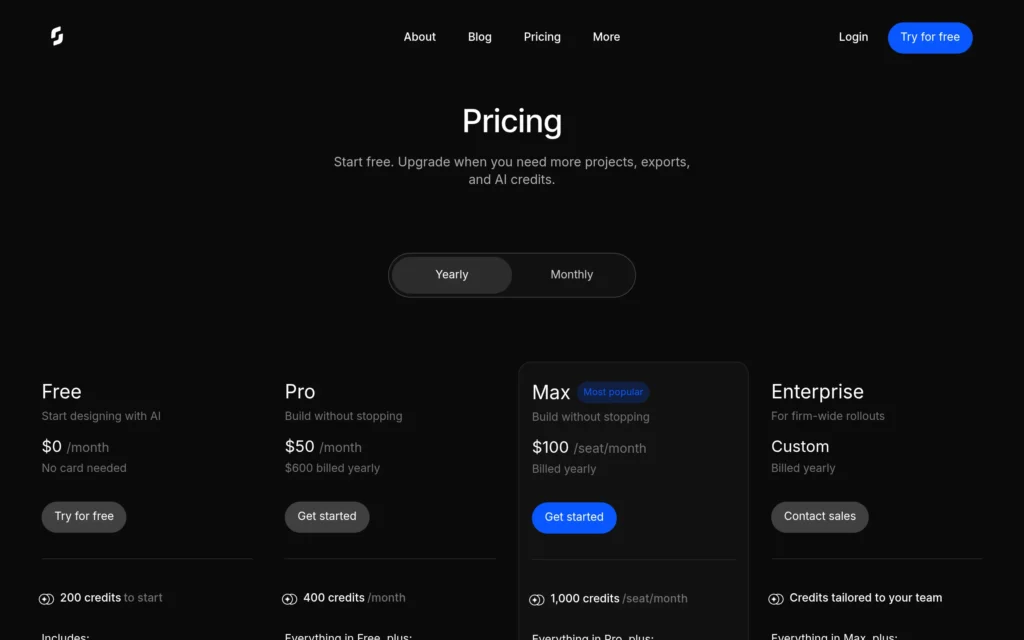
The free plan costs $0: 200 credits to start — a one-time allowance, with no weekly refill — plus one project, the AI design agent, and the Program and Present modes. It has no exports and no BIM mode, so it is a way to try the agent, not to do paid work.
Pro costs $50 a month billed annually — $600 a year — or $60 a month billed monthly, with 400 credits a month, unlimited projects, BIM mode, exports, drawing sheets to PDF, design options, and daylight and illuminance analysis. What it does not give you is a team workspace. That decides the price for a firm: Pro is a one-person plan.
Max costs $100 a seat a month billed annually — $1,200 a seat a year — or $125 a seat billed monthly, with 1,000 credits a seat a month and everything in Pro, plus teams and collaboration, a licence management portal, custom roles and permissions, and a BIM library with custom RFAs. Enterprise is custom, billed yearly: unlimited licences, single sign-on, an open API, directory sync, and premium support.
For a three-person firm, the real choice is three Pro licences at $1,800 a year with no shared workspace, or three Max seats at $3,600 a year with one — the largest single jump in this guide. One person doing feasibility can live on Pro; three people designing together cannot.
Credits work like Veras’: a monthly pool that pays for AI actions, with top-ups when you run out. The page does not publish what each action costs. Snaptrude’s help pages say a new user takes less than a day to get comfortable and a week to become confident.
Who is Snaptrude actually best for? A small firm that loses days to feasibility studies and early massing — the work that is hard to bill and easy to lose a project over. If you test five sites a month, Snaptrude earns its keep; if you do one study a quarter, the free plan plus a Pro month when you need it is smarter.
Maket in detail
Maket does one thing: residential floor plans. Give it your requirements and it generates floor plan options in two to three minutes, with renders, and you can edit the plan or upload an existing one. It is the narrowest tool in this guide, and for a firm that does houses, the fastest.
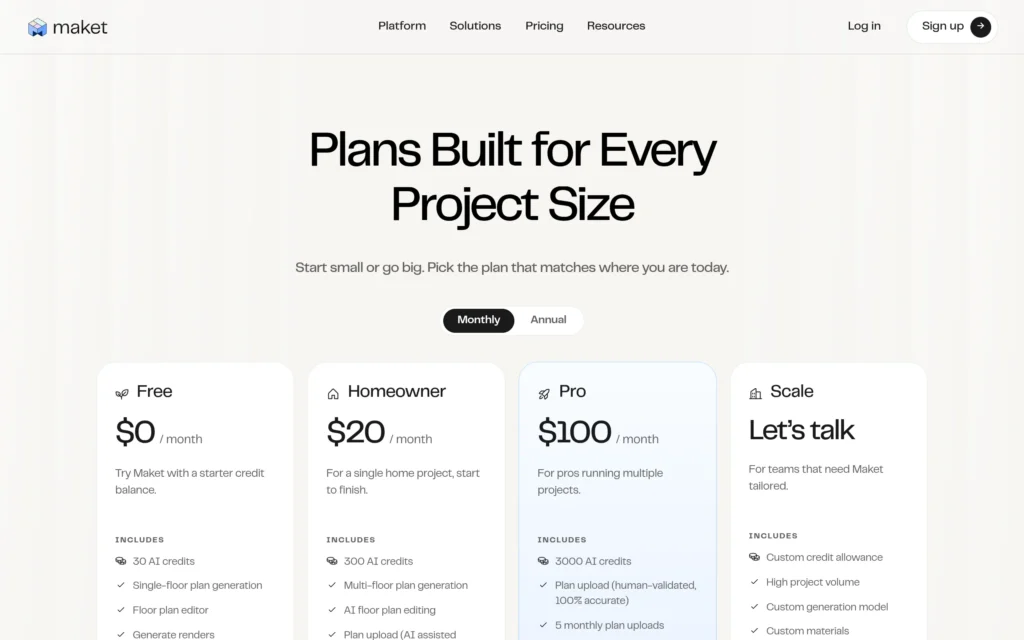
The free plan gives you 30 one-time credits with no credit card required — enough, by Maket’s own count, for one complete single-floor plan and one render. Free projects can be shared by link, but downloadable exports are for paid plans only.
Homeowner costs $20 a month with 300 credits a month, multi-floor generation, AI floor plan editing, one AI-assisted plan upload, and PDF, DXF, and render exports. Pro costs $100 a month with 3,000 credits a month: up to five human-validated plan uploads a month, dedicated onboarding, priority support, branding on design references, and reusable presets.
The human-validated upload is what separates Pro from a toy. Upload a PDF, JPEG, or PNG of an existing plan, and Maket’s team manually reviews it to reproduce the dimensions and placement of rooms, doors, and windows, for what the vendor calls 100% accuracy, delivered within a few hours. Homeowner’s single upload is AI-assisted only, with no accuracy guarantee.
Credits have fixed prices: a floor plan costs 20 credits, a render 10, an optimisation 5. Homeowner’s 300 credits cover up to 15 floors, 30 renders, or 60 optimisations a month; Pro’s 3,000 cover 150 floors, 300 renders, or 600 optimisations. Monthly credits expire and do not roll over; top-up credits never expire, but top-ups are for paid subscribers only.
Annual billing saves 17% — Pro drops to $83 a month, or $996 a year, a saving of $204 that Maket prints on its own pricing page. Pay upfront or in monthly instalments; annual payments are non-refundable. Maket is residential only: if your work is commercial, this tool does not apply.
Who is Maket actually best for? A small residential practice that draws house plans every week. A firm that does two renovations a year should stay on Homeowner and buy top-ups when a job lands.
Autodesk Forma in detail
Forma is the odd one out here: it does not draw your building, it tests whether the building should go on the site at all. Forma Site Design is Autodesk’s AI-powered cloud software for site planning and analysis: set up the site with real contextual data, sketch massing in minutes, and run environmental analyses — sun hours, daylight, wind, and embodied carbon — on the massing model. Forma Board lets the team review options and carry the proposal into Revit without remodelling it.
The price is printed in the product page’s own questions section: a Forma Site Design subscription costs $85 a month, $700 a year, or $2,100 for three years, per seat. There is a free trial. It is also in the Architecture, Engineering & Construction Collection: $460 a month, $3,675 a year, or $11,030 for three years per seat.
That Collection price is the trap to check before you buy Forma on its own. If your firm already pays for the AEC Collection — Revit, AutoCAD, Civil 3D — Forma Site Design is already included, and a standalone subscription would be paying twice. Three seats of Forma standalone cost $2,100 a year; three seats of the Collection cost $11,025. Do not buy the Collection for Forma alone.
Forma connects to Revit, Dynamo, and Rhino, and imports and exports IFC and OBJ. It grew out of Spacemaker, retired by Autodesk in May 2023. The vendor’s customer stories put numbers on it: Baker Barrios says an idea that used to take 60 hours now takes 4, and Scott Shields Architects says avoiding the rework saves 1 to 2 days on average. Those are vendor stories, not independent tests.
The honest limit is scope. Forma analyses the site and the massing; it does not design the building, render it, or check the code. A firm that only does interiors has no use for it. It is also the only tool here with no free tier beyond the trial, so the $700 a year starts the day the trial ends.
Who is Autodesk Forma actually best for? A small firm that competes on sites — feasibility, planning applications, developer work — where winning the site means testing ten massing options before lunch. If your projects start with a site, Forma earns its $700; if they start with a client’s existing house, Maket is the better spend.

UpCodes in detail
UpCodes is the least glamorous tool in this guide and the one most likely to save a project: a searchable library of locally adopted US building codes — the vendor counts more than 11 million code sections across 6,700-plus adoptions, with local amendments shown — plus Copilot, an AI assistant that answers code questions and cites the exact section it used. It remembers your jurisdiction and building type and can generate checklists.
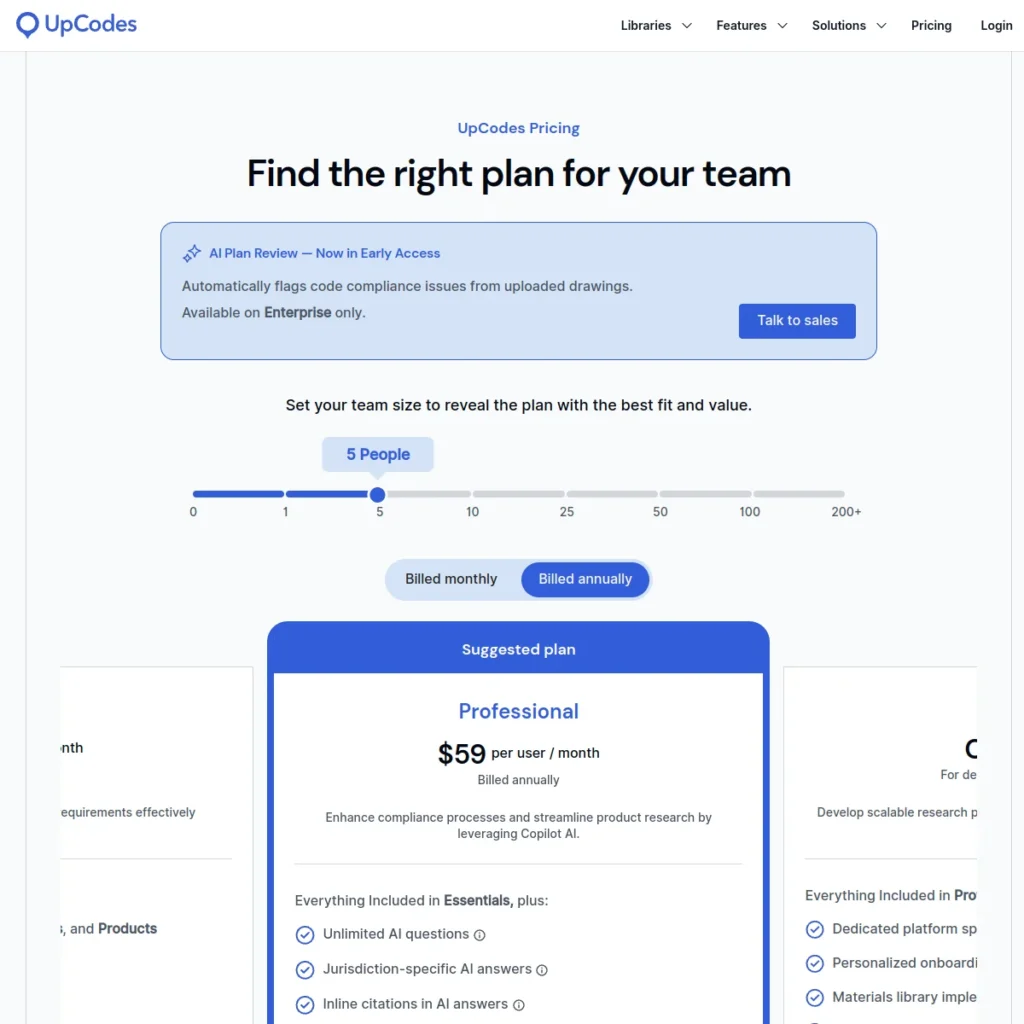
The free plan covers searching the code library and tracking projects. Essentials costs $39 a user a month billed annually — $468 a year — or $45 billed monthly, and adds the diagram, assembly, and product libraries, projects, bookmarks, comments, and the Code Calculator. Professional costs $59 a user a month billed annually — $708 a year — or $68 billed monthly, and adds unlimited Copilot questions with jurisdiction-specific answers and inline citations, UL and GA assembly lookup, and SAML single sign-on. Enterprise is custom pricing, with a dedicated specialist, onboarding, a materials library implementation, bulk discounts for teams of 25 or more, and AI Plan Review. Both paid plans carry a two-week free trial.
The pricing page is the one caveat in this guide: it renders only after JavaScript, so a direct read returned no usable text on the day we verified it. The figures above were cross-checked against several sources quoting UpCodes’ own pricing page, the latest check dated 20 November 2026, and every source agrees on $39 and $59 billed annually, $45 and $68 monthly. The December refresh will re-check them.
AI Plan Review is the feature to read carefully. Launched in June 2026, it analyses uploaded drawings against the adopted codes by discipline, or against your firm’s own checklist, and returns issues by severity linked to drawing pages and code sections. It is early access on Enterprise only, priced through sales. Teams on Essentials or Professional cannot run drawing checks yet. The vendor says Plan Review has flagged 180,000 potential code issues across 1,300 plan sets — its own number, not an independent count.
The value of UpCodes is time: a code question that takes an hour of PDF hunting takes Copilot a minute, with the section cited so you can verify it yourself. At $708 a year per seat, Professional pays for itself if it saves roughly four hours of billable time. The risk runs the other way: an answer about the wrong jurisdiction is worse than no answer, so the citation is not decoration.
Who is UpCodes actually best for? Any small firm that works across jurisdictions and answers code questions weekly. A one-city residential practice can live on Essentials; a firm that does commercial work in three states needs Professional’s Copilot.
The maths: what a three-person firm pays in one year
All figures below are list prices, billed annually, for a three-person firm. Promotions are shown separately. Maket Pro is one account, not three seats.
| Tool | Full tier, 3 people | Lean tier, 3 people | Saving |
|---|---|---|---|
| Veras | Pro, $29 × 3 × 12 = $1,044 | Starter, $16.90 × 3 × 12 = $608.40 | $435.60 |
| Snaptrude | Max, $100 × 3 × 12 = $3,600 | Pro, $50 × 3 × 12 = $1,800 | $1,800 |
| Maket | Pro, $83 × 12 = $996 | Homeowner, $16.60 × 12 = $199.20 | $796.80 |
| Autodesk Forma | Site Design, $700 × 3 = $2,100 | Site Design, $700 × 3 = $2,100 | $0 |
| UpCodes | Professional, $59 × 3 × 12 = $2,124 | Essentials, $39 × 3 × 12 = $1,404 | $720 |
| Total | $9,864 | $6,111.60 | $3,752.40 |
The headline saving is $3,752.40 a year: the full stack at $9,864 minus the lean stack at $6,111.60. Almost half — $1,800 — is Snaptrude Max, the only upgrade that changes how the firm works together rather than how much it can do. Maket Pro’s $796.80 is the next biggest jump, buying human-checked uploads a residential firm uses every week.
Forma saves nothing between the two stacks: one tier only, $700 a seat, $2,100 for three, in both columns. The AEC Collection, at $3,675 a seat a year, would put three seats at $11,025 — more than the entire full stack — so it only makes sense if the firm already needs Revit and the rest.
Paying monthly is the quietest leak in the table. Veras Pro monthly costs $59 a licence, so three licences cost $2,124 a year — a $1,080 penalty against the $1,044 annual price. Snaptrude Max monthly is $125 a seat, or $4,500 a year for three, a $900 penalty. Forma monthly is $85 a seat, or $3,060 for three, a $960 penalty. UpCodes Professional monthly is $68 a seat, or $2,448 for three, a $324 penalty. Maket is the exception: its pricing page prints the $204 annual saving on Pro.
Veras’ Black Friday offer narrows the Veras gap for one year only: Pro at the promotional $23.20 a month costs $278.40 a licence a year, or $835.20 for three — $208.80 less than the $1,044 list price. Year two renewals are charged at the standard price.
The lean stack costs $6,111.60 a year, or about $509 a month for the whole firm. A single project fee, a single planning win, or a single avoided code mistake covers it several times over. The tools are not the expensive part of running a small practice. The unbillable hours they replace are.
Five traps to check before you pay
First, Veras sells credits, not renders. Starter’s 500 credits a month make about 100 images by Chaos’ own conversion, and Pro’s 2,000 make about 400. Video and 3D models draw from the same pool, so the month you start making walkthroughs is the month Starter runs dry. Watch one month of real usage before you decide the tier; using credits voids the refund right.
Second, Snaptrude Pro has no team workspace. Three Pro licences at $1,800 a year are three separate accounts. If all three people need to work in the same model, the price is Max at $3,600 a year — double. Do not budget Pro and discover the gap on the first shared project.
Third, Maket’s monthly credits expire. Homeowner’s 300 credits and Pro’s 3,000 refresh each month and do not roll over, so a quiet month wastes them. Top-ups never expire, but they are for paid subscribers only. Annual payments are non-refundable, so do not prepay Pro until a month of Homeowner has shown you the real burn rate.
Fourth, Forma may already be paid for. If your firm subscribes to the AEC Collection, Forma Site Design is included, and a standalone $700-a-seat subscription is money paid twice. Check the Collection first — and do not buy the Collection for Forma alone, at $3,675 a seat a year.
Fifth, UpCodes’ drawing review is not on the plan you will buy. AI Plan Review is early access on Enterprise only, priced through sales. Essentials and Professional give you the code library and Copilot, not drawing checks.
Work out what your stack really costs
A subscription price is never the whole bill. There is the plan itself, the credits or top-ups on top of it, the hours your team spends learning a new tool, and the projects that go wrong while they learn it. Our free AI Cost Calculator adds those pieces up for your own firm — put in your team size and the plans you are comparing, and it shows the true yearly cost of each stack, not just the page price.
Pros and cons
Veras. Pros: renders inside the tools you already own; the same 30-plus AI models on every plan; image-to-3D makes editable models; 14-day trial. Cons: everything is rationed by credits; video eats the same pool as images; no free plan; Ultra has no published annual price; renders can invent geometry.
Snaptrude. Pros: prompt to a BIM model with real areas; daylight and illuminance analysis on Pro; drawing sheets to PDF; exports to Revit and Rhino. Cons: Pro has no team workspace, so a firm pays double for Max; the page does not publish what each AI action costs; the free plan cannot export.
Maket. Pros: the fastest floor plans in this guide, ready in two to three minutes; human-validated uploads on Pro; annual billing saves 17%; no credit card needed to start. Cons: residential only; monthly credits expire and do not roll over; annual payments are non-refundable; Homeowner’s single upload is AI-assisted only.
Autodesk Forma. Pros: the only site and environmental analysis here; connects to Revit and Rhino without remodelling; the three-year price is the same $700 a year. Cons: one tier only, no cheaper plan, no free tier beyond the trial; it does not render or check code; it may already be in an AEC Collection you pay for.
UpCodes. Pros: the largest library of locally adopted US codes; Copilot answers with the exact section cited; a free tier; a two-week trial on paid plans. Cons: AI Plan Review is Enterprise-only, in early access; the pricing page needs JavaScript, so the figures rest on a cross-check; Copilot is unlimited only on Professional.
Our verdict
For most three-person firms, buy the lean stack first: $6,111.60 a year. Every tool in it can be upgraded later without losing work. The one upgrade to make on day one, if your firm does feasibility together, is Snaptrude Max — the $1,800 jump is the only one that changes how the team works. General contractors face the same stack question — our comparison of the best AI tools for general contractors prices their five tools the same way.
Pick Veras Pro if renders win your work: at $348 a licence a year, one project fee covers all three licences. Pick Snaptrude Pro if one person does feasibility and hands the model on, and Max the moment two people need to design in the same model. Pick Maket Pro if your firm draws houses every week, and Homeowner if you do two renovations a year. Pick Autodesk Forma if your projects start with a site, and check the AEC Collection first so you do not pay twice. Pick UpCodes Professional if your firm answers code questions weekly — at $708 a seat a year, it pays for itself in about four saved billable hours.
Frequently asked questions
What is the best AI tool for architects in 2026?
There is no single winner among the best AI tools for architects, because the five jobs are different. Veras is the best AI renderer, Snaptrude is the best prompt-to-BIM tool, Maket is the best for residential floor plans, Autodesk Forma is the best for site and environmental analysis, and UpCodes is the best for building-code research. A three-person firm that buys the lean tier of each pays $6,111.60 a year; the full tiers cost $9,864.
How much does Veras cost per month?
Veras Starter costs $16.90 a month billed annually ($202.80 a year) with 500 credits a month, and Pro costs $29 a month billed annually ($348 a year) with 2,000 credits a month. Billed monthly, the prices are $20.90 and $59. Ultra carries 6,000 credits, sold monthly only at $127.20 a month, with no annual price published. There is a 14-day free trial with 100 credits, and a Black Friday offer of 20% off new annual licences takes Starter to $13.52 and Pro to $23.20 a month for the first year.
Can Snaptrude replace Revit?
No. Snaptrude takes a prompt to a massing model, a BIM model, and drawing sheets, and it exports to Revit and Rhino — but Revit is still where detailed design, documentation, and coordination happen. Think of it as the feasibility stage that hands a real model to Revit, not as a replacement.
Is UpCodes worth it for a small firm?
Yes, if your firm answers code questions every week. Professional costs $59 a user a month billed annually ($708 a year), and Copilot answers jurisdiction-specific questions with the exact adopted section cited. At a typical billing rate, it pays for itself in about four saved hours a year. Essentials at $39 a month is enough if you only need the code library. Neither plan includes AI Plan Review, which is early access on Enterprise only.
What is the cheapest way for a small architecture firm to start with AI tools?
Start free, in this order: Snaptrude’s free plan (200 one-time credits, one project), Maket’s free plan (30 credits, one floor plan and one render), and UpCodes’ free code library. Add Veras on its 14-day trial when a client presentation is due, and Forma on its free trial when a site job lands. The first paid step should be the tool your firm reaches for twice in one week — for most firms, Veras Starter at $16.90 a month or UpCodes Essentials at $39 a month.
Price note
Price note — updated 24 November 2026: Prices in this post were checked on 24 November 2026. When you are reading this, the price may be lower or higher — always check the official pricing page before you buy.
Prices checked: Veras Starter $16.90 and Pro $29 a month billed annually ($202.80 and $348 a year), Ultra $127.20 a month billed monthly, with a Black Friday offer of 20% off new annual licences (Starter $13.52, Pro $23.20 a month); Snaptrude Free $0, Pro $50 a month billed annually ($60 monthly), Max $100 a seat a month billed annually ($125 monthly), Enterprise custom; Maket Free 30 credits, Homeowner $20 a month, Pro $100 a month ($83 a month billed annually, $996 a year), Scale custom, with 17% off annual billing.
Autodesk Forma Site Design $85 a month, $700 a year, or $2,100 for three years, and the AEC Collection $460 a month, $3,675 a year; UpCodes Free tier, Essentials $39 a user a month billed annually ($45 monthly), Professional $59 ($68 monthly), Enterprise custom, with a two-week free trial on paid plans.
Prices change — check the official pricing page before you pay.
Sources: Veras pricing, Snaptrude pricing, Maket pricing, Autodesk Forma pricing, UpCodes pricing.
Pros
- Veras. Pros: renders inside the tools you already own; the same 30-plus AI models on every plan; image-to-3D makes editable models; 14-day trial.
- Snaptrude. Pros: prompt to a BIM model with real areas; daylight and illuminance analysis on Pro; drawing sheets to PDF; exports to Revit and Rhino.
- Maket. Pros: the fastest floor plans in this guide, ready in two to three minutes; human-validated uploads on Pro; annual billing saves 17%; no credit card needed to start.
- Autodesk Forma. Pros: the only site and environmental analysis here; connects to Revit and Rhino without remodelling; the three-year price is the same $700 a year.
- UpCodes. Pros: the largest library of locally adopted US codes; Copilot answers with the exact section cited; a free tier; a two-week trial on paid plans.
Cons
- Veras. Cons: everything is rationed by credits; video eats the same pool as images; no free plan; Ultra has no published annual price; renders can invent geometry.
- Snaptrude. Cons: Pro has no team workspace, so a firm pays double for Max; the page does not publish what each AI action costs; the free plan cannot export.
- Maket. Cons: residential only; monthly credits expire and do not roll over; annual payments are non-refundable; Homeowner's single upload is AI-assisted only.
- Autodesk Forma. Cons: one tier only, no cheaper plan, no free tier beyond the trial; it does not render or check code; it may already be in an AEC Collection you pay for.
- UpCodes. Cons: AI Plan Review is Enterprise-only, in early access; the pricing page needs JavaScript, so the figures rest on a cross-check; Copilot is unlimited only on Professional.
For most three-person firms, buy the lean stack first: $6,111.60 a year. Every tool in it can be upgraded later without losing work. The one upgrade to make on day one, if your firm does feasibility together, is Snaptrude Max — the $1,800 jump is the only one that changes how the team works. General contractors face the same stack question — our comparison of the best AI tools for general contractors prices their five tools the same way.Pick Veras Pro if renders win your work: at $348 a licence a year, one project fee covers all three licences. Pick Snaptrude Pro if one person does feasibility and hands the model on, and Max the moment two people need to design in the same model. Pick Maket Pro if your firm draws houses every week, and Homeowner if you do two renovations a year. Pick Autodesk Forma if your projects start with a site, and check the AEC Collection first so you do not pay twice. Pick UpCodes Professional if your firm answers code questions weekly — at $708 a seat a year, it pays for itself in about four saved billable hours.