
For a small nonprofit, the cheapest honest AI setup is Givebutter at $0 plus ChatGPT Plus at $20 a month — $20 a month, $240 a year — free donation forms, free donor CRM, and an AI that drafts grants, appeals, and thank-you notes. Canva for Nonprofits adds $0 more: the full Canva Pro design suite free for eligible nonprofits, for a team of up to 50 people. DonorPerfect starts at $119 a month, $1,428 a year — a real donor database with Constant Contact built in — which is $1,188 a year more than the Givebutter-plus-ChatGPT stack. Bloomerang publishes no price at all: its Giving Platform is a custom quote, built around your donor count, so budget on the quote you get in writing, not on any number in this guide.
It is the last week of November and your year-end appeal has to go out to 2,000 donors, the grant report is due Friday, and the volunteer rota for the food drive still has six empty shifts. Your development director is one person, your budget is whatever the board approved in March, and every software vendor you talk to seems to charge like you are a company with a sales team. That is the nonprofit pricing problem in one sentence: the tools are built for businesses, the discounts hide behind a sales call, and the free tier always ends exactly where the real work starts.
This guide prices five tools the way a small nonprofit actually buys them — by what they cost a 2,000-donor organization with one or two staff, not by the headline on the homepage. Two of the five cost nothing at all. One does not publish a price, and we say so plainly instead of guessing. And the cheapest honest AI setup in this guide is twenty dollars a month — a free fundraising platform, a free design suite, and one AI subscription that writes the grant drafts, the thank-you notes, and the volunteer emails.
Every price below was read on the vendor’s own pricing page on 24 November 2026 — no roundups, no figures copied from a review site. One honest admission up front: only two of these five tools are donor databases, and the other three do completely different jobs, so the maths only makes sense when you price them as a stack. And one tool from the original shortlist is missing on purpose: Kindful no longer exists as a standalone product — its site now redirects to Bloomerang, which bought it — so Givebutter takes its place.
Quick Answer
For a small nonprofit, the cheapest honest AI setup is Givebutter at $0 plus ChatGPT Plus at $20 a month — $20 a month, $240 a year — free donation forms, free donor CRM, and an AI that drafts grants, appeals, and thank-you notes.
Canva for Nonprofits adds $0 more: the full Canva Pro design suite free for eligible nonprofits, for a team of up to 50 people. DonorPerfect starts at $119 a month, $1,428 a year — a real donor database with Constant Contact built in — which is $1,188 a year more than the Givebutter-plus-ChatGPT stack. Bloomerang publishes no price at all: its Giving Platform is a custom quote, built around your donor count, so budget on the quote you get in writing, not on any number in this guide.
In this article
- Best AI tools for nonprofits at a glance
- How we compared them (and what we did not test)
- Bloomerang in detail
- DonorPerfect in detail
- Givebutter in detail
- Canva for Nonprofits in detail
- ChatGPT Plus in detail
- The maths: what a nonprofit pays in one year
- Four traps to check before you pay
- Work out what your stack really costs
- Pros and cons
- Our verdict
- Frequently asked questions
Best AI tools for nonprofits at a glance
| Tool | What the AI actually does | Small nonprofit (2,000 donors) | Free option |
|---|---|---|---|
| Bloomerang | Prospect AI finds likely donors; predictive giving insights; AI content assistant in Qgiv forms | Custom quote — no published price | Free demo, no free plan |
| DonorPerfect | Built-in Constant Contact email automation; reporting dashboards; grant and volunteer tracking | From $119/mo ($1,428/yr) | Free demo, no free plan |
| Givebutter | Givebutter Magic AI writes campaigns and donor insights; AI connectors to ChatGPT and Claude | $0 with donor tips on; Plus from $29/mo | Free forever — $0 platform fee |
| Canva for Nonprofits | Canva AI assistant turns text into designs; Magic Write drafts appeals and social posts | $0 for eligible nonprofits (up to 50 users) | Free — full Canva Pro |
| ChatGPT Plus | Drafts grants, appeals, thank-you notes; deep research on funders; scheduled tasks | $20/mo ($240/yr) | Free plan ($0, limited) |
How we compared them (and what we did not test)
Every tool here either publishes its price on its own website or admits openly that it does not. Kindful, the donor CRM on the original shortlist, publishes nothing any more because it no longer exists on its own — Bloomerang acquired it, and kindful.com now sends you to Bloomerang’s pricing page, which asks for a quote. So Kindful is out, and Givebutter takes its place: a free fundraising platform with its own built-in AI, Givebutter Magic, and a pricing page that prints every fee in plain numbers.
We priced everything for the same organization: a small nonprofit with about 2,000 donors, one or two staff, and no IT team, on monthly billing. The five tools split into three kinds: Bloomerang and DonorPerfect are donor databases — the system of record. Givebutter is the fundraising front door — donation forms, events, auctions, and a free CRM. Canva and ChatGPT are the workhorses — design and writing — that every nonprofit needs no matter which database it picks.
We did not run trial campaigns or mystery-shop any vendor for this guide. What follows is prices and published features, checked on the vendors’ own pages on 24 November 2026. One hard line runs through all of it: the AI drafts the appeal and finds the likely donor. You still sign the grant, thank the donor, and decide who gets asked for what.
Bloomerang in detail
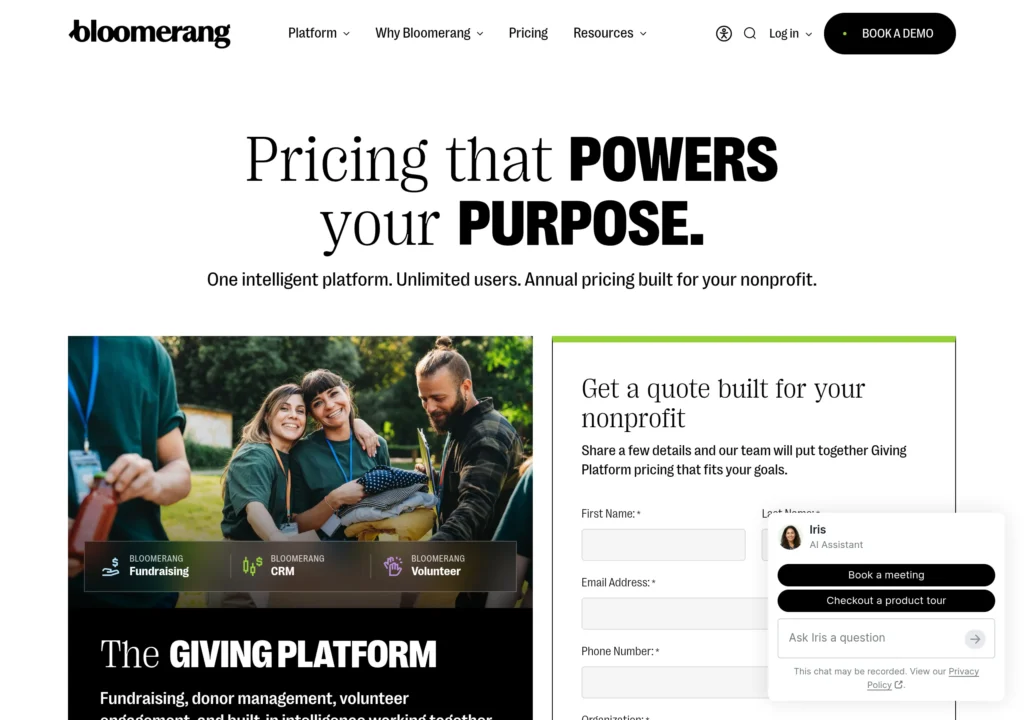
Bloomerang is the biggest name in nonprofit donor software, and the only tool here that tries to be the whole giving platform in one login: fundraising, donor management, and volunteer engagement, with built-in intelligence across all three. Its own numbers say nonprofits using the platform raise 47% more within five years of upgrading, and that first-time donor retention among its top customers runs at 47% against an industry average of 19%.
The AI is the reason Bloomerang leads this guide despite having no published price. Prospect AI and predictive giving insights score your donors and flag who is most likely to give, and how much — the kind of wealth screening and moves management that used to need a consultant. The fundraising side, Qgiv by Bloomerang, adds an AI content assistant that drafts donation-form copy, smart donation amounts that nudge givers upward, and abandoned-gift reminders that chase the donor who left mid-form. Volunteer management is built in: screening, scheduling, shift sign-up, background checks, and a mobile app for volunteers.
The price is the problem, and it is a real one for a small nonprofit. Bloomerang’s pricing page prints no dollar figure at all — it asks you to share a few details so the team can build a quote around your donor count. Plans are built on the number of records you track, every plan comes with unlimited users, and the Giving Platform comes in Standard and Pro bundles, with the CRM, Qgiv fundraising tools, and Volunteer available as individual products too. Training and onboarding are included in the proposal.
That structure is genuinely good news for a two-person team — unlimited users means the board treasurer and the volunteer coordinator cost nothing extra. But it is bad news for budgeting: you cannot compare Bloomerang to DonorPerfect’s $119 a month until Bloomerang gives you a number in writing. Get the quote before the board meeting, ask whether the price is locked for the year, and ask what happens to the price when your donor list grows past the band you were quoted for.
Who is Bloomerang actually best for? A nonprofit that has outgrown spreadsheets and wants one system where the donor record, the donation form, and the volunteer rota all talk to each other — and that can get a quote approved by a board. If your donor list is under 1,000 and your budget is near zero, start with Givebutter and come back to Bloomerang when the list, and the budget, are bigger.
Pros:
- The most complete nonprofit platform here — CRM, fundraising, and volunteer management in one login
- Prospect AI and predictive giving insights, the strongest donor-intelligence features in this guide
- Unlimited users on every plan, so volunteers and board members cost nothing extra
Cons:
- No published price — you cannot budget until you have a quote in writing
- The quote is built on your donor count, so the price rises as your list grows
- No free plan and no free trial with a published length — the demo is the only way in
DonorPerfect in detail
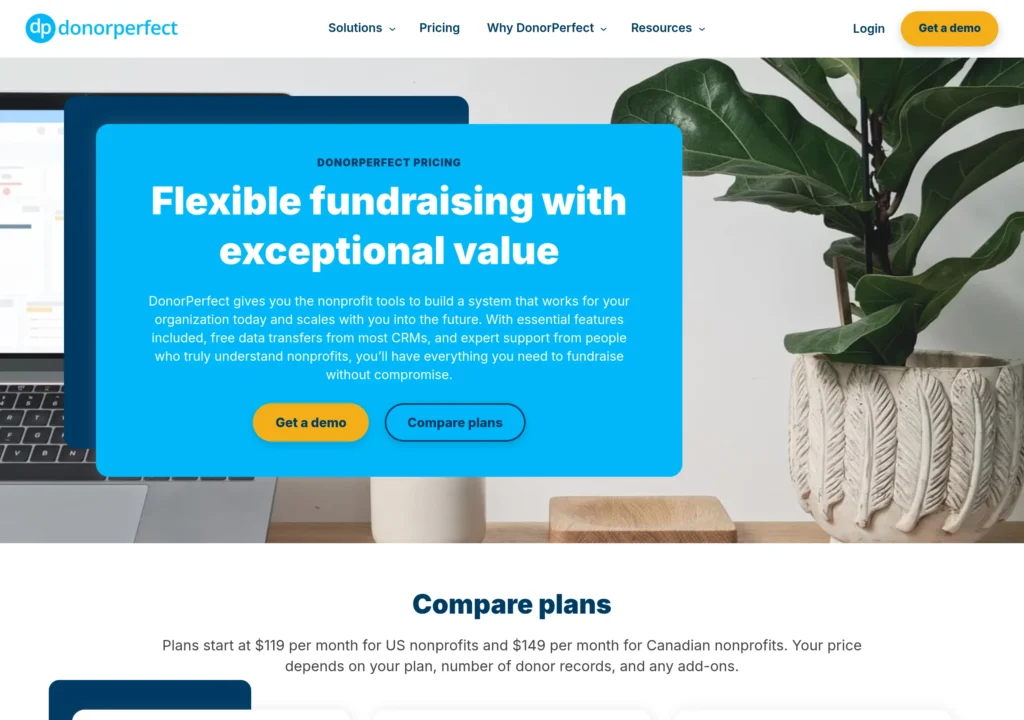
DonorPerfect is Bloomerang’s oldest rival and the most transparent donor database in this guide — the only one of the two that prints a starting price on its pricing page. It is employee-owned, it says 90% of its customers stay year after year, and it claims nonprofits raise 25% more funds in their first year on the platform.
The AI here is quieter than Bloomerang’s but the package is wider. Every plan includes a donor management system, online donation forms with integrated payment processing, reporting dashboards, volunteer tracking, grant management tools, and the mobile app — plus a built-in Constant Contact account with more than 30 free fundraising email templates, so the email marketing most nonprofits pay for separately is already in the box. The higher plans add crowdfunding, moves management, batch gift entry, automated alerts, QuickBooks integration, event management, and enterprise direct-mail segmentation.
The price is three plans, and the starting number is honest. Plans start at $119 a month for US nonprofits and $149 a month for Canadian nonprofits, and the final price depends on the plan, the number of donor records, and any add-ons.
CORE fits teams of up to three users with the essentials. PLUS adds unlimited users, crowdfunding, moves management, and event management for teams ready to grow. PRO adds enterprise direct-mail segmentation, enterprise reports, custom API access, and phone support for established teams managing a high volume of records. Data transfers from most CRMs are free, onboarding is personalized, and a special year-end pricing offer runs until 31 December 2026 — ask what the price becomes in January before you sign in December.
Who is DonorPerfect actually best for? A nonprofit that wants a real donor database with email marketing already included, at a price it can read on the website before the sales call. CORE at $119 is the honest buy for a small team; PLUS is the step up when crowdfunding and events join the calendar.
Pros:
- The only donor database here with a published starting price — $119 a month
- Constant Contact built in, with 30+ fundraising email templates, on every plan
- Free data transfers from most CRMs and personalized onboarding included
Cons:
- $119 is the starting price — the bill rises with your donor records and the bands are not printed
- No free plan; the demo is the only way to try it before you pay
- The AI is mostly email automation and reporting — no donor-scoring tool as visible as Bloomerang’s Prospect AI
Givebutter in detail
Givebutter is the free one, and it is free in a way that actually holds up — which is rare enough to say plainly. Donation forms, fundraising pages, events and ticket sales, auctions, a donor CRM, email, texting, and video messages: the whole fundraising front door, with unlimited users, unlimited contacts, unlimited campaigns, and unlimited email blasts, at $0. It is rated number one on G2 across fundraising, donor management, nonprofit auctions, and nonprofit CRM, and it is the tool in this guide most small nonprofits should try first.
The AI is called Givebutter Magic, and it is built into the free platform rather than sold as an add-on: it writes campaign copy, suggests fundraising goals, and surfaces donor insights from your own data. AI connectors link your Givebutter data to ChatGPT and Claude, so the AI that drafts your appeal can see your actual donor history instead of guessing. More than 1,000 integrations are available natively and through Zapier.
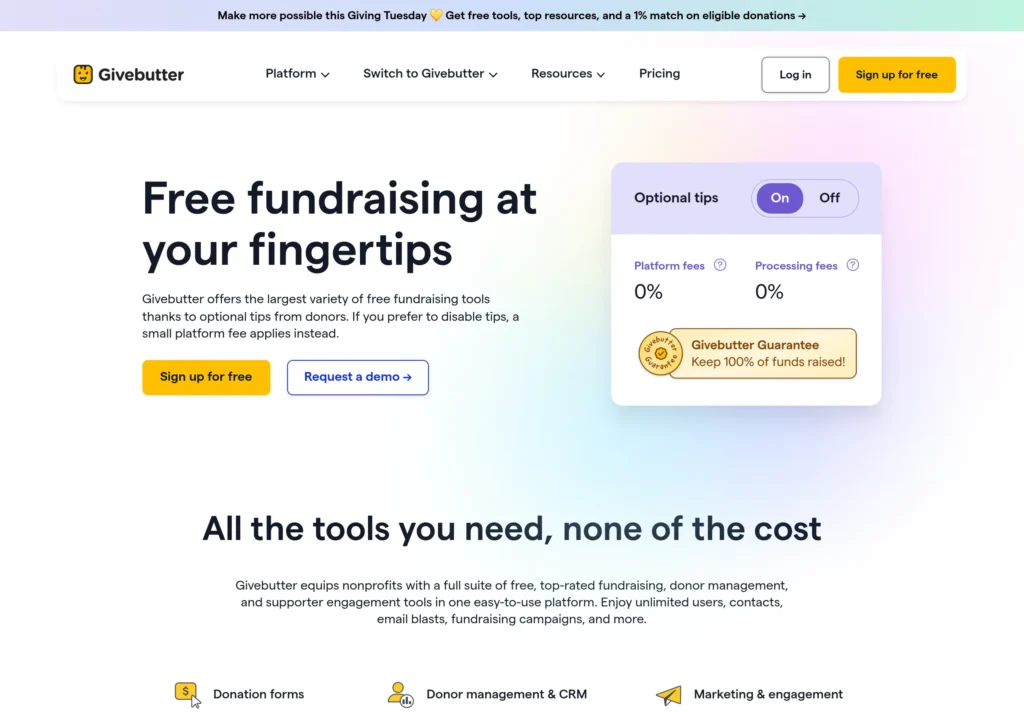
Here is how free works, in the exact numbers from Givebutter’s pricing page. With donor tips enabled, the platform fee is 0% and the nonprofit pays 0% in processing fees — donors are offered the chance to cover the standard processing cost, and the Givebutter Guarantee covers whatever they do not, so the nonprofit keeps 100% of the funds raised. With tips disabled, a flat 3% platform fee applies, plus standard processing fees of 2.9% plus 30 cents per card gift. On $50,000 of card donations averaging $50 a gift, tips-off costs about $3,250 — against $0 with tips on. Most donors do tip when asked, which is why the average campaign keeps nearly all of what it raises.
Givebutter Plus is the paid tier, for organizations that want more: automated workflows, task management, ready-made reports, data hygiene, file uploads, QuickBooks Online sync, priority phone support, and discounted direct mail. Plus is priced by contacts, with a 30-day free trial: $29 a month ($348 billed annually), $79 a month ($948 billed annually), or $129 a month ($1,548 billed annually). The free CRM never charges for contacts — contact pricing applies to Plus only — and you are never required to upgrade, whatever your contact count.
Who is Givebutter actually best for? Almost every small nonprofit reading this guide. It is the fundraising platform you start on, and for many organizations it is the only fundraising platform they ever need. Pay for Plus when the workflows and reporting save your one staff member a day a week — not before.
Pros:
- Genuinely free — $0 platform fee and $0 processing with donor tips on, backed by a written guarantee
- Givebutter Magic AI and ChatGPT/Claude connectors built in, not sold as an add-on
- Unlimited users, contacts, campaigns, and emails on the free plan
Cons:
- “Free” depends on donor tips — turn tips off and the same $50,000 costs about $3,250 in fees
- The free CRM is strong, but advanced reporting and workflows sit behind Plus from $29 a month
- No built-in wealth screening or donor scoring as deep as Bloomerang’s Prospect AI
Canva for Nonprofits in detail
Canva for Nonprofits is the best deal in this entire guide, and it is not close. Registered nonprofits get free access to all Canva Pro features, plus team and collaboration tools for one team of up to 50 users — the same design suite other small businesses pay for, at $0. More than a million nonprofits already use it, across 175 countries, and nonprofit users have created more than 200 million designs with it.
The AI is the point for a team with no designer. The Canva AI assistant turns a typed idea into a finished design, Magic Write drafts the appeal letter, the social caption, and the event flyer in the same place, and Brand Kits keep your colors, fonts, and logo locked so every volunteer-made graphic still looks like your organization. The premium library — more than 100 million photos, videos, graphics, and music tracks — is included, so the year-end appeal does not need a stock-photo budget either.
Eligibility is the part to check before you plan around it. Canva Nonprofits is for registered nonprofits, NGOs, and social impact organizations with a clearly stated charitable mission — in the US, that generally means a 501(c)(3). Not eligible: government agencies, political organizations, educational institutions, for-profit companies, most other 501(c) types, and grant-making foundations. If you qualify, the application asks for registration documents, and approval unlocks the whole Pro suite for a team of up to 50. Additional seats beyond that are 50% off Canva Enterprise.
Who is Canva for Nonprofits actually best for? Every eligible nonprofit, full stop. If you send one appeal, one flyer, or one social post a month, apply before you pay for any design tool — a 50-person team on the free plan covers the staff, the board, and the volunteers.
Pros:
- Free Canva Pro for up to 50 users — the largest free seat count in this guide
- AI assistant and Magic Write draft designs and copy in the same place
- Brand Kits stop volunteer-made graphics from drifting off-brand
Cons:
- Eligibility is narrow — most 501(c) types other than 501(c)(3), foundations, and schools do not qualify
- It designs the appeal; it does not send it or track donations
- Only one free team — a second team needs the paid Enterprise route

ChatGPT Plus in detail
ChatGPT Plus is the only tool here that is not built for nonprofits — and the one your staff will probably use the most. It is a general AI assistant, and for a nonprofit that means one subscription that drafts the grant narrative, rewrites the appeal for three different audiences, turns a board meeting’s notes into a donor update, and answers the “how do I write this?” question at 11pm on a Sunday.
The plan ladder is simple, and the prices are printed on OpenAI’s own pricing page. Free is $0, with limited messages, uploads, image creation, voice, and deep research. Go is $8 a month, for longer conversations and more of everything. Plus is $20 a month, monthly only, with advanced reasoning models, expanded messages and uploads, more complex image creation, expanded deep research, expanded memory and context, projects, scheduled tasks, and custom GPTs. Pro starts at $100 a month and rises to $200 or $500 for heavier research and coding use. Plus has no ads; Go may include ads.
What Plus actually buys a nonprofit is the writing and research workflow. Deep research reads funder websites and builds a shortlist of grants that fit your mission, with sources you can check. Projects and scheduled tasks turn a recurring job — the monthly donor newsletter, the Friday volunteer reminder — into a standing instruction. Custom GPTs can be trained on your own style guide, so the AI drafts in your organization’s voice instead of generic charity-speak. And the grant draft is the highest-value use in this guide: feed Plus your program description and the funder’s guidelines, and it returns a structured first draft in minutes — a draft your development director then edits, fact-checks, and signs.
Who is ChatGPT Plus actually best for? The nonprofit with one person doing the writing for the whole organization. Twenty dollars a month buys back the hours that person spends staring at a blank grant application — and the free plan is a real test: if the free tier’s limits never bite, do not pay.
Pros:
- The most flexible AI here — grants, appeals, thank-yous, volunteer emails, and funder research in one subscription
- Deep research and scheduled tasks turn recurring writing jobs into standing instructions
- The free plan is a genuine test, and Go at $8 is the cheapest paid step up anywhere in this guide
Cons:
- Not built for nonprofits — no donor data, no donation forms, no compliance with donor-privacy rules
- Never paste donor lists or personal details into it; the data belongs in your CRM
- $20 a month is per person, so a three-person team pays $60 — budget it that way

The maths: what a nonprofit pays in one year
One organization, 2,000 donors, monthly billing, regular prices. Annual-billing prices are in brackets where the vendor publishes them.
| Setup | Monthly | Year one |
|---|---|---|
| Bloomerang | Custom quote — no published price | Ask for the quote in writing |
| DonorPerfect | From $119/mo | From $1,428 |
| Givebutter | $0 (tips on) | $0 |
| Givebutter Plus | From $29/mo | From $348 ($348 billed annually) |
| Canva for Nonprofits | $0 (eligible nonprofits) | $0 |
| ChatGPT Plus | $20/mo | $240 |
Read the per-donor and per-gift columns, not the monthly column. DonorPerfect’s $119 a month is the floor — the bill rises with your donor records, and the bands are not printed. Givebutter’s $0 depends on donor tips: with tips off, $50,000 of card gifts averaging $50 each costs about $3,250 in fees ($1,500 platform + $1,450 processing + $300 per-gift fees). ChatGPT Plus is $20 a month per person, so a three-person team pays $60, not $20.
Now the stacks, because no single tool here does every job. The budget stack is Givebutter plus Canva for Nonprofits plus ChatGPT Plus at $20 a month, $240 a year — donation forms, a donor CRM, design, and an AI writer, all for the price of one subscription. The database stack is DonorPerfect plus Canva plus ChatGPT Plus at $139 a month, $1,668 a year — a real donor database with email built in, on top of the same free design and writing tools.
The single most useful number in this guide is the gap between the two stacks at the same organization size: $1,668 minus $240 is $1,428 a year. That is the price of DonorPerfect’s database, its Constant Contact account, and its reporting — against Givebutter’s free CRM. And the gap inside the database choice is just as sharp: DonorPerfect alone costs $1,428 a year, while Givebutter plus ChatGPT Plus costs $240 — $1,188 a year less, for donation forms, a CRM, and an AI that writes the appeals.
Four traps to check before you pay
1. The quote you never got in writing. Bloomerang publishes no price, so the number in the sales call is not a price until it is in an email. Get the quote in writing, ask whether it is locked for twelve months, and ask what the price becomes when your donor list grows past the band you were quoted for. A board that approves a number it has never seen in writing is approving a surprise.
2. The starting price that is not your price. DonorPerfect’s $119 a month is the floor for a small list, and your bill rises with donor records. Givebutter Plus is priced by contacts too — $29, $79, or $129 a month depending on how many you hold. Count your records before the demo, not after the invoice, and ask the rep to confirm your exact price for your exact record count in a single call.
3. The “free” that costs $3,250. Givebutter is $0 with donor tips on and about $3,250 on $50,000 of gifts with tips off. That is still a fair price for what it does — but it is not free, and the difference is one toggle in the campaign settings. Check the toggle before the year-end appeal goes live, and check it again after any staff change, because it is the kind of setting a new volunteer resets without knowing.
4. The donor list in the chat window. ChatGPT Plus is a consumer product, and your supporters’ names, emails, and giving history belong in your donor database — never pasted into a chat. Draft the appeal with Plus, merge the names in the CRM, and keep the two apart. One pasted spreadsheet is all it takes to turn a writing tool into a privacy problem your board will hear about.
Work out what your stack really costs
The prices above are honest, but your stack is yours — a $119-a-month database plus a $20-a-month AI writer plus card fees on $50,000 of gifts is a different number from any single headline. Use AIT Biz Hub’s free AI Cost Calculator at aitbizhub.com/ai-cost-calculator/ to total the monthly and yearly cost of the stack you are considering before the first invoice arrives. The difference between a $20-a-month stack and a $139-a-month stack is $1,428 a year — worth seeing in advance.
Pros and cons
Pros of using AI in a nonprofit:
- A free fundraising platform plus a $20 AI subscription covers donation forms, a CRM, and all the writing — $240 a year, not $1,428
- Canva for Nonprofits puts a full professional design suite in the hands of a 50-person team for $0
- Givebutter Magic and ChatGPT draft the appeal, the grant, and the thank-you note in minutes instead of evenings
- Bloomerang’s Prospect AI flags the donors most likely to give, so a one-person team asks the right people first
Cons of using AI in a nonprofit:
- No single tool here does every job — the databases do not design, the design tool does not send, and the writer does not hold donor data
- Bloomerang’s price is a quote, DonorPerfect’s price rises with records, and Givebutter’s free tier depends on donor tips — three different ways the headline can mislead
- AI drafts still need a human’s eyes: a grant with an invented statistic or a thank-you note with the wrong donor’s name costs more than the time it saved
Our verdict
Buy the $20-a-month stack if price decides it: Givebutter at $0, Canva for Nonprofits at $0, and ChatGPT Plus at $20. That is $240 a year for donation forms, a donor CRM, professional design for up to 50 people, and an AI that writes grants and appeals. It is $1,428 a year cheaper than the same stack with DonorPerfect instead of Givebutter’s free CRM; the trade-off is depth — no wealth screening, no enterprise mail segmentation, and a CRM that grows with you rather than ahead of you.
Buy DonorPerfect from $119 a month if you want a real donor database with email built in. That is $1,428 a year at the floor price, plus $240 for ChatGPT Plus — $1,668 a year for the database stack — but budget on the price the rep confirms for your record count, not on the $119 headline.
Get a Bloomerang quote if your donor list has outgrown a spreadsheet and your board will approve a platform, not a price. It is the strongest donor intelligence in this guide — Prospect AI, predictive insights, volunteer management in the same login — but do not budget on a number you have not seen in writing, and do not sign until you know what the next donor-count band costs.
Apply for Canva for Nonprofits before you pay for any design tool. If you are an eligible 501(c)(3), it is free Canva Pro for up to 50 people, and it is the easiest $0 decision in this guide. Pair it with Givebutter’s free CRM and ChatGPT Plus, and a one-person development team has a fundraising operation that would have needed three hires five years ago.
Start with the free trials — Givebutter and Canva cost nothing to try, ChatGPT’s free plan costs nothing to test, DonorPerfect and Bloomerang both offer demos — and run the same real appeal through two stacks before you buy. The same missed-donor maths applies to other small organizations — see our guides to how to use ChatGPT for customer service replies for donor messages that need a fast, warm answer, and how to set up an AI chatbot on your website if the donation page needs someone to answer questions at midnight.
Frequently asked questions
How much does AI software cost a nonprofit per month?
The honest range is $0 to $139 a month: Givebutter $0, Canva for Nonprofits $0, ChatGPT Plus $20, Givebutter Plus from $29, DonorPerfect from $119, and Bloomerang on a custom quote. The budget stack — Givebutter, Canva, and ChatGPT Plus — is $20 a month, $240 a year. The database stack — DonorPerfect, Canva, and ChatGPT Plus — is $139 a month, $1,668 a year at DonorPerfect’s floor price.
Which AI tool is best for nonprofit donor management?
Bloomerang has the strongest donor intelligence — Prospect AI and predictive giving insights — but publishes no price, so you budget on a quote. DonorPerfect is the best-priced real database, from $119 a month with Constant Contact built in. Givebutter’s free CRM is the honest starting point: unlimited contacts, donation forms, and events at $0, with Givebutter Magic AI built in. Most small nonprofits should start with Givebutter and move to a paid database when the donor list, and the reporting needs, outgrow it.
Is Givebutter really free for nonprofits?
Yes, with one condition that matters: with donor tips enabled, the platform fee is 0% and the nonprofit pays 0% in processing fees, backed by the Givebutter Guarantee. With tips disabled, a flat 3% platform fee applies plus standard processing — 2.9% plus 30 cents per card gift — which costs about $3,250 on $50,000 of card gifts averaging $50 each. Givebutter Plus, from $29 a month, adds workflows, reporting, and QuickBooks sync, but the free CRM never charges for contacts and you are never required to upgrade.
Can AI write grant applications for a nonprofit?
It can write the first draft, and that is where the value is. ChatGPT Plus at $20 a month takes your program description and the funder’s guidelines and returns a structured draft in minutes, with deep research to shortlist funders that fit your mission. But the draft is not the application: every figure, every claim about your outcomes, and every budget line needs a human to check it before it goes out, and donor data must never be pasted into the chat. A grant with an invented statistic is worse than a late grant.
Does Canva for Nonprofits really give you Canva Pro for free?
Yes — for eligible registered nonprofits, generally 501(c)(3) organizations in the US. You get free access to all Canva Pro features plus team tools for one team of up to 50 users, including the Canva AI assistant, Magic Write, Brand Kits, and the premium library of more than 100 million assets. Not eligible: government agencies, political organizations, educational institutions, most other 501(c) types, and grant-making foundations. Apply with your registration documents; approval unlocks the full suite.
Price note
Price note — updated 24 November 2026: Prices in this post were checked on 24 November 2026. When you are reading this, the price may be lower or higher — always check the official pricing page before you buy.
Pros
- A free fundraising platform plus a $20 AI subscription covers donation forms, a CRM, and all the writing — $240 a year, not $1,428
- Canva for Nonprofits puts a full professional design suite in the hands of a 50-person team for $0
- Givebutter Magic and ChatGPT draft the appeal, the grant, and the thank-you note in minutes instead of evenings
- Bloomerang's Prospect AI flags the donors most likely to give, so a one-person team asks the right people first
Cons
- No single tool here does every job — the databases do not design, the design tool does not send, and the writer does not hold donor data
- Bloomerang's price is a quote, DonorPerfect's price rises with records, and Givebutter's free tier depends on donor tips — three different ways the headline can mislead
- AI drafts still need a human's eyes: a grant with an invented statistic or a thank-you note with the wrong donor's name costs more than the time it saved
Buy the $20-a-month stack if price decides it: Givebutter at $0, Canva for Nonprofits at $0, and ChatGPT Plus at $20. That is $240 a year for donation forms, a donor CRM, professional design for up to 50 people, and an AI that writes grants and appeals. It is $1,428 a year cheaper than the same stack with DonorPerfect instead of Givebutter's free CRM; the trade-off is depth — no wealth screening, no enterprise mail segmentation, and a CRM that grows with you rather than ahead of you.Buy DonorPerfect from $119 a month if you want a real donor database with email built in. That is $1,428 a year at the floor price, plus $240 for ChatGPT Plus — $1,668 a year for the database stack — but budget on the price the rep confirms for your record count, not on the $119 headline.Get a Bloomerang quote if your donor list has outgrown a spreadsheet and your board will approve a platform, not a price. It is the strongest donor intelligence in this guide — Prospect AI, predictive insights, volunteer management in the same login — but do not budget on a number you have not seen in writing, and do not sign until you know what the next donor-count band costs.Apply for Canva for Nonprofits before you pay for any design tool. If you are an eligible 501(c)(3), it is free Canva Pro for up to 50 people, and it is the easiest $0 decision in this guide. Pair it with Givebutter's free CRM and ChatGPT Plus, and a one-person development team has a fundraising operation that would have needed three hires five years ago.