

For a five-person team on Asana Starter ($10.99 a seat a month, $659.40 a year), the cheapest like-for-like switch is ClickUp Core at $9 a user a month billed yearly — $45 a month, $540 a year — saving $119.40 a year. Core includes unlimited Gantt charts, custom fields, unlimited forms, and 1,000 automations a month. Trello Premium, Notion Plus, and Wrike Team each cost $600 a year for five seats — $50 a month — saving $59.40 a year. Monday.com Standard costs $720 a year — $60.60 a year more than Asana Starter. If your team needs Asana Advanced ($24.99 a seat, $1,499.40 a year), ClickUp Business at $1,020 a year saves $479.40, and Monday.com Pro at $1,140 a year saves $359.40.
The email arrives on a Tuesday, and it is never good news. Your Asana renewal is coming up, the price has gone up again, and the plan your five-person team actually needs — the one with portfolios, goals, and resource management — now costs $24.99 a seat a month. That is $1,499.40 a year for five people.
This is the moment most small teams start Googling “Asana alternatives” — and the moment most comparison articles fail them. They list ten tools, quote last year’s prices, and never do the one calculation that matters: what does this cost my five-person team, for the features Asana Starter actually gives us, over a full year? This guide does that calculation five times, on prices read from the vendors’ own pricing pages on 24 November 2026.
The short version: the cheapest honest switch is ClickUp Core at $540 a year, saving $119.40 a year against Asana Starter’s $659.40. The biggest saving is for the team that needs Asana Advanced: ClickUp Business does the same job for $1,020 a year, $479.40 less than Advanced’s $1,499.40.
Every price below was read on the vendor’s own pricing page on 24 November 2026. Two of the five are running limited-time discounts today — this guide uses the price on the page and prints the regular price beside it, so you can see what the bill becomes when the offer ends.
Quick Answer
For a five-person team on Asana Starter ($10.99 a seat a month, $659.40 a year), the cheapest like-for-like switch is ClickUp Core at $9 a user a month billed yearly — $45 a month, $540 a year — saving $119.40 a year. Core includes unlimited Gantt charts, custom fields, unlimited forms, and 1,000 automations a month. Trello Premium, Notion Plus, and Wrike Team each cost $600 a year for five seats — $50 a month — saving $59.40 a year.
Monday.com Standard costs $720 a year — $60 a month — $60.60 a year more than Asana Starter, the only alternative here that costs more at the equivalent tier. If your team needs Asana Advanced ($24.99 a seat, $1,499.40 a year), ClickUp Business at $1,020 a year saves $479.40, and Monday.com Pro at $1,140 a year saves $359.40.
In this article
- Asana alternatives at a glance
- How we compared them (and what we did not test)
- Monday.com in detail
- ClickUp in detail
- Trello in detail
- Notion in detail
- Wrike in detail
- The maths: what a five-person team pays in one year
- Four traps to check before you pay
- Work out what your switch really costs
- Pros and cons
- Our verdict
- Frequently asked questions
Asana alternatives at a glance
| Tool | What it replaces in Asana | Five-person team, Starter-equivalent tier | Free option |
|---|---|---|---|
| Monday.com | Timelines, dashboards, automations | Standard $12/seat/mo annual ($720/yr) | Free plan, 2 seats only |
| ClickUp | Gantt, goals, dashboards, automations | Core $9/user/mo billed yearly ($540/yr) | Free Forever plan, $0 |
| Trello | Boards, Timeline view, Dashboard view | Premium $10/user/mo annual ($600/yr) | Free plan, up to 10 collaborators |
| Notion | Docs, databases, timelines, AI workspace | Plus $10/seat/mo billed yearly ($600/yr) | Free plan, $0 |
| Wrike | Gantt, dashboards, request forms | Team $10/user/mo ($600/yr) | Free plan, $0 |
How we compared them (and what we did not test)
Every tool here either publishes its price on its own website or admits it does not. The original shortlist of Asana alternatives — Monday.com, ClickUp, Trello, Notion, and Wrike — survived the check intact. No swaps were needed, but two prices moved while we were reading: Monday.com is running a special offer that cuts Standard from $14 to $12 a seat and Pro from $22 to $19, and ClickUp’s page shows Core at $9 against a regular $12 and Business at $17 against a regular $25. This guide uses the price on the page today and prints the regular price beside it, because a saving that evaporates at renewal is not a saving.
We priced everything for the same team: five people, annual billing wherever the vendor offers it, at the tier that matches what Asana Starter gives you — Timeline and Gantt views, automations, forms, custom fields, and dashboards. That tier-matching matters, because every vendor’s cheapest paid plan looks like a bargain until you discover it cannot draw a timeline. Monday.com Basic at $9 a seat cannot. Trello Standard at $5 a user cannot. The honest comparison starts one tier up.
We also priced the Advanced-equivalent tier for each tool — the plan with portfolios or goals, resource management, and real AI — because that is where Asana’s price hurts most. Trello has no equivalent tier.
We did not run trial projects or mystery-shop any vendor. What follows is prices and published features, checked on the vendors’ own pages on 24 November 2026. One hard line runs through all of it: a $59 saving means nothing if nobody on the team will open the tool.
Monday.com in detail
Monday.com is the alternative most Asana teams try first. It looks familiar: boards, timelines, dashboards, automations, and a marketplace of templates that covers almost any small-business workflow. It also has the most complicated pricing page in this guide, because the price depends on the team size you pick.
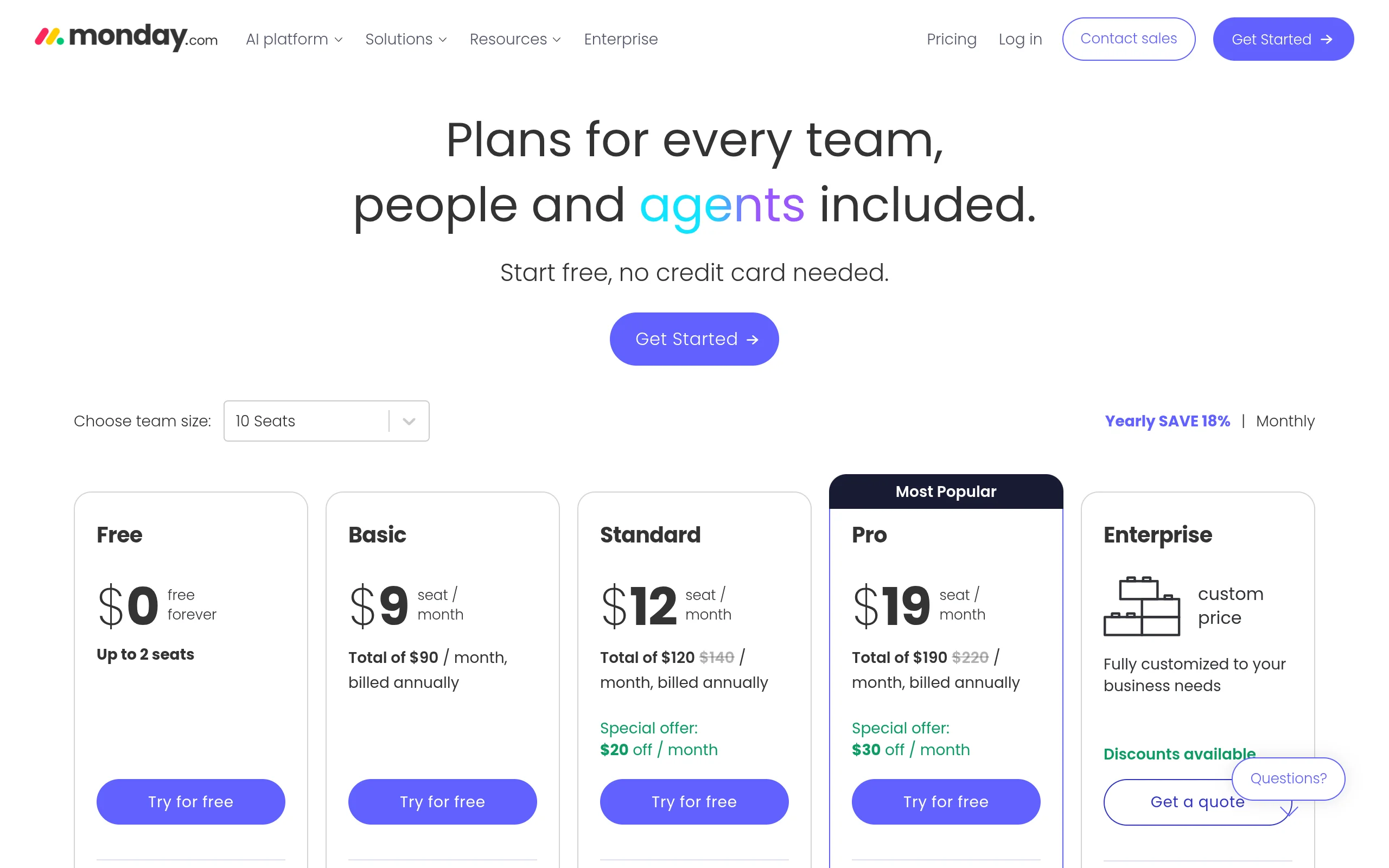
The plans are Free at $0, Basic at $9 a seat a month, Standard at $12 a seat a month, Pro at $19 a seat a month, and Enterprise at custom pricing — all per seat, all billed annually, with yearly billing saving 18% against monthly. The Free plan covers up to 2 seats, so a five-person team cannot use it, and plans start from 3 users. There is a 14-day free trial of the Pro plan.
Here is the catch. Basic at $9 a seat does not include Timeline or Gantt views. It gives you unlimited boards, 200+ templates, and basic automations, but the timeline only arrives on Standard. So the honest Monday.com price for an Asana Starter team is Standard at $12 a seat: $60 a month, $720 a year for five seats, $60.60 a year more than Asana Starter — the only tool here that costs more than Asana at the equivalent tier.
Standard also brings automations (250 actions a month), integrations, and a dashboard with five boards. Pro at $19 a seat — $95 a month, $1,140 a year for five seats — adds time tracking, formula columns, private boards, and 25,000 automation actions a month, and it is the tier that matches Asana Advanced most closely, saving $359.40 a year against Advanced’s $1,499.40.
Two things on the page today deserve a careful read. First, the special offer: Standard shows a $20-a-month discount against a $140 total for ten seats, and Pro shows $30 off against a $220 total — so the list prices are $14 and $22 a seat. Second, AI now runs on credits: the page says a typical three-person team uses roughly 800–1,200 credits a month, and the credits are not priced on the page — budget for them separately if AI is the reason you are switching.
Who is Monday.com actually best for? A team that wants the most polished boards-and-timelines experience available and will pay a small premium for it. If the goal is purely to spend less, it is the wrong switch.
Pros:
- The most polished boards, timelines, and dashboards in this guide — the closest feel to Asana, with a better template library
- Standard includes Timeline, Gantt, automations, and dashboards — the full Asana Starter feature set
- 14-day free trial of Pro, and a genuinely useful free plan for teams of two
Cons:
- Standard costs $720 a year — $60.60 a year more than Asana Starter, the only premium-priced switch here
- Basic at $9 a seat has no Timeline or Gantt, so the cheap tier is a false economy for Asana switchers
- Today’s $12 and $19 prices are special offers against $14 and $22 list prices, and AI runs on credits that are not priced on the page
ClickUp in detail
ClickUp is the cheapest honest Asana alternative in this guide, and it is cheap in the way that matters: the low price is on the plan that actually does the job, not on a stripped-down tier. It is also the most feature-dense tool here — teams that love ClickUp love how much it does, and teams that leave it usually say it does too much.
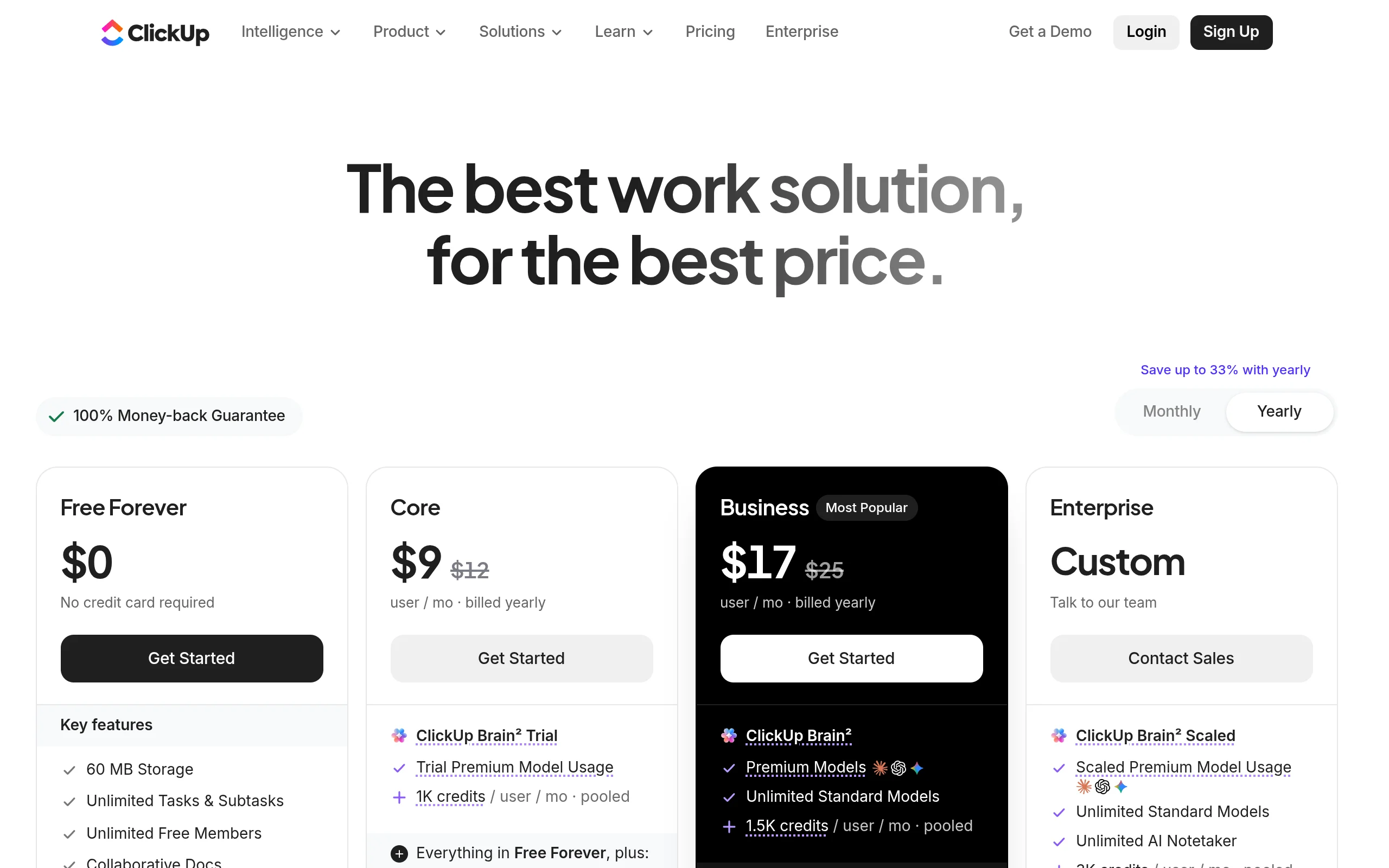
The plans are Free Forever at $0, Core at $9 a user a month billed yearly, Business at $17 a user a month billed yearly, and Enterprise at custom pricing. The page prints the regular prices beside the current ones: Core’s regular price is $12 and Business’s is $25. The Free Forever plan is genuinely generous — unlimited tasks and subtasks, unlimited free members, collaborative docs, Kanban boards, calendar view, sprint management, and time tracking — with only 60 MB of storage as the real limit.
Core at $9 a user is the Asana Starter match: $45 a month, $540 a year for five seats, saving $119.40 a year against Asana Starter’s $659.40. Core includes unlimited Gantt charts, custom fields, unlimited storage and spaces, unlimited forms, 1,000 automations a month, goals, and live chat support. That Gantt inclusion makes Core the bargain: Monday.com charges $12 a seat for the same view, and Trello charges $10 a user.
The honest limit on Core is AI. Core includes a trial of ClickUp Brain with trial premium-model usage — but unlimited standard AI models only arrive on Business at $17 a user: $85 a month, $1,020 a year for five seats. Business also raises automations to 10,000 a month and adds advanced dashboards, resource management, timesheets, webhooks, and private views. Against Asana Advanced’s $1,499.40 a year, Business saves $479.40 a year — the biggest verified saving in this guide, and the figure on the featured image. It is the closest feature match to Advanced here: both have goals, dashboards, resource management, and AI.
Two details from the pricing page: ClickUp bills per workspace, so upgrading upgrades every member, not just your five people. And guests are capped on paid plans — a five-seat Core workspace gets 13 guest seats — while Asana Starter gives unlimited free guests. Count the guest seats before you switch if outside collaborators matter.
Who is ClickUp actually best for? A five-person team that wants the lowest bill for the full feature set and does not mind a busier interface. It is the only tool here that beats Asana on price at both tiers.
Pros:
- The cheapest like-for-like switch — Core at $540 a year saves $119.40 against Asana Starter
- Business at $1,020 a year saves $479.40 against Asana Advanced, with goals, dashboards, and AI included
- The most generous free plan here — unlimited tasks, members, docs, and boards for $0
Cons:
- The $9 and $17 prices are discounted against $12 and $25 regular prices, so the saving shrinks if the offer ends
- Core’s AI is a trial only — real AI needs Business at $17 a user
- Guest seats are capped on paid plans, while Asana Starter gives unlimited free guests
Trello in detail
Trello is the simplest tool in this guide, and the simplest switch. If your team uses Asana mostly as a shared board — cards moving from “to do” to “doing” to “done” — Trello does that job with less clutter, less setup, and a lower bill. If your team uses Asana’s portfolios, goals, and workload views, Trello is not a switch at all.
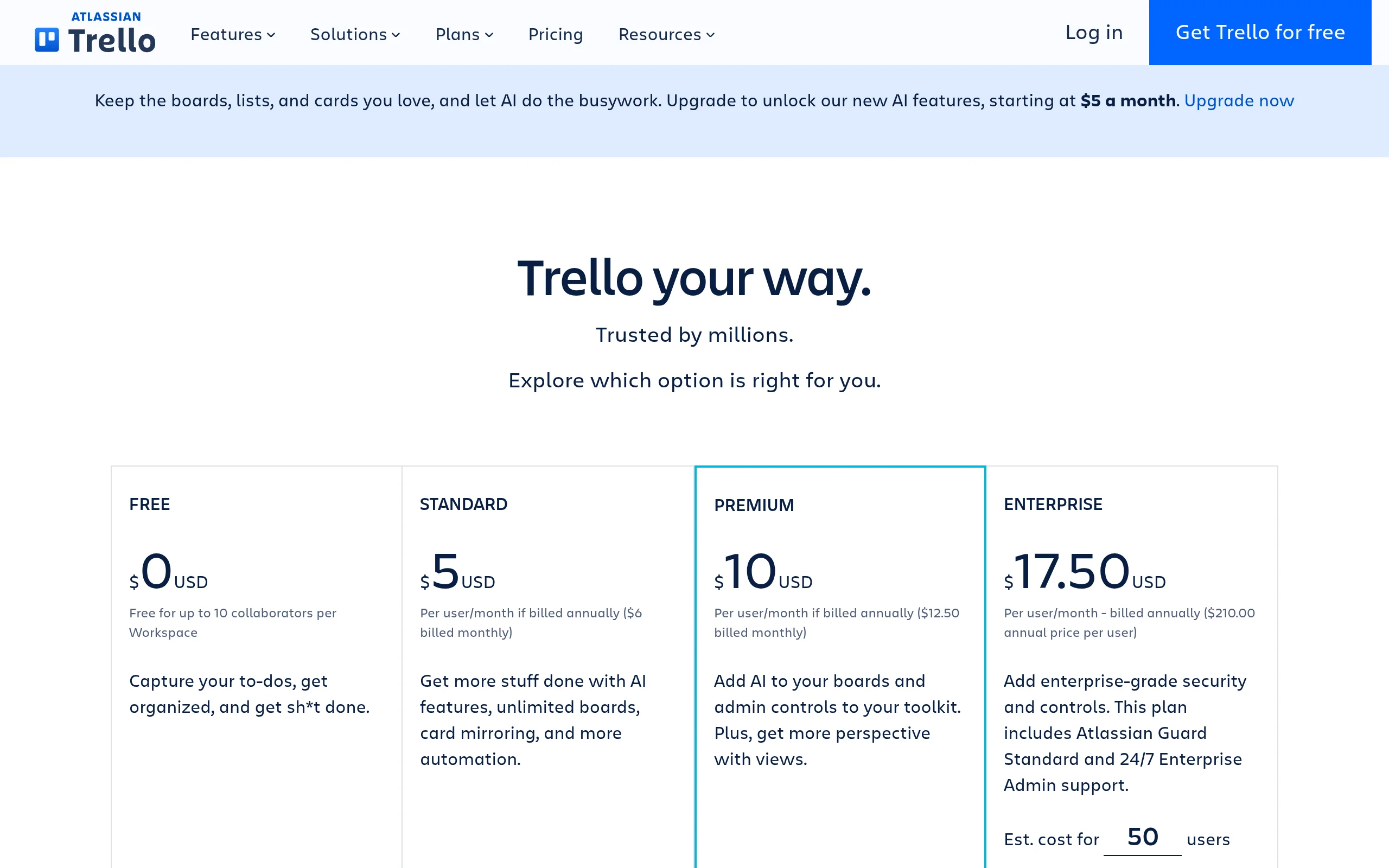
The plans are Free at $0, Standard at $5 a user a month, Premium at $10 a user a month, and Enterprise at $17.50 a user a month — all per user, all billed annually, with monthly billing at $6 and $12.50 for Standard and Premium. The Free plan covers up to 10 collaborators per workspace with unlimited cards, and the only real limits are 10 boards per workspace and no Timeline view.
Premium at $10 a user is the Asana Starter match: $50 a month, $600 a year for five seats, saving $59.40 a year against Asana Starter. Premium adds the Timeline, Dashboard, Calendar, Table, and Map views, plus AI features — summarization, organization that generates checklists and due dates, and AI-generated boards — advanced checklists, custom fields, unlimited boards, and unlimited automation runs. Standard at $5 a user — $300 a year — looks tempting, but it has no Timeline view, no Dashboard view, and no AI features, so it cannot replace Asana Starter.
The honest limit is the ceiling. Trello has no plan with portfolios, goals, or resource management. Enterprise at $17.50 a user — $1,050 a year for five seats — buys enterprise security, Atlassian Guard Standard, and 24/7 admin support, not project-management depth. A team that needs Advanced’s portfolios will outgrow Trello too — the switch that saves them money is ClickUp Business, not Trello Enterprise.
What Trello does have is the lightest learning curve here: a board, lists, cards, and AI features on top. For a team that found Asana heavy, that lightness is the product.
Who is Trello actually best for? A small team that uses Asana as a board, not as a portfolio manager — and wants the simplest tool, the fastest migration, and a $59.40-a-year saving. If anyone needs goals or workload views, read ClickUp instead.
Pros:
- The simplest switch — boards, lists, and cards your team already understands, with the fastest migration
- Premium at $600 a year saves $59.40 against Asana Starter, and the free plan fits a whole five-person team
- AI features (summaries, checklists, due dates, generated boards) are included on Premium, not an add-on
Cons:
- No portfolios, goals, or resource management at any price — Trello cannot replace Asana Advanced
- Standard at $5 a user has no Timeline or Dashboard view, so the cheap tier cannot replace Starter
- Enterprise at $1,050 a year buys security, not deeper project management
Notion in detail
Notion is the odd one out in this guide, because it is not really a project management tool — it is a workspace that project management happens inside. That decides whether it is a brilliant Asana alternative or a frustrating one. If your projects live in docs, briefs, meeting notes, and databases, Notion can replace Asana and half your other tools. If your projects live in timelines and workload charts, Notion will feel like a spreadsheet wearing a costume.
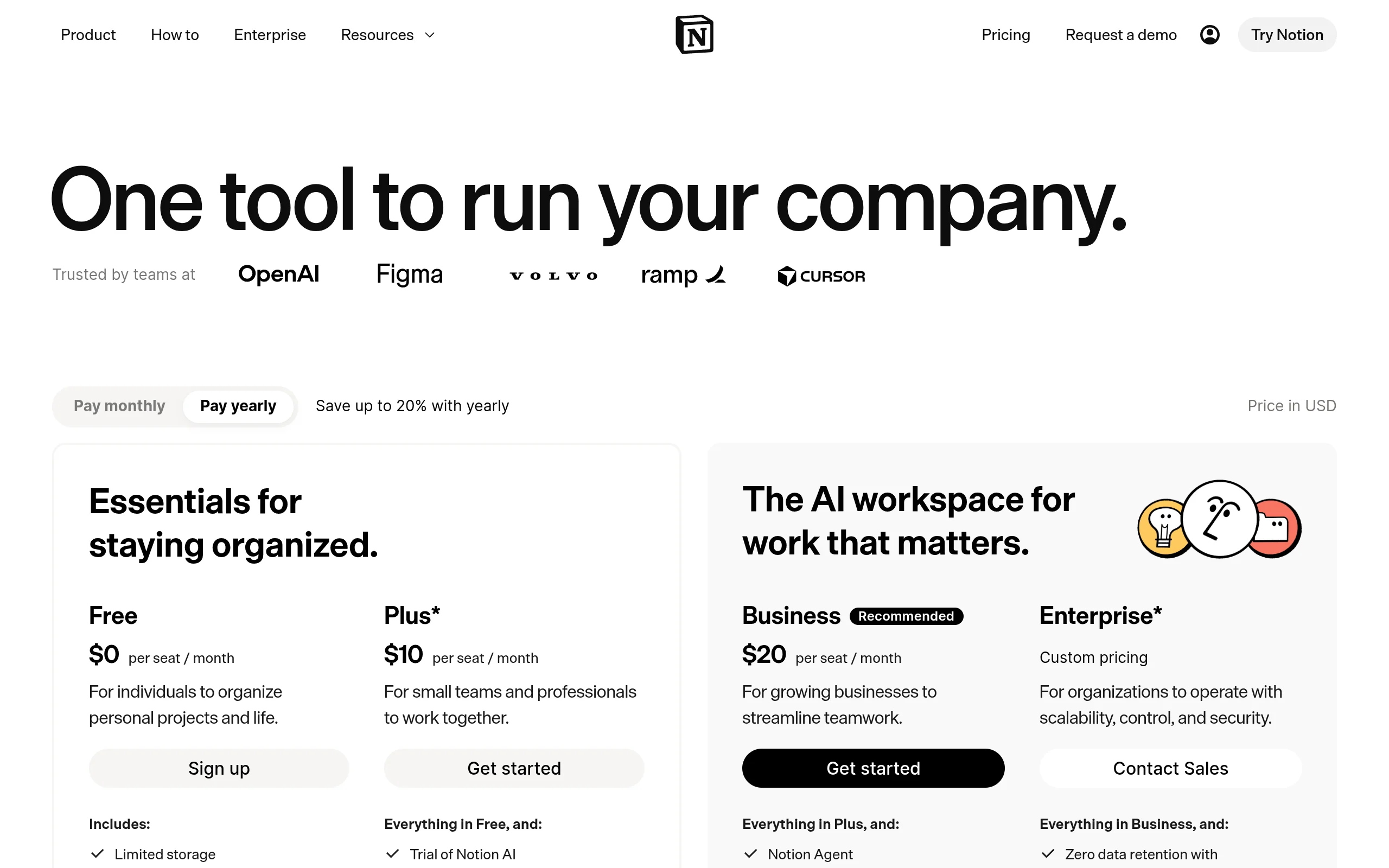
The plans are Free at $0, Plus at $10 a seat a month, Business at $20 a seat a month, and Enterprise at custom pricing — all per seat, all billed annually, with annual billing saving up to 20%. Guests are free, so clients and contractors can be invited to individual pages without a seat. Every paid plan includes a trial of Notion AI, and Business adds the full AI stack: Notion Agent, AI Meeting Notes, and Enterprise Search in beta.
Plus at $10 a seat is the Asana Starter match: $50 a month, $600 a year for five seats, saving $59.40 a year against Asana Starter. Plus gives you the workspace — pages, databases with subtasks and dependencies, custom properties, charts, and file uploads up to 5 GB — plus a trial of Notion AI. The timeline comes from database views, not a dedicated Gantt chart: Notion’s timelines are flexible and pretty, but they are not Asana’s Timeline view, with dependencies and critical path built in.
Business at $20 a seat — $100 a month, $1,200 a year for five seats — is the Advanced-equivalent tier, saving $299.40 a year against Asana Advanced’s $1,499.40. The comparison is looser than ClickUp’s: Business gives you the AI agent and meeting notes, private teamspaces, and granular permissions, but still no portfolios, goals, or resource management. What it gives you instead is everything around the project — the brief, the notes, the wiki, the meeting record — in the same place as the task list.
One more detail: Custom Agents cost $10 per 1,000 Notion credits after the trial, so the AI agents that make Business attractive have a meter running behind them. Plus only gets a limited AI trial — the full agent needs Business.
Who is Notion actually best for? A team whose work is mostly documents — briefs, content, research, meeting notes — and wants the task list next to the documents instead of in a separate tool. If your team lives in Gantt charts, do not switch.
Pros:
- The only workspace in this guide — briefs, docs, meeting notes, and tasks in one place, with free guests
- Plus at $600 a year saves $59.40 against Asana Starter, and Business at $1,200 saves $299.40 against Advanced
- AI Meeting Notes on Business turn client calls into briefs and action lists without retyping
Cons:
- No native Gantt, portfolios, or resource management — timelines come from database views, not a dedicated project view
- The full AI stack needs Business at $20 a seat; Plus only gets a limited AI trial, and Custom Agents are metered at $10 per 1,000 credits
- A workspace that holds everything becomes the workspace nobody can find anything in — it needs discipline Asana enforces for you
Wrike in detail
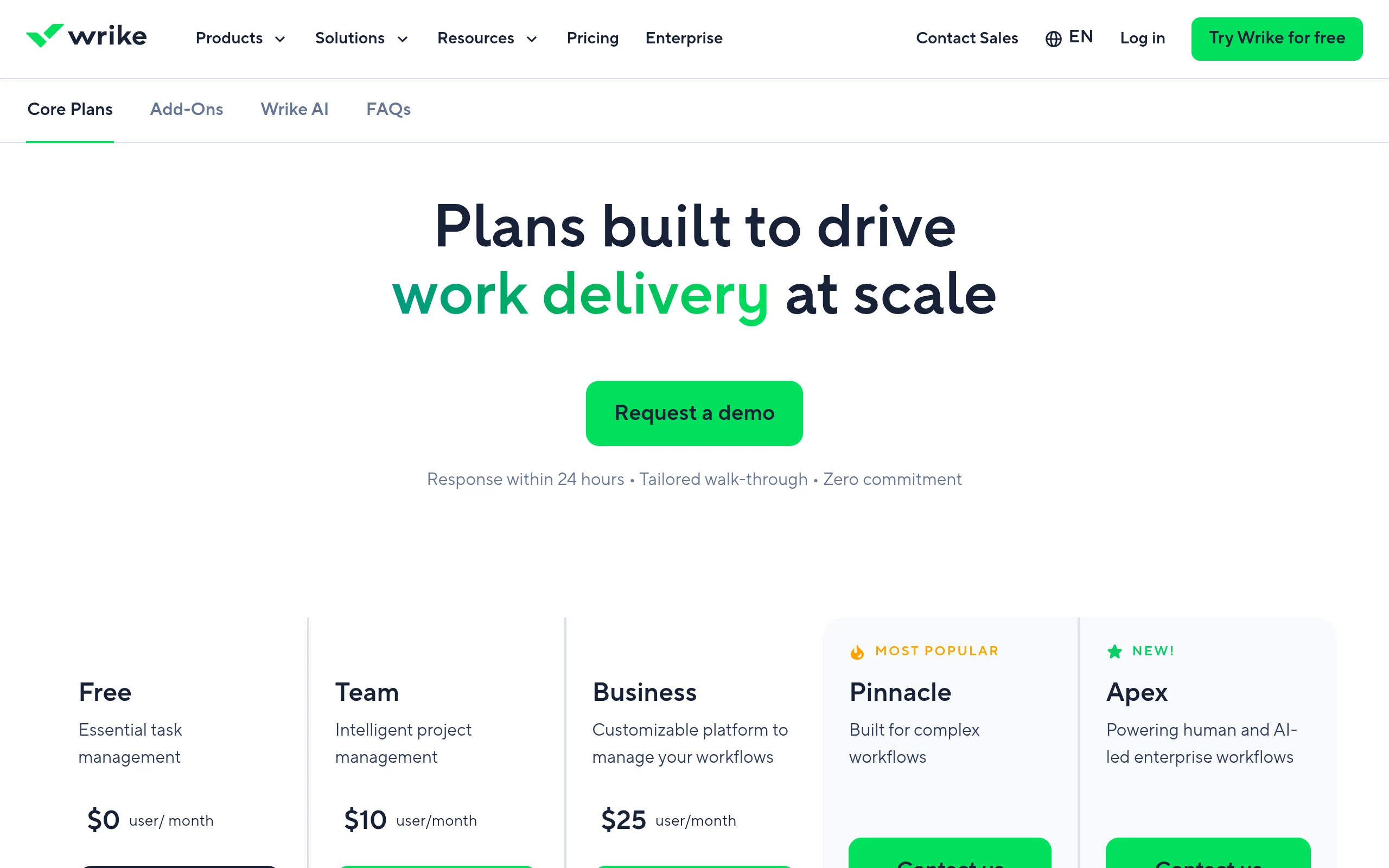
Wrike is the most enterprise-shaped tool in this guide, and the one with the firmest ceiling for a small team. It is built for work delivery at scale — marketing teams, professional services, operations — and its pricing page reads like it: five plans and two kinds of user licence. For a five-person team, only the first three plans matter, and one of them is the honest buy.
The plans are Free at $0 a user a month, Team at $10 a user a month, Business at $25 a user a month, and Pinnacle and Apex at custom pricing. The page confirms that Business plans and above are annual subscriptions only, that Wrike is sold in groups of users (groups of five for accounts up to 30 seats, so five seats is exactly one group), and that a first-time user gets a 14-day free trial.
Team at $10 a user is the Asana Starter match: $50 a month, $600 a year for five seats, saving $59.40 a year against Asana Starter. Team includes Gantt charts, shared dashboards, request forms, task management, and integrations — the core project-tracking set, with the timeline view Asana Starter includes.
Business at $25 a user — $125 a month, $1,500 a year for five seats — is the Advanced-equivalent tier, and it costs $0.60 a year more than Asana Advanced’s $1,499.40. That is the only Advanced-equivalent tier here that does not save money: if you need Wrike’s Business tier, you are not switching to save money. What Business adds is custom workflows, approvals, time tracking, resource management, and a starter package of AI Elite actions, with the full AI volume reserved for the higher tiers.
Two details from the pricing page: full and limited users have different permissions, and limited users cost less as contributors or are free as viewers — so outside collaborators seat cheaper than the headline $10. And AI is tiered: entry plans get a starter package of AI actions, with the full AI Elite volume on Business and above. If AI is the reason you are switching, ask what the starter package covers before you migrate.
Who is Wrike actually best for? A team that runs client work — marketing, services, operations — and wants request forms, approvals, and time tracking in the same tool as the task list. If your work is internal task tracking, the cheaper tools here do the same job.
Pros:
- Team at $600 a year saves $59.40 against Asana Starter, with Gantt, dashboards, and request forms included
- Request forms and approvals make it the best fit here for client-facing work
- Limited-user licences seat outside collaborators cheaper than a full seat, and viewers are free
Cons:
- Business at $1,500 a year costs $0.60 more than Asana Advanced — the only Advanced-equivalent tier here with no saving
- Pinnacle and Apex are custom-quoted, so growing past Business means a sales conversation
- AI actions are metered by tier, with the generous volume reserved for the custom-priced plans
The maths: what a five-person team pays in one year
The Starter-equivalent comparison — the switch most teams actually make. Asana Starter costs $10.99 a seat a month on annual billing: $54.95 a month, $659.40 a year for five seats. Against that baseline: ClickUp Core costs $540 a year and saves $119.40. Trello Premium, Notion Plus, and Wrike Team each cost $600 a year and save $59.40. Monday.com Standard costs $720 a year and costs $60.60 more. The cheapest honest switch saves about ten dollars a month — real money, but not the reason to switch.
The Advanced-equivalent comparison — where the real money is. Asana Advanced costs $24.99 a seat a month: $124.95 a month, $1,499.40 a year for five seats. Against that baseline: ClickUp Business costs $1,020 a year and saves $479.40. Monday.com Pro costs $1,140 a year and saves $359.40. Notion Business costs $1,200 a year and saves $299.40. Wrike Business costs $1,500 a year — $0.60 more than Advanced. Trello has no equivalent tier.
The free-tier comparison — the switch that costs nothing. ClickUp Free Forever, Trello Free, Notion Free, and Wrike Free all cost $0, and Trello’s fits a whole five-person team. Asana’s free Personal plan covers only 2 users, so a five-person team cannot use Asana for free at all.
The monthly-billing penalty. Paying monthly instead of annually costs extra everywhere: Asana Starter rises from $10.99 to $13.49 a seat — $150 a year extra for five seats — and Trello Premium rises from $10 to $12.50 a user, another $150. Whatever tool you pick, annual billing is the first saving to take.
Four traps to check before you pay
Trap one: the tier without the timeline. Monday.com Basic at $9 a seat and Trello Standard at $5 a user both look cheaper than Asana Starter, and both lack the Timeline view that Asana Starter includes. The cheap tier is only cheap if you never need the feature it drops. Price the tier that has the timeline, not the tier on the left of the page.
Trap two: the promotional price. Monday.com Standard shows $12 a seat today against a $14 list price, and ClickUp Core shows $9 a user against a $12 regular price. Both are genuine prices on the page today, and both can rise at renewal. Read the struck-through figure before you budget, and ask what the renewal price will be — the saving on the featured image uses the price on the page today, and this guide prints the regular price beside it for exactly that reason.
Trap three: the per-seat multiplier and the seat minimum. Every price here is per seat, and the headline is always for one seat. A $10 tool is a $50 tool for five people. Monday.com’s plans start from 3 users, Wrike sells in groups of five, and Asana’s free plan covers only 2 users — so a five-person team cannot be free on Asana, cannot buy a single Monday.com seat, and buys Wrike in exactly one group of five.
Trap four: buying the AI before you know what it costs. Asana charges $0.50 per AI request prepaid and $0.60 pay as you go, Monday.com runs AI on credits that are not priced on the page, Notion charges $10 per 1,000 credits for Custom Agents, and Wrike meters AI Elite actions by tier. None of these is a flat fee — run a month on the trial, count what the AI actually does, and then price it.
Work out what your switch really costs
The maths above is for a five-person team on annual billing, and your team is not that team. Your headcount, your guest count, and your automation volume change every number in this guide. That is exactly what our free AI Cost Calculator is for: put in your seats and the tools you are considering, and it totals the real monthly and yearly cost before you sign anything. Run Asana Starter against ClickUp Core and Monday.com Standard side by side, and the $119.40 and $60.60 gaps become your gaps, priced for your team. You will find it at aitbizhub.com/ai-cost-calculator/ — free, no sign-up, and it takes about two minutes.
Pros and cons
Pros:
- ClickUp Core at $540 a year is the cheapest like-for-like switch, saving $119.40 against Asana Starter
- ClickUp Business at $1,020 a year saves $479.40 against Asana Advanced — the biggest verified saving here
- Four of the five tools have genuinely useful free plans, and Trello’s fits a whole five-person team for $0
- Every tool publishes its price, so the whole comparison is checkable
Cons:
- Monday.com Standard costs $720 a year — $60.60 more than Asana Starter — and its $12 price is a special offer against $14
- Trello cannot replace Asana Advanced at any price — no portfolios, goals, or resource management
- Wrike Business costs $0.60 a year more than Asana Advanced, and its top tiers are custom-quoted
- AI is metered or trial-only on the cheaper tiers
Our verdict
Switch to ClickUp if the goal is to spend less without giving anything up. Core at $540 a year covers the Asana Starter feature set for five people and saves $119.40 a year. Business at $1,020 a year covers the Asana Advanced feature set and saves $479.40 a year. No other tool here beats Asana on price at both tiers, and the free plan lets you test the whole thing for $0 before migrating a single task.
Switch to Trello Premium if your team wants the simplest possible tool and the fastest migration — $600 a year, $59.40 saved, and a board your team already understands.
Switch to Notion Plus if your team’s work lives in documents and you want the task list next to the brief — $600 a year, $59.40 saved, and one subscription instead of two.
Switch to Wrike Team if your work arrives as client requests and you need forms and approvals — $600 a year, $59.40 saved.
Switch to Monday.com Standard if you want the most polished timelines and dashboards available and you are willing to pay $60.60 a year extra for them — $720 a year, and the prettiest boards in this guide.
Do not switch on price alone. Migrate one project, not the whole workspace, run the new tool alongside Asana for two weeks, and check the renewal price before the trial ends. The $479.40 saving is real — but only if your team actually opens the tool every morning.
Frequently asked questions
What is the cheapest Asana alternative for a small team?
ClickUp Core at $9 a user a month billed yearly — $45 a month, $540 a year for five seats — saving $119.40 a year against Asana Starter’s $659.40. Core includes unlimited Gantt charts, custom fields, unlimited forms, and 1,000 automations a month. If your team fits on a free plan, Trello’s free plan covers up to 10 collaborators and ClickUp’s Free Forever plan covers unlimited members — both cost $0, while Asana’s free Personal plan covers only 2 users.
Is Monday.com cheaper than Asana?
Not at the equivalent tier. Monday.com Standard costs $12 a seat a month on annual billing — $720 a year for five seats — against Asana Starter’s $659.40, so it costs $60.60 a year more. Basic at $9 a seat is cheaper but has no Timeline or Gantt view, so it cannot replace Starter. At the higher tier, Pro at $1,140 a year is cheaper than Advanced at $1,499.40, saving $359.40 a year.
Which Asana alternative has the best free plan?
Trello, for a five-person team: its free plan covers up to 10 collaborators per workspace with unlimited cards. ClickUp’s Free Forever plan is the most generous overall — unlimited tasks, members, docs, and boards — but storage is capped at 60 MB. Asana’s free Personal plan covers only 2 users, so a five-person team cannot use Asana for free.
Can Trello replace Asana for a growing team?
It can replace Asana Starter, but not Asana Advanced. Trello Premium at $10 a user a month gives you the Timeline view, Dashboard view, AI features, and unlimited boards for $600 a year. But Trello has no portfolios, goals, or resource management at any price — a team that needs those should look at ClickUp Business instead, which costs $1,020 a year and saves $479.40 against Asana Advanced.
Does Notion AI cost extra on top of Notion?
Not as a separate subscription, but it is not free either. Every paid plan includes a trial of Notion AI, and Business at $20 a seat a month includes the full stack — Notion Agent, AI Meeting Notes, and Enterprise Search in beta. Plus at $10 a seat only gets a limited AI trial, and Custom Agents cost $10 per 1,000 Notion credits after the trial.
Price note
Price note — updated 24 November 2026: Prices in this post were checked on 24 November 2026 on the vendors’ own pricing pages — asana.com/pricing, monday.com/pricing, clickup.com/pricing, trello.com/pricing, notion.com/pricing, and wrike.com/pricing. When you are reading this, the price may be lower or higher, a plan may have changed, or a promotion may have ended. Check the vendor’s pricing page before you buy, and treat any figure here as a snapshot of 24 November 2026, not a quote.
Sources: Asana pricing, Monday.com pricing, ClickUp pricing, Trello pricing, Notion pricing, and Wrike pricing.
Pros
- ClickUp Core at $540 a year is the cheapest like-for-like switch, saving $119.40 against Asana Starter
- ClickUp Business at $1,020 a year saves $479.40 against Asana Advanced — the biggest verified saving here
- Four of the five tools have genuinely useful free plans, and Trello's fits a whole five-person team for $0
- Every tool publishes its price, so the whole comparison is checkable
Cons
- Monday.com Standard costs $720 a year — $60.60 more than Asana Starter — and its $12 price is a special offer against $14
- Trello cannot replace Asana Advanced at any price — no portfolios, goals, or resource management
- Wrike Business costs $0.60 a year more than Asana Advanced, and its top tiers are custom-quoted
- AI is metered or trial-only on the cheaper tiers
Switch to ClickUp if the goal is to spend less without giving anything up. Core at $540 a year covers the Asana Starter feature set for five people and saves $119.40 a year. Business at $1,020 a year covers the Asana Advanced feature set and saves $479.40 a year. No other tool here beats Asana on price at both tiers, and the free plan lets you test the whole thing for $0 before migrating a single task.