

For a five-person team paying for Zoom Pro ($14.16 a user a month billed annually, $849.60 a year), the cheapest like-for-like switch is Microsoft Teams Essentials at $4 a user a month paid yearly — $20 a month, $240 a year — saving $609.60 a year. Essentials includes 30-hour meetings for up to 300 people, plus meeting recordings with transcripts and live captions. Nothing extra to buy.Google Meet is the best switch only if your team already lives in Google Workspace — and only on the Standard plan at $14 a user a month ($840 a year), because the $7 Starter plan has no recording and no Gemini AI notes in Meet. Whereby Pro at $10.99 a host a month ($131.88 a year) is the cheapest paid room, with no time limit and unlimited recording, but the recording stays on your own computer and the pricing page does not say which plan gets transcription.Riverside Pro at $24 a month ($288 a year) is a recording studio, not a meeting room — buy it for recorded interviews, not team calls. Jitsi Meet costs $0, and it is genuinely free, but free meetings on meet.jit.si now stop at 95 minutes and there is no transcript.
The meeting ends at forty minutes. Not because the work is done — because the free plan says so. Everyone drops off, someone sends a new link, and the last ten minutes of the conversation happen in a chat thread nobody reads. That is the moment most small teams start Googling “zoom alternatives” — and the moment most comparison articles fail them. They list ten tools, quote last year’s prices, and never answer the two questions that matter: does the cheaper plan include recording and AI notes, or is that another subscription on top?
This guide answers both questions five times, on prices read from the vendors’ own pricing pages on 24 November 2026. Every calculation uses a five-person team, paying annually, that needs meetings plus recording plus a transcript or AI notes.
The short version: Zoom Pro costs $849.60 a year for five people. Microsoft Teams Essentials does the same job — meetings, recording, transcripts — for $240 a year, saving $609.60. Google Meet looks cheap at $420 a year on Workspace Starter, but Starter has no recording and no AI notes; the plan that does the job costs $840. Whereby Pro is the cheapest paid meeting room at $131.88 a year, and Jitsi Meet is free — with limits you need to see before you switch.
Quick Answer
For a five-person team paying for Zoom Pro ($14.16 a user a month billed annually, $849.60 a year), the cheapest like-for-like switch is Microsoft Teams Essentials at $4 a user a month paid yearly — $20 a month, $240 a year — saving $609.60 a year. Essentials includes 30-hour meetings for up to 300 people, plus meeting recordings with transcripts and live captions. Nothing extra to buy.
Google Meet is the best switch only if your team already lives in Google Workspace — and only on the Standard plan at $14 a user a month ($840 a year), because the $7 Starter plan has no recording and no Gemini AI notes in Meet. Whereby Pro at $10.99 a host a month ($131.88 a year) is the cheapest paid room, with no time limit and unlimited recording, but the recording stays on your own computer and the pricing page does not say which plan gets transcription.
Riverside Pro at $24 a month ($288 a year) is a recording studio, not a meeting room — buy it for recorded interviews, not team calls. Jitsi Meet costs $0, and it is genuinely free, but free meetings on meet.jit.si now stop at 95 minutes and there is no transcript.
In this article
- Zoom alternatives at a glance
- How we compared them (and what we did not test)
- Google Meet in detail
- Microsoft Teams in detail
- Riverside in detail
- Whereby in detail
- Jitsi Meet in detail
- The maths: what a five-person team pays in one year
- Four traps to check before you pay
- Work out what your switch really costs
- Pros and cons
- Our verdict
- Frequently asked questions
Zoom alternatives at a glance
| Tool | Free plan | Cheapest plan that records | Five people, one year | AI notes included? |
|---|---|---|---|---|
| Google Meet | Yes — 60-minute group meetings, 100 people | Workspace Standard, $14 a user a month | $840 | Yes, from Standard |
| Microsoft Teams | Yes — 60-minute group meetings, 100 people | Teams Essentials, $4 a user a month | $240 | Yes — transcripts and captions |
| Riverside | No free plan — 14-day trial | Pro, $24 a month | $288 | Yes — transcripts in 100+ languages |
| Whereby | Yes — 30-minute meetings, 4 people | Pro, $10.99 a host a month | $131.88 | Not stated on the pricing page |
| Jitsi Meet | Yes — 95-minute limit | No paid plan needed | $0 | No — no transcript on meet.jit.si |
The table hides one important difference. Riverside’s $288 is for one account, not five seats, and it is a studio for recording — it does not run your daily team meetings. Whereby’s $131.88 is for one host, not five people. Only two prices in the table buy five people a complete meeting tool with recording and AI notes: Teams Essentials at $240 and Workspace Standard at $840. Zoom Pro, the plan you are leaving, is $849.60.
How we compared them (and what we did not test)
Every price in this guide was read on the vendor’s own pricing page on 24 November 2026, and every figure below is the list price, not a first-year discount. Two of the five vendors are running limited-time offers today, and both are printed next to the list price so you can see what the bill becomes when the offer ends. Monthly billing costs more than annual billing everywhere, and the penalty is in the maths section.
The comparison team is five people in one small business. They meet every day, they need the meeting recorded, and they need a transcript or AI notes afterwards — because that is the feature most “free alternative” lists quietly leave out. A tool only counts as a zoom alternative if it covers all three: meetings, recording, and notes.
We did not test the tools hands-on, and we did not count features that only exist on a sales call. If a price or a feature was not printed on the vendor’s own pricing page, this guide says so instead of guessing. Whereby’s pricing page would not load for a direct check, so its figures were cross-checked against several sources quoting Whereby’s own pricing page; the December price refresh will re-check them directly. Jitsi Meet has no pricing page, because it is free — its limits come from Jitsi’s own site and blog.
Google Meet in detail
Google Meet is the meeting tool most small businesses already have and do not know it. Any free Google account can host up to 100 people, with group calls of three or more running up to 60 minutes and one-to-one calls up to 24 hours on a computer. That beats Zoom’s free plan, which stops every meeting at 40 minutes. The catch is the same as Zoom’s: the free plan has no recording. To record a meeting, you need a paid Google Workspace plan.
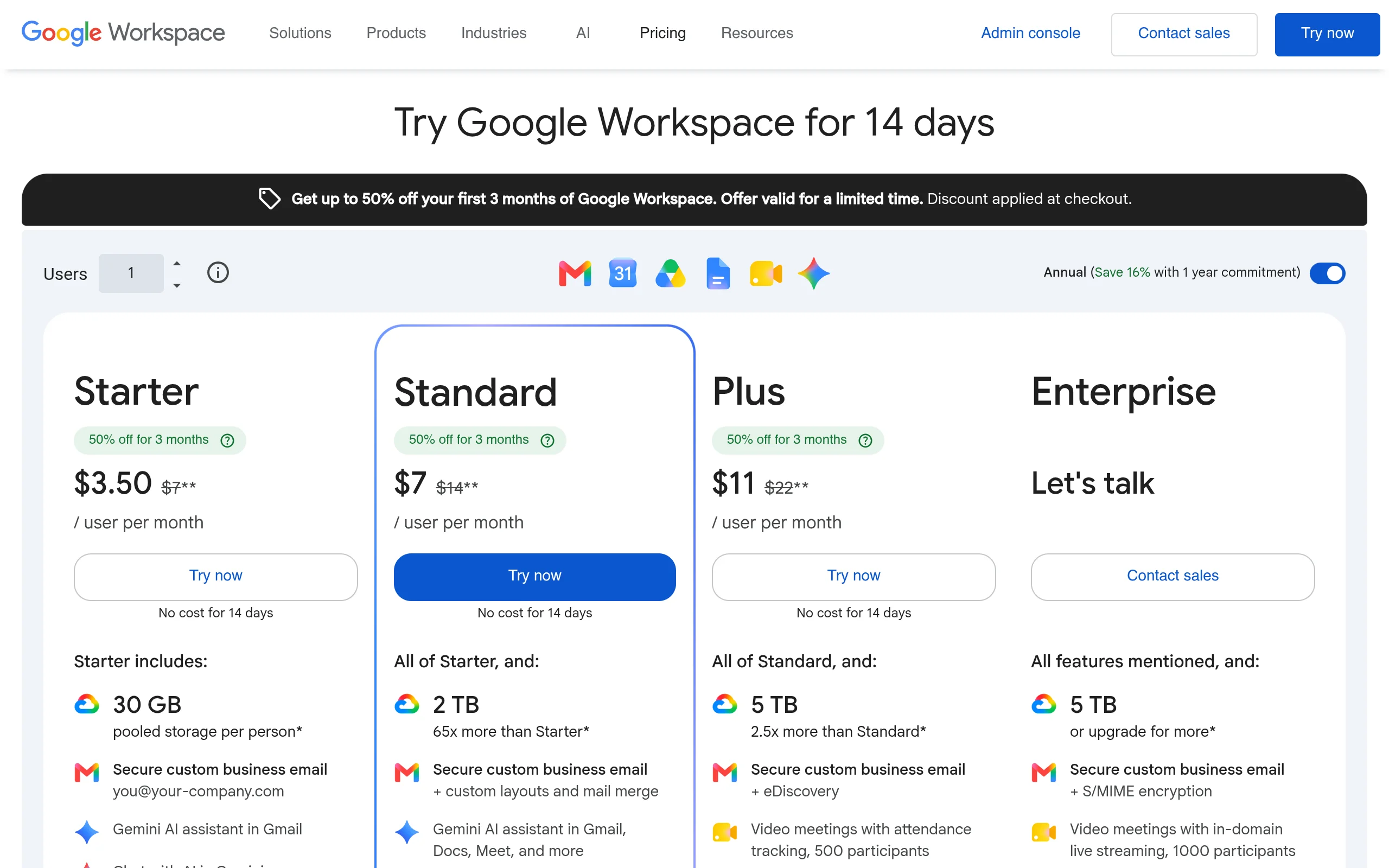
Workspace has three business plans, and the difference between them is exactly the difference this guide is about. Business Starter costs $7 a user a month billed annually, with 30 GB of pooled storage per person and a custom business email. Business Standard costs $14 a user a month billed annually, with 2 TB of storage and 150 participants per meeting. Business Plus costs $22 a user a month billed annually, with 5 TB of storage, 500 participants, and attendance tracking. Enterprise is priced by talking to sales.
Here is the part that decides the switch. Gemini in Meet — the AI notes and summaries — is not on Business Starter. It starts at Standard. Meeting recording is the same story: it needs Standard or above. So the $7 Starter plan, the one that looks like the cheap Zoom alternative, does not do the job this guide is measuring. The plan that does is Standard at $14 a user a month — $70 a month, $840 a year for five people.
That is $9.60 a year less than Zoom Pro, which is effectively the same price, and the only reason to switch on price alone is the rest of Workspace: Gmail, Docs, Drive, and Calendar in the same subscription.
Google is running a promotion today: 50% off your first three months on every plan, so Starter shows as $3.50 and Standard as $7 for the first three months. The old promotion from our earlier Zoom comparison — 10% off for 12 months — is gone. Work on the list price — after three months the bill is the full $840 a year. There is a 14-day free trial on every plan.
Meet’s free tier is generous, but it is a meeting tool inside a bigger suite, and you cannot buy Meet on its own. If your team does not use Gmail and Google Docs, you are paying for an office suite to get a meeting tool. If your team does use them, Meet is the lowest-friction switch here — everyone already has an account.
Microsoft Teams in detail
Microsoft Teams is the cheapest honest Zoom replacement in this guide, and it is not close. Teams Essentials costs $4 a user a month paid yearly — $20 a month, $240 a year for five people. For that you get meetings of up to 30 hours with up to 300 participants, meeting recordings with transcripts and live captions in English, 10 GB of cloud storage per user, and unlimited chat. Recording and AI notes are included at the cheapest paid price. No other tool in this guide does that.
The free version of Teams is also worth knowing about, because it beats Zoom’s free plan on the one limit that hurts most. Free Teams gives unlimited group meetings of up to 60 minutes for up to 100 participants, with 5 GB of cloud storage per user and unlimited chat. One-to-one calls run up to 30 hours. Zoom’s free plan stops every meeting — including one-to-ones — at 40 minutes. If your team only needs the occasional call, free Teams is the better free plan. It does not promise recording, so the moment you need a record, you are back to a paid plan.
Above Essentials, the prices climb with the rest of Microsoft 365. Microsoft 365 Business Basic costs $7 a user a month paid yearly and adds 1 TB of storage, the web and mobile versions of the Office apps, and a custom business email, with Teams included. Business Standard with Copilot costs $23.50 a user a month paid yearly. A Teams Premium add-on costs $10 a user a month paid yearly. Microsoft’s pricing page did not show monthly-billed prices, so this guide prints yearly-billed figures only; month-to-month will cost more.
The honest catch is the ecosystem. Teams is at its best inside Microsoft 365, and if your team lives in Gmail and Google Docs, switching to Teams means switching everything else too. If your team already uses Outlook, Word, and OneDrive, the switch is nearly free in effort as well as in money. If your team coordinates in Slack rather than Teams, our Slack alternatives guide compares the chat tools that sit alongside a meeting tool.
Riverside in detail
Riverside is the odd one out here, because so many lists include it without saying what it actually is. Riverside is a recording studio, not a meeting room. You do not hold your daily team stand-up in Riverside. You record interviews, podcasts, and webinars in it, in studio quality, with each person recorded on a separate track. If Zoom’s recordings look and sound bad, Riverside solves it. If Zoom costs too much for daily meetings, Riverside does not.
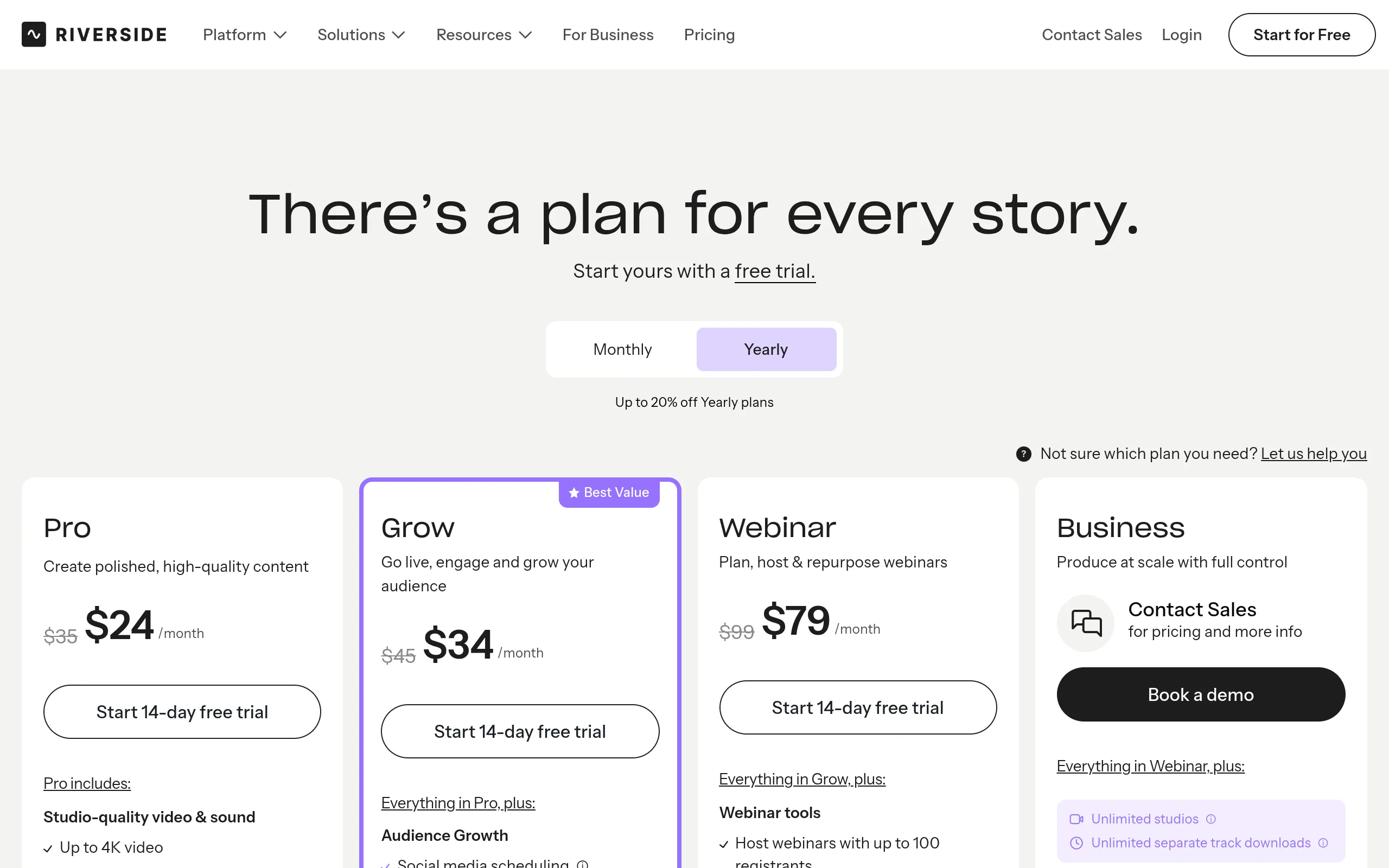
The pricing is per account, not per seat. Pro costs $24 a month billed yearly — $288 a year for the whole account. Grow costs $34 a month billed yearly, or $408 a year. Webinar costs $79 a month billed yearly, or $948 a year. Business is custom pricing. There is no free plan any more; paid plans start with a 14-day free trial.
You get serious recording quality: video in up to 4K, unlimited recording, and separate-track downloads — 15 hours a month on Pro, 20 on Grow, 25 on Webinar. Automatic transcripts in more than 100 languages come with every paid plan, with speaker tags and timestamps, downloadable as text or subtitle files. Pro includes 400 free AI credits, and the core AI tools — Magic Clips, Magic Audio, and the AI Co-Creator — do not need credits at all.
One warning about the prices themselves. Riverside’s own pricing page shows two different monthly figures: the plan cards show $35 a month for Pro if you pay monthly, while the page’s own frequently-asked-questions section still says $29. The yearly figure — $24 a month billed yearly — is the same in both places, and this guide uses it. Check the monthly figure at checkout.
Buy Riverside when the recording is the product: a client interview, a podcast, a webinar you will publish. Do not buy it as a Zoom replacement for team meetings, because it is not one — you would still need a meeting tool as well, and then you are paying twice.
Whereby in detail
Whereby is the simplest tool in this guide. There is nothing to install and no account needed for guests: you send a fixed room link, people click it, and they are in the meeting. If your meetings are mostly with clients who do not want to download another app, that matters more than any feature list.
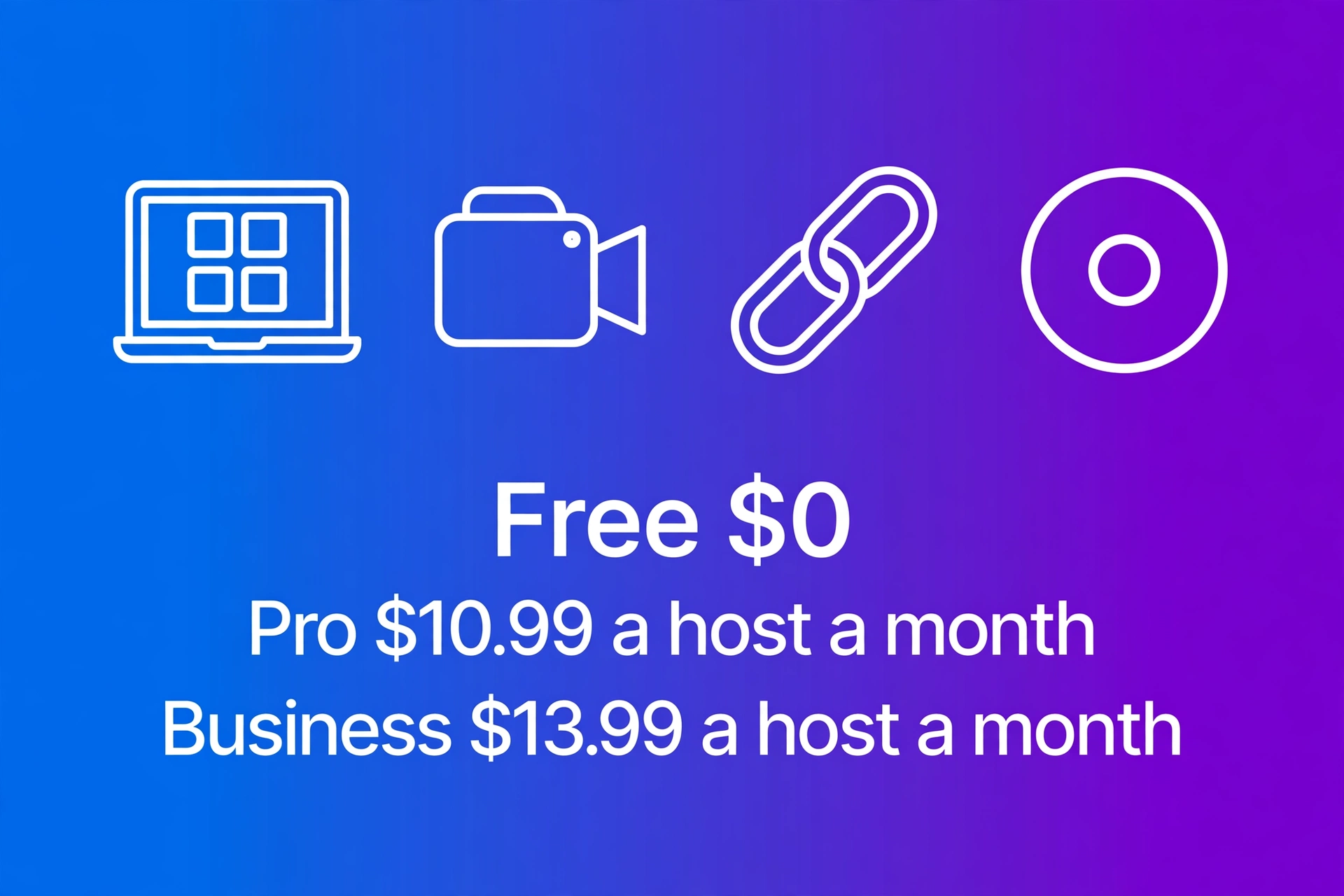
The free plan costs $0 and gives you one host, one room, four attendees, and meetings of up to 30 minutes. Pro costs $10.99 a host a month and gives you three room links, up to 100 attendees, no time limit, unlimited recording, and custom branding. Business costs $13.99 a host a month, with a minimum of three hosts, and gives you unlimited rooms, up to 200 attendees, and a custom subdomain. Annual billing saves 17%, but Whereby does not print the annual dollar prices — only the monthly ones — so the yearly figures in this guide are our own maths, the monthly price times twelve.
The yearly maths uses the monthly price times twelve: Pro is $131.88 a year for one host, and Business is $503.64 a year because of the three-host minimum.
Two limits decide whether Whereby fits. First, recording is local: it saves to the host’s own computer and is never sent to Whereby’s servers. Good for privacy, bad for sharing — the host must upload the file themselves. Second, transcription is listed as a feature, but the pricing page does not say which plan includes it. Do not buy Whereby for AI notes until you have checked that on the live page.
Whereby’s pricing page would not load for a direct check on the day we verified this guide, so these figures were cross-checked against several sources quoting Whereby’s own pricing page on the same day. They are the figures the page shows, but the December price refresh will re-check them directly. If anything has moved, the refresh will correct it.
Jitsi Meet in detail
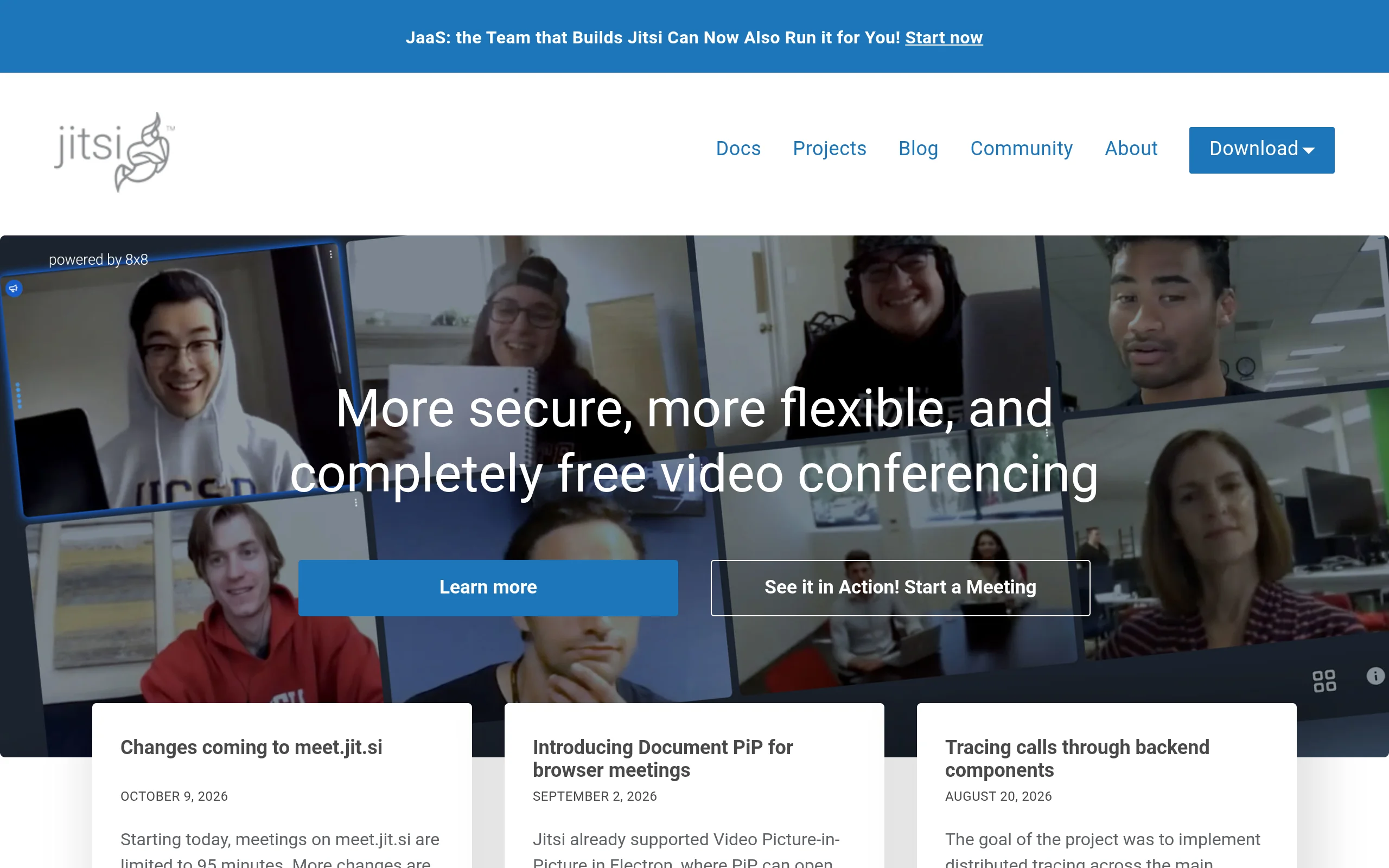
Jitsi Meet costs $0. It is open-source video conferencing, free to use, with no account and no subscription. The public service at meet.jit.si lets anyone start a meeting from a browser link. For a five-person team that only needs to talk, it is the whole answer — with three limits to know first.
The first limit is new. Since 9 October 2026, meetings on meet.jit.si are limited to 95 minutes. The announcement says more changes are coming, and this guide will re-check the limit in the December refresh. The second limit is older: since August 2023, the first person into a room must sign in with a Google, GitHub, or Facebook account. The third is the free-use cap in the terms: 25 monthly active endpoints, with no service guarantee and no support. If the service is down, there is nobody to call.
Recording is where the free price shows its edge. On meet.jit.si you can only record locally, as a WebM file, in Chrome or Edge on a desktop — and there is no transcript, because transcription is switched off on the public service. Uploading a recording to Dropbox is not available there either. If you run your own Jitsi server, you can add Jibri recording and a transcription pipeline — the 2026 release can send audio to xAI, OpenAI, Deepgram, Google Gemini, or a self-hosted model — but then you are paying for a server and maintaining it, which is not free in any honest sense.
There is also a paid hosted version, Jitsi as a Service from 8×8, priced per monthly active user with a free tier up to 25 monthly active users. This guide does not price it — the free tier covers a five-person team. Jitsi is the right switch when the budget is truly zero and the team is comfortable with do-it-yourself tools. It is the wrong switch when someone else in the business needs a transcript, a support number, or a guarantee the meeting will work.
The maths: what a five-person team pays in one year
All figures below are list prices, billed annually, for a five-person team that needs meetings plus recording plus a transcript or AI notes. Promotions are shown separately, because they end.
| Tool | Plan that does the job | Monthly bill | One year |
|---|---|---|---|
| Zoom (the plan you are leaving) | Pro | $70.80 | $849.60 |
| Microsoft Teams | Essentials | $20.00 | $240.00 |
| Google Meet | Workspace Standard | $70.00 | $840.00 |
| Riverside | Pro (one account) | $24.00 | $288.00 |
| Whereby | Pro (one host) | $10.99 | $131.88 |
| Jitsi Meet | Free | $0.00 | $0.00 |
The headline saving is $609.60 a year: Zoom Pro at $849.60 minus Teams Essentials at $240. That is the saving for the same job — meetings, recording, and transcripts included on both sides. No other switch saves more, because no other tool includes all three at its cheapest paid price.
The other savings are real but less honest. Whereby Pro saves $717.72 a year against Zoom Pro, but its recording is local-only and its transcription is unconfirmed — you are not buying the same job. Riverside Pro saves $561.60, but it is a studio, not a meeting room — you would still need a meeting tool. Jitsi saves the full $849.60, but there is no transcript and no support. Google Workspace Standard saves only $9.60 a year against Zoom Pro — effectively nothing; the reason to pick it is the rest of Workspace, not the price.
Paying Zoom monthly instead of annually costs $1,019.40 a year — a $169.80 penalty for the same plan. Zoom’s 30% off first-year offer cuts Pro to $594.60 for year one — still $354.60 more than Teams Essentials, and year two is the full $849.60. Google’s 50% off first three months cuts Standard to $735 for year one, which is still $495 more than Teams Essentials. A promotion narrows the gap; it does not close it.
One symmetry worth noting: Teams Essentials plus the $10-a-user Teams Premium add-on costs $840 a year — exactly the same as Workspace Standard. So the choice between Microsoft and Google, once you add the premium AI features, is not a price choice at all. It is a choice about which office suite your team already lives in.
Four traps to check before you pay
First, Zoom’s 30% off is year one only. The pricing page shows Pro at $9.91 and Business at $12.83 a user a month, with the offer expiring on 7 December 2026. The list prices are $14.16 and $18.33. If you stay on Zoom because the offer looks cheap, put the second-year price in your budget now: $849.60 for Pro, $1,099.80 for Business.
Second, Google Workspace Starter does not do the job. At $7 a user a month it looks like the cheapest Google switch, and it is — for email and documents. But Gemini in Meet and meeting recording both start at Standard, which is $14 a user a month. A team that buys Starter for meetings, then finds it cannot record them, has bought the wrong plan — the fix is a $420-a-year upgrade to Standard.
Third, Whereby Business has a three-host minimum. The price on the page is $13.99 a host a month, which sounds like $167.88 a year. It is not: three hosts is the minimum, so the smallest Business bill is $41.97 a month, or $503.64 a year. And remember that Whereby’s recording is local only, so the host’s computer has to stay on and the host has to share the file afterwards.
Fourth, Jitsi’s free tier keeps changing. The 95-minute limit arrived on 9 October 2026 with a note that more changes are coming, and the first person into a room has had to sign in since 2023. Free is free, but the terms can move under you, and there is no support desk to ask. If your business depends on meetings happening, budget for a paid plan somewhere — even if it is only Whereby Pro at $131.88 a year as a backup.
Work out what your switch really costs
A meeting tool is never the whole bill. There is the plan itself, the recording and notes add-on if it is not included, the time your team spends learning a new tool, and the meetings that go wrong while they learn it. Our free AI Cost Calculator adds those pieces up for your own team — put in your team size, your meeting hours, and the plans you are comparing, and it shows the true yearly cost of each switch, not just the page price. Run the two finalists through it before you pay: the cheapest plan on the page is not always the cheapest switch in practice.
Pros and cons
Google Meet. Pros: the best free plan in this guide after Teams; 60-minute group meetings and 100 people free; Gemini AI notes from Standard; everyone already has a Google account. Cons: no recording and no AI notes on the $7 Starter plan; no standalone Meet price — you buy the whole Workspace suite; Plus at $22 is the priciest option here.
Microsoft Teams. Pros: the cheapest like-for-like switch — $240 a year with recording and transcripts included; the best free plan, with 60-minute groups and 30-hour one-to-ones; 300 participants on the cheapest paid plan. Cons: monthly prices are not printed, so the annual figure is the only one you can check; at its best inside Microsoft 365, so Google-based teams face a bigger switch.
Riverside. Pros: the best recording quality in this guide, up to 4K with separate tracks; transcripts in more than 100 languages on every paid plan; one account price, not per seat. Cons: it is a studio, not a meeting room — it does not replace Zoom for daily calls; no free plan, only a 14-day trial; the page shows two different monthly prices for Pro.
Whereby. Pros: the cheapest paid meeting room — $131.88 a year; nothing to install, guests join from a link; no time limit on Pro. Cons: recording is local only, saved on the host’s computer; the pricing page does not say which plan gets transcription; Business needs three hosts minimum; the pricing page would not load for a direct check.
Jitsi Meet. Pros: genuinely free, open source, no account needed to join; no subscription and no per-seat price. Cons: free meetings now stop at 95 minutes; no transcript on the public service; recording is local WebM only; no support and no service guarantee.
Our verdict
For most five-person teams paying for Zoom Pro, the switch among these zoom alternatives is Microsoft Teams Essentials. It is the only tool in this guide that includes meetings, recording, and transcripts at its cheapest paid price, and it costs $240 a year — $609.60 less than Zoom Pro for the same job. Its free version is the best free plan here, so the team can try real meetings before paying anything.
Pick Google Meet on Workspace Standard if your team already lives in Gmail, Docs, and Drive. At $840 a year it saves almost nothing against Zoom Pro, but the switch costs nothing in learning. Do not pick Workspace Starter for meetings — it has no recording and no AI notes.
Pick Whereby Pro if your meetings are mostly with clients and you want the simplest possible room. At $131.88 a year it is the cheapest paid plan in this guide, and guests never install anything. Just know that the recording lives on your computer and the transcription question is unanswered.
Pick Riverside Pro if the recording is the product — interviews, podcasts, webinars you will publish. It is not a meeting replacement, so budget for a meeting tool as well. And pick Jitsi Meet if the budget is truly zero and your team is comfortable fixing things themselves. For everyone else, the free tier’s 95-minute limit and missing transcript will cost more in time than Teams Essentials costs in money.
Stay on Zoom Pro if your team runs webinars and large meetings on the same plan, or if the 30% first-year offer brings the price low enough that switching is not worth the disruption. Do the maths on year two first — that is the price you will actually pay.
Frequently asked questions
What is the cheapest Zoom alternative for a small team?
Jitsi Meet at $0, with the limits this guide spells out: 95-minute meetings, no transcript, no support. Among paid meeting tools, Whereby Pro is cheapest at $131.88 a year, and Microsoft Teams Essentials is cheapest for a five-person team at $240 a year. The cheapest plan is not the same as the cheapest switch — check that recording and AI notes are included before you compare prices.
Is Microsoft Teams cheaper than Zoom?
Yes, by a large amount. Teams Essentials costs $4 a user a month paid yearly — $240 a year for five people — against Zoom Pro at $14.16 a user a month, or $849.60 a year. The saving is $609.60 a year, and both plans include meeting recordings with transcripts. Zoom’s 30% first-year offer narrows the gap to $354.60 in year one, but the second year is the full $849.60.
Which Zoom alternative has the best free plan?
Microsoft Teams and Google Meet tie on paper: both give free group meetings of up to 60 minutes for up to 100 people, against Zoom’s 40-minute limit on every free meeting. Teams edges ahead because its free one-to-one calls run up to 30 hours, against Meet’s 24 hours, and free Teams includes 5 GB of cloud storage per user. Neither free plan includes recording. Jitsi Meet is the only free option with no 60-minute limit, but its meetings now stop at 95 minutes.
Can Jitsi Meet replace Zoom for a small business?
Yes, for simple calls — and it is the only replacement that costs nothing. It cannot replace Zoom if your business needs cloud recording, a transcript, or someone to call when a meeting fails. Recording on the public service is local WebM only, transcription is switched off, and there is no support desk. A team that records client calls or needs a written record should pick Teams Essentials or Workspace Standard instead.
Does Google Meet include AI meeting notes?
Only from the Standard plan up. Gemini in Meet — the AI notes and summaries — is not included on Business Starter at $7 a user a month, and neither is meeting recording. Both need Business Standard at $14 a user a month, which costs $840 a year for five people. The free version of Meet has no AI notes and no recording at all.
Price note
Prices in this guide were checked on the vendors’ own pricing pages on 24 November 2026: Zoom Pro $14.16 and Business $18.33 a user a month billed annually ($16.99 and $21.99 monthly), with 30% off the first year, expiring 7 December 2026; Google Workspace Starter $7, Standard $14, and Plus $22 a user a month billed annually, with 50% off the first three months; Microsoft Teams Essentials $4 a user a month paid yearly, Microsoft 365 Business Basic $7, Business Standard with Copilot $23.50, and the Teams Premium add-on $10.
Riverside Pro $24, Grow $34, and Webinar $79 a month billed yearly; Whereby Free $0, Pro $10.99 a host a month, and Business $13.99 a host a month with a three-host minimum; Jitsi Meet $0.
Prices change — check the official pricing page before you pay.
Sources: Zoom pricing, Google Workspace pricing, Microsoft Teams pricing, Riverside pricing, Whereby pricing, Jitsi Meet.
Pros
- Google Meet — the best free plan in this guide after Teams; 60-minute group meetings and 100 people free; Gemini AI notes from Standard; everyone already has a Google account.
- Microsoft Teams — the cheapest like-for-like switch, $240 a year with recording and transcripts included; the best free plan, with 60-minute groups and 30-hour one-to-ones; 300 participants on the cheapest paid plan.
- Riverside — the best recording quality in this guide, up to 4K with separate tracks; transcripts in more than 100 languages on every paid plan; one account price, not per seat.
- Whereby — the cheapest paid meeting room, $131.88 a year; nothing to install, guests join from a link; no time limit on Pro.
- Jitsi Meet — genuinely free, open source, no account needed to join; no subscription and no per-seat price.
Cons
- Google Meet — no recording and no AI notes on the $7 Starter plan; no standalone Meet price, you buy the whole Workspace suite; Plus at $22 is the priciest option here.
- Microsoft Teams — monthly prices are not printed, so the annual figure is the only one you can check; at its best inside Microsoft 365, so Google-based teams face a bigger switch.
- Riverside — it is a studio, not a meeting room, it does not replace Zoom for daily calls; no free plan, only a 14-day trial; the page shows two different monthly prices for Pro.
- Whereby — recording is local only, saved on the host's computer; the pricing page does not say which plan gets transcription; Business needs three hosts minimum; the pricing page would not load for a direct check.
- Jitsi Meet — free meetings now stop at 95 minutes; no transcript on the public service; recording is local WebM only; no support and no service guarantee.
For most five-person teams paying for Zoom Pro, the switch among these zoom alternatives is Microsoft Teams Essentials. It is the only tool in this guide that includes meetings, recording, and transcripts at its cheapest paid price, and it costs $240 a year — $609.60 less than Zoom Pro for the same job. Its free version is the best free plan here, so the team can try real meetings before paying anything.Pick Google Meet on Workspace Standard if your team already lives in Gmail, Docs, and Drive. At $840 a year it saves almost nothing against Zoom Pro, but the switch costs nothing in learning. Do not pick Workspace Starter for meetings — it has no recording and no AI notes.Pick Whereby Pro if your meetings are mostly with clients and you want the simplest possible room. At $131.88 a year it is the cheapest paid plan in this guide, and guests never install anything. Just know that the recording lives on your computer and the transcription question is unanswered.Pick Riverside Pro if the recording is the product — interviews, podcasts, webinars you will publish. It is not a meeting replacement, so budget for a meeting tool as well. And pick Jitsi Meet if the budget is truly zero and your team is comfortable fixing things themselves. For everyone else, the free tier's 95-minute limit and missing transcript will cost more in time than Teams Essentials costs in money.Stay on Zoom Pro if your team runs webinars and large meetings on the same plan, or if the 30% first-year offer brings the price low enough that switching is not worth the disruption. Do the maths on year two first — that is the price you will actually pay.