

The best slack alternatives in 2026 are Microsoft Teams for teams already paying for Microsoft 365, Google Chat for teams living in Gmail and Drive, Discord for the best free team chat, Rocket.Chat for teams that want to own their chat, and Pumble for the cheapest paid team chat. At ten people, Slack Pro costs $870 a year on annual billing, Google Chat through Workspace Starter costs $840 a year, Pumble Pro costs $298.80 a year, Microsoft Teams Essentials costs $480 a year, and Discord and Rocket.Chat Starter both cost $0 a year for the chat itself. The cheapest switch saves the whole $870, and the real saving is not the plan fee but the messages you stop losing to Slack's 90-day free limit.
Slack is the chat app everybody copies and the bill everybody quietly resents. The free plan is generous until the day you need a message from four months ago, and then it is gone. The paid plan is reasonable until you count the seats, and then a ten-person team is paying close to nine hundred dollars a year just to talk to each other.
This post prices the switch properly: five real alternatives, one fixed scenario, every fee shown. No roundup prices, no affiliate picks, and no promotion dressed up as a price.
Quick Answer Box
The best slack alternatives in 2026 are Microsoft Teams for teams already paying for Microsoft 365, Google Chat for teams living in Gmail and Drive, Discord for the best free team chat, Rocket.Chat for teams that want to own their chat, and Pumble for the cheapest paid team chat. At ten people, Slack Pro costs $870 a year on annual billing, Google Chat through Workspace Starter costs $840 a year, Pumble Pro costs $298.80 a year, Microsoft Teams Essentials costs $480 a year, and Discord and Rocket.Chat Starter both cost $0 a year for the chat itself.
The cheapest switch saves the whole $870, and the real saving is not the plan fee but the messages you stop losing to Slack’s 90-day free limit.
Quick Answer Box / Why Teams Start Looking for Slack Alternatives / The Tools at a Glance / First, What Slack Itself Costs Now / 1. Microsoft Teams — Best for Teams Already Paying Microsoft / 2. Google Chat — Best for Teams Living in Gmail and Drive / 3. Discord — Best Free Team Chat / 4. Rocket.Chat — Best for Teams That Want to Own Their Chat / 5. Pumble — Best for the Cheapest Paid Team Chat
Cost Maths: What a 10-Person Team Actually Pays / The Hidden Costs and Gotchas / Strategic Pivot: Price the Stack Before You Buy It / Pros and Cons / Our Verdict: Slack Alternatives / Frequently Asked Questions / Price Note
Why Teams Start Looking for Slack Alternatives
People rarely leave Slack because the chat stopped working. They leave because the history disappeared. The free plan keeps ninety days of messages, and on day ninety-one the decision, the link, and the client’s answer are gone unless somebody paid. For a small team that treats chat as its memory, that is not a limit, it is a leak.
The second reason is the seat maths. Slack Pro costs $7.25 per person per month on annual billing, which sounds small until you multiply it: ten people is $870 a year, twenty people is $1,740 a year, and every contractor and guest you add to a channel is another seat on the bill.
The third reason is the bundle trap. Most small teams already pay for Microsoft 365 or Google Workspace, and both include a chat app in the price. Paying Slack on top means paying twice for the same job: one subscription for email and files, another for the chat that talks about them. Teams that notice the double payment start asking whether the chat they already own is good enough, and usually it is.
The Tools at a Glance
| Tool | Best for | Cost for 10 people (year one) | Free plan or trial | The catch in one line |
|---|---|---|---|---|
| Microsoft Teams | Teams already paying Microsoft 365 | $480 a year on Teams Essentials | Free tier, 1-month trial | Heaviest app here, and overkill if you only need chat |
| Google Chat | Teams living in Gmail and Drive | $840 a year on Workspace Starter | Chat free with a Google account | No real standalone price, you buy Workspace to get the business version |
| Discord | Best free team chat | $0 a year, Nitro optional | Free, no card | Built for communities, not for client-facing business chat |
| Rocket.Chat | Teams that want to own their chat | $0 a year on Starter, server extra | Free Starter up to 50 users | Paid plans are custom quote only, and self-hosting is your job |
| Pumble | Cheapest paid team chat | $298.80 a year on Pro | Free plan, 7-day trial | Free plan allows only 3 integrations, and the app library is smaller than Slack’s |
First, What Slack Itself Costs Now
Slack Free costs $0 and keeps ninety days of message history, ten app integrations, one-to-one huddles, and one-to-one Slack Connect. Anything older than ninety days is hidden until you pay, and free-plan data is deleted after a year.
Slack Pro costs $8.75 per person per month on monthly billing, or $7.25 per person per month billed yearly, which works out to $87 a year per person. It removes the history limit and the integration cap, adds group huddles and group external messages, and includes Basic AI. Business Plus costs $18 a month, or $15 a month billed yearly, and adds advanced AI, SAML single sign-on, and SCIM user provisioning. Enterprise Plus is priced on contact with sales, with enterprise-grade AI and no weekly limit on the AI assistant.
Two details matter more than the headline prices. First, Slack is currently offering 50 percent off Pro and Business Plus for three months, which makes Pro $4.38 a month for the first three months on monthly billing. That is a promotion, not a price, and the annual-billed rate of $7.25 a month is still the cheaper year. Second, Slack lists no free-trial length on its pricing page, so do not budget around a trial that is not printed there. See the current figures on the official page (https://slack.com/pricing).

1. Microsoft Teams — Best for Teams Already Paying Microsoft
Microsoft Teams is the chat app most small businesses already pay for without realising it. If your team uses Microsoft 365 for email and Office, Teams is in the bundle: chat, video meetings, file sharing, and the Office apps in one window, with no separate chat bill. The standalone route is Teams Essentials, which costs $4 per user per month on yearly billing and gives you chat, meetings of up to thirty hours with 300 participants, and 10 GB of cloud storage per user.
The bundle route is Microsoft 365 Business Basic at $7 per user per month on yearly billing, which adds the Office apps and 1 TB of storage per user alongside Teams. Business Standard with Copilot costs $23.50 per user per month on yearly billing.
Microsoft shows no monthly-billed price for any of these on its business pricing page, so do not budget around a month-to-month rate that is not printed there. The free version of Teams costs $0, covers one person, and gives 5 GB of storage, unlimited chat and search, and group calls of up to sixty minutes with 100 participants. Business plans start with a one-month free trial, which converts to a paid subscription automatically, so set a reminder before the month ends.
The trade-off is weight. Teams is the heaviest app here: the interface packs chat, meetings, files, apps, and Copilot into one window, and a team that only needs chat will find it cluttered and slow next to Slack. The add-ons stack up too: Teams Premium costs $10 per user per month on top of the plan, and the Copilot add-on costs $18. A team that already lives in Microsoft 365 gets the best value, because the chat costs nothing extra; a team that does not use Microsoft at all gets the least from Teams, because the value is the bundle, not the chat. See the current figures on the official page (https://www.microsoft.com/en-us/microsoft-teams/compare-microsoft-teams-business-options).

2. Google Chat — Best for Teams Living in Gmail and Drive
Google Chat is the chat app most small teams already own without knowing it. If your team lives in Gmail, Drive, Calendar, and Docs, Chat sits inside all of them: a message can turn into a Meet call, a shared Doc, or a calendar invite without leaving the window. There is no separate chat bill because Chat is part of Google Workspace, and for a personal Google account the core chat is free, with direct messages, group chats, and Spaces.
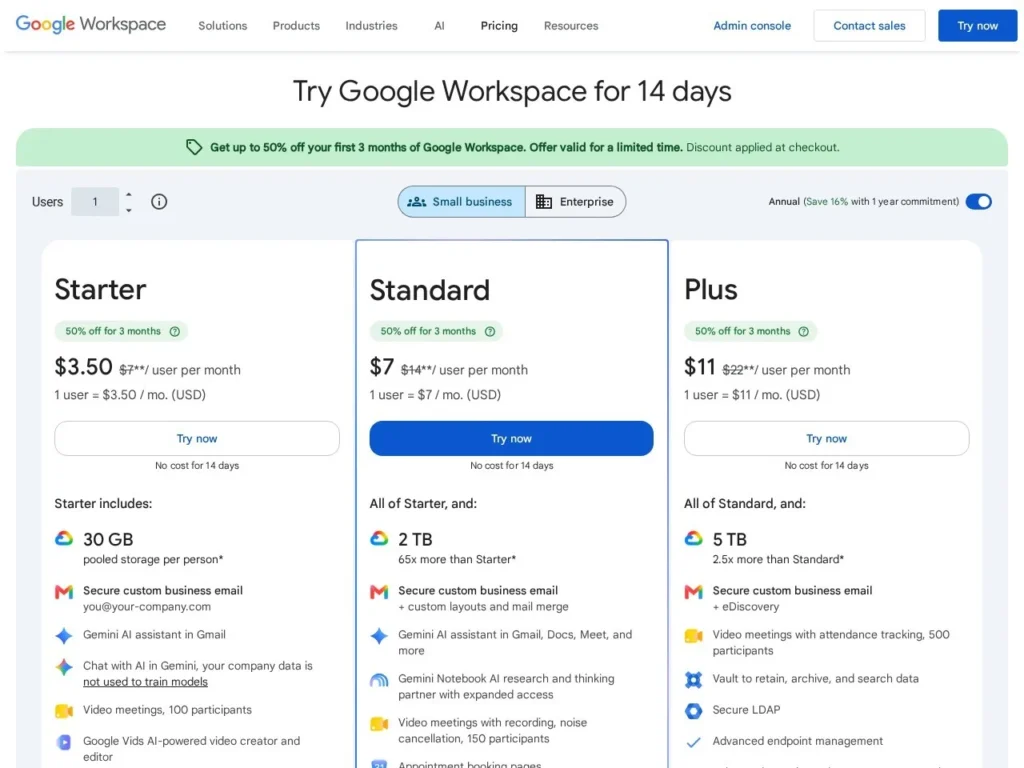
The business price is the Workspace price. Business Starter costs $7 per user per month on a one-year commitment, with 30 GB of pooled storage per user, a custom business email, and Meet calls with up to 100 participants. Business Standard costs $14 per user per month on a one-year commitment, with 2 TB of pooled storage, and it is the plan Google marks most popular. Business Plus costs $22 per user per month on a one-year commitment, with 5 TB of pooled storage.
Paying month to month without a commitment costs more: the flexible standard rates are $8.40, $16.80, and $26.40 per user per month for Starter, Standard, and Plus, and every plan covers up to 300 users. Every plan starts with a 14-day free trial.
Google is currently offering 50 percent off the first three months, which makes Starter $3.50, Standard $7, and Plus $11 per user per month for three months, then the standard rate. That is a promotion, not a price, so budget on the $7 Starter rate.
The trade-off is that Chat on its own is thin. It handles everyday messages well, but the threads, integrations, and automation are lighter than Slack’s, and the AI help in Chat is limited on Starter while Standard and Plus get the fuller Gemini features. A team that already pays for Workspace gets Chat for nothing extra, which makes it the easiest switch here. A team that does not use Google at all gets very little from Chat on its own, because the value is the bundle, not the chat. See the current figures on the official page (https://workspace.google.com/pricing).
3. Discord — Best Free Team Chat
Discord is the cheapest real answer in this comparison, because the chat itself costs nothing. Servers, channels, text chat, voice channels, screen sharing, and video calls are all free, with no per-seat price and no 90-day clock stated on its pricing page. A ten-person team pays $0 a year for the same conversations Slack Pro charges $870 a year for, and the history stays searchable.
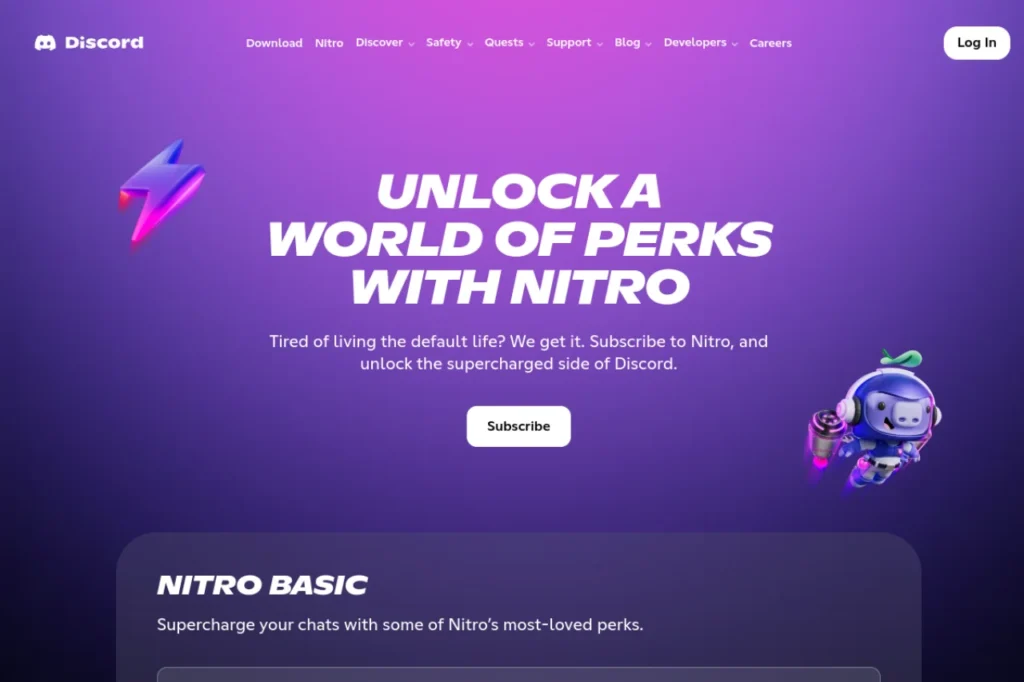
The paid part is optional and personal. Nitro Basic costs $2.99 a month and adds custom emoji anywhere, 50 MB uploads, and custom app icons. Full Nitro costs $9.99 a month and adds 1 GB uploads, HD video streaming, custom profiles, longer messages, and two Server Boosts, plus a discount on extra Boosts. Neither plan is needed for team chat, and Discord lists no annual Nitro price on its pricing page, so do not budget around one.
The trade-off is the setting. Discord was built for communities and gaming, and it shows: the interface is informal, with no business admin console, no enterprise compliance, and no single sign-on on the free tier. Clients who expect a polished business tool may find a Discord invite odd, and a team that needs retention rules or audit logs will not find them. But for a small team that talks all day and wants the bill to be zero, Discord is the most capable free chat available, and the voice channels, where people drop in and out without scheduling a call, are better than anything Slack sells. See the current figures on the official page (https://discord.com/nitro).
4. Rocket.Chat — Best for Teams That Want to Own Their Chat
Rocket.Chat is the open-source answer: a Slack-style chat that runs on your own server, with your messages, your files, and your rules. The Starter plan costs $0 per user per month for up to 50 users on a self-managed workspace, and every new deployment starts there. The Community Edition is also free and self-hosted, with up to 100 concurrent users. If your team is fifty people or fewer and you can run a server, the chat itself is free forever.
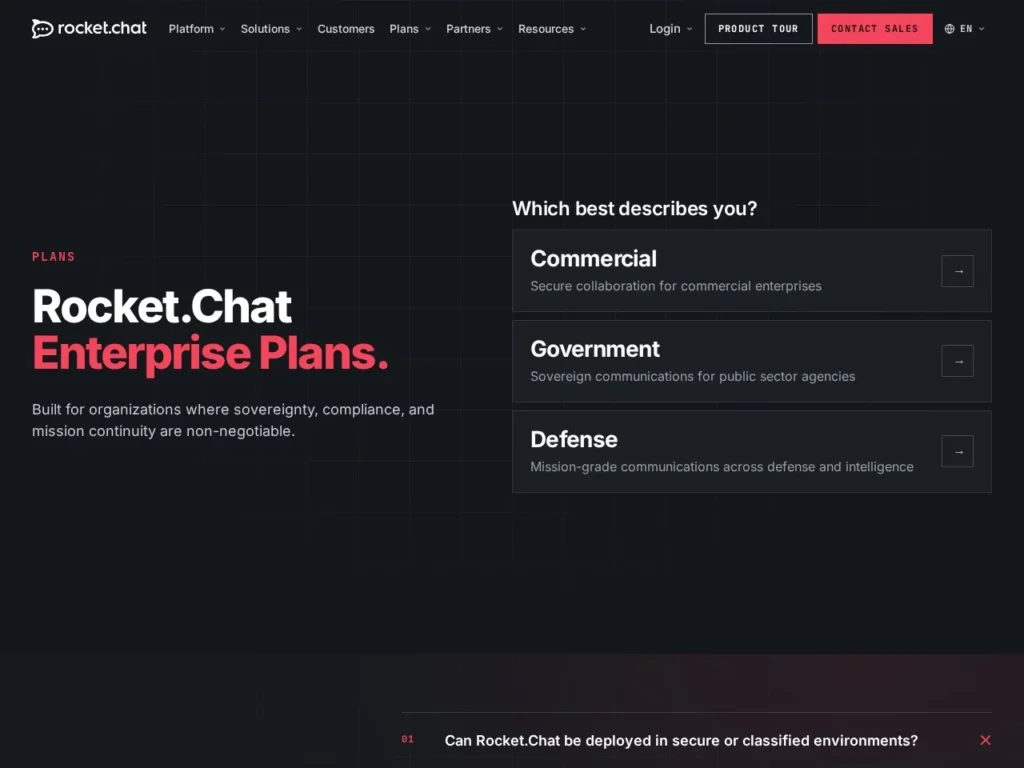
The paid side is different from the other tools here. Rocket.Chat no longer lists a fixed per-user paid price on its pricing page: the Enterprise plans, Commercial, Government, and Defense, are custom quote only, priced to your deployment, users, and compliance needs. Do not trust older roundups that still print a four-dollar Pro plan, because that tier no longer exists on the current pricing page. Non-profits can ask about a reduced-price Commercial plan, and qualifying government, defense, and critical-infrastructure organisations can get a free guided evaluation. No free-trial length is stated.
The trade-off is work, and it is real work. Self-hosting means you install the updates, keep the backups, and fix it when it breaks at midnight. A small virtual server costs a few dollars a month on top of the free plan, and a team without anyone comfortable running a server should not self-host. But for a team with compliance rules, data-residency requirements, or a dislike of renting its own conversations, Rocket.Chat is the only tool here where the messages live on hardware you control, and the price for that is $0 a year plus the server. See the current figures on the official page (https://www.rocket.chat/pricing).
5. Pumble — Best for the Cheapest Paid Team Chat
Pumble is the Slack lookalike that charges the least. It works like Slack on purpose: channels, threads, direct messages, mentions, reactions, and pins, with one-to-one voice and video meetings and screen sharing built in. A team that knows Slack needs no training, and the free plan is the most generous here after Discord: unlimited users, unlimited message history, unlimited channels, and Slack import, with 10 GB of storage for the whole workspace and up to three app integrations.
The Pro plan costs $2.49 per seat per month billed annually, or $2.99 a seat per month billed monthly, and adds 10 GB of storage per seat, group voice meetings and video conferencing for up to 100 members, meeting recordings, and more integrations. Business costs $3.99 a seat per month billed annually, or $4.99 monthly, and Enterprise costs $6.99 a seat per month billed annually, or $7.99 monthly. Every paid plan starts with a 7-day free trial that needs no credit card, and paying annually saves about two months. Pumble is made by the same company behind Clockify and Plaky, and those integrations are included free.
The trade-off is depth. Pumble’s app library is smaller than Slack’s, the free plan allows only three integrations, and there is no built-in task management: that lives in Plaky, a separate app from the same company. But for a small team that wants Slack’s shape at a third of Slack’s price, Pumble Pro at $298.80 a year for ten people is the cheapest paid plan in this comparison, and the free plan alone fixes the one thing that drives most teams away from Slack: the history never runs out.

Cost Maths: What a 10-Person Team Actually Pays
The scenario is a ten-person small business, one year, standard prices, annual billing where the tool offers it. Slack Pro is the baseline, because it is the plan most small teams land on once the free history limit bites.
| Tool | Plan for 10 people | Monthly cost | Year-one cost |
|---|---|---|---|
| Slack Pro | Pro, annual billing | $72.50 | $870 |
| Microsoft Teams | Teams Essentials, paid yearly | $40 | $480 |
| Google Chat | Workspace Business Starter, 1-year commitment | $70 | $840 |
| Discord | Free core chat | $0 | $0 |
| Rocket.Chat | Starter, self-managed | $0 | $0 |
| Pumble | Pro, annual billing | $24.90 | $298.80 |
Microsoft Teams Essentials at $4 a user a month on yearly billing costs $480 a year for ten people, saving $390 a year against Slack Pro. A team that already pays for Microsoft 365 Business Basic at $7 a user a month gets Teams included, so the chat costs nothing extra on top of the $840 a year the bundle already costs. Add the five alternatives together and the year-one total is $1,618.80, or $134.90 a month, against $870 for Slack Pro alone, and two of the five cost nothing at all.
The headline is that the cheapest switches cost nothing. Discord and Rocket.Chat Starter both cost $0 a year for the chat itself, against $870 for Slack Pro, which is a saving of the whole $870. Pumble Pro at $298.80 a year saves $571.20 a year against Slack Pro, and Google Chat through Workspace Starter at $840 a year saves $30 a year, before counting the email, storage, and video calls that Workspace already includes.
The second headline is that the cheapest number is not always the cheapest switch. Rocket.Chat at $0 still needs a server you pay for and somebody to run it, and Discord at $0 still needs a team willing to look informal in front of clients. Pumble Pro at $298.80 is the cheapest paid plan here, with no server and no bundle to buy first.
The Hidden Costs and Gotchas
First, Slack’s free plan deletes more than it hides. Messages older than ninety days are hidden, and free-plan data is deleted after a year, so a team that treats Slack as its memory loses its memory unless it pays or exports regularly.
Second, Slack’s 50 percent off offer is a three-month promotion on monthly billing, not a price cut. Budget on the $7.25-a-month annual rate, because that is the bill that arrives after the promotion ends, and the annual rate is cheaper than the promoted monthly rate anyway.
Third, Slack lists no free-trial length on its pricing page. Do not plan a two-week test drive around a trial that is not printed there; the free plan is the trial.
Fourth, Microsoft Teams is cheapest inside a bundle you already pay for. Teams Essentials costs $4 a user a month, but only on yearly billing: Microsoft shows no monthly-billed price on its business page. The free version of Teams covers one person with 5 GB of storage and group calls capped at sixty minutes, so it is a starting point, not a team plan. And the add-ons add up: Teams Premium costs $10 a user a month on top of the plan, and the Copilot add-on costs $18.
Fifth, Google Chat’s business price is a Workspace price, and Workspace plans cap at 300 users on Starter, Standard, and Plus. A team that outgrows 300 people needs an Enterprise conversation, and the $7 Starter rate is a one-year commitment, not a month-to-month price.
Sixth, Discord’s free tier has no business admin console, no single sign-on, and no enterprise compliance. A team that needs message retention rules, audit logs, or an admin who can manage members properly will not find them, and the informal setting can look wrong to clients.
Seventh, Discord’s Nitro prices are per person, not per team, and they buy personal perks, not business features. Paying for Nitro does not turn Discord into a business chat tool.
Eighth, Rocket.Chat’s free Starter covers fifty users, and the Community Edition is free with up to 100 concurrent users, but both need a server you pay for and maintain. The old four-dollar Pro plan that roundups still print no longer exists, and the paid Enterprise plans are custom quote only, so get a number from Rocket.Chat before you budget for the paid side.
Ninth, Pumble’s free plan allows only three app integrations and 10 GB of storage for the whole workspace, and the paid plans are the only way past that. And do not switch to Twist, the async tool many roundups still list: it closes on 1 March 2027 and is being replaced by Todoist Comms, so a team that moves there would have to move again within months.
Tenth, every tool here charges per person except Discord and Rocket.Chat Starter, so the bill scales with headcount. Count contractors, part-timers, and guests before you compare prices, because a ten-person team with five regular guests is a fifteen-seat bill on Slack, Teams, and Pumble.
Eleventh, switching chat is not free even when the new tool is. Exporting Slack history needs a paid plan, rebuilding channels and integrations takes days, and a team that lives in Slack will take weeks to stop opening the old app. Budget the migration, not just the subscription.
Strategic Pivot: Price the Stack Before You Buy It
The chat app is rarely the expensive line in a small business. The expensive line is the stack: the chat, the email, the storage, the video calls, the docs, and the AI assistant, each billed per person per month. A team that prices one tool at a time ends up paying twice for the same job, usually because Slack sits on top of a Microsoft or Google bundle that already includes a chat app.
Before you switch, price the whole stack. Our free AI Cost Calculator (https://aitbizhub.com/ai-cost-calculator/) adds up the real starting price of the tools you already use, so you can see whether the chat you already own covers the job and what the switch actually saves. Tick the tools you pay for, compare the total against the alternatives in this guide, and only then decide whether the $870 a year for Slack Pro, or the $0 for Discord, is the number that matters.
Pros and Cons
Pros (switching away from Slack): Free chat on Discord and Rocket.Chat Starter, saving the whole $870 a year; no double payment when Chat or Teams is already inside a bundle you own; full message history without paying on Discord, Rocket.Chat, and Pumble; a chat app that fits how your team actually works, async or live.
Cons (switching away from Slack): Migration takes days: channels, history, integrations, and habits; some features you rely on may sit on a higher plan on the new tool; no single replacement matches Slack feature for feature, especially on integrations and automation.
Pros (Microsoft Teams): Chat, meetings, and Office files in one app; Teams Essentials at $4 a user a month on yearly billing; included in Microsoft 365 Business Basic at $7 a user a month; free tier and a one-month trial.
Cons (Microsoft Teams): Heaviest app here, and cluttered for a team that only needs chat; no monthly-billed price shown on the business page; add-ons like Teams Premium at $10 a user a month stack up; Business Premium is not listed on the current pricing page.
Pros (Google Chat): Included in every Workspace plan at no extra per-seat charge; chat, email, files, and video calls in one window; 14-day free trial on every plan.
Cons (Google Chat): Thin on its own outside the Google bundle; AI help in Chat is limited on Starter; Workspace plans cap at 300 users on Starter, Standard, and Plus.
Pros (Discord): Free core chat with no per-seat price and no 90-day clock stated on its pricing page; best voice channels here, with drop-in calls and screen sharing; no card, no trial, no setup.
Cons (Discord): No business admin console, single sign-on, or compliance tools; informal setting can look wrong to clients; Nitro buys personal perks, not business features.
Pros (Rocket.Chat): Free Starter for up to 50 users, free Community Edition with up to 100 concurrent users; you own your messages, files, and server; open source, with no vendor lock-in.
Cons (Rocket.Chat): Self-hosting is your job: updates, backups, and midnight fixes; paid plans are custom quote only, with no fixed price to budget against; needs someone technical on the team.
Pros (Pumble): Cheapest paid plan here at $298.80 a year for ten people; free plan with unlimited users and unlimited message history; works like Slack, so no training needed; 7-day free trial with no card.
Cons (Pumble): Free plan allows only three integrations and 10 GB of storage for the whole workspace; smaller app library than Slack; no built-in tasks, that is a separate app.
Our Verdict: Slack Alternatives
Most small teams should switch to Google Chat and stop paying for chat at all, provided they already pay for Google Workspace. It costs nothing extra, it lives inside Gmail and Drive, and the $840 a year for Workspace Starter buys email, storage, video calls, and docs alongside the chat.
The exceptions are clear. Pick Discord if you want the bill to be zero and your team talks to each other more than to clients, because $0 a year, no per-seat price, and the best voice channels here is the best free deal in team chat. Pick Rocket.Chat Starter if you want to own your conversations and you have someone technical, because $0 a year plus a small server buys a chat nobody can take away. Pick Pumble Pro if you want Slack’s shape at a third of Slack’s price, because $298.80 a year for ten people is the cheapest paid plan here and the free plan’s unlimited history fixes the one thing that drives teams away from Slack.
Pick Microsoft Teams if your team already pays for Microsoft 365, because it is already paid for, and Teams Essentials at $480 a year for ten people is the cheapest Microsoft route if you only need chat.
Pick none of them if your Slack is already wired into everything: integrations, automations, client channels, and a team that knows where everything lives. Switching costs more than the $30 to $870 a year a cheaper plan saves, and the cheapest switch is the one your team will actually use.
Frequently Asked Questions
- What is the cheapest Slack alternative in 2026?
Discord and Rocket.Chat Starter are the cheapest, at $0 a year for the chat itself. Discord needs no server and no card, while Rocket.Chat Starter needs a server you pay for and maintain. The cheapest paid business plan here is Pumble Pro at $298.80 a year for ten people. - Is there a free Slack alternative with unlimited message history? Yes. Discord keeps your full message history on its free plan, with no per-seat price and no ninety-day history limit. The catch is the setting: Discord is built for communities, not for client-facing business chat, so it suits an internal team better than a client-facing one.
- Which Slack alternative is best for a small team already using Microsoft 365?
Microsoft Teams, because it is included in the Microsoft 365 plans you already pay for, with chat, meetings, and Office files in one app. Business Basic at $7 a user a month includes Teams plus the Office apps and 1 TB of storage, so the chat costs nothing extra, and Teams Essentials at $4 a user a month on yearly billing is the cheaper route if you only need chat. - Can I move my messages and channels from Slack?
Partly. Every tool here can import users and rebuild channels, but full message history export from Slack needs a paid plan, and threads, integrations, and automations do not move across. Plan for days of rebuilding, keep Slack live until the new tool has taken a real week of work, and export your history before you cancel. - Do I need to leave Slack to save money?
No, and leaving it costs you money if your team is wired into it. The free plan costs $0 until the ninety-day history limit bites, and the Pro plan at $7.25 a month on annual billing is cheaper than most paid alternatives for a small team. The saving from switching is in the seat count and the bundle you already own, not in the headline price.
Price Note
Price note — updated 21 November 2026: Prices in this post were checked on 21 November 2026. When you are reading this, the price may be lower, the offer may have ended, or the plan may have changed, so check the official pricing page before you buy.
Slack, Google Workspace, Discord, Rocket.Chat, and Pumble prices were read from their official pages on 21 November 2026. Microsoft Teams prices were read from microsoft.com on 21 November 2026. Twist prices are not printed here because Twist closes on 1 March 2027. Rocket.Chat’s paid plans are custom quote only and no fixed per-user price is published. Discord Server Boost prices and Nitro annual prices are not published on the official page and are not printed here.
Pros
- Pros (switching away from Slack): Free chat on Discord and Rocket.Chat Starter, saving the whole $870 a year; no double payment when Chat or Teams is already inside a bundle you own; full message history without paying on Discord, Rocket.Chat, and Pumble; a chat app that fits how your team actually works, async or live.
- Pros (Microsoft Teams): Chat, meetings, and Office files in one app; Teams Essentials at $4 a user a month on yearly billing; included in Microsoft 365 Business Basic at $7 a user a month; free tier and a one-month trial.
- Pros (Google Chat): Included in every Workspace plan at no extra per-seat charge; chat, email, files, and video calls in one window; 14-day free trial on every plan.
- Pros (Discord): Free core chat with no per-seat price and no 90-day clock stated on its pricing page; best voice channels here, with drop-in calls and screen sharing; no card, no trial, no setup.
- Pros (Rocket.Chat): Free Starter for up to 50 users, free Community Edition with up to 100 concurrent users; you own your messages, files, and server; open source, with no vendor lock-in.
- Pros (Pumble): Cheapest paid plan here at $298.80 a year for ten people; free plan with unlimited users and unlimited message history; works like Slack, so no training needed; 7-day free trial with no card.
Cons
- Cons (switching away from Slack): Migration takes days: channels, history, integrations, and habits; some features you rely on may sit on a higher plan on the new tool; no single replacement matches Slack feature for feature, especially on integrations and automation.
- Cons (Microsoft Teams): Heaviest app here, and cluttered for a team that only needs chat; no monthly-billed price shown on the business page; add-ons like Teams Premium at $10 a user a month stack up; Business Premium is not listed on the current pricing page.
- Cons (Google Chat): Thin on its own outside the Google bundle; AI help in Chat is limited on Starter; Workspace plans cap at 300 users on Starter, Standard, and Plus.
- Cons (Discord): No business admin console, single sign-on, or compliance tools; informal setting can look wrong to clients; Nitro buys personal perks, not business features.
- Cons (Rocket.Chat): Self-hosting is your job: updates, backups, and midnight fixes; paid plans are custom quote only, with no fixed price to budget against; needs someone technical on the team.
- Cons (Pumble): Free plan allows only three integrations and 10 GB of storage for the whole workspace; smaller app library than Slack; no built-in tasks, that is a separate app.
Most small teams should switch to Google Chat and stop paying for chat at all, provided they already pay for Google Workspace. It costs nothing extra, it lives inside Gmail and Drive, and the $840 a year for Workspace Starter buys email, storage, video calls, and docs alongside the chat.The exceptions are clear. Pick Discord if you want the bill to be zero and your team talks to each other more than to clients, because $0 a year, no per-seat price, and the best voice channels here is the best free deal in team chat. Pick Rocket.Chat Starter if you want to own your conversations and you have someone technical, because $0 a year plus a small server buys a chat nobody can take away. Pick Pumble Pro if you want Slack's shape at a third of Slack's price, because $298.80 a year for ten people is the cheapest paid plan here and the free plan's unlimited history fixes the one thing that drives teams away from Slack.Pick Microsoft Teams if your team already pays for Microsoft 365, because it is already paid for, and Teams Essentials at $480 a year for ten people is the cheapest Microsoft route if you only need chat.Pick none of them if your Slack is already wired into everything: integrations, automations, client channels, and a team that knows where everything lives. Switching costs more than the $30 to $870 a year a cheaper plan saves, and the cheapest switch is the one your team will actually use.
1 thought on “Slack Alternatives (2026): 5 Compared by Real Price”