

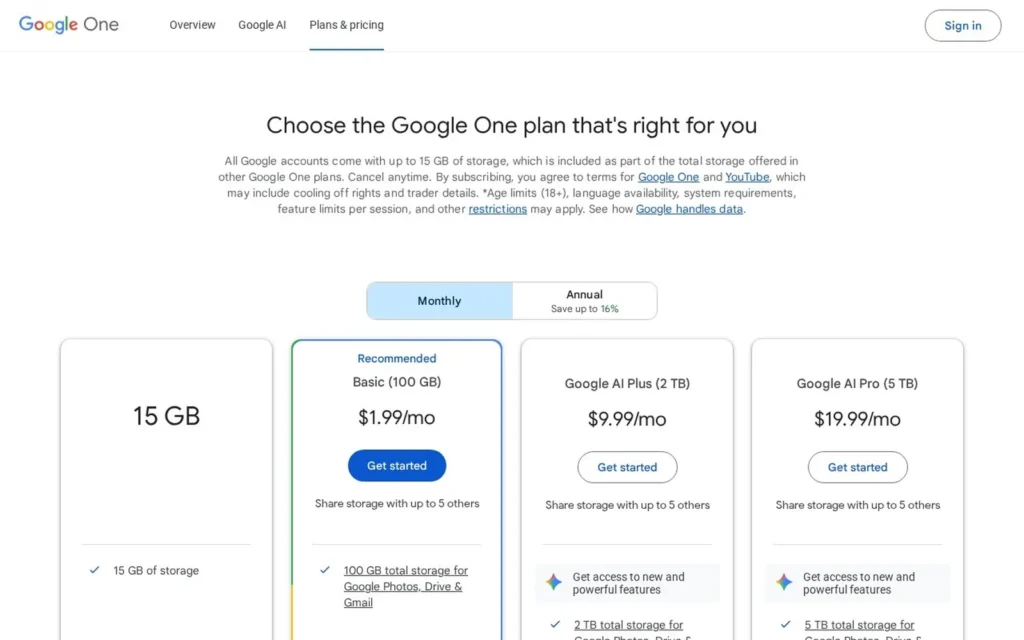
Google Gemini is Google's AI assistant. It is a chatbot you can talk or type to, a set of AI features built into Gmail, Docs, Sheets, and Meet, and the name of the AI model family underneath all of it. The free version costs $0 and handles everyday writing, questions, and file summaries. If you use it every week, Google AI Pro costs $19.99 a month and is the plan most small businesses should buy. It includes the most capable Gemini model, Gemini 4 Argon, the highest Deep Research limits, image and video generation with Veo, and 5 TB of Google storage. Google AI Plus costs $9.99 a month with 2 TB of storage and lighter limits. Google AI Ultra comes in two tiers and is only worth it if AI video and the highest usage limits directly make you money — its dollar price was not shown on Google's plans page when we checked, so check the page before you buy. If your team already pays for Google Workspace, Gemini is bundled into every paid Workspace plan from $7 a user a month — usually the cheapest way for a business to get it. The short version: start free, upgrade to Pro when you hit the free limits, and do not touch Ultra until you can name the job that pays for it.
Your inbox has an AI button now. Your Docs have an AI button now. Your phone has an AI button now. And every single one of them is called Gemini, which raises the obvious question: what is Google Gemini, actually, and which version of it are you supposed to pay for?
Google has not made this easy. Gemini is an app, a model, a subscription, and a feature inside Gmail, all at the same time. This guide untangles it: what Gemini is, what each plan costs, and where it quietly costs you more than the sticker price.
Every price in this post was checked on Google’s own pages on 18 November 2026 — except the Ultra dollar price, which Google’s plans page does not show. That section says so plainly.
Quick Answer Box
Google Gemini is Google’s AI assistant. It is a chatbot you can talk or type to, a set of AI features built into Gmail, Docs, Sheets, and Meet, and the name of the AI model family underneath all of it. The free version costs $0 and handles everyday writing, questions, and file summaries.
If you use it every week, Google AI Pro costs $19.99 a month and is the plan most small businesses should buy. It includes the most capable Gemini model, Gemini 4 Argon, the highest Deep Research limits, image and video generation with Veo, and 5 TB of Google storage.
Google AI Plus costs $9.99 a month with 2 TB of storage and lighter limits. Google AI Ultra comes in two tiers and is only worth it if AI video and the highest usage limits directly make you money — its dollar price was not shown on Google’s plans page when we checked, so check the page before you buy.
If your team already pays for Google Workspace, Gemini is bundled into every paid Workspace plan from $7 a user a month — usually the cheapest way for a business to get it.
The short version: start free, upgrade to Pro when you hit the free limits, and do not touch Ultra until you can name the job that pays for it.
In This Article
- Quick Answer Box
- The Short Version: Gemini in One Paragraph
- What Is Google Gemini, in Plain English?
- Gemini’s Plans, Compared
- Gemini Free: What $0 Actually Buys
- Google AI Plus, at $9.99 a Month
- Google AI Pro, at $19.99 a Month
- Google AI Ultra, in Two Tiers
- Gemini for Business: Google Workspace, From $7 a User a Month
- What Gemini Actually Does for a Small Business
- Gemini vs ChatGPT vs Claude
- Cost Maths: What a Small Business Pays in Year One
- The Hidden Costs and Gotchas
- Who Is Each Plan Actually Best For?
- Work Out Your Own Number First
- Pros and Cons
- Our Verdict
- Frequently Asked Questions
- Price Note
The Short Version: Gemini in One Paragraph
Think of Gemini the way you think of electricity in an office. There is one supply, and it reaches the building through several different sockets. The Gemini app on your phone and at gemini.google.com is the most visible socket: a chatbot you type or talk to.
Gmail, Docs, Sheets, Slides, and Meet are the other sockets: the same AI, built into the tools you already use, so it can draft the email, summarise the spreadsheet, or take notes on the call without you opening a second app.
Underneath all of it sits the Gemini model family, the engine that does the thinking. The current model family is Gemini 4: Flash-Lite on the free plan, Gemini 4 Hydrogen on Plus, Gemini 4 Argon on Pro, and Gemini 4 Carbon on Ultra.
You need to remember which socket you are paying for: Google sells the same electricity at four different prices, and the cheapest one is usually right.
What Is Google Gemini, in Plain English?
Gemini started life as Bard, Google’s first answer to ChatGPT, and Google renamed it Gemini in early 2024. Bard was a chatbot. Gemini is Google’s whole AI platform: the chatbot, the models, and the features woven through Google’s products.
Here is what that means in practice. You open the Gemini app, or gemini.google.com, and you get a chat window. You type a question, paste a document, upload a photo, or talk out loud, and Gemini answers. It can write, summarise, translate, plan, brainstorm, and explain.
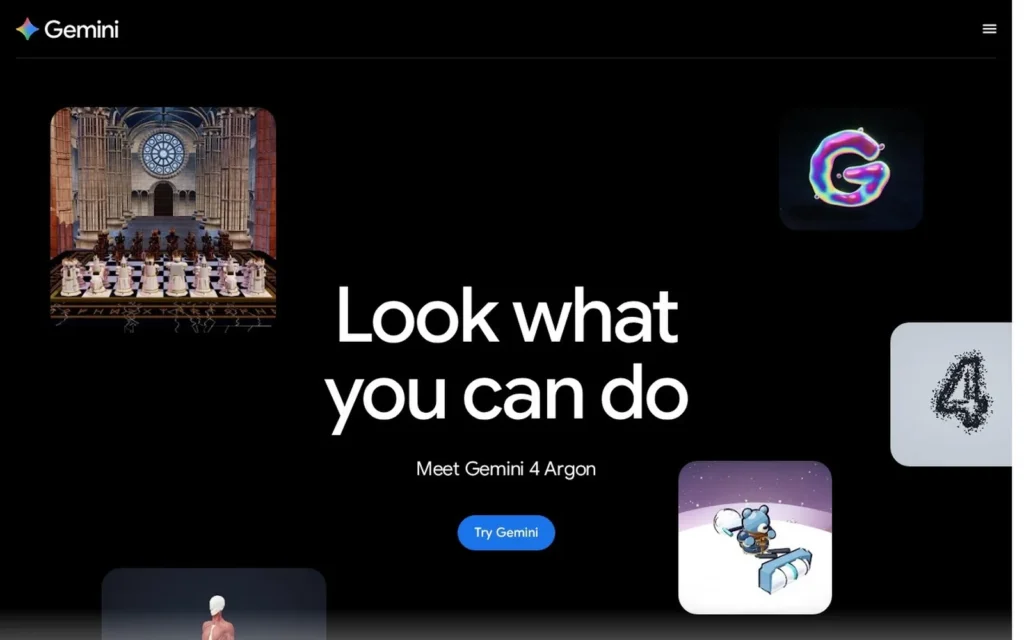
Then there is the part most small businesses actually end up using. Inside Gmail it drafts replies and summarises threads; inside Docs it writes first drafts; inside Sheets it builds formulas and explains the numbers; inside Meet it takes notes.
ChatGPT is a destination: you go to it. Gemini is already sitting inside the inbox and the documents where your work happens. The trade-off is that Google’s pricing is spread across three different stores — Google One, Google Workspace, and the Gemini API — and the same feature can cost $0, $9.99, $19.99, or $7 a user a month depending on which door you walk through.
Gemini’s Plans, Compared
| Plan | Price | Storage | Best for | Key limit |
|---|---|---|---|---|
| Gemini Free | $0 | 15 GB | Trying Gemini, occasional questions | Lowest usage limits, Flash-Lite model |
| Google AI Plus | $9.99/month | 2 TB | Light weekly use, more storage | Gemini 4 Hydrogen, double the free limits |
| Google AI Pro | $19.99/month | 5 TB | Regular business use, research, content | Gemini 4 Argon, Deep Research, Veo video |
| Google AI Ultra | Two tiers — check the official page | From 20 TB | Heavy AI video and research work | Gemini 4 Carbon, 5x or 20x Pro limits |
| Google Workspace Starter | $7/user/month | 30 GB pooled | A team that needs business email + Gemini | Gemini in Gmail and Vids only |
| Google Workspace Standard | $14/user/month | 2 TB pooled | A growing team | Full Gemini in Gmail and Docs |
| Google Workspace Business Plus | $22/user/month | 5 TB pooled | A team that wants the most AI | Highest Workspace Gemini limits |
Prices are monthly, in US dollars, as shown on Google’s own pages on 18 November 2026. Google One and Workspace plans both offer an annual option that saves up to 16%, and every Workspace plan includes a 14-day free trial.
Gemini Free: What $0 Actually Buys
The free version of Gemini costs nothing and needs only a Google account. You open gemini.google.com or the Gemini app, and you can chat, ask questions, upload files, and generate images. For an owner still deciding whether AI belongs in the working day, free is the right place to start.
Free gets you the Flash-Lite model, not the most capable one. It gets you image generation, file uploads, and voice chat with Gemini Live. It does get Deep Research, the feature that reads dozens of sources and writes you a report. What it does not get you is the most capable model, video generation with Veo, NotebookLM Plus, or the 1-million-token context window for very large files.
There are two catches that matter. First, the usage limits on free are unpublished and they move. Google does not print a number of prompts per day for the free plan, so the day you hit the wall is the day you find out the wall exists.
Second, and more important for a business: on the free plan, Google may use your conversations to improve its services, so anything with customer data — a client contract, a price list — should never go into free Gemini. The paid plans come with a promise that your content is not used to train models. That promise alone is worth $19.99 a month for many businesses, and it is the single best reason to upgrade even if you never touch the extra features.
Google AI Plus, at $9.99 a Month
Google AI Plus is the entry paid tier, and it is the plan most roundups get wrong: several still list it at $4.99 or $7.99 a month, while Google’s own plans page, read today, shows $9.99 a month with 2 TB of storage. This post uses the live figure.
What does $9.99 buy? More of everything free gives you: double the usage limits, the Gemini 4 Hydrogen model, access to newer features as they roll out, and 2 TB of storage shared across Drive, Gmail, and Photos, up from the 15 GB that comes free with every Google account. It also buys the privacy promise: your content is not used to train Google’s models.
What it does not buy is the most capable model, Gemini 4 Argon, or the highest image and video generation limits. Those stay behind the Pro paywall. It does include Deep Research, Gemini Live, and NotebookLM, with double the free plan’s usage limits.
One honest flag: Google’s own Gemini about page lists Plus at 400 GB of storage, not 2 TB. The plans page governs pricing, and this post uses its 2 TB figure — but if storage decides your purchase, check the plans page yourself on the day you buy. So Plus is a storage plan with a better chatbot attached, not a power-user plan.
Buy it if you need the storage first — a photographer with 2 TB of client photos, a shop owner whose Gmail is full — and want a better Gemini as a side benefit. If your main goal is the AI, skip Plus: the $10 a month you save costs you the features that make Gemini worth paying for.
See the official pricing for yourself: Google One plans.
Google AI Pro, at $19.99 a Month
Google AI Pro is the plan this guide recommends for most small businesses — the tier where Gemini stops being a chatbot and starts being a work tool. It costs $19.99 a month, with 5 TB of storage, and it is where Google puts its most capable model, its research tools, and its media generation.
Pro includes access to Gemini 4 Argon, Google’s frontier model for complex workflows. It includes Deep Research, which reads dozens of websites and hands you a sourced report instead of a single answer. It includes Gemini Live, the voice mode that lets you talk to Gemini like a colleague while you work. It includes image generation with Nano Banana and video generation with Veo — short 8-second clips from a text prompt — plus higher limits on both.
It includes NotebookLM Plus, Google’s research notebook that turns your own documents into a searchable, quotable source. It includes a 1-million-token context window and file uploads of up to 3,000 pages. And it includes Gemini inside Gmail, Docs, Sheets, Slides, and Meet, which is where most of the working hours actually go.
Five terabytes is enough for a small business to stop thinking about storage: every client file, photo, and email attachment in one account. A business paying separately for storage and a chatbot usually pays more than $19.99 a month for the two.
Google One’s annual billing option saves up to 16% across the plans page, so check the annual toggle before you subscribe. No free trial was shown on the plans page when we checked, so do not count on one — the right way to test Pro is to subscribe for one month, run your real work through it, and cancel if it does not earn its keep.
See the official pricing for yourself: Google One plans.
Google AI Ultra, in Two Tiers
Google AI Ultra is Google’s top consumer tier, and the tier where Google’s own pricing pages are hardest to read. Google’s Gemini page lists Ultra in two tiers, at 5x and 20x Pro’s usage limits, with storage starting from 20 TB. Published roundups disagree about the dollar price: some still show the old $249.99 a month, others show $100 and $200 a month for the two tiers. This post does not print a dollar figure it has not seen on Google’s own page.
The Google One plans page we checked lists Free, Basic, AI Plus, and AI Pro — there is no Ultra card on it at all. Check the Google One plans page for the current Ultra price before you buy.
What is not in dispute is what Ultra is for. It is the highest usage limits Google sells to an individual, the highest access to the most capable model, and the only consumer tier with the full video generation suite, including Flow, Google’s AI filmmaking tool, and the highest Veo limits. It also comes with storage starting from 20 TB, maximum access to Gemini 4 Carbon, Argon, and Hydrogen, the most Google Flow credits, Project Genie, and a YouTube Premium subscription in supported markets.
Here is the honest maths. At the old $249.99 price, Ultra costs twelve and a half Pro plans. At $200, it costs ten. At $100, it costs five.
Whichever figure the live page shows, the question is the same: does AI video generation or the highest research limits directly make you money? If you are a solo creator selling video, maybe. If you run a shop, a clinic, a tutoring business, or a trade crew, almost certainly not. Pro does the same writing, the same research, and the same email drafting. Ultra buys you more of it, faster, and with video. That is a creator’s purchase, not a small business purchase.
See the official pricing for yourself: Google One plans.
Gemini for Business: Google Workspace, From $7 a User a Month
If your business already pays for Google Workspace — business Gmail, Drive, Meet, and Calendar — then you may already own Gemini, or you may be one plan step away from it. Google folded Gemini into every paid Workspace plan, so there is no separate Gemini add-on to buy any more. The AI rides inside the subscription you already pay for.
The list prices, read live from Google’s Workspace pricing page today, with the annual toggle on: Business Starter costs $7 a user a month, Business Standard costs $14 a user a month, and Business Plus costs $22 a user a month. Enterprise Standard costs $32.40 a user a month and Enterprise Plus costs $42.

Every plan comes with a 14-day free trial. Google was also showing an introductory discount on Starter and Standard at our check — 10% off for 12 months, which makes them $6.30 and $12.60 a user a month — but offers change, so read the page on the day you buy. The annual toggle saves 16% against monthly billing.
What changes between the tiers is how much Gemini you get. Starter includes the Gemini AI assistant in Gmail and Vids only — not Docs, Sheets, Slides, Drive, Meet, or Chat — and 30 GB of pooled storage per person. Standard steps up to 2 TB of pooled storage and the fuller Gemini feature set across Gmail, Docs, and Sheets. Business Plus adds 5 TB of pooled storage and the highest Workspace AI limits, plus eDiscovery and video meetings with attendance tracking for 500 participants.
For a three-person business, Standard costs $42 a month and puts Gemini in every inbox and document. The same three people on individual Pro plans would cost $59.97 a month. Workspace is cheaper, and it comes with business email, shared drives, and admin controls on top.
One catch: a one-person business on Starter pays $7 a month but does not get the top model or Gemini in Docs, Sheets, Slides, Drive, Meet, or Chat, so solo owners wanting the full Gemini should still buy Pro. Workspace wins with two or more people.
See the official pricing for yourself: Google Workspace pricing.
What Gemini Actually Does for a Small Business
Here is what Gemini does on a normal Tuesday for a small business owner.
It writes the first draft — the quote email, the reply to the unhappy customer, the job posting, the product description — from three bullet points you give it.
It reads the long thing: the supplier contract, the twenty-page council guidance, the thread with forty replies. You paste it in, ask what changed, and Gemini tells you in five lines. Deep Research goes further and writes you a sourced report.
NotebookLM, included with Pro, lets you upload your price lists, manuals, and past quotes, then ask questions that get answered from your files, with citations.
Gemini Live lets you talk to Gemini while you drive between jobs, and in Meet it takes notes and drafts the follow-up email.
It makes the visuals. Product photos with Nano Banana, social posts, a simple logo variation, a short 8-second video clip with Veo for a listing. The image and video tools are not a replacement for a designer, but they are fast enough that a small business can stop paying a freelancer for every social image.
Jules, Google’s coding agent included with Pro, can build a simple form, fix a spreadsheet formula, or write the script that renames a thousand files — you describe the job in plain English and it writes the code.

None of this is magic: Gemini gets facts wrong and writes in a voice that sounds like every other AI unless you edit it, so check the output before it reaches a customer.
Gemini vs ChatGPT vs Claude
| Gemini (Google AI Pro) | ChatGPT (Plus) | Claude (Pro) | |
|---|---|---|---|
| Price | $19.99/month | $20/month* | $20/month, $17 on annual billing |
| Free tier | Yes, $0 | Yes, $0 | Yes, $0 |
| Best model included | Gemini 4 Argon | GPT-6 class model | Claude Sonnet/Opus class |
| Built into your inbox and docs | Yes — Gmail, Docs, Sheets, Meet | No — separate app | No — separate app |
| Deep research reports | Yes, on Pro | Yes, on Plus | Yes, on Pro |
| Image generation | Yes | Yes | No native image generation |
| Video generation | Yes, Veo on Pro/Ultra | Yes, Sora on Plus | No |
| Voice mode | Gemini Live | Voice mode | Voice mode |
| Coding help | Jules agent on Pro | Codex/Code interpreter | Strongest for code review |
| Storage included | 5 TB | None | None |
| Privacy promise on paid plans | Yes — content not used for training | Yes — opt-out on paid plans | Yes — content not used for training |
The honest summary is short. If your business runs on Gmail and Google Docs, Gemini is the obvious pick, because it is already there and it brings 5 TB of storage.
*ChatGPT Plus was $20 a month when we verified it on 17 November 2026; OpenAI’s page showed a blank amount on 18 November, so confirm it live before you buy. Claude’s prices were verified live on 18 November 2026.
Compare them yourself: ChatGPT pricing and Claude pricing.
If you want the best all-round chatbot and the biggest app ecosystem, ChatGPT Plus at $20 a month is its equal and sometimes better at long writing. If your work is careful writing, editing, or code review, Claude Pro is the strongest writer of the three, and its $17-a-month annual price is the cheapest paid tier here. We compared the five best general chatbots in full in our best AI chatbots guide.
Cost Maths: What a Small Business Pays in Year One
Take a realistic small business: you, plus two staff, all on Gmail already, wanting Gemini for everyone. Here is what year one costs on each route, using the live prices from Google’s own pages.
Route one, three individual Pro plans: $19.99 times three is $59.97 a month, or $719.64 a year. Each person gets the top model, Deep Research, image and video generation, NotebookLM Plus, and 5 TB of storage.
Route two, Google Workspace Standard for three people: $14 times three is $42 a month, or $504 a year. The team gets Gemini in Gmail, Docs, Sheets, and Meet, plus business email and admin controls. You lose the 5 TB of personal storage per person — Standard gives 2 TB pooled each instead — but you save $215.64 a year.
Route three, one Pro plan for you plus free Gemini for the staff: $19.99 a month, or $239.88 a year. You do the research and the heavy lifting; the staff use the free tier for drafting and questions.
Route four, Ultra for one person: Ultra’s dollar price was not shown on the Google One plans page when we checked, so we are not printing a figure here — check the plans page yourself. Whatever the figure, it is several times Pro’s $19.99, and unless AI video is your product, this is the route that buys the least business value per dollar.
What must Gemini earn back? At $19.99 a month, Pro pays for itself if it saves you about forty minutes a month at a $30-an-hour value of your time — one supplier email drafted, one contract summarised, one meeting’s notes written. The risk is not the $19.99. The risk is paying for three seats when one would do, or paying for Ultra when Pro does the same jobs.
Work out your own number with our free tool: AI Cost Calculator.
The Hidden Costs and Gotchas
The sticker prices are honest. The costs that surprise people are the ones Google does not print in big type.
The first is the free-tier privacy trade. On the free plan, Google may use your conversations to improve its services, so a client list or a quote pasted into free Gemini is shared with Google’s training pipeline. The paid plans promise your content is not used for training. If you handle customer data, treat the free plan as a demo, not a tool.
The second is the unpublished limits. Google does not publish how many prompts, research reports, or images each plan allows per day. The limits exist, they change, and you discover them by hitting them — Pro’s limits are generous for normal business use, but a week of heavy research can still hit the wall.
The third is the Ultra price fog. At the time of writing, respected roundups disagree about whether Ultra costs $249.99, $200, or $100 a month, because Google changed the tiers at I/O 2026 and not every page caught up — and Google’s own plans page does not show an Ultra card at all. Google’s Gemini page confirms the shape: two tiers, at 5x and 20x Pro’s usage limits, with storage from 20 TB. Do not trust a roundup on the Ultra price — open the Google One plans page yourself.
The fourth is the model-name churn. Google has renamed its AI twice in two years, and its models change names every few months — the about page today leads with Gemini 4 Argon. Judge the plan by what it lets you do, not by the model number, because the number will change and the plan is what you pay for.
The fifth is the storage trap in reverse. Five terabytes sounds like a lot until a business treats Drive as filing cabinet, photo archive, and email store at once. The 15 GB free tier fills up fast, and Gmail stops receiving mail when it does. If your Gmail already warns you about storage, you need a paid plan for the storage alone.
The sixth is the annual-billing fine print. Google One’s annual option saves up to 16%, and Workspace saves 16% with a one-year commitment — but “up to” does the work in that sentence: the saving varies by plan, and the commitment means you pay for the year.
The seventh is regional pricing. The dollar figures here are the US prices from Google’s official pages. In Bangladesh, the same plans are listed in taka at different amounts, so outside the US, check the plans page in your own region before you buy.
Who Is Each Plan Actually Best For?
Gemini Free is best for the owner who is still curious. Try it for two weeks on real work. If it saves you time, upgrade.
Google AI Plus is best for the owner who needs storage first and AI second. Two terabytes for $9.99 a month is a fair storage price, and the better chatbot is a bonus.
Google AI Pro is best for the owner who uses AI every week. The most capable model, NotebookLM Plus, image and video generation, and 5 TB of storage for $19.99 a month is the best value in Google’s whole lineup.
Google AI Ultra is best for the creator whose product is AI video, or the researcher who runs Deep Research all day. If neither of those is you, Ultra is features you will not use at several times Pro’s price.
Google Workspace is best for the team. Two or more people on Gmail should buy Gemini through Workspace Standard, not individual Pro plans. It is cheaper per person, covers the whole team, and comes with the business email and admin controls a growing business needs anyway.
Work Out Your Own Number First
Before you pay for any AI plan, run the numbers for your own business. Our free AI Cost Calculator adds up what your AI stack costs per month and per year, so you can see whether Pro, Workspace, or a single shared seat is cheapest for your team. It takes two minutes.
Pros and Cons
Pros:
- Gemini lives inside Gmail, Docs, Sheets, and Meet, so there is no second app to open and no copy-paste round trip.
- Google AI Pro at $19.99 a month includes the most capable model, NotebookLM Plus, image and video generation, and 5 TB of storage — more bundled value than ChatGPT Plus or Claude Pro at the same price.
- The free tier is genuinely usable for everyday questions, drafting, and file summaries.
- Workspace bundles Gemini into plans a business already pays for, from $7 a user a month, which is the cheapest team route.
- Paid plans promise your content is not used to train Google’s models.
Cons:
- Usage limits are unpublished, so you discover them by hitting them.
- The free plan may use your conversations to improve Google’s services, which rules it out for customer data.
- The Ultra price is confusing, with roundups disagreeing after Google’s I/O 2026 tier changes.
- Model names change every few months, so guides go stale fast.
- Gemini invents facts when you do not check its answers.
Our Verdict
For most small businesses, buy Google AI Pro at $19.99 a month. It is the only consumer plan with the most capable model, NotebookLM Plus, and the media tools, and the 5 TB of storage alone would cost you nearly that much from Google anyway. If you have two or more people on Gmail, buy Gemini through Google Workspace Standard at $14 a user a month instead. It is cheaper per person, it covers the whole team, and the business email and admin controls come with it.
Do not buy Ultra unless AI video or all-day research is literally your product. Do not buy Plus for the AI alone; buy it for the storage. And whatever you buy, check Gemini’s answers before they reach a customer — one wrong quote costs more than a year of Pro.
Frequently Asked Questions
Is Google Gemini free?
Yes. Gemini Free costs $0 and includes the Flash-Lite model, image generation, file uploads, Deep Research, and voice chat with Gemini Live, with 15 GB of storage. The limits are lower than the paid plans, the most capable model is not included, and Google may use your free-plan conversations to improve its services. For business use, the paid plans are the safer choice.
Is Google Gemini better than ChatGPT?
It depends on where your work lives. If your business runs on Gmail and Google Docs, Gemini is better, because it works inside those tools and brings 5 TB of storage for the same $19.99 a month as ChatGPT Plus.
What is the difference between Gemini Free and Google AI Pro?
Pro costs $19.99 a month and adds the Gemini 4 Argon model, NotebookLM Plus, image and video generation with higher limits, a 1-million-token context window, Gemini inside Gmail and Docs, and 5 TB of storage instead of 15 GB. It also comes with the promise that your content is not used to train Google’s models, which the free plan does not offer.
Does Gemini come with Google Workspace?
Yes. Google folded Gemini into every paid Workspace plan, so there is no separate add-on to buy. Business Starter at $7 a user a month includes Gemini in Gmail and Vids, Business Standard at $14 adds the fuller feature set, and Business Plus at $22 adds the highest limits. Every plan includes a 14-day free trial.
Can Gemini replace ChatGPT for a small business?
For most small businesses, yes. Gemini Pro handles the same daily jobs — drafting, summarising, research, planning, and image creation — inside Gmail and Docs where the work already happens. The exceptions are businesses that need a specific ChatGPT app integration, or writers who prefer Claude’s editing.
Price Note
Price note — updated 18 November 2026: Prices in this post were checked on 18 November 2026. When you are reading this, the price may be lower or higher — always check the official pricing page before you buy.
Related: Best AI SEO Tools for Small Business (2026): 5 Compared by Real Price
Pros
- Gemini lives inside Gmail, Docs, Sheets, and Meet, so there is no second app to open and no copy-paste round trip.
- Google AI Pro at $19.99 a month includes the most capable model, NotebookLM Plus, image and video generation, and 5 TB of storage — more bundled value than ChatGPT Plus or Claude Pro at the same price.
- The free tier is genuinely usable for everyday questions, drafting, and file summaries.
- Workspace bundles Gemini into plans a business already pays for, from $7 a user a month, which is the cheapest team route.
- Paid plans promise your content is not used to train Google's models.
Cons
- Usage limits are unpublished, so you discover them by hitting them.
- The free plan may use your conversations to improve Google's services, which rules it out for customer data.
- The Ultra price is confusing, with roundups disagreeing after Google's I/O 2026 tier changes.
- Model names change every few months, so guides go stale fast.
- Gemini invents facts when you do not check its answers.
For most small businesses, buy Google AI Pro at $19.99 a month. It is the only consumer plan with the most capable model, NotebookLM Plus, and the media tools, and the 5 TB of storage alone would cost you nearly that much from Google anyway. If you have two or more people on Gmail, buy Gemini through Google Workspace Standard at $14 a user a month instead. It is cheaper per person, it covers the whole team, and the business email and admin controls come with it. Do not buy Ultra unless AI video or all-day research is literally your product. Do not buy Plus for the AI alone; buy it for the storage. And whatever you buy, check Gemini's answers before they reach a customer — one wrong quote costs more than a year of Pro.
1 thought on “What Is Google Gemini? (2026): The Complete Guide for Small Business”