

The best note-taking apps for most small businesses in 2026 are Microsoft OneNote at $0 and Notion Plus at $10 per member per month billed annually. OneNote costs $0 and is the best free note-taking app: the whole app is free on every platform, and you only pay if you outgrow the 5GB of OneDrive storage that comes with it — 100GB costs $1.99 a month. Notion Plus costs $10 per member per month billed annually ($120 a year per person) and is the best pick for a team that wants notes, tasks, and a shared wiki in one place. Obsidian costs $0 for the app itself and is the pick if you want your notes as files you own — sync across devices costs $4 per user a month billed annually. Evernote Starter costs $14.99 a month or $99 a year ($8.25 a month billed annually) and is the pick if you live in your notes and want the best web clipper and search. Apple Notes costs $0 and is the pick if everyone on your team uses Apple devices — storage upgrades start at $0.99 a month for 50GB of iCloud. If you only buy one, buy Notion Plus: $600 a year for a team of five, and your meeting notes, client files, and to-dos finally live in one searchable place.
Best Note-Taking Apps (2026): Compared by Real Price
Quick Answer Box
The best note-taking apps for most small businesses in 2026 are Microsoft OneNote at $0 and Notion Plus at $10 per member per month billed annually. OneNote costs $0 and is the best free note-taking app: the whole app is free on every platform, and you only pay if you outgrow the 5GB of OneDrive storage that comes with it — 100GB costs $1.99 a month.
Notion Plus costs $10 per member per month billed annually ($120 a year per person) and is the best pick for a team that wants notes, tasks, and a shared wiki in one place. Obsidian costs $0 for the app itself and is the pick if you want your notes as files you own — sync across devices costs $4 per user a month billed annually. Evernote Starter costs $14.99 a month or $99 a year ($8.25 a month billed annually) and is the pick if you live in your notes and want the best web clipper and search.
Apple Notes costs $0 and is the pick if everyone on your team uses Apple devices — storage upgrades start at $0.99 a month for 50GB of iCloud. If you only buy one, buy Notion Plus: $600 a year for a team of five, and your meeting notes, client files, and to-dos finally live in one searchable place.
In this article
- Quick Answer Box
- The Short Version: What You Are Actually Choosing Between
- How I Compared Them
- Notion: The Team Workspace, at $10 a Member a Month Annual
- Evernote: The Capture Machine, at $8.25 a Month Annual
- Obsidian: The One You Own, at $0 Plus $4 a Month for Sync
- Microsoft OneNote: The Free One, at $0
- Apple Notes: The Built-In One, at $0
- Head-to-Head Comparison Table
- Cost Maths: What a Team of Five Really Pays in Year One
- The Hidden Costs and Gotchas
- Who Is Each Tool Actually Best For?
- Work Out Your Own Number First
- Pros and Cons
- Our Verdict
- Frequently Asked Questions
- Price Note
The Short Version: What You Are Actually Choosing Between
Every small business runs on notes. The quote from the supplier, the thing the client said on the phone, the idea at 11pm that is gone by morning — if it is not written down somewhere searchable, it is lost. A notes app is the cheapest piece of software a business will ever buy, and the one it will open most often.
Here is the short version. OneNote is free, full stop, and it is the first app most people should try — Zapier tested more than 50 note apps and called it the best free note-taking app, and in serious contention for the best note-taking app overall. Apple Notes is free too, and if your whole team is on iPhones and Macs, you may never need anything else. Obsidian is free as well, and it is the only app here where your notes are plain files on your own computer — nobody can lock you out of them.
Notion is the one that stops being a notes app and becomes your team’s second office: notes, tasks, databases, and a wiki in one place, for $10 a person a month. Evernote is the old name that rebuilt itself: the best at grabbing things from the web and finding them again later, from $8.25 a month billed annually.
The trap to watch for is the free plan that is not really a plan. Evernote’s free plan allows 50 notes, one notebook, and one device — for the life of your account. That is a trial wearing a free plan’s clothes. Notion’s free plan is unlimited for one person, but the moment a second member joins, your blocks are capped. Obsidian’s free app has no sync at all. OneNote and Apple Notes are the only two here whose free plans have no note limit, only a storage limit, and storage is cheap to buy.
If you run a one-person business, start with OneNote or Apple Notes and spend nothing. If you run a team that shares notes, start with Notion Plus. If you take notes for a living, look hard at Obsidian and Evernote. The rest of this post is the evidence: every price read on the vendor’s own pricing page, and the maths for a team of five over a full year.
How I Compared Them
I compared five apps: Notion, Evernote, Obsidian, Microsoft OneNote, and Apple Notes. I picked them from Zapier’s 2026 roundup of the best note-taking apps, where a reviewer tested more than 50 note apps and named these five among the seven best. Every price in this post was read on the vendor’s own pricing page on 18 November 2026, and the publishing check re-read all five pages and corrected anything that had moved.
I judged each app on five things a small business actually feels: what the free plan really allows before it asks for money, what the first paid plan costs per person per year, whether you can get your notes out again, how good search and capture are, and what a team of five pays for a full year including the storage and sync add-ons the headline price hides.
One more thing before the details. Prices here are in US dollars, as the vendors show them. Notion and Obsidian charge per member or per user. Evernote’s Starter and Advanced are individual plans, so a team of five pays five times. OneNote and Apple Notes are free with storage you buy separately.
Notion: The Team Workspace, at $10 a Member a Month Annual
Notion is not really a notes app. It is a notes app that grew up into an office: pages, databases, tasks, wikis, calendars, and now AI agents, all in one workspace. Zapier named it the best note-taking app for collaboration, and that is exactly right — Notion’s strength is not taking a note, it is what happens to the note afterwards. A meeting note becomes a task list, the task list becomes a project board, the project board becomes the client wiki.
The free plan costs $0. For one person working alone, it is genuinely unlimited: as many pages and blocks as you like, with a 5MB file upload limit and up to 10 external guests. The catch arrives the moment a second member joins — then the free plan caps your blocks, and you will hit the ceiling fast. Students and educators get the Plus plan free for one member with a school email.
Plus costs $10 per member per month billed annually ($120 per member a year), or $12 per member per month billed monthly. It adds unlimited blocks for a team, unlimited file uploads up to 5GB per file, 30-day page history, charts, custom forms and sites, and basic connections to other apps. What it does not add is full AI — Plus gets only a limited trial of Notion AI, which is the first gotcha in this post and worth remembering.
Business costs $20 per member per month billed annually ($240 a year), or $24 billed monthly. This is where full Notion AI lives: Notion Agent, AI Meeting Notes, Enterprise Search, plus SAML single sign-on, private teamspaces, granular database permissions, 90-day page history, and dashboards. Until May 2025, Notion AI was a separate $10 add-on. Notion withdrew it and folded full AI into Business — so if you want Notion with AI, the floor is $20 a person a month, not $10. Custom Agents run on credits on top: $10 per 1,000 monthly Notion credits, with no rollover.
For a team of five, Plus costs $600 a year and Business costs $1,200 a year. Guests are free, so invite clients as guests and do not pay for them. Most teams do not need Business until they want AI meeting notes or single sign-on — start on Plus, and let the AI question decide the upgrade.
Notion’s weakness is the same as its strength: it can be more than most people need for simple notes. Opening Notion to jot down a phone number feels like opening a spreadsheet to write a shopping list.
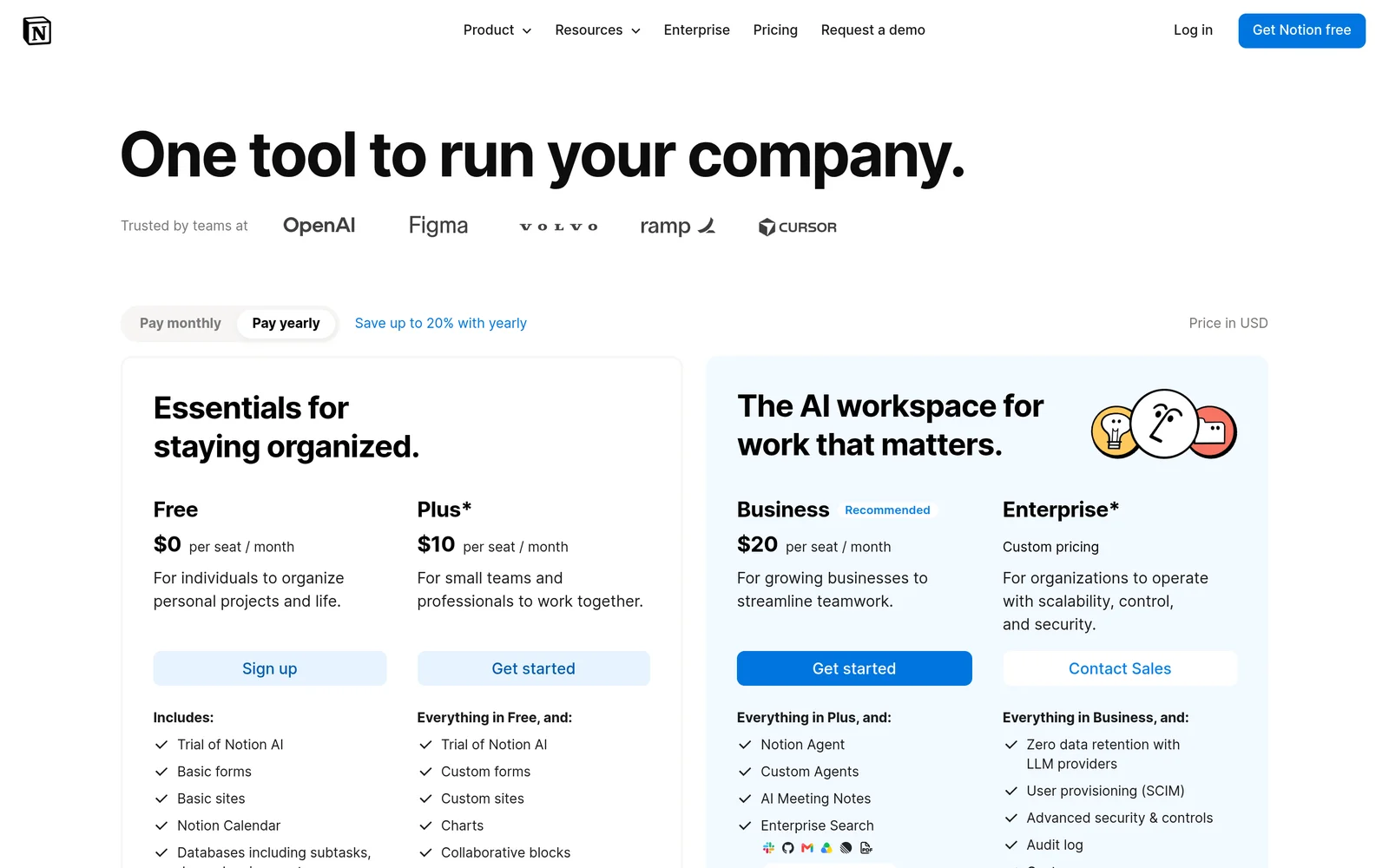
Check the current prices on Notion’s official pricing page.
Evernote: The Capture Machine, at $8.25 a Month Annual
Evernote is the oldest name on this list, and it spent years being the app everyone had left. Then Bending Spoons bought it, rebuilt it, and Zapier — after testing more than 50 apps — now calls it a redemption arc: familiar, modernized, with calendar and AI features and a solid core note experience. The thing Evernote still does better than anyone here is capture. Clip a web page, photograph a whiteboard, forward an email, scan a document — Evernote takes it in, makes the text inside it searchable, and hands it back months later when you type two words.
The free plan costs $0, and you should read its limits twice: 50 notes, 1 notebook, 1 synced device, 1GB of storage, 20 tags, and 200 attachments — for the life of your account. Fifty notes is a weekend of serious use. Evernote’s free plan is a trial with a friendlier name, and if you take notes every day, you will outgrow it in a week.
Starter costs $14.99 a month, or $99 a year — $8.25 a month billed annually. It raises the limits to 1,000 notes, 20 notebooks, 3 synced devices, 5GB of storage, and 1,000 attachments, and it includes the AI features. Advanced costs $24.99 a month, or $249.99 a year ($20.83 a month billed annually), and lifts the caps to unlimited notes, notebooks, devices, and storage — with what Evernote calls safeguard limits, which it does not put a number on.
Advanced adds the full AI set: AI Assistant, semantic search, AI Transcribe for meetings, and AI Edit. It also connects to AI tools like Claude and ChatGPT through MCP. For teams, there is a Flexible plan from $10 per seat a month, and an Enterprise plan by quote. Paid plans come with a 7-day free trial.
For one person, Starter at $99 a year is the honest price of Evernote. For a team of five, five Starter seats cost $495 a year, and five Advanced seats cost $1,249.95 a year — the most expensive per-person price on this list. For a business that lives on research — clipping supplier pages, saving client emails, photographing receipts — the answer is often yes, because Evernote’s search reads the text inside images and scanned documents, which none of the other four apps here does as well. For a business that mostly writes its own meeting notes, the answer is usually no, and OneNote does the job for $0.
Evernote’s weakness is trust. It has changed its plans and prices more often than any app here — Personal and Professional were retired in November 2025 and replaced by Starter and Advanced, and the free plan has shrunk repeatedly over the years. The rebuild is real and the app is good again, but you are buying into a company that has already shown it will move the goalposts.

Check the current prices on Evernote’s official pricing page.
Obsidian: The One You Own, at $0 Plus $4 a Month for Sync
Obsidian is the odd one out. The app is free — for any purpose, personal or commercial, with no account and no sign-up. Your notes are plain Markdown files in a folder on your own computer. There is no server in the middle, no subscription holding your words hostage, and no company that can change the terms underneath you. Zapier named it the best note-taking app for power note-takers, and warned in the same breath that it has a steep learning curve. Both are true.
What makes Obsidian different is linking. Every note can link to every other note, in both directions, and the graph view shows your whole knowledge base as a web of connections. For a consultant or researcher building a second brain out of years of work, there is nothing else like it at any price.
The app costs $0, and that includes commercial use — since February 2025, Obsidian has said plainly that you do not need to pay to use it for work. The optional Commercial license costs $50 per user a year: a way to support development, not a condition of use. It adds no feature and includes no Sync or Publish.
Sync is the thing most people will pay for, because the free app does not sync at all. Sync Standard costs $4 per user a month billed annually ($48 a year), or $5 billed monthly: one vault, 1GB of storage, a 5MB maximum file size, and one month of version history, with end-to-end encryption.
Sync Plus costs $8 a month billed annually ($96 a year), or $10 monthly, for 10 synced vaults, 10GB of storage, 200MB files, and 12 months of version history. Publish, which turns selected notes into a hosted website, costs $8 per site a month billed annually ($96 a year), or $10 monthly. Students, faculty, and nonprofit staff get 40% off Sync and Publish.
For one person, Obsidian with Sync Standard costs $48 a year — the cheapest paid plan on this list. For a team of five, five Sync Standard seats cost $240 a year, or $490 a year if the team also buys the optional Commercial license for each person. You can also skip Sync entirely and sync the folder yourself with iCloud, Dropbox, or a USB stick — the files are yours, and Obsidian does not mind. That freedom is the whole point, and it is also the catch: Obsidian gives you the pieces and expects you to build the system.
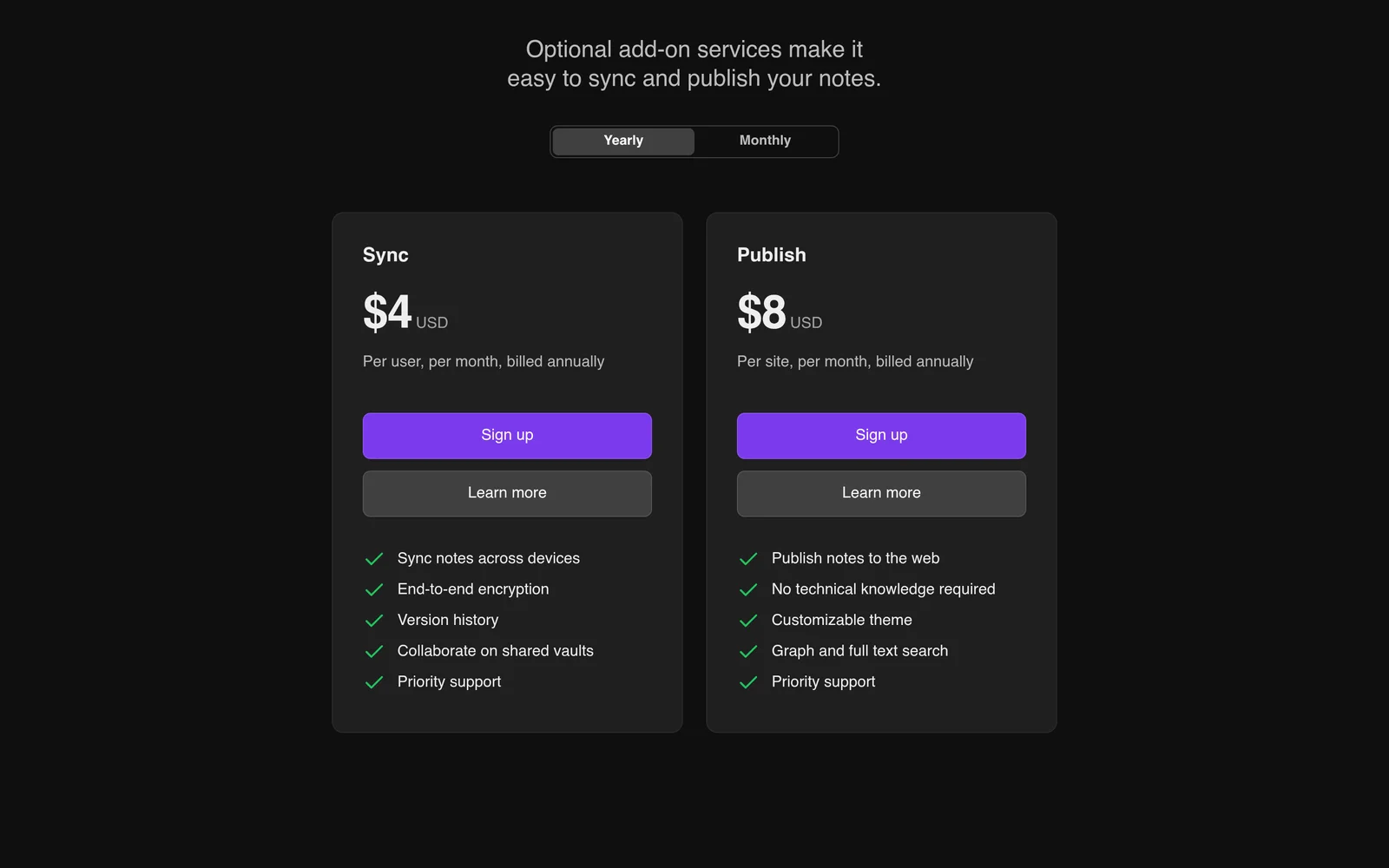
Check the current prices on Obsidian’s official pricing page.
Microsoft OneNote: The Free One, at $0
Microsoft OneNote is the best free note-taking app, and Zapier says it is in serious contention for the best note-taking app overall. It is also the simplest recommendation in this post: if you do not know which notes app to pick, pick OneNote, and spend nothing. It is free on Windows, Mac, iOS, Android, and the web, with no cap on how many notes you keep.
OneNote works like a ring binder. Each notebook is divided into sections, each section into pages, and each page is a freeform canvas — click anywhere and start typing, drop in a photo, record audio, scribble with a stylus. That freedom is its signature: no other app here lets you scatter text, images, and drawings across a page the way OneNote does.
The price is $0, and the only thing you pay for is storage. OneNote uses your OneDrive storage: you get 5GB free, which is more than enough for text notes, but photos and audio recordings eat it faster than you expect. If you hit the limit, 100GB costs $1.99 a month through Microsoft 365 Basic ($19.99 a year). Microsoft 365 Personal, which adds 1TB of storage and the full Office apps, costs $9.99 a month or $99.99 a year — verify the current figure on Microsoft’s page before you buy, because Microsoft has raised this price before and Zapier’s older figure of $7.20 a month is out of date.
Copilot, Microsoft’s AI assistant, can create, summarize, and edit text inside OneNote, but only for Microsoft 365 Copilot and Copilot Pro customers — a separate subscription, not part of OneNote’s free plan.
For a team of five, OneNote costs $0 if everyone stays inside 5GB, or $99.95 a year if all five buy the 100GB Basic plan — the cheapest team price on this list by a distance. The honest weakness is that OneNote is a Microsoft app, and it feels like one: capable, familiar, and a little corporate. Its search is good but not Evernote good.

Check the current prices on Microsoft’s official Microsoft 365 pricing page.
Apple Notes: The Built-In One, at $0
Apple Notes is the notes app you already own. It is built into every iPhone, iPad, and Mac, it syncs through iCloud, and there is a web version at icloud.com/notes for the days you are stuck on a PC. Zapier named it the best note-taking app for Apple users, and the reason is simple: it is free, it is already there, and it keeps getting better. Now it has Markdown support, tags, sharing, powerful search, audio recording with live transcripts, document scanning, handwriting, and it even solves maths problems.
The price is $0, and the only thing you pay for is iCloud storage. Every Apple account gets 5GB of iCloud storage free, shared across all iCloud services. When that fills up, iCloud+ costs $0.99 a month for 50GB, $2.99 a month for 200GB, $9.99 a month for 2TB, $29.99 for 6TB, and $59.99 for 12TB. Apple bills iCloud+ monthly only — there is no annual discount, so a year of 200GB is $35.88, every year, forever.
The paid tiers add Private Relay, Hide My Email, a custom email domain, and HomeKit Secure Video, and the 200GB and 2TB tiers can be shared with up to five other family members.
For a team of five on Apple devices, Apple Notes costs $0 if everyone stays inside 5GB, or $35.88 a year per person if everyone takes the 200GB tier — $179.40 a year for five. The weakness is the one you already know: it only makes sense inside Apple. On Android or Windows, Apple Notes is a web page, and a web page is not a notes app. There is no real team workspace, no databases, no graph view, no web clipper worth the name. But if your whole team carries iPhones, the app you already have beats the app you have to buy, install, learn, and pay for — and the $0 price is hard to argue with.

Check the current prices on Apple’s official iCloud+ plans and pricing page.
Head-to-Head Comparison Table
| App | Free plan | First paid plan (annual) | Best for | Biggest limit |
|---|---|---|---|---|
| Notion | $0 — unlimited blocks solo, capped for 2+ members | Plus $10/member/mo ($120/yr) | Team notes + tasks + wiki | Full AI needs Business $20 |
| Evernote | $0 — 50 notes, 1 notebook, 1 device | Starter $8.25/mo ($99/yr) | Capturing + searching everything | Free plan is a trial in practice |
| Obsidian | $0 — full app, any use, no account | Sync Standard $4/user/mo ($48/yr) | Owning your notes as files | No sync until you pay or DIY |
| Microsoft OneNote | $0 — unlimited notes, 5GB storage | Basic $1.99/mo ($19.99/yr, 100GB) | Free on every platform | Storage is the only paid lever |
| Apple Notes | $0 — unlimited notes, 5GB iCloud | iCloud+ 50GB $0.99/mo ($11.88/yr) | Apple-only teams | Weak outside Apple devices |
Cost Maths: What a Team of Five Really Pays in Year One
Headline prices lie by omission, so here is the honest maths for the best note-taking apps for a team of five, over one full year, on annual billing wherever it exists. The scenario is a small business: five people, notes every day, sync across phone and laptop, and enough storage for photos and scans.
Notion Plus: 5 members × $10 a month × 12 months = $600 a year. Business, with full AI, doubles it to $1,200 a year. Guests are free, so clients cost nothing.
Evernote Starter: 5 people × $99 a year = $495 a year. Advanced is 5 × $249.99 = $1,249.95 a year. The Flexible team plan starts from $10 a seat a month, or $600 a year for five.
Obsidian: the app is $0, and five Sync Standard seats cost 5 × $48 = $240 a year. Add the optional Commercial license for each person and it becomes $490 a year. Skip Sync and sync the folder yourself, and the whole team pays $0.
OneNote: $0 if all five stay inside their free 5GB of OneDrive storage. If all five buy the 100GB Basic plan, 5 × $19.99 = $99.95 a year. If all five take Microsoft 365 Personal at $99.99 a year, that is $499.95 a year — but that buys the whole Office suite, not just notes.
Apple Notes: $0 if all five stay inside 5GB of iCloud. If all five take the 200GB iCloud+ tier, 5 × $35.88 = $179.40 a year.
Add up the cheapest paid tier that covers the job for all five apps, and the year-one total is $600 + $495 + $240 + $99.95 + $0 = $1,434.95. Nobody buys all five — the point is the spread. The most expensive sensible choice, Notion Business at $1,200 a year, costs twelve times the cheapest, OneNote at $0 to $99.95. Per person per year, the ladder is: OneNote $0, Apple Notes $0, Obsidian $48, Evernote Starter $99, Notion Plus $120. The free apps are not a compromise here — they are the rational choice for most teams.
The Hidden Costs and Gotchas
First, Notion’s free plan caps your blocks the moment a second member joins. Budget for Plus from the day you invite your second person.
Second, Notion’s full AI lives on Business at $20 a person a month. The $10 Plus plan gets only a trial of AI. If you chose Notion for the AI, your real price is $20, not $10 — and Custom Agents cost $10 per 1,000 credits on top.
Third, Evernote’s free plan is 50 notes for life. It is a trial, and you will hit it in a week of real use. Do not build a business process on it.
Fourth, Evernote Starter caps at 1,000 notes, 20 notebooks, and 3 devices. A heavy clipper — someone who saves every supplier page and client email — will hit 1,000 notes inside a year and face the jump to Advanced at $249.99.
Fifth, Evernote’s Advanced “unlimited” carries safeguard limits that Evernote does not put a number on — you will not know where the line is until you cross it.
Sixth, Obsidian’s free app has no sync. Your notes live on one device. Sync costs $4 a user a month, or you set up your own sync with iCloud or Dropbox — which works, but which you must maintain.
Seventh, Obsidian Sync is priced per user. Five people means five times $48 a year, and the 1GB storage on Standard fills fast if your notes carry photos.
Eighth, OneNote’s free plan is really a storage plan. Text is tiny, but photos, scans, and audio recordings are not, and the 5GB of free OneDrive storage is shared with everything else you store.
Ninth, OneNote’s Copilot is a separate subscription, and its price is not printed on the OneNote page — check Microsoft’s page before you promise it to your team.
Tenth, Apple Notes only makes sense inside Apple. On Windows or Android it is a web page at icloud.com, not a notes app. If one person on your team uses Android, Apple Notes stops being free — it starts being a workaround.
Eleventh, iCloud+ has no annual discount. Apple bills monthly only, so the 200GB tier is $35.88 a year, every year, with no way to pay less by committing. The same storage from Google or Microsoft costs less on annual billing.
Who Is Each Tool Actually Best For?
Among the best note-taking apps, pick Notion if you run a team that needs one place for notes, tasks, and a shared wiki — a marketing agency, a small consultancy, a shop with five staff who all need the same client file. Pick it on Plus, and upgrade to Business only when you want AI meeting notes or single sign-on.
Pick Evernote if you capture more than you write — clipping supplier pages, saving client emails, photographing whiteboards and receipts, and finding them again months later.
Pick Obsidian if your notes are your business asset — a researcher, a writer, a consultant building a knowledge base over years — and you want those notes as files you own.
Pick OneNote if you want the best free notes app and you do not want to think about it again. It is free, it is on every platform, and it has no note limit.
Pick Apple Notes if everyone on your team uses Apple devices and you want the app that is already on their phone. It is free, it syncs, and it does more every year.
Work Out Your Own Number First
Before you buy any of these, work out your own number. How many people will actually use it every day? How many notes do you take in a month, and how many carry photos? How much storage do your notes really need? A team of five on Notion Plus pays $600 a year; the same team on OneNote pays $0. That $600 buys a shared wiki and a task system — but only if your team actually uses them. If they just write meeting notes, you paid $600 for a free app with a fancier cover.
Our free AI Cost Calculator does that maths for you: tick the tools you use, put in the real price, and it adds up what your stack actually costs a month and a year. Do the maths before the subscription, not a year into it.
Pros and Cons
Pros
- OneNote is free on every platform with no note limit, and it is the first app most people should try.
- Apple Notes is free, built into every Apple device, and keeps getting better.
- Obsidian’s app is free for any use, and your notes are plain files you own forever.
- Notion Plus at $10 a member a month gives a team notes, tasks, and a wiki in one place.
- Evernote’s capture and search are the best here — it reads the text inside your photos and scans.
Cons
- Evernote’s free plan allows only 50 notes, one notebook, and one device — it is a trial, not a plan.
- Notion’s full AI needs the $20 Business plan, so the real price doubles if you want AI.
- Obsidian has no sync in the free app, and building your own system takes a weekend.
- OneNote’s 5GB of free storage fills fast once your notes carry photos and audio.
- Apple Notes is a web page, not an app, the moment you leave Apple devices.
Our Verdict
If you only buy one, buy Notion Plus at $10 per member per month billed annually — $600 a year for a team of five — but only if your team will actually use it as a shared workspace. For most small businesses, the honest answer is to buy nothing: start with OneNote, which costs $0, works on every device, and has no note limit. If everyone on your team uses Apple devices, start with Apple Notes instead.
If your notes are your livelihood and you want to own them as files, pay Obsidian’s $48 a year for Sync. If you capture the whole internet and need to find it again, pay Evernote’s $99 a year for Starter. The most expensive mistake here is not picking the wrong app — it is paying $600 a year for a workspace your team uses as a notepad. Start free, prove the habit, and pay only for the feature you actually miss.
Frequently Asked Questions
What is the best free note-taking app for a small business?
Microsoft OneNote. It costs $0, works on Windows, Mac, iOS, Android, and the web, and has no cap on how many notes you keep — only the 5GB of OneDrive storage that comes free with it. Apple Notes is the free pick if your whole team uses Apple devices.
Is Notion worth $10 a month for notes?
It is worth $10 a member a month if your team uses it as a shared workspace — notes, tasks, and a wiki in one place. It is not worth it if your team only writes meeting notes, because OneNote and Apple Notes do that for $0. Remember that full Notion AI needs the $20 Business plan, so if you are buying Notion for the AI, budget $20, not $10.
Is Evernote still worth it in 2026?
Yes, for one job: capturing everything and finding it again. Its web clipper, document scanning, and search — including text inside images — are still the best in this comparison, and Starter at $99 a year is fair for that. It is not worth it as a general notes app any more, because OneNote does general notes for $0.
Can I use Obsidian for free at work?
Yes. Obsidian’s app is free for any purpose, including commercial use, with no account and no sign-up, and the company says so plainly. The $50-a-year Commercial license is optional and adds no feature. The only thing you pay for is Sync at $4 a user a month billed annually, and only if you want Obsidian to sync your notes between devices — you can sync the folder yourself for $0.
What happens to my notes if I cancel my subscription?
It depends on the app. With Obsidian, nothing happens — your notes are files on your own computer, and cancelling Sync changes nothing about them. With OneNote and Apple Notes, your notes stay, but you drop back to the free storage limit, so export anything over 5GB first. With Notion, you drop to the free plan and its block cap for teams, so export your workspace before you cancel. With Evernote, you drop to the free plan’s 50 notes and one device, so export your notebooks first.
Price Note
Price note — updated 18 November 2026: Prices in this post were checked on 18 November 2026 on each vendor’s official pricing page (notion.com/pricing, evernote.com/pricing, obsidian.md/pricing, microsoft.com, and Apple’s iCloud+ pricing page). When you are reading this, the price may be lower or higher — vendors change prices without notice, and Microsoft in particular has raised its Microsoft 365 prices before. Check the official page before you buy.
Pros
- OneNote is free on every platform with no note limit, and it is the first app most people should try.
- Apple Notes is free, built into every Apple device, and keeps getting better.
- Obsidian's app is free for any use, and your notes are plain files you own forever.
- Notion Plus at $10 a member a month gives a team notes, tasks, and a wiki in one place.
- Evernote's capture and search are the best here — it reads the text inside your photos and scans.
Cons
- Evernote's free plan allows only 50 notes, one notebook, and one device — it is a trial, not a plan.
- Notion's full AI needs the $20 Business plan, so the real price doubles if you want AI.
- Obsidian has no sync in the free app, and building your own system takes a weekend.
- OneNote's 5GB of free storage fills fast once your notes carry photos and audio.
- Apple Notes is a web page, not an app, the moment you leave Apple devices.
If you only buy one, buy Notion Plus at $10 per member per month billed annually — $600 a year for a team of five — but only if your team will actually use it as a shared workspace. For most small businesses, the honest answer is to buy nothing: start with OneNote, which costs $0, works on every device, and has no note limit. If everyone on your team uses Apple devices, start with Apple Notes instead. If your notes are your livelihood and you want to own them as files, pay Obsidian's $48 a year for Sync. If you capture the whole internet and need to find it again, pay Evernote's $99 a year for Starter. The most expensive mistake here is not picking the wrong app — it is paying $600 a year for a workspace your team uses as a notepad. Start free, prove the habit, and pay only for the feature you actually miss.
3 thoughts on “Best Note-Taking Apps (2026): Compared by Real Price”