

Superhuman Docs vs Notion comes down to one question: how many people on your team actually build documents, and how many just read them? Superhuman Docs (the new name for Coda) charges you only for Doc Makers — the people who create docs — at $12 per Doc Maker a month billed annually ($144 a year), or $33 a month for Business ($396 a year). Editors and viewers are free on every plan. Notion charges you for every member at $10 a member a month billed annually ($120 a year) for Plus, or $20 a member a month ($240 a year) for Business. If two people build and three people only read, Superhuman Docs Pro costs $288 a year and Notion Plus costs $600 a year — Docs wins by $312. If all five people build, Notion Plus costs $600 a year and Superhuman Docs Pro costs $720 — Notion wins by $120. Both are free to start. If you want docs that behave like little apps, with buttons, automations, and trackers, pick Superhuman Docs. If you want one calm workspace where docs, wikis, and projects live together, pick Notion.
Quick Answer Box
Superhuman Docs vs Notion comes down to one question: how many people on your team actually build documents, and how many just read them? Superhuman Docs (the new name for Coda) charges you only for Doc Makers — the people who create docs — at $12 per Doc Maker a month billed annually ($144 a year), or $33 a month for Business ($396 a year). Editors and viewers are free on every plan.
Notion charges you for every member at $10 a member a month billed annually ($120 a year) for Plus, or $20 a member a month ($240 a year) for Business. If two people build and three people only read, Superhuman Docs Pro costs $288 a year and Notion Plus costs $600 a year — Docs wins by $312. If all five people build, Notion Plus costs $600 a year and Superhuman Docs Pro costs $720 — Notion wins by $120.
If you want docs that behave like little apps, with buttons, automations, and trackers, pick Superhuman Docs. If you want one calm workspace where docs, wikis, and projects live together, pick Notion.
In this article
- Quick Answer Box
- The Short Version: What You Are Actually Choosing Between
- How I Compared Them
- Superhuman Docs: The Doc That Acts Like an App, at $12 a Doc Maker
- Notion: The All-in-One Workspace, at $10 a Member
- Head-to-Head Comparison Table
- Cost Maths: What a 5-Person Team Really Pays in Year One
- The Hidden Costs and Gotchas
- Who Is Each Tool Actually Best For?
- Work Out Your Own Number First
- Pros and Cons
- Our Verdict
- Frequently Asked Questions
- Price Note
The Short Version: What You Are Actually Choosing Between
Superhuman Docs and Notion are both brilliant at turning a blank page into the place your business runs from. The difference is not the page. It is the bill.
On 8 July 2026, Coda became Superhuman Docs. Same product, new name, now sitting inside the Superhuman family next to Grammarly, Mail, and Go. The old pricing page at coda.io/pricing now redirects to superhuman.com/plans/docs, and the old Team plan is now called Business. If you read a guide from last year that says Coda costs $10 and $30 a Doc Maker, that guide is out of date.
The current published prices are $12 and $33 billed annually, and the vendor’s own announcement said existing customers’ pricing was not changing — which is why so many old pages still show the old numbers. Trust the live pricing page, not the roundup.
Notion, meanwhile, has not changed its name or its model. It charges per member, and every member pays the same.
So the short version is this. Superhuman Docs is a doc that wants to be an app. You write a page, then you add a table that behaves like a database, a button that sends a Slack message, and an automation that updates a row when a deal closes.
Notion is a workspace that wants to be your second brain. You write a page, then you link it into a wiki, a project board, and a meeting-notes system that all feel like the same place. Both do both jobs, badly or well, depending on the day. But Docs leans toward building things, and Notion leans toward organising things.
The trap to watch for is the billing model you did not read. With Superhuman Docs, the price on the page is per Doc Maker, and only the people who create docs count. With Notion, the price is per member, and everybody counts. A five-person team where two people build and three people read pays $288 a year for Docs Pro and $600 a year for Notion Plus.
The same five people, all building, pay $720 for Docs Pro and $600 for Notion Plus. Same tools, same team, different answer — because the question is not which tool is cheaper. It is who on your team builds.
If you are a solo founder, the maths flips again: one Doc Maker on Pro costs $144 a year, and one member on Plus costs $120 a year. Notion is cheaper for one person. If you run a small shop where you build the trackers and your staff just check them, Docs is cheaper by a wide margin. The rest of this post is the evidence: every price read on the vendor’s own pricing page on 18 November 2026, and the maths for a real five-person team.
How I Compared Them
I compared two tools: Superhuman Docs (formerly Coda) and Notion. I started from Zapier’s head-to-head comparison of Coda and Notion, where a reviewer tested both tools side by side, and then I checked every price on the vendors’ own pricing pages on 18 November 2026 — superhuman.com/plans/docs and notion.com/pricing — and re-checked them on the day of publishing.
I judged each tool on five things a small business actually feels: what the free plan really allows before it asks for money, what the first paid plan costs for a five-person team over a full year, who exactly you pay for and who is free, how good the built-in AI is and what it costs, and what the tool costs when you add the storage, domains, or credits the headline price hides.
If you also need somewhere to keep the notes behind the docs, our comparison of the best note-taking apps covers five apps that pair well with either tool here.
One more thing before the details. Prices here are in US dollars, as the vendors show them. Superhuman Docs charges per Doc Maker. Notion charges per member.
Superhuman Docs: The Doc That Acts Like an App, at $12 a Doc Maker
Superhuman Docs is what Coda became on 8 July 2026. If you used Coda, nothing about your docs changed: they carried over automatically, and the vendor said existing customers’ pricing was not changing. What changed is the name on the door, the pricing page address, and the bundle. Docs now sits in the Superhuman suite next to Grammarly, Mail, and Go, and the paid plans bundle those products in. The company behind it is the one formerly called Grammarly, which renamed itself Superhuman in October 2025.
The idea behind Docs is simple and a little strange the first time you meet it: a document that behaves like an app. You start with a page, the way you would in any word processor. Then you add a table, and the table is not a table — it is a database, with rows you can filter, sort, and connect to other tables. Then you add a button, and the button does something: it sends a message, creates a row, or updates a status.
Then you add an automation, and the doc starts doing work while you sleep. A client tracker, a content calendar, an inventory list, and a meeting-notes hub can all be the same doc, and they can all talk to each other.

The free plan costs $0. It gives you collaborative docs, connected tables, views and forms, formulas and automations on a low quota, a trial of Docs AI, a trial of MCP (the protocol that lets AI tools reach into your docs), and trials of Grammarly and Go. The limits are real: shared docs are capped at 50 objects and 1,000 rows, attachments are 1GB per doc, and version history goes back only 7 days. For one person testing the idea, that is plenty. For a team running a real tracker, the row cap is the wall you will hit first.
Pro costs $12 per Doc Maker a month billed annually ($144 a year). Pay monthly and Pro costs $15 per Doc Maker a month ($180 a year). Pro removes the size limits: unlimited doc size, 30-day version history, hidden pages, custom icons, branding and domains, and 5GB of attachments per doc.
It adds Docs AI in beta, the ability to build AI trackers, pages, and views, and to create with Claude and other tools through MCP. And it includes Grammarly and Go — on annual billing. On monthly billing, the pricing page lists Grammarly at $15 per Maker a month, so paying month to month costs you the bundle as well as the discount. That is a gotcha worth knowing before you choose your billing cycle.
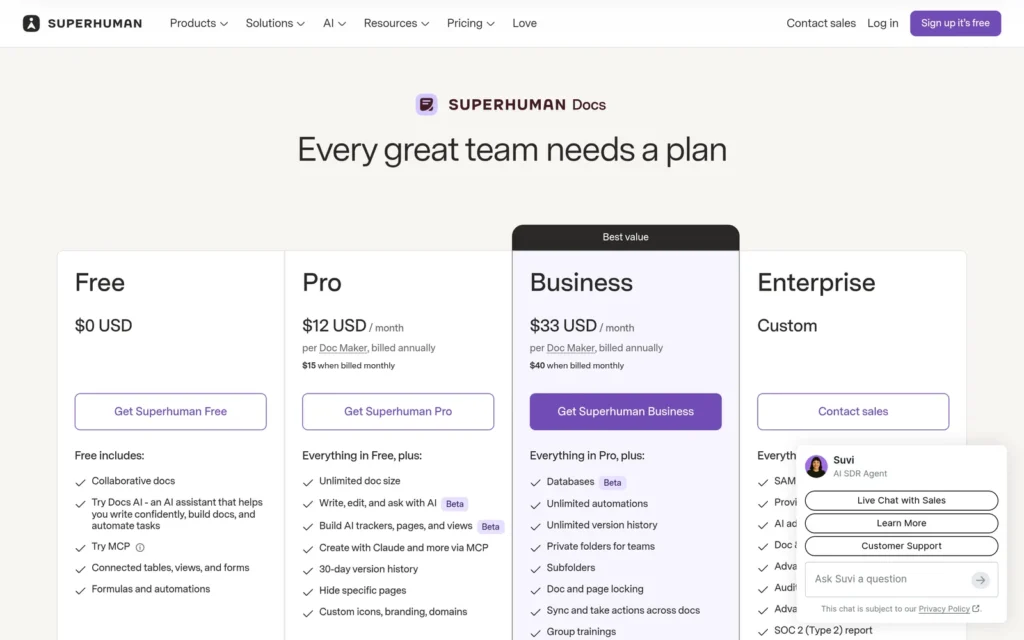
Business costs $33 per Doc Maker a month billed annually ($396 a year). Pay monthly and Business costs $40 per Doc Maker a month ($480 a year). Business adds Databases in beta, unlimited automations, unlimited version history, private folders for teams, subfolders, doc and page locking, the ability to sync and take actions across docs, and group trainings. It also adds Superhuman Mail to the bundle, alongside Grammarly and Go. Enterprise is custom-priced through sales, and adds SAML single sign-on, SCIM user provisioning, AI admin controls, audit events, SOC 2 Type 2, and HIPAA compliance.
The billing model is the whole story, so here it is plainly. You pay only for Doc Makers — the people who create docs and pages and use Docs AI.
Editors and viewers are free on every plan, including Enterprise. A team of two makers and twenty editors pays for two makers: $288 a year on Pro, $792 a year on Business. A team where everyone builds pays for everyone. The model rewards a small number of builders and a large number of readers, which is exactly how most small businesses actually work: one or two people build the systems, and everybody else uses them.
The honest weakness is the learning curve and the beta label. Docs is more powerful than Notion at turning a page into a working tool, and more confusing the first week you use it. Formulas, automations, and cross-doc syncing are real skills, and a new user will spend an afternoon learning them. Docs AI is still in beta, and the vendor has not announced what it will cost after the beta ends — so the AI you get free today may not be free next year.
And the rename itself is a small tax: half the guides on the internet still call it Coda and still print the old $10 and $30 prices, so you have to check the live page yourself.
Notion: The All-in-One Workspace, at $10 a Member
Notion is the tool most people picture when they hear “all-in-one workspace.” It started as a notes app, grew into a wiki, then into a project manager, and now it wants to be the one place where your whole business lives: meeting notes, client pages, project boards, and the company handbook, all linked together, all searchable, all in the same calm interface. It has no learning cliff. A new hire opens Notion and knows what to do in ten minutes, which is a bigger deal than it sounds.
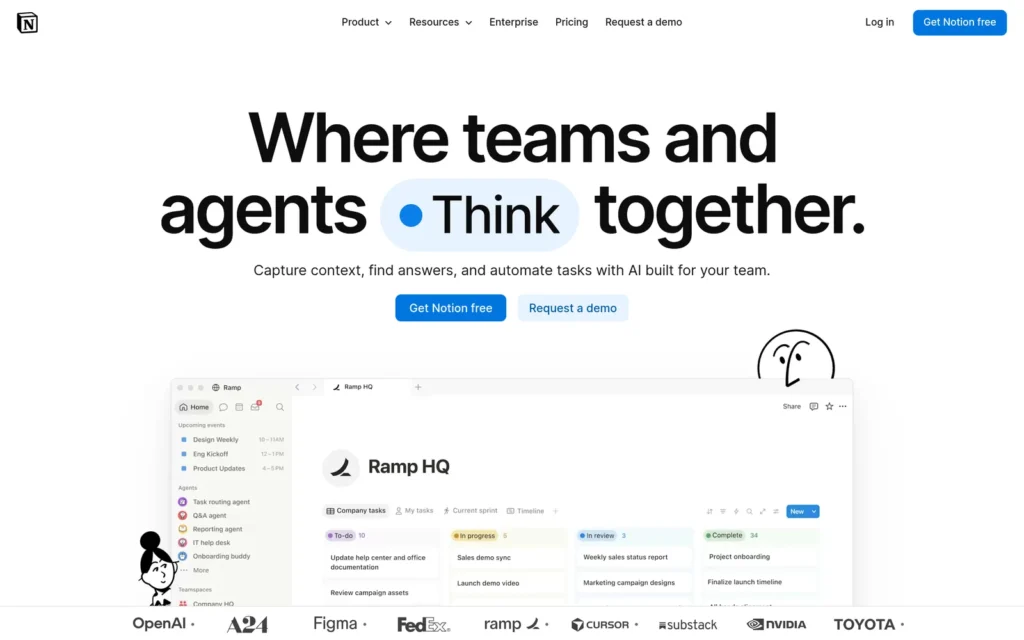
The free plan costs $0. For one person working alone, it is genuinely unlimited: as many pages and blocks as you like. The moment a second member joins, the free plan caps you at 1,000 blocks, with 5MB file uploads, 10 guests, and 7 days of page history. You also get a trial of Notion AI, basic forms, basic sites, Notion Calendar, and databases with subtasks, dependencies, and custom properties. For a solo founder, the free plan is a real home. For a team, it is a test drive with a visible end.
Plus costs $10 per member a month billed annually ($120 a year). Pay monthly and Plus costs $12 per member a month ($144 a year). Plus removes the block limit, raises file uploads to 5GB per file, extends page history to 30 days, and adds custom forms and custom sites, charts, collaborative blocks, and basic connections to other apps. Students and educators get Plus free with a school email, with a one-member limit. What Plus does not give you is full AI: on Free and Plus, Notion AI is a limited trial only.

Business costs $20 per member a month billed annually ($240 a year). Pay monthly and Business costs $24 per member a month ($288 a year).
Business is where the AI lives: Notion Agent, AI Meeting Notes, Enterprise Search in beta, and a monthly allowance of AI credits for each member. It also adds SAML single sign-on, private teamspaces, granular database permissions, 90-day page history, premium connections, and the ability to verify any page. Enterprise is custom-priced through sales, and adds zero data retention with AI providers, SCIM user provisioning, an audit log, domain management, advanced security, and a customer success manager.
The billing model is the mirror image of Docs. Notion charges per member, and every member costs the same. Guests are free, but a guest can only see the individual pages you invite them to — they cannot browse the teamspaces, and they cannot be given a role in the workspace. So the honest way to count a Notion bill is to count the people who need to live inside the workspace, not the people who occasionally read a page.
Five members on Plus cost $600 a year. Five members on Business cost $1,200 a year. There is no free-reader tier inside a workspace, which is the single biggest difference from Superhuman Docs.
Two more things to know before you pay. First, Notion AI used to be a $10 per member add-on you could attach to any plan. That ended in May 2025: full AI now lives only on Business and Enterprise, so if you want Notion and its AI, the floor is $20 a member a month, not $10.
Second, the AI runs on credits. Business and Enterprise seats include a monthly allowance of Standard and Select AI credits, and if you burn through them — on Custom Agents, or on the most expensive models — extra credits cost $10 per 1,000 Notion credits. For most small teams the allowance is enough. For a team that leans hard on agents, it is a second bill to watch.
The honest weakness is the ceiling. Notion is wonderful at organising information and weaker at doing things with it. Its automations are basic next to Docs: buttons exist, but the formula language is simpler, the cross-database actions are thinner, and there is no real equivalent of a doc that runs itself. If your work is mostly writing, linking, and finding things, Notion is the better tool. If your work is mostly tracking, calculating, and automating, you will feel the ceiling sooner than you expect.
Head-to-Head Comparison Table
| Superhuman Docs (formerly Coda) | Notion | |
|---|---|---|
| Free plan | $0 — collaborative docs, tables, formulas, automations (low quota); shared docs capped at 50 objects / 1,000 rows; 1GB attachments per doc; 7-day version history | $0 — unlimited blocks solo; 1,000-block cap with 2+ members; 5MB uploads; 10 guests; 7-day page history; AI trial only |
| First paid plan (annual) | Pro $12 per Doc Maker/mo ($144/yr) | Plus $10 per member/mo ($120/yr) |
| First paid plan (monthly) | Pro $15 per Doc Maker/mo ($180/yr) | Plus $12 per member/mo ($144/yr) |
| Business tier (annual) | $33 per Doc Maker/mo ($396/yr) | $20 per member/mo ($240/yr) |
| Who you pay for | Doc Makers only — editors and viewers free on every plan | Every member — guests free, but only for individual pages |
| Full AI included from | Pro (Docs AI, beta) | Business ($20/member/mo) |
| Best for | Docs that work like apps: trackers, buttons, automations | One calm workspace: docs, wiki, projects, notes |
| Biggest limit | Steeper learning curve; Docs AI still beta with no post-beta price | Per-member billing punishes big teams; AI floor is $20/member |
Cost Maths: What a 5-Person Team Really Pays in Year One
Headline prices lie by omission, so here is the honest maths for Superhuman Docs vs Notion for a five-person small business, over one full year, on annual billing. The scenario is the one most small businesses actually live in: two people build the docs and trackers, and three people read them, comment on them, and check things off.
Superhuman Docs Pro: two Doc Makers at $12 a month is $24 a month, or $288 a year. The three editors cost nothing. Superhuman Docs Business: two Doc Makers at $33 a month is $66 a month, or $792 a year. The three editors still cost nothing.
Notion Plus: five members at $10 a month is $50 a month, or $600 a year. Notion Business: five members at $20 a month is $100 a month, or $1,200 a year. Every member pays, including the three who only read.
Now flip the scenario. Suppose all five people build — everyone makes docs, everyone edits tables, everyone uses the AI. Superhuman Docs Pro becomes five makers at $12 a month: $60 a month, or $720 a year. Notion Plus stays at $600 a year. On the Business tier, five makers on Docs Business cost $1,980 a year, and five members on Notion Business cost $1,200 a year. When everybody builds, Notion wins by $120 a year on Plus and by $780 a year on Business.
And for one person working alone: Superhuman Docs Pro costs $144 a year, and Notion Plus costs $120 a year. Notion is $24 a year cheaper for a solo founder, and its free plan is the more generous of the two for a single user.
Pay monthly instead of annually and the gap grows. Docs Pro monthly is $15 a maker instead of $12 — $36 more per maker per year, and Grammarly stops being included in the bundle. Docs Business monthly is $40 a maker instead of $33 — $84 more per maker per year. Notion Plus monthly is $12 a member instead of $10 — $24 more per member per year.
Notion Business monthly is $24 a member instead of $20 — $48 more per member per year. On a five-person team, paying monthly costs $120 extra a year on Notion Plus and $240 extra on Notion Business, and $72 extra per maker on Docs Pro.
Here is the break-even that makes the decision easy. If your time is worth $25 an hour, Superhuman Docs Pro for two makers ($288 a year) pays for itself if it saves the team 11.5 hours in a whole year. Notion Plus for five members ($600 a year) pays for itself at 24 hours a year.
The Hidden Costs and Gotchas
First, the stale prices. Half the internet still says Coda costs $10 and $30 a Doc Maker, because those were the prices before the July 2026 rename. The live pricing page says $12 and $33 billed annually. If you budget from an old guide, you will be $24 a maker a year short on Pro and $36 short on Business.
Notion has the same problem in reverse: older guides still print $8 and $15 a member, from before Notion’s prices moved to $10 and $20. Check the vendor’s own page on the day you buy. This post did, on 18 November 2026.
Second, the monthly-billing penalty with a twist. Both tools charge more month to month, which is normal. What is not normal is the Docs bundle: Grammarly and Go are included with Pro on annual billing, but the pricing page lists Grammarly at $15 per Maker a month on monthly billing. Pay monthly for Pro and you lose the discount and pay extra for the writing assistant. If you want the bundle, pay annually.
Third, the free plan walls. Superhuman Docs caps shared docs at 50 objects and 1,000 rows on the free plan, and attachments at 1GB per doc. A tracker with a few thousand rows hits that wall fast, and the wall does not warn you politely — the doc goes read-only after a grace period. Notion caps the free plan at 1,000 blocks the moment a second member joins, which sounds like a lot until you realise a single meeting-notes page with headings, bullets, and a table can eat fifty blocks before lunch.
Fourth, the AI pricing nobody has announced yet. Docs AI is in beta, and it is available to Doc Makers during the beta. The vendor has not said what it will cost when the beta ends. If your workflow depends on Docs AI, budget for a price you cannot see yet. Notion is clearer but not free: full AI starts at Business, and heavy agent use burns credits at $10 per 1,000 Notion credits beyond the monthly allowance. A team that automates everything should watch the credit meter the way it watches the seat count.
Fifth, the seat-count trap on Notion. Guests are free, but only for individual pages. The moment a guest needs to browse a teamspace, join a project, or be given a role, they become a member — and members cost $10 or $20 a month.
Count the people who need to live inside the workspace, not the people who read one page. On Docs, the equivalent trap runs the other way: anyone who starts creating docs becomes a Doc Maker, and makers are billed. If your three “readers” start building their own trackers, your two-maker bill quietly becomes a five-maker bill. Check who is actually a maker in the admin panel every quarter.
Sixth, Enterprise is a sales call on both sides. Neither vendor publishes an Enterprise price, and both require a conversation. If you need SAML single sign-on, SCIM provisioning, or an audit log, you are not buying a plan — you are negotiating one.
Who Is Each Tool Actually Best For?
Superhuman Docs is best for the team where one or two people build and everybody else uses. It is also best for the team that wants its docs to do work: buttons that send messages, tables that update each other, automations that chase the follow-up before you forget it.
And it is best for the team that already pays for Grammarly, because Pro bundles it in on annual billing and the bundle is worth more than the discount.
Notion is best for the team where everybody writes. The consultancy where every consultant keeps client notes, the agency where every account manager updates the same project board, the shop where the whole team lives in one wiki. It is also best for the team that wants the lowest learning curve: a new hire is productive in Notion in an afternoon, and the template gallery means you rarely start from a blank page. And it is best for the solo founder, where one member on Plus costs $120 a year against one maker on Pro at $144.
Superhuman Docs is the wrong pick if everyone on your team needs to build and nobody wants to learn formulas. Notion is the wrong pick if your team is large, mostly readers, and you would be paying $10 or $20 a month for people who only check a page. If your team is five people and three of them only read, Docs Pro saves you $312 a year. If your team is five people and all five build, Notion Plus saves you $120 a year. That is the whole Superhuman Docs vs Notion decision in one sentence: count the makers, then count the readers.
Work Out Your Own Number First
The maths above assumes two makers and three readers, or five builders, or one solo founder. Count how many people actually create docs, count how many only read them, and count how many need the AI every day. Then put the two totals side by side. Our free AI Cost Calculator does exactly that kind of comparison: plug in the seats, the billing cycle, and the add-ons, and it shows you the real yearly cost instead of the headline monthly figure. Five minutes with a calculator beats a year of paying for seats nobody uses.
Pros and Cons
Pros:
- Superhuman Docs charges only for Doc Makers, so a team of two builders and twenty readers pays for two people — the cheapest real-world bill in this comparison.
- Notion Plus costs $10 a member a month billed annually, $24 a year less than Docs Pro for a solo user, with the gentlest learning curve of any workspace tool.
- Superhuman Docs Pro bundles Grammarly and Go on annual billing, and Business adds Superhuman Mail — three tools for one price.
- Notion’s template gallery and linked databases make it the fastest tool to set up: a new workspace is useful on day one, not week two.
- Both tools are free to start, and both free plans are honest test drives — you can run a real project on either before you pay.
Cons:
- Superhuman Docs has a steeper learning curve: formulas, automations, and cross-doc syncing take an afternoon to learn, and Docs AI is still in beta with no announced post-beta price.
- Notion charges for every member, so a five-person team pays $600 a year on Plus even if three people only read pages.
- Notion’s full AI starts at Business, so the real floor for Notion plus AI is $20 a member a month, not the $10 headline.
- Superhuman Docs caps free shared docs at 50 objects and 1,000 rows, and Notion caps the free team plan at 1,000 blocks — both free plans have a wall you will hit.
- Neither vendor publishes an Enterprise price, and both make you book a sales call for SAML, SCIM, and audit logs.
Our Verdict
If you only buy one, buy the one that matches how your team actually works, not the one with the lower headline price. For most small businesses, the Superhuman Docs vs Notion answer is Superhuman Docs Pro — because most small businesses have one or two builders and a team of readers, and Docs is the only tool here that does not charge you for the readers. Two makers on Pro cost $288 a year, with Grammarly and Go included on annual billing, and the docs you build can run the business while you sleep.
But the honest answer depends on your headcount. If all five people on your team build docs every day, buy Notion Plus at $600 a year and save $120 against Docs Pro. If you are a solo founder, buy Notion Plus at $120 a year and save $24 against Docs Pro.
If you want full AI on Notion, buy Business at $20 a member a month — and go in knowing the AI floor is $240 a member a year, not $120. If you want full AI on Docs, buy Pro and use Docs AI while it is in beta, but keep an eye on the price announcement, because the beta will not last forever.
Start free on both. Build one real tracker — a client list, a content calendar, a simple inventory — in each tool, and give it to the people who will actually use it. The tool your team opens without being asked is the right tool. The tool that costs less for the people who only read is the cheaper one. For most small teams, those two answers point at Superhuman Docs. For teams where everybody writes, they point at Notion. The most expensive mistake here is not picking the wrong workspace — it is spending another month choosing while the business runs on sticky notes.
Frequently Asked Questions
Is Superhuman Docs the same as Coda?
Yes. Coda was renamed Superhuman Docs on 8 July 2026, and it is the same product: your existing docs carried over automatically, and the vendor said existing customers’ pricing was not changing. The pricing page moved from coda.io/pricing to superhuman.com/plans/docs, and the old Team plan is now called Business. The new published prices are $12 and $33 per Doc Maker a month billed annually, up from the old $10 and $30 in older guides.
Which is cheaper for a small team, Superhuman Docs or Notion?
It depends on who builds. Superhuman Docs charges only for Doc Makers, so a five-person team with two makers pays $288 a year for Pro, against $600 a year for five members on Notion Plus. But if all five people build, Notion Plus costs $600 a year and Docs Pro costs $720 a year, so Notion is cheaper. For one person, Notion Plus at $120 a year beats Docs Pro at $144 a year. Count your makers first, then compare.
Can I use Superhuman Docs or Notion free forever?
Yes, both have a free plan with no time limit, but both have walls. Superhuman Docs caps free shared docs at 50 objects and 1,000 rows, with 1GB of attachments per doc and 7 days of version history. Notion’s free plan is unlimited for one person, but caps a multi-member workspace at 1,000 blocks, with 5MB file uploads and 10 guests. A solo founder can live on either free plan for a long time; a team will hit a wall within months.
Which has better AI, Superhuman Docs or Notion?
They aim at different jobs. Docs AI, still in beta, builds trackers, pages, and views from a prompt and answers questions across your docs, and it is included with Pro while the beta lasts — with no announced price after the beta.
Notion AI is the more finished product: Notion Agent, AI Meeting Notes, and Enterprise Search, but full AI starts at Business, which costs $20 a member a month, and heavy use burns credits at $10 per 1,000 Notion credits. If you want AI included at the cheapest paid tier, Docs wins. If you want the most polished AI today, Notion Business wins.
Can I switch from Notion to Superhuman Docs, or back again?
Yes, but expect a weekend of cleanup, not a one-click move. Both tools let you import files and export your pages, so your words survive the move — but tables, formulas, automations, and linked databases rarely survive intact, and you will rebuild the clever parts by hand. Move one project first, keep the old workspace open for a month, and only cancel when the new one is doing the real work. The switching cost is the strongest reason to pick carefully now.
Price Note
Price note — updated 18 November 2026: Prices in this post were checked on 18 November 2026. When you are reading this, the price may be lower or higher — always check the official pricing page before you buy.
Pros
- Superhuman Docs charges only for Doc Makers, so a team of two builders and twenty readers pays for two people — the cheapest real-world bill in this comparison.
- Notion Plus costs $10 a member a month billed annually, $24 a year less than Docs Pro for a solo user, with the gentlest learning curve of any workspace tool.
- Superhuman Docs Pro bundles Grammarly and Go on annual billing, and Business adds Superhuman Mail — three tools for one price.
- Notion's template gallery and linked databases make it the fastest tool to set up: a new workspace is useful on day one, not week two.
- Both tools are free to start, and both free plans are honest test drives — you can run a real project on either before you pay.
Cons
- Superhuman Docs has a steeper learning curve: formulas, automations, and cross-doc syncing take an afternoon to learn, and Docs AI is still in beta with no announced post-beta price.
- Notion charges for every member, so a five-person team pays $600 a year on Plus even if three people only read pages.
- Notion's full AI starts at Business, so the real floor for Notion plus AI is $20 a member a month, not the $10 headline.
- Superhuman Docs caps free shared docs at 50 objects and 1,000 rows, and Notion caps the free team plan at 1,000 blocks — both free plans have a wall you will hit.
- Neither vendor publishes an Enterprise price, and both make you book a sales call for SAML, SCIM, and audit logs.
If you only buy one, buy the one that matches how your team actually works, not the one with the lower headline price. For most small businesses, the Superhuman Docs vs Notion answer is Superhuman Docs Pro — because most small businesses have one or two builders and a team of readers, and Docs is the only tool here that does not charge you for the readers. Two makers on Pro cost $288 a year, with Grammarly and Go included on annual billing, and the docs you build can run the business while you sleep. But the honest answer depends on your headcount. If all five people on your team build docs every day, buy Notion Plus at $600 a year and save $120 against Docs Pro. If you are a solo founder, buy Notion Plus at $120 a year and save $24 against Docs Pro. If you want full AI on Notion, buy Business at $20 a member a month — and go in knowing the AI floor is $240 a member a year, not $120. If you want full AI on Docs, buy Pro and use Docs AI while it is in beta, but keep an eye on the price announcement, because the beta will not last forever. Start free on both. Build one real tracker — a client list, a content calendar, a simple inventory — in each tool, and give it to the people who will actually use it. The tool your team opens without being asked is the right tool. The tool that costs less for the people who only read is the cheaper one. For most small teams, those two answers point at Superhuman Docs. For teams where everybody writes, they point at Notion. Pick one this week, move one project into it, and stop comparing. The most expensive mistake here is not picking the wrong workspace — it is spending another month choosing while the business runs on sticky notes.
1 thought on “Superhuman Docs vs Notion (2026): Which One Should You Pick?”