

The best to-do list apps for most small businesses in 2026 are Todoist Pro at $5 a month billed annually and Microsoft To Do at $0. Todoist Pro costs $5 a month billed annually ($60 a year) and is the best all-round pick: it works on every platform, it understands plain English due dates, and its free plan is generous enough to test properly. Microsoft To Do costs $0 and is the best free to-do list app: the whole app is free, with no task limit, and you only pay if you outgrow the 5GB of OneDrive storage that comes with it — 100GB costs $1.99 a month. TickTick Premium costs $49.99 a year (about $4.17 a month) and is the pick if you want a calendar, a habit tracker, and a Pomodoro timer in the same app instead of buying three apps. Any.do Premium costs $4.99 a month billed annually ($59.88 a year) and is the pick for a household or a small team that wants shared lists and WhatsApp reminders. Things 3 costs $49.99 once for the Mac app (or $59.98 once for Mac plus iPhone) and is the pick if you live on Apple devices and would rather own your task manager than rent it.
Best To-Do List Apps (2026): Compared by Real Price
Quick Answer Box
The best to-do list apps for most small businesses in 2026 are Todoist Pro at $5 a month billed annually and Microsoft To Do at $0. Todoist Pro costs $5 a month billed annually ($60 a year) and is the best all-round pick: it works on every platform, it understands plain English due dates, and its free plan is generous enough to test properly.
Microsoft To Do costs $0 and is the best free to-do list app: the whole app is free, with no task limit, and you only pay if you outgrow the 5GB of OneDrive storage that comes with it — 100GB costs $1.99 a month.
TickTick Premium costs $49.99 a year (about $4.17 a month) and is the pick if you want a calendar, a habit tracker, and a Pomodoro timer in the same app instead of buying three apps. Any.do Premium costs $4.99 a month billed annually ($59.88 a year) and is the pick for a household or a small team that wants shared lists and WhatsApp reminders. Things 3 costs $49.99 once for the Mac app (or $59.98 once for Mac plus iPhone) and is the pick if you live on Apple devices and would rather own your task manager than rent it.
In this article
- Quick Answer Box
- The Short Version: What You Are Actually Choosing Between
- How I Compared Them
- Todoist: The Default, at $5 a Month Annual
- TickTick: The All-in-One, at $49.99 a Year
- Microsoft To Do: The Free One, at $0
- Any.do: The Family One, at $4.99 a Month Annual
- Things 3: The Buy-Once One, at $49.99 for Mac
- Head-to-Head Comparison Table
- Cost Maths: What One Person Really Pays in Year One
- The Hidden Costs and Gotchas
- Who Is Each Tool Actually Best For?
- Work Out Your Own Number First
- Pros and Cons
- Our Verdict
- Frequently Asked Questions
- Price Note
The Short Version: What You Are Actually Choosing Between
Every small business runs on a list. The five apps here run from free to $60 a year, and four of them are free to start. The question is not whether you can afford a to-do app. It is which free plan quietly stops being enough the moment your business grows.
Here is the short version. Todoist is the default: the app most people mean when they say to-do list app, and the one that works the same on every device you own. TickTick is the all-in-one: tasks, calendar, habits, and a Pomodoro timer in a single app, for less than Todoist.
Microsoft To Do is free, full stop, and if your business already lives in Outlook, it is the first app you should try. Any.do is the family one: shared grocery lists, a shared household, and reminders that arrive on WhatsApp. Things 3 is the buy-once one: you pay $49.99 for the Mac app and never pay again, but only if every device you own has an Apple logo on it.
The trap to watch for is the free plan that is not really a plan. Todoist’s free Beginner plan allows only 5 personal projects — fine for one person, useless the moment you separate work from home. TickTick’s free plan allows 9 lists and 99 tasks per list, which sounds generous until your third project fills up. Any.do’s free plan has no recurring tasks and no location reminders, which are the two features that make a to-do app actually remind you. Microsoft To Do and Things 3 have no such trap, for opposite reasons: To Do is free with no paid tier at all, and Things 3 has no free tier at all.
If you run a one-person business, start with Microsoft To Do and spend nothing, or start with Todoist’s free plan and pay $60 a year when you hit the 5-project wall. The rest of this post is the evidence: every price read on the vendor’s own pricing page, and the maths for one person over a full year.
How I Compared Them
I compared five apps: Todoist, TickTick, Microsoft To Do, Any.do, and Things 3. I picked them from Zapier’s 2026 roundup of the best to-do list apps, where a reviewer tested dozens of task apps and named these five among the best. Every price in this post was read on the vendor’s own pricing page on 18 November 2026, and the publishing check re-read all five pages and corrected anything that had moved.
If you also need somewhere to keep the notes behind the tasks, our comparison of the best note-taking apps covers the five apps that pair best with a to-do list.
One more thing before the details. Prices here are in US dollars, as the vendors show them. Todoist, TickTick, and Any.do charge per person or per member. Microsoft To Do has no paid tier. Things 3 charges once per device, with no subscription. Where a price could not be read on the official page on the day of publishing, I left it out and said so — I would rather print nothing than print a guess.
Todoist: The Default, at $5 a Month Annual
Todoist is the app most people picture when they hear to-do list app. It has been around since 2007, it works on Windows, Mac, iOS, Android, the web, and even Linux, and Zapier named it the best to-do list app overall. Its strength is not any single feature. It is that the whole thing feels effortless: type “Call the supplier every Friday at 9am” and Todoist understands the words, sets the recurring task, and gets out of your way.
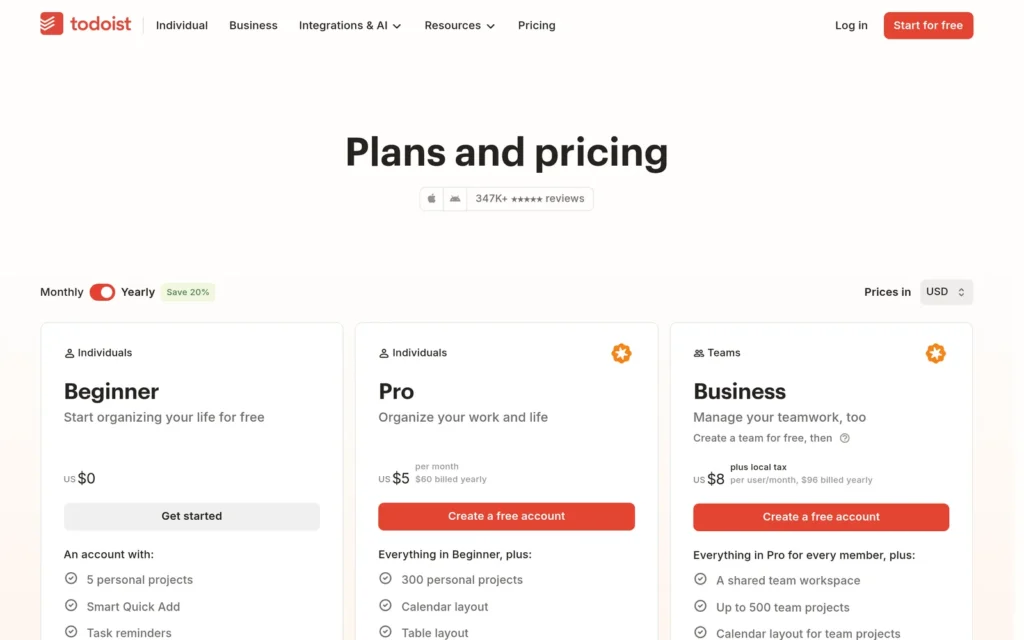
The free Beginner plan costs $0. It gives you 5 personal projects, Smart Quick Add, task reminders, flexible list and board layouts, 3 filter views, and 1 week of activity history, plus email and calendar integrations. Five projects sounds like plenty until you try to separate work, home, and the side project — then you are full, and that is the point. The free plan is a proper test drive, not a permanent home.
Pro costs $5 a month billed annually ($60 a year). Pay monthly and Pro costs $7 a month ($84 a year). Pro raises the limits to 300 personal projects, adds calendar and table layouts, task duration, custom task reminders, 150 filter views, full reporting history, deadlines, unlimited voice capture with Ramble, and Task Assist, the AI that helps you break a big task into steps. There is a 7-day Pro trial if you want to test the paid features first.
Business costs $8 per user a month billed annually ($96 a year), plus local tax. It gives every member everything in Pro, plus a shared team workspace, up to 500 team projects, shared templates, and team roles and permissions, for up to 1,000 team members and guests. Pay monthly and Business costs $10 per user a month ($120 a year), plus local tax.
For one person, Todoist Pro costs $60 a year. The honest weakness is the same as its strength: Todoist is a task list, not a calendar, not a habit tracker, and not a project manager. If you want your tasks on a calendar, you pay for Pro and then sync it to Google Calendar or Outlook yourself. If you want habits, you buy a second app.
TickTick: The All-in-One, at $49.99 a Year
TickTick is the app for people who looked at Todoist and asked why it does not have a calendar. It is a to-do list, a calendar, a habit tracker, and a Pomodoro timer in one app, on every platform including Linux. Zapier named it the best to-do list app for a reason: it is the only app here that can replace three apps at once, and it costs less than Todoist to do it.
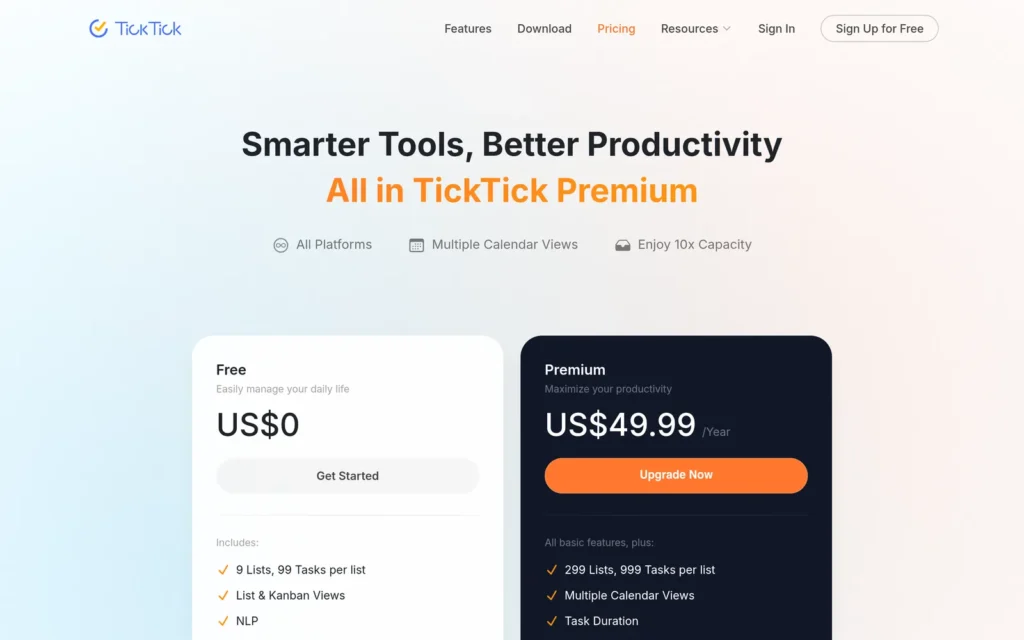
The free plan costs $0. It gives you 9 lists, 99 tasks per list, list and kanban views, natural-language date recognition, a basic calendar, 5 habits, a Pomodoro timer, and limited reminders. Nine lists is more than Todoist’s 5 projects, and for a lot of people the free plan never runs out. The catch is the calendar: full calendar views, the timeline, and two-way calendar sync are Premium features, and so are the Eisenhower Matrix, custom smart lists, themes, and detailed habit statistics.
Premium costs $49.99 a year on TickTick’s own website — about $4.17 a month, charged once a year. That is the list price on the upgrade page today. Two things to know before you pay. First, the monthly option exists only in the app stores: the US App Store lists Premium at $4.99 a month, which comes to $59.88 a year.
Second, some visitors see a promotional annual price of $35.99 a year instead of $49.99 — TickTick runs that offer on and off, so check the upgrade page on the day you buy and take the lower figure if it is showing. Students and educators get 25% off the annual plan with a school email.
For one person, Premium costs $49.99 a year — $10.01 less than Todoist Pro for an app that does more. The honest weakness is trust in the small print: there is no team or family plan, so a team of five pays five times with no discount. But for one person who wants tasks, calendar, habits, and a timer in one place, TickTick is the best value on this list.
Microsoft To Do: The Free One, at $0
Microsoft To Do is the best free to-do list app, and the simplest recommendation in this post: if you do not know which to-do app to pick, pick To Do, and spend nothing. It is free on Windows, Mac, iOS, Android, and the web, with a free Microsoft account, and there is no paid tier at all. No project limit, no task limit, no feature held back for a subscription that does not exist.

To Do works like a paper list that got smart. Every morning it shows you My Day: a fresh list you build from your tasks, your flagged emails, and anything due today. If your business already lives in Outlook, To Do is already there — flagged emails become tasks automatically, and your Planner tasks and Teams assignments show up in the same list.
The price is $0, and the only thing you pay for is storage. To Do uses your OneDrive storage: you get 5GB free, which is more than enough for text tasks, but file attachments eat it faster than you expect. If you hit the limit, 100GB costs $1.99 a month through Microsoft 365 Basic ($19.99 a year). Microsoft 365 Personal, which adds 1TB of storage and the full Office apps, costs $9.99 a month or $99.99 a year.
For one person, Microsoft To Do costs $0, and for a team of five it also costs $0, as long as everyone stays inside 5GB. The honest weakness is that To Do is a simple app, and it knows it. There are no tags, no kanban board, no natural-language input, no start dates, no built-in Pomodoro timer, and no habit tracker. If your task list is a list and nothing more, To Do is all you need. If you want the app to do more than hold the list, you will outgrow it — and when you do, the upgrade path is Todoist or TickTick, not a Microsoft upsell, because there is nothing to upsell to.
Any.do: The Family One, at $4.99 a Month Annual
Any.do is the to-do app for people whose lists are shared. If your business list and your family list live in the same head, Any.do is the app that keeps them in the same place without mixing them up.
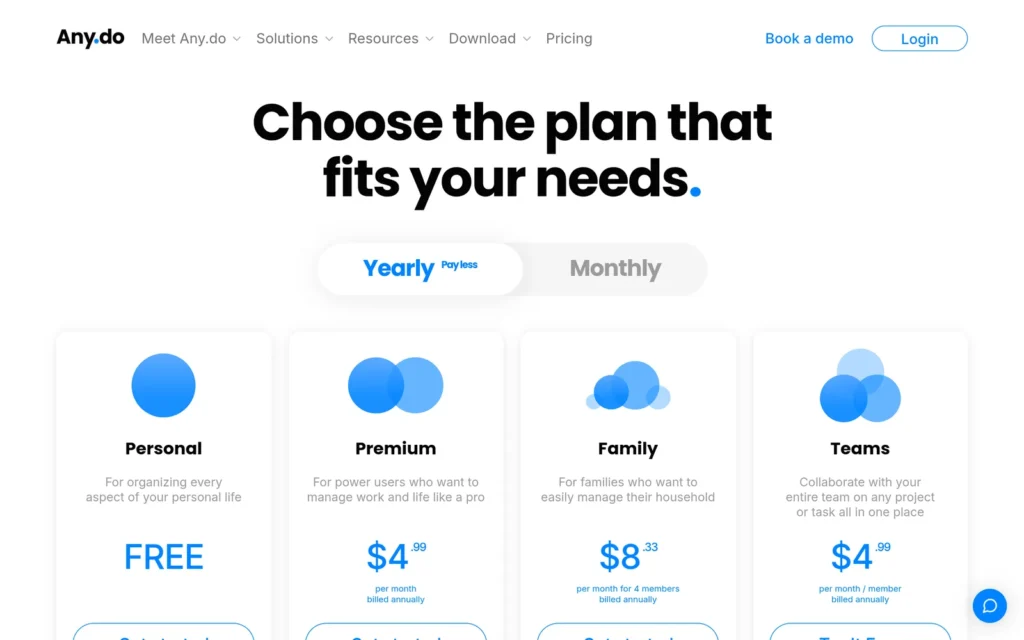
The free Personal plan costs $0, forever, with no credit card. It gives you tasks and lists, reminders, a calendar, a daily planner, and sync across devices. What it does not give you is the reason most people pay: recurring tasks, location reminders, color tags, AI-powered features, and WhatsApp reminders are all Premium. The free plan is a proper list app, but the moment you want the app to remind you when you arrive at the shop, you need to pay.
Premium costs $4.99 a month billed annually ($59.88 a year), or $7.99 a month billed monthly. It adds everything in Personal, plus recurring tasks, WhatsApp reminders, AI-powered features, color tags, and location reminders.
The Family plan costs $8.33 a month for 4 members billed annually ($99.96 a year), or $9.99 a month billed monthly, and adds a shared family space, up to 4 members included, a shared grocery list, and up to 4 shared projects. The Teams plan costs $4.99 per member a month billed annually, or $7.99 billed monthly, and adds a collaborative workspace, unlimited project boards, unlimited team members, more than 100 workflow templates, and admin tools and permissions.
Teams comes with a 14-day free trial. For one person, Any.do Premium costs $59.88 a year — almost the same as Todoist Pro, for a different kind of app. The honest weakness is that Any.do is a list app with a calendar attached, not a project manager: there are no 300-project limits to hit, but there is also no board view worth the name and no reporting history. Its strength is the one nobody else here has: WhatsApp reminders and a family plan that costs less than two Premium seats.
Things 3: The Buy-Once One, at $49.99 for Mac
Things 3 is the odd one out, and the prettiest app on this list. It is made by Cultured Code, it has won the Apple Design Award twice, and it is the only app here with no subscription at all. You buy it once, on each device, and it is yours. There is no free tier, no monthly bill, and no company that can raise the price on you next year — because there is no price next year.
Things works like a calm piece of paper. Areas hold the parts of your life, Projects sit inside them with headings for phases, and every to-do can have a checklist, tags, notes, a When date, and a separate Deadline. The Today view shows your calendar events next to the day’s to-dos. Quick Entry lets you capture a task from any app in seconds.
The price is one-time, per device: $49.99 for the Mac app, $9.99 for the iPhone app (which includes the Apple Watch app), $19.99 for the iPad app, and $29.99 for the Apple Vision Pro app. Buying the usual three — Mac, iPhone, and iPad — costs $79.97, once. All four cost $109.96, once. The Mac app comes with a 15-day free trial; the iPhone, iPad, and Vision apps have no trial, so you pay before you see them. Sync through Things Cloud is free, and there is no subscription to keep it working.
For one person on a Mac and an iPhone, Things 3 costs $59.98 once — about the same as one year of Todoist Pro, and then nothing, ever. Over five years, that is $59.98 against $300 for Todoist Pro or $249.95 for TickTick Premium. The honest weakness is the one you already know: Things 3 runs only on Apple devices. No Windows, no Android, no web app, and no way to share a list with anyone. If your whole life is on Apple devices and your lists are yours alone, Things 3 is the best deal on this list. If anyone on your team uses Windows, it is not an option at all.
Head-to-Head Comparison Table
| App | Free plan | First paid plan (annual) | Best for | Biggest limit |
|---|---|---|---|---|
| Todoist | $0 — 5 projects, 3 filter views | Pro $5/mo ($60/yr) | The all-round default | No calendar, habits, or timer built in |
| TickTick | $0 — 9 lists, 99 tasks per list | Premium $49.99/yr ($4.17/mo) | Tasks + calendar + habits in one app | No team plan; promo price varies |
| Microsoft To Do | $0 — no task limit, no paid tier | None — $0 forever | Free on every platform | No tags, no kanban, no natural language |
| Any.do | $0 — tasks, lists, calendar | Premium $4.99/mo ($59.88/yr) | Shared family and household lists | Weak project views and reporting |
| Things 3 | None — no free tier | Mac $49.99 once ($59.98 Mac + iPhone) | Apple-only owners who hate subscriptions | Apple only; no sharing at all |
Cost Maths: What One Person Really Pays in Year One
Headline prices lie by omission, so here is the honest maths for the best to-do list apps for one person, over one full year, on annual billing wherever it exists. The scenario is a one-person business: tasks every day, lists for work and home, sync across phone and laptop, and reminders that actually arrive.
Todoist Pro: $5 a month billed annually, or $60 a year. Pay monthly and Pro costs $7 a month ($84 a year), while Business costs $10 per user a month ($120 a year), plus local tax.
TickTick Premium: $49.99 a year on the website, about $4.17 a month. Pay through the App Store monthly and it costs $4.99 a month, or $59.88 a year — $9.89 more than the annual plan. If the $35.99 promotional annual price is showing on the day you buy, take it: that is $2.99 a month, and $14 less than the list price.
Microsoft To Do: $0. No paid tier exists. If your attachments outgrow the free 5GB of OneDrive, 100GB costs $19.99 a year through Microsoft 365 Basic — but that is storage, not the app.
Any.do Premium: $4.99 a month billed annually, or $59.88 a year. Pay monthly and it costs $7.99 a month, or $95.88 a year — $36 more than the annual plan, the biggest monthly penalty on this list. The Family plan for 4 members costs $99.96 a year billed annually, or $24.99 per person per year.
Things 3: $59.98 once for the Mac and iPhone apps, and then $0 a year after that. Add the iPad app and it is $79.97 once. There is no annual bill to forget, and no renewal to cancel.
Add it up. The four subscription apps together cost $169.87 a year: Todoist Pro $60, TickTick Premium $49.99, Microsoft To Do $0, and Any.do Premium $59.88. Add Things 3 at $59.98 once, and all five together cost $229.85 in year one — and only $169.87 in year two, because Things 3 never bills again.
Here is the break-even that makes the decision easy. If your time is worth $25 an hour, Todoist Pro pays for itself if it saves you 2.4 hours in a whole year — about 12 minutes a month. TickTick Premium pays for itself at 2 hours a year. Any.do Premium pays for itself at 2.4 hours a year. If a to-do app saves you one forgotten follow-up, one missed supplier call, or one late invoice in a year, it has already paid for itself several times over. The expensive mistake is not buying the wrong app. It is running your business from memory and sticky notes.
The Hidden Costs and Gotchas
First, the monthly penalty. Every subscription app here charges more if you pay monthly, and the gap is not small. Any.do charges $36 a year extra for monthly billing. TickTick charges $9.89 extra. Todoist charges $24 a year extra for monthly billing on Pro ($7 a month instead of $5), and $24 a year extra per user on Business.
Second, the free plan wall. Todoist’s 5-project limit arrives faster than you think: work, home, and one side project, and you are full. TickTick’s 9 lists last longer, but 99 tasks per list fills up if you keep a running list of everything. Any.do’s free plan has no recurring tasks, which means the daily and weekly jobs you actually need reminding about are the ones it will not do. Microsoft To Do has no wall at all, which is why it is the best free plan here.
Third, the promo price that is not the price. TickTick’s website lists Premium at $49.99 a year, but some visitors see $35.99 a year, and the App Store lists $4.99 a month. All three are real prices for the same plan, on different days and different stores. Buy the cheapest one you can see on the day, and write down what you paid, because the renewal will charge the price you signed up at — check it before it renews, not after.
Fourth, the Things 3 device trap. Things 3 is cheap if you buy it once and use it for years, but it is $79.97 for the usual three devices, and $109.96 if you add Vision Pro, and there is no bundle. If you buy the Mac app and then switch to Windows, your $49.99 buys you nothing on the new machine. Buy Things 3 only if you are sure your next computer will also be a Mac.
Fifth, the storage bill that is not the app bill. Microsoft To Do is free, but its attachments live in OneDrive, and 5GB goes fast once your tasks carry photos and PDFs. The 100GB upgrade costs $19.99 a year, which is still cheap — but it is a bill you did not expect from a free app, and it recurs every year.
Sixth, the team maths. Todoist Business costs $8 per user a month, so a team of five pays $480 a year. TickTick has no team plan, so five Premium seats cost $249.95 a year with no discount. Any.do Teams costs $4.99 per member a month billed annually, or $299.40 a year for five. Microsoft To Do costs $0 for five people, and Things 3 cannot be used by a team at all. If you are buying for a team, the per-person price is the wrong number — multiply first, then choose.
Seventh, the export question. Todoist and TickTick both export your data, and Todoist’s Pro plan keeps a full reporting history. Things 3 keeps your tasks on your own devices, in a format you can back up. Microsoft To Do and Any.do keep your tasks on their servers, and getting them out takes more work.
Who Is Each Tool Actually Best For?
Todoist is best for the owner who wants the safe default. It works everywhere, it has the biggest community and the most integrations, and its free plan is good enough to test for a month. Skip it if you want a calendar or a habit tracker built in — Todoist will make you buy a second app for that.
TickTick is best for the owner who wants one app instead of three. Tasks, calendar, habits, and a Pomodoro timer, for $49.99 a year, on every platform including Linux. Skip it if you need a team plan.
Microsoft To Do is best for the owner who wants to spend nothing and already lives in Outlook. It is free, it has no limits, and flagged emails become tasks without you doing anything. It is also the best pick for a team of five on a $0 budget, because the whole team pays nothing. Skip it if you want tags, a kanban board, or natural-language input — To Do is a list, and it is proud of it.
Any.do is best for the household and the small team that shares lists. The Family plan at $8.33 a month for 4 members is the cheapest shared plan here, and WhatsApp reminders are the feature nobody else offers. Skip it if you need project reporting or a board view — Any.do is a list app, not a project manager.
Things 3 is best for the Apple-only owner who hates subscriptions. Pay $59.98 once for Mac and iPhone, and never think about the bill again. It is the prettiest app here, and the calmest to use. Skip it if anyone on your team uses Windows or Android, if you need to share a list with a colleague, or if you want to attach files to your tasks — Things 3 does none of those things, on purpose.
Work Out Your Own Number First
A free plan with a 5-project limit is free only until your sixth project. A $49.99 annual plan is cheap only if you pay annually — monthly, it is $59.88. A buy-once app is cheap only if you stay on the same platform for years.
That is exactly what our free AI Cost Calculator is for. Put in the price of the app you are considering, the number of people who will use it, and the hours it saves you each week, and it works out the real cost per person per year — including the monthly-billing penalty and the renewal price. Use it before you pay, not after: https://aitbizhub.com/ai-cost-calculator/
Pros and Cons
The best to-do list apps in 2026 share the same strengths: every one of them is free to start except Things 3, every one of them syncs across your phone and your computer, and the dearest subscription here costs $5 a month — less than one coffee.
Pros:
- Microsoft To Do is free on every platform with no task limit, and it is the first app most people should try.
- Todoist Pro at $5 a month billed annually is the safest default: it works everywhere and understands plain English dates.
- TickTick Premium at $49.99 a year replaces three apps — tasks, calendar, habits, and a Pomodoro timer in one place.
- Any.do Premium at $4.99 a month billed annually adds WhatsApp reminders and a family plan for 4 members at $8.33 a month.
- Things 3 costs $59.98 once for Mac and iPhone, and then never bills you again.
Cons:
- Todoist’s free plan allows only 5 projects, and its monthly-billed price is higher than the $5 annual figure the page leads with.
- TickTick’s price changes by store and by day — $49.99 a year on the website, $4.99 a month in the App Store, and a $35.99 promo some visitors see.
- Microsoft To Do has no tags, no kanban board, no natural-language input, and no habit tracker.
- Any.do’s free plan has no recurring tasks and no location reminders, and monthly billing costs $36 a year more than annual.
- Things 3 is Apple-only, has no free tier, no sharing, and costs $79.97 once if you want it on Mac, iPhone, and iPad.
Our Verdict
If you only buy one, buy Todoist Pro at $5 a month billed annually — $60 a year — because it is the app you are least likely to regret. It works on every device, it understands plain English, and its free plan lets you test it properly before you pay. But the honest answer for most small businesses is to buy nothing first: start with Microsoft To Do, which costs $0, works on every platform, and has no task limit. If you hit its limits — no tags, no kanban, no natural language — move to Todoist Pro and pay the $60.
If you want one app instead of three, buy TickTick Premium at $49.99 a year — $10.01 less than Todoist Pro, with a calendar, a habit tracker, and a Pomodoro timer included. Check the upgrade page on the day you buy: if the $35.99 promotional price is showing, take it. If your household shares lists, buy Any.do Premium at $4.99 a month billed annually, or the Family plan at $8.33 a month for 4 members. If every device you own is made by Apple and you never want another subscription, buy Things 3 for $59.98 once and be done with it.
Frequently Asked Questions
What is the best free to-do list app for a small business?
Microsoft To Do. It costs $0, it has no task or project limit, and it works on Windows, Mac, iOS, Android, and the web. The only thing you pay for is OneDrive storage if your attachments outgrow the free 5GB — 100GB costs $1.99 a month.
Is Todoist Pro worth $5 a month?
Yes, if you use a to-do app every day. Pro costs $60 a year billed annually and raises the project limit from 5 to 300, adds calendar and table layouts, custom reminders, deadlines, and full reporting history. At $25 an hour, it pays for itself if it saves you 2.4 hours in a whole year. If you only keep a short daily list, the free Beginner plan is enough — pay when you hit the 5-project wall, not before.
Is TickTick Premium really $49.99 a year?
That is the list price on TickTick’s own upgrade page, and it is the price this post prints. Two variations exist: the US App Store lists Premium at $4.99 a month ($59.88 a year), and some visitors see a promotional annual price of $35.99 a year on the website. All three are real prices for the same plan.
Can I use Things 3 on Windows or Android?
No. Things 3 runs only on Apple devices: Mac, iPhone, iPad, Apple Watch, and Apple Vision Pro. There is no web app, no Windows app, and no Android app. It also has no sharing, so you cannot share a list with a colleague. If anyone on your team uses Windows, Things 3 is not an option — use Todoist or TickTick instead.
What happens to my tasks if I cancel my subscription?
Your tasks stay in the free plan, with the free plan’s limits. Todoist drops you to 5 projects, so move your extra projects before you cancel or they become read-only. TickTick drops you to 9 lists and 99 tasks per list. Any.do drops you to the Personal plan and switches off recurring tasks and location reminders. Things 3 has no subscription, so there is nothing to cancel — the apps keep working.
Price Note
Price note — updated 18 November 2026: Prices in this post were checked on 18 November 2026. When you are reading this, the price may be lower or higher — always check the official pricing page before you buy.
Related: Smartsheet vs Asana (2026): Which One Should You Pick?
Pros
- Microsoft To Do is free on every platform with no task limit, and it is the first app most people should try.
- Todoist Pro at $5 a month billed annually is the safest default: it works everywhere and understands plain English dates.
- TickTick Premium at $49.99 a year replaces three apps — tasks, calendar, habits, and a Pomodoro timer in one place.
- Any.do Premium at $4.99 a month billed annually adds WhatsApp reminders and a family plan for 4 members at $8.33 a month.
- Things 3 costs $59.98 once for Mac and iPhone, and then never bills you again.
Cons
- Todoist's free plan allows only 5 projects, and its monthly-billed price is higher than the $5 annual figure the page leads with.
- TickTick's price changes by store and by day — $49.99 a year on the website, $4.99 a month in the App Store, and a $35.99 promo some visitors see.
- Microsoft To Do has no tags, no kanban board, no natural-language input, and no habit tracker.
- Any.do's free plan has no recurring tasks and no location reminders, and monthly billing costs $36 a year more than annual.
- Things 3 is Apple-only, has no free tier, no sharing, and costs $79.97 once if you want it on Mac, iPhone, and iPad.
If you only buy one, buy Todoist Pro at $5 a month billed annually — $60 a year — because it is the app you are least likely to regret. It works on every device, it understands plain English, and its free plan lets you test it properly before you pay. But the honest answer for most small businesses is to buy nothing first: start with Microsoft To Do, which costs $0, works on every platform, and has no task limit. If you hit its limits — no tags, no kanban, no natural language — move to Todoist Pro and pay the $60. If you want one app instead of three, buy TickTick Premium at $49.99 a year — $10.01 less than Todoist Pro, with a calendar, a habit tracker, and a Pomodoro timer included. Check the upgrade page on the day you buy: if the $35.99 promotional price is showing, take it. If your household shares lists, buy Any.do Premium at $4.99 a month billed annually, or the Family plan at $8.33 a month for 4 members. If every device you own is made by Apple and you never want another subscription, buy Things 3 for $59.98 once and be done with it. Pick one today, put everything in it for a week, and then decide. The app you actually open is the right app.
1 thought on “Best To-Do List Apps (2026): Compared by Real Price”