

The best URL shorteners for most small businesses in 2026 are Rebrandly Essentials at $8 per month billed annually and Short.io's free plan at $0. Rebrandly Essentials costs $8 per month billed annually ($9 billed monthly) and is the best all-round pick: 250 branded links a month, 2 custom domains, and real analytics. Short.io's free plan costs $0 and gives you 1,000 branded links and 50,000 tracked clicks a month — the most generous free plan here — but you must bring your own custom domain. Bitly Growth costs $29 per month billed annually ($348 a year) and covers 500 links a month; Core at $10 caps at 100 links, and the free plan shows adverts to your clickers. Dub Business costs $90 per month ($81 billed yearly) and is the pick if you want modern link management with conversion tracking and affiliate payouts. TinyURL Pro costs $9 per month billed annually ($108 a year) at 125 links a month, or $13 a month billed annually ($156 a year) at the 250-link volume, and is the pick if you want the fastest free short link with no account at all. If you only buy one, buy Rebrandly Essentials: $96 a year, 200 links a month with room to spare, and your links carry your domain, not someone else's.
A café owner I know prints a QR code on every takeaway cup, and the link behind it is so long it wraps twice around the cup. She asked me for a shorter link. Then she asked the question that actually matters: what does the short link cost, and who owns it when she stops paying?
That second question is the whole guide. Shortening a link is free in about ten places; owning one — your domain, your clicks, your data — is where the money starts.
This guide compares the five URL shorteners that matter for a small business in 2026 — Rebrandly, Bitly, Dub, TinyURL, and Short.io — by real price, at one realistic usage level, with every figure checked on the vendor’s own pricing page on 17 November 2026.
Quick Answer Box
- The best URL shorteners for most small businesses in 2026 are Rebrandly Essentials at $8 per month billed annually and Short.io’s free plan at $0.
- Rebrandly Essentials costs $8 per month billed annually ($9 billed monthly) and is the best all-round pick: 250 branded links a month, 2 custom domains, and real analytics.
- Short.io’s free plan costs $0 and gives you 1,000 branded links and 50,000 tracked clicks a month — the most generous free plan here — but you must bring your own custom domain.
- Bitly Growth costs $29 per month billed annually ($348 a year) and covers 500 links a month; Core at $10 caps at 100 links, and the free plan shows adverts to your clickers.
- Dub Business costs $90 per month ($81 billed yearly) and is the pick if you want modern link management with conversion tracking and affiliate payouts.
- TinyURL Pro costs $9 per month billed annually ($108 a year) at 125 links a month, or $13 a month billed annually ($156 a year) at the 250-link volume, and is the pick if you want the fastest free short link with no account at all.
- If you only buy one, buy Rebrandly Essentials: $96 a year, 200 links a month with room to spare, and your links carry your domain, not someone else’s.
In this article
- Quick Answer Box
- The Short Version: What You Are Actually Choosing Between
- How I Compared Them
- Rebrandly: The Best All-Round Shortener, at $8 a Month Annual
- Bitly: The Big Name With Adverts on Its Free Plan, at $10 a Month Annual
- Dub: The Modern One, at $90 a Month
- TinyURL: The Free, Fast, No-Account Option, at $9 a Month
- Short.io: The Generous Free Plan, at $0
- Head-to-Head Comparison Table
- Cost Maths: What 200 Links a Month Really Costs
- The Hidden Costs and Gotchas
- Who Is Each Tool Actually Best For?
- Work Out Your Own Number First
- Pros and Cons
- Our Verdict
- Frequently Asked Questions
- Price Note
The Short Version: What You Are Actually Choosing Between
Picking the best URL shorteners for a small business comes down to three questions, and only one of them is price. First, whose name is on the link? A link that says bit.ly borrows someone else’s brand. A link that says go.yourshop.com is yours — a small advert every time someone sees it.
Second, how many links do you actually make? Two hundred a month is a busy business: every social post, every email, every flyer, every QR code on a cup. Three of the five tools here cover 200 links a month on their cheapest paid plan. Two do not — Bitly Core stops at 100 links and TinyURL Pro starts at 125 — and both make you pay for the next step up.
Third, what happens when you stop paying? A short link sits on a printed menu, a van, a business card — if it dies when the subscription lapses, the printed thing dies with it.
The price spread is small — $0 to $90 a month — so the wrong choice costs tens of dollars, not hundreds. The expensive mistake is printing 5,000 menus with a link that dies.
How I Compared Them
To find the best URL shorteners for a small business, I compared all five at the same usage level: one person, running a small business, creating about 200 short links a month, on one custom domain.
Four things mattered: price at the entry paid tier, annual and monthly; whether the free plan is a real home or a countdown; whether your links survive if you cancel; and whether the analytics tell you anything you can act on.
Every price in this guide was read on the vendor’s own pricing page on 17 November 2026, and the publishing check re-read all five pages on the day this post went live and corrected anything that had moved. Where a page hides its monthly-billed figure behind a toggle, I read the toggle and print both figures. Three prices moved between the first read and the live check: Bitly’s free plan now allows 50 links a month, up from 5; Rebrandly’s monthly prices fell to $9, $27 and $125; and Dub’s pricing page now sells partner plans only, so the Dub section below is built around its Business plan at $90 a month, not the $30 Pro plan older guides quote.
Rebrandly: The Best All-Round Shortener, at $8 a Month Annual
Rebrandly is the shortener this guide recommends first: it does everything a small business needs, at a price a small business can pay, with no trap in the fine print.
Start with the free plan. Rebrandly Free costs $0 and gives you 10 links a month, 10 QR codes a month, 100 tracked clicks a month, one custom domain, and a free rebrand.ly domain. Ten links a month is not much — a café posting daily burns through it in a week — but the links do not expire, and the free plan is a real place to learn the tool before you pay.
The paid tier most small businesses land on is Essentials. It costs $8 per month billed annually, or $9 billed monthly, and raises the ceiling to 250 links a month, 250 QR codes a month, 10,000 tracked clicks a month, 2 custom domains, 10 link destination edits a month, and 3 link galleries — Rebrandly’s link-in-bio pages. That is the tier this guide’s 200-links-a-month business needs, and it costs $96 a year.
Professional costs $22 per month billed annually, or $27 billed monthly, and buys 1,500 links and QR codes a month, 25,000 tracked clicks a month, 3 custom domains, conversion tracking, city-level data, 2 workspaces, and link expiration. Growth costs $104 per month billed annually, or $125 billed monthly, and buys 3,500 links a month, 150,000 tracked clicks a month, 10 custom domains, and 5 workspaces. Enterprise is custom pricing.
The honest weaknesses are two. First, the free plan’s 10 links a month is the second-tightest free limit here, and 100 tracked clicks a month means your analytics go dark on a busy week — the links still work, you just stop seeing the data. Second, conversion tracking and link expiration both live on Professional at $22, so if you need to know whether a click became a sale, the real price is $22, not $8.
Who is Rebrandly actually best for? A small business that wants branded links and real analytics, posts regularly, and will pay $96 a year to stop borrowing someone else’s domain.

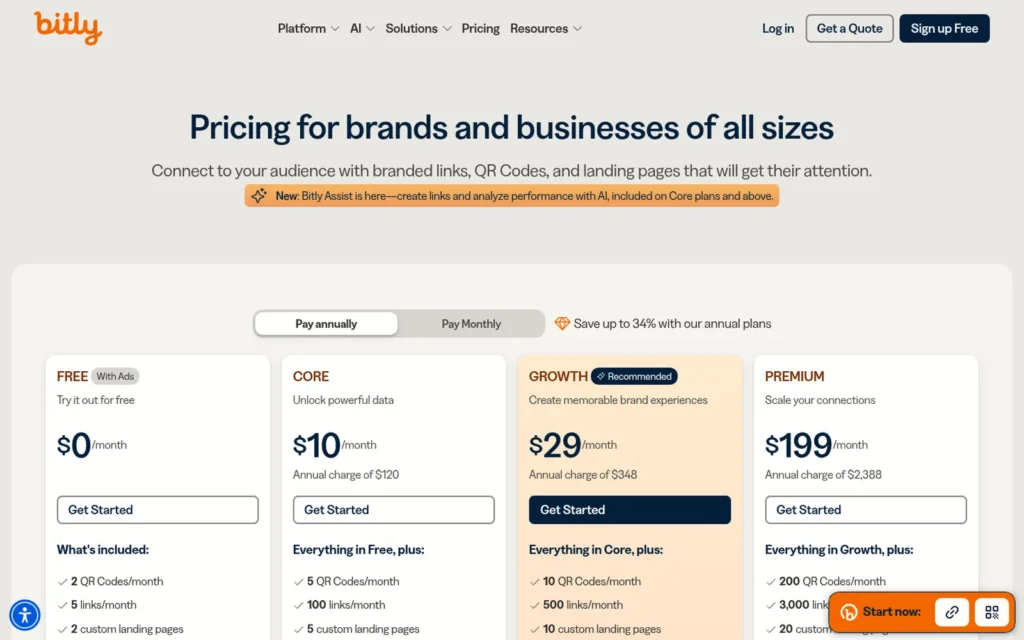
Bitly: The Big Name With Adverts on Its Free Plan, at $10 a Month Annual
Bitly is the URL shortener everyone has heard of, and that is exactly the problem: most owners never check the price — and for a small business, it has quietly become the worst deal in this guide.
Start with the free plan. Bitly Free costs $0 and gives you 50 links a month, 2 QR codes a month, 2 custom landing pages, and 3 custom back-halves a month. Fifty links is a workable allowance for a light user — more than Rebrandly’s free 10 — but the free plan is “With Ads”: anyone who clicks your free short link sees an interstitial advert first. Your customer clicks your link and meets someone else’s advert before they meet you.
The paid tier most small businesses land on is Core. It costs $10 per month, annual billing only — $120 charged up front, with no monthly option shown on the page. Core buys 100 links a month, 5 QR codes a month, 5 custom landing pages, 30 days of click and scan data, a UTM builder, and Bitly Assist, the new AI feature that writes links and analyses performance. One hundred links a month is the key number: it does not cover this guide’s 200-links-a-month business.
The next tier is Growth, and it is the one a small business would actually buy. Growth costs $29 per month billed annually ($348 a year), or $35 billed monthly, and buys 500 links a month, 10 QR codes a month, 10 custom landing pages, and a free custom domain. That is the tier that covers this guide’s 200-links-a-month business, and it costs $348 a year — not the $420 Zapier’s May 2026 update reported, because Zapier’s $35 was the monthly figure, not the annual one.
Premium costs $199 per month billed annually ($2,388 a year), or $300 billed monthly, and buys 3,000 links a month, 200 QR codes a month, 20 custom landing pages, a year of click and scan data, city-level and device-type data, and mobile deep linking.
What does $10 actually buy? The Bitly name, a QR code generator, a UTM builder, and 30 days of data — but not enough links: 100 a month is half of what a busy small business makes. The honest price of Bitly for this guide’s business is not $10 — it is Growth at $29 a month, $348 a year.
The honest weaknesses are two, and both are about value. First, the free plan shows adverts to your clickers, and 2 QR codes a month is tight for a business that prints codes. Second, the pricing ladder is built to push you up: Core’s 100-link cap means the $10 plan fails the exact job this guide measures, and the plan that covers it costs $29 — nearly three times the headline price.
Who is Bitly actually best for? A large business that shares thousands of links a month and has a marketing team to use the city-level data and deep linking. For a small business starting fresh in 2026, Bitly is the most expensive way to shorten a link.
Dub: The Modern One, at $90 a Month
Dub is the newest tool in this guide — launched in late 2022 — and it feels like it. The interface is clean, the keyboard shortcuts work, and the whole product reads like it was built by people who were annoyed by the older tools.
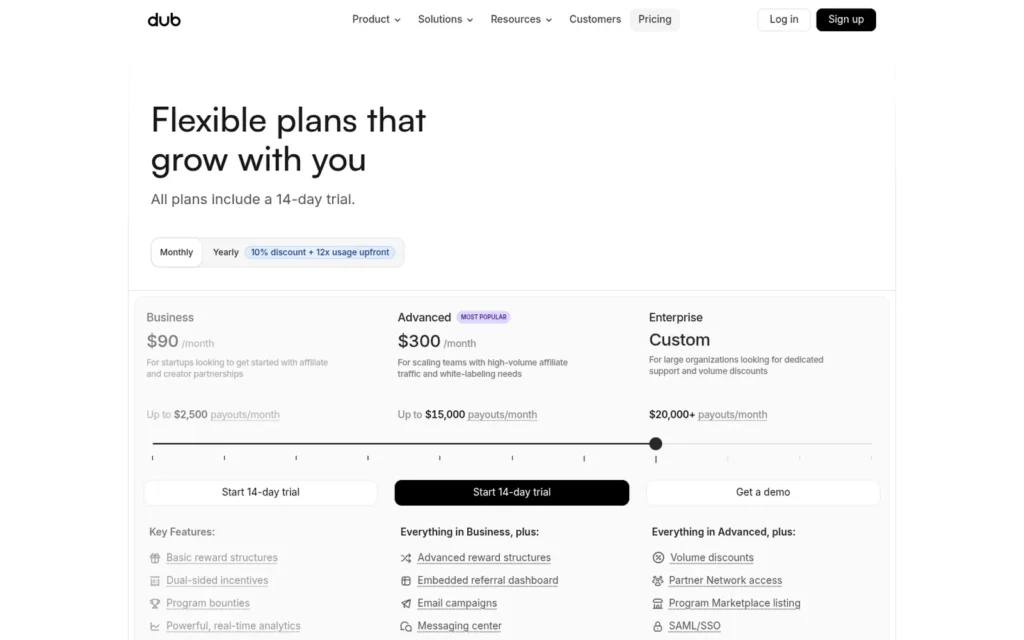
Dub has changed since older guides were written. Its pricing page no longer sells a $30 link-only Pro plan: the plans on the live page are Business at $90 a month ($81 billed yearly), Advanced at $300 a month ($270 billed yearly), and Enterprise at a custom price. The $30 Pro plan that other guides quote is gone — do not budget for it.
Start with Business, because it is the entry tier. Dub Business costs $90 a month, or $81 a month billed yearly ($972 a year), and buys 10,000 new links a month (120,000 a year), 3 million tracked events a year, 100 custom domains, 10 users, conversion tracking, device and geo targeting, custom social media cards, A/B testing, link cloaking, password protection, link expiration, and deep links. Advanced costs $300 a month ($270 billed yearly) and buys 50,000 new links a month, 12 million tracked events a year, and Dub Partners, the affiliate payout system. Every plan includes a 14-day free trial.
What does $90 actually buy? The best link management in this guide at this price: device and geo targeting, A/B testing, link cloaking, password protection, link expiration, deep links, and conversion tracking — all included on Business — plus the affiliate payout system if you run a partner programme.
The honest weaknesses are two. First, $90 a month is more than eleven times Rebrandly Essentials at $8, and for a business making 200 links a month, the extra headroom is headroom you will never use. You are paying for targeting and conversion tracking, and if you do not use those, you are overpaying. Second, Dub is pivoting toward affiliate payouts, and there is a small risk the plain link-shortening side gets less attention over time. Check again before you renew.
Who is Dub actually best for? A small business that runs campaigns and wants to know what happened after the click — which link converted, which city bought, which device. If you run paid ads, Dub Business at $90 is worth it only if you use the targeting and conversion tracking. If you just need short branded links, Rebrandly at $8 does the same job for a fraction of the price.
TinyURL: The Free, Fast, No-Account Option, at $9 a Month
TinyURL has been shortening links since 2002: it does one thing, it does it instantly, and it asks you for nothing. No account, no email, no card.
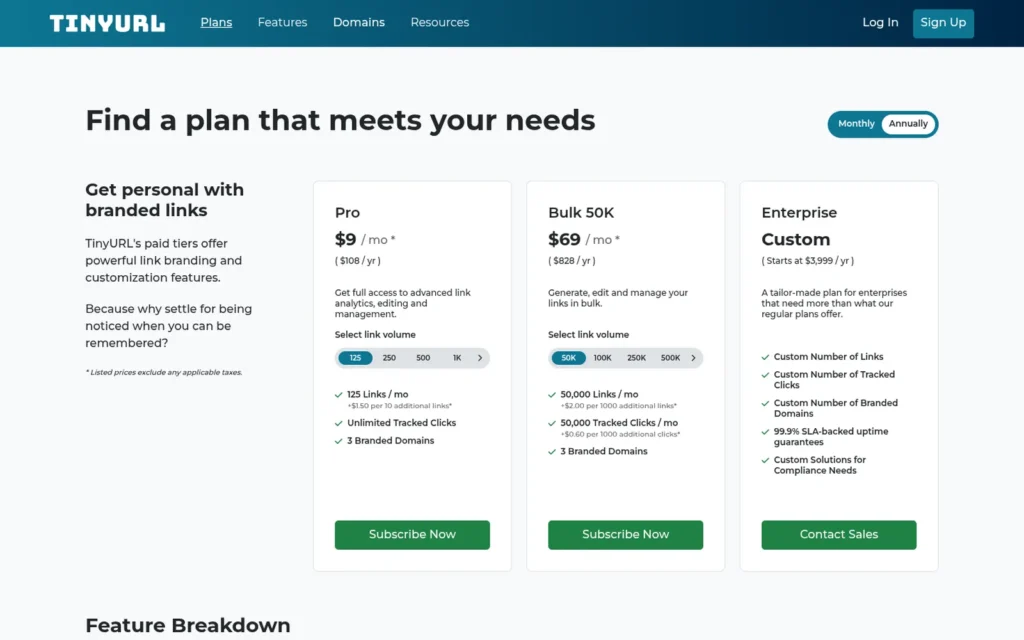
Start with the free plan, the only one here that needs no account at all. TinyURL Free costs $0 and lets you shorten a link without signing up. You can customise the second half — tinyurl.com/your-shop instead of tinyurl.com/2x9f4k — and the link never expires. Sign up for a free account and you get a history of your links, with 30 links a month. That is the whole free offer, and for a one-off link it is all anyone needs.
The paid tier is Pro. It costs $9 per month billed annually ($108 a year) at 125 links a month, or $13 a month billed annually ($156 a year) at the 250-link volume, and buys tracked links, branded domains, click analytics, and the ability to edit a link after you create it. Billed monthly, Pro costs $11 a month at 125 links and $16 at 250.
The catch is the volume: Pro starts at 125 links a month, with unlimited tracked clicks and 3 branded domains, and you pay $1.50 for every 10 additional links over 125, or $1.00 over 250. At this guide’s 200 links a month, 125 is not enough — you need the 250-link volume at $13 a month billed annually. Bulk 50K costs $69 a month billed annually ($828 a year) for 50,000 links a month, and Enterprise starts at $3,999 a year.
What does $9 actually buy? The same instant shortening, plus the three things the free plan cannot do: track clicks, use your own domain, and fix a link after you have shared it. A wrong link on a printed flyer is a dead flyer; an editable link is a flyer you can rescue.
The honest weaknesses are two. First, TinyURL’s feature set is the thinnest here: no link-in-bio pages, no A/B testing, no conversion tracking, no team seats, no targeting. If your needs grow past “shorten it and count the clicks”, you will outgrow TinyURL. Second, the website looks dated, and the paid plan has changed price more than once.
Who is TinyURL actually best for? Anyone who needs a short link right now, once, for free — a text message, a group chat, a QR code on a noticeboard. For a small business that makes under 125 links a month and wants a branded domain and click tracking and will never need targeting or teams, Pro at $9 is fair.
Short.io: The Generous Free Plan, at $0
Short.io is the surprise of this guide: the least famous name here, with the most generous free plan — most small businesses may never need to pay it at all.
Start with the free plan, because it is the story. Short.io Free costs $0 and gives you 1,000 branded links, 50,000 tracked clicks a month, 5 custom domains, and a full-featured dashboard with click analytics — free, for commercial use, per Short.io’s own pricing page. No other free plan here comes close: Rebrandly gives you 10 links a month, Bitly gives you 50, Short.io gives you 1,000.
There is one catch, and it is a real one: you must bring your own custom domain, even on the free plan. Short.io gives you no free short domain of its own. If you do not own a domain, you must buy one from a registrar first — a separate yearly cost. If you already own a domain, the catch disappears entirely.
The paid tiers are Hobby, Pro, Team, and Enterprise. Pro costs $18 a month billed monthly, and Team — not Pro — is the tier the page marks most popular, at $48 a month. Annual billing saves 17%: Hobby $50 a year, Pro $180 a year ($15 a month), Team $480 a year ($40 a month), Enterprise $1,480 a year. The shape: Hobby adds country targeting and referrer hiding, 2,500 links and 100,000 tracked clicks a month; Pro adds password protection, link expiration, link cloaking, and unlimited links and clicks; Team adds city targeting, mobile deep links, and unlimited users; every paid plan includes a 7-day free trial.
What does $0 actually buy? Almost everything a small business needs: branded links on your own domain, QR codes, and 50,000 tracked clicks a month. When you do pay, Pro at $18 a month buys unlimited links and tracked clicks, password protection, link expiration, and link cloaking.
The honest weaknesses are two. First, the custom-domain requirement: if you have no domain and no appetite for buying one, Short.io is not free at all — it is a domain purchase plus a free tool. Second, the paid prices are hard to read: the page hides its dollar figures behind a currency selector and a billing toggle.
Who is Short.io actually best for? A small business that already owns a domain and makes a steady number of links — a shop, a freelancer, a restaurant with a weekly menu link. At 200 links a month the free plan carries you for five months and costs nothing, and when you do pay, Pro is priced for small businesses, not enterprises.

Head-to-Head Comparison Table
| Tool | Entry paid price | Free plan | Custom domains on free plan | Best for | Key limit |
|---|---|---|---|---|---|
| Rebrandly | Essentials $8/mo annual ($9 monthly) | $0 — 10 links/mo, 100 tracked clicks/mo | 1 (plus free rebrand.ly domain) | Best all-round shortener | Free plan caps at 10 links/mo |
| Bitly | Growth $29/mo annual ($348/yr); Core $10/mo annual only | $0 — 50 links/mo, ads shown to clickers | 0 (free custom domain on Growth+) | Large businesses, brand safety | Core caps at 100 links/mo; Growth covers 500 |
| Dub | Business $90/mo monthly ($81/mo yearly, $972/yr) | No free plan on the pricing page — 14-day trial | — | Conversion tracking, affiliate payouts | $90 is 11x Rebrandly for the same link count |
| TinyURL | Pro $9/mo annual ($108/yr) at 125 links/mo; $13/mo annual at 250 | $0 — unlimited one-off links, no account needed; 30 links/mo on a free account | 0 | One-off free links | Pro starts at 125 links/mo; thinnest features |
| Short.io | Pro $18/mo monthly ($15/mo annual, $180/yr) | $0 — 1,000 links total, 50,000 clicks/mo | 5 | Best free plan, if you own a domain | No free domain; 1,000 links is a lifetime total |
Cost Maths: What 200 Links a Month Really Costs
The table above tells you the sticker price of the best URL shorteners. This section tells you what a real business pays.
The usage level is fixed: 200 new short links a month, one custom domain, click tracking on — 2,400 links a year.
Rebrandly Essentials at $8 a month billed annually costs $96 a year, covers 200 links a month with 50 to spare, and costs 4 cents a link. Billed monthly at $9, the same year costs $108 — $12 more for paying monthly. That $12 is the first hidden cost in this guide, and it is printed right on the pricing page.
Bitly Core at $10 a month costs $120 a year — but it does not cover the job. Core caps at 100 links a month, half of what this business makes. The tier that covers it is Growth at $29 a month billed annually, or $348 a year — 14.5 cents a link at 200 links a month, roughly three and a half times Rebrandly’s 4 cents. Billed monthly, Growth is $35 a month. Premium at $199 a month billed annually exists for businesses making 3,000 links a month, which this one does not. Zapier’s May 2026 update reported Growth at $35 — that is the monthly-billed figure, not the annual one, and the maths here follows the live page.
Dub Business at $81 a month billed yearly costs $972 a year and covers 10,000 new links a month, so at 200 links a month you use a fiftieth of the allowance — 40.5 cents a link at your actual usage. Billed monthly, Business is $90 a month ($1,080 a year). The $30 Pro plan older guides quote is no longer sold.
TinyURL Pro at the 250-link volume costs $13 a month billed annually — $156 a year, 6.5 cents a link — and $16 a month billed monthly ($192 a year). The 125-link volume is $9 a month billed annually ($108 a year). The free tier is certain: $0, unlimited one-off links, no account.
Short.io’s free plan costs $0 a year and covers the whole job — until link number 1,001. At 200 links a month you hit the lifetime cap in month five, and from month six you need Pro at $18 a month billed monthly. Year one therefore costs between $0 and $126 — the cheapest year one in this guide by a distance.
Add it up. Year one, at 200 links a month, on the cheapest paid tier that covers the job: Rebrandly $96, Bitly $348 (Growth, because Core does not cover it), Dub $972, TinyURL $156 at the 250-link volume, Short.io $0 to $126. The spread is $0 to $972 for the same 2,400 links.
And the break-even. If a branded link lifts your click-through rate by even a tenth, and each click is worth a dollar, Rebrandly’s $96 a year pays for itself with 96 extra clicks — about 8 a month. Bitly Growth at $348 needs 348 extra clicks a year, or about 29 a month, just to break even against doing nothing. Dub Business at $972 needs 972 extra clicks a year, about 81 a month.
The Hidden Costs and Gotchas
Every shortener in this guide has a catch that the pricing page does not lead with.
The link cap is a monthly cap, except when it is not. Rebrandly, Bitly, and Dub count new links per month; Short.io counts total links ever made — a 1,000-link free plan is five months at 200 links a month, then a cliff.
The free plan can show adverts to your customers. Bitly’s free plan is labelled “With Ads”: someone clicks your link and sees an advert before your page. Your customer, your link, someone else’s advert.
The monthly price is not the annual price, and the gap is the story. Rebrandly Essentials is $9 monthly and $8 annual — an 11% gap. Bitly Core has no monthly option at all: $120 up front or nothing.
The cheapest paid tier may not cover your volume. Bitly Core at $10 covers 100 links a month; this guide’s business makes 200. The step up is Growth at $29 — $19 more a month, not the $199 Premium tier the page puts beside it. TinyURL Pro starts at 125 links a month for the same reason: the headline price buys the smallest volume. Always read the link cap on the tier you are buying.
Conversion tracking is a higher tier everywhere. Knowing a link was clicked is cheap; knowing the click became a sale costs more: Rebrandly Professional at $22, Dub Business at $90. If you run paid ads, budget for the tier that includes conversion tracking, not the tier that includes clicks.
Who Is Each Tool Actually Best For?
Rebrandly is best for the small business that posts every day and wants its name on every link.
Bitly is best for the large business that already lives on Bitly, or the enterprise that needs city-level data and deep linking. It is not best for a small business starting fresh — the free plan shows adverts, and the paid ladder has a missing rung.
Dub is best for the business that runs campaigns and wants to know what happened after the click. If you run paid ads, Dub Business’s conversion tracking is worth $90 a month only if you use it. If you just need short branded links, Rebrandly at $8 does the same job for a fraction of the price.
TinyURL is best for the person who needs a short link in the next ten seconds and will never think about it again. For a small business that wants a branded domain and click tracking and will never need targeting or teams, Pro at $9 is fair.
Short.io is best for the business that already owns a domain and wants the most free plan in this guide: 1,000 links and 50,000 tracked clicks a month for $0.
Work Out Your Own Number First
Before you buy any of these, count the links you actually make in a month — the ones in your sent emails, your scheduled posts, your printed flyers. Most owners guess double.
Our free AI Cost Calculator does that maths for you: tick the tools you use, put in the real price, and it adds up what your stack actually costs a month and a year. Run your shortener through it next to the other tools you pay for.
Pros and Cons
On the plus side, a branded short link is the cheapest trust signal a small business can buy, and even basic click data tells you which post worked. The free plans here are genuinely usable — Short.io and TinyURL will carry a small business for months without a card.
On the minus side, the free plans keep shrinking — Bitly’s went from 10,000 links a month a few years ago to 50 today — and every vendor can change its limits tomorrow. A short link is also a dependency: if the vendor shuts down, your links go with it. Google’s own shortener, goo.gl, shut down in 2019 — a risk that applies to all five tools equally.
Our Verdict
If you only buy one, buy Rebrandly Essentials at $8 a month billed annually: the cheapest paid plan that covers a real small business’s volume, with your name on every link, QR codes, and real analytics — $96 a year, less than a single boosted social post a month.
If you already own a domain and want to spend nothing, start with Short.io’s free plan: 1,000 links and 50,000 tracked clicks a month for $0. By the time you use it up, you will know exactly which paid features you actually need.
If you run paid ads and need to know which click became a sale, buy Dub Business at $90 a month ($81 billed yearly) — the only tool here where conversion tracking and targeting are built for campaigns rather than bolted on.
If you need one short link right now, use TinyURL for free and do not think about it again.
Bitly is the hardest sell here: 50 free links a month with adverts, a $10 plan capped at 100 links, and Growth at $29 — nearly four times Rebrandly’s $8 for fewer links. If you already have Bitly links printed everywhere, stay — moving printed links costs more than the subscription. If you are starting from zero, start somewhere else.
Whatever you buy, do this first: buy the domain before you print anything. A short link on a domain you own is an asset. A short link on a domain you rent from a vendor is a subscription with a printing bill attached.
Frequently Asked Questions
What is the best free URL shortener for a small business?
Short.io has the most generous free plan: 1,000 branded links and 50,000 tracked clicks a month for $0 — but you must bring your own custom domain. If you do not own one, TinyURL shortens unlimited links for free with no account at all.
Is Bitly still worth it in 2026?
For a large business, yes — Bitly is reliable and its Premium tier has the deepest analytics here. For a small business, no: 50 free links a month with adverts, a $10 plan capped at 100 links, and Growth at $29 — nearly four times Rebrandly’s $8 for fewer links.
Do short links expire?
It depends on the tool and the plan. TinyURL’s free links never expire. Rebrandly’s free links keep working too — only the analytics stop after 100 tracked clicks a month. Bitly links made on a free plan keep working, but you can only make 50 new ones a month.
Can I use my own domain with a free URL shortener?
Yes, on some. Short.io allows 5 custom domains on its free plan, Rebrandly allows 1 plus a free rebrand.ly domain, and Dub Business includes 100 custom domains. Bitly and TinyURL need a paid tier for a custom domain. A domain itself is a separate yearly purchase from a registrar.
What happens to my short links if I cancel my subscription?
Your existing links usually keep working, but you lose new links beyond the free plan’s limits, plus analytics and editing. The safest habit is to own your custom domain yourself, so everything printed with it stays yours even if you change shorteners.
Price Note
Price note — updated 17 November 2026: Prices in this post were checked on 17 November 2026. When you are reading this, the price may be lower or higher — always check the official pricing page before you buy.
Pros
- Rebrandly Essentials at $8 a month covers 200 links a month with a branded domain and real analytics.
- Short.io's free plan gives you 1,000 branded links and 50,000 tracked clicks a month for $0.
- TinyURL shortens links for free with no account at all, and the links never expire.
- Dub Business at $90 a month includes 10,000 new links a month, 100 custom domains and conversion tracking.
- QR codes are included on Rebrandly, Dub, and Short.io, so one link works on screen and on paper.
Cons
- Bitly's free plan allows 50 links a month but shows adverts to your clickers.
- Bitly Core at $10 caps at 100 links a month, and the plan that covers 200 links is Growth at $29.
- Short.io gives you no free domain — you must buy a custom domain before the free plan is useful.
- TinyURL's feature set is the thinnest here: no targeting, no teams, no conversion tracking.
- Free plans keep shrinking — Bitly's went from 10,000 links a month to 50 — and a short link depends on the vendor staying in business.
If you only buy one, buy Rebrandly Essentials at $8 a month billed annually: the cheapest paid plan that covers a real small business's volume, with your name on every link, QR codes, and real analytics — $96 a year, less than a single boosted social post a month. If you already own a domain and want to spend nothing, start with Short.io's free plan: 1,000 links and 50,000 tracked clicks a month for $0. If you run paid ads and need to know which click became a sale, buy Dub Business at $90 a month ($81 billed yearly) — the only tool here where conversion tracking and targeting are built for campaigns rather than bolted on — but at $972 a year it is the most expensive pick here. If you need one short link right now, use TinyURL for free and do not think about it again. Bitly is the hardest sell here: 50 free links a month with adverts, a $10 plan capped at 100 links, and Growth at $29 — nearly four times Rebrandly's $8 for fewer links. Whatever you buy, do this first: buy the domain before you print anything. A short link on a domain you own is an asset.