

The best wireframe tools for most small businesses in 2026 are Whimsical Pro at $10 per editor per month billed annually and Figma Professional at $16 per user per month billed annually. Figma Professional costs $16 per user per month billed annually and is the safe default when a designer or developer will touch the file after you. Balsamiq Starter also costs $16 per editor per month billed annually and is the pick if you have never opened a design tool and never want to learn one. UXPin Core costs $29 per seat per month billed annually and is the pick only when your prototype needs real logic. If you only buy one, buy Whimsical Pro. It costs $120 a year for unlimited boards, and a one-person business will rarely need anything else to sketch a website or an app.
Best Wireframe Tools (2026): Figma vs Whimsical vs Balsamiq vs UXPin
A founder I know paid a freelancer $800 for wireframes of a booking page. The freelancer delivered them in an afternoon: grey boxes, a few arrows, one note that said “hero goes here.” The founder paid happily, because the alternative — staring at a blank canvas and guessing where the booking button should live — felt worse.
Here is the part nobody told him: the tool the freelancer used cost $16 a month, and the founder could have drawn the same boxes himself in a lunch break.
This guide compares the four wireframe tools that matter for a small business in 2026 — Figma, Whimsical, Balsamiq, and UXPin — by real price, at one realistic usage level, with every figure checked on the vendor’s own pricing page on 17 November 2026.
Quick Answer Box
- The best wireframe tools for most small businesses in 2026 are Whimsical Pro at $10 per editor per month billed annually and Figma Professional at $16 per user per month billed annually.
- Figma Professional costs $16 per user per month billed annually and is the safe default when a designer or developer will touch the file after you.
- Balsamiq Starter also costs $16 per editor per month billed annually and is the pick if you have never opened a design tool and never want to learn one.
- UXPin Core costs $29 per seat per month billed annually and is the pick only when your prototype needs real logic.
- If you only buy one, buy Whimsical Pro. It costs $120 a year for unlimited boards, and a one-person business will rarely need anything else.
In this article
- Quick Answer Box
- The Short Version: What You Are Actually Choosing Between
- How I Compared Them
- Figma: The Collaboration Default, at $16 a Month Annual
- Whimsical: The Fastest Sketch, at $10 a Month Annual
- Balsamiq: The Non-Designer’s Sketchpad, at $16 a Month Annual
- UXPin: The Code-Based One, at $29 a Month Annual
- Head-to-Head Comparison Table
- Cost Maths: What a Realistic Stack Costs
- The Hidden Costs and Gotchas
- Who Is Each Tool Actually Best For?
- Work Out Your Own Number First
- Pros and Cons
- Our Verdict
- Frequently Asked Questions
- Price Note
The Short Version: What You Are Actually Choosing Between
Picking the best wireframe tools for a one-person business comes down to three questions, and only one of them is price. First, who draws? If it is you, the owner, with no design background, you want the tool that gets out of the way — Whimsical or Balsamiq. If a designer draws and you only comment, you want Figma, because that is where the designer already lives.
Second, how far does the sketch need to go? A grey-box layout that a developer builds from needs less than a clickable prototype with working forms and logic.
Here is the short version. Figma is the industry default. Its free Starter plan is genuinely usable — unlimited drafts, 150 AI credits a day — and the $16 Professional seat buys unlimited files, team libraries, and the Dev Mode handoff your developer actually wants. Whimsical is the fastest way from an idea in your head to a link in your developer’s inbox. Its free plan caps you at 50 board objects a month, and Pro at $10 removes the cap and the watermark.
The price spread is small — $10 to $29 a month — so the wrong choice here costs you tens of dollars, not hundreds. The expensive mistake is different: buying the $29 tool when a $10 one would do, or buying any of them and then paying a freelancer $800 to draw the boxes anyway.
How I Compared Them
I compared all four at the same usage level: one editor, sketching a small business website or app — a booking page, a pricing page, and a checkout flow — sharing the result with a developer and a couple of stakeholders who only view and comment. That is the job a small business actually buys a wireframe tool for.
Four things mattered. Price at the entry paid tier, annual and monthly, with the free plan’s real limits.
Every price in this guide was read on the vendor’s own pricing page on 17 November 2026. Where a page hides its monthly-billed figure behind a toggle, I read the toggle and print both figures. The publishing check on the day this post went live re-read all four pages and corrected anything that had moved. Visily, the AI-first wireframer on Zapier’s list, is not in this guide: on the day of publishing its pricing page redirected to a log-in screen, so no price on it could be verified — check its site directly before you buy.
Figma: The Collaboration Default, at $16 a Month Annual
Figma is the wireframe tool your designer already knows, your developer already opens, and your competitors already use. That is both its biggest strength and its most honest weakness: it is a professional design suite that happens to be excellent at wireframes, not a wireframing tool that happens to be professional.
Start with the free plan, because it is the most generous free plan in this guide. Figma Starter costs $0 and gives you unlimited drafts, UI kits and templates, and 150 AI credits a day up to 500 a month. Viewers are free on every plan, so your developer, your partner, and your most opinionated customer can all comment without costing you a seat.
The paid tier most small businesses land on is Professional. A Full seat costs $16 per user per month when billed annually. That buys unlimited files and projects for a single team, team-wide design libraries, advanced Dev Mode inspection, and 3,000 AI credits a month. There is also a Dev seat at $12 a month and a Collab seat at $3 a month.
What does $16 actually buy? Pre-sized frames for every common device, so you stop Googling iPhone screen dimensions. A component library and a plugin library with free UI kits, icons, and stock photos. FigJam, the built-in whiteboard, for storyboarding the flow before you draw a single screen.
The AI is real but metered. Figma’s AI generates prototype interactions, organises layers, and drafts starter screens, all against your credit allowance. Professional gives you 3,000 credits a month, or about 0.53 cents per credit.
The handoff is where Figma earns its keep. Dev Mode lets a developer inspect spacing, copy CSS, iOS, and Android code, and export assets without ever asking you what font that was. If a freelancer or agency will build your site, there is a good chance they will ask for the Figma file before they ask for anything else — and once the wireframe is approved, our best AI website builder guide compares the tools that turn it into a live site.
The honest weaknesses are two. First, the learning curve. The features that justify the $16 — auto-layout, constraints, variants, Dev Mode — take a weekend to learn and a month to get fast at. Second, the seat math. Figma charges per seat across three seat types, and buying the wrong seat wastes money every month. The monthly-billed Professional figure is $20, against $16 billed annually — $48 a year more for paying month to month.
Who is Figma actually best for? A small business that already works with a designer or developer, or plans to. If the file will travel — from you to a designer to a developer to a client — Figma is the only tool in this guide where the file arrives in the format everyone expects.

Whimsical: The Fastest Sketch, at $10 a Month Annual
Whimsical is the tool for the owner who has the layout in their head and wants it on a screen in ten minutes. It is deliberately limited — fewer colours, fewer fonts, fewer fiddly options — and that limitation is the whole point. When you cannot spend twenty minutes choosing a shade of grey, you spend those twenty minutes thinking about where the booking button goes.
The free plan costs $0 and is honest about what it is: a trial with a roof. You get unlimited boards, unlimited workspace members, and unlimited guests, but only 50 board objects and 50 doc blocks a month, a watermark on exports, and 7-day version history.
Pro costs $10 per editor per month billed annually, or $11 billed monthly, and it removes every limit that matters: unlimited board objects, unlimited doc blocks, no watermark on exports, 90-day version history, and 1GB file uploads. Business costs $20 per editor per month billed annually, or $23 monthly, and adds private teams, SAML single sign-on, SCIM, and unlimited version history. Whimsical’s own FAQ text still says $12 for monthly Pro, but the live price card shows $11 — the card is the price you will actually pay. Viewers are always free, guests are free and unlimited on every plan, and students and teachers use Whimsical free. Non-profits get 20% off if they ask.
Speed is the feature. The drag-and-drop canvas is clean enough that anyone on your team can build a wireframe without a tutorial, Whimsical restricts your design choices on purpose: pre-defined colour palettes and simplified UI elements. During the early stage of a project, that restriction keeps the meeting short.
The AI is powered by Claude’s models and it generates wireframe layouts, flowcharts, and mind maps from a text prompt. Unlike Figma, Balsamiq, and UXPin, Whimsical publishes no AI credit meter for it. There is no published credit count to burn through and no top-up to buy.
The weaknesses are the other side of the speed coin. Custom styling is limited — the restrictive colour palettes that keep you focused also mean your wireframe will never look like your brand. And the free plan’s 50-object monthly cap is the tightest free limit in this guide: Figma gives you unlimited drafts for free, and Whimsical gives you fifty boxes.
Who is Whimsical actually best for? The owner who sketches alone or with one other person, needs the link shareable today, and will hand a screenshot — not a file — to the developer. If your wireframe’s job is to settle an argument in a meeting, Whimsical settles it fastest.

Balsamiq: The Non-Designer’s Sketchpad, at $16 a Month Annual
Balsamiq has been the non-designer’s wireframe tool since 2008, and it shows in the best way: nothing about it has been redesigned to impress anyone. Your wireframes look like hand-drawn sketches — wobbly lines, comic-style lettering, grey boxes — and that roughness is a deliberate decision.
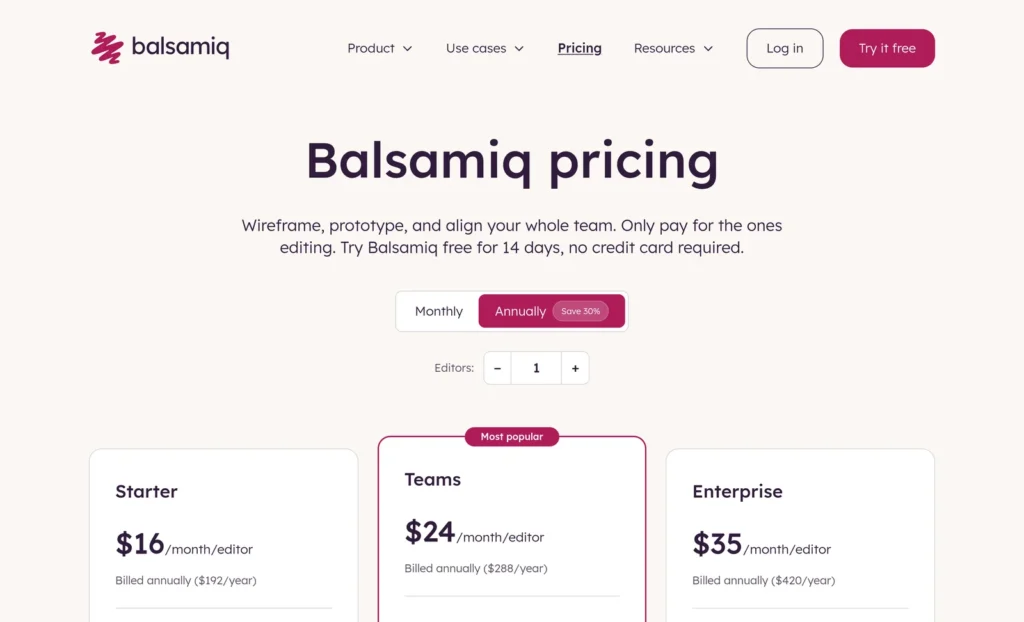
There is one fact to get out of the way first: Balsamiq has no free plan. Every plan starts with a 14-day free trial, no credit card required, and after 14 days you pick a plan or lose access to editing. That makes it the only tool in this guide where the free tier is a countdown, not a permanent home.
Starter costs $16 per editor per month billed annually, or $192 a year, and covers up to 10 projects with unlimited reviewers. Every plan includes 500 monthly Balsamiq AI credits per editor — enough, by Balsamiq’s own count, for around 31 wireframes or 10 prototypes — plus a Balsamiq MCP server, Slack integration, custom reusable UI components, and PDF or image export. Reviewers are unlimited and free on every plan.
Teams costs $24 per editor per month billed annually, or $288 a year, and raises the ceiling to 100 projects and 1,000 AI credits per editor per month, with priority support and a billing admin role. Enterprise costs $35 per editor per month billed annually, or $420 a year, and adds 400 projects, 2,500 AI credits, SSO with SAML, US or EU file storage, and premium support. On-demand AI credit top-ups cost $15 per 500 credits on every plan. The monthly-billed figures are higher: Starter $23 a month and Teams $34 a month, while Enterprise is annual-only.
The AI is practical rather than magical. Balsamiq’s AI credits generate and edit wireframes, convert screenshots into wireframes, generate images, and generate interactive prototypes. The screenshot-to-wireframe trick is the one worth knowing about: hand it a screenshot of a competitor’s booking page and it returns an editable sketch of the same layout. At 500 credits a month on Starter, and roughly 16 credits per AI wireframe by Balsamiq’s own maths, you get about 31 AI wireframes a month.
The weaknesses are the price of the simplicity. There are no custom design elements: you cannot build your brand’s button and reuse it, only Balsamiq’s library. Prototyping is limited — you can link screens together, but you cannot build the conditional, logic-driven flows that UXPin handles.
Who is Balsamiq actually best for? The owner who has never opened a design tool, who sketches to think, and who presents to people who need to see the idea rather than the design.
UXPin: The Code-Based One, at $29 a Month Annual
UXPin is the wireframe tool for the business whose prototype has to behave like the product, not just look like it. If your booking flow branches — new customer versus returning customer, pickup versus delivery, card versus cash — and you need to test whether the branches work before a developer builds them, UXPin is the only tool in this guide built for that job. It is also the most expensive, the most complex, and the easiest to buy by mistake.
The pricing is per seat, and the page is admirably blunt about it. Core costs $29 per seat per month when billed annually, against $49 billed monthly — the 40% saving is printed right on the card. Growth costs $40 per seat per month billed annually, against $69 monthly. Every plan starts with a 14-day free trial with access to all features, no credit card required, and when the trial ends you can continue on a limited free plan: 2 prototypes and 50 AI credits a month.
Core buys 250 AI credits a month plus 100 per extra seat, unlimited prototypes, built-in coded libraries, conditional logic, variables and expressions, custom fonts, password-protected previews, and 7-day version history. Growth raises the AI allowance to 600 credits a month plus 100 per seat, and adds Patterns, Design Systems, Storybook integration, SSO and 2FA security, and 30-day version history.
The coded libraries are the feature that justifies the price. Instead of drawing a button, you use a real component from MUI, Bootstrap, Tailwind, or Ant Design — the same libraries your developer uses — so the prototype behaves like production code. When the prototype is done, the developer does not get a picture of a button. They get the button.
The honest weaknesses start with the obvious one: $29 a seat is nearly triple Whimsical’s $10, and the free plan’s 2 prototypes will not carry a real project. The second weakness is the learning curve. Conditional logic, variables, and expressions are powerful, and they are also a second job to learn.
Who is UXPin actually best for? A small business with a developer on the team, building an app or a web product where the prototype must prove the logic before the build starts. If your wireframe needs an “if this, then that” — and you can name the “that” — UXPin earns its $29.

Head-to-Head Comparison Table
| Tool | Entry paid price (annual) | Free plan | AI credits on entry paid tier | Best for | Key limit |
|---|---|---|---|---|---|
| Figma Professional | $16/user/mo | Yes — unlimited drafts, 500 AI credits/mo | 3,000/mo | Teams with a designer or developer | Learning curve; 3 seat types |
| Whimsical Pro | $10/editor/mo | Yes — 50 board objects/mo, watermark | No meter published | Fastest sketch to shareable link | Free plan caps at 50 objects a month |
| Balsamiq Starter | $16/editor/mo | No — 14-day trial only | 500/mo (~31 wireframes) | Non-designers | No free plan; no custom elements |
| UXPin Core | $29/seat/mo | Limited — 2 prototypes, 50 AI credits | 350/mo (first seat) | Logic-heavy prototypes | Tightest credit meter; steepest price |
Cost Maths: What a Realistic Stack Costs
Add up the best wireframe tools at their entry prices and the total is smaller than one freelancer afternoon. One editor on each tool, billed annually: Figma Professional $16, Whimsical Pro $10, Balsamiq Starter $16, and UXPin Core $29 — $71 a month, or $852 a year.
Billed monthly instead of annually, the two tools that print both figures on their cards charge noticeably more. Whimsical Pro rises from $10 to $11 a month, or $132 a year instead of $120 — $12 more. UXPin Core jumps from $29 to $49, or $588 instead of $348 — $240 more, the biggest monthly penalty in this guide by a wide margin. Across those two tools alone, paying monthly costs $252 a year extra.
Figma and Balsamiq hide their monthly figures behind a toggle, and the toggle reads higher too: Figma Professional costs $20 a month billed monthly, or $240 a year instead of $192 — $48 more; Balsamiq Starter costs $23 a month, or $276 instead of $192 — $84 more. Across all four entry tiers, paying monthly costs $384 a year extra.
The realistic stack for a small business is two tools, not four: Whimsical Pro for the fast sketch and Figma Professional for the finished file. That costs $26 a month, or $312 a year. If you only ever sketch for yourself, one tool is enough: Whimsical Pro alone costs $120 a year, and it covers a small business’s wireframing for twelve months. If your whole software budget is $50 a month, our best AI tools under $50 a month guide shows a full stack that fits.
The AI credit maths is worth doing once, because the meters look similar and are not. Figma Professional gives you 3,000 credits for $16, or about 0.53 cents per credit. Balsamiq Starter gives you 500 credits for $16, or 3.2 cents per credit — but Balsamiq tells you what a credit buys: about 31 AI wireframes a month, or roughly 52 cents per AI-generated wireframe. UXPin Core gives the first seat 350 credits for $29, or about 8.3 cents per credit — roughly fifteen times Figma’s per-credit price, for a tool whose AI is aimed at developers rather than owners.
Now the break-even, at a modest $25 an hour for your time. Whimsical Pro pays for itself if it saves you 24 minutes a month. Figma Professional and Balsamiq Starter each need about 38 minutes. UXPin Core needs about 70 minutes. Remember the founder at the top of this guide: $800 for one afternoon of grey boxes. That $800 buys 6.7 years of Whimsical Pro.
The Hidden Costs and Gotchas
First, Figma’s seat trap. The pricing page lists three seat types — Full at $16, Dev at $12, Collab at $3 — and a free viewer seat that costs nothing. The person who only reviews and comments needs the free viewer seat. Buy a $16 Full seat for them and you have tripled or quintupled the cost of that person for no reason.
Second, Balsamiq’s trial cliff. There is no free plan, only a 14-day trial, and when it ends you choose a plan or lose editing access. If you sketch in bursts — a website redesign in January, nothing until June — the trial model punishes you.
Third, the watermark tax. Whimsical’s free plan watermarks every export. A watermarked wireframe is fine for an internal meeting and embarrassing in front of a client or an investor. If the wireframe leaves your office, the free plan has already cost you the upgrade.
Fourth, credits that evaporate. Figma, Balsamiq, and UXPin all reset AI credits monthly, and none of them roll over. A quiet month wastes the allowance; a busy month burns it by the 20th.
Fifth, UXPin’s credit squeeze. Core’s first seat gets 350 AI credits a month, and every extra seat adds only 100. A two-person team gets 450 credits between them for $58 a month. That is the tightest allowance in this guide by a wide margin, and it is the one most likely to stop you mid-project.
Sixth, the “free” that is not free. UXPin’s free plan allows 2 prototypes — enough to learn the tool, not enough to run a project. Balsamiq’s free trial is 14 days, not a plan. Figma’s and Whimsical’s free plans are permanent, but each caps something that matters: Figma caps AI credits at 500 a month, Whimsical caps objects at 50 a month. Read the cap before you build your whole project on the free tier.
Who Is Each Tool Actually Best For?
If you read this guide because you searched for the best wireframe tools and felt overwhelmed by the choice, here is the honest cut: the choice is not between four equal tools. It is between three jobs, and each job has one obvious tool.
The solo owner sketching their own website or app should buy Whimsical Pro at $10 a month.
The owner working with a designer or developer should buy Figma Professional at $16 a month. It is the only tool here where the file arrives in the format the next person expects, with the Dev Mode handoff and the team libraries that keep a project consistent.
The owner who has never designed anything and never wants to learn should buy Balsamiq Starter at $16 a month. Its hand-drawn look keeps every meeting about the layout, its interface has nothing to learn, and its screenshot-to-wireframe AI is a legitimate shortcut for studying competitors.
The product team building an app with branching logic should buy UXPin Core at $29 a seat a month — and only that team should. If your prototype needs conditions, variables, and real code libraries, UXPin is the only tool here that does the job properly.
Work Out Your Own Number First
Before you pay for any of these, do ten minutes of arithmetic with your own numbers. How many screens will you wireframe this year? How many people need to edit, and how many only need to view — because viewers are free on Figma, Whimsical, and Balsamiq, and every editor you do not need is $10 to $29 a month you do not spend.
Our AI Cost Calculator does that maths for you: put in the tools, the seats, and the billing period, and it shows the monthly and yearly totals side by side, so the annual-versus-monthly gap stops being a surprise at checkout.
Pros and Cons
Pros:
- Whimsical Pro at $10 a month is the cheapest paid tier in this guide, and unlimited boards cover a small business easily.
- Three of the four tools have free plans, so you can test the canvas before you pay anything.
- Figma’s free Starter plan is the most generous free tier here — unlimited drafts and 500 AI credits a month.
- Balsamiq’s hand-drawn style keeps early meetings about layout instead of colours, and its screenshot-to-wireframe AI is genuinely useful.
- UXPin’s coded libraries mean the prototype uses the same components the developer ships.
Cons:
- UXPin Core at $29 a seat is nearly triple Whimsical’s price, and its 350-credit AI allowance is the tightest in this guide.
- Balsamiq has no free plan at all — only a 14-day trial — so occasional sketchers pay or lose access.
- Figma charges per seat across three seat types, and buying the wrong seat wastes money every month.
- Whimsical’s free plan caps you at 50 board objects a month and watermarks every export.
- AI credits do not roll over on any of the three metered tools, so a quiet month wastes the allowance and a busy month runs dry.
Our Verdict
The best wireframe tools debate has no single winner, but it has a clear default. Start with Whimsical Pro at $10 per editor per month billed annually. It costs $120 a year for unlimited boards, it is the fastest way from an idea to a link your developer can open, and for a one-person business it is usually everything wireframing needs to be.
Buy Figma Professional at $16 per user per month billed annually if a designer or developer will touch the file after you, or if you want the deepest free plan while you learn.
Buy Balsamiq Starter at $16 per editor per month billed annually if you have never opened a design tool and want the sketch to look like a sketch.
Buy UXPin Core at $29 per seat per month billed annually only if your prototype needs real logic — conditions, variables, production code libraries — and you can name the branch that needs it. Whatever you buy, start on a free plan or a free trial first. The most expensive mistake in this guide is not picking the wrong wireframe tool. It is paying $800 for an afternoon of grey boxes, or $29 a month for logic your booking page will never use.
Frequently Asked Questions
Which wireframe tool is cheapest for a small business?
Whimsical Pro is the cheapest paid tier in this guide at $10 per editor per month billed annually, or $11 billed monthly. Its free plan caps you at 50 board objects a month, so start free and upgrade the month you hit the cap.
Is Figma free enough for wireframing?
For most small businesses, yes. Figma’s free Starter plan gives you unlimited drafts, UI kits and templates, and 150 AI credits a day up to 500 a month, with free viewers and commenters. You only need the $16 Professional seat when you want unlimited files and projects for a team, team libraries, advanced Dev Mode, or 3,000 AI credits a month.
Can I wireframe without any design skills?
Yes. Balsamiq’s drag-and-drop library needs no design knowledge at all — you drag a button onto the canvas and you are done — though it has no free plan, only a 14-day trial. Whimsical is the simpler middle ground: easy enough for anyone, with a free plan to learn on.
Do wireframe tools replace a designer?
No. A wireframe settles layout and flow — where the button goes, what happens when it is tapped, what order the screens come in. A designer settles the rest: typography, colour, spacing, imagery, and the polish that makes a visitor trust the page. The tools in this guide save you the $800 freelancer sketch; they do not save you the designer if your website needs to look like a business rather than a sketch.
What is the difference between a wireframe and a prototype?
A wireframe is a static sketch of one screen: grey boxes showing where things go. A prototype links those screens together so you can click through them like the real product. Every tool in this guide makes wireframes; Figma, Balsamiq, and UXPin all link screens into clickable prototypes, and UXPin goes further with working logic — conditions and variables that change what the prototype shows.
Price Note
Price note — updated 17 November 2026: Prices in this post were checked on 17 November 2026. When you are reading this, the price may be lower or higher — always check the official pricing page before you buy.
Pros
- Whimsical Pro at $10 a month is the cheapest paid tier in this guide, and unlimited boards cover a small business easily.
- Three of the four tools have free plans, so you can test the canvas before you pay anything.
- Figma's free Starter plan is the most generous free tier here — unlimited drafts and 500 AI credits a month.
- Balsamiq's hand-drawn style keeps early meetings about layout instead of colours, and its screenshot-to-wireframe AI is genuinely useful.
- UXPin's coded libraries mean the prototype uses the same components the developer ships.
Cons
- UXPin Core at $29 a seat is nearly triple Whimsical's price, and its 350-credit AI allowance is the tightest in this guide.
- Balsamiq has no free plan at all — only a 14-day trial — so occasional sketchers pay or lose access.
- Figma charges per seat across three seat types, and buying the wrong seat wastes money every month.
- Whimsical's free plan caps you at 50 board objects a month and watermarks every export.
- AI credits do not roll over on any of the three metered tools, so a quiet month wastes the allowance and a busy month runs dry.
The best wireframe tools debate has no single winner, but it has a clear default. Start with Whimsical Pro at $10 per editor per month billed annually. It costs $120 a year for unlimited boards, it is the fastest way from an idea to a link your developer can open, and for a one-person business it is usually everything wireframing needs to be. Buy Figma Professional at $16 per user per month billed annually if a designer or developer will touch the file after you, or if you want the deepest free plan while you learn. Buy Balsamiq Starter at $16 per editor per month billed annually if you have never opened a design tool and want the sketch to look like a sketch. Buy UXPin Core at $29 per seat per month billed annually only if your prototype needs real logic — conditions, variables, production code libraries — and you can name the branch that needs it. For five static pages, it is the wrong tool at triple the price. Whatever you buy, start on a free plan or a free trial first. The most expensive mistake in this guide is not picking the wrong wireframe tool. It is paying $800 for an afternoon of grey boxes, or $29 a month for logic your booking page will never use.