
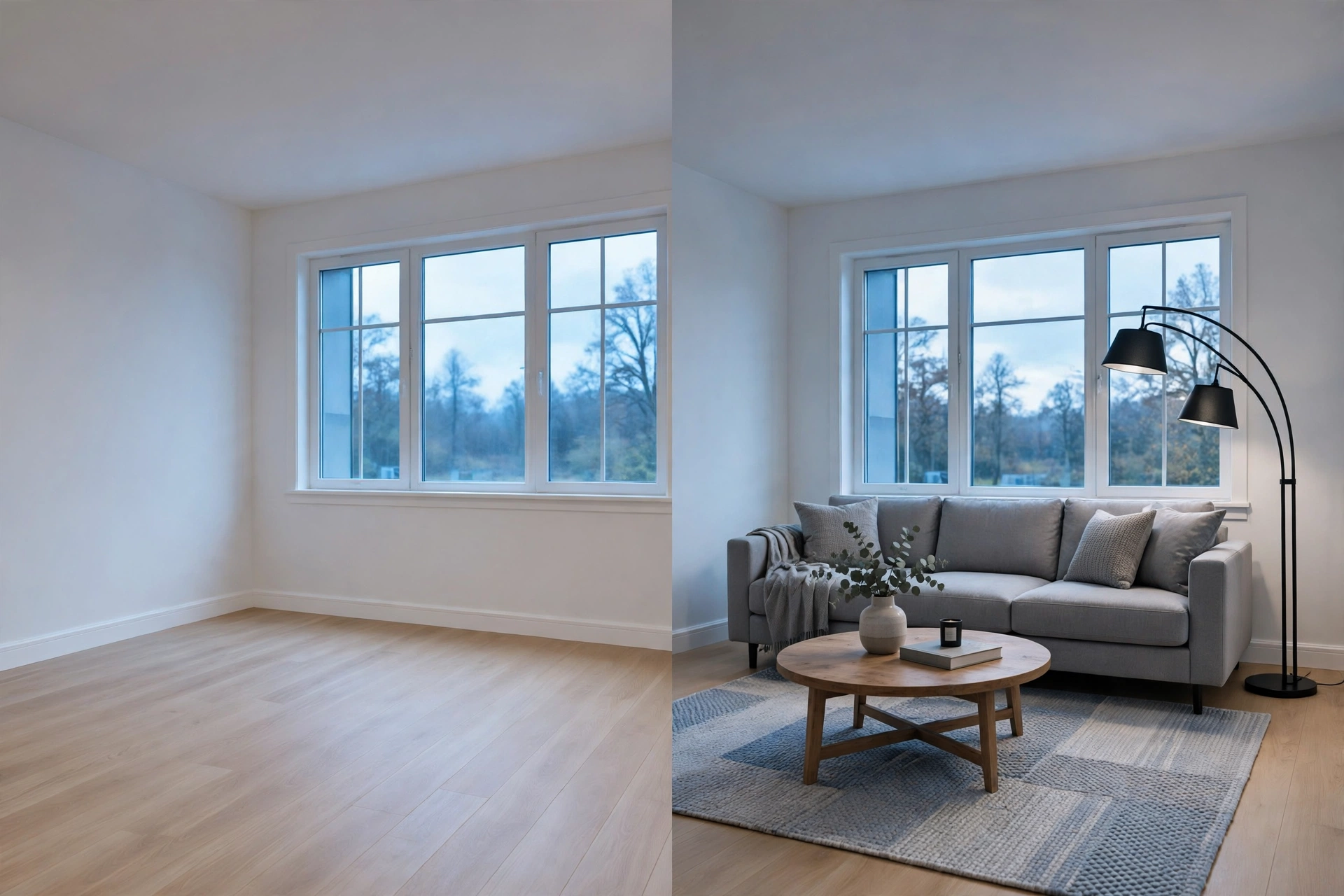
For most real estate agents, the best AI tools for real estate agents start with Collov AI or REimagineHome, both at $19 a month billed yearly. Collov AI Standard costs $19 a month billed yearly ($228 a year) for 60 photo credits a month, and REimagineHome Essential costs $19 a month for 30 credits a month — either one covers four listings a month at six staged photos each. Collov's credits reset every month, so unused credits are lost; REimagineHome gives you 5 free designs to start, with no credit card.Pick Virtual Staging AI if you want to test staging one photo at a time: Standard costs $19 a month billed yearly ($228 a year) for 20 photos a month, or $35 a month billed monthly. Professional costs $39 a month billed yearly ($468 a year) for 60 photos. Every plan includes unlimited renders and downloads, no watermark, and a 10-second turnaround.Pick BoxBrownie if the listing is expensive enough that a human should touch it: virtual staging costs US$24 per image, flat, with no subscription. A human editor stages the photo — which is why it costs about $576 a month at four listings, against $19 for the AI tools.Pick Apply Design if you want to move the furniture yourself: staging costs from $7 per image, with DIY staging at 1 coin per image and one-click staging at 1.5 coins — $168 a month for DIY staging at four listings, or $252 a month for one-click. The turnaround is about 15 minutes, with a 100 percent money-back guarantee.The short version: stage four listings a month with Collov AI Standard or REimagineHome Essential at $19 a month billed yearly, and send only your hero shots to BoxBrownie at $24 each when the listing price justifies it. Stage the whole listing for $19, spend $96 on four hero shots, and the month costs $115.
5 AI Tools for Real Estate Agents (2026): Compared by Real Price
You list a vacant house on Tuesday. The photos go live on Thursday: empty rooms, bare walls, a living room that looks smaller than it is. Buyers scroll past in three seconds — an empty room tells them nothing.
That is the problem agents search for when they look for AI tools for real estate agents: not a chatbot or a CRM, but the listing photo. In r/realtors and r/RealEstatePhotography the same argument runs thread after thread — virtual staging works only when the furniture looks like it belongs in the room and the buyer is told the photo is staged. Agents keep asking two questions: is it worth it, and which tool makes a photo you can stand behind when the buyer walks in and the room is empty?
This guide answers that search with real prices, checked on the official pricing pages on 15 November 2026. It compares five tools a solo agent can run this week — REimagineHome, Virtual Staging AI, Collov AI, BoxBrownie and Apply Design. The cheapest plan covering four listings a month costs $19 a month, and the cheapest start is free.
Quick Answer
For most real estate agents, the best AI tools for real estate agents start with Collov AI or REimagineHome, both at $19 a month billed yearly. Collov AI Standard costs $19 a month billed yearly ($228 a year) for 60 photo credits a month, and REimagineHome Essential costs $19 a month for 30 credits a month — either one covers four listings a month at six staged photos each. Collov’s credits reset every month, so unused credits are lost; REimagineHome gives you 5 free designs to start, with no credit card.
Pick Virtual Staging AI if you want to test staging one photo at a time: Standard costs $19 a month billed yearly ($228 a year) for 20 photos a month, or $35 a month billed monthly. Professional costs $39 a month billed yearly ($468 a year) for 60 photos. Every plan includes unlimited renders and downloads, no watermark, and a 10-second turnaround.
Pick BoxBrownie if the listing is expensive enough that a human should touch it: virtual staging costs US$24 per image, flat, with no subscription. A human editor stages the photo — which is why it costs about $576 a month at four listings, against $19 for the AI tools.
Pick Apply Design if you want to move the furniture yourself: staging costs from $7 per image, with DIY staging at 1 coin per image and one-click staging at 1.5 coins — $168 a month for DIY staging at four listings, or $252 a month for one-click. The turnaround is about 15 minutes, with a 100 percent money-back guarantee.
The short version: stage four listings a month with Collov AI Standard or REimagineHome Essential at $19 a month billed yearly, and send only your hero shots to BoxBrownie at $24 each when the listing price justifies it. Stage the whole listing for $19, spend $96 on four hero shots, and the month costs $115.
In this article
- Why the listing photo is the listing
- The 5 AI tools for real estate agents, compared at a glance
- 1. REimagineHome — best virtual staging value
- 2. Virtual Staging AI — best for testing single photos
- 3. Collov AI — best for high volume
- 4. BoxBrownie — best human-edited staging
- 5. Apply Design — best for hands-on control
- Staging or a listing description — what actually changes
- What 4 listings a month really costs
- The four traps: how to read a staging price
- How to choose in 10 minutes
- Frequently asked questions
- Verdict
Why the listing photo is the listing
A buyer decides whether to visit a house from the photos, not from the description. An empty living room photographs badly: bare walls, a floor that looks bigger than it is, nothing for the eye to rest on. A staged living room photographs like a home. That is the whole job — and why staging has always been the most expensive part of listing a vacant house, at $100 to $300 per room for physical staging, days to arrange, and four figures for a full house.
AI staging changed the price, not the question. A staged photo now costs between $0.32 and $0.79 per image on a monthly plan, against $24 for a human-edited image. The question is still the same one: does the staged photo look like the room, and does the buyer know it is staged? The five tools below are priced by that test, not by their feature lists.
The agents who get burned upload a bad photo, accept the first render, and publish it. The agents who get results upload a straight, well-lit photo, regenerate until the furniture sits right, and check the windows, walls and floor before the image goes live. The tool does not decide which camp you are in. The review does.
There is also a rule now, not just a norm. California’s AB 723 has required a disclosure and a link to the original unstaged photo on virtually staged images since 1 January 2026, and MLS boards have their own rules on top of that. A staged photo without a disclosure is a compliance problem. Every tool in this guide produces images you must label.
The other number worth knowing: the National Association of Realtors’ 2026 Technology Report found that 23 percent of Realtors use AI daily and another 25 percent weekly, and that 75 percent of the agents who use AI use it for listing descriptions. Staging is the visible job; writing is the frequent one.

The 5 AI tools for real estate agents, compared at a glance
| Tool | Best for | Free way to try | Entry paid price* | How it counts usage |
|---|---|---|---|---|
| REimagineHome | Best virtual staging value | 5 free designs, no card | Essential $19/month for 30 credits | Credits — 1 credit per generation |
| Virtual Staging AI | Best for testing single photos | Free image editing trial included | Standard $19/month billed yearly ($35/month billed monthly) for 20 photos | Photos per month — flat subscription |
| Collov AI | Best for high volume | 5 free trials, with watermark | Standard $19/month billed yearly ($27/month billed monthly) for 60 credits | Credits — 1 credit per staging, reset monthly |
| BoxBrownie | Best human-edited staging | No free plan — pay per image | Virtual staging US$24 per image | Per image — no subscription |
| Apply Design | Best for hands-on control | First image free | From $7 per image (DIY staging 1 coin) | Coins — 1 coin DIY, 1.5 coins one-click |
Prices checked 15 November 2026 on the official pricing pages. REimagineHome Pro $36/month (200 credits), Advanced $59/month (400), Agency $119/month (900). Virtual Staging AI Professional $39/month billed yearly ($79 monthly) for 60 photos, Enterprise $79/month billed yearly ($139 monthly) for 150. Collov Advanced $49/month billed yearly ($59 monthly) for 150 credits, Premium $79/month billed yearly ($99 monthly) for 263, Enterprise $127/month billed yearly ($170 monthly) for 526. BoxBrownie enhancement US$1.60, day to dusk US$4, floor plans US$24–$32. Apply Design one-click 1.5 coins, 360-degree 2–2.5 coins.
Read the last column before the price column: these five AI tools for real estate agents do not count the same thing. REimagineHome and Collov sell credits, and a regeneration costs another credit. Virtual Staging AI sells photos per month, with unlimited renders inside the plan. BoxBrownie sells one finished image at a time, edited by a person. Apply Design sells coins — 1 coin DIY, 1.5 coins one-click. At 24 staged photos a month, the credit plans cost $19, the photo plan $39, the coin plan $168, and the human plan $720.
1. REimagineHome — best virtual staging value
REimagineHome is the pick when you want the most staging for the least money and you are willing to direct the result. It is a conversational design tool: describe the room, pick a style, refine the result step by step. Pro and above add batch processing, reference photos and faster rendering.
The pricing is credit-based, and one generation costs one credit. Essential costs $19 a month for 30 credits a month, which works out to $0.63 per credit. Pro costs $36 a month for 200 credits, or $0.19 per credit, and is the plan the site marks most popular. Advanced costs $59 a month for 400 credits, or $0.14 per credit. Agency costs $119 a month for 900 credits, or $0.13 per credit. The page shows monthly billing only, with no annual discount listed. Every new user gets 5 free designs with the same AI as the paid plans, and no credit card is required.
One thing to watch: the page title says the plans run “$14–$99/mo”, but the prices actually rendered on the page are $19 to $119 a month. The title is stale; the rendered prices are the real ones, and this guide uses them.
REimagineHome suits an agent who stages regularly and wants control. At four listings a month with six staged photos each, you need 24 generations — the Essential plan’s 30 credits cover it at $19 a month. The catch is the regeneration: every new version costs another credit, so a room that takes three tries costs three credits. Budget two generations per photo, and the Essential plan covers 15 photos, not 30.
The limit to watch is the credit maths: Essential is cheap per month but expensive per credit, at $0.63, so past about 40 photos a month Pro at $36 for 200 credits is cheaper. And the free designs are only five — enough to learn the tool, not to list a house.
Pros: the cheapest entry price here with the most control; 5 free designs with no card is a real test; batch processing and reference photos on Pro and above. Cons: the page title shows stale prices ($14–$99) against rendered plans ($19–$119); every regeneration costs another credit, so the 30-credit plan is really 15 photos at two tries each; no annual discount is listed.
Best for: an agent staging two to four listings a month who wants to direct the style.
2. Virtual Staging AI — best for testing single photos
Virtual Staging AI is the pick when you want the simplest deal in the category: a number of photos per month, unlimited renders, no watermark, and a result in about 10 seconds. You upload an empty room, pick from more than 50 styles, and download the staged version.
The pricing has two faces, and the gap between them is the largest in this guide. Billed yearly, Basic costs $16 a month for 6 photos a month, Standard costs $19 a month for 20 photos, Professional costs $39 a month for 60 photos, and Enterprise costs $79 a month for 150 photos. Billed monthly, the same plans cost $25, $35, $79 and $139 a month. The yearly price is the one the page shows first; the monthly price is nearly double on the bigger plans.
Every plan lists only “free image editing trial included” — the page states no number of free photos and no trial length, so treat the trial as a look, not a listing. All plans include unlimited renders and downloads with no watermark: a bad first version costs you nothing but ten seconds, and that is the one cost the credit-based tools charge for.
Virtual Staging AI suits an agent who stages in bursts — a listing this week, nothing next week — because you can upgrade for just the month you need more photos. At four listings a month with six staged photos each, you need 24 photos, and Standard’s 20 fall short: the plan that covers the month is Professional at $39 a month billed yearly, or $79 a month billed monthly.
The limit to watch is the monthly billing trap. If you sign up on the monthly price and forget to switch to yearly, Professional costs $948 a year instead of $468 — the same plan, double the money, for nothing extra. The second limit is the trial: with no stated number of free photos, do not plan a listing around it.
Pros: the simplest pricing here — photos per month, unlimited renders, no watermark, 10-second turnaround; cheap per photo at volume on yearly billing ($0.53 on Enterprise). Cons: monthly-billed prices are nearly double the yearly ones ($39 vs $79 on Professional); Standard’s 20-photo cap falls short of a four-listing month; the free trial states no number of photos or days.
Best for: an agent who wants to test AI staging with no credits to learn, and who can commit to yearly billing.
3. Collov AI — best for high volume
Collov AI is the pick when you stage a lot and want one subscription to cover staging, photo editing and tours as well. It is the broadest tool here: virtual staging, multi-angle staging, AI chat editing, photo enhancement, twilight and lawn edits, a virtual tour builder and a 360 panorama maker, plus a human-assisted staging option on the higher plans.
The pricing is credit-based, and one staging costs one credit. Billed yearly, Standard costs $19 a month ($228 a year) for 60 credits, Advanced costs $49 a month ($588 a year) for 150 credits, Premium costs $79 a month ($948 a year) for 263 credits, and Enterprise costs $127 a month ($1,524 a year) for 526 credits. Billed monthly, the same plans cost $27, $59, $99 and $170 a month. The page labels the yearly prices “25% off”, and the site was showing a 25 percent off code, FRESH26, when we checked on 15 November 2026 — a promo code is not a price, and it may be gone by the time you read this.
The free way to try is five watermarked renders. The rule that matters most is the reset: photo usage resets every month, and unused credits are lost. A 60-credit plan is only cheap if you stage close to 60 photos — at 24 photos a month you pay $19 for 24 credits and throw 36 away, which works out to $0.79 per staged photo, not the $0.32 the plan advertises at full use.
Collov suits a team or a high-volume solo agent. At four listings a month, Standard at $19 a month billed yearly covers the month with room to spare, and the same $19 also buys photo editing and twilight conversion that the other $19 plan does not include.
The limit to watch is the credit reset. A quiet month costs the same $19 as a busy one, and the credits do not roll over, so a forgotten subscription is $228 a year for nothing. The second limit is the watermark on the free trials: the five free renders are for testing, not for publishing.
Pros: the most features per dollar here — staging, editing, twilight, tours and panoramas on one subscription; the cheapest per-photo cost at full use ($0.32 a credit on Standard billed yearly); human-assisted staging on Premium and Enterprise. Cons: credits reset every month, so a quiet month wastes most of the plan; the $19 price needs a $228 yearly payment up front; the free renders are watermarked.
Best for: an agent or small team staging five or more listings a month, who will also use the editing and tour tools.

4. BoxBrownie — best human-edited staging
BoxBrownie is the pick when the listing is expensive enough that a person should stage it. There is no AI subscription and no credit to count: you pay per image, a human editor stages it, and the result comes back in about 48 hours.
The pricing is flat and public, in US dollars, with no subscription. Virtual staging costs US$24 per image. Image enhancement costs US$1.60, day to dusk costs US$4, item removal costs US$4 to US$8, floor plan redraws cost US$24 to US$32, and copywriting costs US$28 to US$64 depending on length. A 360-degree virtual staging costs US$48, and a virtual tour costs US$16 to US$24. There is no free plan and no trial: the cheapest way to test it is one $24 image.
BoxBrownie suits a luxury listing, an awkward room, or any photo where the AI tools keep getting the scale wrong. At four listings a month with six staged photos each, 24 images at $24 each costs $576 a month — $6,912 a year — which is why nobody stages a whole listing this way. The way agents actually use it is selective: stage the whole listing in Collov or REimagineHome for $19, then send the four hero shots to BoxBrownie for $96. The month then costs $115, and the four photos buyers see first are the ones a person touched.
The limit to watch is the turnaround: a human editor takes 48 hours, against 10 seconds for the AI tools, so BoxBrownie cannot save a listing that has to go live tonight. The second limit is the maths: at $24 an image, a 40-photo listing costs $960 to stage — more than the AI tools cost for a year. Use it where it shows, not everywhere.
Pros: a human editor stages every image, which is why the results hold up at a showing; the most-named tool by experienced agents on Reddit; flat per-image pricing with no subscription. Cons: US$24 an image makes a full listing cost $576 a month at four listings; no free plan or trial — the cheapest test is $24; a 48-hour turnaround.
Best for: the hero shots of a higher-priced listing, or any room where the AI tools keep getting the scale wrong.
5. Apply Design — best for hands-on control
Apply Design is the pick when you want to move the furniture yourself. It is a drag-and-drop staging editor: you place the sofa, the table and the rug where you want them, from a library of more than 18,000 furniture pieces, and the AI renders the result. There is also a one-click mode that stages the room for you.
The pricing is coin-based. One-click virtual staging costs 1.5 coins per 2D image, and DIY staging with the drag-and-drop editor costs 1 coin per 2D image. A 360-degree image costs 2 coins DIY or 2.5 coins one-click. The site’s pricing page says staging costs as low as $7 per image, and coins cost $7 each when you buy 20 or more. The site offers a 100 percent money-back guarantee, and its page shows a 4.9 out of 5 rating from 500 reviews.
Apply Design suits an agent who does not trust a one-click render, or whose rooms keep coming back wrong from the one-click tools. At four listings a month, 24 DIY images at 1 coin each cost $168 a month at the $7 coin price, and 24 one-click images at 1.5 coins each cost $252 a month. That is far more than the $19 credit plans — you are paying for control, one placed sofa at a time.
The limit to watch is the time: 15 minutes a room means 24 photos is six hours of staging, not six minutes. The second limit is the coin maths: coins are bought in packs, and the $7 price needs a 20-coin purchase, so the first month costs at least $140.
Pros: the only tool here that lets you place every piece of furniture yourself, which fixes the scale problem Reddit complains about; one-click mode when you do not want to place anything; 15-minute turnaround with a money-back guarantee. Cons: $168 a month for DIY staging is nearly nine times the $19 credit plans at the same volume; six hours of staging for 24 photos; coins are bought in packs, so the first purchase is at least $140.
Best for: an agent with a difficult room — odd angles, a bay window, a narrow hallway — who would rather place furniture for 15 minutes than regenerate ten times.

Staging or a listing description — what actually changes
Staging is the job this guide prices, because it is the job with the money in it: a staged photo changes whether a buyer visits, and a visit changes whether a house sells. But the job agents do most often with AI is writing — 75 percent of agents who use AI use it for listing descriptions, per the National Association of Realtors’ 2026 Technology Report.
A listing description carries a different risk. A staged photo can mislead a buyer about a room; a written description can break the law. The Fair Housing Act applies to AI-written ads exactly as it applies to human-written ones, and an AI that calls a neighbourhood perfect “for young families” or “near a church” has written a discriminatory ad — one published test caught exactly that pattern. The fix is a human reading the description before it goes live, working from a fact sheet the agent controls, with a ban on letting the AI invent anything.
The workflow that works is boring, and that is why it works. Stage the photos with one of the five tools above. Write the description from your own fact sheet, using a general AI assistant for a first draft if you want one, and read every line before it publishes. None of those jobs needs a second subscription to the staging tool — they need the right tool for each job, and the cheapest plan that covers the volume you actually do.
What 4 listings a month really costs
The volume that matters is four listings a month, six staged photos each — 24 staged photos a month. Here is what each tool costs at exactly that volume, on the cheapest plan that covers it.
| Tool | Plan that covers 24 photos | Monthly cost | Yearly cost | Cost per staged photo |
|---|---|---|---|---|
| REimagineHome | Essential, 30 credits | $19 | $228 | $0.79 |
| Virtual Staging AI | Professional, 60 photos, billed yearly | $39 | $468 | $1.63 |
| Collov AI | Standard, 60 credits, billed yearly | $19 | $228 | $0.79 |
| BoxBrownie | Pay per image, 24 × US$24 | $576 | $6,912 | $24.00 |
| Apply Design | DIY, 24 × 1 coin at $7 | $168 | $2,016 | $7.00 |
Two things jump out. First, the cheapest AI plan and the human plan are $19 and $576 a month for the same 24 photos — a 30-times gap. Second, the per-photo cost is a trap when the plan counts credits: Collov’s $0.32 a credit is the cheapest number in the table, but only if you use all 60 credits. At the 24 photos an agent actually stages, Collov costs $0.79 a photo — the same as REimagineHome Essential, because the plan that covers 24 photos is the same $19. Always divide the monthly price by the photos you actually stage, not by the plan’s maximum.
The stack most agents should actually buy is a hybrid: stage all 24 photos in Collov AI Standard or REimagineHome Essential for $19, and send the four hero shots to BoxBrownie at $24 each — $96. The month costs $115, the year costs $1,380, and the photos buyers see first are the ones a person staged. Compare that with physical staging at $1,600 to $4,800 a month, and the hybrid stack is a tenth of that. If the listing is cheap enough that $96 of hero shots is hard to justify, skip BoxBrownie entirely and the month is $19.
The four traps: how to read a staging price
1. The yearly price is not the monthly price. Virtual Staging AI Professional costs $39 a month billed yearly and $79 billed monthly; Collov AI Standard costs $19 billed yearly and $27 billed monthly. The page always shows the yearly price first, in the biggest type, and the monthly price sits behind a toggle. If you sign up monthly and never switch, you pay nearly double for the same plan — check which toggle is on before you pay.
2. The page title can disagree with the page. REimagineHome’s pricing page title says the plans run “$14–$99/mo”, but the prices actually rendered on the page are $19 to $119 a month. The title is stale; the rendered prices are the ones you pay. This guide uses the rendered prices. Whenever a site’s title and its pricing page disagree, trust the pricing page — and re-check the number at checkout.
3. A credit is not a photo, and a photo is not a finished image. REimagineHome charges one credit per generation, so a room that takes three tries costs three credits — the 30-credit Essential plan is really 15 photos at two tries each. Collov’s credits reset every month. Virtual Staging AI charges per photo but gives unlimited renders, so a bad first version costs nothing. Before you compare two prices, ask: does a regeneration cost extra, do unused credits roll over, and does the plan count photos, credits or coins?
4. A staged photo without a disclosure is a compliance problem, not a marketing choice. California’s AB 723 has required a disclosure and a link to the original unstaged photo since 1 January 2026, and MLS boards add their own rules. Label every staged photo, link the original, and check the furniture scale before you publish: if the sofa looks smaller than the doorway, regenerate it. The disclosure costs nothing. The missing disclosure can cost the listing.
How to choose in 10 minutes
Answer three questions. First, how many listings a month? Four or fewer, and the $19 plans — Collov AI Standard or REimagineHome Essential — cover the volume. Second, do you want to test one photo at a time, or stage a whole listing? One photo, and Virtual Staging AI’s $19 a month billed yearly is the test; a whole listing, and the $19 credit plans are the buy. Third, is the listing expensive enough for a human? If it is, send the four hero shots to BoxBrownie at $24 each and stage the rest with AI — the hybrid stack at $115 a month.
Start free either way: REimagineHome gives you 5 free designs with no card, Collov gives you 5 watermarked trial renders, and Virtual Staging AI includes a free image editing trial. Stage one real room in each of two tools, and buy the one whose furniture looks like it belongs in the room.
Frequently asked questions
What is the best AI tool for real estate agents?
For most agents, Collov AI Standard or REimagineHome Essential, both at $19 a month billed yearly. Collov covers 60 credits a month and adds photo editing and tours; REimagineHome covers 30 credits and gives you more control over each room. If the listing is expensive, add BoxBrownie at US$24 an image for the hero shots only.
Is virtual staging worth it?
Yes, for most vacant listings — with a review step. Physical staging costs $100 to $300 a room and takes days; AI staging costs $19 a month for a whole month of listings. The agents who regret it publish the first render without checking it — regenerate until the scale looks right, and disclose the staging.
Do I have to disclose virtually staged photos?
Yes. California’s AB 723 has required a disclosure and a link to the original unstaged photo since 1 January 2026, and most MLS boards have their own rules too. Label the photo as virtually staged, link the original, and keep the original on file.
How much does virtual staging cost per photo?
Between $0.32 and $0.79 a photo on the AI plans at realistic volume, $7 a photo on Apply Design’s DIY plan, and US$24 a photo for human-edited BoxBrownie staging. The $0.32 figure is Collov’s Standard plan at full use — 60 credits for $19 a month billed yearly. At 24 photos a month it works out to $0.79, because the unused credits expire. Always divide the monthly price by the photos you actually stage, not by the plan’s maximum.
Can AI staging change the room’s structure?
Yes, and that is the risk to check. AI staging can move a window, straighten a wall, or shrink a room by drawing small furniture in it. Before you publish, compare the staged photo with the original: same windows, same doors, same floor. If anything moved, regenerate it or send that photo to a human editor.
What is the cheapest way to stage a listing?
Start with the free offers: REimagineHome gives you 5 free designs with no card, Collov gives you 5 watermarked trial renders, and Virtual Staging AI includes a free image editing trial. For a paid plan, Collov AI Standard or REimagineHome Essential at $19 a month billed yearly is the cheapest way to stage a full month — $228 a year for four listings a month. Do not buy a bigger plan until you have staged a full month on the small one.
Verdict
Start free: REimagineHome’s 5 free designs and Collov’s 5 watermarked trials cover a real room before you spend anything. When you pay, pay for the volume you actually stage — Collov AI Standard or REimagineHome Essential at $19 a month billed yearly for four listings a month, Virtual Staging AI Professional at $39 a month billed yearly for unlimited renders, and BoxBrownie at US$24 an image for the four hero shots. The hybrid stack costs $115 a month and $1,380 a year, against $1,600 to $4,800 a month for physical staging.
Price note — updated 15 November 2026: Prices in this post were checked on 15 November 2026 on the official pricing pages (REimagineHome, Virtual Staging AI, Collov AI, BoxBrownie, Apply Design). When you are reading this, the price may be lower or higher, and promo codes shown on the day — such as Collov’s FRESH26 — may have expired. Check the official pricing page before you buy.
Pros
- REimagineHome — Pros: the cheapest entry price here with the most control; 5 free designs with no card is a real test; batch processing and reference photos on Pro and above.
- Virtual Staging AI — Pros: the simplest pricing here — photos per month, unlimited renders, no watermark, 10-second turnaround; cheap per photo at volume on yearly billing ($0.53 on Enterprise).
- Collov AI — Pros: the most features per dollar here — staging, editing, twilight, tours and panoramas on one subscription; the cheapest per-photo cost at full use ($0.32 a credit on Standard billed yearly); human-assisted staging on Premium and Enterprise.
- BoxBrownie — Pros: a human editor stages every image, which is why the results hold up at a showing; the most-named tool by experienced agents on Reddit; flat per-image pricing with no subscription.
- Apply Design — Pros: the only tool here that lets you place every piece of furniture yourself, which fixes the scale problem Reddit complains about; one-click mode when you do not want to place anything; 15-minute turnaround with a money-back guarantee.
Cons
- REimagineHome — Cons: the page title shows stale prices ($14–$99) against rendered plans ($19–$119); every regeneration costs another credit, so the 30-credit plan is really 15 photos at two tries each; no annual discount is listed.
- Virtual Staging AI — Cons: monthly-billed prices are nearly double the yearly ones ($39 vs $79 on Professional); Standard's 20-photo cap falls short of a four-listing month; the free trial states no number of photos or days.
- Collov AI — Cons: credits reset every month, so a quiet month wastes most of the plan; the $19 price needs a $228 yearly payment up front; the free renders are watermarked.
- BoxBrownie — Cons: US$24 an image makes a full listing cost $576 a month at four listings; no free plan or trial — the cheapest test is $24; a 48-hour turnaround.
- Apply Design — Cons: $168 a month for DIY staging is nearly nine times the $19 credit plans at the same volume; six hours of staging for 24 photos; coins are bought in packs, so the first purchase is at least $140.
Start free: REimagineHome's 5 free designs and Collov's 5 watermarked trials cover a real room before you spend anything. When you pay, pay for the volume you actually stage — Collov AI Standard or REimagineHome Essential at $19 a month billed yearly for four listings a month, Virtual Staging AI Professional at $39 a month billed yearly for unlimited renders, and BoxBrownie at US$24 an image for the four hero shots. The hybrid stack costs $115 a month and $1,380 a year, against $1,600 to $4,800 a month for physical staging.
1 thought on “5 AI Tools for Real Estate Agents (2026): Compared by Real Price”