

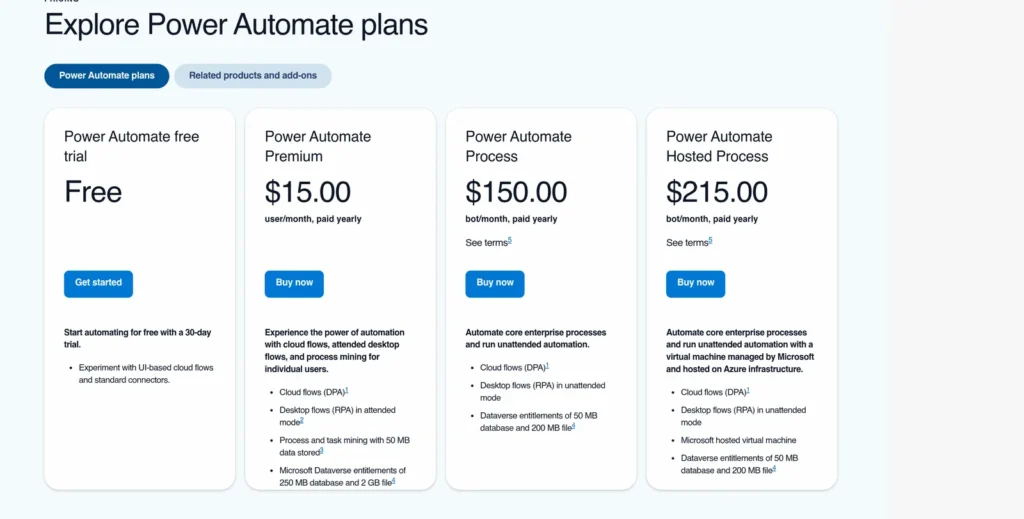
Power Automate Premium costs $15 per user per month, billed annually. It unlocks premium and custom connectors, attended desktop automation (RPA with a human present), and process mining. Power Automate Process costs $150 per bot per month, billed annually. It licenses the automation itself, not a person — one unattended bot, or one shared cloud flow, for unlimited users. Power Automate Hosted Process costs $215 per bot per month, billed annually. Same as Process, plus a Microsoft-hosted virtual machine, so you run unattended RPA without managing your own machine. Your Microsoft 365 subscription already includes limited Power Automate use at no extra cost — cloud flows with standard connectors only. The moment a flow needs a premium connector, a desktop flow, or AI Builder, you pay. The Process Mining add-on costs $5,000 per tenant per month, billed annually. That is not a typo, and it is the single most expensive line item in this guide. For most small businesses, the honest starting point is Premium for the people who build flows, and Zapier Pro at $19.99 a month billed annually if your apps live outside Microsoft. Buy a Process licence only when a flow must run with nobody at the keyboard.
You open Microsoft’s pricing page expecting a neat row of plans, and what you get is a grid with three prices, a $5,000-a-month add-on that is not a typo, and the slow realisation that the “free” automation you already have stops working the moment your flow touches Salesforce.
That is Power Automate pricing in one sentence: cheap to start, genuinely confusing to budget, and full of tripwires that only show up after you have built something. This guide untangles the three paid plans, the free use rights hiding inside your Microsoft 365 subscription, the per-user versus per-bot maths, and how Power Automate stacks up against Zapier and Make — every price checked on the vendor’s own page on 17 November 2026.
Quick Answer Box
- Power Automate Premium costs $15 per user per month, billed annually. It unlocks premium and custom connectors, attended desktop automation (RPA with a human present), and process mining.
- Power Automate Process costs $150 per bot per month, billed annually. It licenses the automation itself, not a person — one unattended bot, or one shared cloud flow, for unlimited users.
- Power Automate Hosted Process costs $215 per bot per month, billed annually. Same as Process, plus a Microsoft-hosted virtual machine, so you run unattended RPA without managing your own machine.
- Your Microsoft 365 subscription already includes limited Power Automate use at no extra cost — cloud flows with standard connectors only. The moment a flow needs a premium connector, a desktop flow, or AI Builder, you pay.
- The Process Mining add-on costs $5,000 per tenant per month, billed annually. That is not a typo, and it is the single most expensive line item in this guide.
- For most small businesses, the honest starting point is Premium for the people who build flows, and Zapier Pro at $19.99 a month billed annually if your apps live outside Microsoft. Buy a Process licence only when a flow must run with nobody at the keyboard.
In This Article
- Quick Answer Box
- The Short Version: What Power Automate Actually Charges For
- What You Already Get Free With Microsoft 365
- Premium: The $15 Per-User Plan
- Process: The $150 Per-Bot Plan
- Hosted Process: The $215 Plan With a Microsoft Machine
- Process Mining: The $5,000 Add-On
- Pay-As-You-Go: The $0.60 Meter
- The Hidden Costs and Gotchas
- The Competition: Zapier, the Small-Business Baseline
- The Competition: Make, the Credit Counter
- Head-to-Head Comparison Table
- Cost-Maths: What a Realistic Stack Costs
- Who Is Each Tool Actually Best For?
- Work Out Your Own Number First
- Pros and Cons
- Our Verdict
- Frequently Asked Questions
- Price Note
The Short Version: What Power Automate Actually Charges For
Power Automate is Microsoft’s workflow automation tool, and it lives inside the Microsoft ecosystem the way a kitchen lives inside a house — it is part of the building, not an extension. Move data between SharePoint and Teams, trigger emails from Outlook, automate approvals in Dynamics 365, and drive desktop apps that have no API through robotic process automation (RPA). That is the core of it.
Microsoft charges for it in three different ways at once, which is where the confusion starts. Premium charges per person. Process charges per bot. Pay-as-you-go charges per run. Pick the wrong unit and you can pay ten times more than the team next door for the same automation.
Three things decide your bill: who builds and runs the flows, whether anyone needs to be at the keyboard when they run, and whether the flow touches anything outside Microsoft’s own apps. Get those three answers right and the pricing page suddenly makes sense.
One more thing before the numbers. Power Automate pricing assumes Microsoft 365 is already in your budget. If your team lives in Teams, SharePoint, Outlook and Dynamics 365, that assumption is fair and the tool slots in beautifully. If your stack is Gmail, Slack, HubSpot and a Shopify store, the assumption is doing a lot of heavy lifting — and the maths in this guide will show you exactly where it breaks.
What You Already Get Free With Microsoft 365
Before you pay for anything, it is worth knowing what you already own. Microsoft 365 plans come with limited Power Automate use rights at no extra cost. If your organisation already runs on Microsoft 365, your users can build automations today without buying a separate plan.
What is covered is cloud flows that use standard connectors only. That includes the Microsoft apps your team probably already lives in — Outlook, SharePoint, Teams, OneDrive, Excel, Forms and Planner — plus some popular non-Microsoft apps like Slack, Gmail, Dropbox and Trello. That is enough to handle a lot of internal busywork: routing an approval, posting a Teams message when a SharePoint list updates, or saving email attachments to OneDrive.
But the ceiling arrives fast. The moment a flow needs to reach outside the Microsoft ecosystem — Salesforce, SAP, ServiceNow, SQL Server, or anything that requires a premium connector — the included licence stops working and you are into paid territory. Desktop flows (RPA) are not included either, and neither is AI Builder. The included plan also has daily action limits, so high-volume automation hits a wall.
This trips up more teams than any other part of Power Automate licensing. The free tier is real, and it is genuinely useful for simple internal flows. It is also a demo of the product, not the product. Budget as though it will run out — because for any flow that touches a real business system, it will.
Premium: The $15 Per-User Plan
Power Automate Premium costs $15 per user per month, billed annually. It is the entry point for teams that need more than what comes bundled with Microsoft 365, and for most small businesses it is the only Power Automate plan you will ever need.
The Premium plan covers cloud flows with standard, premium and custom connectors, attended desktop flows — RPA with a human present at the keyboard — and process and task mining with 50 MB of data storage. It also includes Dataverse entitlements: 250 MB of database capacity and 2 GB of file capacity per user, which matters if you run Power Apps alongside Power Automate.
There is a 30-day free trial, which gives you access to cloud flows and standard connectors to test the basics before committing.
One thing to flag: the Premium licence is per user. For a small team, that is manageable — ten people is $150 a month, $1,800 a year. For a larger organisation rolling automation out across departments, the per-seat model adds up quickly, especially when not everyone needs the same level of access. A receptionist who clicks “approve” on a flow twice a week does not need the same licence as the person who builds the flows. Microsoft charges them the same $15 anyway.
The daily action limit is 40,000 per user. That sounds enormous until you do the division: a flow that fires every minute and runs five actions burns 7,200 actions a day. Most small businesses will never touch the limit. High-volume teams should count before they commit.
Premium is the plan for the makers. If one person builds the flows and five people run them, you licence the builder — and, for instant button flows, every person who presses the button. That last detail is the one that quietly doubles small teams’ bills, and it gets its own section in the gotchas below.
Process: The $150 Per-Bot Plan
The Process plan costs $150 per bot per month, billed annually. It is built for unattended automation — workflows that run in the background without a human in the loop — and it is priced per bot rather than per user, which makes it a different model entirely from Premium.
Each bot runs one unattended flow at a time. The plan includes unattended desktop flows (RPA that runs without human interaction), cloud flows, and Dataverse entitlements of 50 MB of database capacity and 200 MB of file capacity. It is the right plan if you are automating back-office processes, data migration, system integrations and scheduled batch jobs, where nobody needs to be at a keyboard to watch them run.
Because it is process-based rather than user-based, it can be more cost-effective for high-volume automation that runs on a set schedule. One Process licence covers one shared automation that unlimited users can benefit from. The break-even is simple arithmetic: $150 divided by $15 is 10. Once 11 or more people run the same flow, a single Process licence on that flow costs less than licensing each of them with Premium.
There is also a catch the pricing page does not shout about: a Process licence does not replace a user licence. The person who builds and manages the desktop flows still needs Power Automate Premium, and the machine that receives a Process licence must have been registered by a Premium user. Budget $150 for the bot plus $15 for its maker — $165 a month, not $150.
The daily action limit is 250,000 per licence, and licences are stackable up to 10 on one flow. That is the plan for volume: a bot that chews through invoices all night will not notice the ceiling.
One more detail that matters for budgeting: the Process licence is priced per environment. If you run separate development, test and production environments, each one needs its own licence. Three environments, three bots, $450 a month — for one automation.
Hosted Process: The $215 Plan With a Microsoft Machine
The Hosted Process plan adds cloud-hosted infrastructure to the Process plan for $215 per bot per month, billed annually. Instead of running desktop flows on your own machines or virtual machines, you get a Microsoft-hosted virtual machine on Azure infrastructure.
This is the plan for organisations that want the power of unattended RPA without managing their own infrastructure. The tradeoff is cost: hosted infrastructure comes at a $65-a-month premium over the standard Process plan, which is $780 a year per bot for the privilege of not owning a server.
Who should actually buy it? A small business with no IT staff and no server closet. If nobody on your team wants to patch a Windows machine, keep it awake, and babysit an unattended bot at 2 a.m., the $65 premium buys you sleep. If you already run a VM somewhere, save the money — the standard Process plan at $150 does the same work on your hardware.
Like Process, Hosted Process carries the same 250,000 daily action limit and the same per-environment pricing. And like Process, it does not include the Premium licence your maker still needs.
Process Mining: The $5,000 Add-On
Process Mining is an add-on available only with the Power Automate Premium plan, priced at $5,000 per tenant per month, billed annually. That is not a typo. It is an enterprise-tier product with enterprise-tier pricing: 100 GB of data storage, 2 GB of Dataverse database entitlements, and 1 TB of file capacity.
It lets you discover, visualise and analyse your business processes before you automate them, which helps you identify where the actual bottlenecks are rather than guessing. That is genuinely valuable work — automating a broken process just produces broken results faster — but $60,000 a year is a lot of money to spend learning that your approval chain has eleven steps and needs three.
Pay-As-You-Go: The $0.60 Meter
There is a fourth way to pay, and Microsoft does not put it on the main pricing grid: pay-as-you-go billing, at $0.60 per premium cloud flow run. No monthly commitment, no per-user licence — you pay for what runs.
At low volume, this is the cheapest way to use a premium connector. Ten premium runs a month costs $6. A hundred costs $60. The meter only starts hurting when volume grows: 250 runs a month is $150, exactly the price of one Process bot. A thousand runs is $600 a month — four Process bots’ worth of money for one flow’s worth of work.
That makes pay-as-you-go a brilliant trial mechanism and a terrible permanent plan. Use it to prove a flow is worth automating, measure the real run volume for a month, then buy the licence that matches the volume. A flow that runs 300 times a month belongs on a Process licence. A flow that runs 30 times a month belongs on the meter.
Pay-as-you-go also has a quiet advantage: it sidesteps the per-user question entirely. Nobody needs a licence to trigger a metered flow. For a team that wants one expensive connector in one flow, used rarely, it is the cheapest honest answer on the page.
The Hidden Costs and Gotchas
Every pricing page hides something. Power Automate hides several things, and they are all the kind that show up on an invoice, not in a demo.
The AI Builder credits are gone. Premium and Process licences used to include about 5,000 AI Builder credits per user per month. From 1 November 2026, new and renewed qualifying licences no longer receive newly seeded credits. Any flow that uses AI — reading an invoice, extracting text from a PDF — now draws on Copilot Credits or a paid AI Builder capacity add-on that Microsoft sells separately. If you built flows around AI document processing in 2025, your 2026 renewal quietly repriced them. Check what your flows actually use before you renew.
The button-flow trap. An automated or scheduled flow needs Premium for the owner only. An instant flow — the kind a person triggers with a button — needs Premium for every person who runs it. One approval flow with a button, used by 15 people, is 15 Premium licences: $225 a month for a flow that runs twice a week. The fix is to trigger it automatically instead — a scheduled check, or a trigger on a SharePoint list change — so only the owner needs the licence. Or put the flow on a Process licence, which covers unlimited users for one flow.
The per-environment multiplier. A Process licence is priced per environment. Development, test and production are three environments, so one automation in three environments is three Process licences: $450 a month. Small businesses can dodge this by keeping one environment and testing carefully, but know the tradeoff you are making.
The legacy plans are dead, and the replacement costs more. The old per-user plan and per-flow plan, and the unattended RPA add-on, were removed from Microsoft’s price list on 1 February 2024. Existing per-flow licences keep working but cannot be stacked or added to. If you are reading an old blog post that mentions a $40 per-user plan or a $100 per-flow plan, that price no longer exists.
The monthly-billing premium. All three headline prices assume an annual commitment. Pay month-to-month and the price rises. Microsoft does not advertise the monthly figure on the main grid, so treat the $15, $150 and $215 as annual-commitment prices and expect more if you refuse to commit.
The Dataverse ceiling. Premium includes 250 MB of database capacity and 2 GB of file capacity per user. Process includes 50 MB and 200 MB. That is generous for approvals and notifications, and tight for anything that stores documents at volume. Extra Dataverse capacity is sold separately, and it is another line item the pricing page keeps in a footnote.
The connector wall. Standard connectors are free with Microsoft 365. Premium connectors — Salesforce, SAP, ServiceNow, SQL Server, the ones your business actually runs on — need Premium at minimum. The wall is not a bug, it is the business model: Microsoft gives away the automation and charges for the door to the rest of your stack. Before you budget, list every app your flows will touch, and mark which ones are premium. One premium connector in one flow is enough to move a whole team onto paid licences.
The Competition: Zapier, the Small-Business Baseline
Comparing Microsoft Power Automate pricing to Zapier is not apples-to-apples. There are different pricing models and different assumptions about how your team works — and the difference is the whole decision.
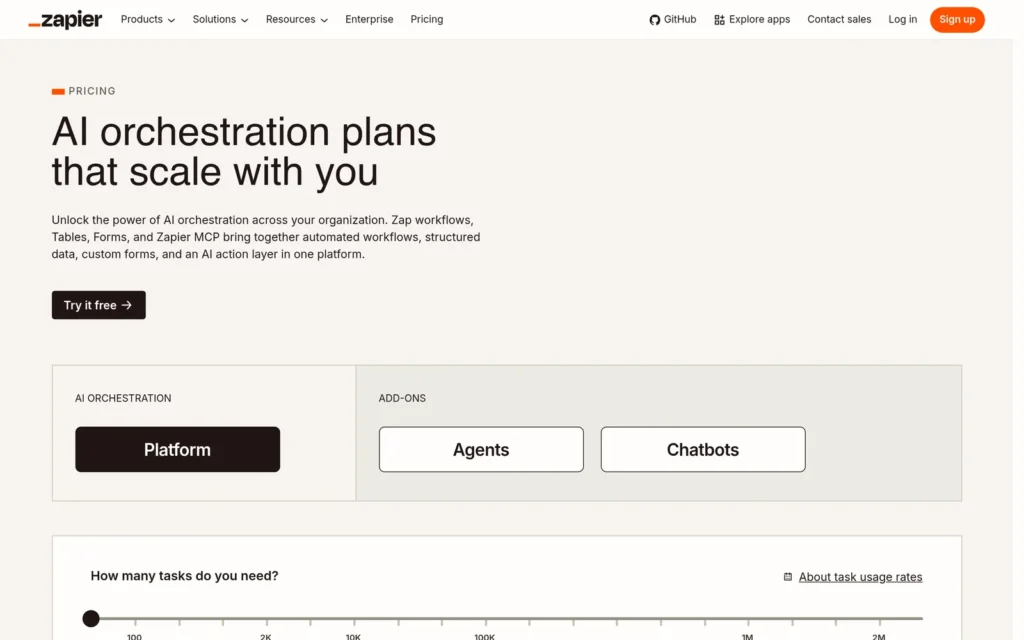
Zapier prices on tasks, not seats. The Free plan costs $0 and includes 100 tasks a month with two-step Zaps. Professional starts at $19.99 a month billed annually, with 750 tasks, multi-step Zaps, unlimited premium apps, webhooks and AI fields. Team starts at $69 a month billed annually, with 2,000 tasks and 25 users, shared Zaps and folders, shared app connections and SAML SSO. Enterprise is contact for pricing. Every new account gets a 14-day free trial of Professional, no card required. All of it is on Zapier’s pricing page.
The structural difference matters more than the sticker price. Power Automate Premium is $15 per user per month. Run that on a 20-person team and you are at $300 a month before add-ons. Zapier Team is $69 a month for up to 25 users. A 20-person team that automates through Zapier pays $69 a month. The same team on Power Automate pays $300, and that is before the first premium connector.
Zapier also counts tasks generously. Triggers never cost a task. Failed actions never cost a task. Polling for new data never costs a task. Built-in tools — Filter, Formatter, Paths, Delay, Tables, Forms — never cost a task. Only successful actions count. Power Automate’s daily action limits are generous too, but every action in a flow counts, successful or not, and the meter runs per user.
So if you are a Microsoft-first organisation automating mostly within Microsoft tools, Power Automate holds up on price, and its native connectors are genuinely better inside that world. But if your stack is mixed, or you are trying to get automation working across teams using different tools, the per-seat model and the connector wall can end up costing more, and you are better off using Zapier.
The Competition: Make, the Credit Counter
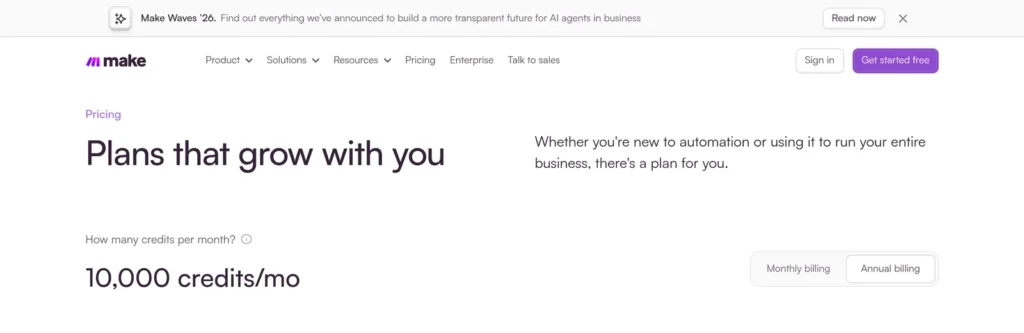
Make is the third way to pay for automation, and it counts something different again: credits. Make’s Core plan costs $9 a month billed annually, Pro costs $16 a month billed annually, and Teams costs $29 a month billed annually, with monthly billing higher. Every plan includes a monthly credit allowance, and every operation in a scenario — every module that runs — burns credits.
Make’s model is the cheapest of the three at small scale and the hardest to predict. A simple two-step scenario that runs a thousand times a month costs almost nothing in credits. A scenario with ten modules, a router, three filters and an aggregator burns credits like a kettle burns electricity — every module, every time, including the trigger checks and the test runs. Make’s credit system is genuinely confusing, and the gap between the sticker price and the real bill is the widest of the three tools in this guide.
One more wrinkle: Make has shown different prices to different visitors — a live browser session on 17 November 2026 verified Core $9, Pro $16 and Teams $29 a month billed annually, while server captures of the same page show $12, $21 and $38. If your page shows the higher set, that is the price you will pay. We broke down the full credit maths in our Make.com pricing teardown.
Against Power Automate, Make wins on two fronts: price and transparency of the unit. Core at $9 a month undercuts Premium at $15, and one Make account can run scenarios for a whole team without per-seat charges. What Make cannot do is desktop RPA — it has no answer to a bot that clicks through a legacy Windows app with no API — and it has no native home inside Microsoft 365.
Head-to-Head Comparison Table
Here is Power Automate pricing next to Zapier and Make at the same usage level — the same three tools, priced on the same page, so the per-user versus per-task versus per-credit difference is visible in one place.
| Tool | Entry price | What you pay for | Free option | Unattended bots | Premium connectors | Best for |
|---|---|---|---|---|---|---|
| Power Automate Premium | $15/user/mo, billed annually | Per person | Limited use with Microsoft 365 | No — attended only | Included | Microsoft 365 teams, makers |
| Power Automate Process | $150/bot/mo, billed annually | Per bot / flow | No | Yes | Included | One shared flow, scheduled batch work |
| Power Automate Hosted Process | $215/bot/mo, billed annually | Per bot + hosted VM | No | Yes, on Microsoft’s VM | Included | Unattended RPA with no IT staff |
| Zapier Professional | $19.99/mo, billed annually | Per account, by tasks | $0, 100 tasks/mo | n/a — cloud only | All 9,000+ apps included | Small businesses, mixed stacks |
| Zapier Team | $69/mo, billed annually | Per account, 25 users | — | n/a — cloud only | All 9,000+ apps included | Teams sharing automations |
| Make Core | $9/mo, billed annually | Per account, by credits | Free tier available | n/a — cloud only | Included | Cheapest cloud automation |
| Make Pro | $16/mo, billed annually | Per account, by credits | — | n/a — cloud only | Included | Growing scenario volume |
Cost-Maths: What a Realistic Stack Costs
Numbers on a pricing page are abstract. Here is what four realistic small-business setups actually cost over a year, using the prices verified on 17 November 2026.
Scenario A — the ten-person Microsoft shop. Ten people build and run approval and inbox flows inside Microsoft 365. Ten Premium licences at $15 a month is $150 a month, $1,800 a year. Nothing else is needed — no bots, no add-ons, no Process licences. This is Power Automate at its best: simple, predictable, and cheaper than a single Zapier Team plan would be if you priced it per seat.
Scenario B — the one unattended invoice bot. A bot pulls invoices from email, reads them, and posts them to the accounts system overnight, with nobody at the keyboard. One Process licence at $150 a month, plus one Premium licence at $15 for the person who builds and manages it: $165 a month, $1,980 a year. Add a second environment for testing and the bill becomes $315 a month, $3,780 a year. The bot is cheap. The discipline around the bot is what costs money.
Scenario C — the hosted bot, no IT staff. Same invoice bot, but nobody on the team wants to manage a Windows machine. One Hosted Process licence at $215 plus the maker’s Premium at $15: $230 a month, $2,760 a year. The $65-a-month premium over Scenario B buys $780 a year of not owning a server. For a team with no IT staff, that is money well spent. For a team with a spare VM, it is money burned.
Scenario D — the same ten people on Zapier instead. Zapier Team at $69 a month billed annually covers 25 users and 2,000 tasks: $828 a year. Against Scenario A’s $1,800, Zapier saves $972 a year — and every integration is included, with no connector wall. But if those ten people also need desktop RPA, Zapier cannot do the job at any price, and the comparison ends.
Who Is Each Tool Actually Best For?
Power Automate Premium is best for the Microsoft 365 team that automates inside Microsoft’s apps. If your day is Outlook, Teams, SharePoint and Excel, Premium is the cheapest honest licence in this guide, and the native connectors are better than anything Zapier or Make can offer inside that world.
Power Automate Process is best for one shared automation that many people benefit from — the invoice bot, the nightly sync, the scheduled report. The moment 11 or more people use one flow, Process is cheaper than licensing them all, and it is the only plan in this guide that runs with nobody at the keyboard.
Power Automate Hosted Process is best for the team that needs unattended RPA and has nobody to run a machine. The $65 premium is an IT department in a box. If you have an IT person and a VM, buy Process instead.
Zapier is best for the small business whose apps live outside Microsoft, or across several ecosystems at once. The task model is kinder than per-seat pricing for teams, the free plan is real, and 9,000+ integrations with no connector wall means the price on the page is the price you pay.
Work Out Your Own Number First
The worst way to buy Power Automate is the way most people do: read the $15 headline, multiply by headcount, and discover the connector wall, the button-flow trap and the per-environment multiplier three months later, on an invoice.
The best way takes an afternoon and costs nothing. List every flow you want to build. For each one, write down who triggers it, whether anyone must be at the keyboard when it runs, and which apps it touches. Count the premium connectors. Count the runners on every button flow. Then price the list three ways — Premium seats, Process licences, and pay-as-you-go — and take the cheapest honest answer. Our free AI Cost Calculator does the arithmetic for you: put in your headcount, your bot count and your monthly runs, and it shows the yearly total for each model side by side, so the $15 headline stops being a guess.
And before you buy anything, run the 30-day Premium trial on your real flows, not on a demo. Measure the daily actions, count the premium connectors, and watch which flows your team actually uses. The trial is the only price quote that uses your numbers instead of Microsoft’s.
Pros and Cons
Pros — Power Automate:
- The only tool in this guide with desktop RPA — it automates legacy Windows apps that have no API, which neither Zapier nor Make can touch.
- Native connectors inside Microsoft’s apps are deeper and more reliable than any third-party integration.
- Process licences cover unlimited users for one flow, so high-volume shared automation can be cheaper than per-seat pricing.
- Pay-as-you-go at $0.60 a run lets you prove a flow’s value before committing to a licence.
- The included Microsoft 365 use rights mean simple internal flows cost literally nothing extra.
Cons — Power Automate:
- Per-user pricing compounds fast: 20 people is $300 a month before any add-on, while Zapier Team covers 25 users for $69.
- The premium connector wall means the free tier stops working the moment a flow touches Salesforce, SAP or ServiceNow.
- Button flows need a Premium licence for every person who presses the button — a trap that can multiply a small team’s bill overnight.
- Process licences are priced per environment, so a proper dev/test/prod setup triples the bot bill.
- AI Builder credits were removed from Premium and Process licences on 1 November 2026, repricing every AI flow.
- Process Mining at $5,000 a month is priced for enterprises, not small businesses, and the monthly-billing premium is not advertised on the main grid.
Our Verdict
Our honest read on Power Automate pricing is this: it is the cheapest automation in the world if you live inside Microsoft, and a trap if you do not.
Buy Premium if your team runs on Microsoft 365 and your flows stay mostly inside Microsoft’s apps. At $15 a user, it is fair value — premium connectors, attended RPA and process mining in one licence — and the included use rights mean your simplest flows cost nothing. Start with the 30-day trial, measure your real usage, and licence the makers first.
Buy a Process licence the day a flow must run with nobody at the keyboard, or the day 11 people use the same flow. At $150 a bot, it is the cheapest unattended automation with a published price anywhere, and it is the only plan here that does the job at all. Add the maker’s $15 Premium licence to the maths, count your environments, and you have the real number.
Do not buy Power Automate if your stack lives outside Microsoft. A Gmail, Slack, Shopify and HubSpot business will pay the per-seat price, hit the connector wall, and still need Zapier or Make for half its flows. Start with Zapier Team at $69 a month for 25 users, or Make Core at $9 a month if budget is the whole decision, and let Microsoft earn its way in later — if it ever does.
And whatever you buy, price it on your workload, not on the headline. The $15 is real. The $150 is real. The $215 is real. The $5,000 is real. Which ones show up on your invoice depends entirely on the flows you build — so build the list first, count honestly, and let the maths choose.
Frequently Asked Questions
How much does Power Automate cost per month?
Power Automate Premium costs $15 per user per month billed annually, Process costs $150 per bot per month billed annually, and Hosted Process costs $215 per bot per month billed annually. Your Microsoft 365 subscription already includes limited use — cloud flows with standard connectors only — at no extra cost. Monthly billing costs more than the annual prices shown here.
Is Power Automate free with Microsoft 365?
Partly. Microsoft 365 plans include limited Power Automate use rights at no extra cost: cloud flows using standard connectors only, across Microsoft apps like Outlook, SharePoint and Teams, plus some popular apps like Slack and Gmail. Premium connectors, desktop flows and AI Builder are not included — those need a paid plan.
What is the difference between Power Automate Premium and Process?
Premium is priced per user and covers the people who build and run flows, including attended desktop automation with a human present. Process is priced per bot and licenses the automation itself — one unattended bot, or one shared cloud flow, for unlimited users. Once 11 or more people use one flow, a single Process licence at $150 is cheaper than 11 Premium seats.
Does Power Automate still include AI Builder credits?
No — not for new or renewed licences. From 1 November 2026, Premium and Process licences no longer receive newly seeded AI Builder credits (previously about 5,000 per user per month). Flows that use AI now draw on Copilot Credits or a paid AI Builder capacity add-on sold separately. Check what your flows use before you renew.
Is Power Automate cheaper than Zapier?
It depends on your stack. For a Microsoft 365 team automating inside Microsoft apps, Power Automate Premium at $15 a user is competitive, and a single Process licence can be cheaper than licensing a whole team. For a mixed stack, Zapier is usually cheaper: Team covers 25 users for $69 a month billed annually, all 9,000+ integrations are included, and there is no per-seat charge or connector wall. Price both on your actual flows before you decide.
Price Note
Price note — updated 17 November 2026: Prices in this post were checked on 17 November 2026. When you are reading this, the price may be lower or higher — always check the official pricing page before you buy.
Pros
- The only tool in this guide with desktop RPA — it automates legacy Windows apps that have no API, which neither Zapier nor Make can touch.
- Native connectors inside Microsoft's apps are deeper and more reliable than any third-party integration.
- Process licences cover unlimited users for one flow, so high-volume shared automation can be cheaper than per-seat pricing.
- Pay-as-you-go at $0.60 a run lets you prove a flow's value before committing to a licence.
- The included Microsoft 365 use rights mean simple internal flows cost literally nothing extra.
Cons
- Per-user pricing compounds fast: 20 people is $300 a month before any add-on, while Zapier Team covers 25 users for $69.
- The premium connector wall means the free tier stops working the moment a flow touches Salesforce, SAP or ServiceNow.
- Button flows need a Premium licence for every person who presses the button — a trap that can multiply a small team's bill overnight.
- Process licences are priced per environment, so a proper dev/test/prod setup triples the bot bill.
- AI Builder credits were removed from Premium and Process licences on 1 November 2026, repricing every AI flow.
- Process Mining at $5,000 a month is priced for enterprises, not small businesses, and the monthly-billing premium is not advertised on the main grid.
Our honest read on Power Automate pricing is this: it is the cheapest automation in the world if you live inside Microsoft, and a trap if you do not. Buy Premium if your team runs on Microsoft 365 and your flows stay mostly inside Microsoft's apps. At $15 a user, it is fair value — premium connectors, attended RPA and process mining in one licence — and the included use rights mean your simplest flows cost nothing. Start with the 30-day trial, measure your real usage, and licence the makers first. Buy a Process licence the day a flow must run with nobody at the keyboard, or the day 11 people use the same flow. At $150 a bot, it is the cheapest unattended automation with a published price anywhere, and it is the only plan here that does the job at all. Add the maker's $15 Premium licence to the maths, count your environments, and you have the real number. Do not buy Power Automate if your stack lives outside Microsoft. A Gmail, Slack, Shopify and HubSpot business will pay the per-seat price, hit the connector wall, and still need Zapier or Make for half its flows. Start with Zapier Team at $69 a month for 25 users, or Make Core at $9 a month if budget is the whole decision, and let Microsoft earn its way in later — if it ever does. And whatever you buy, price it on your workload, not on the headline. The $15 is real. The $150 is real. The $215 is real. The $5,000 is real. Which ones show up on your invoice depends entirely on the flows you build — so build the list first, count honestly, and let the maths choose.