
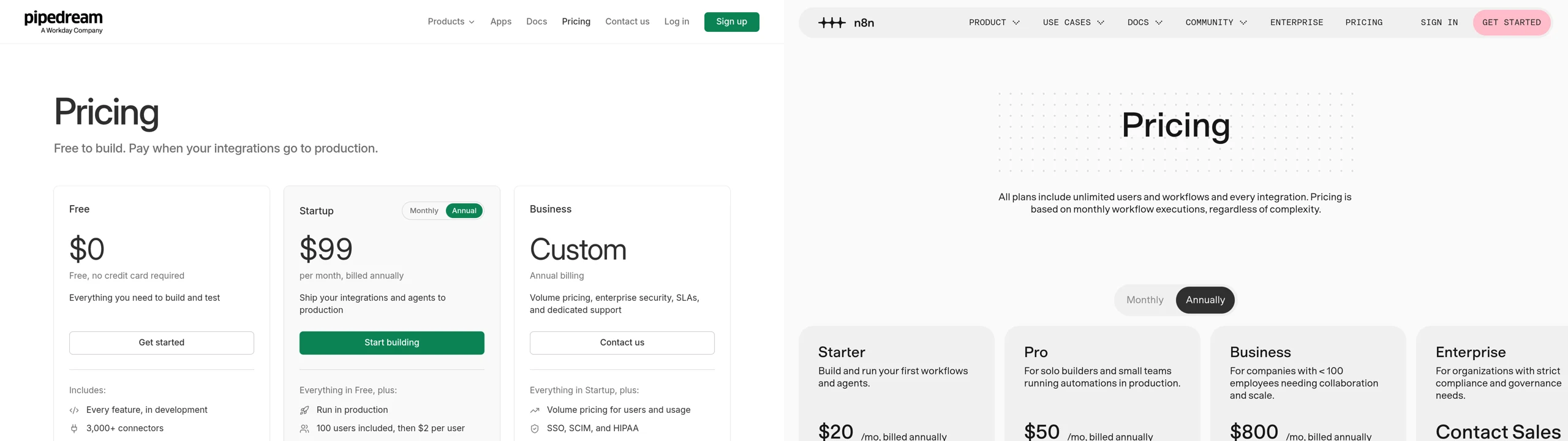
Pipedream is no longer a general workflow builder. It is now Pipedream Connect, a developer API and SDK for embedding integrations into your own apps. Free in development; Startup is $99 a month billed annually ($150 a month billed monthly), including 10,000 compute credits and 100 external users. Warning: legacy Workflows shut down on 31 March 2027. n8n Cloud Pro is $50 a month billed annually for 10,000 executions, and self-hosted Community is free. Make Core starts at $9 a month billed annually for 10,000 credits. For most small businesses, Make or n8n is the honest pick — Pipedream only makes sense if you are a developer embedding integrations into your own product.
Pipedream Pricing Teardown (2026): Why the Old Plans Are Dead (And What It Costs Now)
You pull up Pipedream’s pricing page expecting a simple list of plans for building your little Slack-to-Notion automations, and instead, you’re hit with terms like “external users,” “usage credits,” and a quiet little corporate footnote that feels like finding out your favorite restaurant is turning into a bank. If you’ve spent the last few years using Pipedream as a handy no-code workflow builder, brace yourself: the ground beneath your feet has shifted, and the pricing page tells a completely different story than the blog posts you read in 2024.
Let’s cut through the marketing fluff, look at the real numbers, and examine how Pipedream pricing stacks up against n8n and Make in 2026.
Quick Answer Box
- Pipedream: No longer a general workflow builder. It is now Pipedream Connect, a developer API and SDK for embedding integrations into your own apps. Free in development; Startup plan is $99/month billed annually ($150/month billed monthly), which includes 10,000 compute credits and 100 external users. Warning: Legacy workflows shut down on March 31, 2027.
- n8n: The heavy-duty automation pick. Cloud Starter is $20/mo billed annually; Cloud Pro is $50/mo billed annually. Self-hosted Community edition is free (you pay server costs).
- Make: The visual favorite for non-technical users. Free tier gives 1,000 credits/month. Core plan starts at $9/mo billed annually ($108/yr) or $10.59/mo billed monthly for 10,000 credits, with prices scaling by credit volume.
In This Article
- Quick Answer Box
- The Big Pivot: Why Pipedream Isn’t What It Used to Be
- Pipedream Connect: Plans, Tiers, and Real-World Numbers
- The Hidden Costs and Gotchas of Pipedream
- How to Migrate Off Pipedream Workflows Before 31 March 2027
- The Competition: n8n Pricing and Reality Check
- The Competition: Make Pricing and Reality Check
- Head-to-Head Comparison Table
- Cost-Maths: What a Full Stack Actually Costs
- Who Is Each Tool Actually Best For?
- Make Smarter Software Decisions
- Pros and Cons
- Our Verdict
- Frequently Asked Questions
- Price Note
The Big Pivot: Why Pipedream Isn’t What It Used to Be
If you are looking for a standard no-code tool to connect your email marketing to your CRM, stop right here. Pipedream was acquired by Workday in 2026, and the old workflow builder you might remember is on death row.
Pipedream Workflows—the old no-code interface where you strung together triggers and actions—is officially shutting down on March 31, 2027. It is currently in maintenance mode. No new signups or workflow subscriptions are allowed, existing workflows will run until that March cutoff date, and all data gets wiped by April 30, 2027.
What the pricing page sells now is Pipedream Connect. This is a developer-first product. It’s an API and SDK that lets your SaaS application or AI agent act across 3,000+ third-party services on behalf of your customers. If you are a non-technical founder looking to automate your own internal agency tasks, Pipedream is no longer built for you. But if you are embedding integrations into a product you are building, keep reading.
Pipedream Connect: Plans, Tiers, and Real-World Numbers
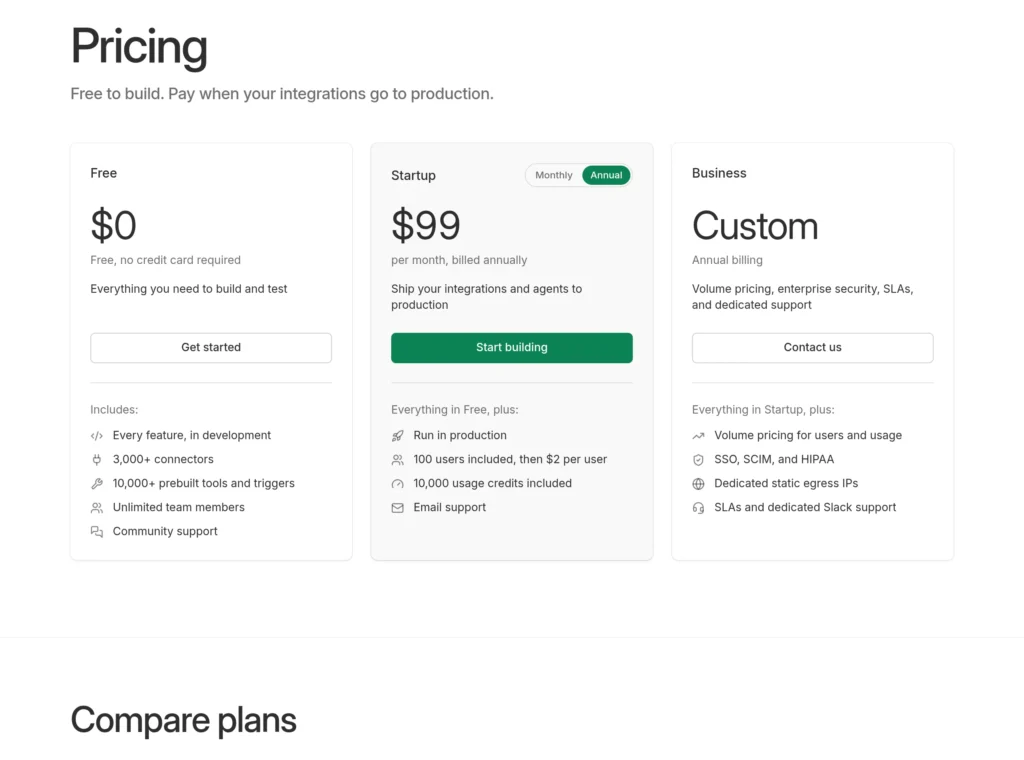
Pipedream’s current pricing model reflects its new identity as an embedded integration platform. Let’s look at the actual tiers available on pipedream.com.
1. Free Plan ($0, No Credit Card)
- What you get: Everything you need to build and test in development only. Access to 3,000+ connectors, 10,000+ prebuilt tools and triggers, unlimited team members, community support, SOC 2 Type 2, and GDPR compliance.
- The catch: Production use, external users, and usage credits are strictly off-limits here. Free workspaces have a daily credit limit and a limited number of connected accounts, though exact numbers are not published by Pipedream.
2. Startup Plan ($99/mo annual or $150/mo monthly)
- What you get: Annual billing saves you 34% ($1,188/yr vs $1,800/yr). You get everything in the Free tier, permission to run in production, 100 external users included, 10,000 usage credits included per month, and email support.
- The catch: Once you cross 100 external users, you pay an extra $2 per user per month. Overage credits beyond the 10,000 limit cost $0.012 per credit, with rates dropping at higher volumes (though no published curve exists).
3. Business Plan (Custom, Annual Contract Only)
- What you get: Volume pricing for users and usage, single sign-on (SSO), SCIM provisioning, HIPAA compliance, dedicated static egress IPs, SLAs, and dedicated Slack support.
- The catch: No public price. It’s strictly sales-led, meaning you’ll need to sit through a discovery call to find out what it costs.
The Hidden Costs and Gotchas of Pipedream
Pipedream Connect is powerful, but its billing structure has a few landmines that can catch a growing startup off guard.
The Metering Trap: Time, Not Runs
A usage credit on Pipedream is not an execution count. 1 credit equals 30 seconds of compute.
If a script runs for 31 seconds, it costs 2 credits. If it runs for 5 minutes, it costs 10 credits. If your integration handles heavy data processing or calls slow APIs, your credit consumption will spike without you realizing it.
The Memory Multiplier
By default, Pipedream runs components at 256 MB memory. But if your integration needs more juice and you bump it up to 512 MB, your credit burn doubles. Scale that memory up to 1 GB, and your credit burn quadruples—turning a 1-second run into 4 credits instead of 1.
The Per-User Multiplication
The $99/mo Startup plan looks affordable until you realize it only covers your first 100 external users. If your app grows and you onboard 500 active users connecting their accounts, your math changes fast:
$99 + (400 extra users x $2) = $899/mo on annual billing
The user count, not the compute, is usually what blows up a startup’s Pipedream bill.
Silent Overage Billing
Pipedream doesn’t lock you out or throw a hard block when you exceed your monthly limits on the Startup plan. Extra credits are simply calculated and billed silently on your next invoice.
No Published Business Price
If your company grows past the Startup tier, evaluating the pricing becomes a guessing game. Any tier above Startup requires a custom enterprise contract. Because there are no public numbers for the Business plan, you cannot accurately forecast your software budget as you scale—you have to surrender an hour of your life to a sales call just to get a quote.
No Credit Rollover, No Trial
Unused monthly usage credits do not roll over to the next billing cycle. If you buy allowance and don’t use it, you lose it. Furthermore, Pipedream does not offer a time-limited free trial of its paid Startup plan. The only way to test production features is to put your credit card down and start paying immediately, making it harder to evaluate Pipedream pricing risk-free.
How to Migrate Off Pipedream Workflows Before 31 March 2027
If you are currently relying on Pipedream’s legacy no-code workflows to run your internal business operations, you are standing on a deadline. March 31, 2027, is a hard stop, not a contract renewal date. After April 30, 2027, your historical execution data is wiped completely.
Transitioning away from the platform requires a methodical approach. First, conduct a ruthless audit of which workflows are actually active and driving value. Don’t migrate dead automations.
Next, remember that Pipedream workflows are largely built on standard code—Node.js or Python steps. You can extract your custom logic and scripts directly rather than starting from scratch.
Then, pick your replacement based on your technical stack: move simple marketing and operational tasks to Make, route step-heavy or self-hosted operations to n8n, or transition to Pipedream Connect exclusively if you are embedding integrations into a software product you sell to others.
Rebuild your critical automations in your new home, and run both systems in parallel for at least two weeks to catch edge cases, missing webhooks, or unhandled errors. Finally, export all your logs and data before the final April deletion date so you aren’t left scrambling.
One more step saves real pain: count your executions before you choose a plan. Open your Pipedream dashboard and note how many workflow runs you used in the last 30 days, then compare that number with the execution limits above. A workflow that polls every few minutes can burn through a Starter limit faster than the headline numbers suggest.
Also check who owns the migration. If one developer built all your workflows, ask that person to document each workflow’s triggers and secrets before anything moves. Shared logins, API keys, and webhook URLs are the items most often forgotten, and they are the hardest to rebuild after the April deletion date.
The Competition: n8n Pricing and Reality Check
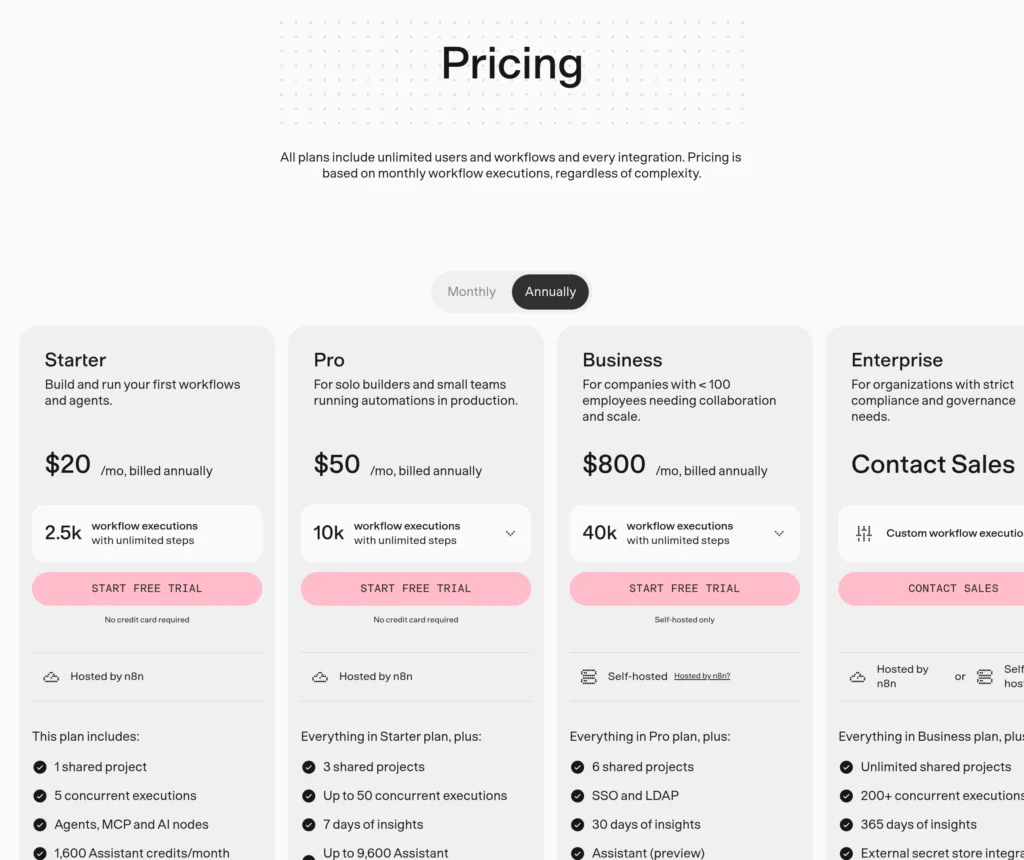
If you aren’t building a developer tool and just want to automate your business operations, n8n is a major contender. Prices below are in US dollars, as listed on n8n’s pricing page for US visitors, with annual billing saving roughly 17%.
1. Starter Cloud ($20/mo annual, or $24/mo monthly)
- Limits: 2,500 workflow executions per month, 5 concurrent executions.
- AI credits: 1,600 assistant credits included per month.
2. Pro Cloud ($50/mo annual, or $60/mo monthly)
- Limits: 10,000 workflow executions per month, up to 50 concurrent executions. (A higher tier exists at 50,000 executions for $120/mo annual).
- AI credits: Up to 9,600 assistant credits included per month.
3. Business & Enterprise
- Business: $800/mo annual ($9,600/yr) or $960/mo monthly for 40,000 executions/month. Self-hosted only. Under-20-employee companies may qualify for a 50% startup discount.
- Enterprise: Custom quote, cloud or self-hosted.
4. Community Edition (Self-Hosted)
- Price: $0 license. You pay for your own VPS server (roughly $5 to $15/mo depending on the host like PikaPods or DigitalOcean).
- Limits: Unlimited executions, but you get zero cloud-managed perks, no SSO, and you handle your own updates and debugging.
The n8n Execution Gotcha
In n8n, one execution equals one complete workflow run, no matter how many steps it has. That sounds great, but watch out for schedule triggers. If you set a workflow to check your email every 5 minutes, it burns an execution on every single tick—even if there is zero email to process. That can drain a Starter plan limit in under 9 days if you aren’t careful. Furthermore, Starter and Pro plans have no overages: hit your cap, and workflows stop until the month resets.
The Competition: Make Pricing and Reality Check
Make (formerly Integromat) is famous for its colorful, visual node-based editor. Its pricing model centers around “credits” (which replaced operations) and scales features rather than just limits.
1. Free Plan ($0)
- Limits: 1,000 credits/month, 2 active scenarios, 15-minute minimum scheduling interval, 5-minute max run time, 5 MB file size limit, 7 days of execution history.
2. Core Plan ($9/mo annual or $10.59/mo monthly)
- Limits: Starts at 10,000 credits/month. Includes unlimited scenarios, 1-minute scheduling, 40-minute max run time, 100 MB files, 30 days of logs, and access to the Make API.
3. Pro Plan ($16/mo annual or $18.82/mo monthly)
- Limits: 10,000 credits/month (scales up with volume sliders), adds priority execution, custom variables, full-text log search, and 250 MB file limits.
4. Teams Plan ($29/mo annual or $34.12/mo monthly)
- Limits: 10,000 credits/month, adds team roles, shared templates, and 500 MB file limits.
A Warning About Make’s Prices
One warning before you trust these numbers: Make has been seen showing different prices to different visitors in November 2026 — some visitors see Core at $12 a month billed annually instead of $9. The figures above are the ones verified live on the official pricing page for this guide. If the price on your screen differs, trust your screen and check the live page before you buy.
The Make Credit Multiplier
Make’s credit system can be deceptive. Most module actions cost 1 credit each. If your scenario reads a row from Google Sheets, filters it, loops through three line items, posts to Slack, and updates a CRM, every single one of those steps costs credits. A scenario run that looks simple on paper can easily consume 10 to 20 credits per execution. A “10,000-credit plan” vanishes much faster than a beginner expects.

Head-to-Head Comparison Table
| Metric / Feature | Pipedream Connect (Startup) | n8n Cloud (Pro) | Make (Core) |
|---|---|---|---|
| Primary Use Case | Embedded API/SDK for developer apps | Heavy-duty internal automation & self-hosting | Visual no-code workflows for business users |
| Entry Paid Price | $99/mo (annual) / $150/mo (monthly) | $50/mo (annual) | $9/mo (annual) / $10.59/mo (monthly) |
| Billing Unit | Compute credits (30-sec blocks) + users | Completed workflow executions | Module operation credits |
| Free Tier | Dev sandbox only (no production) | Self-hosted Community ($0) or Cloud trial | 1,000 credits/mo, 2 scenarios |
| User Limits | 100 external users included ($2/extra) | Unlimited users | Varies by plan tier |
| Workflow Shutdown Risk | Yes (Workflows die Mar 31, 2027) | No | No |
Cost-Maths: What a Full Stack Actually Costs
Let’s look at what running a realistic automation load costs across these platforms for a growing small business or early-stage product.
- Scenario A: Light Internal Automations (10,000 runs/month, 5 steps each)
- Make Core: 50,000 credits needed. Core charges $0.90 per 1,000 credits at the 10,000-credit rung, so 50,000 credits at that flat rate would be $45/mo — but the per-credit rate falls as volume rises, so the real slider price is lower, around $35 to $40/mo on annual billing.
- n8n Cloud Pro: 10,000 executions included for $50/mo billed annually.
- Pipedream: Inapplicable, unless you are embedding this inside a software product for end-users.
- Scenario B: Embedded App Integration (100 external users, 10,000 compute credits)
- Pipedream Connect Startup: $99/mo billed annually ($1,188/yr) or $150/mo monthly. Covers the baseline safely as long as compute stays under 30 seconds per action.
- If you scale to 500 external users: Your bill jumps to $899/mo on annual billing ($99 + [400 × $2]).
- Scenario C: The Bootstrapper’s Zero-Dollar Stack
- n8n Community Edition: $0 license fee hosted on a $7/mo VPS. Total cost: ~$7/mo for unlimited executions, provided you have the technical skills to configure and maintain Docker containers.
- Scenario D: Heavy Compute Load (100 external users, 25,000 compute credits)
- Pipedream Connect Startup: Base Startup plan ($99/mo annual) plus 15,000 overage credits beyond the 10,000 allowance at $0.012 per credit ($180).
- Total calculation: $99 + (15,000 x $0.012) = $279/mo on annual billing. When evaluating Pipedream pricing, data-heavy workloads will burn through your credit allowance long before your user count does.
- Scenario E: Growing SaaS App (250 external users, 10,000 compute credits)
- Pipedream Connect Startup: Base Startup plan ($99/mo annual) plus 150 extra users over the 100-user threshold at $2 per user ($300).
- Total calculation: $99 + (150 x $2) = $399/mo on annual billing ($450/mo if billed monthly). Keeping an eye on your user acquisition rate is essential when factoring in the real pricing for scaling startups.
Who Is Each Tool Actually Best For?
- Choose Pipedream ONLY if: You are a software developer or technical founder building a product and need to let your customers connect their third-party app accounts via an API/SDK. Do not buy it for internal company automation.
- Choose n8n if: You have complex, data-heavy workflows with many steps, want predictable per-run pricing, or possess the technical chops to self-host the Community edition for pennies.
- Choose Make if: You are non-technical, want a polished visual builder, and need to set up basic marketing and operational zaps without touching code.
Make Smarter Software Decisions
Balancing your software stack and figuring out what tools actually drive ROI can quickly become a guessing game. Before you commit to monthly subscriptions that drain your cash flow, it pays to map out your numbers first — a $99 plan that quietly becomes $899 when your users grow is exactly the kind of surprise a calculator catches early.
If you are trying to figure out where your money is going, run the numbers before you sign anything: work out what your software stack costs with our free AI Cost Calculator and see what the whole stack actually costs per month before the first invoice arrives.
Pros and Cons
Pipedream Connect
- Pros: Massive library of 3,000+ prebuilt connectors; excellent developer API/SDK; robust team permissions and security.
- Cons: Legacy workflow builder is shutting down in 2027; confusing time-based credit system; external user fees scale up rapidly.
n8n
- Pros: Incredible value on self-hosted Community edition; execution-based pricing means complex multi-step workflows don’t cost extra per step; strong AI integration features.
- Cons: Schedule triggers burn executions even when idle; strict hard caps on cloud plans with no overage buffer.
Make
- Pros: Extremely user-friendly visual canvas; cheap entry-level pricing for light users; robust error-handling pathways.
- Cons: Credit consumption multiplies fast with multi-module scenarios; file size limits on lower tiers can choke document-heavy workflows.
Our Verdict
The workflow automation landscape has matured, and tool specialization is clearer than ever. Make wins for non-technical users who want simple, affordable visual automation. n8n wins for power users and technical teams who want unlimited execution potential through self-hosting or predictable cloud pricing.
As for Pipedream pricing, the verdict is stark: Pipedream is no longer a general automation tool. If you evaluate Pipedream pricing today, you are looking at enterprise developer infrastructure disguised as a workflow tool—with a ticking clock on its legacy features. Match your tool to your actual technical capability, and read the fine print on how your chosen platform counts its usage.
Frequently Asked Questions
How much does Pipedream cost?
Pipedream Connect offers a free development tier, while its Startup plan costs $99/month billed annually ($150/month billed monthly), which includes 10,000 usage credits and 100 external users. Custom Business plans require a sales quote.
Does Pipedream have a free plan?
Yes, Pipedream offers a free development tier with access to 3,000+ connectors and community support, but it is strictly for building and testing, with no production usage allowed.
Is Pipedream shutting down?
Pipedream’s legacy workflow builder is shutting down on March 31, 2027. However, the company itself is pivoting entirely to Pipedream Connect, its embedded integration platform for developers.
What is a Pipedream usage credit?
A Pipedream usage credit equals 30 seconds of compute time at 256 MB memory. Longer runs or increased memory allocations consume credits faster.
What happens when I pass 100 external users?
On the Startup plan, each additional external user costs an extra $2 per month, which is billed automatically based on your active connected users.
Price Note
Price note — updated 17 November 2026: Prices in this post were checked on 17 November 2026. When you are reading this, the price may be lower or higher — always check the official pricing page before you buy.
Pros
- Pipedream Connect: Massive library of 3,000+ prebuilt connectors
- Pipedream Connect: Excellent developer API/SDK
- Pipedream Connect: Robust team permissions and security
- n8n: Incredible value on self-hosted Community edition
- n8n: Execution-based pricing means complex multi-step workflows don't cost extra per step
- n8n: Strong AI integration features
- Make: Extremely user-friendly visual canvas
- Make: Cheap entry-level pricing for light users
- Make: Robust error-handling pathways
Cons
- Pipedream Connect: Legacy workflow builder is shutting down in 2027
- Pipedream Connect: Confusing time-based credit system
- Pipedream Connect: External user fees scale up rapidly
- n8n: Schedule triggers burn executions even when idle
- n8n: Strict hard caps on cloud plans with no overage buffer
- Make: Credit consumption multiplies fast with multi-module scenarios
- Make: File size limits on lower tiers can choke document-heavy workflows
Make wins for non-technical users who want simple, affordable visual automation. n8n wins for power users and technical teams who want unlimited execution potential through self-hosting or predictable cloud pricing. As for Pipedream pricing, the verdict is stark: Pipedream is no longer a general automation tool. If you evaluate Pipedream pricing today, you are looking at enterprise developer infrastructure disguised as a workflow tool — with a ticking clock on its legacy features. Match your tool to your actual technical capability, and read the fine print on how your chosen platform counts its usage.