

Workato pricing splits into a newer Self-Service tier and the traditional Enterprise model. Free: $0 with a one-time grant of 50,000 Workato credits that do not renew. Pro: $75 to $1,275 a month for 2,500 to 50,000 credits, billed by card, no rollover. Enterprise editions (Standard, Business MCP, Enterprise MCP, Workato ONE): quote-only, with buyer-reported contracts typically $10,000–$15,000 a year at entry and a $64,544 median. Unless you process heavy bulk data syncs or need dev/test/prod staging, Zapier Team at $169 a month billed annually is the saner path for a small business.
Workato Pricing Teardown (2026): What It Actually Costs Small Businesses
If a software vendor’s pricing page requires you to schedule a 45-minute discovery call with a person named Chad just to learn what a subscription costs, you already know you can’t afford it. Workato spent years wearing its enterprise-only status like a velvet rope at an exclusive club. Mention Workato pricing to a bootstrapped founder, and they’ll usually picture a six-figure sales proposal, an army of certified consultants, and a lengthy procurement process involving three layers of legal review.
The reality has quietly shifted. Workato now offers self-service plans online, attempting to capture the growing mid-market before Zapier locks them down forever. But beneath those shiny new credit tiers lies a complex ecosystem of platform editions, unpublished credit conversion rates, and add-on fees that can shock an unsuspecting small business owner.
We waded through the documentation, analyzed buyer-reported data, and mapped out the real-world math. Here is your unvarnished, hands-on look at what Workato actually costs in 2026, how it compares to Zapier and Tray.io, and whether your small business should even touch it.
Quick Answer
Workato pricing splits into a newer Self-Service tier and the traditional Enterprise model.
- The Free Plan: Costs $0 with a one-time grant of 50,000 Workato credits that do not renew monthly.
- Pro Self-Service Plans: Range from $75/mo (2,500 credits) to $1,275/mo (50,000 credits) billed via credit card with no credit rollover.
- Enterprise Editions (Standard, Business MCP, Enterprise MCP, Workato ONE): Quote-only. Third-party market data pegs typical entry-level enterprise contracts between $10,000 and $15,000 per year, with median spend hovering around $64,544.
- The Verdict for Small Businesses: Unless you process heavy bulk data syncs or require rigorous dev/test/prod staging environments, Zapier Team (starting around $169/mo billed annually) or self-hosted alternatives usually offer a far saner financial path.
In This Article
- Quick Answer
- The New Reality of Workato’s Pricing
- Workato Self-Service Tiers Explained
- The Enterprise Model: Platform Editions and Hidden Costs
- Zapier vs. Workato vs. Tray.io: The Feature & Price Showdown
- Deep Dive: Zapier Pricing and Limits
- Deep Dive: Tray.io Pricing and Gotchas
- The Hidden Costs and Gotchas No One Tells You About
- The Cost Math: A Realistic Small Business Scenario
- Who Is Workato Actually Best For?
- How to Get a Real Workato Quote (Without Wasting a Week)
- How Automation Fits Your AI and Tech Stack
- Pros and Cons
- Our Verdict
- Frequently Asked Questions
The New Reality of Workato Pricing
For years, the internet repeated the same refrain: Workato has no free plan, and Workato pricing is strictly quote-only. That information is officially outdated.
Workato now sells self-service plans directly through its site via credit card. If you navigate to their signup page, you can spin up a workspace without talking to Chad from sales.
However, enterprise buyers still hit the classic “Schedule a Demo” wall. The main pricing page lists four distinct platform editions—Standard, Business MCP, Enterprise MCP, and Workato ONE—without publishing a single dollar figure. Why the split personality? Workato wants developer-led teams and small departments to swipe a company credit card for self-service tiers, while reserving its enterprise sales engine for companies ready to drop mid-five figures annually.
Understanding this dual-track approach means understanding how credits, not seats, drive the bill. You aren’t just buying workflows; you are buying into a credit-consumption model that behaves very differently from traditional user-seat software.
Workato Self-Service Tiers Explained
If you want to avoid the enterprise sales gauntlet, Workato’s self-service tier is your entry point. Let’s look at the numbers as published in their official documentation:
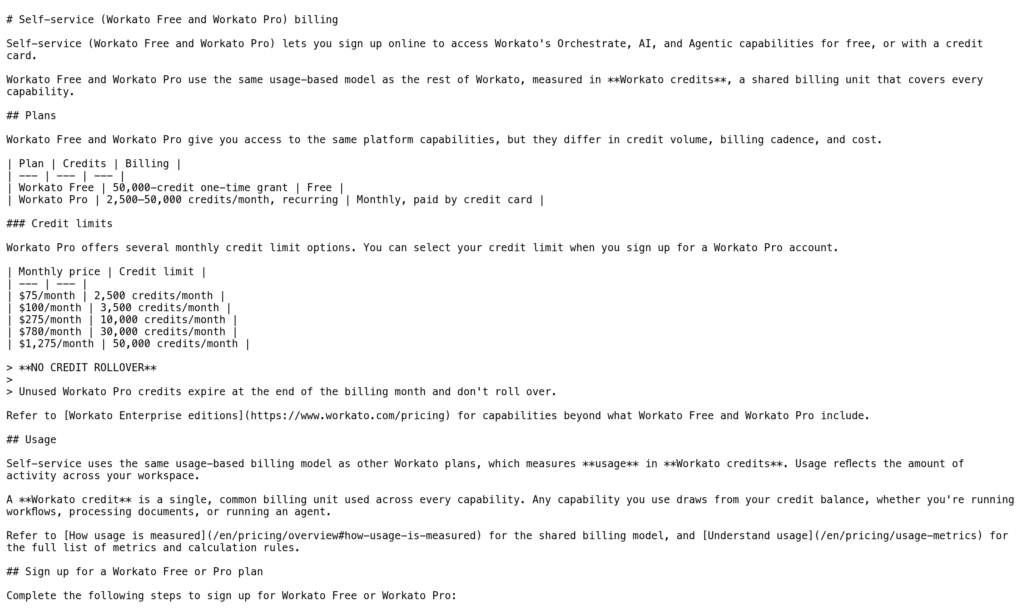
- Free Plan ($0): Gives you a one-time grant of 50,000 Workato credits. Crucially, this balance does not renew monthly. Once your 50,000 credits are gone, your automations stop until you upgrade. There is no time-limited trial; the Free plan is your trial.
- Pro Tiers (Monthly Card Billing):
- $75/mo for 2,500 credits/mo
- $100/mo for 3,500 credits/mo
- $275/mo for 10,000 credits/mo
- $780/mo for 30,000 credits/mo
- $1,275/mo for 50,000 credits/mo
Here is the catch that trips people up: credits expire at the end of each billing month with zero rollover. If your business has a slow month and you only use 2,000 of your 10,000 credits, the remaining 8,000 evaporate.
Furthermore, self-service Pro plans cap workspaces at a maximum of 3 users. If you are a growing small business with five or six team members needing access, you will quickly hit architectural walls.
The Enterprise Model: Platform Editions and Hidden Costs
Once you step past self-service, Workato structures enterprise contracts around three variables: the platform edition, shared usage credits, and optional add-ons.
Workato publishes four enterprise editions, though none of them come with a public price tag:
- Standard: Geared toward app integration and process automation. Includes recipe lifecycle management, dev/test/production environments, 1 Standard Workbot, SAML SSO, role-based access, 30-day log retention, and 1 concurrency slot.
- Business MCP: Adds pre-built Model Context Protocol (MCP) servers, an AI/MCP Gateway, an Enterprise Skill builder, data integration (ETL/ELT), an API platform, 10 Enterprise Workbots, and 3 On-Premise Agents (OPAs).
- Enterprise MCP: Adds Data Pipelines, Event Streams, Intelligent Document Processing, AI by Workato, Insights, unlimited Enterprise Workbots, enhanced security (data masking, activity audit, hourly key rotation), 90-day log retention, 10 OPAs, and 15 concurrency slots.
- Workato ONE: The top-tier package. Includes everything in Enterprise MCP plus Agent Studio, Workato Knowledge Base, Workato GO (Employee Assistant, Enterprise Search, Action Board), 30 OPAs, and 30 concurrency slots.
What Market Data Tells Us About Enterprise Costs
Because Workato hides its numbers, we have to look at secondary market aggregator data. According to marketplace metrics from Vendr, median enterprise contracts for Workato sit around $64,544 per year, with a historical range stretching from $20,000 to over $183,999. Smaller businesses entering the ecosystem through basic enterprise setups typically report spending $10,000 to $15,000 annually, while larger implementations routinely cross the $300,000 mark.
Implementation and professional onboarding are sold separately — buyer reports put the added first-year cost at $10,000 to $50,000+.
Zapier vs. Workato vs. Tray.io: The Feature & Price Showdown
| Feature / Metric | Workato | Zapier | Tray.io |
|---|---|---|---|
| Entry Price | Free (50k one-time credits) / Pro from $75/mo | Free ($0) / Pro from $19.99/mo annual | Quote-only (Helix builder starts around $50/mo, iPaaS custom) |
| Enterprise Pricing | Custom quote ($10k–$64k+/yr median) | Custom quote (Enterprise tier) | Custom quote (usage-based HCUs) |
| Free Trial | Free plan acts as perpetual trial | 14-day trial (Professional) | 30-day trial (full platform) |
| App Ecosystem | 1,200+ connectors | 9,000+ apps | 12,000+ apps, APIs, and services |
| Staging Environments | Yes (Standard edition and up) | No (managed via folders/Zaps) | Not stated publicly |
| Billing Metric | Shared Workato credits | Tasks (actions executed) | Tasks and Helix Compute Units (HCUs) |
Deep Dive: Zapier Pricing and Limits
Zapier remains the undisputed heavyweight champion of general automation app counts, boasting over 9,000 integrations. Its pricing is straightforward and entirely self-service:
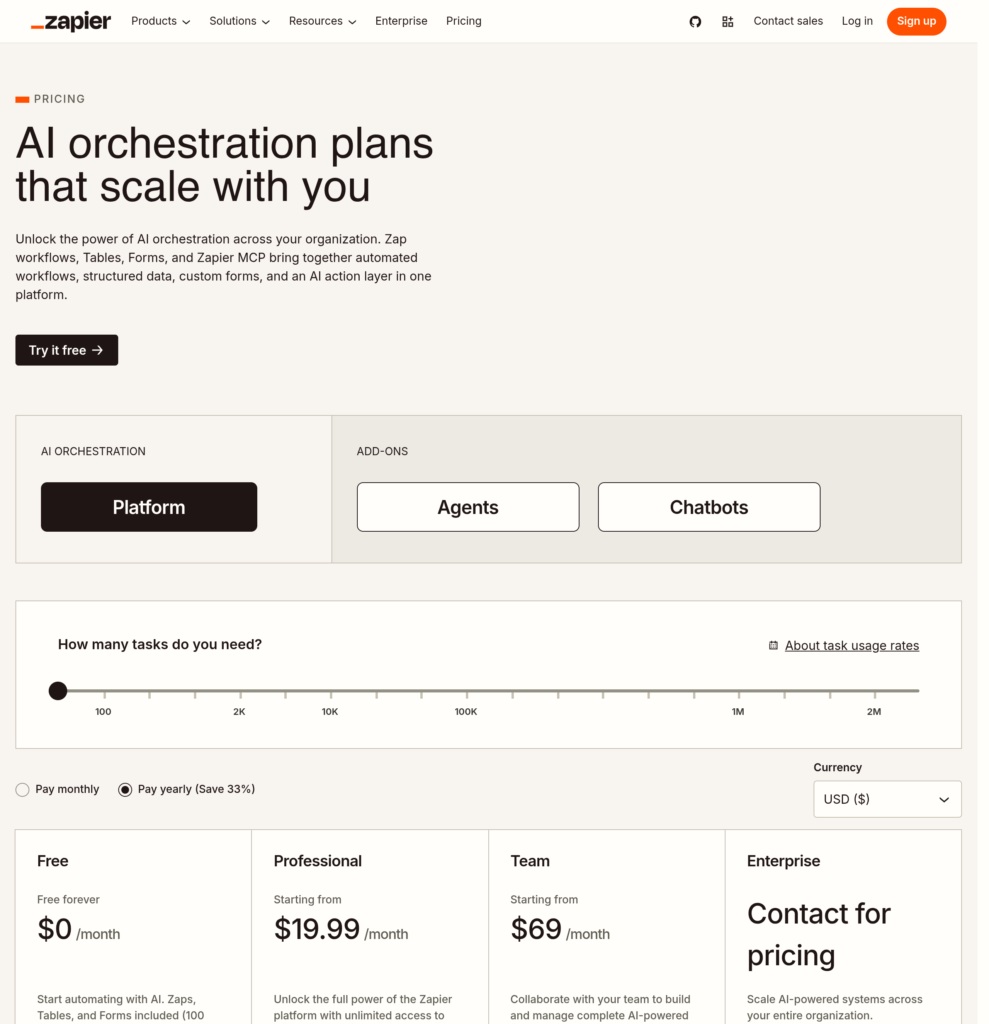
- Free ($0/mo): 100 tasks per month, restricted to 2-step Zaps. Great for testing, useless for running an actual business.
- Professional (from $19.99/mo billed annually): Unlocks multi-step Zaps, filters, and formatters for 750 tasks and 1 user.
- Team (from $69/mo billed annually): Jumps to 2,000 tasks, up to 25 users, shared workspaces, SAML SSO, and priority support. Higher volume tiers scale up to 100,000 tasks per month ($489/mo on Professional, $599/mo on Team).
How Zapier Counts Tasks
A task is counted each time a Zap successfully executes an action step. Triggers never count. Built-in helper steps like Filters, Formatter, Paths, Delays, and Looping do not consume tasks.
However, AI steps (like OpenAI integrations) consume 1 to 5 tasks depending on model complexity, and MCP tool calls consume 2 tasks each. If you leave overage billing enabled, excess tasks are billed at a slightly higher per-task rate, preventing your critical workflows from abruptly halting mid-month.
Deep Dive: Tray.io Pricing and Gotchas
Tray.io positions itself as a general-purpose low-code automation and integration platform (iPaaS) built for technical operations teams.
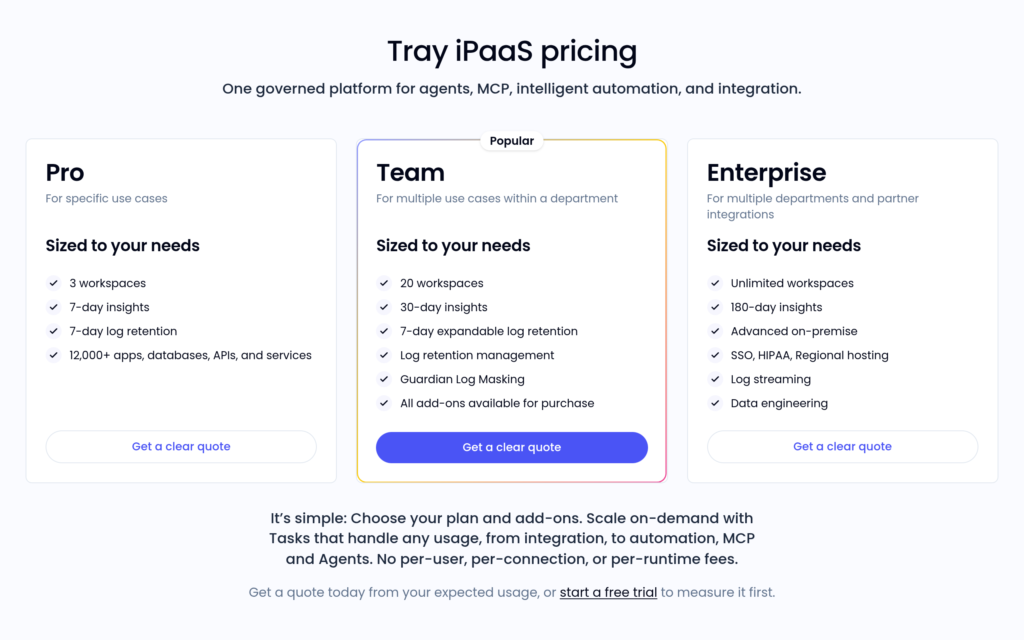
- The $50/mo Headline Trap: Tray’s pricing page lists the “Helix Builder Edition” starting around $50/mo. Do not confuse this with full enterprise iPaaS. That entry price covers specific AI-built app runtimes, not your core business integrations. True Tray iPaaS plans (Pro, Team, Enterprise) are entirely quote-only.
- The Trigger Billing Gotcha: This is Tray’s most critical operational distinction. While Zapier and Workato only charge you when an action successfully executes downstream, Tray charges you for the trigger itself. If an incoming webhook fires, that counts as a Task. Furthermore, every single connector step, data helper, and pass through a boolean loop counts as a billable task.
- The Math Impact: For identical workflows, Tray will consume roughly 33% more billable units than Zapier simply because the trigger event carries a price tag.
- The Silver Lining: Tray offers a generous 30-day free trial with zero credit card required, making it the easiest platform to stress-test before talking to sales.
The Hidden Costs and Gotchas No One Tells You About
Software bills rarely reflect your true cost of ownership. When calculating the true cost of ownership, watch out for these eleven hidden friction points:
- The Sales Tax on Your Time: Enterprise pricing is hidden behind a sales demo. Budget at least a day of your life talking to sales reps before you see a single contract.
- The Unpublished Credit Conversion: Workato measures usage in “credits,” but never publishes a transparent conversion table showing how many credits a complex API call, document parsing action, or agent step consumes.
- AI and Agent Cannibalization: AI features, Workbots, and document processing draw from your shared credit balance. Running heavy LLM prompts will drain your monthly allowance vastly faster than simple record-updating workflows.
- Use-It-or-Lose-It Pro Credits: Self-service Pro plans feature zero rollover. If you buy 10,000 credits and use 3,000, the remaining 7,000 vanish on the final day of the billing cycle.
- Overage Penalties: Exceeding your plan limits without upgrading triggers steep overage rates—often estimated at 2x to 3x the bundled per-credit rate.
- Mandatory Professional Services: Buyer reports put implementation and onboarding packages at typically between $10,000 and $50,000+, billed upfront alongside your software contract.
- Add-On Bloat: Need advanced security governance, On-Premise Agents (OPAs), Private Link, or EDI connectors? Nearly all of these require custom-quoted add-on fees.
- Upfront Annual Lock-In: Enterprise contracts are strictly annual commitments paid entirely in advance and non-refundable. You cannot downgrade mid-term if business slows down.
- The 3-User Workspace Wall: Self-service Pro workspaces cap out at 3 users. Growing small teams inevitably outgrow this constraint and get forced into enterprise pricing tiers.
- The Legacy Misconception: Blog posts from previous years often quote a flat “~$10k per workspace” model. Workato’s current architecture has moved away from this, pairing base platform editions with credit pools instead.
- Tray’s Trigger Tax: If you cross-shop Tray, remember that its trigger-billing model means your task volume metrics will look 33% higher than they would on Zapier for the exact same pipeline.
The Cost Math: A Realistic Small Business Scenario
To ground these numbers in reality, let’s look at a typical small business stack.
The Scenario
A 5-person service agency runs 6 core workflows:
- New lead captured in web form → adds to CRM, posts to Slack, sends welcome email.
- New sale closed → creates QuickBooks invoice, updates Google Sheets tracker.
- Support ticket created → posts urgent alert to Slack, logs note in CRM.
- New newsletter subscriber → adds to email marketing platform, tags CRM.
- Weekly unpaid invoice sweep → checks database, sends email reminder.
- New client booking → updates CRM, sends calendar confirmation.
The Volume: Approximately 2,000 workflow runs per month total (~333 runs per workflow). Each run averages 3 successful action steps. No heavy loops, no complex AI summarization steps.
The Billable Unit Breakdown
- Zapier: 2,000 runs × 3 actions = 6,000 tasks/mo.
- Workato: 6,000 workflow actions = 6,000 credits/mo (assuming a hypothetical 1:1 task-to-credit ratio, though Workato does not publish this conversion).
- Tray.io: 2,000 runs × (1 trigger + 3 actions) = 8,000 tasks/mo (due to trigger billing).
The Financial Reality
- Zapier: The Professional tiers start at $19.99/mo for 750 tasks and restrict you to 1 user at every tier — even the 10,000-task tier at $129/mo. That fails for a 5-person team. You need the Zapier Team plan at the 10,000-task tier, running $169/mo billed annually ($2,028/year).
- Workato Self-Service: 6,000 credits/mo sits awkwardly between the $100/mo tier (3,500 credits) and the $275/mo tier (10,000 credits). If you choose the $275/mo tier, you pay $3,300/year — IF one task costs one credit, an assumption Workato does not publish — and you must restrict your workspace to 3 users. If you scale to 5 users, you must jump to enterprise.
- Workato Enterprise: Buyer data suggests entry-level enterprise starts around $10,000 to $15,000/year. For a 5-person business, this is massive overkill.
- Tray.io: Unpriceable without talking to sales, but your measured 8,000 task volume makes an ideal candidate for their 30-day free trial.
Where Workato Wins the Math: Bulk Processing
If your business runs massive weekly data syncs—such as batch-processing 500 rows in a spreadsheet—Zapier charges you for 500 individual task steps. Workato, by contrast, treats bulk/batch actions as a single task step, saving you massive amounts of credit volume during heavy data migrations.
Who Is Workato Actually Best For?
Workato is not designed for a standard 5-person local business syncing Stripe to Mailchimp. It shines in specific, heavy-duty environments:
- Mid-Market & Enterprise IT Teams: Organizations that need strict developer lifecycles with segregated Dev, Test, and Production environments.
- Companies Requiring On-Premise Agents (OPAs): Businesses needing secure tunnels behind corporate firewalls to legacy SQL databases.
- High-Volume Batch Integrations: Companies processing tens of thousands of records simultaneously where batch-action credit pricing beats per-task SaaS fees.
- AI-First Operations: Teams building sophisticated internal AI agents, custom Workbots, and automated document processing pipelines under strict enterprise compliance governance.
How to Get a Real Workato Quote (Without Wasting a Week)
If you still want a Workato number, do the measuring before the sales call, not after it. Count your real usage for 30 days: how many workflow runs, how many action steps per run, and how many of those runs are bulk syncs. That count is the only leverage you have, because the quote is built on volume you cannot verify from public data.
Use the Free plan as a measuring stick. Its one-time 50,000 credits cost nothing, and watching how fast they drain across your real workflows tells you more than any sales deck. Do the same on the other side: Tray.io’s 30-day trial needs no card and no sales call, so run the same three workflows there and compare the measured task counts against the quotes.
Then walk into the Workato call with five questions, and get every answer in writing: what does one task cost in credits, what is the overage rate, which add-ons are in the quote and which are extra, are fees paid annually in advance and non-refundable, and what discount applies if you commit to a second year. Buyer data says the average negotiated saving is around 19%, so treat the first quote as an opening bid, not a final price.
How Automation Fits Your AI and Tech Stack
Choosing an automation platform is rarely an isolated decision; it dictates how your entire software stack communicates. When you are mapping out complex workflows—especially those involving automated AI text generation, customer data enrichment, and multi-step data pipelines—figuring out the exact ROI can feel like guessing in the dark.
If you are trying to balance subscription overhead against hours saved, model the numbers before you sign anything: run your projected tool costs through our free AI Cost Calculator and see what the stack actually costs per month before the first invoice arrives.
Pros and Cons
Workato Pros
- Staging Environments: Dev, test, and production recipe environments come standard on enterprise tiers.
- Batch Processing Efficiency: Bulk data operations count as single tasks rather than per-row penalties.
- Massive Native Connector Library: Over 1,200 robust, enterprise-grade connectors.
- Self-Service Options: Credit-card billing tiers allow quick access without scheduling a mandatory sales call.
- Unlimited Workspaces and Users: Enterprise editions include unlimited workspaces and users, so the bill does not grow every time you hire.
Workato Cons
- Opaque Credit Conversion: Failure to publish exact credit consumption rates makes budgeting difficult.
- Strict Pro Limits: Self-service Pro tiers cap workspaces at 3 users.
- High Barrier to Entry: Enterprise pricing starts in the five figures, putting it out of reach for smaller teams.
- Use-It-or-Lose-It Credits: Monthly allowances do not roll over.
- Annual Lock-In: Enterprise contracts are paid annually in advance and are non-refundable.
Our Verdict
For 95% of small businesses and non-technical founders, Workato is complete overkill. The pricing model is built for companies with dedicated IT departments, rigorous compliance needs, and enterprise budgets. If you choose Workato Pro, you are paying a significant premium over Zapier while accepting strict user caps and rigid monthly credit expirations.
Stick with Zapier Team if you want reliable, user-friendly multi-step automation without enterprise sales calls.
Choose Workato only if you are an IT-led mid-market company that requires robust staging environments, on-premise database agents, and heavy batch-processing capabilities—and you have at least $10,000+ a year to invest in your integration infrastructure.
And if Zapier is not quite right either, our Zapier alternatives guide rounds up the best options.
Frequently Asked Questions
How much does Workato cost?
Workato pricing runs from a Free tier up to $1,275/mo for self-service Pro, while enterprise editions are quote-only, with buyer-reported annual contracts typically ranging from $10,000 to over $64,000 per year.
Does Workato have a free plan?
Yes, Workato offers a Free self-service plan that grants a one-time allocation of 50,000 credits that do not renew monthly.
Why doesn’t Workato publish its enterprise prices?
Workato uses a customized enterprise pricing model based on platform edition, shared credit volume, and optional add-ons, requiring sales discovery calls to tailor contracts to individual organizational needs.
What happens if I exceed my Workato credit allowance?
Workato does not publish an overage rate, so the honest answer is: ask sales for it in writing before you sign. Buyer reports put overage at 2–3x the bundled rate, and on self-service Pro your recipes stop when the credits run out.
Is Workato worth it for a small business?
Generally, no. Smaller businesses will find better value, easier user management, and lower overall overhead on platforms like Zapier or self-hosted alternatives.
Price note — updated 17 November 2026: Prices in this post were checked on 17 November 2026. When you are reading this, the price may be lower or higher — always check the official pricing page before you buy.
Pros
- Staging Environments: Dev, test, and production recipe environments come standard on enterprise tiers.
- Batch Processing Efficiency: Bulk data operations count as single tasks rather than per-row penalties.
- Massive Native Connector Library: Over 1,200 robust, enterprise-grade connectors.
- Self-Service Options: Credit-card billing tiers allow quick access without scheduling a mandatory sales call.
- Unlimited Workspaces and Users: Enterprise editions include unlimited workspaces and users, so the bill does not grow every time you hire.
Cons
- Opaque Credit Conversion: Failure to publish exact credit consumption rates makes budgeting difficult.
- Strict Pro Limits: Self-service Pro tiers cap workspaces at 3 users.
- High Barrier to Entry: Enterprise pricing starts in the five figures, putting it out of reach for smaller teams.
- Use-It-or-Lose-It Credits: Monthly allowances do not roll over.
- Annual Lock-In: Enterprise contracts are paid annually in advance and are non-refundable.
For 95% of small businesses and non-technical founders, Workato is complete overkill. The pricing model is built for companies with dedicated IT departments, rigorous compliance needs, and enterprise budgets. Stick with Zapier Team if you want reliable, user-friendly multi-step automation without enterprise sales calls. Choose Workato only if you are an IT-led mid-market company that requires robust staging environments, on-premise database agents, and heavy batch-processing capabilities — and you have at least $10,000+ a year to invest in your integration infrastructure.
2 thoughts on “Workato Pricing Teardown (2026): What It Actually Costs Small Businesses”