
The best ai tools for web designers split into site builders and one writing assistant. Framer Basic costs $10 a month per site billed yearly, with a custom domain, 2 CMS collections, and 1,000 AI credits a month. Webflow Basic costs $15 a month billed yearly but has no CMS, so a site with a blog needs Premium at $25 a month billed yearly. Wix Studio Basic costs $19 a month billed yearly per site with 1,500 CMS items included, and Standard at $27 a month is the first plan that lists accepting payments.Relume Launch hosting costs $12 per site a month billed yearly, and its Pro AI workspace plan costs $14 a month billed yearly per account. ChatGPT Plus costs $20 a month billed monthly for copy, briefs, and client emails. For our test designer running five live sites, the lean stack of Framer Basic on five sites plus ChatGPT Plus costs $840 a year, while buying every route in this post costs $4,200 a year for the same five sites.
Quick Answer
The best ai tools for web designers split into site builders and one writing assistant. Framer Basic costs $10 a month per site billed yearly, with a custom domain, 2 CMS collections, and 1,000 AI credits a month. Webflow Basic costs $15 a month billed yearly but has no CMS, so a site with a blog needs Premium at $25 a month billed yearly. Wix Studio Basic costs $19 a month billed yearly per site with 1,500 CMS items included, and Standard at $27 a month is the first plan that lists accepting payments.
Relume Launch hosting costs $12 per site a month billed yearly, and its Pro AI workspace plan costs $14 a month billed yearly per account. ChatGPT Plus costs $20 a month billed monthly for copy, briefs, and client emails. For our test designer running five live sites, the lean stack of Framer Basic on five sites plus ChatGPT Plus costs $840 a year, while buying every route in this post costs $4,200 a year for the same five sites.
In this article
- How we compared the best ai tools for web designers
- The five tools at a glance
- Framer: the cheapest custom-domain route
- Webflow: design control with a CMS gate
- Wix Studio: CMS included, payments gated
- Relume: AI sitemaps with hosting priced separately
- ChatGPT Plus: the copy and brief assistant
- The maths: what five tools really cost a solo web designer
- Five traps that catch freelance web designers
- What to buy first
- Pros and cons
- Our verdict
- Frequently asked questions
- Sources
How we compared the best ai tools for web designers
Every web designer knows the moment. A client approves the homepage, asks for a blog, a case-studies page, and a contact form, and the builder that looked cheap on the pricing page quietly moves the project to a higher plan. The headline price is per site, the CMS sits behind a gate, and the AI credits run out in the middle of a deadline.
So we compared five tools across both halves of the job. Four build and host websites: Framer, Webflow, Wix Studio, and Relume. One drafts the words that fill them: ChatGPT Plus. Every price below was checked on the vendor’s official pricing page on 27 November 2026, and the dated price note at the end says when to re-check.
Our test designer is a solo freelancer with five live sites on custom domains: a portfolio plus four client marketing sites. Two of the five need a CMS for a blog and case studies. Three are brochure sites. None sells products online, each site stays under 30 pages, and clients only review and comment. Every total in this post uses that designer, so you can scale the maths to your own client list.
One honesty note before the detail. Framer, Webflow, Wix Studio, and Relume are rivals for the same job, not partners. Nobody needs four website builders. We price all four because the right choice depends on whether you need a CMS, client handoff, or AI-generated structure.
The five tools at a glance
| Tool | Job | Price checked 27 November 2026 | Free route |
|---|---|---|---|
| Framer | Design, publish, and host marketing sites | Basic $10/mo per site billed yearly; Pro $30/mo billed yearly | Free plan $0, Framer domain, 500 AI credits |
| Webflow | Visual development with CMS | Basic $15/mo billed yearly (no CMS); Premium $25/mo billed yearly | Starter site free, webflow.io domain |
| Wix Studio | Client sites with CMS and business tools | Basic $19/mo billed yearly; Standard $27/mo; Plus $34/mo | Free workspace on a Wix subdomain |
| Relume | AI sitemap, wireframe, design, and hosting | Launch hosting $12/site/mo billed yearly; Pro AI $14/mo billed yearly | Free plan $0, relumesite.ai address |
| ChatGPT Plus | Copy, briefs, and client communication | Plus $20/mo billed monthly | Free plan $0 |
The table hides the real story, which is multiplication. Four of these five tools charge per site. A $10 headline price becomes $600 a year across five sites, and a $25 CMS plan becomes $600 a year for two blog sites alone.
Framer: the cheapest custom-domain route
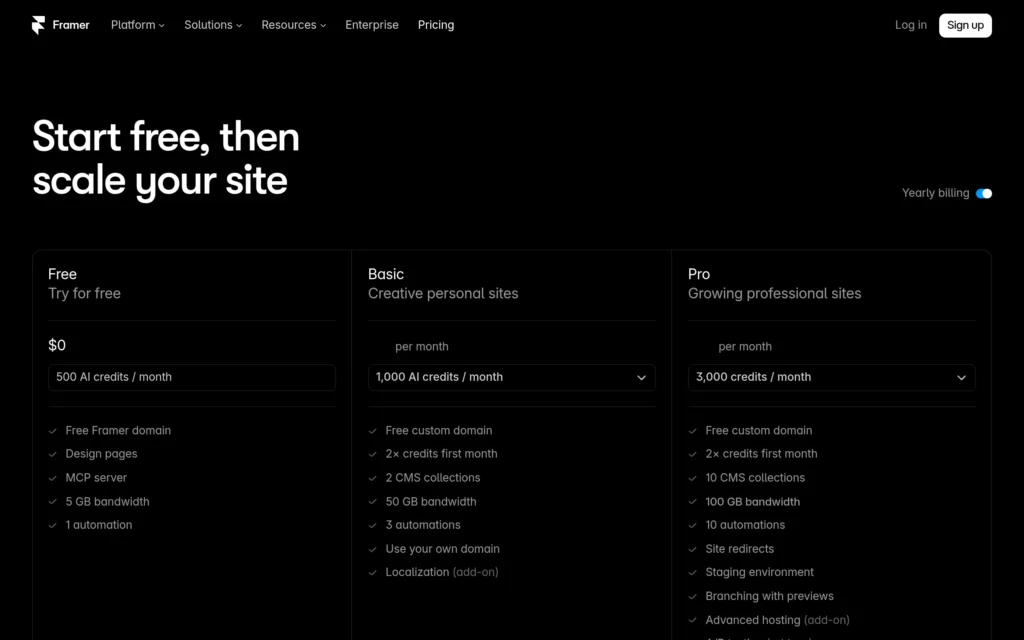
Framer is the design-first builder in this list, and its pricing page leads with a simple promise: start free, then scale your site. The Free plan costs $0 and publishes to a free Framer domain with 500 AI credits a month, design pages, an MCP server, 5 GB of bandwidth, and 1 automation. Framer’s pricing FAQ adds that free projects include 10 CMS collections, 1,000 pages, 5 MB file uploads, and one free locale to try. To connect a custom domain, you upgrade to a paid plan.
Basic is the entry paid plan for creative personal sites, at $10 a month billed yearly or $15 a month billed monthly. It includes a free custom domain, 2 CMS collections, 30 site pages, 50 GB of bandwidth, 3 automations, the option to use your own domain, and localization as an add-on, with 1,000 AI credits a month and double credits in the first month. Additional editors cost $20 a month on yearly billing, and viewers are free.
Pro is aimed at growing professional sites, at $30 a month billed yearly or $45 a month billed monthly. It raises the limits to 10 CMS collections, 150 site pages, 100 GB of bandwidth, and 10 automations, and adds site redirects, a staging environment, and branching with previews, with 3,000 credits a month.
The credits matter because they power the AI features. Framer’s FAQ states that every paid plan includes monthly credits that power Agents, Localization, and other AI features, shared across the workspace and its editors. On the free plan, a workspace with no active subscriptions receives 500 credits to try Agents.
For our test designer, Basic fits the stated workload. Each CMS site needs a blog and case studies, which is exactly 2 CMS collections. Five Basic sites at $10 a month billed yearly cost $50 a month, which is $600 a year. The Pro route for the same five sites costs $30 a month per site billed yearly, which is $1,800 a year. Pro earns its place when a site needs staging, redirects, branching, or more than 2 collections, not as a default upgrade.
The growth trap is the collection cap. A client who adds a team directory, a resources library, and an events list to a blog and case studies has outgrown Basic’s 2 collections. Framer’s FAQ states that Pro add-ons can reach 40,000 CMS items, 40 CMS collections, 2 TB of bandwidth, and 700 pages, so the ceiling can rise without leaving the platform.
Webflow: design control with a CMS gate
Webflow is the visual-development platform in this list, and its pricing splits into two layers. A Site plan pays for hosting one site on a custom domain. A Workspace plan pays for staging sites, seats, and collaboration. Confusing the two layers is where most Webflow quotes go wrong, because a designer needs both layers priced before a client total is honest.
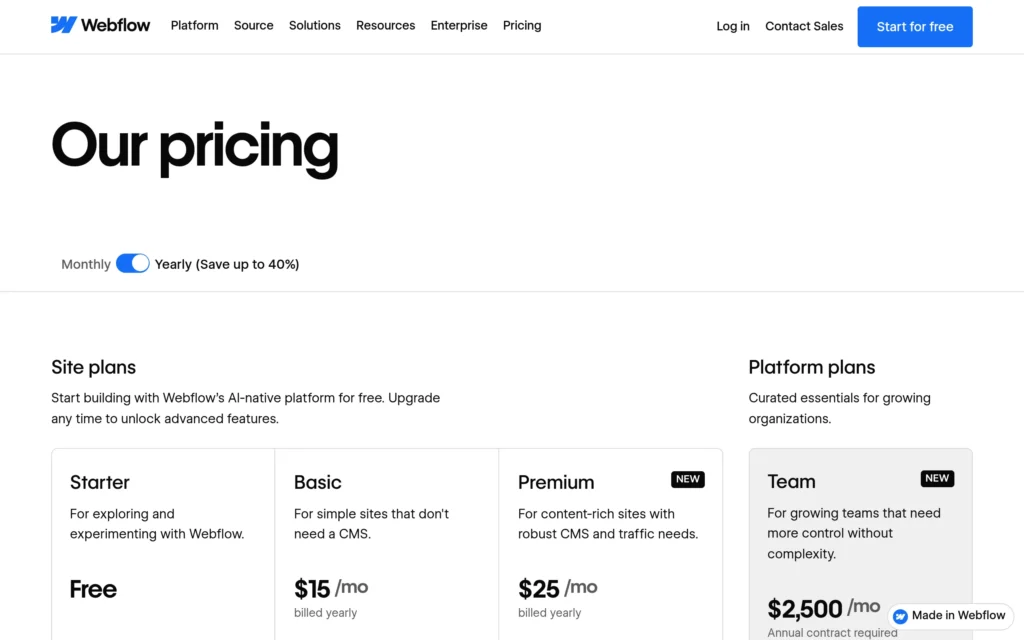
The Starter Site plan is free on a webflow.io domain, with a limited CMS, 2 static pages, 1 GB of bandwidth, and 50 form submissions. Basic costs $15 a month billed yearly and adds a custom domain, 300 static pages, 10 GB of bandwidth, unlimited form submissions, and password protection.
Webflow describes Basic as the plan for simple sites that do not need a CMS. Premium costs $25 a month billed yearly and adds the Webflow CMS, code components, site search, and form file upload. Webflow’s pricing update states that Premium includes 20,000 CMS items and 40 CMS Collections, and that Premium is priced at $25 a month for a yearly plan or $39 a month for a monthly plan. The same update puts Basic at $15 a month yearly and $25 a month monthly.
The Workspace layer decides how many sites you can stage. Every account includes a free Starter Workspace with 2 staging sites, 200 AI credits, and 1 full seat.
The Freelancer Workspace costs $16 a month billed yearly and raises staging to 10 sites, with 300 AI credits, full CMS access on staging sites, client payments, and 1 free client seat per site. The Agency Workspace costs $35 a month billed yearly with unlimited staging sites and 3 free client seats per site. Extra full seats cost $39 a month per seat billed yearly, and limited seats for content editors cost $15 a month per seat billed yearly. AI credits can be added at 2,000 credits a month for $20 a month billed yearly.
For our test designer, the site plans split by CMS need. Three brochure sites on Basic cost $15 a month each billed yearly, which is $540 a year. Two CMS sites on Premium cost $25 a month each billed yearly, which is $600 a year. Site plans total $1,140 a year. Staging five sites exceeds the free Workspace’s 2 staging sites, so the Freelancer Workspace at $16 a month billed yearly adds $192 a year. The Webflow route totals $1,332 a year before any extra seats or AI credit add-ons.
It is the wrong purchase for a five-page brochure site that Framer Basic hosts for $120 a year. The CMS gate is the decision: a blog is not a small feature on Webflow, it is a $10 monthly step per site on yearly billing, from $15 to $25, before the Workspace layer is counted.
Wix Studio: CMS included, payments gated
Wix Studio is Wix’s platform for designers and agencies building client sites, and its pricing page states that all plans include AI responsive design, a collaborative workspace, and advanced dev tools. The page carries a 14-day money-back guarantee. Displayed prices are for yearly subscriptions paid in full at the time of purchase, and prices do not include applicable taxes.
Basic costs $19 a month and is aimed at building online brands. It includes 10 GB of media storage, 3 site collaborators, 1,500 CMS items, and a free domain for 1 year. Standard costs $27 a month, raises media storage to 50 GB, collaborators to 5, and CMS items to 4,000, and lists accepting online payments. Plus costs $34 a month with 120 GB of media storage, 10 site collaborators, 20,000 CMS items, priority support, and payment acceptance. Elite costs $159 a month with unlimited media storage, 100 site collaborators, 10,000,000 CMS items, dedicated data infrastructure, and priority support. Enterprise adds unlimited site collaborators, custom CMS quota, multi-site management, and single sign-on, priced through sales.
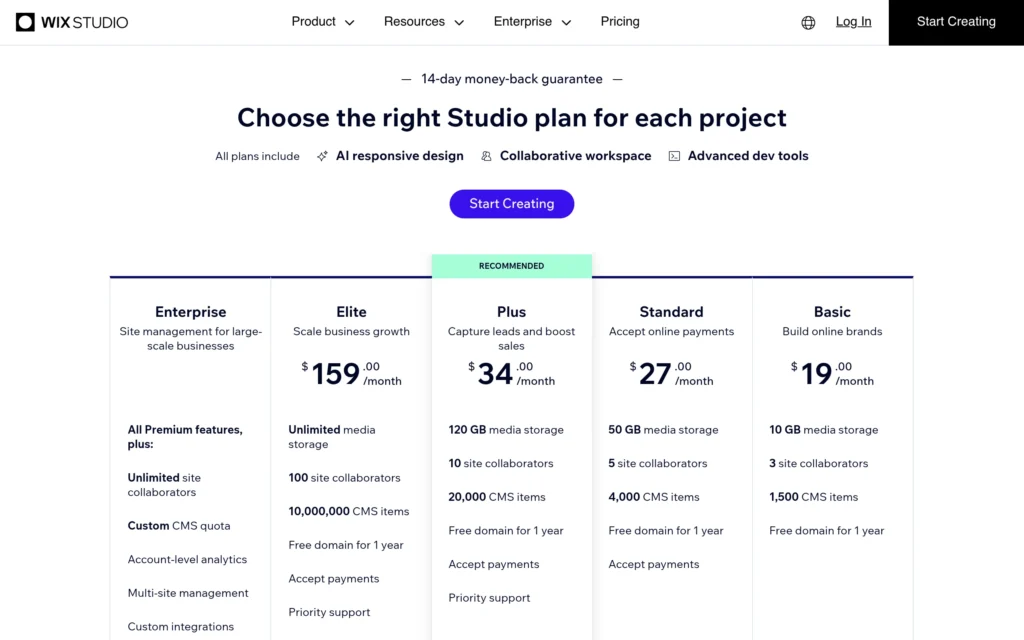
The honest reading of that ladder is that the CMS is not the gate. Basic already includes 1,500 CMS items, which covers a small business blog and case-studies list without a plan jump. The gate is payments. Basic’s feature list does not include accepting payments, while Standard, Plus, and Elite list it. A client who wants to take deposits or sell gift cards online starts at Standard, whatever the homepage needs.
For our test designer, none of the five sites sells online, so Basic covers all five. Five Basic sites at $19 a month billed yearly cost $95 a month, which is $1,140 a year. If one client later needs payments, that single site moves to Standard at $27 a month: four Basic sites at $228 a year each plus one Standard site at $324 a year totals $1,236 a year. The payment gate costs $96 a year for that one site, which is cheap insurance if the client actually sells.
Its weakness for a design-led freelancer is that every live site carries a yearly plan paid in full, and the free domain covers the first year only. Renewal years should be quoted to clients at the plan price plus the domain, not at the first-year bundle.
Relume: AI sitemaps with hosting priced separately
Relume is the AI structure tool in this list. It generates a brief, sitemap, wireframe, and design, then lets you publish on Relume or export the work. Its pricing separates the AI workspace from hosting, and that separation is the whole pricing story. Hosting is per website. The AI plan is per account.
The free plan costs $0 with no credit card needed. Relume states that it includes enough monthly AI usage to build a full website, free hosting on a relumesite.ai address, up to 20 form submissions a month, and 7 days of analytics, with the Relume badge shown on free sites. The pricing table puts free published sites at 1,500 monthly page views. Launch hosting costs $12 per site a month billed yearly, billed as $144 yearly, or $16 a month billed monthly. Launch puts the site on a custom domain with SSL, unlimited forms and submissions, full analytics, and no Relume badge, starting at 6,000 monthly page views.
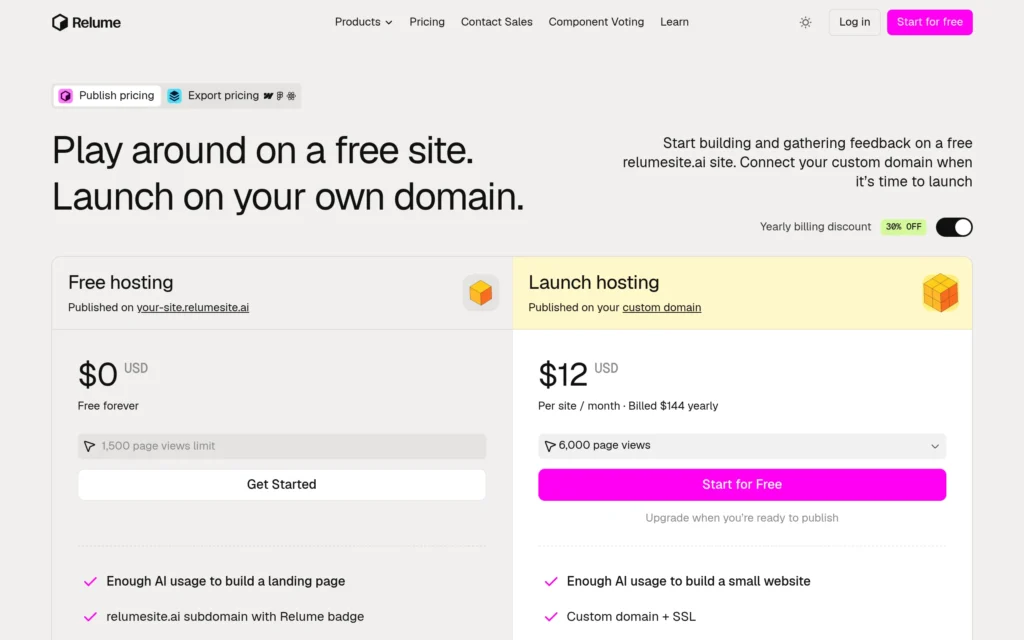
The Pro AI workspace plan costs $14 a month billed yearly, billed as $168 yearly, or $24 a month billed monthly, and comes with a 7-day free trial. Relume describes it as covering AI usage across all projects, with premium AI models, higher generation limits, and priority access at peak times. The pricing table lists unlimited websites and unlimited editors with no per-seat charge, which suits a designer who invites a client into the workspace to review structure before design starts.
For our test designer, five Launch sites at $12 a month billed yearly cost $60 a month across the five sites, which is $720 a year. Adding the Pro AI workspace plan at $14 a month billed yearly brings the Relume route to $888 a year. A designer who builds five sites spread across a year may stay inside the free AI usage, because the free plan’s monthly capacity resets; the Pro plan is for heavier generation months, premium models, and priority access.
Export pricing is a separate per-user list: Starter costs $18 a month billed yearly for 1 project and 5 pages, and Pro costs $40 a month billed yearly for unlimited projects and pages, each with a 7-day free trial. Our maths prices the Publish route, because our test designer hosts on Relume. Relume earns its place at the start of a project, when the expensive mistake is building the wrong pages. It is not a like-for-like replacement for Webflow’s CMS depth or Framer’s design canvas, and designers who export to another builder should price that builder’s site plan as well, because Relume hosting and export are separate decisions.
ChatGPT Plus: the copy and brief assistant
ChatGPT Plus does a different job from the four builders. It does not host a site or hold a CMS. It drafts. A web designer can turn a client call into a page brief, turn a brief into homepage copy options, rewrite a services page in the client’s voice, and draft the email that explains why the launch date moved. The designer still edits every line, because clients can smell generic copy and because a wrong claim about a client’s business is the designer’s problem, not the model’s.
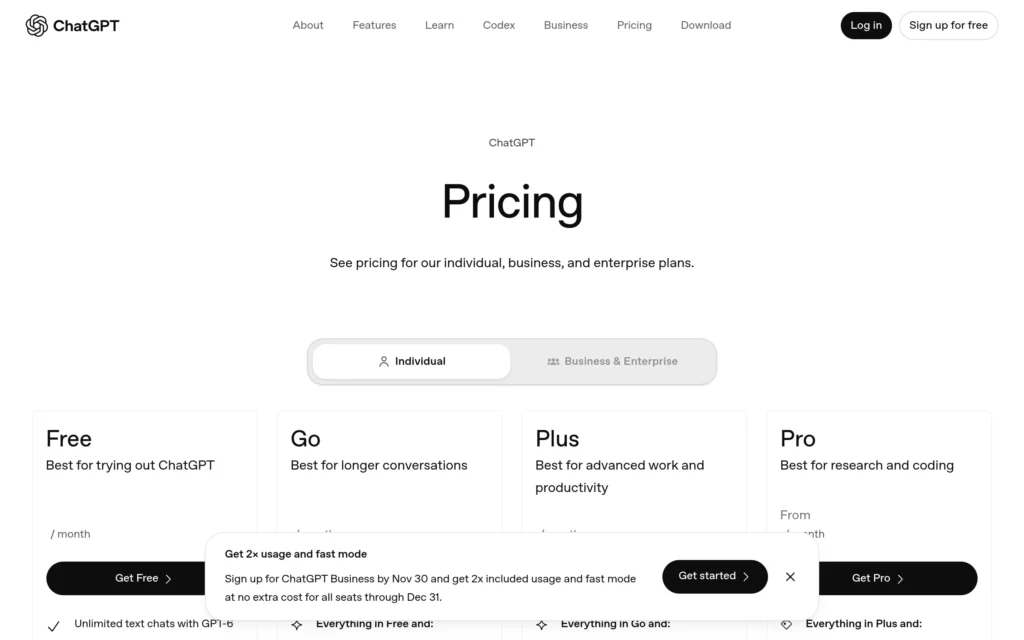
OpenAI’s Help Center states that ChatGPT Plus provides enhanced access to the ChatGPT web app for $20 a month, billed monthly. It also states that annual billing is not supported for Plus, and that API usage is separate and billed independently. The listed benefits include priority access during high-traffic periods, higher model limits, advanced reasoning access, faster response speeds, voice conversations, image generation, file uploads and analysis, and Deep Research tools where available. Usage limits such as message caps may apply, especially during high demand.
For a web designer, the file-upload and reasoning features carry the value. Uploading a client’s existing brochure, a competitor page, or a messy services list and asking for a structured page outline is faster than starting from a blank document. Image generation can fill a mood board or a placeholder hero while a client chooses photography, as long as generated images are labelled as placeholders and replaced or licensed properly before launch.
The maths is simple. ChatGPT Plus at $20 a month costs $240 a year for one designer. There is no yearly discount to chase, because OpenAI does not offer annual billing for Plus. The free plan costs $0 and suits occasional use, but a designer drafting copy every week will meet its limits. Plus earns its place when it saves one hour of copy drafting a month. It does not earn its place as an unedited author, and it never replaces the client’s own facts, testimonials, or legal claims.
The trap is sameness. Five client sites drafted with the same prompts read like five branches of the same business. Designers should feed Plus the client’s real services, prices, service area, and customer words, then edit for voice. The tool is a drafting assistant inside a design business.
The maths: what five tools really cost a solo web designer
Here is the full picture for our solo designer with five live sites on custom domains, two needing a CMS, none selling online, at yearly billing where the vendor offers it, with prices checked on 27 November 2026. Framer Basic on five sites costs $10 a month per site, which is $600 a year. Webflow costs $540 a year for three Basic sites plus $600 a year for two Premium sites plus $192 a year for the Freelancer Workspace, which is $1,332 a year.
Wix Studio Basic on five sites costs $19 a month per site, which is $1,140 a year. Relume Launch hosting on five sites costs $720 a year, and the Pro AI workspace plan at $14 a month billed yearly brings the Relume route to $888 a year. ChatGPT Plus costs $240 a year.
Spread across five sites, Framer Basic hosting is $120 per site per year. Wix Studio Basic is $228 per site per year. Relume Launch is $144 per site per year before any Pro AI plan. Webflow’s blended route is $266.40 per site per year once the Freelancer Workspace is included, because the two Premium sites and the Workspace layer raise the average.
The lean stack this post recommends is Framer Basic on five sites plus ChatGPT Plus. Hosting totals $600 a year and the writing assistant totals $240 a year, which is $840 a year in total. That stack covers custom domains, two-collection CMS sites, 50 GB of bandwidth per site, 1,000 AI credits a month per Framer plan, and a drafting assistant for copy. It leaves out Webflow’s deeper CMS, Wix Studio’s business tools, and Relume’s AI sitemap generation, which this designer’s stated workload does not need.
Buying every route anyway costs $4,200 a year. Framer Basic at $600, the Webflow route at $1,332, Wix Studio Basic at $1,140, Relume with Pro AI at $888, and ChatGPT Plus at $240 total $4,200. Four of those lines host the same five websites four times over. The difference between the all-routes total and the lean stack is $3,360 a year, and none of it buys a better homepage.
Billing period is the quiet lever inside every total. Webflow’s two Premium sites cost $600 a year on yearly billing and $936 a year on monthly billing at $39 a month each, a $336 difference for the same CMS. Framer and Relume both present yearly billing as the default view on their pricing pages, so a designer who budgets from the headline figure and pays monthly will under-quote the client. Quote the billing period in writing, every time.
If you want to run these numbers at your own site count, our free AI Cost Calculator lets you model a software stack before you commit a client quote to it. Bring your live-site count, your CMS-site count, and your billing period. Those three numbers decide more than any feature list.
Five traps that catch freelance web designers
First, the per-site trap. Framer, Webflow, Wix Studio, and Relume hosting all charge per site. A $10 plan across five sites is $600 a year, and a $19 plan across five sites is $1,140 a year. Multiply the headline price by the live-site count before you quote anyone.
Second, the CMS gate trap. Webflow Basic at $15 a month billed yearly has no CMS, so a blog moves that site to Premium at $25 a month. Framer Basic includes 2 CMS collections, so a blog plus case studies fits, but a third collection pushes the site toward Pro. Ask for the client’s full content list before choosing the plan.
Third, the workspace trap. Webflow’s free Workspace stages 2 sites. A designer staging five client sites needs the Freelancer Workspace at $16 a month billed yearly, and extra full seats cost $39 a month each. The site plan is only half the Webflow bill.
Fourth, the AI credits trap. Framer plans include 500, 1,000, or 3,000 AI credits a month depending on tier, Webflow Workspaces include 200 to 400 AI credits with 2,000 more for $20 a month billed yearly, and Relume’s Pro AI workspace is separate from its hosting. AI generation is metered everywhere. Budget the meter, not just the plan.
Fifth, the handoff trap. Every builder needs a paid plan for a custom domain, and free sites carry a builder domain or badge. Decide at contract stage who owns the billing at launch: the client, or the designer passing the cost through. A site that goes dark at renewal because nobody owned the plan is a reputation problem, not a pricing problem.
What to buy first
Start with the builder that matches the content list, not the builder with the loudest AI demo. That is Framer Basic if each site needs a custom domain, up to 2 CMS collections, and fast marketing pages at $120 per site per year. It is Webflow Premium if a site needs a deeper CMS, code components, or a designer working close to CSS, with the Freelancer Workspace priced in. It is Wix Studio Basic if the client needs CMS and business tools in one workspace and does not sell online, moving to Standard at $27 a month when payments arrive.
One builder is enough. The second builder is a second login, a second renewal calendar, and a second set of limits.
Next, fix the structure before buying generation. Relume’s free plan builds a full website’s structure, and its Pro AI workspace at $14 a month billed yearly suits heavier months. A sitemap the client approves in week one prevents the redesign conversation in week six. Our guide to the best ai tools for marketing agencies covers the wider client-work tool landscape if your design practice also sells campaigns and reporting.
Add ChatGPT Plus when copy drafting starts eating design time. At $20 a month billed monthly, it is the cheapest line in this post and the easiest to cancel. The order matters more than the list. Builder first, structure second, copy help third, upgrades only when a named limit is hit.
Pros and cons
Framer. Pros: Basic at $10 a month per site billed yearly with a custom domain and 2 CMS collections, a free $0 plan with 500 AI credits, Pro staging and branching for professional sites, and AI credits included on every plan. Cons: Basic caps CMS at 2 collections, AI credits are metered, and every live site needs its own paid plan.
Webflow. Pros: Premium includes 20,000 CMS items and 40 Collections, code components and site search, a free Starter site and Workspace, and Freelancer client seats and payments. Cons: Basic has no CMS, the Workspace layer adds $16 a month billed yearly for five staging sites, and extra full seats cost $39 a month each billed yearly.
Wix Studio. Pros: Basic at $19 a month billed yearly already includes 1,500 CMS items and 3 collaborators, AI responsive design on all plans, unlimited bandwidth in the benefits list, and a 14-day money-back guarantee. Cons: Basic does not list accepting payments, yearly plans are paid in full with taxes extra, and the free domain covers one year.
Relume. Pros: a free plan with enough AI usage to build a full website, Launch hosting at $12 per site a month billed yearly with no badge, unlimited websites and editors in the pricing table, and a 7-day trial on the Pro AI workspace plan. Cons: hosting and AI usage are priced separately, free sites show the Relume badge at 1,500 monthly page views, and Launch starts at 6,000 monthly page views.
ChatGPT Plus. Pros: Plus at $20 a month with higher limits, reasoning access, file uploads, image generation, and Deep Research where available. Cons: no annual billing, usage caps may apply during high demand, API usage is billed separately, and every draft needs the designer’s edit.
Our verdict
For most solo web designers running five marketing sites, the best ai tools for web designers start with one builder and honest multiplication. Framer Basic on five sites at $600 a year, plus ChatGPT Plus at $240 a year, costs $840 a year and covers custom domains, two-collection CMS sites, and weekly copy drafting. That is the stack we would buy first.
Webflow is the depth alternative. Its route costs $1,332 a year for the same five sites because two sites need Premium’s CMS and the designer needs the Freelancer Workspace for staging. Choose Webflow when CMS depth, code components, or CSS-level control matter more than the $732 yearly difference against Framer Basic hosting alone. Wix Studio at $1,140 a year for five Basic sites suits designers whose clients live inside Wix’s business tools, with Standard ready when a client starts taking payments.
Relume is the structure-first choice at $720 a year for five Launch sites, or $888 with the Pro AI workspace plan on yearly billing. Buy it when sitemaps and wireframes are the bottleneck, not as a second host for sites another builder already runs. The full five-tool stack is a showroom, not a shopping list. Four of the tools host the same websites. Pick one builder, price the CMS gate before you quote, and let the saved $3,360 a year fund better design time instead.
Frequently asked questions
What is the cheapest way to host five client sites in this comparison?
Framer Basic is cheapest for the stated workload: $10 a month per site billed yearly across five sites is $600 a year, with a custom domain and 2 CMS collections per site. Relume Launch hosting is next at $12 per site a month billed yearly, which is $720 a year for five sites before any Pro AI plan.
Does Webflow Basic include a CMS?
No. Webflow describes Basic, at $15 a month billed yearly, as the plan for simple sites that do not need a CMS. A site with a blog or case studies needs Premium at $25 a month billed yearly, which includes 20,000 CMS items and 40 CMS Collections.
Framer or Webflow for client sites?
Choose Framer Basic when a site needs a custom domain, up to 2 CMS collections, and fast marketing pages at $120 per site per year. Choose Webflow Premium when a site needs deeper CMS structure, code components, or CSS-level control, and price the Freelancer Workspace at $16 a month billed yearly into the quote.
Is Relume hosting included in its AI plan?
No. Relume prices hosting per website and the AI workspace per account. Launch hosting costs $12 per site a month billed yearly or $16 billed monthly, while the Pro AI workspace plan costs $14 a month billed yearly, or $24 a month billed monthly, with a 7-day free trial.
Is ChatGPT Plus worth it for a web designer?
Yes, when copy drafting is a weekly job. Plus costs $20 a month billed monthly, which is $240 a year, with higher limits, file uploads, image generation, and reasoning access. The free plan suits occasional use, and every Plus draft still needs the designer’s edit before a client sees it.
Sources
Prices and terms were checked on the official pages on 27 November 2026: Framer pricing page and pricing FAQ (framer.com), Webflow pricing page and pricing update (webflow.com), Wix Studio pricing page (wix.com), Relume pricing page (relume.ai), and OpenAI Help Center and ChatGPT pricing page (help.openai.com and chatgpt.com). Wix Studio’s displayed prices are for yearly subscriptions paid in full, so this post prices Wix Studio on yearly billing only. ChatGPT Plus has no annual billing, so its yearly total is twelve monthly payments.
Price note — updated 27 November 2026: Prices in this post were checked on 27 November 2026. When you are reading this, the price may be lower or higher, and plan limits such as AI credits may have changed. Check the official pricing page before you buy.
Related: Best AI Tools for Graphic Designers (2026): 5 Compared by Real Price
Pros
- Framer: Basic at $10 a month per site billed yearly with a custom domain and 2 CMS collections
- Framer: A free $0 plan with 500 AI credits
- Framer: Pro staging and branching for professional sites
- Framer: AI credits included on every plan
- Webflow: Premium includes 20,000 CMS items and 40 Collections
- Webflow: Code components and site search
- Webflow: A free Starter site and Workspace
- Webflow: Freelancer client seats and payments
- Wix Studio: Basic at $19 a month billed yearly already includes 1,500 CMS items and 3 collaborators
- Wix Studio: AI responsive design on all plans
- Wix Studio: Unlimited bandwidth in the benefits list
- Wix Studio: A 14-day money-back guarantee
- Relume: A free plan with enough AI usage to build a full website
- Relume: Launch hosting at $12 per site a month billed yearly with no badge
- Relume: Unlimited websites and editors in the pricing table
- Relume: A 7-day trial on the Pro AI workspace plan
- ChatGPT Plus: Plus at $20 a month with higher limits, reasoning access, file uploads, image generation, and Deep Research where available
Cons
- Framer: Basic caps CMS at 2 collections
- Framer: AI credits are metered
- Framer: Every live site needs its own paid plan
- Webflow: Basic has no CMS
- Webflow: The Workspace layer adds $16 a month billed yearly for five staging sites
- Webflow: Extra full seats cost $39 a month each billed yearly
- Wix Studio: Basic does not list accepting payments
- Wix Studio: Yearly plans are paid in full with taxes extra
- Wix Studio: The free domain covers one year
- Relume: Hosting and AI usage are priced separately
- Relume: Free sites show the Relume badge at 1,500 monthly page views
- Relume: Launch starts at 6,000 monthly page views
- ChatGPT Plus: No annual billing
- ChatGPT Plus: Usage caps may apply during high demand
- ChatGPT Plus: API usage is billed separately
- ChatGPT Plus: Every draft needs the designer's edit
For most solo web designers running five marketing sites, the best ai tools for web designers start with one builder and honest multiplication. Framer Basic on five sites at $600 a year, plus ChatGPT Plus at $240 a year, costs $840 a year and covers custom domains, two-collection CMS sites, and weekly copy drafting. That is the stack we would buy first.Webflow is the depth alternative. Its route costs $1,332 a year for the same five sites because two sites need Premium's CMS and the designer needs the Freelancer Workspace for staging. Choose Webflow when CMS depth, code components, or CSS-level control matter more than the $732 yearly difference against Framer Basic hosting alone. Wix Studio at $1,140 a year for five Basic sites suits designers whose clients live inside Wix's business tools, with Standard ready when a client starts taking payments.Relume is the structure-first choice at $720 a year for five Launch sites, or $888 with the Pro AI workspace plan on yearly billing. Buy it when sitemaps and wireframes are the bottleneck, not as a second host for sites another builder already runs. The full five-tool stack is a showroom, not a shopping list. Four of the tools host the same websites. Pick one builder, price the CMS gate before you quote, and let the saved $3,360 a year fund better design time instead.
1 thought on “Best AI Tools for Web Designers (2026): 5 Compared by Real Price”