
The best ai tools for graphic designers split by job, not by hype. Canva Pro lists at US$18 a month billed monthly for one person and covers layouts, Brand Kits, background removal, and client-ready social graphics. Adobe Firefly Standard costs US$9.99 a month with unlimited standard image features and 2,000 generative credits a month for premium work.Midjourney Standard costs $288 a year billed annually, with 15 Fast GPU hours a month and unlimited Relax image generations. Figma Professional costs $16 a month for a Full seat on annual billing, with 3,000 AI credits a month. Kittl Pro costs $14 a month per editor billed annually for typography, merch, and mockups with a commercial license.For our test designer, one solo freelancer doing commercial client work, the lean stack of Canva Pro plus Firefly Standard costs $335.88 a year on monthly billing. Buying all five routes in this post costs $983.88 a year. The gap is the story: most designers need two of these tools, not five.
Quick Answer
The best ai tools for graphic designers split by job, not by hype. Canva Pro lists at US$18 a month billed monthly for one person and covers layouts, Brand Kits, background removal, and client-ready social graphics. Adobe Firefly Standard costs US$9.99 a month with unlimited standard image features and 2,000 generative credits a month for premium work.
Midjourney Standard costs $288 a year billed annually, with 15 Fast GPU hours a month and unlimited Relax image generations. Figma Professional costs $16 a month for a Full seat on annual billing, with 3,000 AI credits a month. Kittl Pro costs $14 a month per editor billed annually for typography, merch, and mockups with a commercial license.
For our test designer, one solo freelancer doing commercial client work, the lean stack of Canva Pro plus Firefly Standard costs $335.88 a year on monthly billing. Buying all five routes in this post costs $983.88 a year. The gap is the story: most designers need two of these tools, not five.
In this article
- How we compared the best ai tools for graphic designers
- The five tools at a glance
- Canva Pro: layouts and client graphics at speed
- Adobe Firefly: generation with a commercial paper trail
- Midjourney: concept images with a privacy gate
- Figma Professional: AI inside the design file
- Kittl: typography, merch, and mockups
- The maths: what five tools really cost a solo designer
- Five traps that catch freelance graphic designers
- What to buy first
- Pros and cons
- Our verdict
- Frequently asked questions
- Sources
How we compared the best ai tools for graphic designers
Every freelance designer knows the invoice moment. A client approves the concept, asks for six social sizes, a mockup on a tote bag, and the logo in a presentation deck by Friday. The tool that looked cheap on the pricing page suddenly meters the exact feature the deadline needs.
So we compared five tools across the real halves of the job. Canva Pro and Kittl finish client-facing graphics. Adobe Firefly and Midjourney generate and edit images. Figma Professional puts AI inside interface and brand-system files. Every price below was checked on the vendor’s official pricing page on 27 November 2026, and the dated price note at the end says when to re-check.
Our test designer is a solo freelancer with one seat and one editor account. The workload is commercial client work: social graphics, logo and merch concepts, product mockups, and presentation decks. Clients view and comment but do not edit. No design in the test workload runs past 500,000 copies, and no client work sits under a non-disclosure agreement.
One honesty note before the detail. These five tools overlap more than their homepages admit. Nobody needs five AI subscriptions to ship a carousel post. We price all five because the right pair depends on whether your bottleneck is layout speed, image generation, typography, or file-based design work.
The five tools at a glance
| Tool | Job | Price checked 27 November 2026 | Free route |
|---|---|---|---|
| Canva Pro | Layouts, templates, Brand Kits, background removal | US$18/mo billed monthly | Free plan $0, limited AI |
| Adobe Firefly | Image generation, Generative Fill, vectors | Standard US$9.99/mo | Free plan, limited daily generations |
| Midjourney | Concept and campaign imagery | Standard $288/yr billed annually | No free plan |
| Figma Professional | Design files, prototypes, AI credits | Full seat $16/mo billed annually | Starter free, 500 AI credits/mo |
| Kittl Pro | Typography, merch, mockups | $14/mo per editor billed annually | Free plan, personal use only |
The table hides the real story, which is metering. Four of these five tools ration AI work in credits, tokens, or GPU hours. A cheap headline price can still strand you mid-deadline when the monthly allowance runs dry.
Canva Pro: layouts and client graphics at speed
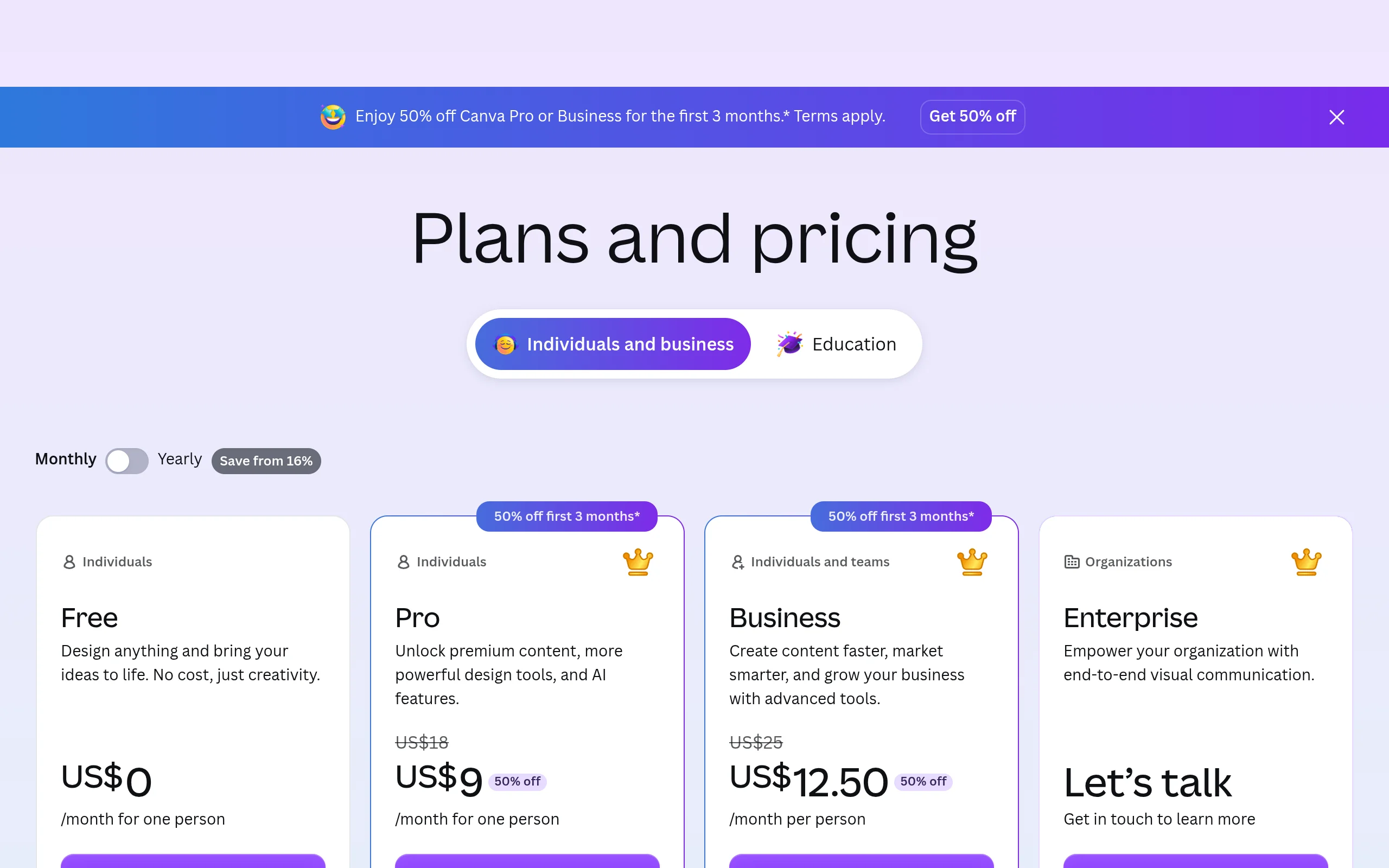
Canva is the finishing tool in this list. Its job is turning an idea into a sized, branded, exportable graphic without opening a heavyweight design app. The Free plan costs $0 for one person with limited AI use. Pro unlocks premium content, more powerful design tools, and AI features for one person.
Pro lists at US$18 a month billed monthly. Canva’s page showed a 50% discount on the first three months of monthly plans, ending 4 December 2026, which is a promotion, not the list price. Budget on the list price and treat any discount as a bonus.
The features that matter to a working designer are unglamorous. Brand Kits keep client colors, fonts, and logos one click away. Background removal turns a product photo into a clean cut-out. Magic Resize rebuilds one approved design into the six sizes a client actually asked for.
For our test designer, Pro is the production floor. Social graphics, deck covers, and simple ad layouts ship from Canva without touching the other four tools. At US$18 a month, Pro costs $216 a year on monthly billing, which is less than a few hours of freelance billing in most US markets.
The limit is originality. Canva is a template and asset system, so a logo built from stock elements can collide with another designer’s work. Use Canva to finish and present. Do not sell a template element as a client’s original logo.
Adobe Firefly: generation with a commercial paper trail
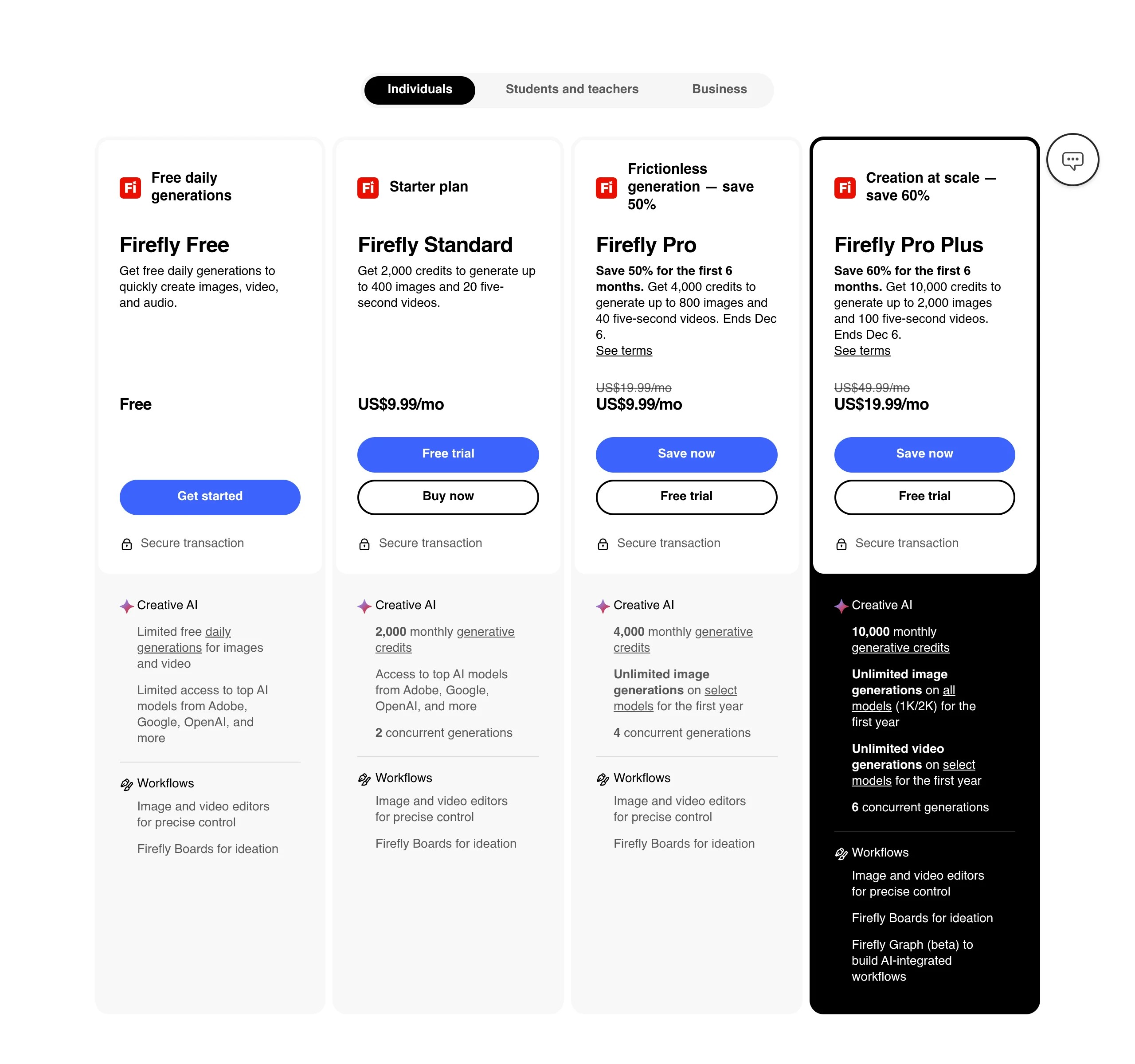
Adobe Firefly is the generation engine in this list. It makes and edits images, vectors, video, and audio, and its standard features sit inside the tools designers already open. Adobe states that all paid Firefly plans include unlimited access to standard generative AI features like Generate Image, Generative Fill, Generative Expand, and Text to Vector.
Premium features spend credits. Generate Video, sound effects, speech, music, audio translation, and partner AI models draw from a monthly generative-credit allowance. Credits reset each billing cycle and do not roll over. When credits run out, Adobe’s options are to wait for the reset, upgrade, or add a credit add-on plan.
Firefly Standard costs US$9.99 a month with 2,000 generative credits a month, enough for up to 400 images and 20 five-second videos by Adobe’s estimate. Firefly Pro lists at US$19.99 a month with 4,000 credits, and adds Adobe Express Premium plus full Photoshop on web and mobile. Pro Plus lists at US$49.99 a month with 10,000 credits. Adobe’s page showed first-six-months discounts on Pro and Pro Plus ending December 6, so this post budgets on the list prices.
For a graphic designer, the Standard plan is the honest entry point. Unlimited standard image features cover the daily work: generate a background, fill a gap, expand a canvas, turn text into a vector. The 2,000 credits are for the premium extras, not for basic image generation.
The commercial angle is why agencies keep Firefly in the stack. Adobe positions Firefly outputs for commercial use, and its credit system is published rather than mysterious. A designer can price a job knowing which features are unlimited and which ones spend credits.
The trap is assuming credits behave like a bank balance. They do not roll over. A quiet month wastes the allowance, and a heavy month still hits the same ceiling. Price client work on the standard features first, and treat premium credits as a monthly ration.
Midjourney: concept images with a privacy gate
Midjourney is the concept tool in this list. Designers use it for mood boards, campaign directions, and hero imagery before production starts. Its pricing is the cleanest in this post because Midjourney publishes the whole ladder in its own documentation.
Basic costs $10 a month, or $96 a year billed annually. Standard costs $30 a month, or $288 a year. Pro costs $60 a month, or $576 a year. Mega costs $120 a month, or $1,152 a year. Annual billing saves 20%, with the full year paid upfront. There is no free plan.
The plans buy GPU time. Basic includes 3.3 Fast GPU hours a month. Standard includes 15 hours, Pro includes 30 hours, and Mega includes 60 hours. Standard, Pro, and Mega add unlimited Relax image generations. Extra GPU time costs $4 an hour on every plan.
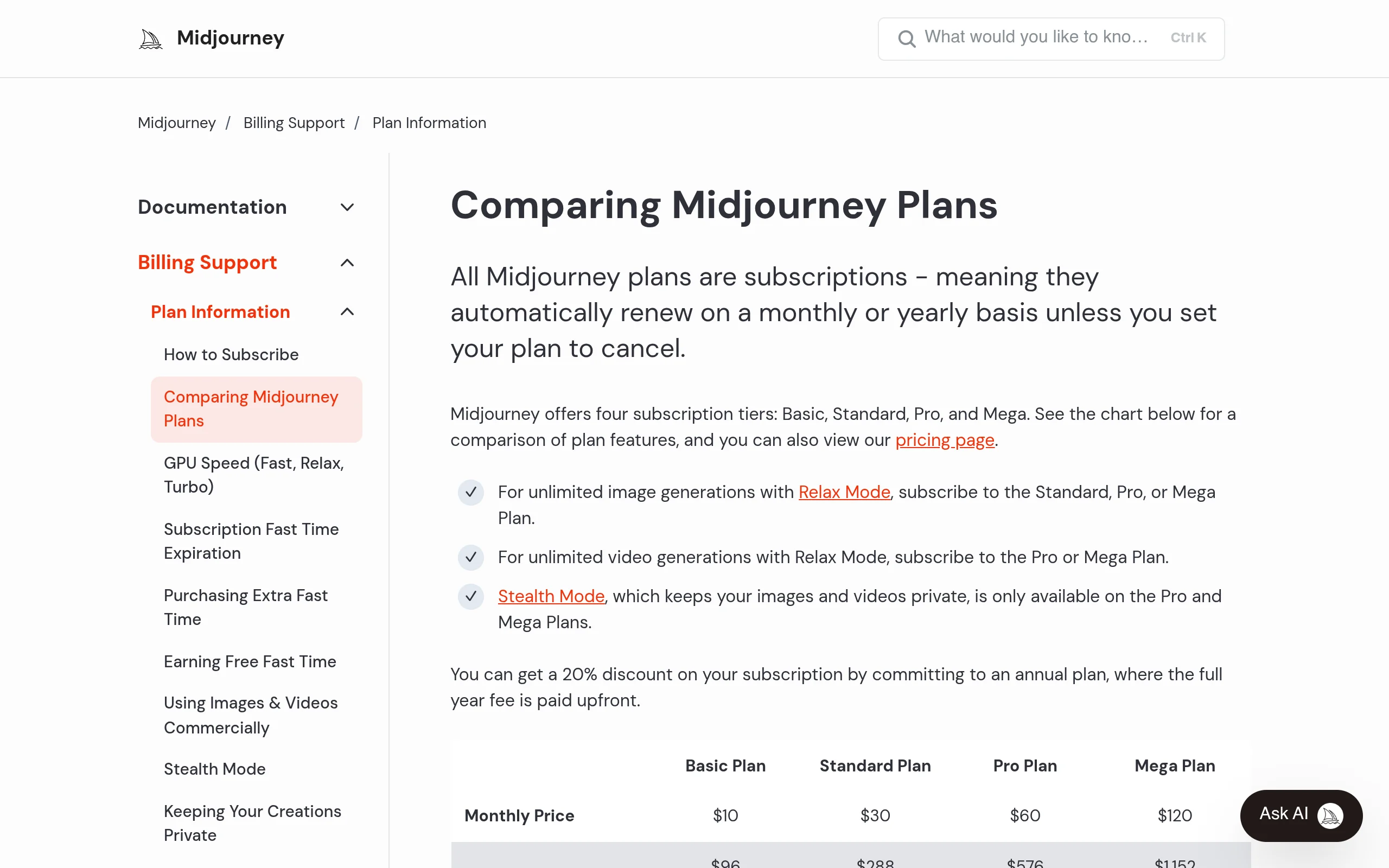
Two gates decide the real price. The first is Relax mode: Basic has none, so a Basic designer who burns 3.3 Fast hours is done until the reset or a top-up. The second is Stealth Mode, which keeps images and videos private. Stealth is only on Pro and Mega.
For our test designer, Standard at $288 a year is the working plan. Fifteen Fast hours cover deadline work, and unlimited Relax images cover exploration. The workload has no non-disclosure agreement, so public-by-default generations are acceptable.
Change one fact and the answer changes. A designer generating unreleased brand assets for a client launch needs Stealth, and Stealth starts at Pro for $576 a year. Midjourney also states that a company making more than $1,000,000 a year in gross revenue must buy Pro or Mega. Privacy and revenue are pricing inputs here, not footnotes.
Figma Professional: AI inside the design file
Figma is the file-based tool in this list. Graphic designers who also build interfaces, brand systems, and presentation decks live here, and its AI features run inside those files. Figma prices by seat, not by product, and every seat carries a monthly AI credit allowance.
Starter is free with unlimited drafts, UI kits and templates, and 150 AI credits a day up to 500 credits a month. Professional costs $16 a month for a Full seat on annual billing, or $20 a month billed monthly, with 3,000 AI credits a month. A Dev seat costs $12 a month and a Collab seat costs $3 a month, each with 500 AI credits a month.
Organization costs $55 a month for a Full seat billed annually, with 3,500 AI credits a month. Enterprise costs $90 a month for a Full seat billed annually, with 4,250 AI credits a month. Viewers and commenters on paid plans do not need paid seats, which matters when clients only review work.
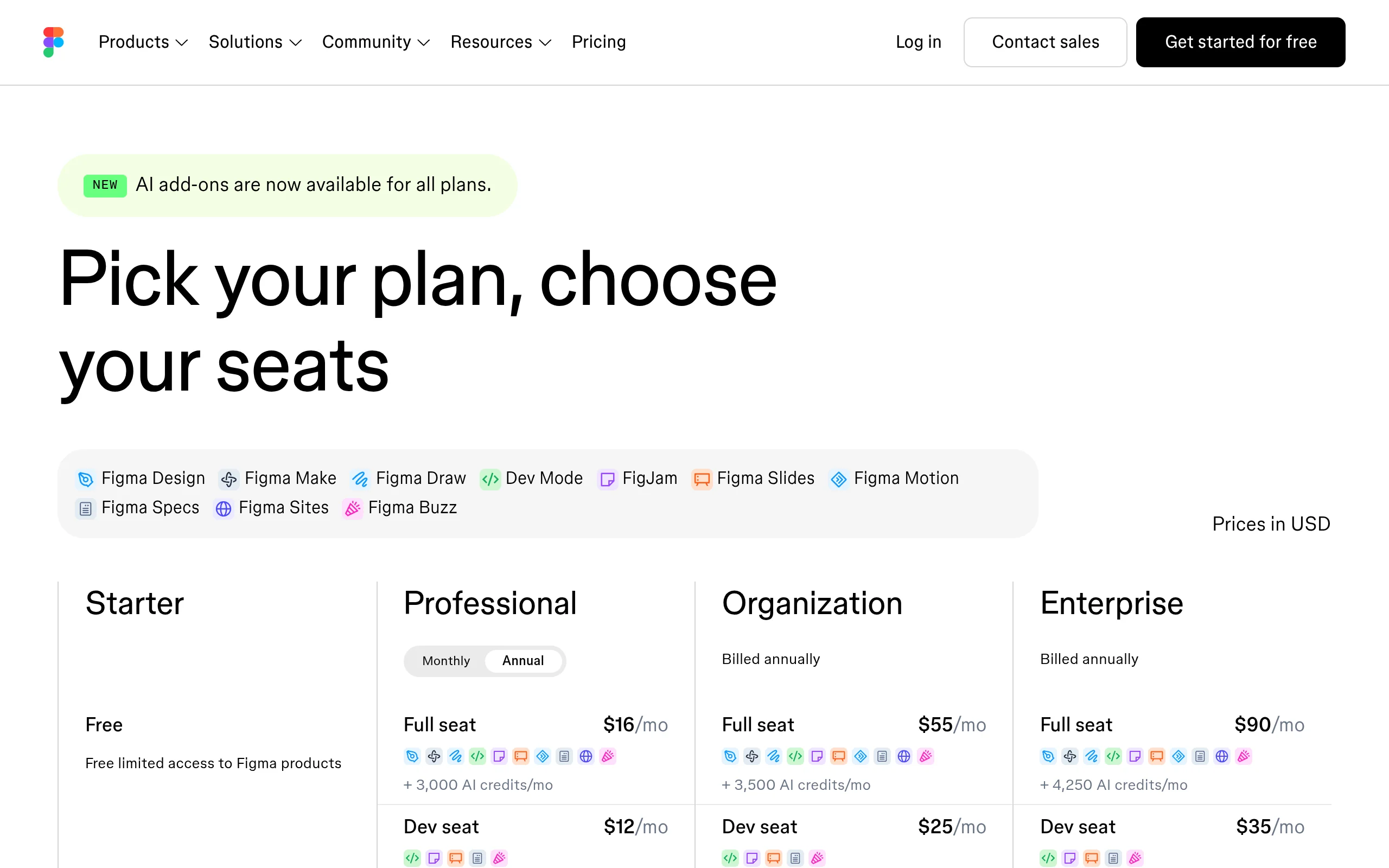
For our test designer, one Professional Full seat at $16 a month is $192 a year. That buys unlimited files and projects for a single team, team-wide design libraries, and 3,000 AI credits a month. A solo designer does not need Organization’s admin layer.
The honest limit is the credit meter. Figma AI credits are shared across Figma AI features, reset monthly, and do not roll over. A designer who leans on AI generation all day can exhaust 3,000 credits before the month ends. Extra credits can be purchased, but Figma does not print that add-on price on the pricing page.
Figma earns its place when the deliverable is a file, not a flat graphic. Brand systems, deck templates, and interface mockups belong here. A one-off social post does not need a $192-a-year seat when Canva Pro already covers it.
Kittl: typography, merch, and mockups
Kittl is the typography and merch tool in this list. It builds logos, merchandise, packaging, labels, and marketing assets in the browser, with AI features powered by tokens. Its pricing turns on one line most designers miss: the free plan is for personal use only.
Free costs $0 with 100 AI tokens one time, enough for up to 20 images or 1 video. Pro costs $14 a month per editor billed annually, which is $168 a year, with 2,000 AI tokens a month. Expert costs $39 a month billed annually, which is $468 a year, with 6,000 AI tokens a month. Max was shown at $42.50 a month billed annually during a Black Friday offer, with 12,000 AI tokens a month. Viewers are free, and additional editors are charged per editor.
Paid plans unlock the full premium template and asset library, high-resolution and vector exports, more AI tokens, and commercial licensing. Pro and Expert include a Commercial License covering reproduction in up to 500,000 copies. The top tier carries an Enhanced License for wider reach beyond that limit.
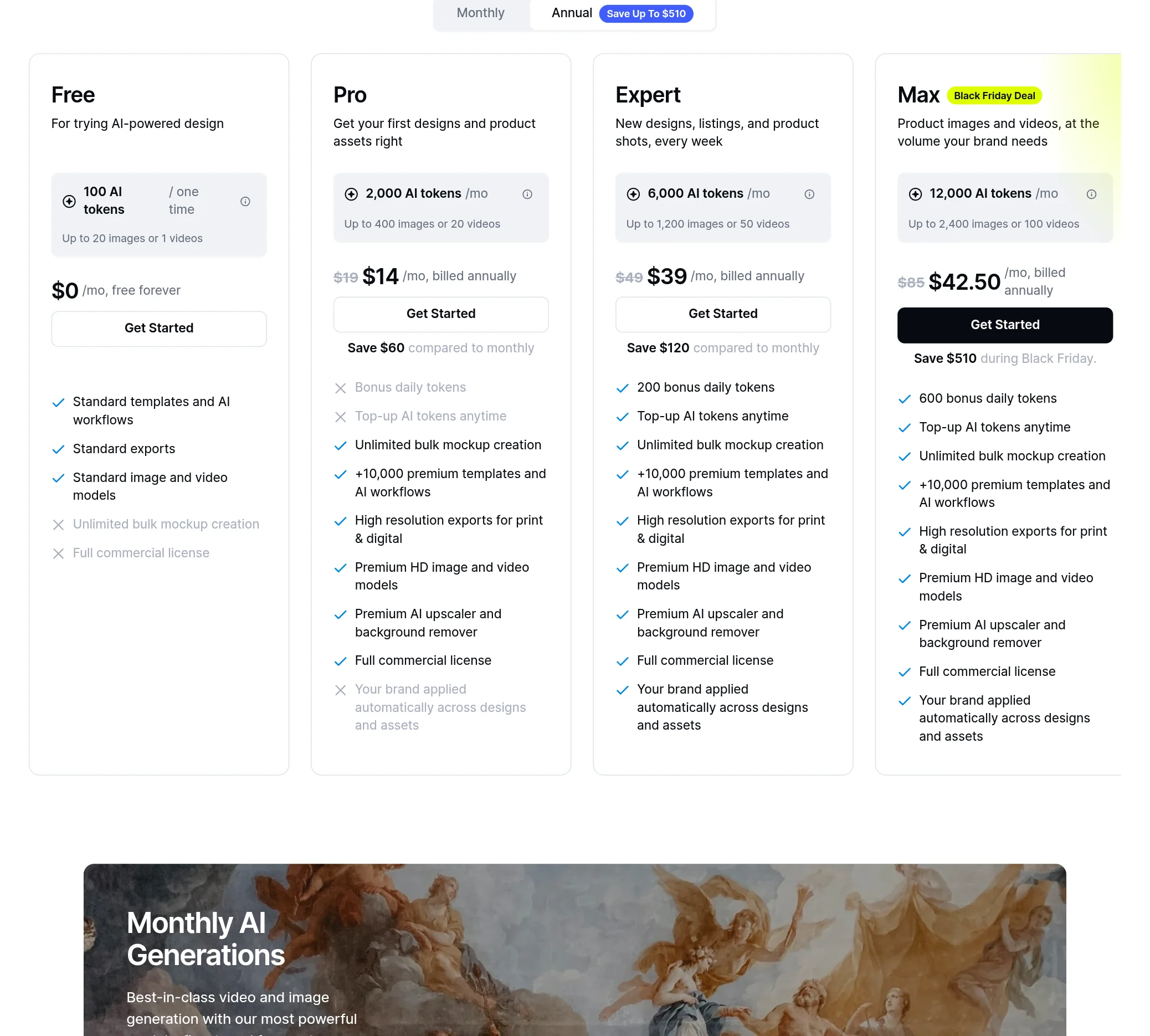
Tokens behave like Firefly credits. Monthly tokens arrive at the start of the billing cycle and do not roll over. Expert adds 200 bonus daily tokens and Max adds 600, and daily tokens are spent before the monthly balance. A designer who generates in bursts should watch the daily allowance, not just the monthly one.
For our test designer, Pro at $168 a year covers the merch and typography workload. The 500,000-copy commercial limit sits far above a solo designer’s print runs. Expert only earns its place when token volume or daily generation becomes the bottleneck.
The trap is the free plan. A design made on Free carries no commercial rights, so a client logo or a shirt design cannot ship from a free account. Kittl is cheap for commercial work, but only from Pro upward.
The maths: what five tools really cost a solo designer
Price each tool at the plan our test designer would actually buy. Canva Pro costs US$18 a month billed monthly, which is $216 a year. Firefly Standard costs US$9.99 a month, which is $119.88 a year. Midjourney Standard costs $288 a year billed annually.
Figma Professional costs $16 a month for one Full seat on annual billing, which is $192 a year. Kittl Pro costs $14 a month for one editor billed annually, which is $168 a year. Add them together and the five routes cost $983.88 a year for one designer.
Nobody needs all five. The lean stack for this workload is Canva Pro plus Firefly Standard: $216 plus $119.88 is $335.88 a year. Canva finishes the graphics, and Firefly generates and edits the images inside them. The lean stack saves $648 a year against buying every route.
The upgrades price out cleanly. Midjourney Pro for Stealth costs $576 a year instead of $288, a $288 step. Firefly Pro at $19.99 a month is $239.88 a year, a $120 step over Standard for double credits plus Photoshop on web and mobile. Kittl Expert at $468 a year is a $300 step over Pro for heavier token volume.
If you want to run these numbers at your own workload, our free AI Cost Calculator lets you model a software stack before you commit to it. Bring your seat count, your billing period, and whether client work needs privacy. Those three inputs decide more than any feature list.
Five traps that catch freelance graphic designers
First, the personal-use trap. Kittl’s free plan is for personal use only, with no commercial rights. A client design shipped from a free account is unlicensed work. Commercial use starts at Pro.
Second, the public-gallery trap. Midjourney generations are public by default below Pro. Stealth Mode, which keeps images and videos private, starts at Pro for $576 a year. Unreleased client brand work on a Standard plan is visible work.
Third, the rollover trap. Firefly credits, Figma AI credits, and Kittl tokens reset monthly and do not roll over. A quiet month banks nothing. Price AI-heavy client work inside one month’s allowance, not across a quarter.
Fourth, the promotion trap. Canva’s page has shown 50% off the first three months of monthly plans. That is a three-month promotion, not the price. Budget on the US$18 monthly list price, and let any discount be a windfall.
Fifth, the seat trap. Figma charges per seat and Kittl charges per editor. A second editor doubles those lines. Clients who only view and comment stay free on both, so invite reviewers as viewers, not editors.
What to buy first
Buy the finishing tool first. Canva Pro at US$18 a month covers layouts, Brand Kits, background removal, and resizing, which is most of a solo designer’s weekly output. Start on the free plan only to learn the editor, because client work needs the premium assets and AI features.
Add generation second. Firefly Standard at US$9.99 a month covers unlimited standard image features with 2,000 premium credits. Choose Midjourney Standard at $288 a year instead when concept imagery and campaign directions are the bottleneck, and Midjourney Pro when client privacy demands Stealth.
Add the specialist third, only when the workload proves it. Kittl Pro at $168 a year earns its place when typography, merch, or mockups recur weekly. Figma Professional at $192 a year earns its place when deliverables are files and systems, not flat graphics. Our guide to the best ai tools for web designers covers the adjacent site-building stack if your practice also ships websites.
Pros and cons
Canva Pro. Pros: US$18 a month billed monthly, Brand Kits and background removal built in, Magic Resize for client size lists, and a free plan to learn on. Cons: template elements can collide with other designers’ work, AI use is metered, and the 50% discount covers only the first three months.
Adobe Firefly. Pros: unlimited standard image features on paid plans, a published credit system, Standard at US$9.99 a month, and a commercial-use position agencies trust. Cons: credits do not roll over, premium features spend credits, and the top tiers price for video volume most graphic designers never use.
Midjourney. Pros: the clearest published price ladder, unlimited Relax images from Standard at $288 a year, and extra GPU time at $4 an hour. Cons: no free plan, Basic has no Relax mode, and private generations require Pro at $576 a year.
Figma Professional. Pros: AI inside the design file, 3,000 AI credits a month on a Full seat, unlimited files for one team, and free viewing for clients. Cons: per-seat pricing, credits reset monthly, and the AI credit add-on price is not printed on the pricing page.
Kittl. Pros: typography and merch depth, a 500,000-copy commercial license from Pro, vector exports on paid plans, and free viewers. Cons: the free plan is personal use only, tokens do not roll over, and every additional editor pays again.
Our verdict
For most solo graphic designers, the best ai tools for graphic designers start with two subscriptions. Canva Pro at $216 a year on monthly billing plus Firefly Standard at $119.88 a year costs $335.88 a year and covers layouts, branding, background removal, generation, and editing. That is the stack we would buy first.
Midjourney is the concept alternative. Standard at $288 a year suits designers whose bottleneck is campaign directions and hero imagery, while Pro at $576 a year is the privacy step for unreleased client work. Kittl Pro at $168 a year is the merch and typography specialist, and Figma Professional at $192 a year is the file-and-systems specialist.
The full five-tool stack at $983.88 a year is a showroom, not a shopping list. Three of the tools generate images, and two of them finish graphics. Pick one finisher and one generator, price the license and privacy gates before you quote, and let the saved $648 a year fund better design time instead.
Frequently asked questions
What is the cheapest AI stack for a freelance graphic designer?
Canva Pro plus Firefly Standard is cheapest for the stated workload: $216 a year plus $119.88 a year is $335.88 a year. Canva covers layouts, Brand Kits, and background removal, while Firefly covers unlimited standard image features with 2,000 premium credits a month.
Can I use Kittl’s free plan for client work?
No. Kittl states the free plan is for personal use only, with no commercial rights. Commercial licensing starts at Pro, which covers reproduction in up to 500,000 copies. A client logo or shirt design needs a paid plan before it ships.
Do Midjourney images stay private on the Standard plan?
No. Stealth Mode, which keeps images and videos private, is only available on the Pro and Mega plans. Standard at $288 a year suits public-facing work. Unreleased client brand assets need Pro at $576 a year.
Do AI credits roll over if I do not use them?
No. Firefly generative credits reset each billing cycle and do not roll over, and Figma AI credits and Kittl tokens work the same way. A quiet month banks nothing, so AI-heavy client work should be priced inside one month’s allowance.
Is Figma Professional worth it for a graphic designer?
Yes, when deliverables are files and systems rather than flat graphics. One Full seat costs $16 a month on annual billing with 3,000 AI credits a month, unlimited files, and team libraries. For social posts alone, Canva Pro covers the job for less.
Sources
Prices and terms were checked on the official pages on 27 November 2026: Canva pricing page (canva.com), Adobe Firefly plans page (adobe.com), Midjourney plan comparison documentation (docs.midjourney.com), Figma pricing page (figma.com), and Kittl pricing page (kittl.com). Promotional discounts are reported separately from list prices, and Canva is priced on monthly billing because its yearly US price did not render in the live check. Midjourney annual prices are paid upfront for the year.
Price note — updated 27 November 2026: Prices in this post were checked on 27 November 2026. When you are reading this, the price may be lower or higher, and plan limits such as AI credits may have changed. Check the official pricing page before you buy.
Pros
- Canva Pro: US$18 a month billed monthly
- Canva Pro: Brand Kits and background removal built in
- Canva Pro: Magic Resize for client size lists
- Canva Pro: A free plan to learn on
- Adobe Firefly: Unlimited standard image features on paid plans
- Adobe Firefly: A published credit system
- Adobe Firefly: Standard at US$9.99 a month
- Adobe Firefly: A commercial-use position agencies trust
- Midjourney: The clearest published price ladder
- Midjourney: Unlimited Relax images from Standard at $288 a year
- Midjourney: Extra GPU time at $4 an hour
- Figma Professional: AI inside the design file
- Figma Professional: 3,000 AI credits a month on a Full seat
- Figma Professional: Unlimited files for one team
- Figma Professional: Free viewing for clients
- Kittl: Typography and merch depth
- Kittl: A 500,000-copy commercial license from Pro
- Kittl: Vector exports on paid plans
- Kittl: Free viewers
Cons
- Canva Pro: Template elements can collide with other designers' work
- Canva Pro: AI use is metered
- Canva Pro: The 50% discount covers only the first three months
- Adobe Firefly: Credits do not roll over
- Adobe Firefly: Premium features spend credits
- Adobe Firefly: The top tiers price for video volume most graphic designers never use
- Midjourney: No free plan
- Midjourney: Basic has no Relax mode
- Midjourney: Private generations require Pro at $576 a year
- Figma Professional: Per-seat pricing
- Figma Professional: Credits reset monthly
- Figma Professional: The AI credit add-on price is not printed on the pricing page
- Kittl: The free plan is personal use only
- Kittl: Tokens do not roll over
- Kittl: Every additional editor pays again
For most solo graphic designers, the best ai tools for graphic designers start with two subscriptions. Canva Pro at $216 a year on monthly billing plus Firefly Standard at $119.88 a year costs $335.88 a year and covers layouts, branding, background removal, generation, and editing. That is the stack we would buy first.Midjourney is the concept alternative. Standard at $288 a year suits designers whose bottleneck is campaign directions and hero imagery, while Pro at $576 a year is the privacy step for unreleased client work. Kittl Pro at $168 a year is the merch and typography specialist, and Figma Professional at $192 a year is the file-and-systems specialist.The full five-tool stack at $983.88 a year is a showroom, not a shopping list. Three of the tools generate images, and two of them finish graphics. Pick one finisher and one generator, price the license and privacy gates before you quote, and let the saved $648 a year fund better design time instead.