
The best AI tools for photo booth businesses split into booth software and business software. LumaBooth costs $18 a month billed annually for two Apple devices, with AI portraits at $0.10 each. Snappic Business costs $1,799 a year at standard annual pricing, or $1,299 in its Black Friday offer to 6 December 2026, with AI-FX credits at $0.10 each. Darkroom Booth costs $295 once for Windows. HoneyBook Essentials costs $588 a year at list price for bookings and payments, and Canva Pro costs US$18 a month for templates and overlays. Buying all five costs $4,194 in year one at our test volume. A lean stack of LumaBooth, HoneyBook, and Canva costs $1,380 a year, saving $2,814.
Quick Answer
The best AI tools for photo booth businesses split into booth software and business software. LumaBooth costs $18 a month billed annually for two Apple devices, with AI portraits at $0.10 each. Snappic Business costs $1,799 a year at standard annual pricing, or $1,299 in its Black Friday offer to 6 December 2026, with AI-FX credits at $0.10 each. Darkroom Booth costs $295 once for Windows. HoneyBook Essentials costs $588 a year at list price for bookings and payments, and Canva Pro costs US$18 a month for templates and overlays. Buying all five costs $4,194 in year one at our test volume. A lean stack of LumaBooth, HoneyBook, and Canva costs $1,380 a year, saving $2,814.
In this article
- How we compared the best ai tools for photo booth businesses
- The five tools at a glance
- Snappic: the premium iPad booth with AI-FX
- Darkroom Booth: buy once on Windows
- LumaBooth: two devices, every feature, low price
- HoneyBook: bookings, contracts, and payments
- Canva: templates, overlays, and guest-ready design
- The maths: what five tools really cost a photo booth business
- Five traps that catch photo booth operators
- What to buy first
- Pros and cons
- Our verdict
- Frequently asked questions
- Sources
How we compared the best ai tools for photo booth businesses
Most photo booth software lists rank capture modes and printer support, then mention AI in a footnote. A working photo booth owner has a different problem. Guests want an AI portrait or an instant share before the line moves, the client wants branded overlays and lead data after the event, and the deposit has to land before anyone poses.
So we compared five tools across both halves of the job. Three run the booth itself. One handles bookings, contracts, and payments. One makes the templates and overlays guests actually see. Every price below was checked on the vendor’s official pricing page on 27 November 2026, and the dated price note at the end says when to re-check.
Our test operator is a solo photo booth business running six events a month. That is 72 events a year at an average of $650 an event, or $46,800 a year before expenses. Clients pay a deposit and a balance, so 144 payments of $325 move through the year. For AI usage, we assume 50 AI guest images per event, which is 3,600 AI images a year. Every total in this post uses that operator, so you can scale the maths to your own diary.
The five tools at a glance
| Tool | Job | Price checked 27 November 2026 | Free route |
|---|---|---|---|
| Snappic | iPad booth, AI-FX, 360 and roaming | Starter $69/mo; Business $189/mo or $1,799/yr; Premium $279/mo; Scale $399/mo | 48-hour event licences from $29 |
| Darkroom Booth | Windows booth, printing and kiosks | Booth $295 once; maintenance $95/yr; iPad Booth $29.99/mo or $299/yr | Free trial; iPad 7-day trial |
| LumaBooth | Booth on Windows, Apple, Android | Windows $17/mo billed annually; Apple and Android $18/mo billed annually, 2 devices | Free trial; 20 free AI transformations |
| HoneyBook | Proposals, contracts, payments | Starter $29/mo; Essentials $49/mo; Premium $109/mo, billed yearly | 30-day trial |
| Canva | Templates, overlays, brand design | Pro US$18/mo for one person; Business US$25/mo per person | Free plan US$0 |
One honesty note before the detail. Snappic, Darkroom Booth, and LumaBooth are rivals for the same job, not partners. Nobody needs three booth apps on the same event. We price all three because the right choice depends on your hardware, your booth types, and whether AI portraits are a paid add-on or a party trick. The maths section shows the cost of buying everything anyway, so the duplication is priced in plain sight.
Snappic: the premium iPad booth with AI-FX
Snappic is the premium iPad-first booth platform, and its AI headline is AI-FX. Snappic’s Black Friday page describes AI-FX as a creative effect that transforms guest photos with styles chosen for the brief, separate from the subtle photo enhancements every plan includes. VideoFX for 360 booths, Glambots, and video experiences sits in the same tier. This is the tool operators reach for when a corporate client asks for a branded AI activation rather than a strip of four photos.
The AI gate is the first price to understand. AI-FX and VideoFX start on the Business plan. The Starter plan covers still, GIF, and Burst capture with text, email, and QR sharing, but it does not unlock AI-FX. Snappic’s package comparison lists Starter at $69 a month, $499 a year, or $29 for a 48-hour event licence. Business costs $189 a month, $1,799 a year, or $79 per 48-hour event. Premium costs $279 a month or $2,799 a year, and Scale costs $399 a month or $3,999 a year.
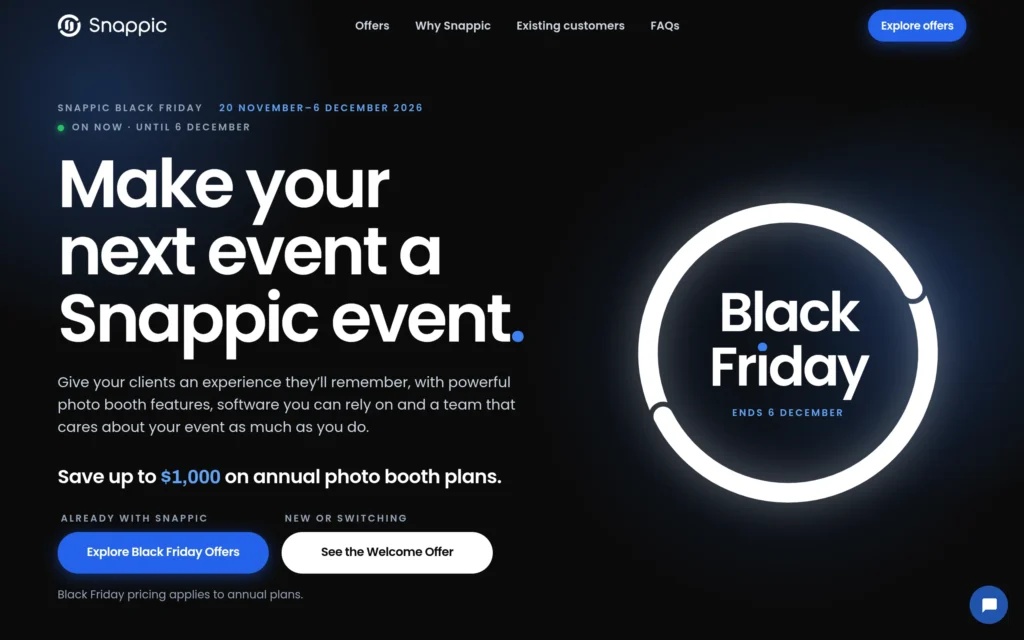
On 27 November 2026, Snappic’s Black Friday page showed annual offers running from 20 November to 6 December 2026. Business annual was $1,299 against a $1,799 standard annual price, Premium was $1,999 against $2,799, and Starter was $449 against $499. Our maths uses the standard $1,799 Business price, because a sale that ends on 6 December is not a budget. If you buy during the sale, year one drops by $500 and the renewal question arrives a year later.
The second price is credits. AI-FX requires an internet connection and uses credits, typically 1 to 6 credits per image at a live event depending on the effect. Snappic’s help centre prices credits at $0.10 per credit, for example 200 credits for $20 and 1,000 credits for $100. Preset filters cost 2 credits per guest image, which is $0.20. At our test volume of 3,600 AI images a year, preset filters cost $720 in credits. The full range is $360 at 1 credit per image to $2,160 at 6 credits per image, so the effect your client picks changes the bill more than the plan does.
Licences multiply with hardware. Each Snappic licence covers one device, and additional photo booth licences cost extra. On Business, an additional photo booth licence is $109 a month or $1,099 a year at standard pricing. A second booth on the same Saturday is therefore not a small upgrade. It is a second software bill. Snappic also runs on Apple hardware, so a Windows-only operator should read the next two sections before paying for an iPad they do not own.
For our test operator, Snappic Business at standard annual pricing costs $1,799 plus $720 in preset-filter credits, which is $2,519 a year. That is the most expensive booth line in this post. It earns that place when clients pay for 360 video, roaming capture, branded microsites, surveys, and AI effects as a package. For a wedding strip booth with a printer, it is a premium answer to a simpler question.
Darkroom Booth: buy once on Windows
Darkroom Booth is the old-school Windows answer, and its pricing model is the opposite of Snappic’s. Darkroom’s pricing page lists Booth at $295 to buy once. Booth 2025 includes 1 year of software updates and support, also called software maintenance. An additional year of updates and support costs $95. When maintenance expires, the software continues to function, but you lose access to support and the latest versions. If maintenance has been expired for more than a year, the upgrade price goes to $195.
The feature list is built for printing and control. Darkroom Booth lists hashtag printing from a kiosk with a custom template, print signing, type-a-note on prints, multi-monitor support, custom booth lock screens, built-in support for bill acceptors, and simple boomerang GIF setup. That suits operators building kiosk or coin-op booths, venue installations, and print-heavy rental rigs where a Windows PC drives the hardware. The supported operating system on the pricing page is Windows 11.
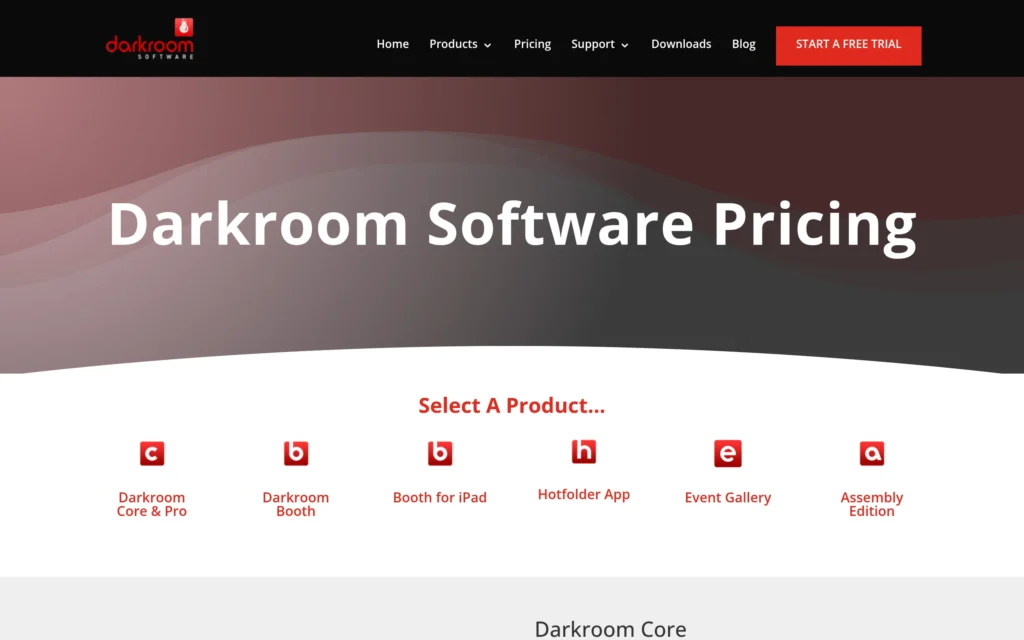
The AI honesty note matters here. Darkroom’s official pricing page does not list an AI portrait price or an AI image credit. We therefore price Darkroom’s AI images at $0 in this post, not because AI is free, but because the official pricing page we checked does not sell it as a priced line. An operator who needs AI portraits as a paid add-on should not buy Darkroom on the assumption that the pricing page hides an AI plan. Buy it for printing, kiosks, and a licence that keeps working after maintenance lapses.
There is also an iPad route. Darkroom lists Booth for iPad at $29.99 per month or $299 per year, with a free 7-day trial through the Apple App Store. The iPad version lists multiple capture modes including still images, GIFs, and Burst GIFs, white-label branding, live galleries, overlays, and sharing to email, text apps, and social media. A 10-day licence of Darkroom Booth costs $45, but Darkroom states that it is intended for existing full-version customers who need a short-term solution for a down computer or an overbooked situation, with no technical support without a previous full-version purchase.
For our test operator, Darkroom Booth on Windows costs $295 in year one and $0 in year two if maintenance is allowed to lapse, or $95 if updates and support are renewed. Spread over 72 events, year one costs about $4.10 per event. That is why Darkroom stays in this comparison despite the missing AI price. For a print-first booth, the cheapest software is the one you stop paying for.
LumaBooth: two devices, every feature, low price
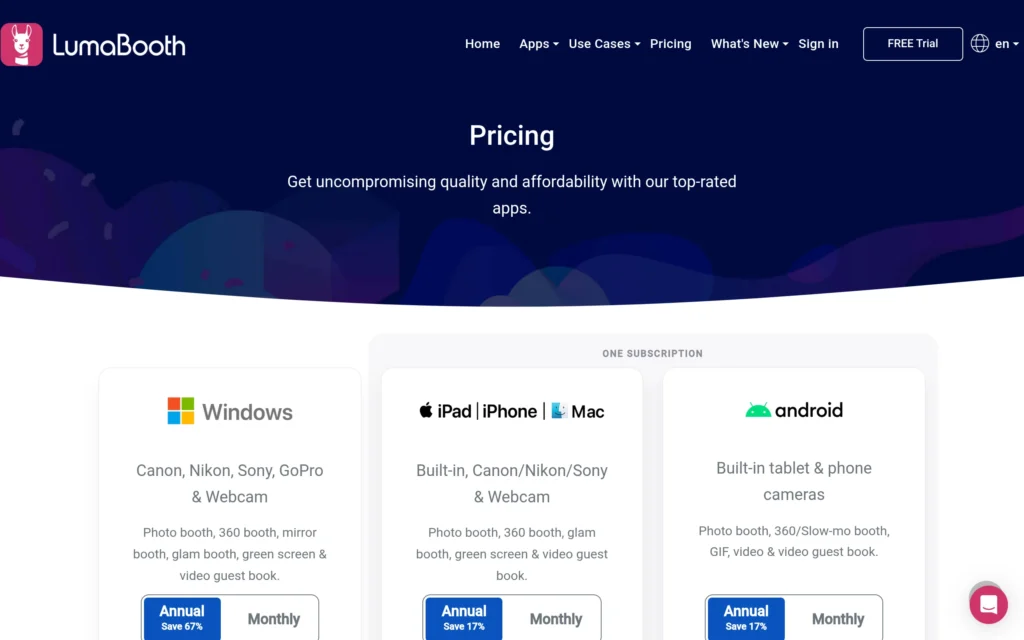
LumaBooth is the price disruptor in this list. LumaBooth’s own comparison page states that LumaBooth costs $18 per month billed annually and includes two devices, across iPad, iPhone, Mac, and Android. Windows is a separate subscription at $17 per month billed annually, also with two computers included. The pricing page screenshot shows the same structure: a Windows card, an iPad, iPhone, and Mac card, and an Android card, each with Annual and Monthly toggles. The Windows annual toggle is marked Save 67%, and the Apple and Android annual toggles are marked Save 17%.
The monthly route costs more. LumaBooth for Windows is $49.99 month-to-month against $17 billed annually, which is $204 a year. Apple and Android are $19.99 month-to-month against $18 billed annually, which is $216 a year. For an operator running six events a month, annual billing is the obvious road. For a one-event test, the monthly price is the honest comparison, and the free trial lets you test the workflow before either bill starts.
The feature gate is where LumaBooth differs from Snappic. LumaBooth states that every app feature is on every plan, including the cheapest, with no capture, printing, AI, or camera feature behind an upgrade. The comparison page lists photo, video, GIF, boomerang, 360, slow motion, green screen, surveys, and AI background replacement on the base plan. It also lists surveys, lead capture, analytics, branded galleries, a layout designer, and an online dashboard. Whether every feature suits your rig is a testing question. The pricing question is simpler: there is no higher tier to unlock the booth features.
AI portraits are priced by use. LumaBooth’s AI portraits page lists $0.10 per portrait, pay only for what you use, with 20 free AI transformations to try and 170+ professional AI presets included. At our test volume of 3,600 AI images a year, that is $360 in AI portrait costs. The 20 free transformations are a trial allowance, not a yearly saving worth modelling. Against Snappic’s preset-filter maths of $0.20 per guest image, LumaBooth’s flat $0.10 halves the AI line before the subscription is even counted.
Platform reach is the other advantage. LumaBooth runs on Windows, Mac, iPad, iPhone, and Android, while Snappic is Apple-based and Darkroom Booth’s main licence is Windows. LumaBooth for Windows lists tethered Canon, Nikon, Sony, GoPro, and webcam support. The Apple card lists built-in, Canon, Nikon, Sony, and webcam capture. The Android card lists built-in tablet and phone cameras only. Read that Android limit carefully. An Android tablet booth is a built-in-camera booth, not a tethered DSLR booth.
For our test operator on Apple hardware, LumaBooth costs $216 a year plus $360 in AI portraits, which is $576 a year for two devices. On Windows it costs $204 plus $360, which is $564. Either way, LumaBooth is the cheapest AI booth line in this post by a wide margin. The trade is brand and ecosystem. Snappic sells a premium activation platform with 24/7 support positioning. LumaBooth sells two devices, every feature, and a bill that stays small.
HoneyBook: bookings, contracts, and payments
HoneyBook is the generalist in this list. It handles enquiries, proposals, contracts, invoices, and payments for service businesses, and photo booth owners use it for the booking half of the job. It has no booth software and no idea what a 360 platform is. What it does well is turning a quote into a signed contract and a paid deposit without a chain of emails, which is where small event businesses quietly lose hours every week.
The pricing page lists three plans billed yearly. Starter costs $29 a month, Essentials costs $49 a month, and Premium costs $109 a month. HoneyBook’s own pricing summary describes Starter as including unlimited clients and projects, invoices and payments, proposals and contracts, templates, a client portal, and HoneyBook AI. Essentials adds the scheduler, automations, QuickBooks integration, team members, and SMS reminders. Premium adds unlimited team members, priority support, multiple companies, and advanced reporting. All plans start with a 30-day free trial, and HoneyBook states that no credit card is required for the trial.
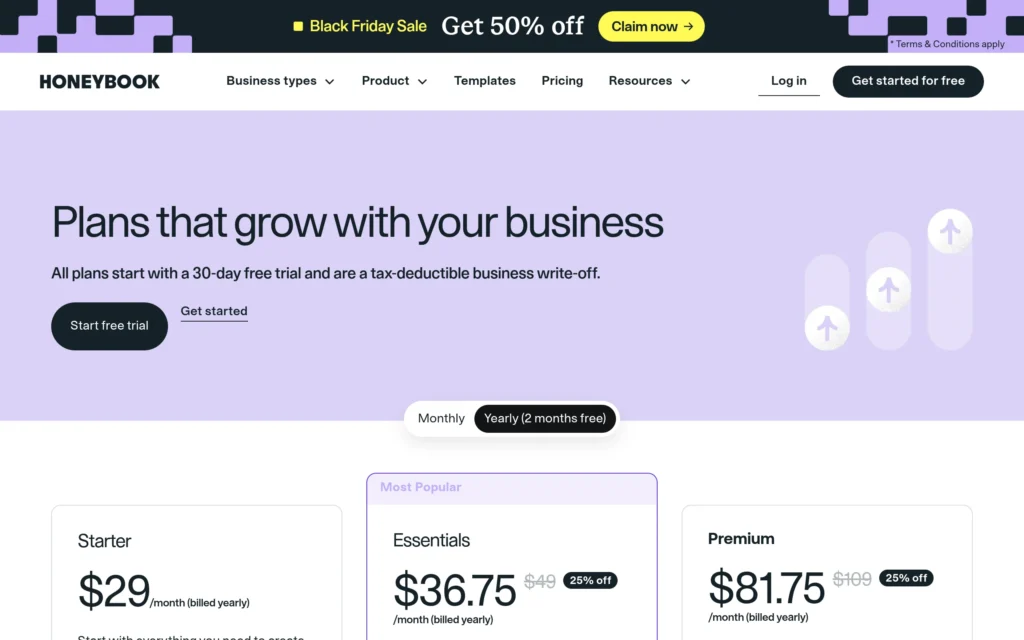
Automations are the dividing line. Essentials is the realistic tier for an operator sending deposit reminders, final-balance nudges, and event-day details across 72 events a year. At $49 a month billed yearly, Essentials costs $588 a year. Starter at $348 a year suits an operator who books a handful of events and sends every email by hand. Premium at $1,308 a year suits a multi-brand operation, not a solo booth.
Payment fees decide the rest. HoneyBook lists card payments starting at 2.9% plus 25 cents, while ACH bank transfers cost 1.5%. On our test operator’s 144 payments of $325, card fees total $1,393.20 a year. The same money by ACH costs $702. Steering clients to bank transfer saves $691.20 a year, which is more than the Essentials subscription itself. Operators who compare booth software to the dollar and ignore processing fees are watching the small number.
HoneyBook also overlaps with the booth tools on lead capture. Snappic Business includes custom surveys and data capture at the event. LumaBooth lists surveys and lead capture in the booth. HoneyBook handles the enquiry before the event and the contract after it. The honest split is this: booth software captures guest data in the room, and HoneyBook captures the client’s signature and money before the room exists. Running both is not duplication when each one owns a different moment.
Canva: templates, overlays, and guest-ready design
Canva is the design tool in this list, and photo booth work is design work. Every event needs an overlay with the couple’s names, a start screen with the client’s logo, a gallery header, and a social post the morning after. Canva’s pricing page describes Pro as unlocking premium content, more powerful design tools, and AI features, including AI tools to resize, translate, and remove backgrounds. For a booth operator, background removal and resize are not party tricks. They are how a client’s logo becomes a clean overlay before the event.
The pricing page screenshot on 27 November 2026 showed the Monthly view. Free costs US$0 a month for one person. Pro showed US$18 struck through with US$9 marked 50% off, per month for one person. Business showed US$25 struck through with US$12.50 marked 50% off, per month per person. The page banner states the offer plainly: 50% off Canva Pro or Business for the first 3 months on a monthly plan, with terms applying. Prices exclude applicable tax.
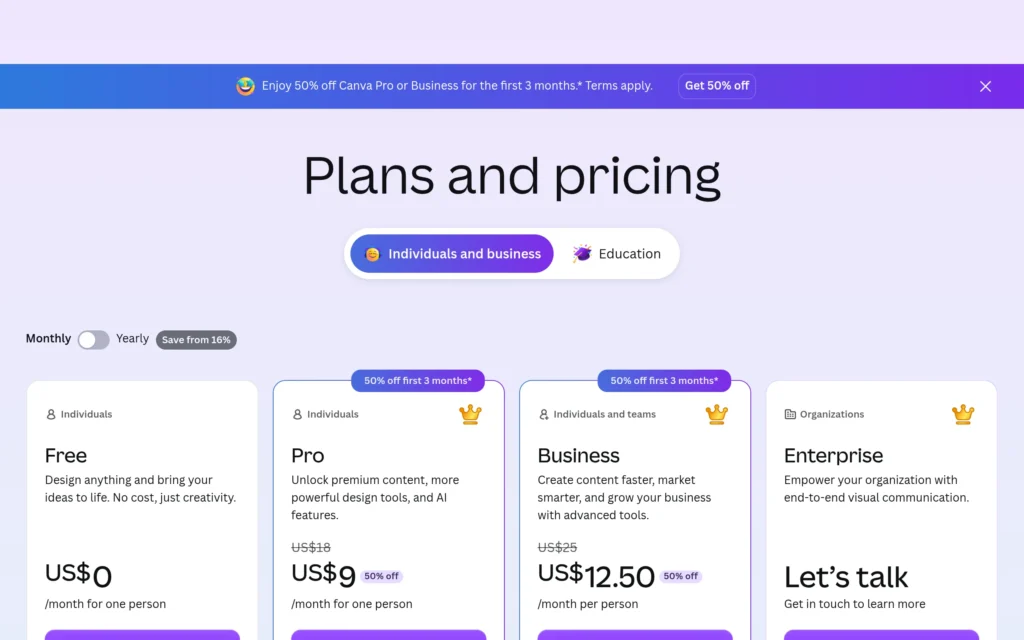
Our maths uses the list price, not the promotion. Canva Pro at US$18 a month is $216 over twelve monthly payments. The first-three-months offer would make the first year $189 on monthly billing, but a promotion is not a budget. The pricing page also shows a Yearly toggle marked Save from 16%. We price the monthly list figure we verified on the page, and the price note at the end tells you to check the yearly figure on the official page before you buy, because Canva shows different prices in some countries.
The one-person limit matters. Pro is priced for one person. Business is priced per person and is aimed at individuals and teams. A solo operator designing overlays alone fits Pro. A two-person business where both partners design client templates should price Business per person rather than sharing a Pro login and hoping the terms never matter. At US$25 a month per person, two Business seats cost $600 over twelve monthly payments before any promotion.
For our test operator, Canva Pro costs $216 a year at list monthly pricing. That buys the templates, premium assets, background removal, and resize tools behind every overlay and start screen. The free plan costs US$0 and suits an operator testing whether clients care about branded design. Most paying clients do care, because the overlay is the part of your work that ends up on their guests’ phones.
The maths: what five tools really cost a photo booth business
Here is the full stack for our solo operator, at list prices checked on 27 November 2026, with 3,600 AI images a year. Snappic Business costs $1,799 a year plus $720 in preset-filter AI credits, which is $2,519. Darkroom Booth costs $295 once. LumaBooth on Apple costs $216 a year plus $360 in AI portraits, which is $576. HoneyBook Essentials costs $588 a year. Canva Pro costs $216 over twelve monthly payments. The year-one total is $4,194.
Spread across 72 events, that stack costs $58.25 per event. Against a $650 average fee, software and AI credits take about 9% of gross income before payment fees. Add HoneyBook card fees of $1,393.20 and the true cost of the full stack passes $5,500. Payment method and AI effect choice, not the headline subscription, are the biggest lines in that bill.
The lean stack drops the duplication. LumaBooth at $576 including AI portraits, plus HoneyBook Essentials at $588, plus Canva Pro at $216, costs $1,380 a year, or about $19.17 per event. That saves $2,814 against the full stack. The operator gives up Snappic’s premium activation platform and Darkroom’s print-kiosk licence. Whether that trade is wise depends on how the events are won.
A Snappic stack suits a premium operator. Snappic Business at $2,519 including preset credits, plus HoneyBook Essentials at $588, plus Canva Pro at $216, costs $3,323 a year at standard pricing. During the Black Friday annual offer to 6 December 2026, the same stack costs $2,823 in year one. That stack makes sense when corporate clients pay for AI effects, microsites, and surveys as part of the package. It makes little sense for a wedding strip booth competing on price.
A Darkroom stack suits a print-first operator. Darkroom Booth at $295, plus HoneyBook Essentials at $588, plus Canva Pro at $216, costs $1,099 in year one. In year two it costs $804 if Darkroom maintenance lapses, or $899 if the $95 maintenance year is renewed. The trade is AI portraits. That stack has no priced AI portrait line on Darkroom’s official pricing page, so it suits events where prints and sharing matter more than AI effects.
Run your own numbers before copying ours. Our free AI Cost Calculator lets you enter your event count, your average fee, and your AI images per event, then see the stack cost per event. Ten minutes there beats a year of paying for credits your guests never used.
Five traps that catch photo booth operators
First, the AI gate trap. Snappic’s $69 Starter plan does not unlock AI-FX. AI-FX starts on Business at $189 a month or $1,799 a year, and credits cost extra at $0.10 each. An operator who budgets $69 and promises AI portraits has underpriced the event before it starts.
Second, the credit trap. Snappic AI-FX uses 1 to 6 credits per image depending on the effect. At 3,600 images a year, that range is $360 to $2,160. LumaBooth charges a flat $0.10 per AI portrait, which is $360 at the same volume. Price the effect your client picks, not the cheapest effect in the library.
Third, the second-device trap. Snappic licences cover one device each, and an additional Business photo booth licence costs $109 a month or $1,099 a year. LumaBooth includes two devices in its $216 Apple subscription. A busy Saturday with two booths costs very differently on each platform.
Fourth, the maintenance trap. Darkroom Booth keeps working after maintenance expires, but support and the latest versions stop. Let maintenance lapse for more than a year and the upgrade price goes to $195. Budget the $95 maintenance year if updates matter, or accept a frozen version on purpose.
Fifth, the payment-fee trap. HoneyBook card fees on 144 payments of $325 reach $1,393.20 a year, while ACH costs $702. Operators who compare booth subscriptions to the dollar and ignore processing fees are watching the small number. Offer bank transfer first and keep cards as the backup.
What to buy first
Start with the booth software your hardware needs. That is LumaBooth if you run iPads, Windows PCs, or a mix and want AI portraits at $0.10 each with two devices included. It is Snappic Business if corporate clients pay for AI-FX, 360 video, roaming capture, and branded microsites. It is Darkroom Booth if you build Windows print kiosks and want a $295 licence that keeps working. One booth platform is enough. The second one is a hobby, not a business expense.
Next, fix the money path. HoneyBook Essentials pays for itself when it replaces deposit chasing and contract emails across 72 events. Its automations and scheduler sit on the $49 tier, so budget $588 a year rather than the $348 Starter figure. Our guide to the best ai tools for event planners covers the wider booking stack if you also plan the events you booth.
Add Canva Pro when branded overlays start winning compliments or repeat bookings. At US$18 a month it is the easiest purchase in this post to justify and the easiest to delay. The order matters more than the list. Booth first, payments second, polish third.
Pros and cons
Snappic. Pros: AI-FX and VideoFX for 360 booths and Glambots, branded microsites, custom surveys and client analytics on Business, 48-hour event licences from $29, and 24/7 support positioning. Cons: AI starts at $189 a month, credits add $0.10 each at 1 to 6 per image, extra devices cost extra, and the platform is Apple-based.
Darkroom Booth. Pros: $295 once on Windows, software keeps working after maintenance lapses, print signing, hashtag printing, bill-acceptor support, and a $45 10-day licence for existing owners. Cons: the official pricing page lists no AI portrait price, updates stop without the $95 maintenance year, and the main licence is Windows 11 only.
LumaBooth. Pros: $216 a year for two Apple devices, every app feature on every plan, AI portraits at a flat $0.10, and Windows, Mac, iPad, iPhone, and Android reach. Cons: Windows and Apple bill as separate subscriptions, Android is built-in cameras only, and monthly billing on Windows costs $49.99 against $17 billed annually.
HoneyBook. Pros: proposals, contracts, and payments in one flow, a 30-day trial with no credit card required, and ACH fees of 1.5% that undercut cards. Cons: automations need the $49 Essentials tier, card fees reach $1,393.20 a year at our test volume, and there is no booth software or guest gallery.
Canva. Pros: premium templates and assets, AI background removal and resize for overlays, a free US$0 plan, and Pro at US$18 a month for one person. Cons: Pro covers one person only, Business costs US$25 a month per person, prices exclude tax, and Canva shows different prices in some countries.
Our verdict
For most solo photo booth businesses, the best ai tools for photo booth businesses start with one booth platform and one money tool. LumaBooth at $576 a year including AI portraits, plus HoneyBook Essentials at $588, plus Canva Pro at $216, costs $1,380 and covers the booth, the booking, and the design. That is the stack we would buy first at six events a month.
Snappic Business is the upgrade, not the starting point. At $2,519 a year including preset-filter credits, it makes sense when clients pay premium rates for AI-FX, 360 video, roaming capture, and branded data capture. Buy it for the activation work it wins, not for features a wedding strip booth never switches on.
Darkroom Booth is the print-first alternative. At $295 once, it suits Windows kiosks and print-heavy rigs where AI portraits are not part of the package. The full five-tool stack at $4,194 is a showroom, not a shopping list. Three of the tools do the same job. Pick one booth platform, pay for AI by the image, and let the saved $2,814 fund the next booth instead.
Frequently asked questions
What is the cheapest AI tool for a photo booth business?
LumaBooth is the cheapest AI booth line in this post. It costs $216 a year for two Apple devices billed annually, with AI portraits at $0.10 each. At 3,600 AI images a year, the total is $576. Darkroom Booth is cheaper at $295 once, but its official pricing page lists no AI portrait price.
Does Snappic include AI-FX credits in the plan price?
No. Snappic’s Black Friday page states that AI-FX uses credits, that credits are bought separately in packs, and that they are not unlimited. Credits cost $0.10 each, and an image typically uses 1 to 6 credits at a live event. Preset filters cost 2 credits per guest image, which is $0.20.
Is Darkroom Booth a subscription or a one-time purchase?
Both, depending on platform. Darkroom Booth for Windows costs $295 once and includes 1 year of updates and support. An additional maintenance year costs $95, and the software keeps working if maintenance expires. Booth for iPad is a subscription at $29.99 per month or $299 per year.
How much do AI portraits cost per event?
At 50 AI images per event, LumaBooth costs $5 per event at $0.10 per portrait. Snappic preset filters cost $10 per event at $0.20 per guest image. Snappic effects using 1 to 6 credits range from $5 to $30 per event at the same volume. Your effect choice decides the bill.
HoneyBook or booth software first?
Booth software first, because without it there is no event to invoice. LumaBooth at $216 a year runs the booth on two devices. HoneyBook Essentials at $588 a year then fixes contracts, deposit reminders, and payments. Running booth software without a money tool leaves the booking half of the business in your inbox.
Sources
Prices and terms were checked on the official pages on 27 November 2026: Snappic Black Friday annual offers page and help centre package comparison (snappic.com and help.snappic.com), Darkroom Software pricing page (darkroomsoftware.com), LumaBooth pricing and comparison pages (dslrbooth.com), HoneyBook pricing page (honeybook.com), and Canva pricing page (canva.com). Snappic’s standard annual prices are shown beside its Black Friday offers on the same page, and our maths uses the standard prices. Canva’s screenshot shows the Monthly view, and our maths uses the US$18 monthly list price shown there.
Price note — updated 27 November 2026: Prices in this post were checked on 27 November 2026. When you are reading this, the price may be lower or higher, and sale prices such as Black Friday offers may have ended. Check the official pricing page before you buy.
Pros
- Snappic: AI-FX and VideoFX for 360 booths and Glambots, branded microsites, custom surveys and client analytics on Business, 48-hour event licences from $29, and 24/7 support positioning.
- Darkroom Booth: $295 once on Windows, software keeps working after maintenance lapses, print signing, hashtag printing, bill-acceptor support, and a $45 10-day licence for existing owners.
- LumaBooth: $216 a year for two Apple devices, every app feature on every plan, AI portraits at a flat $0.10, and Windows, Mac, iPad, iPhone, and Android reach.
- HoneyBook: proposals, contracts, and payments in one flow, a 30-day trial with no credit card required, and ACH fees of 1.5% that undercut cards.
- Canva: premium templates and assets, AI background removal and resize for overlays, a free US$0 plan, and Pro at US$18 a month for one person.
Cons
- Snappic: AI starts at $189 a month, credits add $0.10 each at 1 to 6 per image, extra devices cost extra, and the platform is Apple-based.
- Darkroom Booth: the official pricing page lists no AI portrait price, updates stop without the $95 maintenance year, and the main licence is Windows 11 only.
- LumaBooth: Windows and Apple bill as separate subscriptions, Android is built-in cameras only, and monthly billing on Windows costs $49.99 against $17 billed annually.
- HoneyBook: automations need the $49 Essentials tier, card fees reach $1,393.20 a year at our test volume, and there is no booth software or guest gallery.
- Canva: Pro covers one person only, Business costs US$25 a month per person, prices exclude tax, and Canva shows different prices in some countries.
For most solo photo booth businesses, the best ai tools for photo booth businesses start with one booth platform and one money tool. LumaBooth at $576 a year including AI portraits, plus HoneyBook Essentials at $588, plus Canva Pro at $216, costs $1,380 and covers the booth, the booking, and the design. That is the stack we would buy first at six events a month.Snappic Business is the upgrade, not the starting point. At $2,519 a year including preset-filter credits, it makes sense when clients pay premium rates for AI-FX, 360 video, roaming capture, and branded data capture. Buy it for the activation work it wins, not for features a wedding strip booth never switches on.Darkroom Booth is the print-first alternative. At $295 once, it suits Windows kiosks and print-heavy rigs where AI portraits are not part of the package. The full five-tool stack at $4,194 is a showroom, not a shopping list. Three of the tools do the same job. Pick one booth platform, pay for AI by the image, and let the saved $2,814 fund the next booth instead.