

For a solo planner running 20 events a year, HoneyBook Essentials is the best first buy: $49 a month billed annually, or $588 a year, with proposals, contracts, payments, automations, and HoneyBook AI email drafts and meeting notes in one client system. Aisle Planner costs $69.99 a month for up to 15 active projects if timelines, budgets, and seating must live in the same login. Social Tables needs its $150-a-month Pro plan at 20 events a year because Standard stops at 15 events. Whova is quote-only per event, plus 3.0% + $0.99 per paid ticket. Canva Pro adds AI design for $144 a year on annual billing.
An independent event planner rarely loses a client over the event itself. The money leaks earlier: the proposal sent two days late, the timeline rebuilt in a spreadsheet at midnight, the seating chart redrawn after every RSVP change, the vendor follow-up that sat in an inbox through a site visit.
That gap work is what the best ai tools for event planners are supposed to absorb. The honest version is narrower. One drafts client emails with real AI and takes payment in the same flow. One runs timelines and seating but sells automation, not a named AI assistant. One starts floor plans from banquet paperwork. One quotes its price privately. One designs the proposal.
We compared five tools for the same solo planner and checked every price on the vendor’s own page on 26 November 2026. No roundup prices, and no tool here pays us anything. Where a vendor does not print a price, we say so instead of filling the gap with a guess.
Quick Answer
For a solo planner running 20 events a year, HoneyBook Essentials is the best first buy: $49 a month billed annually, or $588 a year, with proposals, contracts, payments, automations, and HoneyBook AI email drafts and meeting notes in one client system. Aisle Planner costs $69.99 a month for up to 15 active projects if timelines, budgets, and seating must live in the same login. Social Tables needs its $150-a-month Pro plan at 20 events a year because Standard stops at 15 events. Whova is quote-only per event, plus 3.0% + $0.99 per paid ticket. Canva Pro adds AI design for $144 a year on annual billing.
In this article
- How we compared the best ai tools for event planners
- The five tools at a glance
- HoneyBook: proposals, payments, and AI drafts in one client system
- Aisle Planner: timelines, budgets, and seating priced by active projects
- Social Tables: floor plans and seating, with a 15-event trap
- Whova: the conference app, priced by quote
- Canva: AI design for proposals and event graphics
- The maths: what five tools really cost a solo planner
- Five traps that catch event planners
- What to buy first
- Pros and cons
- Our verdict
- Frequently asked questions
How we compared the best ai tools for event planners
Every price in this guide is for the same imaginary business: one solo event planner, running 20 events a year, never carrying more than 15 active projects at once, with no more than 150 attendees on a single attendee list. The planner collects one $5,000 client payment per event through the client system, which is $100,000 of payments processed a year. Where a vendor charges per project, per event, or a percentage of a payment, we run those same 20 events through the formula.
We judged each tool on five things: year-one cost for 20 events; whether the AI is real and which plan unlocks it; whether proposals, timelines, seating, and payments live in one system; how price moves as bookings grow; and which fees stay unprinted.
One honesty note before the numbers. These five tools do four different jobs. HoneyBook is a client system: leads, proposals, contracts, invoices, and payments. Aisle Planner is a planning system: sales tools plus timelines, budgets, guest management, and seating. Social Tables is a diagramming tool: floor plans and seating charts. Whova is a conference platform: registration, an attendee app, and onsite check-in. Canva is a design tool. You would run one client or planning system, add diagramming or design only where the work demands it, and treat Whova as a per-conference purchase.
A second honesty note: the AI labels vary in honesty. HoneyBook lists named AI features, including email drafts and a meeting notetaker. Social Tables lists an AI feature that starts diagrams from banquet paperwork. Canva sells AI design tools with usage allowances that rise by plan. Aisle Planner’s pricing page names no AI assistant; its automation is automated email responses and a scheduling assistant. Whova sells attendee matchmaking from profile data and publishes no platform price. We price each tool for the job it actually does, not the badge on the homepage.
The five tools at a glance
| Tool | Best for | Starting price | Free plan or trial | Year-one cost for 20 events |
|---|---|---|---|---|
| HoneyBook | Proposals, contracts, payments, and AI drafts | Starter $29 a month billed annually | 30-day free trial, no credit card required | Essentials $588 subscription; payment fees extra |
| Aisle Planner | Timelines, budgets, seating, and client portal in one login | Sales Essentials $49.99 a month, no planning tools | 30-day free trial, credit card required | Up to 15 projects $839.88 at the monthly rate |
| Social Tables | Floor plans, seating charts, and venue collaboration | Free for 3 events; Standard $49 a month billed monthly | Free plan, no credit card required | Pro $1,800 at the monthly rate; Standard covers only 15 events |
| Whova | Conferences, registration, attendee app, and check-in | Custom quote per event | Trial account by request | Quote only, plus 3.0% + $0.99 per paid ticket |
| Canva | Proposals, mood boards, signage, and social graphics | Free; Pro US$12 a month billed yearly | Free plan; Pro 30-day trial | Pro $144 a year for one person |
The table hides the two numbers that decide most real bills. The first is the percentage fee: HoneyBook charges card processing starting at 2.9% + 25¢ on every client payment, while ACH bank transfers cost 1.5%. The second is the meter: Aisle Planner counts active projects, Social Tables counts events per year, and both meters can push a busy planner into the next tier mid-season. The sections below price both.
HoneyBook: proposals, payments, and AI drafts in one client system
HoneyBook is a clientflow platform for independent service businesses. For an event planner, the useful chain is short: a lead arrives through a contact form, the proposal combines service selection, contract, and payment in one flow, and the client portal holds the project details afterwards. Invoices, payment schedules, autopay, and automatic payment reminders sit in the same account, so the deposit chase stops being a separate spreadsheet.
The AI is named and specific. HoneyBook’s pricing page lists HoneyBook AI features including priority lead notifications with predictive alerts about high-value leads, email drafts, a meeting notetaker that joins video calls to generate notes, transcripts, and action items, project recaps delivered before meetings, lead enrichment, and Gmail suggestions that analyse your inbox for potential projects. For a planner, the notetaker and the email drafts are the daily value: the venue walkthrough becomes action items, and the vendor follow-up starts as a draft instead of a blank box.
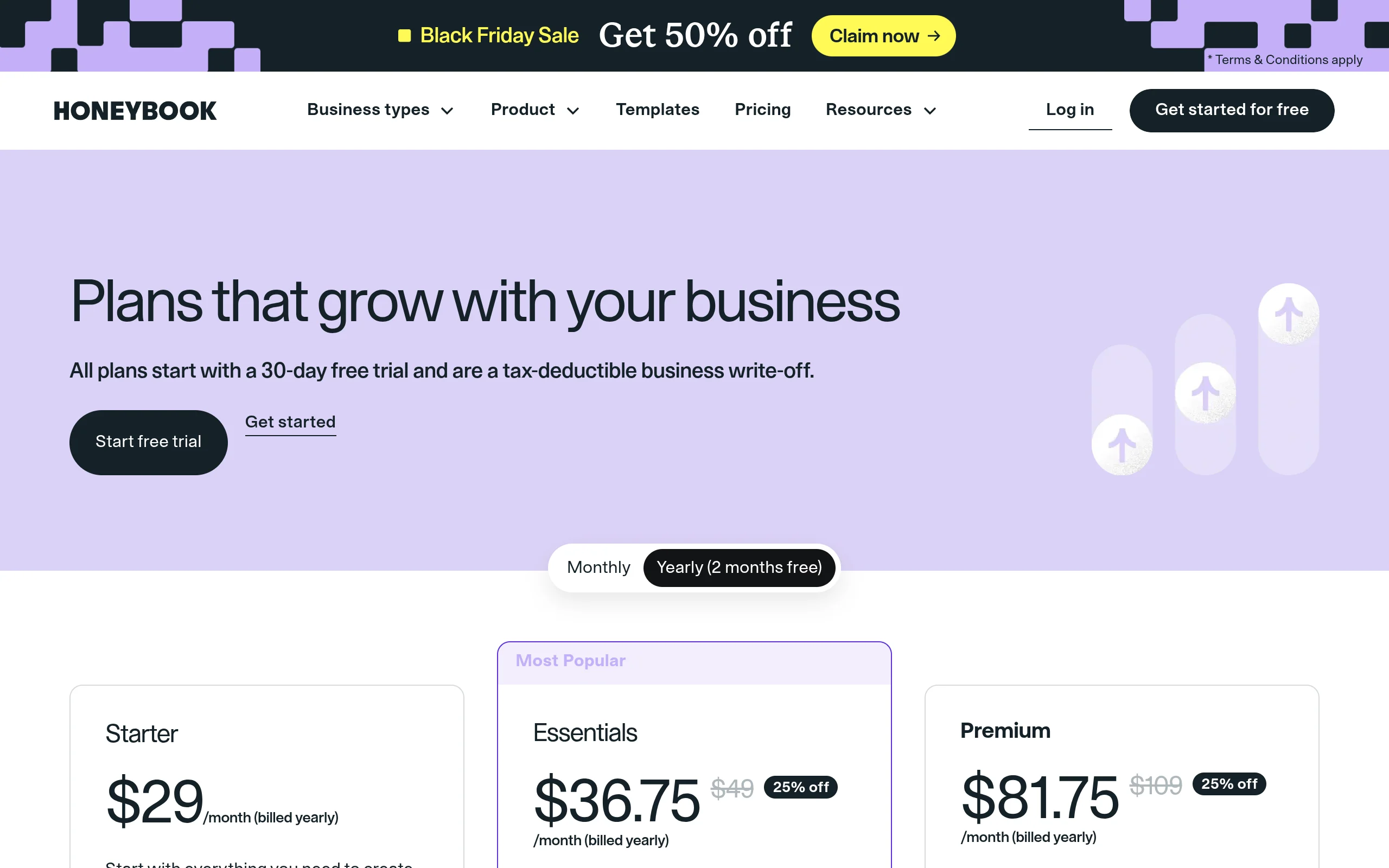
Pricing is billed annually on the page we checked: Starter is $29 a month, Essentials is $49 a month, and Premium is $109 a month, each billed annually and excluding any applicable sales tax. Every plan includes unlimited clients and projects. The gates matter more than the headline. Automations that trigger follow-up emails, files, or tasks are not on Starter. The scheduler is limited to one session type on Starter and unlimited on Essentials. Team members start at Essentials, with up to two, while Premium removes the team limit and adds multiple companies.
The trial is low-friction: 30 days free, no credit card required. At $588 a year, Essentials costs $29.40 per event across 20 events before payment fees. Starter saves $240 a year, but a planner who needs automated follow-ups will feel the missing pieces in the first busy month.
Payment fees are the number to model before you commit. HoneyBook states that card processing fees start at 2.9% + 25¢, and ACH bank transfers cost 1.5%. On one $5,000 client payment, the starting card rate is $145.25, while ACH is $75. Across 20 payments, that is at least $2,905 in card fees against $1,500 on ACH. The subscription is not the bill. The payment rail is the bill, and steering clients toward ACH saves at least $1,405 a year at this volume.
HoneyBook’s limit is planning depth. It manages the client relationship and the money, not the room. There is no seating chart, no floor plan, and no guest-list engine comparable to a planning system. A planner whose pain is proposals and payments should start here. A planner whose pain is timelines and seating should read the next section first, because buying both systems means paying twice for overlapping client management.
Aisle Planner: timelines, budgets, and seating priced by active projects
Aisle Planner Pro puts sales tools and planning tools behind one login. Sales covers leads, brochures, proposals, contracts, invoicing, and payments. Planning adds the client portal, checklists, timelines, budgets, guest management, layouts and seating, and RSVP websites. For a planner rebuilding timelines and seating in separate apps, that consolidation is the product.
Its meter is unusual: the price follows the number of active projects you manage at once, not your team size. Every plan includes unlimited users, so assistants and associate planners join without changing the bill. The pricing page we checked lists Sales Essentials at $49.99 a month, up to 15 projects at $69.99 a month, 16 to 25 projects at $109.99 a month, 26 to 50 projects at $164.99 a month, and 51 to 100 projects at $229.99 a month. Each card carries a “Save 10% Annually” label, and applicable sales tax may apply.
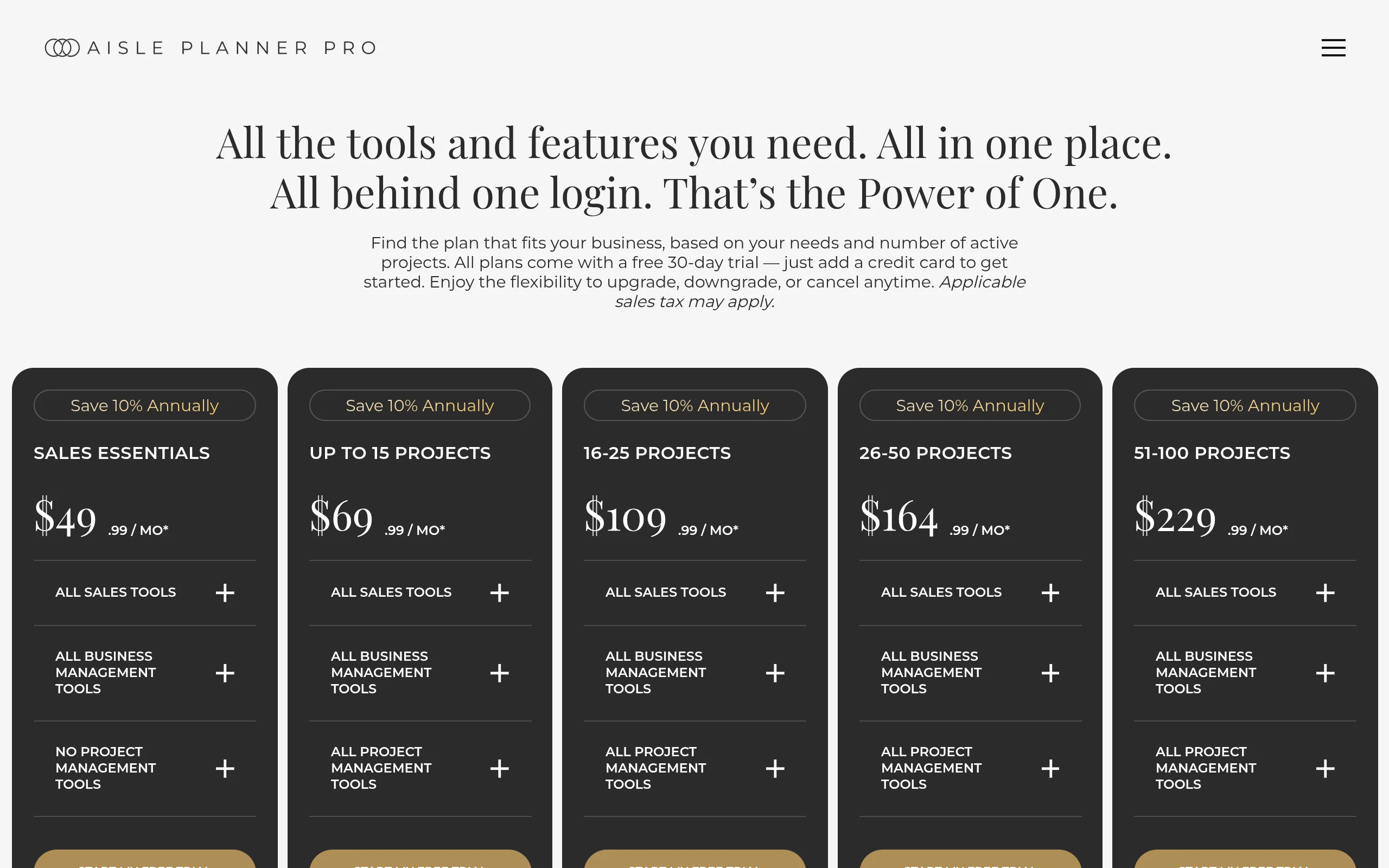
The trap is printed on the cheapest card. Sales Essentials includes all sales tools and all business management tools, but no project management tools. A planner who buys the $49.99 headline for timelines and seating has bought the wrong tier. The first tier with planning tools is up to 15 projects at $69.99 a month, which is $839.88 over a year at the monthly rate, or $41.99 per event across 20 events. The page labels a 10% annual saving but does not print the annual total, so budget on the monthly-rate year until checkout shows the annual figure.
The trial needs care. All plans come with a free 30-day trial, but the page says to just add a credit card to get started. That is a different risk from a no-card trial: the planner who forgets the cancel date pays for month two. The page also promises the flexibility to upgrade, downgrade, or cancel anytime, which softens the project meter. A planner can sit on the 15-project tier through a quiet season and step up only when concurrent work demands it.
On AI, honesty matters. Aisle Planner’s pricing page names no AI assistant. Its automation story is automated email responses to new leads and a scheduling assistant, which save minutes without pretending to think. That is not a weakness if timelines and seating are the pain. It is a weakness if the buying reason was AI-drafted client emails, because that job belongs to HoneyBook in this comparison. Buy Aisle Planner for planning depth in one login, and judge its automation as automation.
Social Tables: floor plans and seating, with a 15-event trap
Social Tables, now sold as Cvent Event Diagramming, does one job deeply: to-scale floor plans, seating, and attendee management that planners and venues edit together. Build the room, seat attendees from a list, share the diagram, and export a PDF for the venue. For a planner redrawing rooms in presentation software, that workflow is the saving.
The AI claim is specific and modest. The pricing page describes advanced diagramming features including a BEO uploader that uses AI to get started on events and diagrams based on information in your banquet event order. Advanced features also include diagram status, favourites, templates, reusable layouts, and table numbering. That is a head start on a diagram, not a planner in a box. The room still needs your judgment; the software removes the blank-page hour.
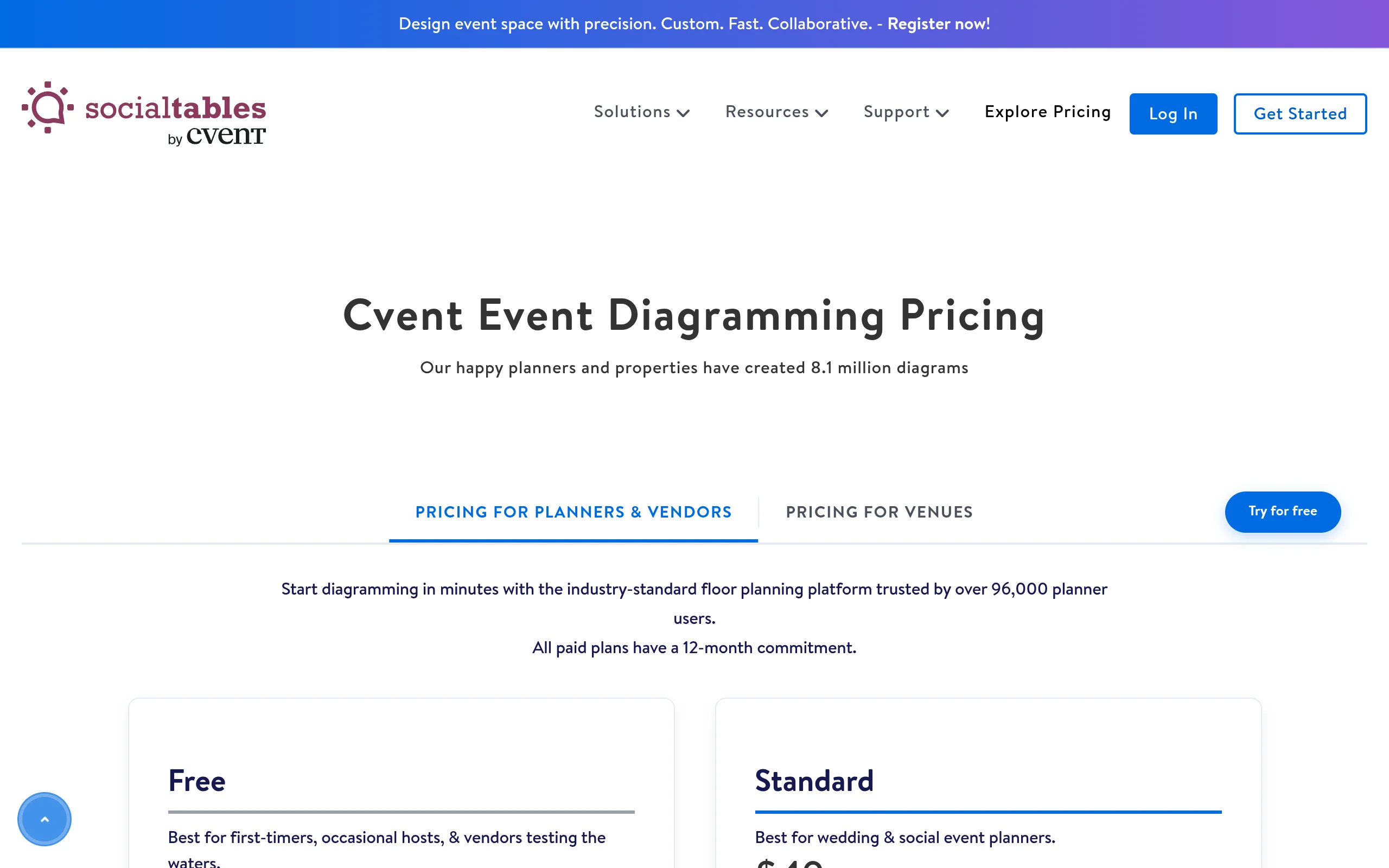
Pricing is where the trap sits. The free plan costs $0 for one user, 3 events, 2 diagrams per event, and 150 attendees per attendee list, with no credit card required to sign up. Standard costs $49 billed monthly for 15 events a year. Pro costs $150 billed monthly for 50 events a year and 3 diagrams per event. Premium costs $320 billed monthly for unlimited events, diagrams, and attendees. Annual billing saves 18% on Standard, 17% on Pro, and 9% on Premium, as labelled on the page. Every paid plan carries a 12-month commitment, even when billed monthly.
At 20 events a year, Standard is not enough. Its 15-event cap forces Pro at $1,800 over a year at the monthly rate, which is $90 per event before the annual saving. A planner running 12 events a year can stay on Standard at $588 a year at the monthly rate. A planner running three events can stay free. The same tool is cheap, reasonable, or expensive depending entirely on event count, which is why the meter matters more than the headline.
Two more limits deserve a trial before commitment. Free, Standard, and Pro all cap an attendee list at 150 attendees, so a 200-guest gala needs Premium or a workaround. Paid tiers also include one user account, with unlimited collaborators, so a second planner seat is a sales conversation rather than a settings toggle. Social Tables earns its place when venues already share layouts in it or when seating changes arrive daily. As a solo planner’s only system, it leaves proposals, contracts, and payments to another tool.
Whova: the conference app, priced by quote
Whova is the heavyweight of the five, and it plays a different sport. It is an all-in-one platform for conferences, association events, trade shows, and expos: registration, agenda and speaker management, a mobile event app, attendee networking, live polling, sponsor and exhibitor tools, onsite check-in, badge printing, and post-event analytics. Attendees get personal agendas, announcements, community boards, messaging, and matchmaking that suggests people with similar backgrounds and shared interests.
Fit comes before features. Whova’s own guidance says it is not suitable for small gatherings under 50 attendees or personal events such as weddings. Conference producers are the target customer. An 80-guest celebration does not need a conference engine.
On price, Whova publishes the ticket fee and hides the platform fee. Its official comparison states custom pricing per event, with registration fees of 3.0% + $0.99 per paid ticket and no fee for free tickets. The same page works the example: a $500 ticket carries a $15.99 fee. Whova’s platform page says the cost varies based on the size of your event and the specific features you need. There is no public price list to budget against, so any year-one total without a written quote would be invented. This guide prints none.
The ticket maths still matters, because it scales with success. On 200 paid tickets at $100, the fee is $3.99 per ticket, or $798 for the event, before the platform quote and before any external payment processing. A free-ticket community event pays no ticket fee, but the platform quote remains. That structure rewards ticketed conferences with healthy margins and punishes low-priced tickets, where $0.99 is a large share of the price.
Whova earns its place when one client event needs registration, an app attendees actually open, and check-in that feeds analytics. It is a per-event purchase to quote alongside the venue and catering, not a subscription a solo planner carries all year. Request the quote in writing for your attendee count and feature list, add the ticket fees at your real ticket price, and compare that total against the registration tools you already own.
Canva: AI design for proposals and event graphics
Canva is the design layer of this stack: proposals, mood boards, signage, menus, social posts, and sponsor decks that look designed rather than assembled. For an event planner, the value is speed with brand control. A Brand Kit holds colours, fonts, and logos, premium templates remove the blank page, and AI tools such as Magic Write and Magic Layers help draft copy and rebuild layouts. The client sees polish. The planner avoids a design fee for routine graphics.
Pricing is per person and published in US dollars. The free plan costs US$0 for one person, with real templates and editing plus 5GB of storage. Canva Pro costs US$12 a month per person billed yearly, which is US$144 a year, or US$18 month-to-month. Pro is a single-user plan: only one person can hold the subscription. It adds unlimited premium content, Brand Kit access, 100GB of cloud storage, and full access to AI tools. A 30-day trial is available, and Canva notes that AI allowance during the trial matches the free plan, with the full allowance on the paid plan.
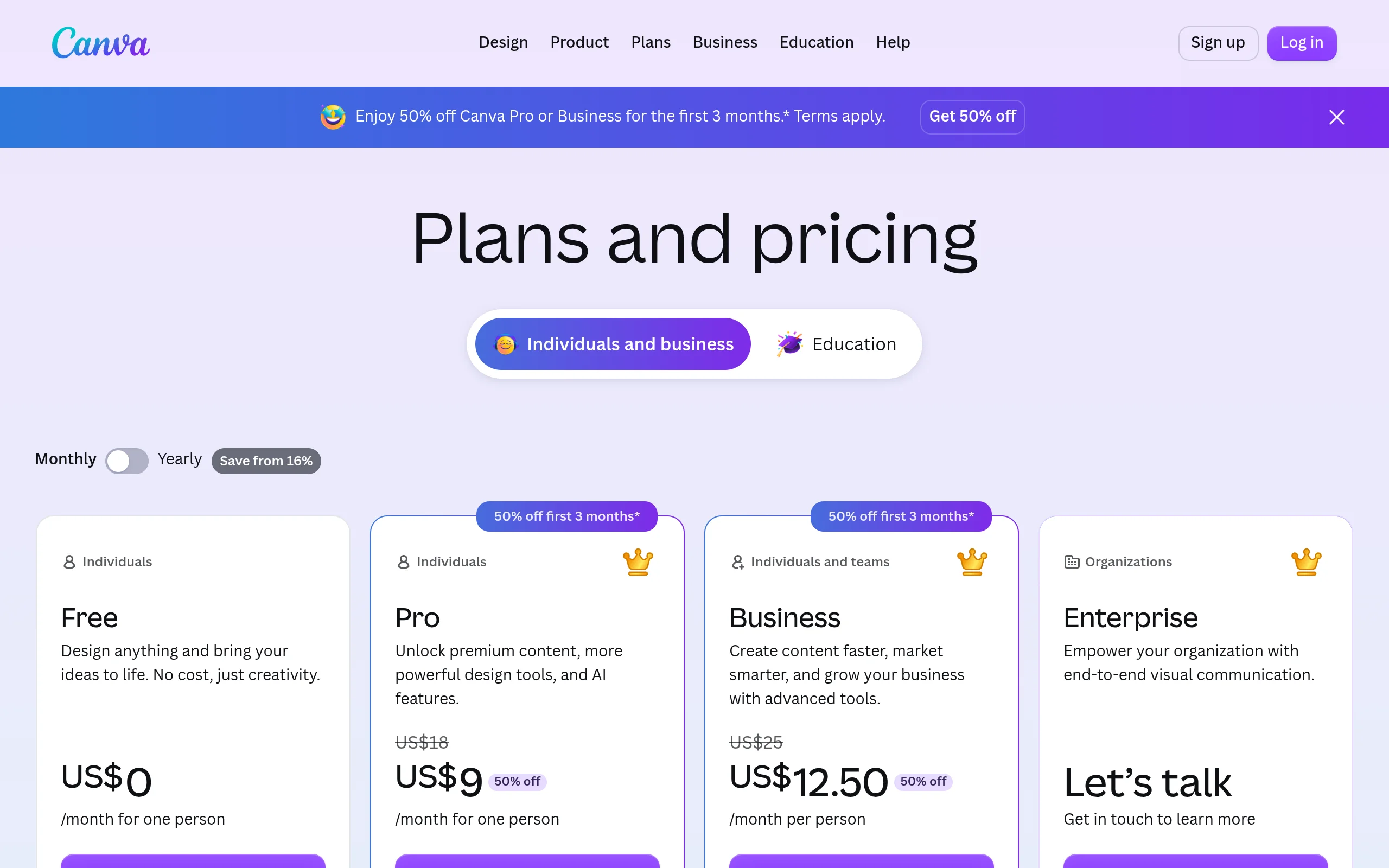
Canva Business is the team step at US$20.83 a month per person billed yearly, or US$25 month-to-month, adding up to 100 Brand Kits, 500GB of storage, collaboration, approvals, and higher AI limits. A solo planner does not need Business. A planner whose assistant edits graphics weekly should price it per seat.
The pricing page also showed a promotion on the day we checked: 50% off Pro or Business for the first three months on monthly plans, with terms applying. Promotions expire. Budget on the list price, treat the discount as a trial subsidy, and confirm the renewal figure before the third month ends. At list price, Pro on annual billing costs $7.20 per event across 20 events, which is the cheapest line in this guide. Its limit is scope: Canva designs the documents around the event. It does not manage leads, contracts, seating, or payments.
The maths: what five tools really cost a solo planner
Start with the client system, because every planner needs exactly one. HoneyBook Essentials is $588 a year billed annually. Aisle Planner’s first planning tier is $839.88 over a year at the monthly rate. Those two overlap on leads, proposals, contracts, and invoicing, so buying both means paying $1,427.88 a year for two front doors to the same client. Pick the system whose depth matches the pain: HoneyBook for AI drafts and payments, Aisle Planner for timelines and seating.
Per event, at 20 events a year, the subscriptions run $29.40 for HoneyBook Essentials, $41.99 for Aisle Planner’s 15-project tier, $90 for Social Tables Pro, and $7.20 for Canva Pro on annual billing. The per-event view is the honest one for a solo planner, because software is a fixed cost spread over however many events actually happen. A quiet season does not shrink the subscription. It raises the cost hiding inside every event.
Now add the fees the headlines hide. HoneyBook card processing starts at 2.9% + 25¢, which is $145.25 on a $5,000 payment and at least $2,905 across 20 payments. ACH at 1.5% is $75 per payment and $1,500 across the year. Steering clients to ACH saves at least $1,405 a year at this volume, which is more than the Essentials subscription and Canva Pro combined. Whova’s ticket fee runs the other way: 3.0% + $0.99 per paid ticket adds $798 on 200 tickets at $100, before its platform quote.
The stack test shows the real saving. Buying HoneyBook Essentials at $588, Aisle Planner at $839.88, Social Tables Pro at $1,800, and Canva Pro at $144 together costs $3,371.88 in year one, before payment fees and before any Whova quote. Running HoneyBook Essentials plus Canva Pro instead costs $732 a year. The difference is $2,639.88 a year, which is the price of the second client system and the diagramming tier you did not buy. Add Social Tables only when venue collaboration or daily seating changes prove the need, and add Aisle Planner only when planning depth beats AI drafts.
Growth flips some of the order. Percentage fees grow with revenue. Project meters grow with concurrent work, so Aisle Planner’s 15-project tier becomes $109.99 a month when bookings overlap. Event meters grow with volume, so Social Tables Standard ends at 15 events. Price each tool at next year’s workload.
Five traps that catch event planners
First, the percentage fee under the headline. HoneyBook Essentials at $49 a month sounds like the whole bill until card processing starts at 2.9% + 25¢ on every client payment. At $100,000 processed, that is at least $2,905 a year. Price the payment rail at your real volume, and offer ACH where clients accept it.
Second, the planning-tools gate. Aisle Planner’s $49.99 Sales Essentials card states no project management tools. The timelines, budgets, and seating live from the $69.99 tier upward. The feature in the headline and the price in the headline are rarely the same tier. Find the gate before you compare prices.
Third, the event-count meter. Social Tables Standard covers 15 events a year, and every paid plan carries a 12-month commitment. Event sixteen forces Pro at $150 a month. Count last year’s events honestly, including the small ones, before choosing the tier.
Fourth, the trial that wants a card. Aisle Planner’s 30-day trial requires a credit card to start, while HoneyBook’s 30-day trial requires no credit card. Both trials last a month. Only one can bill you for forgetting. Set the cancel reminder on day one.
Fifth, the unprinted price. Whova publishes its ticket fee and quotes its platform fee per event. Where a vendor prints no platform price, treat the missing number as a cost you have not been shown, not a cost of zero, and get it in writing for your attendee count before you sell tickets against it.
What to buy first
Buy one client system first, and let the room work decide the rest. A solo planner whose pain is slow proposals, payment chasing, and vendor follow-ups should start with HoneyBook Essentials, run the 30-day no-card trial on real inquiries, and watch whether the AI email drafts and meeting notes survive contact with real clients. If timelines, budgets, guest lists, and seating must live in the same login as contracts, Aisle Planner’s 15-project tier is the consolidation play at $69.99 a month. Our HoneyBook vs Dubsado comparison covers the client-system choice in more depth if proposals and automations are the deciding factor.
Add Canva Pro when design becomes weekly work; at $144 a year it is the cheapest upgrade here. Add Social Tables when venues share layouts in it, priced at Pro beyond 15 events a year. Quote Whova per conference when registration, app, and check-in must connect.
Our free AI Cost Calculator takes the prices above and turns them into a monthly and yearly figure for your own event count and payment volume, so you can test the percentage fees and project meters before any trial starts. Run your real numbers there, then trial the cheapest system that survives your busiest month.
Pros and cons
HoneyBook. Pros: proposals, contracts, invoices, payments, and a client portal in one system; named AI features including email drafts, a meeting notetaker, project recaps, and lead enrichment; unlimited clients and projects on every plan; a 30-day trial with no credit card required. Cons: automations and team members start at Essentials, not Starter; card processing starting at 2.9% + 25¢ can exceed the subscription at volume; no seating charts or floor plans; annual billing is the priced basis on the page we checked.
Aisle Planner. Pros: sales tools and planning tools behind one login, including timelines, budgets, guest management, layouts and seating, and RSVP websites; unlimited users on every plan; pricing follows active projects, with upgrade, downgrade, or cancel flexibility. Cons: the $49.99 tier excludes project management tools; the 30-day trial requires a credit card; the pricing page names no AI assistant; the annual total is labelled as a 10% saving rather than printed.
Social Tables. Pros: to-scale floor plans with seating and attendee management; unlimited collaborators for venue teamwork; an AI BEO uploader to start diagrams from banquet paperwork; a free plan for three events with no credit card required. Cons: Standard stops at 15 events a year; every paid plan carries a 12-month commitment; attendee lists cap at 150 below Premium; paid plans include one user account.
Whova. Pros: registration, attendee app, networking, check-in, badges, and analytics in one conference platform; matchmaking from attendee profiles; no ticket fee on free tickets; built for conferences, associations, trade shows, and expos. Cons: the platform price is quote-only, so budgeting needs a sales process; paid tickets add 3.0% + $0.99 each; Whova itself says it is not suitable for small gatherings under 50 attendees or personal events; a per-event purchase suits conferences, not year-round solo planning.
Canva. Pros: a genuinely usable free plan; Pro at US$144 a year adds premium content, Brand Kit, 100GB of storage, and full AI tool access; Business adds collaboration, approvals, and higher AI limits for teams; a 30-day Pro trial. Cons: Pro is single-user, so team editing needs per-seat Business pricing; AI allowance during the trial matches the free plan; promotions such as 50% off the first three months expire into list price; design only, with no client management, seating, or payments.
Our verdict
HoneyBook Essentials is the best first buy for a solo event planner who wants AI doing real work: $588 a year for proposals, contracts, payments, automations, AI email drafts, and meeting notes, with a no-card trial to prove it on real inquiries. Its payment fees demand respect, and steering clients to ACH saves at least $1,405 a year at $100,000 processed. Aisle Planner is the better buy when timelines, budgets, and seating in one login outweigh AI drafts, at $839.88 a year for up to 15 active projects at the monthly rate.
Canva Pro earns its $144 a year the first week proposals and signage become routine. Social Tables earns its place when venues collaborate in it, priced at Pro once events pass fifteen a year. Whova is the conference quote to request per event, not a subscription to carry. Whichever system wins your trial, buy one client system, price the meters and percentage fees before the headline, and let the trial month argue with your busiest week.
Frequently asked questions
What is the cheapest AI tool for a solo event planner?
HoneyBook Essentials is the cheapest complete client system here with named AI features: $49 a month billed annually, or $588 a year, with proposals, contracts, payments, automations, AI email drafts, and a meeting notetaker. Canva Pro is cheaper at US$144 a year, but it only covers design. Aisle Planner’s planning tier costs $69.99 a month, and Social Tables Pro costs $150 a month at 20 events a year.
How much does HoneyBook cost with payment fees?
Essentials costs $588 a year billed annually. Payment fees sit on top: card processing starts at 2.9% + 25¢ per payment, and ACH bank transfers cost 1.5%. On twenty $5,000 client payments, card fees run at least $2,905 a year at the starting rate, while ACH costs $1,500. Budget the payment rail at your real processed volume, not the subscription alone.
Which Aisle Planner plan includes timelines and seating?
The project tiers do. Sales Essentials at $49.99 a month includes sales and business management tools but no project management tools. Timelines, budgets, guest management, layouts and seating, and RSVP websites start with the up-to-15-projects tier at $69.99 a month. Every plan includes unlimited users, and the 30-day trial requires a credit card.
Why does Social Tables cost $150 a month at 20 events?
Because Standard stops at 15 events a year. Standard costs $49 billed monthly for 15 events, while Pro costs $150 billed monthly for 50 events a year. A planner running 20 events needs Pro, which is $1,800 over a year at the monthly rate before the labelled 17% annual saving. Every paid plan carries a 12-month commitment, and attendee lists cap at 150 below Premium.
How much does Whova cost per event?
Whova does not publish a platform price. Its official pages state custom pricing per event based on event size and features, plus registration fees of 3.0% + $0.99 per paid ticket, with no fee for free tickets. A $500 ticket carries a $15.99 fee on Whova’s own example. Request a written quote for your attendee count and add ticket fees at your real ticket price.
Price note — updated 26 November 2026: Prices in this post were checked on 26 November 2026. When you are reading this, the price may be lower or higher, plans may have changed, and trial terms may differ. Check the official pricing page before you buy, and confirm any unprinted fee, such as a per-event platform quote, with the vendor in writing.
Sources
- HoneyBook pricing: https://www.honeybook.com/lp/pricing
- Aisle Planner pricing: https://www.aisleplanner.com/pricing
- Social Tables pricing: https://www.socialtables.com/pricing/
- Whova event management software: https://whova.com/event-management-software/
- Whova registration pricing comparison: https://whova.com/blog/event-registration-software-price-comparison/
- Canva pricing: https://www.canva.com/pricing/
- Canva plan comparison: https://www.canva.com/learn/canva-pro-vs-canva-enterprise/
Pros
- HoneyBook: proposals, contracts, invoices, payments, and a client portal in one system; named AI features including email drafts, a meeting notetaker, project recaps, and lead enrichment; unlimited clients and projects on every plan; a 30-day trial with no credit card required
- Aisle Planner: sales tools and planning tools behind one login, including timelines, budgets, guest management, layouts and seating, and RSVP websites; unlimited users on every plan; pricing follows active projects, with upgrade, downgrade, or cancel flexibility
- Social Tables: to-scale floor plans with seating and attendee management; unlimited collaborators for venue teamwork; an AI BEO uploader to start diagrams from banquet paperwork; a free plan for three events with no credit card required
- Whova: registration, attendee app, networking, check-in, badges, and analytics in one conference platform; matchmaking from attendee profiles; no ticket fee on free tickets; built for conferences, associations, trade shows, and expos
- Canva: a genuinely usable free plan; Pro at US$144 a year adds premium content, Brand Kit, 100GB of storage, and full AI tool access; Business adds collaboration, approvals, and higher AI limits for teams; a 30-day Pro trial
Cons
- HoneyBook: automations and team members start at Essentials, not Starter; card processing starting at 2.9% + 25¢ can exceed the subscription at volume; no seating charts or floor plans; annual billing is the priced basis on the page we checked
- Aisle Planner: the $49.99 tier excludes project management tools; the 30-day trial requires a credit card; the pricing page names no AI assistant; the annual total is labelled as a 10% saving rather than printed
- Social Tables: Standard stops at 15 events a year; every paid plan carries a 12-month commitment; attendee lists cap at 150 below Premium; paid plans include one user account
- Whova: the platform price is quote-only, so budgeting needs a sales process; paid tickets add 3.0% + $0.99 each; Whova itself says it is not suitable for small gatherings under 50 attendees or personal events; a per-event purchase suits conferences, not year-round solo planning
- Canva: Pro is single-user, so team editing needs per-seat Business pricing; AI allowance during the trial matches the free plan; promotions such as 50% off the first three months expire into list price; design only, with no client management, seating, or payments
HoneyBook Essentials is the best first buy for a solo event planner who wants AI doing real work: $588 a year for proposals, contracts, payments, automations, AI email drafts, and meeting notes, with a no-card trial to prove it on real inquiries. Its payment fees demand respect, and steering clients to ACH saves at least $1,405 a year at $100,000 processed. Aisle Planner is the better buy when timelines, budgets, and seating in one login outweigh AI drafts, at $839.88 a year for up to 15 active projects at the monthly rate.Canva Pro earns its $144 a year the first week proposals and signage become routine. Social Tables earns its place when venues collaborate in it, priced at Pro once events pass fifteen a year. Whova is the conference quote to request per event, not a subscription to carry. Whichever system wins your trial, buy one client system, price the meters and percentage fees before the headline, and let the trial month argue with your busiest week.