

For a business with 10 employees in one state, Patriot Full Service Payroll is the cheapest full-service start at $37 a month plus $5 per worker paid, which is $87 a month or $1,044 a year. Square Payroll costs $95 a month, Gusto Simple and OnPay cost $109 a month, and QuickBooks Workforce Payroll costs $120 a month. Every price was checked on the vendor's official pricing page on 28 November 2026.
Quick Answer
The best ai payroll software for small business is decided by two numbers, not by the feature list: the monthly base fee and the fee for every person you pay. For a business with 10 employees in one state, Patriot Full Service Payroll is the cheapest full-service start at $37 a month plus $5 per worker paid, which is $87 a month or $1,044 a year.
Square Payroll costs $35 a month plus $6 per person paid, which is $95 a month or $1,140 a year. Gusto Simple costs $49 a month plus $6 per person, which is $109 a month or $1,308 a year. OnPay Payroll Essentials costs the same $49 plus $6, so also $1,308 a year, but it includes multi-state payroll in that price. QuickBooks Workforce Payroll costs $50 a month plus $7 per active employee, which is $120 a month or $1,440 a year.
Buying all five at those sensible tiers costs $6,240 a year. Starting on Patriot Full Service alone costs $1,044 a year, so one right tool saves $5,196 a year. Every price below was checked on the vendor’s official pricing page on 28 November 2026.
In this article
- How we compared the best ai payroll software for small business
- The five tools at a glance
- Patriot Software: the lowest published full-service price
- Square Payroll: payroll inside the Square ecosystem
- Gusto: payroll, onboarding and benefits in one system
- OnPay: multi-state payroll included in one price
- QuickBooks Workforce: payroll connected to Intuit accounting
- The maths: 10 employees in one state, then two states
- Five traps that catch payroll buyers
- Strategic Pivot: count workers and states before you buy
- Pros and cons
- Our verdict
- Frequently asked questions
- Sources
How we compared the best ai payroll software for small business
Payroll looks simple until the first tax deadline arrives. Then the real questions appear: does the provider file and pay the taxes for you, what happens when an employee works in a second state, and does the per-person fee follow the people you paid or everyone on your roster?
Our test business has 10 W-2 employees in one state, all paid every month. It runs regular pay runs, needs federal and state payroll taxes filed and paid, and wants year-end W-2 forms handled without a separate year-end project.
We compared the same four things for every tool. First, what that business pays each month and each year at list prices. Second, what the per-person meter counts: workers paid, people on the plan, or active employees. Third, whether full tax filing is included or sold as the upgrade. Fourth, what changes when a second state or local payroll taxes enter the picture.
One honesty note before the detail. In payroll, the useful automation is the part that calculates taxes, files forms, pays agencies on time, and flags problems before payday. That is what these five tools automate. None of them removes your responsibility as the employer, so you still review each run and confirm the deposits happened.
The five tools at a glance
| Tool | Best for | Price checked 28 November 2026 | Free route |
|---|---|---|---|
| Patriot Software | Lowest full-service price | Full Service $37/mo + $5 per worker paid | 30 days free, then 50% off for 3 months |
| Square Payroll | Teams already on Square | $35/mo + $6 per person paid | No free plan on pricing page |
| Gusto | Payroll plus onboarding and benefits | Simple $49/mo + $6 per person | No free plan on pricing page |
| OnPay | Multi-state payroll in one price | $49/mo + $6 per worker | First month free |
| QuickBooks Workforce | Payroll inside Intuit accounting | Workforce Payroll $50/mo + $7 per active employee | No free plan; introductory discounts rotate |
The table hides the real split, which is the meter. Patriot and Square charge for each person you actually pay in the month. Gusto and OnPay charge per person or worker on the plan at the same headline rate. QuickBooks charges per active employee, which can include someone who received no wages that month.
That split decides the winner for seasonal and hourly teams. A business that pays 10 people every month sees one bill. A business that pays 6 people in a slow month and 12 in a busy month sees a very different bill depending on which meter it picked.
Patriot Software: the lowest published full-service price
Patriot Software is the budget option in this comparison, and its pricing page is unusually clear. Basic Payroll costs $17 a month plus $4 per worker paid. Full Service Payroll costs $37 a month plus $5 per worker paid. Both are shown before the current offer of 30 days free plus 50% off for 3 months.
The difference between the two plans is tax filing. Basic Payroll calculates payroll and gives you free direct deposit, a free employee portal, unlimited payrolls, and auto payroll, but you deposit and file the payroll taxes yourself. Full Service adds federal, state, and local tax filings and deposits, year-end payroll tax filings at no additional fee, and a tax filing reliability guarantee.

Patriot’s own example table matches the arithmetic. One worker on Full Service costs $42 a month, 5 workers cost $62 a month, and 10 workers cost $87 a month. Those examples use workers paid, meaning employees and contractors you paid during the month.
Two add-on prices matter. Time & Attendance and HR Software each cost $6 a month plus $2 per employee. Full Service Payroll adds $12 a month for each additional state it files in. A second state is therefore a small, known fee rather than a plan upgrade.
For our test business, Full Service costs $37 plus 10 times $5, which is $87 a month or $1,044 a year. That is the lowest full-service price in this comparison. Basic would cost $57 a month or $684 a year, but only makes sense if you deliberately want to handle tax deposits and filings yourself.
Best for: small employers who want full-service tax filing at the lowest published price, and owners who only pay people in months when work happens. Skip if: you want time tracking, HR tools, and benefits administration bundled into the base plan, because Patriot sells those as separate monthly add-ons.
Square Payroll: payroll inside the Square ecosystem
Square Payroll is the ecosystem option. Its pricing page lists two prices: full-service payroll at $35 a month plus $6 per person paid, and contractor-only payroll at $6 per person paid with no monthly base fee. The per-person fee applies in months when you actually pay that person.
Full-service payroll includes unlimited pay runs per month, no long-term contract, simple onboarding, and pay by check, direct deposit, or Cash App. It also includes auto payroll, off-cycle payments, multistate payroll, multiple pay rates, and employee self-onboarding.

The tax section is where Square earns its place. Full-service includes automatic payroll tax calculations, automated federal tax payments and filings, automated state tax payments and filings, digital delivery of W2s and 1099s, new-hire reporting, and multiple tax jurisdiction support. Mailing paper copies of W2s or 1099s costs an annual fee of $3 per mailed form.
Square’s strength is the connection to the rest of Square. Timecards and tips can be imported from Square POS or the Square Team App, overtime is calculated, and labor-cost reporting shows wages and tips together. For a cafe, retail shop, or salon already ringing sales on Square, hours and tips flow into payroll instead of being retyped.
For our test business, full-service costs $35 plus 10 times $6, which is $95 a month or $1,140 a year. That is $96 a year more than Patriot Full Service, and $168 a year less than Gusto Simple or OnPay at the same headcount.
Best for: businesses already using Square POS, Square Team App, or Square scheduling, and contractor-heavy teams that want a no-base-fee contractor plan. Skip if: you need broader HR tools, benefits administration, or payroll support outside Square’s support hours, because Square Payroll is a focused payroll product inside a payments ecosystem.
Gusto: payroll, onboarding and benefits in one system
Gusto is the all-in-one option. Simple costs $49 a month plus $6 per person. Plus costs $80 a month plus $12 per person. Premium costs $180 a month plus $22 per person. All three are monthly prices, so there is no annual-billing discount to unlock.
Simple is designed for payroll in one state. It includes unlimited payroll runs, automatic payroll tax filings and payments, employee self-service, and basic PTO policies. Gusto also puts onboarding, PTO tools, and benefits in the same system, with medical, dental, and vision benefits available across all 50 states and Washington, D.C.

Plus is the tier most growing teams price first. It adds multi-state payroll, built-in time tracking and scheduling, and next-day direct deposit. Premium adds a dedicated service advisor, certified HR experts, priority support, custom reports, and performance and compensation tools.
The cost driver is the plan gate, not the headcount. Our test business in one state pays $49 plus 10 times $6 on Simple, which is $109 a month or $1,308 a year. The moment one employee works in a second state, or the team needs built-in time tracking, the comparison moves to Plus at $80 plus 10 times $12, which is $200 a month or $2,400 a year.
Direct-deposit speed also deserves a setup question. New employers may start on a slower debit schedule, with faster two-day or next-day options depending on account history, plan, and eligibility. Ask about your funding timeline before you promise a first payday.
Best for: first-time employers and single-state teams that want payroll, onboarding, PTO, and benefits in one system with a clean employee experience. Skip if: you already know you need multi-state payroll or built-in time tracking on day one, because those needs push you to Plus at nearly double the Simple bill for 10 people.
OnPay: multi-state payroll included in one price
OnPay is the one-price option. Payroll Essentials costs $49 a month plus $6 per worker. That is the same headline price as Gusto Simple, but the included services differ in one important way: OnPay includes multi-state payroll in the base price, with no additional state fee.
Payroll Essentials is full-service. It includes unlimited pay runs, W-2 and 1099 payroll, federal, state, and local tax filings and payments, employee self-service, PTO accruals, onboarding tools, and benefits administration. OnPay also offers help migrating historical payroll data, and phone, email, and live-chat support on weekdays.
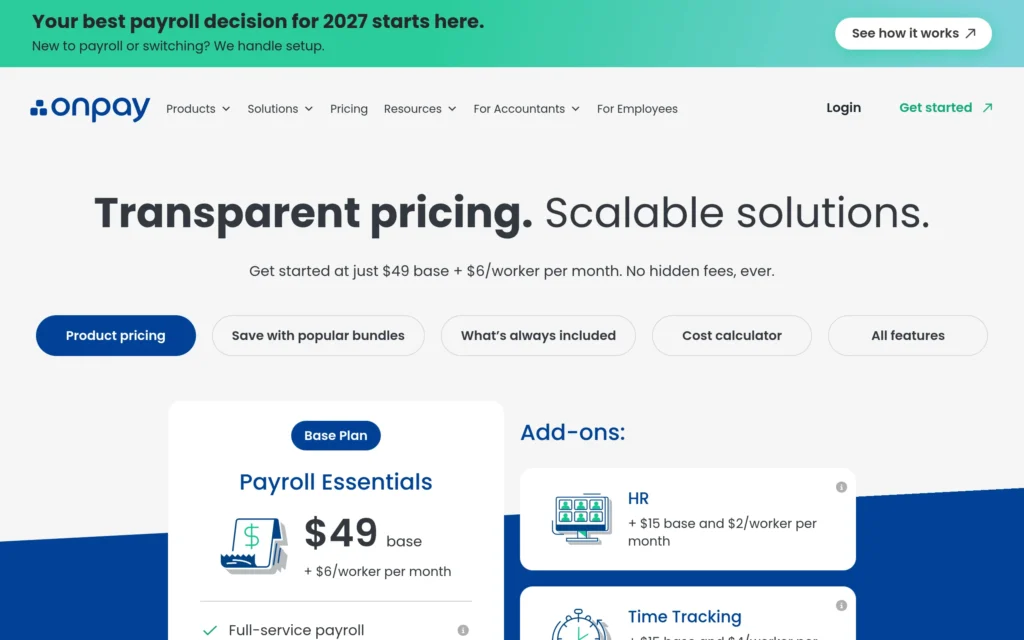
The per-worker fee follows the workers included in pay runs, so a person you do not pay in a month does not add the $6 fee for that month. New customers also get the first month free, which softens the switching cost without changing the regular price you should budget from month two.
The add-ons are priced separately. The HR add-on costs $15 a month plus $2 per worker and adds broader HR features such as PTO approvals, org charts, and advanced onboarding workflows. Time tracking and live HR support also cost extra, so price the bundle you actually need rather than the base plan alone.
For our test business, OnPay costs $49 plus 10 times $6, which is $109 a month or $1,308 a year in one state. In two states it still costs $109 a month, because the second state does not change the plan or the price. That is $1,092 a year less than Gusto Plus for the same 10 people.
Best for: small employers with workers in more than one state, or who expect to hire across state lines, and who want one predictable payroll price. Skip if: built-in time tracking is a day-one need, because time tracking is an add-on, and employers must still provide and maintain their state account IDs and rates.
QuickBooks Workforce: payroll connected to Intuit accounting
QuickBooks Workforce is the Intuit option. Intuit now sells its payroll under the Workforce name in three plans: Workforce Payroll at $50 a month plus $7 per employee, Workforce Premium at $88 a month plus $13 per employee, and Workforce Elite at $134 a month plus $17 per employee.
Workforce Payroll covers full-service payroll with federal and state payroll tax filing, employee self-service, 1099 e-filing, product support, and guided setup. A QuickBooks Online accounting subscription is not required to buy payroll by itself, but the value is clearest when payroll and the books already live in Intuit tools.

The limitation to price carefully is local taxes. The entry Workforce Payroll tier does not automatically pay and file local payroll taxes. Employers with local payroll-tax obligations either handle those themselves or move to Workforce Premium, which adds automated local taxes, time tracking, same-day direct deposit subject to eligibility, setup review, and HR support.
The meter also differs. The per-employee charge applies to active employees during the billing period, even if an active employee receives no wages that month. A seasonal worker who stays active on the roster can therefore cost $7 in a month when they were not paid.
For our test business, Workforce Payroll costs $50 plus 10 times $7, which is $120 a month or $1,440 a year. If the business owes local payroll taxes and wants them automated, Premium costs $88 plus 10 times $13, which is $218 a month or $2,616 a year.
Best for: businesses already running QuickBooks accounting that want payroll, taxes, and labor costs connected to the books. Skip if: you owe local payroll taxes and do not want the Premium tier, or your roster holds seasonal staff who stay active in months when they earn nothing.
The maths: 10 employees in one state, then two states
Start with the simple case: 10 W-2 employees, one state, everyone paid every month, list prices, no add-ons, no benefits premiums. Patriot Full Service costs $87 a month, which is $1,044 a year. Square Payroll costs $95 a month, which is $1,140 a year.
Gusto Simple and OnPay both cost $109 a month, which is $1,308 a year. QuickBooks Workforce Payroll costs $120 a month, which is $1,440 a year. The full stack of all five sensible tiers costs $6,240 a year, while the lean Patriot Full Service choice costs $1,044 a year. One right tool saves $5,196 a year.
Now change one fact: two of the 10 employees work in a second state. Patriot Full Service becomes $99 a month, or $1,188 a year, after the $12 additional-state fee. Square stays at $95 a month because multistate payroll is included. OnPay stays at $109 a month because multi-state payroll is included in the base price.
Gusto moves to Plus at $200 a month, or $2,400 a year. QuickBooks stays at $120 a month only if no local payroll taxes need automating; with local taxes automated on Premium it becomes $218 a month, or $2,616 a year. The second state, not the headcount, is what reorders this table.
The per-person meter matters just as much in a slow month. If only 6 of the 10 people are paid, Patriot Full Service costs $67 that month and Square costs $71, because both charge per worker paid. QuickBooks can still charge for all 10 active employees. Count your paid workers and your states before you compare any two quotes.
Five traps that catch payroll buyers
First, comparing a calculation-only plan with a full-service plan. Patriot Basic at $17 plus $4 looks like the cheapest payroll here, but you deposit and file the taxes yourself. Compare it only with other do-it-yourself options, never with full-service prices.
Second, budgeting from the promotional price. Patriot currently offers 30 days free plus 50% off for 3 months, OnPay offers the first month free, and Intuit rotates introductory discounts on Workforce. Those offers change your first quarter, not your year. Budget from the list price and treat the discount as a bonus.
Third, ignoring the second state. Gusto Simple is a single-state plan, Patriot charges $12 a month per additional state, and OnPay and Square include multi-state payroll. One remote hire in another state can move your bill by more than $1,000 a year depending on the provider.
Fourth, forgetting local payroll taxes. QuickBooks Workforce Payroll automates federal and state taxes, but automated local tax filing sits on Premium. If your city or county levies a payroll tax, price Premium before you sign, not after the first local deadline.
Fifth, assuming the per-person fee only counts paid workers. Patriot and Square charge per person paid. QuickBooks charges per active employee, including an active employee with no wages that month. Clean up your roster before you compare quotes, and ask each provider exactly who counts.
Strategic Pivot: count workers and states before you buy
Payroll pricing rewards businesses that count first. Before you request a demo, write down four numbers: how many people you pay in a normal month, how many stay on the roster in a slow month, how many states your workers sit in, and whether any local payroll taxes apply to you.
Then price each tool with your own numbers instead of the headline rate. Our free AI Cost Calculator helps you compare the yearly cost of the lean choice against the full stack before you commit. If hiring is the step before payroll, our guide to the best ai applicant tracking systems for small business prices the hiring pipeline the same way.
If your books are the reason payroll feels messy, our guide to the best ai accounting software for small business compares the accounting side at the same realistic scale. Payroll, hiring, and accounting work best as one counted system, not three separate subscriptions bought in three separate months.
Pros and cons
Patriot Software pros: the lowest published full-service price in this comparison at $37 plus $5 per worker paid, a clear example table by worker size, and a cheap Basic plan for owners who file taxes themselves. Patriot cons: time tracking and HR software are separate add-ons, and each additional state costs $12 a month.
Square Payroll pros: a $35 base fee with multistate payroll, automated federal and state tax filings, and timecards and tips imported from Square POS. Square cons: it is a focused payroll product inside the Square ecosystem, with narrower HR depth than Gusto or OnPay.
Gusto pros: payroll, onboarding, PTO, and benefits in one system, with benefits available in all 50 states and Washington, D.C. Gusto cons: Simple is single-state, and multi-state payroll with built-in time tracking requires Plus at $80 plus $12 per person.
OnPay pros: multi-state full-service payroll, benefits administration, and year-end forms inside one $49 plus $6 price, with the first month free. OnPay cons: time tracking, broader HR features, and live HR support are add-ons, and you must maintain your state account IDs and rates.
QuickBooks Workforce pros: payroll connected to Intuit accounting, guided setup, and no QuickBooks Online subscription required to buy payroll alone. QuickBooks cons: automated local tax filing requires Premium, and the per-employee fee follows active employees even in months with no wages.
Our verdict
For a 10-person business in one state, Patriot Full Service Payroll is the value pick at $1,044 a year. It files federal, state, and local taxes, charges only for workers you pay, and publishes its whole price without a sales call. Start there if price is the deciding factor.
Choose OnPay if a second state is likely, because its $1,308 a year for 10 workers does not change when you cross state lines. Choose Gusto if onboarding, PTO, and benefits in one system matter more than the lowest bill, and price Plus honestly if you need multi-state payroll or time tracking.
Choose Square Payroll if your hours and tips already live in Square, because the timecard import removes the retyping that causes payroll errors. Choose QuickBooks Workforce if your accounting already runs on Intuit and you accept the active-employee meter. In every case, budget from list prices, count your states, and confirm your direct-deposit timeline before the first payday.
Frequently asked questions
What is the cheapest payroll software for a small business?
Patriot Full Service Payroll is the cheapest full-service option in this comparison at $37 a month plus $5 per worker paid, checked on 28 November 2026. For 10 workers paid monthly that is $87 a month or $1,044 a year. Patriot Basic is cheaper at $17 plus $4, but you file and deposit payroll taxes yourself.
How much does payroll software cost for 10 employees?
At list prices checked on 28 November 2026, 10 employees in one state cost $87 a month on Patriot Full Service, $95 a month on Square Payroll, $109 a month on Gusto Simple or OnPay, and $120 a month on QuickBooks Workforce Payroll. That is $1,044 to $1,440 a year before add-ons and benefits premiums.
Does payroll software file payroll taxes for you?
Full-service plans do. Patriot Full Service, Square full-service, Gusto, OnPay, and QuickBooks Workforce all calculate, file, and pay payroll taxes as part of the plans priced here, with one exception: QuickBooks Workforce Payroll does not automate local payroll taxes, which require Workforce Premium. Calculation-only plans such as Patriot Basic leave filing to you.
What happens to payroll cost when employees work in two states?
It depends on the provider. OnPay and Square include multi-state payroll, so 10 workers still cost $109 and $95 a month. Patriot adds $12 a month per additional state, making $99 a month. Gusto requires Plus for multi-state payroll, making $200 a month for 10 people at list prices checked on 28 November 2026.
Is there free payroll software for small business?
None of the five tools here offers a free full-service payroll plan on its pricing page. The free routes are trials and offers: Patriot offers 30 days free plus 50% off for 3 months, and OnPay offers the first month free. Budget from the regular list price, because the free period ends while payroll does not.
Sources
- Patriot Software pricing
- Square Payroll pricing
- Gusto pricing
- OnPay pricing
- QuickBooks Workforce pricing
Price note — updated 28 November 2026: Prices in this post were checked on 28 November 2026 on each vendor’s official pricing page. When you are reading this, the price may be lower or higher, and promotions may have changed. Check the official pricing page before you buy.
Pros
- Patriot Software: the lowest published full-service price in this comparison at $37 plus $5 per worker paid, a clear example table by worker size, and a cheap Basic plan for owners who file taxes themselves.
- Square Payroll: a $35 base fee with multistate payroll, automated federal and state tax filings, and timecards and tips imported from Square POS.
- Gusto: payroll, onboarding, PTO, and benefits in one system, with benefits available in all 50 states and Washington, D.C.
- OnPay: multi-state full-service payroll, benefits administration, and year-end forms inside one $49 plus $6 price, with the first month free.
- QuickBooks Workforce: payroll connected to Intuit accounting, guided setup, and no QuickBooks Online subscription required to buy payroll alone.
Cons
- Patriot Software: time tracking and HR software are separate add-ons, and each additional state costs $12 a month.
- Square Payroll: it is a focused payroll product inside the Square ecosystem, with narrower HR depth than Gusto or OnPay.
- Gusto: Simple is single-state, and multi-state payroll with built-in time tracking requires Plus at $80 plus $12 per person.
- OnPay: time tracking, broader HR features, and live HR support are add-ons, and you must maintain your state account IDs and rates.
- QuickBooks Workforce: automated local tax filing requires Premium, and the per-employee fee follows active employees even in months with no wages.
For a 10-person business in one state, Patriot Full Service Payroll is the value pick at $1,044 a year. It files federal, state, and local taxes, charges only for workers you pay, and publishes its whole price without a sales call. Start there if price is the deciding factor.Choose OnPay if a second state is likely, because its $1,308 a year for 10 workers does not change when you cross state lines. Choose Gusto if onboarding, PTO, and benefits in one system matter more than the lowest bill, and price Plus honestly if you need multi-state payroll or time tracking.Choose Square Payroll if your hours and tips already live in Square, because the timecard import removes the retyping that causes payroll errors. Choose QuickBooks Workforce if your accounting already runs on Intuit and you accept the active-employee meter. In every case, budget from list prices, count your states, and confirm your direct-deposit timeline before the first payday.
1 thought on “Best AI Payroll Software for Small Business (2026): 5 Compared by Real Price”