

For a five-person business that processes about 200 receipts and invoices a month, Zoho Expense Standard is the cheapest full expense system at $3 per user per month billed annually, which is $15 a month or $180 a year. Expensify Collect costs $300 a year, Dext Business starts at $302.50 billed annually, Shoeboxed Pro costs $297 a year, and AutoEntry Gold costs $552 a year before VAT. Every price was checked on the vendor's official pricing page on 28 November 2026.
Quick Answer
The best ai expense management software for small business is decided by the meter, not by the receipt scanner demo. For a five-person business that processes about 200 receipts and invoices a month, Zoho Expense Standard is the cheapest full expense system at $3 per user per month billed annually, which is $15 a month or $180 a year.
Expensify Collect costs $5 per member per month, so the same five people cost $25 a month or $300 a year. Dext Business starts at $302.50 billed annually for 250 documents a month and 5 users. Shoeboxed Pro costs $297 a year for 250 digital scans a month and 5 users. AutoEntry Gold costs $46 a month excluding VAT for 200 credits, which is $552 a year before VAT.
Buying all five at those sensible tiers costs $1,631.50 a year. Starting on Zoho Expense Standard alone costs $180 a year, so one right tool saves $1,451.50 a year. Every price below was checked on the vendor’s official pricing page on 28 November 2026.
In this article
- How we compared the best ai expense management software for small business
- The five tools at a glance
- Zoho Expense: the lowest full-system price
- Expensify: receipts, approvals and reimbursements without changing cards
- Dext: bookkeeping capture for receipts, bills and statements
- AutoEntry: pay by document credit, not by user
- Shoeboxed: digital scans plus mail-in paper receipts
- The maths: five people and 200 documents a month
- Five traps that catch expense-software buyers
- Strategic Pivot: count users, documents and paper before you buy
- Pros and cons
- Our verdict
- Frequently asked questions
- Sources
How we compared the best ai expense management software for small business
Expense software looks simple until the first month-end arrives. Then the real questions appear: who scanned the receipt, who approved it, which card paid for it, and why is the bookkeeper still asking for the same invoice twice?
Our test business has five people who submit expenses. It processes about 200 documents a month: 180 simple receipts or invoices and 10 invoices that need line-item detail. It wants receipt capture, approvals, mileage tracking, and a clean handoff to accounting software without turning every purchase into a spreadsheet project.
We compared the same four things for every tool. First, what that business pays each month and each year at published prices. Second, what the meter counts: users, members, documents, credits, or scans. Third, whether the tool is a full expense system or only the capture layer in front of the ledger. Fourth, what changes when paper receipts, line items, bank statements, or a sixth employee enter the picture.
One honesty note before the detail. In expense software, the useful AI is the part that reads the receipt, fills the merchant, date, amount and category, and flags a missing detail before month-end. None of these tools removes your responsibility to approve spending and keep records your accountant can defend.
The five tools at a glance
| Tool | Best for | Price checked 28 November 2026 | Free route |
|---|---|---|---|
| Zoho Expense | Lowest full-system price | Standard $3/user/month billed annually; Premium $5 | Free for up to 3 users |
| Expensify | Approvals and reimbursements with your own cards | Collect $5/member/month | Submit free for individuals |
| Dext | Receipts and bills into bookkeeping | Business from $302.50 billed annually | 14-day free trial |
| AutoEntry | Document capture without per-user fees | Gold $46/month excl. VAT for 200 credits | Trial includes 25 free credits |
| Shoeboxed | Paper receipts and mileage | Pro $297/year or $29/month | 30-day money-back guarantee |
The table hides the real split, which is the job each tool does. Zoho Expense and Expensify manage the expense after the receipt is scanned: reports, approvals, policies, cards, and reimbursements. Dext and AutoEntry mainly capture documents and push coded data into accounting software. Shoeboxed sits between them: it scans receipts, tracks mileage, and can process paper receipts you mail in.
That split decides the winner. A business with staff reimbursements needs an expense system. A business whose bookkeeper drowns in supplier invoices may need document capture first. Buying both jobs twice is how a $180 problem becomes a $1,631.50 stack.
Zoho Expense: the lowest full-system price
Zoho Expense is the budget option in this comparison, and its pricing page is unusually clear. The Free plan costs $0 for up to 3 users. Standard costs $4 per user per month billed monthly, or $3 per user per month billed annually. Premium costs $6 per user per month billed monthly, or $5 per user per month billed annually.
The free plan is not a toy. Zoho lists receipt capture with AI-powered OCR, expense reports, expense tracking via personal cards, mileage expenses via GPS, accounting integrations, multi-currency expenses, and 5 GB of receipt storage. The catch is the scan limit: Free and Trial include 20 receipt scans per user per month.
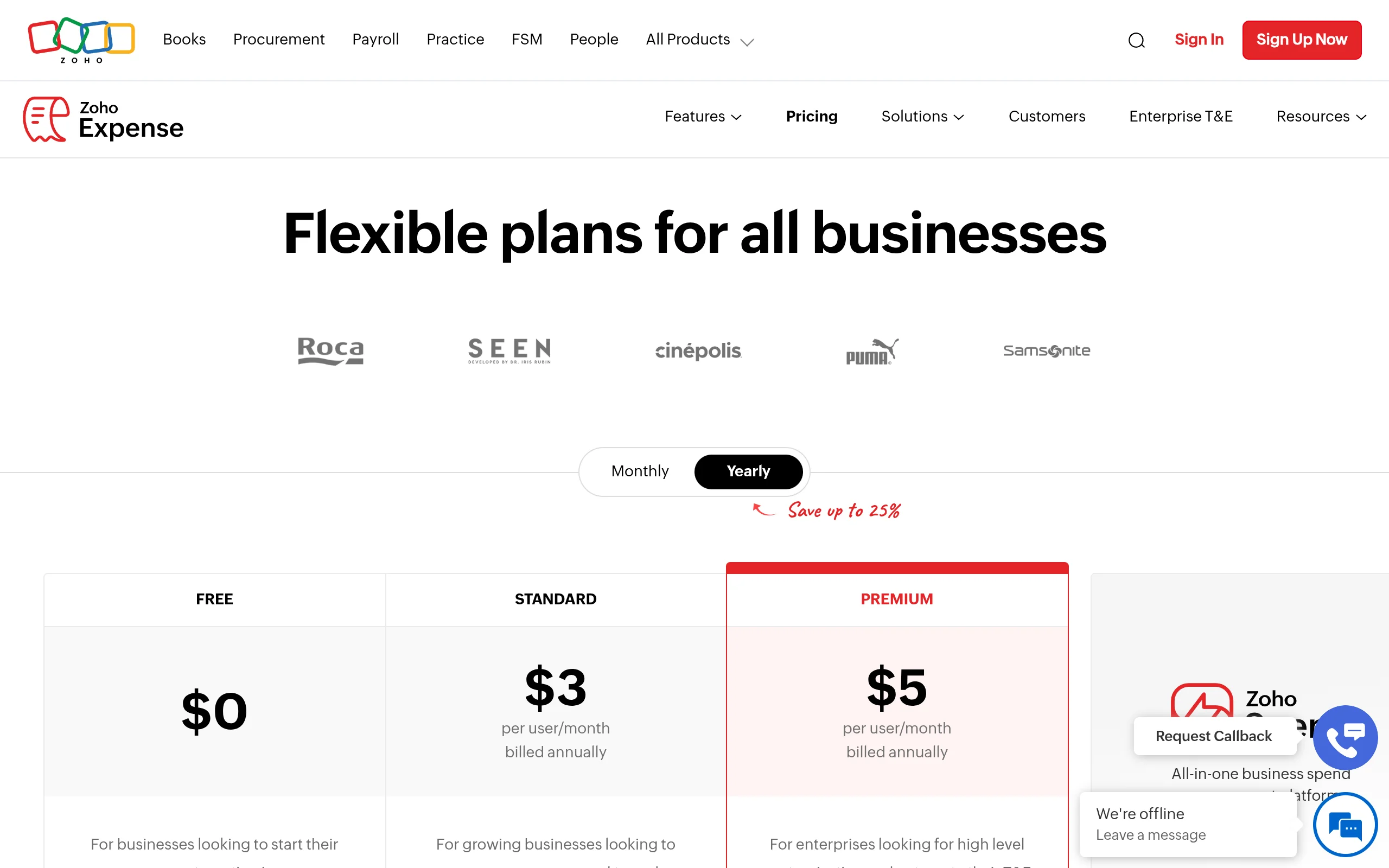
Standard is where most small businesses should start. It adds itemized receipt capture with AI-powered OCR in 38+ languages, corporate card management, real-time card feeds for Visa and Mastercard, multiple expense policies, custom user roles, cash advance management, ACH payments, and direct bank reimbursements. Standard raises the Autoscan limit to 200 receipt scans per user per month.
Premium adds employee self-booking, live budget tracking, advanced approval management, multi-entity expense management, and 1,000 receipt scans per user per month. For a five-person business, Premium is usually more travel and control than the receipt problem needs.
For our test business, Standard on annual billing costs 5 times $3, which is $15 a month or $180 a year. The scan allowance is 200 scans per user per month, so the business is nowhere near the receipt ceiling. The real cost driver is paid users who create expenses or reports, not the number of receipts.
Best for: small businesses that want approvals, reimbursements, mileage, and receipt scanning at the lowest published full-system price. Skip if: your main problem is supplier bills and bank statements for a bookkeeper, because Dext and AutoEntry are built more directly for that document-capture job.
Expensify: receipts, approvals and reimbursements without changing cards
Expensify is the card-flexible option. Its free Submit plan is for individual employees whose company has not adopted Expensify. It includes receipt scanning, mileage tracking, expense reports, categories and tags, and personal card import, but it does not include approvals, payments, company cards, or accounting integrations.
Collect is the small-business plan. Expensify lists Collect at $5 per member per month. It adds reimbursements, corporate card management, approvals, travel, QuickBooks, and Xero. Control starts as low as $9 per member per month when you adopt the Expensify Card, and adds NetSuite, Sage Intacct, HR integrations, SAML/SSO, and multiple approval flows.

The AI feature is SmartScan. Expensify says SmartScan reads the receipt and sends it back coded and categorized, so the employee does not type the merchant, date, amount, and category by hand. That matters most when receipts arrive from the road, from client meals, or from staff who only remember expenses at month-end.
Expensify’s strength is the full expense cycle without forcing a card switch. Cards from many banks can be imported, approvals route to the right person, and reimbursements are part of the same system. That is different from card-first tools that look free because the software is tied to their card program.
For our test business, Collect costs 5 times $5, which is $25 a month or $300 a year. That is $120 a year more than Zoho Expense Standard on annual billing. The extra money buys Expensify’s mature approval, card, travel, and reimbursement workflow, not a cheaper receipt scan.
Best for: teams that need employee expense reports, approvals, corporate-card reconciliation, and reimbursements while keeping the cards they already have. Skip if: price is the deciding factor and Zoho’s workflow is enough, or if your real bottleneck is bookkeeper document capture rather than employee expenses.
Dext: bookkeeping capture for receipts, bills and statements
Dext is the bookkeeping-capture option. It is built to capture receipts, invoices, expenses, and statements, extract the data, categorise it, and sync it to accounting software. That makes it different from a pure employee-expense app: the buyer is often the owner, office manager, or bookkeeper who needs clean documents in the ledger.
Dext Business is a single plan that scales with users and documents. The base plan starts at 5 users and 250 documents a month. Each additional user adds 50 documents, 5 sheets of Bank Statement Extraction, 5 documents with Line Item Extraction, and 1 Supplier Statement Extraction. Allowances reset each monthly billing period.
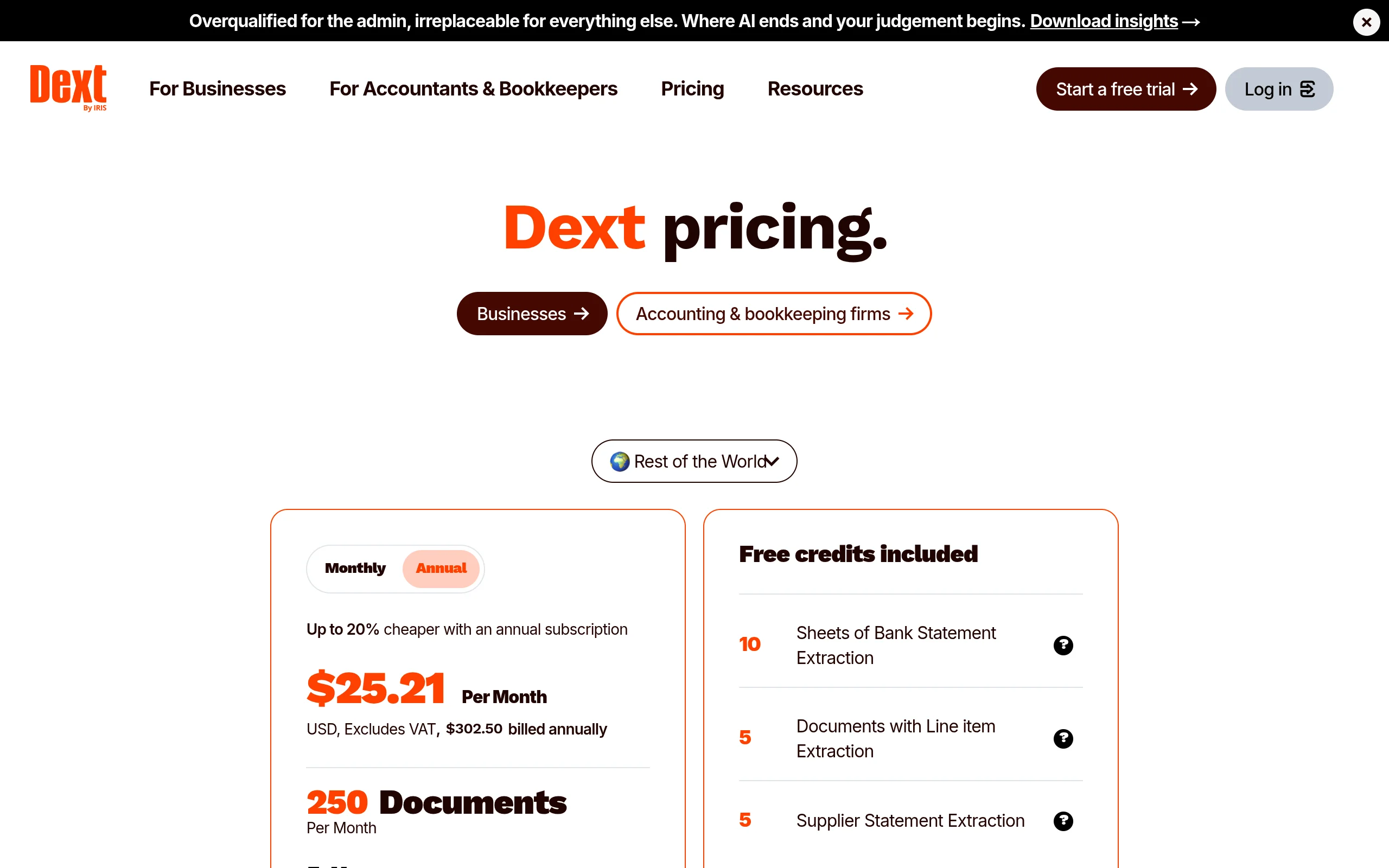
The US pricing page shows $302.50 billed annually, excluding tax, with annual billing up to 20% cheaper than monthly billing. The base plan includes free credits for 10 sheets of bank statement extraction, 5 documents with line-item extraction, and 5 supplier statement extractions. Dext also offers a free 14-day trial with no payment details required.
The limit matters. Dext says there is no pay-as-you-go option for documents. If you reach the monthly allowance, you can keep uploading, but extraction pauses until the allowance resets. You can upgrade to extract sooner, or process the documents manually.
For our test business, 200 documents fit inside the 250-document base allowance, and five users fit the base plan. The cost is $302.50 a year excluding tax. That is close to Expensify Collect, but the job is different: Dext is strongest when receipts and bills must become coded bookkeeping entries.
Best for: businesses and bookkeepers who need receipts, supplier invoices, and statements captured into QuickBooks, Xero, Sage, Zoho, or another accounting system. Skip if: you mainly need staff approvals and reimbursements, because a full expense system such as Zoho Expense or Expensify fits that job more directly.
AutoEntry: pay by document credit, not by user
AutoEntry is the per-document option. Every plan comes with a monthly credit allowance, unlimited users, and the ability to keep unused credits for up to 90 days. That makes it attractive when many people upload documents but only a modest number of documents need processing.
The US dollar prices on the official pricing page are Bronze at $13 per month excluding VAT for 50 credits, Silver at $24 for 100 credits, Gold at $46 for 200 credits, Platinum at $103 for 500 credits, Diamond at $298 for 1,500 credits, and Sapphire at $469 for 2,500 credits. The trial includes 25 free credits.
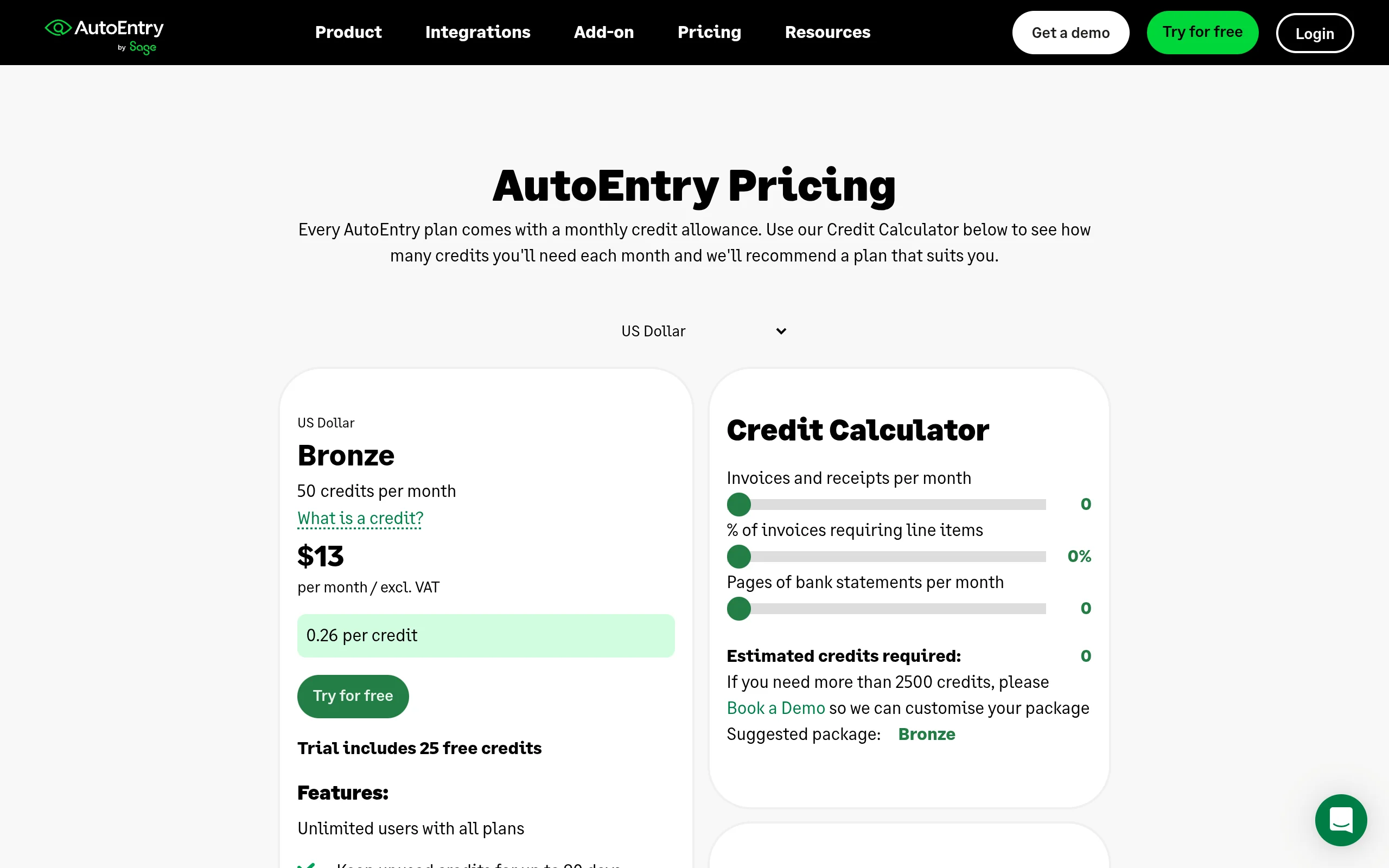
The credit rules decide the real price. AutoEntry charges 1 credit for a purchase or sales invoice, 2 credits for an invoice with line items, 1 credit for an expense receipt, 2 credits for a supplier statement, and 3 credits per page for bank and credit card statements. A plan with 200 credits is therefore not always 200 documents.
For our test business, the maths is exact. The business has 180 simple receipts or invoices at 1 credit each, plus 10 line-item invoices at 2 credits each. That is 180 plus 20, which equals 200 credits. Gold fits at $46 a month excluding VAT, or $552 a year before VAT.
The twist is statements. Add ten bank-statement pages and the same business needs 30 more credits, pushing it past Gold. That is the AutoEntry bargain in one line: no per-user fee, but every document type has a different price.
Best for: businesses and bookkeepers who want document capture with unlimited users and a predictable credit allowance. Skip if: your document mix is heavy on line-item invoices and statement pages, because the credit meter can move you to Platinum faster than the headline price suggests.
Shoeboxed: digital scans plus mail-in paper receipts
Shoeboxed is the paper-receipt option. It scans digital receipts, tracks mileage, creates expense reports, and offers a Magic Envelope service for paper receipts you mail in. That makes it useful for businesses whose receipts still arrive in glove boxes, wallets, and supplier envelopes.
The official pricing page lists Starter at $97 a year or $9 a month, with 50 digital scans a month, 20 paper scans a year, 1 Magic Envelope a year, unlimited mileage tracking, 3 years of digital scan storage, and 3 users. Pro costs $297 a year or $29 a month, with 250 digital scans a month, 50 paper scans a month, 1 Magic Envelope per quarter, Gmail receipt sync, QuickBooks Online and Xero integrations, and 5 users.

Plus costs $797 a year or $79 a month, with 1,000 digital scans a month, 150 paper scans a month, 1 Magic Envelope a month, and 10 users. Paper Plus costs $179 a month, with 5,000 digital scans a month, 300 paper scans a month, 2 Magic Envelopes a month, and 10 users. Extra Paper Plus usage costs $0.07 per digital scan, $0.77 per paper scan, and $9 per envelope.
Shoeboxed is not free. Every plan comes with a 30-day money-back guarantee, but your card is charged when you sign up. Shoeboxed also asks you not to request a refund after a Magic Envelope has shipped, because it has already covered those mailing and processing costs.
For our test business, Pro fits: five users, 250 digital scans a month, and accounting integrations. The cost is $297 a year. Starter is cheaper, but 50 digital scans a month and 3 users are too small for the test business.
Best for: businesses with paper receipts, mileage, and a need for human-verified receipt processing without building a full approval workflow. Skip if: you need multi-step approvals, corporate-card controls, or direct reimbursements, because Zoho Expense and Expensify manage that wider expense cycle.
The maths: five people and 200 documents a month
Start with the lean choice. Zoho Expense Standard on annual billing costs $3 per user per month for five users. That is $15 a month and $180 a year. It includes 200 Autoscan receipts per user per month, so receipt volume is not the constraint for this business.
Now price the full stack. Zoho Expense Standard costs $180 a year. Expensify Collect costs $300 a year. Dext Business costs $302.50 a year excluding tax. Shoeboxed Pro costs $297 a year. AutoEntry Gold costs $552 a year excluding VAT. Added together, the five tools cost $1,631.50 a year before the tax treatment on Dext and AutoEntry.
The saving is the difference between buying every route and buying the one route that matches the job. The full stack costs $1,631.50 a year. Zoho Expense Standard alone costs $180 a year. The saving is $1,451.50 a year.
The second scenario changes the winner. If the business adds ten bank-statement pages a month, AutoEntry needs 30 more credits and no longer fits Gold. If the business grows to six expense users, Zoho Standard becomes $216 a year and Expensify Collect becomes $360 a year. If paper receipts rise above 50 a month, Shoeboxed Pro is no longer the comfortable tier.
That is why the meter matters more than the demo. Per-user pricing punishes headcount. Per-document pricing punishes volume. Credit pricing punishes line items and statements. Scan pricing punishes paper. The cheapest tool is the one whose meter matches the way your business actually spends.
Five traps that catch expense-software buyers
The first trap is buying a scanner when you need a system. A receipt scanner reads the paper. An expense system also routes approvals, enforces policy, matches cards, reimburses staff, and exports a report your accountant can use. If employees spend money, buy the system. If only documents need capturing, buy capture.
The second trap is trusting the free plan headline. Zoho Expense Free is useful, but it stops at 3 users and 20 scans per user per month. Expensify Submit is free, but it is for individuals and leaves out approvals, payments, company cards, and accounting integrations. Free is a starting route, not a team expense policy.
The third trap is ignoring the document mix. AutoEntry’s 200 credits fit our test business only because the mix is 180 simple documents and 10 line-item invoices. Add statement pages and the same business needs a bigger plan. Dext has the opposite shape: 250 documents fit comfortably, but extraction pauses when the allowance runs out.
The fourth trap is paying for paper you no longer have. Shoeboxed is valuable when paper receipts are real. If your receipts already arrive by email, card feed, or phone photo, the Magic Envelope may be a feature you admire and never use. Buy paper processing for paper, not for nostalgia.
The fifth trap is forgetting the accounting handoff. Expense software should make the books cleaner, not create another inbox. Before you buy, check the exact accounting integration, the export format, and whether the source receipt stays attached to the transaction. A cheap scan that your bookkeeper must retype is not cheap.
Strategic Pivot: count users, documents and paper before you buy
Before you choose, count three numbers from last month: how many people submitted expenses, how many receipts and invoices needed processing, and how many of those documents were paper. Those three numbers tell you which meter fits.
If five people submit expenses and approvals matter, start with Zoho Expense Standard or Expensify Collect. If a bookkeeper processes supplier bills and statements, compare Dext and AutoEntry first. If paper receipts are the problem, price Shoeboxed Pro before you buy a wider system.
Use our free AI Cost Calculator to model the same five-person, 200-document month before you commit. Then read the best ai accounting software for small business if the expense tool must sit beside your ledger, and the best ai invoicing tools for small business if unpaid customer invoices are the other half of your month-end problem.
Pros and cons
Zoho Expense — Pros: lowest full-system price; free plan for up to 3 users; 200 scans per user per month on Standard; approvals, cards, mileage, and reimbursements in one system. Cons: free plan is small; Premium travel features may be more than a small business needs; paid users who create expenses drive the bill.
Expensify — Pros: mature SmartScan workflow; approvals, reimbursements, corporate cards, travel, QuickBooks, and Xero on Collect; works without forcing a card switch. Cons: Collect costs more than Zoho Standard; Submit free plan is not a company expense system; Control’s lowest price depends on adopting the Expensify Card.
Dext — Pros: strong receipt, bill, and statement capture into accounting software; base plan covers 5 users and 250 documents; 14-day trial with no payment details. Cons: document extraction pauses after the allowance; price excludes tax; it is capture-first, not a full reimbursement system.
AutoEntry — Pros: unlimited users; clear credit pricing; unused credits roll over for up to 90 days; good fit when document volume matters more than headcount. Cons: line-item invoices cost 2 credits; statement pages cost 3 credits each; prices exclude VAT; Gold can be outgrown by document mix, not just document count.
Shoeboxed — Pros: digital scans, mileage, Gmail receipt sync, QuickBooks Online and Xero integrations on Pro; mail-in paper processing; 30-day money-back guarantee. Cons: no free plan; Starter is too small for many teams; paper features are wasted if receipts are already digital; card is charged at signup for the guarantee period.
Our verdict
For most small businesses with staff expenses, Zoho Expense Standard is the best first buy. At $180 a year for five users on annual billing, it gives receipt scanning, approvals, mileage, card feeds, and reimbursements without making you pay for a bookkeeping-capture stack you may not need.
Choose Expensify Collect when the approval and reimbursement workflow matters more than the lowest price, especially if your team already uses cards you do not want to replace. Choose Dext when the bookkeeper’s document pile is the real problem. Choose AutoEntry when unlimited users matter and your document mix fits the credit maths. Choose Shoeboxed when paper receipts and mileage are the daily pain.
The wrong buy is the full stack. Five tools can all read a receipt, but your business only needs one route from purchase to approved, coded, stored expense. Pick the meter that matches your users, documents, and paper, then stop paying for the other four.
Frequently asked questions
What is the cheapest AI expense management software for a small business?
Zoho Expense Standard is the cheapest full expense system in this comparison. For five users on annual billing, it costs $3 per user per month, which is $15 a month or $180 a year. The free plan covers up to 3 users with 20 receipt scans per user per month.
How much does expense software cost for five employees?
For five employees processing about 200 documents a month, Zoho Expense Standard costs $180 a year, Expensify Collect costs $300 a year, Dext Business costs $302.50 a year excluding tax, Shoeboxed Pro costs $297 a year, and AutoEntry Gold costs $552 a year excluding VAT.
Is a receipt scanner enough, or do I need expense management software?
A receipt scanner is enough when one person captures documents for the books. You need expense management software when employees submit expenses, a manager approves them, cards must be reconciled, or staff must be reimbursed. Zoho Expense and Expensify cover that wider cycle; Dext and AutoEntry focus more on capture.
What is the best expense tool for paper receipts?
Shoeboxed is the best fit here for paper receipts because Pro includes 50 paper scans a month and a Magic Envelope each quarter, while Paper Plus raises paper processing to 300 scans a month. If paper is rare, a phone-based system such as Zoho Expense or Expensify is usually better value.
Why do AutoEntry credits cost more than the document count?
AutoEntry charges by document type, not only by document count. A simple receipt costs 1 credit, a line-item invoice costs 2 credits, a supplier statement costs 2 credits, and a bank or credit card statement costs 3 credits per page. That is why 200 documents can need more than 200 credits.
Sources
Price note — updated 28 November 2026: Prices in this post were checked on 28 November 2026. When you are reading this, the price may be lower or higher, so check the official pricing page before buying.
Pros
- Zoho Expense: lowest full-system price, a free plan for up to 3 users, 200 scans per user per month on Standard, and approvals, cards, mileage, and reimbursements in one system.
- Expensify: mature SmartScan workflow with approvals, reimbursements, corporate cards, travel, QuickBooks, and Xero on Collect, without forcing a card switch.
- Dext: strong receipt, bill, and statement capture into accounting software, with a base plan covering 5 users and 250 documents and a 14-day trial with no payment details.
- AutoEntry: unlimited users, clear credit pricing, unused credits roll over for up to 90 days, and a good fit when document volume matters more than headcount.
- Shoeboxed: digital scans, mileage, Gmail receipt sync, QuickBooks Online and Xero integrations on Pro, mail-in paper processing, and a 30-day money-back guarantee.
Cons
- Zoho Expense: the free plan is small, Premium travel features may be more than a small business needs, and paid users who create expenses drive the bill.
- Expensify: Collect costs more than Zoho Standard, the Submit free plan is not a company expense system, and Control's lowest price depends on adopting the Expensify Card.
- Dext: document extraction pauses after the allowance, the price excludes tax, and it is capture-first, not a full reimbursement system.
- AutoEntry: line-item invoices cost 2 credits, statement pages cost 3 credits each, prices exclude VAT, and Gold can be outgrown by document mix, not just document count.
- Shoeboxed: no free plan, Starter is too small for many teams, paper features are wasted if receipts are already digital, and the card is charged at signup for the guarantee period.
For most small businesses with staff expenses, Zoho Expense Standard is the best first buy. At $180 a year for five users on annual billing, it gives receipt scanning, approvals, mileage, card feeds, and reimbursements without making you pay for a bookkeeping-capture stack you may not need.Choose Expensify Collect when the approval and reimbursement workflow matters more than the lowest price, especially if your team already uses cards you do not want to replace. Choose Dext when the bookkeeper's document pile is the real problem. Choose AutoEntry when unlimited users matter and your document mix fits the credit maths. Choose Shoeboxed when paper receipts and mileage are the daily pain.The wrong buy is the full stack. Five tools can all read a receipt, but your business only needs one route from purchase to approved, coded, stored expense. Pick the meter that matches your users, documents, and paper, then stop paying for the other four.