

An MCP server for AI tools is a standard connector that lets an AI app like Claude, ChatGPT, or Cursor use your business tools. MCP stands for Model Context Protocol, an open standard Anthropic released in November 2024 and handed to the Linux Foundation in December 2025. One server, plugged into one AI app, can expose actions from hundreds of apps — send an email, create a calendar event, look up an order — so the assistant stops guessing and starts doing.The cheapest honest route for most small businesses is Zapier MCP. It costs $0 on Zapier's Free plan, which gives you 100 tasks a month — and every successful MCP tool call uses two tasks, so that is 50 calls a month. When 50 calls stop being enough, Zapier Professional costs $19.99 a month on annual billing ($29.99 monthly) for 750 tasks, which is 375 MCP calls. If you want the most free calls, Composio's free plan gives you 10,000 tool calls a month at $0, and its Standard plan costs $18 per seat a month.One warning: the AI app itself has to allow MCP, and the rules differ. Claude allows a custom connector on every plan, including free. ChatGPT only lets you add a custom MCP server on Business, Enterprise, and Edu plans. Cursor uses a config file.
MCP Server for AI Tools (2026): Connect Claude, ChatGPT and Cursor to Your Business Apps
Your AI assistant can write a beautiful email. It cannot send it. It can draft the perfect reply to a customer. It cannot see the customer’s order. It can plan your whole week. It cannot look at your calendar.
That gap is the whole story of AI for small business in 2026. The chatbot is clever, but it is locked in a room with no doors. An MCP server is the door. One connection, and the same assistant can read your Gmail, check your Shopify orders, update your Notion, and post to Slack — without you building a custom integration for each one.
This guide explains what an MCP server is, compares the five ways to get one, shows the steps to connect it in Claude, ChatGPT, and Cursor, and prices every route honestly.
Every price in this post was checked on the vendor’s own pages on 18 November 2026.
Quick Answer Box
An MCP server for AI tools is a standard connector that lets an AI app like Claude, ChatGPT, or Cursor use your business tools. MCP stands for Model Context Protocol, an open standard Anthropic released in November 2024 and handed to the Linux Foundation in December 2025. One server, plugged into one AI app, can expose actions from hundreds of apps — send an email, create a calendar event, look up an order — so the assistant stops guessing and starts doing.
The cheapest honest route for most small businesses is Zapier MCP. It costs $0 on Zapier’s Free plan, which gives you 100 tasks a month — and every successful MCP tool call uses two tasks, so that is 50 calls a month. When 50 calls stop being enough, Zapier Professional costs $19.99 a month on annual billing ($29.99 monthly) for 750 tasks, which is 375 MCP calls.
One warning: the AI app itself has to allow MCP, and the rules differ. Claude allows a custom connector on every plan, including free. ChatGPT only lets you add a custom MCP server on Business, Enterprise, and Edu plans. Cursor uses a config file. The short version: start with Zapier MCP on the free plan, connect it to Claude, pick five actions you actually use, and see whether the assistant earns its keep before you spend a dollar.
In This Article
- Quick Answer Box
- The Short Version: MCP in One Paragraph
- What Is an MCP Server, in Plain English?
- How MCP Actually Works: Host, Client, Server
- The Five Ways to Get an MCP Server, Compared
- Zapier MCP: The No-Code Route, Free to $19.99 a Month
- Pipedream MCP: The Builder’s Route, Free to $99 a Month
- Composio: The Managed-Auth Route, Free to $18 a Seat
- n8n MCP: The Self-Hosted Route, Free to $20 a Month
- Direct Official Servers: The $0 Route
- Connecting It in Claude, ChatGPT and Cursor
- What the AI Apps Themselves Cost
- Cost Maths: What a Small Business Pays in Year One
- The Hidden Costs and Gotchas
- Who Is Each Route Actually Best For?
- Work Out Your Own Number First
- Pros and Cons
- Our Verdict
- Frequently Asked Questions
- Price Note
The Short Version: MCP in One Paragraph
Before MCP, every pair needed a custom integration. MCP replaced that mess with one shared plug shape. A service publishes one MCP server, and any AI app that speaks MCP can use it. Anthropic calls it a USB-C port for AI applications, and the analogy holds: one cable shape, many devices, no adapter drawer. The server never gives the AI your password.
It hands over a scoped connection — the AI can do what you allowed, and nothing else.
What Is an MCP Server, in Plain English?
Imagine you run a small shop. Your assistant sits at a desk with a phone, but the phone has no line out. It can think, write, and plan brilliantly, and it cannot reach a single supplier, customer, or calendar. That is a chatbot without MCP.
An MCP server is the switchboard. It sits between the AI app and your tools, and it translates. When you say “email the customer who ordered the blue vase and tell them it ships Friday,” the AI app does not need to know how Gmail’s API works. It asks the MCP server, the server offers a “send email” tool with a form to fill in, the AI fills it in, and the server sends it.
Three things make this different from the old way. First, the server is written once and works in every AI app that speaks MCP — Claude, ChatGPT, Cursor, VS Code, Gemini CLI — instead of one integration per app. MCP is an open protocol, released by Anthropic in November 2024 and now run by a Linux Foundation fund — nobody owns it, which is why every vendor is building on it.
In practice: a bakery owner connects Zapier MCP to Claude once, and the same afternoon Claude can read new Shopify orders, draft Gmail replies, and update a Google Sheet — no code written. The setup takes minutes. The catch, as always, is the price of the calls — and the plan gate on the AI app itself.
How MCP Actually Works: Host, Client, Server
Every MCP setup has the same three characters, and knowing them saves you from most beginner confusion.
The host is the AI app you talk to: Claude, ChatGPT, Cursor, or VS Code. The client lives inside the host: it opens one connection per server and asks what tools it offers.
The server is the switchboard. It offers tools (things the AI can do, like send an email), resources (things the AI can read, like a file or a database row), and prompts (reusable instructions). The server runs either on your own machine or on somebody else’s — and that distinction decides almost everything about price and safety.
One more piece matters for a small business. A remote server’s tools run with the permissions you granted when you signed in with OAuth — the same “Sign in with Google” flow you already know. No password ever sits in a config file.
The Five Ways to Get an MCP Server, Compared
There are five honest ways to get an MCP server: a no-code bridge, a builder‘s toolkit, a managed-auth layer, one you host yourself, and one that costs nothing because the app you already use publishes its own server.
| Route | What it is | Free tier | First paid step | How you pay for calls | Best for |
|---|---|---|---|---|---|
| Zapier MCP | Hosted bridge to 9,000+ apps | $0, 100 tasks/mo (50 MCP calls) | Pro $19.99/mo annual, 750 tasks (375 calls) | 2 tasks per successful call | Non-technical owners who want it working today |
| Pipedream MCP | Builder platform, 3,000+ connectors | $0, development only | Startup $99/mo, 10,000 usage credits | 1 credit per 30 seconds of compute per call | Owners who build their own workflows |
| Composio | Managed auth + 1,700+ apps | $0, 10,000 tool calls/mo | Standard $18/seat/mo | Included calls, then credits | Teams sharing tools with guardrails |
| n8n MCP | Self-hosted automation + MCP nodes | $0, self-hosted software | Cloud Starter $20/mo annual, 2,500 executions | Executions, not per call | Owners who want full control |
| Direct official servers | Each app’s own server (Notion, Slack, GitHub) | $0 extra | None — the app’s own plan | The AI app’s plan | One or two apps, no middleman |
Read the table as a map, not a ranking — the cheapest free tier is not always the cheapest route once you use it daily.
Zapier MCP: The No-Code Route, Free to $19.99 a Month
Zapier MCP is the easiest door into this world, and for most small businesses it is the right one. You create a server at mcp.zapier.com, pick the apps and actions your assistant may use, and connect it to Claude, Cursor, or ChatGPT with one URL. No code, no server, no config file.
The price is where most people get confused, because there is no MCP price at all. Zapier MCP runs on your existing Zapier plan, and every successful tool call uses two tasks from that plan’s allowance. Failed calls cost nothing. Setup and sign-in cost nothing. The math is simple, and it is worth doing before you connect anything.
Zapier’s Free plan costs $0 and includes 100 tasks a month. Divide by two, and that is 50 successful MCP calls a month — if nothing else uses tasks. The moment a Zap runs, it eats from the same pool. Professional starts at $19.99 a month annual ($29.99 monthly) for 750 tasks — 375 MCP calls. Team starts at $69 a month annual for 2,000 tasks — 1,000 calls, 25 users.
Enterprise is custom pricing. Every new account gets a 14-day Professional trial, no card required.
Second, if you hit your limit with pay-per-task billing off, your calls stop until the cycle resets or you upgrade. On the Free plan there is no pay-per-task option at all, so the stop is absolute.
Every call is logged in a history on your account, so you can see exactly what the assistant did and when. The honest limit is the meter: an agent that verifies before acting burns calls faster than a careless one, so budget for the careful version.

Pipedream MCP: The Builder’s Route, Free to $99 a Month
Pipedream is the route for owners who like building things. It is a developer platform with 3,000-plus connectors and 10,000-plus prebuilt tools and triggers, and its MCP servers expose those tools to Claude, Cursor, and any other client. Where Zapier hands you a finished bridge, Pipedream hands you the parts and a workshop. You can connect an app once through its Connect API, and then every agent and workflow you build shares that connection.
The pricing card is different from Zapier’s, and the difference matters. Pipedream’s Free plan costs $0, needs no credit card, and gives you every feature in development — including MCP servers. The catch is in one word: development. Building and testing are free. Serving real users in production requires the Startup plan. If your MCP server only serves you, the owner, at your own desk, that is development. The moment it serves your team or your customers in production, you need Startup.
Startup costs $99 a month on annual billing ($150 billed monthly). It includes 100 external users, then $2 each, and 10,000 usage credits a month, then $0.012 per credit. Business is custom.
The credit meter is kinder than Zapier’s: each MCP call uses 1 credit per 30 seconds of compute, so 10,000 included credits is roughly 10,000 calls a month on Startup, against Zapier Professional’s 375 — though a long call can use several credits.
Its strength is that it is built for people who build: managed auth keeps credentials encrypted and scoped, and the same connections can feed your workflows and triggers too.

Composio: The Managed-Auth Route, Free to $18 a Seat
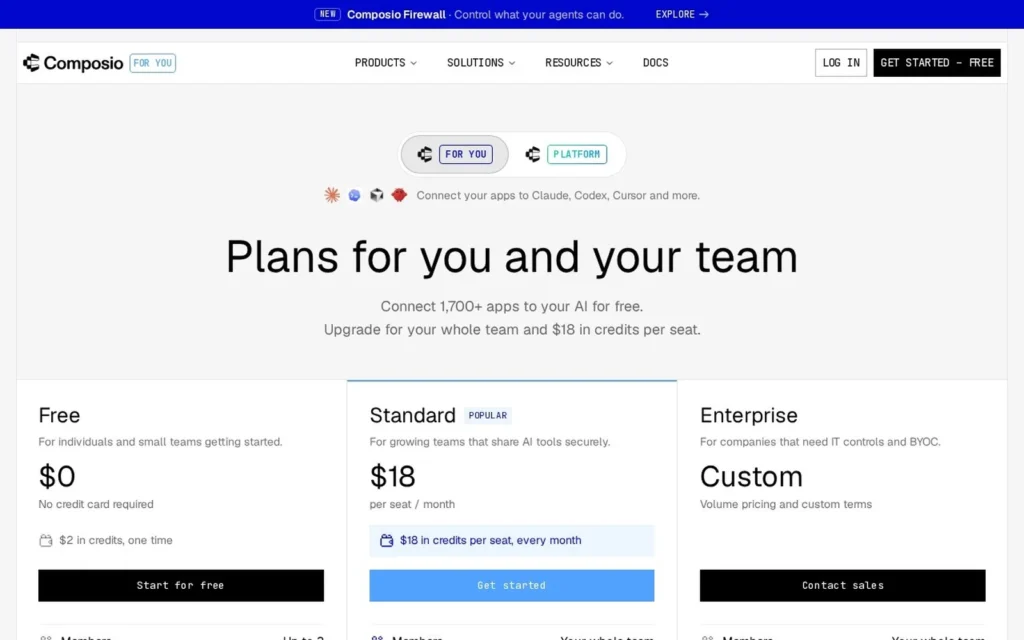
Composio solves the problem the other routes leave half-solved: logins. It is a managed layer that handles authentication, tool discovery, and execution across 1,700-plus apps, with a firewall between the AI and your data.
There are two Composio products, and mixing them up is the single most common pricing mistake in MCP guides, so here it is plainly. “Composio For You” is the no-code product for individuals and teams: you connect it to Claude, ChatGPT, Cursor, or Grok and use it from the assistant you already have. “Composio Platform” is the developer product: SDKs, triggers, and tool execution for people building agents. They have separate price cards. This post prices For You, because that is the product a small business owner buys.
For You’s Free plan costs $0, needs no credit card, and includes up to 3 members, 10,000 app tool calls a month, $2 in credits one time, and up to 3 custom MCP servers — two hundred times Zapier’s free allowance of 50. When the calls run out, usage pauses until next month: a hard cap, no surprise bill.
Standard costs $18 per seat a month, and every seat adds $18 in credits to the workspace each month. It covers your whole team, 10,000 tool calls per seat a month, any number of custom MCP servers, sharing of all connections, the Firewall, single sign-on, and zero data retention. Enterprise is custom, with bring-your-own-cloud, SCIM, and audit logs streamed to your own system. No annual prices are listed on the page, so budget Standard at $18 a seat every month.
The Firewall is the feature worth the money: it blocks risky actions in plain English — “never send email outside the company” — before the tool runs.
For completeness, the developer Platform’s Hobby plan is also $0 with 100,000 calls a month, and Pro is $29 a month — if a guide quotes those figures, it means the Platform, not For You.
The honest limit is complexity: two products, two price cards, and a Firewall that needs someone to write its rules. It is the best route for a team of three or more; for a solo owner who just wants Gmail in Claude, it is more machinery than the job needs.
n8n MCP: The Self-Hosted Route, Free to $20 a Month
n8n is the only route where you can own the whole switchboard: an MCP Server Trigger node turns your workflows into tools an AI app can call, and an MCP Client node lets workflows call other servers. Self-host it and the software costs $0; cloud plans start at $20 a month.
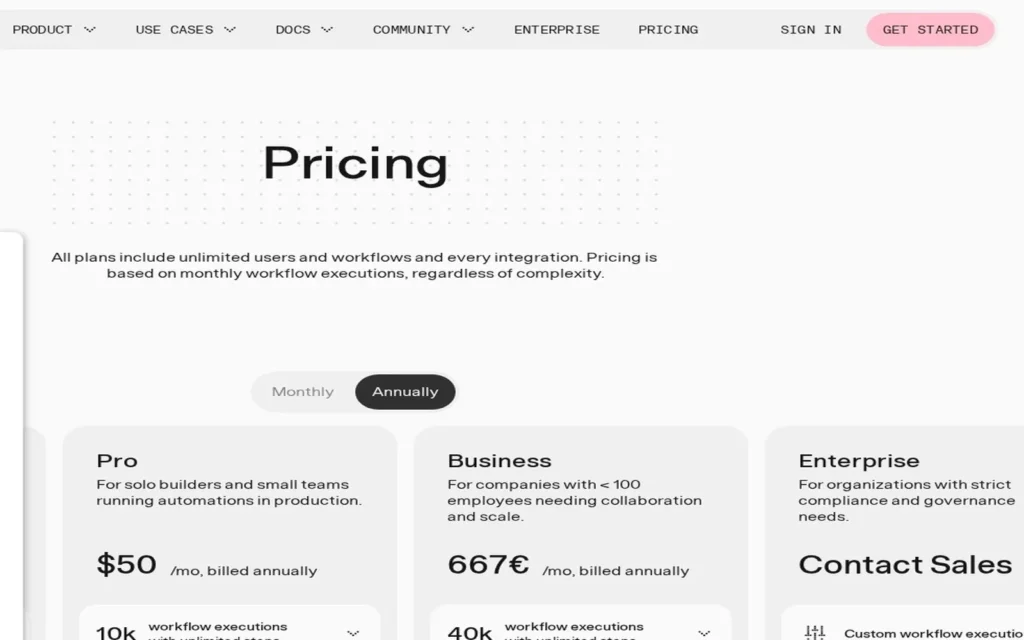
The self-hosted version is genuinely free software — fair-code licensed, yours to run on a server you control. Cloud prices by executions: Starter $20 a month annual ($24 monthly) for 2,500 executions; Pro $50 ($60) for 10,000; Business $800 ($960) for 40,000 — verified live in our earlier guides, re-checked on publish day. On the annual toggle the page may show the same plans in euros — Business at 667 euros a month — which is the currency variant of the $800 figure, not a different price.
An execution is one run of a workflow, and one MCP call triggers one execution — so 2,500 calls a month fits Starter at $20, where the same calls on Zapier Professional would need 5,000 tasks and a plan upgrade.
That server bill is the honest cost most “free” guides skip: around $5 to $6 a month, plus an hour a month keeping it updated and backed up. An unpatched automation server with access to your Gmail is worse than no automation at all.
The honest limit is you. Self-hosting means you are the IT department. Updates, backups, security patches, and the 2 a.m. realisation that the server is down are all yours. For an owner who already self-hosts, n8n MCP is the cheapest serious route on this list. For an owner who has never SSH’d into anything, it is a hobby, not a business tool.
Direct Official Servers: The $0 Route
The fifth route is not a product at all. It is the quiet fact that many of the apps you already pay for publish their own MCP servers, free, with no middleman. Notion publishes one. Slack publishes one. GitHub publishes one. So do Linear, Stripe, Figma, and dozens more. You add the app’s own server URL to your AI app, sign in with OAuth, and Claude or Cursor can read your docs, post to your channels, or open issues — with no Zapier, Pipedream, Composio, or n8n in the middle.
The price is $0 extra — no per-call meter, no task pool. The server is maintained by the vendor who knows its own API best, so it usually breaks less than a third-party bridge.
The limit is scope: one server covers one app, so five apps means five connections to manage, and each one eats a slice of the AI’s context window. And not every app publishes a server — your booking system or niche CRM probably does not, and that is exactly where a bridge like Zapier earns its keep.
Start here if your need is narrow: two official servers do the Notion-and-Slack job for $0. Add a bridge only when the app list grows past three, or when an app has no server of its own.
Connecting It in Claude, ChatGPT and Cursor
Connecting it is the other half, and the steps differ in each app — copying one app’s instructions into another is the most common setup failure. Here is each one.
Claude: the easiest connection
Claude calls your servers “custom connectors,” and it allows them on every plan, including free. On the Free plan you get one custom connector. Paid plans allow more.
On the web, open Settings, then Connectors, then Add custom connector. Paste the server URL — for Zapier MCP, the URL from your server page at mcp.zapier.com — name it, and sign in in your browser. Claude connects from Anthropic’s cloud, so the server must be reachable on the public internet.
In Claude Code it is one terminal command, claude mcp add --transport http, with your server URL; in Claude Desktop, local servers go in the config file.
Once connected, pick only the actions you need — five is a good starting number. A server exposing 300 actions is slower, more confused, and more expensive than one exposing five.
ChatGPT: check your plan first
ChatGPT connects to remote servers only — no local servers, no config file. Add a server under Settings, then Apps, then Create app, paste the URL, and sign in with OAuth.
The gate: custom MCP servers are available on Business, Enterprise, and Edu plans, on the web. Plus subscribers get read-only access, not full custom servers — if you pay $20 a month for Plus and your reason is MCP, you are paying for the wrong plan. Business costs $25 per user a month monthly, or $20 annual.
Cursor: one file, every project
Cursor is the code editor, and its setup matches: you add servers to a JSON file. For one project, the file is .cursor/mcp.json in the project root. For every project, it is ~/.cursor/mcp.json in your home folder. Each entry names the server, gives its URL for remote servers or its command for local ones, and Cursor picks it up when you reload the window. Cursor supports local stdio servers, remote HTTP servers, and SSE servers in the same file, so you can mix a local filesystem server with a remote Zapier server and both work.
The advantage is precision — the tools travel with the codebase. The disadvantage is the same as any config file: a typo breaks it silently, so keep a backup and test one server at a time.
What the AI Apps Themselves Cost
The server is only half the bill. The AI app you plug it into has its own price, and the MCP plan gates sit on top of it.
Claude Pro costs $20 a month on monthly billing, or $17 a month on annual billing ($200 paid up front). Max costs $100 a month, and Ultra costs $200 a month. The free plan costs $0 and allows one custom connector, which is enough to test the whole idea.
ChatGPT Plus costs $20 a month but does not unlock custom MCP servers with write actions; that needs Business at $25 per user a month monthly, or $20 annual. Pro costs $200 a month.
Cursor’s plans start with Free at $0, then Plus at $8 a month, Premium at $30 a month, Super at $100 a month, and Ultra at $200 a month, with Teams from $30 per user a month. The free tier exists, but a business running MCP through Cursor daily will outgrow it fast.
Add it up: Claude Pro plus Zapier Pro is $39.99 a month; Claude Pro plus Composio Free is $20; Claude Free plus Zapier Free is $0 for 50 calls. The AI subscription is usually the bigger half of the bill — test free before you pay for either side.
Cost Maths: What a Small Business Pays in Year One
Take one owner, using the assistant every working day: 10 tool calls a day, 22 working days a month — 220 calls a month.
On Zapier MCP, 220 calls need 440 tasks. The Free plan’s 100 tasks cover 50 calls and stop. Professional at $19.99 a month annual gives 750 tasks, which covers 375 calls — enough, with room to spare. Year one: $239.88. Add Claude Pro at $20 a month, and the stack is $39.99 a month, $479.88 a year.
On Composio For You, 220 calls fit inside the Free plan’s 10,000 calls — year one $0 for the server, $240 a year with Claude Pro.
On Pipedream Startup at $99 a month, 220 calls use roughly 220 of the 10,000 included credits — year one $1,188 for the server alone. Small usage punishes its flat price; heavy usage rewards it.
On n8n Cloud Starter at $20 a month annual, 220 calls are a fraction of the 2,500 executions — year one $240.
The break-even: at $30 an hour, the $479.88 Zapier-plus-Claude stack breaks even at 16 hours saved a year; the $240 Composio stack at 8 hours. Start free, measure a month, and let the meter tell you which paid plan — if any — you need.
The Hidden Costs and Gotchas
Every MCP guide shows the happy path. Here is the rest of it — eight traps, in the order they will find you.
First, the agent loop. An AI that checks before acting is the careful kind you want near customer data, and it burns calls faster than a careless one. One “send the invoice” request can become five calls — ten tasks on Zapier’s meter. Budget for the careful version, not the demo version.
Second, the ChatGPT plan gate. Plus subscribers cannot add a custom MCP server with write actions.
Third, Claude’s free limit. One custom connector on the free plan sounds generous until your business needs Gmail and Slack and Notion. That is three servers, one slot. The free test proves the concept. It does not run the business.
Fourth, Composio’s two price cards. For You and Platform are different products with different free allowances — 10,000 calls a month on one, 100,000 on the other.
Fifth, self-hosting is not free. n8n’s software costs $0. The server costs $5 to $6 a month, and the maintenance costs your evenings. An unpatched server with access to your Gmail is a liability, not a saving.
Sixth, the security hole is real. An MCP server can read and write, and a malicious instruction hidden in a tool description or a document can trick the AI into acting against you — the attack is called prompt injection, and it works because the AI trusts what the server tells it. Connect only servers from vendors you trust, and give the assistant the fewest permissions the job needs.
Seventh, tool bloat. Exposing 300 actions to the assistant does not make it 300 times more useful. It makes it slower, more confused, and more likely to pick the wrong tool. Pick five actions. Add more only when a real job demands them.
Eighth, the hard stop. Free tiers stop, they do not slow down. Zapier Free has no pay-per-task option, so when the 100 tasks are gone, the assistant stops mid-month with no way to buy a few more calls. If the assistant handles anything time-sensitive, a free tier is a test, not an operation.
Who Is Each Route Actually Best For?
Zapier MCP is best for the non-technical owner who wants it working today.
Pipedream MCP is best for the owner who builds. If you already write workflows, it is the best value per call once you pass a few hundred calls a month.
Composio is best for a team of three or more. The 10,000 free calls, the per-seat Standard plan, and the Firewall make it the only route on this list designed for shared access with guardrails.
n8n MCP is best for the owner who wants to own the switchboard. If you already run a server or use n8n, adding MCP costs almost nothing and keeps your data in your hands.
Direct official servers are best for a narrow job. One or two apps, no middleman, no meter, no bill. Start here whenever you can, and add a bridge only when the app list grows or an app has no server of its own.
Work Out Your Own Number First
Every price in this post is a list price, and your usage is not the average. Before you pick a route, work out your own number: how many tool calls will your assistant actually make in a month? Our free AI Cost Calculator does that arithmetic for you — put in the plans you are considering and the calls you expect, and it shows the monthly and yearly cost side by side, so you can see whether the $0 route or the $19.99 route is actually cheaper for your usage. Use it before you pay for anything: https://aitbizhub.com/ai-cost-calculator/
Pros and Cons
Pros: One server works in every AI app that speaks MCP, so you connect once instead of building one integration per app. Setup is genuinely fast — a URL or a config entry, then OAuth in the browser, no passwords in files. Free tiers are real: Zapier gives 50 calls a month, Composio gives 10,000, and official servers cost nothing extra. The protocol is open and owned by a Linux Foundation fund, so no single vendor can take it away.
Cons: The meters are easy to misunderstand — two tasks per call, credits per 30 seconds, executions per workflow — and the cheap-looking plan can be the expensive one at your usage. ChatGPT’s plan gate locks custom servers behind Business, so Plus subscribers pay and still cannot connect. A connected assistant can read and write, which means a prompt-injection attack or a wrong tool pick can do real damage. And free tiers stop dead mid-month with no way to buy a few more calls.
Our Verdict
For most small businesses, the best MCP server for AI tools to start with is Zapier MCP on the free plan, connected to Claude. It takes an afternoon, it costs $0, and 50 calls a month is enough to learn whether an assistant that can act is worth paying for. When the calls run out — and they will, if the idea works — move to Zapier Professional at $19.99 a month, or switch to Composio’s free plan for 10,000 calls and add Claude Pro at $20 a month. That $20 stack is the best value in this guide.
If your business runs on one or two apps with their own servers, skip the bridge entirely — the simplest setup breaks least.
If you build things or already run a server, n8n self-hosted is the cheapest serious route. Whatever you pick, connect five actions, not fifty — the point is the keys to the five doors you use, not to everything.
Frequently Asked Questions
Is MCP free?
The protocol is free and open — nobody charges you to use an MCP server for AI tools itself. The servers are what cost money, and the price depends on the route. Zapier MCP costs $0 on the Free plan for 50 calls a month. Composio’s free plan gives 10,000 calls a month at $0. n8n’s self-hosted software is free, and official servers from apps like Notion and Slack cost nothing extra.
Do I need to know how to code to use MCP?
No, not for the hosted routes. Zapier MCP and Composio connect through a web page and a URL — no code, no terminal, no config file. If you can sign in with Google and paste a URL, you can set up MCP on Zapier or Composio in an afternoon.
Which AI app is best with MCP for a small business?
Claude, for most owners. It allows a custom connector on every plan, including free, it works with remote servers on the web, and its setup is a settings screen, not a config file. ChatGPT is powerful but locks custom servers behind the Business plan.
Is MCP safe? Can it delete my data?
MCP itself is a connection, and a connection is only as safe as the permissions you give it. A server can do whatever its tools allow, including deleting things, if you connect a delete action and the AI calls it. Protect yourself: connect only servers from vendors you trust, give the assistant the fewest actions the job needs, and never paste a server URL from a stranger into your AI app.
What is the difference between MCP and Zapier Zaps?
A Zap is a fixed workflow: when this happens, do that, on a schedule or a trigger. It runs whether or not you are watching. MCP is a live connection: the AI decides in the moment which tool to call, with what inputs, in response to what you just asked.
Price Note
Price note — updated 18 November 2026: Prices in this post were checked on 18 November 2026. When you are reading this, the price may be lower or higher — always check the official pricing page before you buy.
Pros
- One server works in every AI app that speaks MCP, so you connect once instead of building one integration per app.
- Setup is genuinely fast — a URL or a config entry, then OAuth in the browser, no passwords in files.
- Free tiers are real: Zapier gives 50 calls a month, Composio gives 10,000, and official servers cost nothing extra.
- The protocol is open and owned by a Linux Foundation fund, so no single vendor can take it away.
- Zapier keeps a history of every MCP call on your account, so you can audit what the assistant did.
Cons
- The meters are easy to misunderstand — two tasks per call, credits per 30 seconds, executions per workflow — and the cheap-looking plan can be the expensive one at your usage.
- ChatGPT's plan gate locks custom servers behind Business, so Plus subscribers pay and still cannot connect.
- A connected assistant can read and write, which means a prompt-injection attack or a wrong tool pick can do real damage.
- Free tiers stop dead mid-month with no way to buy a few more calls.
- Too many connected servers eat the AI's context window and make its answers worse.
For most small businesses, the best MCP server for AI tools to start with is Zapier MCP on the free plan, connected to Claude. It takes an afternoon, it costs $0, and 50 calls a month is enough to learn whether an assistant that can act is worth paying for. When the calls run out — and they will, if the idea works — move to Zapier Professional at $19.99 a month, or switch to Composio's free plan for 10,000 calls and add Claude Pro at $20 a month. That $20 stack is the best value in this guide. If your business runs on one or two apps with their own servers, skip the bridge entirely — the simplest setup breaks least. If you build things or already run a server, n8n self-hosted is the cheapest serious route. Whatever you pick, connect five actions, not fifty — the point is the keys to the five doors you use, not to everything.
1 thought on “MCP Server for AI Tools (2026): Connect Claude, ChatGPT and Cursor to Your Business Apps”