

The best ai tools for youtubers form a workflow, not a shopping list. For a solo channel publishing eight 20-minute videos a month, the lean paid stack in this guide costs $558 a year: TubeBuddy Pro for keyword research, Descript Hobbyist for transcript editing, and Opus Clip Pro on annual billing for Shorts.Buying the top tier of everything costs $1,746 a year for the same channel. The difference is $1,188 a year, and most of it buys overlap: two SEO suites, a higher editing tier the upload volume never touches, and a recording plan a solo creator may not need.vidIQ is the stronger idea and thumbnail tool. TubeBuddy is the cheaper keyword and optimisation licence. Descript is the editor. Opus Clip is the clipping machine. Riverside only earns its place when guests join from somewhere else. Every price below was checked on the vendor's official page on 29 November 2026.
Most YouTubers do not need five AI subscriptions. They need one tool that finds the video, one that cuts it, and one that turns it into Shorts.
Quick Answer
The best ai tools for youtubers form a workflow, not a shopping list. For a solo channel publishing eight 20-minute videos a month, the lean paid stack in this guide costs $558 a year: TubeBuddy Pro for keyword research, Descript Hobbyist for transcript editing, and Opus Clip Pro on annual billing for Shorts.
Buying the top tier of everything costs $1,746 a year for the same channel. The difference is $1,188 a year, and most of it buys overlap: two SEO suites, a higher editing tier the upload volume never touches, and a recording plan a solo creator may not need.
vidIQ is the stronger idea and thumbnail tool. TubeBuddy is the cheaper keyword and optimisation licence. Descript is the editor. Opus Clip is the clipping machine. Riverside only earns its place when guests join from somewhere else. Every price below was checked on the vendor’s official page on 29 November 2026.
In this article
- How we compared the best ai tools for youtubers
- The five tools at a glance
- vidIQ: ideas, thumbnails and a credit meter
- TubeBuddy: the cheaper SEO licence with an eligibility catch
- Descript: edit the video by editing the transcript
- Opus Clip: Shorts from footage you already shot
- Riverside: recording help you may not need
- The maths: one channel, three stacks
- Five traps that catch YouTubers
- Strategic Pivot: price the stack before you subscribe
- Pros and cons
- Our verdict
- Frequently asked questions
- Sources
How we compared the best ai tools for youtubers
Creators ask a practical question, not a feature-list question. The question is which subscriptions still earn their place after the upload schedule becomes real, and which plan quietly runs out of credits in week three.
Our test channel is a solo creator in the US publishing eight long videos a month. Each video runs about 20 minutes, so the channel produces 160 minutes of source footage a month and 1,920 minutes a year. Two of the monthly videos include a remote guest. There is no editor on payroll and no second channel.
We priced that same channel five ways. First, the annual subscription at published prices. Second, the meter that moves the bill, such as AI credits, media hours, processing credits, seats, or licence eligibility. Third, which plan actually carries the AI feature named in the marketing. Fourth, what the entry plan leaves out. Fifth, whether a free plan or trial lets the creator test before paying.
One honesty note matters here. No AI tool in this guide can make a weak video idea strong. These tools speed up research, cutting and repurposing. The topic, the hook and the retention still belong to the creator.
The five tools at a glance
| Tool | Best for | Price checked 29 November 2026 | Main cap or gate |
|---|---|---|---|
| vidIQ | Video ideas, thumbnail help, AI Coach guidance | Boost $199/yr regular; MAX $468/yr regular | AI credits refresh monthly and do not roll over |
| TubeBuddy | Keyword research and in-Studio optimisation | Pro $192/yr regular; Legend $408/yr regular | Creator Licence excludes businesses and 50k+ subscriber channels |
| Descript | Editing speech by editing text | Hobbyist $16/person/mo billed annually; Creator $24 | Media hours and AI credits per person |
| Opus Clip | Turning long videos into captioned Shorts | Starter $15/mo monthly only; Pro $174/yr billed annually | Processing credits; Starter is monthly-only |
| Riverside | Remote guest recording in studio quality | Pro $24/mo billed yearly; Grow $34/mo billed yearly | Paid plans start with a 14-day trial, not a free tier |
Prices are in US dollars as shown on the official pages. Read each price with its meter, because the headline subscription is only half the bill on four of these five tools.
vidIQ: ideas, thumbnails and a credit meter
vidIQ is the tool creators open before filming. Its pricing page lists a Free plan at $0 with 150 AI credits every month, niche trends, data-backed content ideas and personalised growth tips from AI Coach. For a channel still testing topics, that free tier is a real starting point rather than a demo.
Boost is the paid step most solo creators would consider. The regular annual price is $199 a year for one channel, with 2,000 AI credits a month, click-worthy thumbnail help, personalised ideas, unlimited trends research and AI Coach with deep thinking. MAX costs $468 a year at the regular annual price and raises the allowance to 6,000 AI credits a month, with up to 3x AI Coach conversations and short clipping and generations.

The meter is the part to watch. vidIQ AI credits refresh every month and do not roll over. An AI Coach message costs 10 credits and a thumbnail generation costs 22 credits on the pricing page’s own examples. Eight videos a month means at least eight thumbnail generations, which is 176 credits before a single Coach message. The Free plan’s 150 credits cannot cover that month.
At the check date, vidIQ was running a Cyber Monday offer of 25% off, showing Boost at $12.44 a month billed $149.25 yearly and MAX at $29.25 a month billed $351 yearly. The maths in this guide uses the regular annual prices, so the comparison still holds after the sale banner changes.
Best for: creators who struggle with topics and packaging more than editing. vidIQ earns its money before the camera turns on, when a better title and thumbnail can change what a finished video earns.
Skip if: your bottleneck is editing time, not ideas. vidIQ will not cut your footage, and paying MAX prices for credits you never spend is the fastest way to waste the subscription.
The real cost driver is credit burn. A creator who generates several thumbnail options per video and chats with AI Coach daily will feel the 2,000-credit Boost allowance. A creator who uses vidIQ twice a week will not.
TubeBuddy: the cheaper SEO licence with an eligibility catch
TubeBuddy works inside YouTube Studio as an extension and dashboard. Pro covers keyword research, basic video and thumbnail tools, basic title and tag optimisation, and limited access to Next Video Ideas. For a creator whose main job is choosing searchable topics and tidying metadata, Pro is the working tier.
Legend adds the strategy layer. A/B Testing and the Title Generator sit on Legend, along with content strategy and audience understanding tools that Pro leaves out. Legend also includes 2 user seats, while Pro includes 1. If a second person helps run the channel, that seat difference matters as much as the features.

At the check date, TubeBuddy’s pricing page showed a sale: Pro at $8 a month billed $96 a year, saving $96, and Legend at $17 a month billed $204 a year, saving $204, with 50% off annual licences. Those saving figures put the regular annual prices at $192 for Pro and $408 for Legend. The maths in this guide uses those regular annual prices.
The catch is eligibility. Pro and Legend are Creator Licence packages for individual creators only. TubeBuddy’s own terms treat a channel as a business, and therefore outside the Creator Licence, when it has multiple YouTube channels on TubeBuddy, 50,000 or more subscribers, 3 or more channel managers, or 50 or more employees. A growing channel can outgrow the cheap licence.
Best for: solo creators under 50,000 subscribers who want keyword research and optimisation tools inside Studio without a credit meter. TubeBuddy publishes no monthly credit quota for Pro or Legend, which makes the bill predictable.
Skip if: your channel is already a business by TubeBuddy’s definition, or you mainly want AI-generated thumbnail concepts and coaching. That is vidIQ’s territory, and paying for both suites is where the overlap bill starts.
The real cost driver is the Legend gate. Pro is enough for research. The moment you want A/B tests on titles and thumbnails, the regular price jumps from $192 to $408 a year, so buy Legend for the tests, not for the badge.
Descript: edit the video by editing the transcript
Descript changes the editing job itself. You edit the video by editing its transcript: delete a sentence and it leaves the timeline. For talking-head videos, interviews and tutorials, that turns a fiddly timeline task into a reading task.
The Free plan includes 1 media hour a month, 100 one-time AI credits and 720p exports with a watermark. Our test channel produces 160 minutes of footage a month, which is 2.67 hours. Free covers less than half of one month and watermarks the result, so it is a test drive, not a workflow.
Hobbyist costs $16 per person a month billed annually. It includes 10 media hours a month, 400 AI credits a month, watermark-free 1080p exports, Studio Sound, filler-word removal and clip creation. Ten media hours is 600 minutes, which covers our test channel’s 160 minutes with room for retakes and a second project.
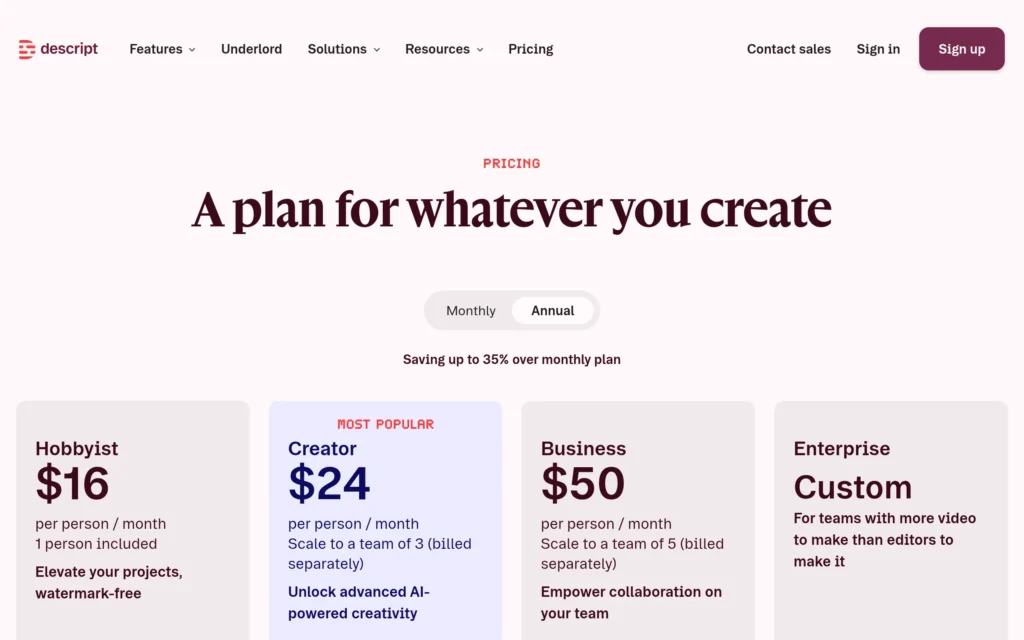
Creator costs $24 per person a month billed annually. It raises the allowance to 30 media hours and 800 AI credits a month, adds 4K watermark-free exports, full access to Underlord, Descript’s AI co-editor, and top-ups for extra hours and credits. Creator can scale to a team of 3 people, billed separately per person.
Best for: creators whose videos are mostly speech. If your raw footage is you talking, an interview, or a screen walkthrough with narration, transcript editing is the single biggest time saver in this guide.
Skip if: your videos are built from B-roll, music and visual effects rather than speech. Descript can handle timelines, but a visual-first editor will serve that style better, and media hours spent on silent footage buy you little.
The real cost driver is media hours, counted on the footage you bring in, not the length of the finished video. A creator who records 20 minutes to publish 12 still spends the 20. Count raw footage, not runtime, before choosing between Hobbyist and Creator.
Opus Clip: Shorts from footage you already shot
Opus Clip takes a long video and returns short, captioned, reframed clips with a Virality Score. For a YouTuber, that is the Shorts pipeline: the same upload that earns watch time on the main channel also feeds the Shorts shelf without a second edit.
The Free plan includes 60 credits a month with watermarked clips that stay exportable for 3 days. Starter costs $15 a month, billed monthly only, with 150 credits a month and no watermark. Pro costs $29 a month billed monthly, or $14.50 a month billed annually at $174 a year, with 3,600 credits over 12 months on the annual plan and unused credits rolling over for 2 months.

That pricing shape creates the trap this guide exists to catch. Starter looks like the cheap entry point at $15 a month. Across a year it costs $180, which is $6 more than Pro on annual billing, while giving fewer credits and no annual option. The cheaper-looking plan is the more expensive year.
Credits are the meter. Opus Clip sells processing credits, and a sensible planning estimate is roughly one credit per minute of source video before extra AI features. Our test channel uploads 160 minutes a month, so Starter’s 150 credits run short every month, while Pro’s annual pool covers the year with room to spare.
Best for: creators who publish long videos and want Shorts from every upload without hand-cutting vertical versions. Pro on annual billing is the value pick, because the credit pool matches a real upload schedule.
Skip if: you film Shorts natively and rarely publish long videos. A clipping tool needs long source footage to clip. Without it, you are paying for a pipeline with nothing flowing through it.
The real cost driver is source minutes, not finished clips. One 60-minute upload spends its credits whether you keep two clips or twenty. Heavy users should count monthly source minutes first, then pick the plan, not the other way round.
Riverside: recording help you may not need
Riverside is the recording step in this stack. It records remote guests in studio quality, with video up to 4K on paid plans, so an interview does not depend on the guest’s internet connection behaving for an hour. For channels built on conversations, that reliability is the product.
Pro costs $24 a month billed yearly, or $29 a month billed monthly. Grow costs $34 a month billed yearly, or $39 billed monthly, and adds audience-growth tools such as social media scheduling. Webinar costs $79 a month billed yearly for creators who run webinars, and Business is priced through sales.

Paid plans start with a 14-day free trial. That trial is the right way to test Riverside, because recording quality depends on your guests’ cameras, microphones and rooms. Two test interviews will tell you more than any feature list.
Our test channel records two guest videos a month, so Riverside Pro can earn its place. A solo creator filming alone in one room gets nothing from it. The same money spent on a better microphone would show up in every video instead of two.
Best for: interview, podcast-style and guest-driven channels where a ruined remote recording costs a whole upload. Pro is the tier to test first, and the 14-day trial covers two real guest sessions.
Skip if: you record alone. Riverside solves a distance problem. If every voice in your videos is in the same room as the camera, this subscription is the easiest $288 a year to cut.
The real cost driver is guest frequency. Two guest videos a month justify Pro. Two guest videos a year do not, and Grow’s scheduling tools only pay when you actually schedule across channels every week.
The maths: one channel, three stacks
Here is the same test channel priced three ways. The channel publishes eight 20-minute videos a month, which is 160 source minutes a month and 1,920 a year. All figures use annual billing at regular published prices, checked on 29 November 2026.
| Stack | Tools included | Annual cost |
|---|---|---|
| Lean solo stack | TubeBuddy Pro $192 + Descript Hobbyist $192 + Opus Clip Pro annual $174 | $558/yr |
| Guest-ready stack | Lean stack + Riverside Pro $288 | $846/yr |
| Overbuy stack | vidIQ MAX $468 + TubeBuddy Legend $408 + Descript Creator $288 + Opus Clip Pro annual $174 + Riverside Grow $408 | $1,746/yr |
The lean stack covers the whole solo workflow. TubeBuddy Pro handles keyword research and optimisation for one channel. Descript Hobbyist gives 600 media minutes a month against a 160-minute need. Opus Clip Pro annual gives 3,600 credits over 12 months against roughly 1,920 source minutes a year.
The guest-ready stack adds Riverside Pro at $288 a year. That is the honest price of reliable remote recording for two guest videos a month, and it is the only upgrade in this table tied to a job the lean stack cannot do.
The overbuy stack costs $1,746 a year. It pays for two SEO suites at once, an editing tier built for 30 media hours a month, and a recording tier with scheduling tools. The channel uses none of that headroom. Choosing the lean stack instead saves $1,188 a year.
Two smaller traps hide inside the table. Opus Clip Starter costs $180 across a year of monthly billing, which is more than Pro annual at $174, with fewer credits. And vidIQ Boost at $199 a year is a fair swap for TubeBuddy Pro at $192 if you prefer AI Coach and thumbnail generation over in-Studio tools. That swap makes the lean stack $565 a year, a $7 difference, not a budget decision.
The free stack deserves one line. vidIQ Free, Descript Free and Opus Clip Free cost $0, but Descript Free covers 60 of the channel’s 160 monthly minutes with a watermark, and Opus Clip Free covers 60 credits with a 3-day export window. Free is for testing the workflow on one video, not running the channel.
Five traps that catch YouTubers
First, buying two SEO suites. vidIQ and TubeBuddy overlap on keyword research and optimisation. Paying for both at top tiers costs $876 a year before you have edited a single frame. Pick one for research and spend the difference on production.
Second, choosing Opus Clip Starter because $15 looks small. It is monthly-only, totals $180 a year, and its 150 monthly credits fall short of a 160-minute upload schedule. Pro annual at $174 is cheaper and larger. The small number is the expensive plan.
Third, ignoring the TubeBuddy eligibility line. Pro and Legend are Creator Licences for individual creators. Pass 50,000 subscribers, add a third channel manager, or run multiple channels on TubeBuddy, and the cheap licence no longer fits your channel. Growth can move you into enterprise pricing.
Fourth, counting finished runtime instead of raw footage. Descript media hours and Opus Clip credits are spent on what you upload and record, not on the polished minutes you publish. A channel that records 40 minutes to publish 15 should budget for 40.
Fifth, subscribing to Riverside before the guests exist. A recording studio for remote guests only pays when guests actually appear. Many solo channels buy it for a podcast they launch twice a year, then keep paying through the other ten months.
Strategic Pivot: price the stack before you subscribe
Before you buy any of these tools, price your own stack the way this guide priced the test channel. Count your monthly source minutes, your videos per month, and your guest sessions. Those three numbers decide every plan in this article.
Our free AI Cost Calculator lets you run that maths on your own numbers before a single subscription starts. Put in the annual prices from the table above, then remove one tool at a time and watch which removal actually breaks your workflow. The tool whose removal breaks nothing is the one to skip.
If your channel also publishes business videos, our guide to AI video tools for small business covers the text-to-video generators this guide leaves out. And if your guest videos double as a podcast, the AI tools for podcasters guide prices the audio side of the same workflow.
Pros and cons
Pros:
- The lean stack covers research, editing and Shorts for $558 a year at regular prices.
- Descript turns speech editing into text editing, which is the biggest time saving here.
- Opus Clip Pro annual at $174 beats Starter’s $180 yearly total with more credits.
- vidIQ and TubeBuddy both offer a low-cost way to test before committing.
- Riverside’s 14-day trial lets you test real guest recordings before paying.
Cons:
- Every tool except TubeBuddy runs on a credit or media-hour meter.
- TubeBuddy’s cheap licences exclude larger and business-run channels.
- vidIQ credits do not roll over, so unused allowance expires monthly.
- Riverside is dead weight for solo creators who never record guests.
- Sale prices at check date will change, so regular prices are the safe planning figures.
Our verdict
For most solo YouTubers, buy the lean stack: TubeBuddy Pro, Descript Hobbyist and Opus Clip Pro on annual billing, at $558 a year. Add Riverside Pro only when guest videos are a monthly habit, which takes the stack to $846 a year.
Choose vidIQ Boost instead of TubeBuddy Pro if ideas and thumbnails are your weak point. The swap costs $7 a year more and buys AI Coach guidance and thumbnail generation. What you should not do is buy both suites, top editing tiers and a recording plan in the same month. That is the $1,746 overbuy stack, and the extra $1,188 buys headroom a small channel never touches.
Frequently asked questions
vidIQ or TubeBuddy: which should a small YouTuber buy?
Buy TubeBuddy Pro at $192 a year for keyword research and optimisation inside YouTube Studio, with no credit meter. Buy vidIQ Boost at $199 a year if video ideas, thumbnail generation and AI Coach guidance matter more. The $7 yearly difference is minor. Buying both is the mistake.
Is Opus Clip Starter enough for a weekly channel?
Usually not. Starter gives 150 credits a month and costs $15 a month billed monthly only, which totals $180 a year. A channel uploading 160 source minutes a month runs short, while Pro on annual billing costs $174 a year with 3,600 credits over 12 months. Pro annual is cheaper and larger.
Which Descript plan fits eight videos a month?
Hobbyist at $16 per person a month billed annually fits. It includes 10 media hours a month, which is 600 minutes, against 160 minutes of source footage in our test channel. Move to Creator at $24 only when you need 4K exports, more AI credits, or footage volume past 10 hours a month.
Does a solo YouTuber need Riverside?
No. Riverside records remote guests in studio quality, with Pro at $24 a month billed yearly after a 14-day trial. If every video is filmed alone in one room, Riverside solves a problem you do not have. Add it when guest videos become a monthly habit, not before.
Can free AI tools run a YouTube channel?
Free tiers can test a workflow but rarely run one. vidIQ Free gives 150 AI credits a month, Descript Free gives 1 media hour with a watermark, and Opus Clip Free gives 60 credits with a 3-day export window. A channel publishing eight videos a month outgrows all three in the first month.
Sources
Price note — updated 29 November 2026: Prices in this post were checked on 29 November 2026. When you are reading this, the price may be lower or higher, and sale prices shown at check date may have ended. Check the official pricing page before buying.
Pros
- The lean stack covers research, editing and Shorts for $558 a year at regular prices.
- Descript turns speech editing into text editing, which is the biggest time saving here.
- Opus Clip Pro annual at $174 beats Starter's $180 yearly total with more credits.
- vidIQ and TubeBuddy both offer a low-cost way to test before committing.
- Riverside's 14-day trial lets you test real guest recordings before paying.
Cons
- Every tool except TubeBuddy runs on a credit or media-hour meter.
- TubeBuddy's cheap licences exclude larger and business-run channels.
- vidIQ credits do not roll over, so unused allowance expires monthly.
- Riverside is dead weight for solo creators who never record guests.
- Sale prices at check date will change, so regular prices are the safe planning figures.
For most solo YouTubers, buy the lean stack: TubeBuddy Pro, Descript Hobbyist and Opus Clip Pro on annual billing, at $558 a year. Add Riverside Pro only when guest videos are a monthly habit, which takes the stack to $846 a year.Choose vidIQ Boost instead of TubeBuddy Pro if ideas and thumbnails are your weak point. The swap costs $7 a year more and buys AI Coach guidance and thumbnail generation. What you should not do is buy both suites, top editing tiers and a recording plan in the same month. That is the $1,746 overbuy stack, and the extra $1,188 buys headroom a small channel never touches.