

The best ai tools for software developers split by where the work happens. GitHub Copilot Business costs $19 per seat a month with 1,900 AI credits per user pooled across the team, and inline suggestions stay unlimited without spending credits. Cursor's Teams Premium seat costs $30 per seat a month for new customers, with a weekly usage pool and third-party models billed separately.Devin Teams starts at a flat $80 a month for the whole team, charged as shared prepaid credits, so the floor is low and the real bill depends on usage. JetBrains AI Pro for organizations costs $20 per user a month with 20 AI credits per 30 days inside JetBrains IDEs. ChatGPT Plus costs $20 a month per person, billed monthly, with expanded Codex usage for reasoning, debugging, and documentation work outside the editor.For our test shop of five developers, buying all five routes costs $6,300 a year. The lean stack of Copilot Business plus ChatGPT Plus costs $2,340 a year. The gap is the story: a small shop needs one editor assistant and one reasoning partner, not five subscriptions.
Quick Answer
The best ai tools for software developers split by where the work happens. GitHub Copilot Business costs $19 per seat a month with 1,900 AI credits per user pooled across the team, and inline suggestions stay unlimited without spending credits. Cursor’s Teams Premium seat costs $30 per seat a month for new customers, with a weekly usage pool and third-party models billed separately.
Devin Teams starts at a flat $80 a month for the whole team, charged as shared prepaid credits, so the floor is low and the real bill depends on usage. JetBrains AI Pro for organizations costs $20 per user a month with 20 AI credits per 30 days inside JetBrains IDEs. ChatGPT Plus costs $20 a month per person, billed monthly, with expanded Codex usage for reasoning, debugging, and documentation work outside the editor.
For our test shop of five developers, buying all five routes costs $6,300 a year. The lean stack of Copilot Business plus ChatGPT Plus costs $2,340 a year. The gap is the story: a small shop needs one editor assistant and one reasoning partner, not five subscriptions.
In this article
- How we compared the best ai tools for software developers
- The five tools at a glance
- GitHub Copilot Business: completions that never meter out
- Cursor: the agent editor with a new price ladder
- Devin: cloud agents on a shared credit pool
- JetBrains AI Pro: credits inside the IDE you already run
- ChatGPT Plus: the reasoning partner outside the editor
- The maths: what five tools really cost a five-developer shop
- Five traps that catch small dev shops
- What to buy first
- Pros and cons
- Our verdict
- Frequently asked questions
- Sources
How we compared the best ai tools for software developers
Every small dev shop knows the renewal moment. Five developers have quietly collected five AI subscriptions, each bought for one good week of work. The invoices arrive together, and nobody can say which tool earned its seat.
So we compared five tools across the real halves of the job. GitHub Copilot and JetBrains AI assist inside the editor. Cursor and Devin run agents that write and change code. ChatGPT Plus handles reasoning, debugging, and documentation outside the editor. Every price below was checked on the vendor’s official pricing or plans page on 27 November 2026, and the dated price note at the end says when to re-check.
Our test shop has five developers doing client web and app work. Repositories live on GitHub, and the team splits between VS Code and JetBrains IDEs. No client work needs air-gapped or self-hosted deployment, and no regulated codebase forces a private model. Prices use monthly billing unless a plan is only sold annually.
One honesty note before the detail. These five tools overlap more than their homepages admit. Nobody needs five AI subscriptions to ship a client release. We price all five because the right pair depends on whether your bottleneck is typing speed, agent work, IDE fit, or hard debugging.
The five tools at a glance
| Tool | Job | Price checked 27 November 2026 | Free route |
|---|---|---|---|
| GitHub Copilot Business | Inline suggestions, chat, agents in the IDE | $19 per seat/mo, 1,900 credits per user pooled | Copilot Free, 2,000 completions/mo |
| Cursor Teams | Agent-first editor, cloud agents, code review | Premium seat $30 per seat/mo, weekly pool | Free plan, limited usage |
| Devin Teams | Cloud coding agents, CLI, Devin Desktop | $80/mo flat floor as shared credits | Free plan, limited usage |
| JetBrains AI Pro | AI chat and agents inside JetBrains IDEs | $20 per user/mo for organizations, 20 credits | AI Free, 3 credits per 30 days |
| ChatGPT Plus | Reasoning, debugging, docs, Codex usage | $20/mo per person, billed monthly | Free plan, limited Codex access |
The table hides the real story, which is metering. Four of these five tools ration agent work in credits, pools, or quotas. A cheap headline price can still strand a developer mid-sprint when the monthly allowance runs dry.
GitHub Copilot Business: completions that never meter out
GitHub Copilot is the baseline tool in this list. Its job is inline suggestions, chat, and agent help inside the editor and on GitHub. Copilot Free costs $0 with limited access, including 2,000 completions a month and auto model selection only.
Individual plans step up by credits. Copilot Pro costs $10 a month with 1,500 AI credits a month. Pro+ costs $39 a month with 7,000 credits. Max costs $100 a month with 20,000 credits. The credit total blends a base allowance with a flex allotment GitHub can adjust.
Business is the team route. It costs $19 per granted seat a month with 1,900 AI credits per user a month, pooled across the organization. Usage beyond the shared pool costs $0.01 per AI credit. Business adds centralized management and Copilot policy control for organization members.
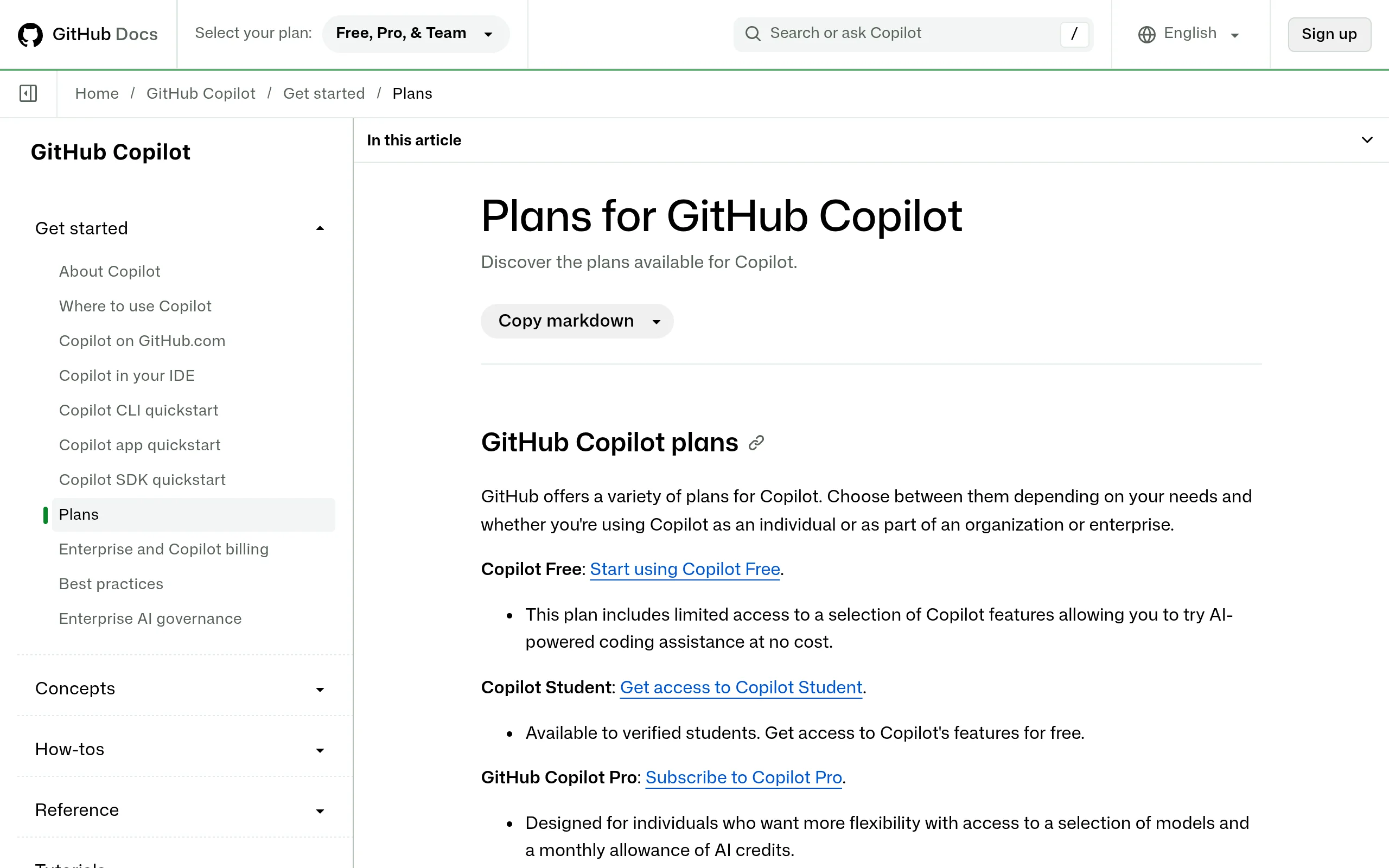
The feature that matters most to a working shop is unglamorous. Inline suggestions are unlimited on every plan and do not consume credits, even when a user hits a spending limit. The typing-speed layer never meters out. Chat and agent work spend the credits.
For our test shop, five Business seats cost $95 a month, which is $1,140 a year. The pooled allowance is 9,500 credits a month across the team, so one heavy agent user can draw on a quiet teammate’s share. That pooling is the small-shop advantage.
The limit is the meter on everything beyond completions. A shop that runs agents all day will spend credits and pay $0.01 per extra credit. Set a spending limit before the first sprint, not after the first surprise invoice.
Cursor: the agent editor with a new price ladder
Cursor is the agent-first editor in this list. It writes, edits, and reviews code with agents inside its own editor, plus cloud agents that keep working outside it. Its pricing changed shape recently, and most roundups still quote the old ladder.
New customers now start on The X Subscription, one subscription covering Grok, Cursor, and X. Free costs $0 with limited usage. Plus costs $8 a month, or $80 a year, with a base weekly pool and fixed model settings. Premium costs $30 a month, or $300 a year, with four times the Plus pool.
Super costs $100 a month, or $1,000 a year, with fifteen times the Plus pool. Ultra costs $200 a month, or $2,000 a year, with fifty times the Plus pool. Teams seats cost $30, $100, or $200 per seat a month, matching the seat’s tier. Prices exclude tax.
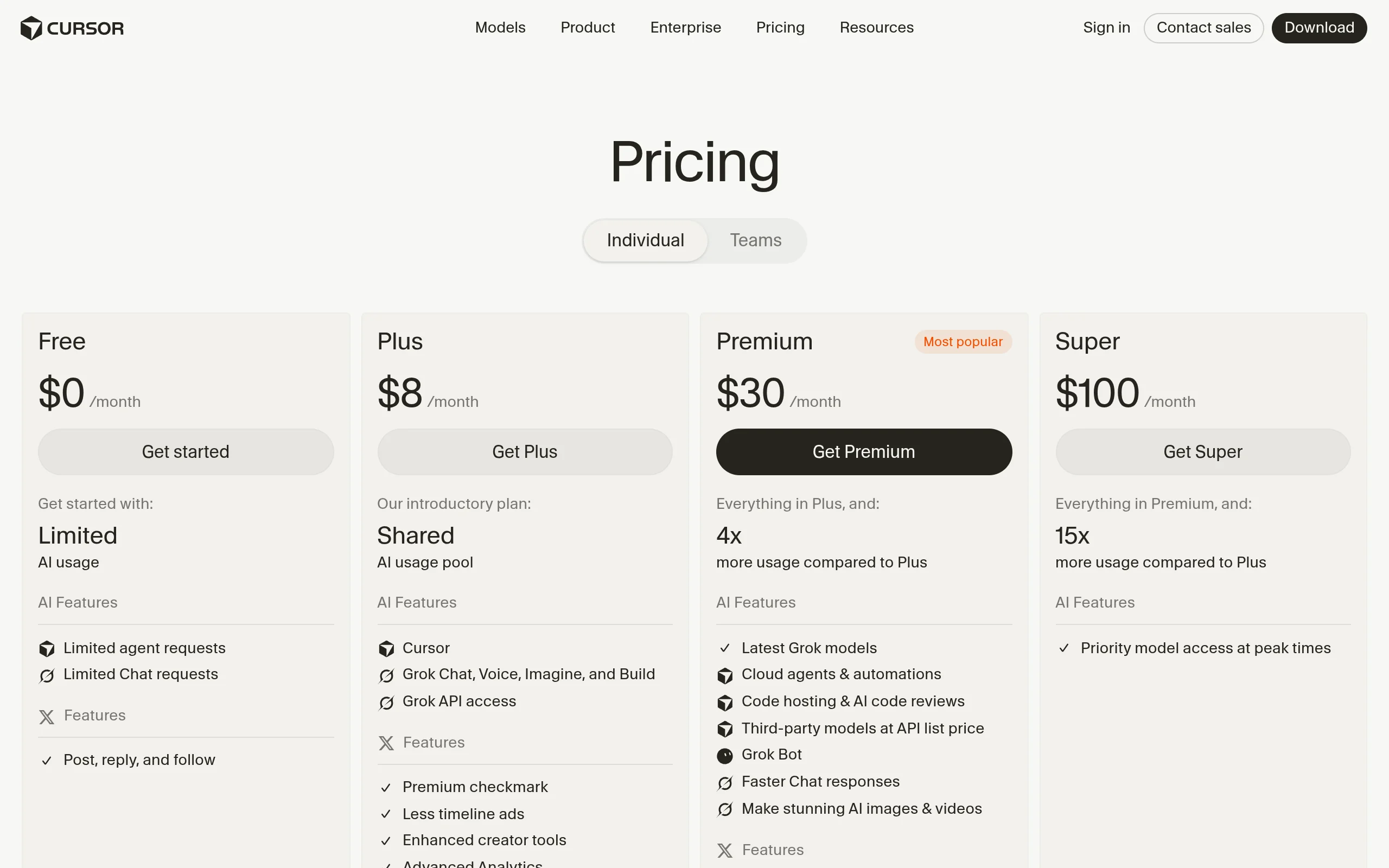
Two gates decide the real price. The first is the weekly pool: Cursor models draw from one weekly allowance shared across Cursor and Grok, so a heavy Monday can thin out Friday. The second is third-party models. Claude and GPT models are not included; they bill at API list prices from prepaid credit on Premium and above.
Plus is a starter tier, not a working one. It runs Cursor models at fixed settings without Auto routing, Cloud Agents, Automations, or Bugbot code review. Premium and above add all of those. The old Pro plan at $20 a month is a legacy plan now, kept for existing subscribers and not sold to new customers.
For our test shop, five Teams Premium seats cost $150 a month, which is $1,800 a year before any third-party model spend. Budget the prepaid credit for Claude or GPT use as a separate line. Cursor earns its place when agent-led editing is the bottleneck, not when completions are.
Devin: cloud agents on a shared credit pool
Devin is the cloud-agent tool in this list. It runs coding sessions in the cloud, in a CLI, and in Devin Desktop, the editor formerly known as Windsurf. Its pricing looks simple and behaves like a meter.
Free costs $0 with limited usage, plus access to Devin Review and DeepWiki. Pro costs $20 a month for one user, with a daily and weekly usage quota covering sessions, the CLI, and Desktop. Max costs $200 a month with a significantly larger weekly quota and no daily cap.
Teams is the shop route, and it works differently from every other plan here. Every Teams subscription is a flat $80 a month, charged as prepaid on-demand credits. The $80 lands in a shared pool each month, every member draws from the same pool, and there is no per-member allowance.
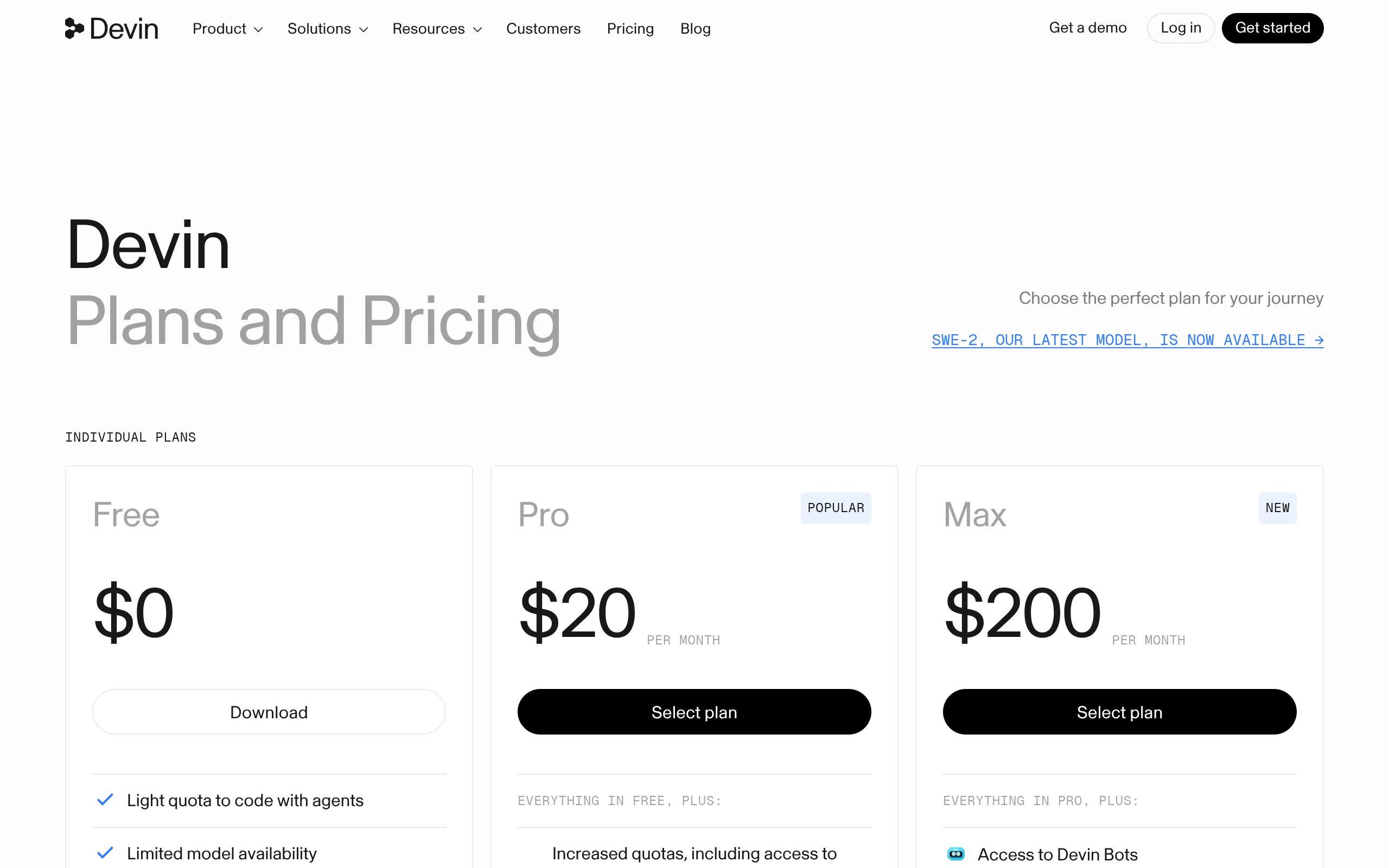
Teams adds the controls a shop needs. SAML or OIDC single sign-on is included. Admins can cap each member with up to three usage tiers, and new work blocks once a member hits a limit. A Free mode powered by SWE-2 lets each member run up to two cloud sessions at a time at no cost.
Credits behave better here than anywhere else in this post. Purchased on-demand credits roll over month to month and never expire. When the pool runs dry, sessions pause until a top-up lands. Admins can set auto-reload thresholds and default session spending limits.
For our test shop, the Teams floor is $80 a month, which is $960 a year. Treat that figure as a floor, not a budget. Five developers sharing one credit pool will top up in any busy month, and the honest Devin line is $960 plus the usage your sprints actually burn.
JetBrains AI Pro: credits inside the IDE you already run
JetBrains AI is the incumbent-IDE tool in this list. It adds AI chat, code generation, and agents inside JetBrains IDEs like IntelliJ IDEA, PyCharm, and WebStorm. Its pricing turns on one unit: one AI credit equals $1 of AI use.
AI Free costs $0 with 3 AI credits per 30 days. For individual users, AI Pro costs $10 with 10 credits per 30 days, and AI Ultimate costs $30 with 35 credits. A free trial carries 10 credits for the trial period.
Organizations pay the team ladder. AI Pro costs $20 per user with 20 credits per 30 days. AI Ultimate costs $60 with 70 credits. AI Enterprise costs $60 with a quota on par with Ultimate or higher. Quota resets every 30 days from first use.

JetBrains publishes what a credit buys, which most vendors hide. One credit covers roughly 10 AI Chat code-generation requests, about 40 editor generation requests, or around 280 documentation requests. Purchased top-up credits stay valid for 12 months, so extra credits do not vanish at the reset.
Two shop details matter. AI Pro is provided for free with All Products Pack and dotUltimate subscriptions, so a JetBrains-committed shop may already own this line. Organizations are also migrating to a shared credit pool managed in JetBrains Central, with per-user monthly limits an admin can set.
For our test shop, five organization AI Pro seats cost $100 a month, which is $1,200 a year, before top-ups. JetBrains AI earns its place when the team already lives in JetBrains IDEs. A VS Code shop must budget JetBrains IDE licenses separately, because the AI subscription alone buys no editor.
ChatGPT Plus: the reasoning partner outside the editor
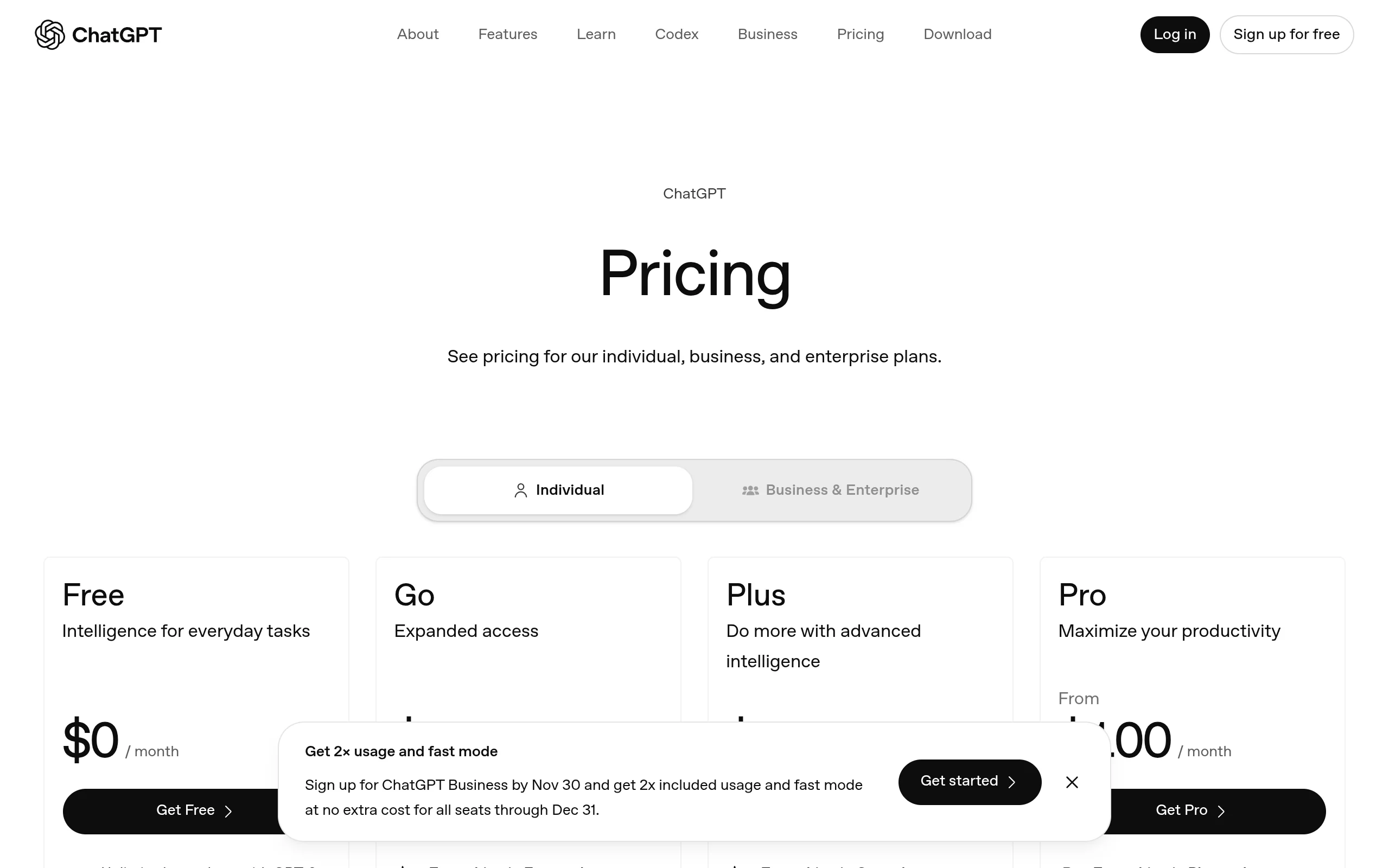
ChatGPT Plus is the outside-the-editor tool in this list. Developers use it for debugging, architecture questions, code explanation, and documentation drafts. Its pricing is the simplest here: $20 a month, billed monthly.
Plus provides enhanced access to the ChatGPT web app. Benefits include higher model limits than Free, advanced reasoning access for coding and multi-step analysis, faster responses, and expanded features like file uploads, image generation, and Deep Research where available. The pricing page lists expanded Codex usage on Plus, while Free carries limited Codex access.
Two limits belong in the budget. Plus subscriptions may include usage limits such as message caps, especially during high demand, and those limits can vary with system conditions. OpenAI does not support annual billing for Plus, so there is no yearly discount to plan around.
API usage is separate and billed independently. A Plus subscription does not include API credits for your own apps or agents. Shops that build on the OpenAI API should keep that invoice mentally separate from the five Plus seats.
For our test shop, five Plus subscriptions cost $100 a month, which is $1,200 a year. That buys every developer a reasoning partner for the work editors handle badly: reading a stack trace, weighing two designs, or turning a messy module into documentation. It does not replace an in-editor assistant, and it is not priced like one.
The maths: what five tools really cost a five-developer shop
Price each tool at the route our test shop would actually buy. Copilot Business costs $19 per seat a month for five seats, which is $1,140 a year. Cursor Teams Premium seats cost $30 per seat a month, which is $1,800 a year before third-party model credit.
Devin Teams costs a flat $80 a month, which is a $960-a-year floor before credit top-ups. JetBrains AI Pro for organizations costs $20 per user a month, which is $1,200 a year before top-ups. ChatGPT Plus costs $20 a month per person, which is $1,200 a year. Add them together and the five routes cost $6,300 a year.
Nobody needs all five. The lean stack for this shop is Copilot Business plus ChatGPT Plus: $1,140 plus $1,200 is $2,340 a year. Copilot covers completions, chat, and agents in the editor, and Plus covers reasoning and documentation outside it. The lean stack saves $3,960 a year against buying every route.
The upgrades price out cleanly. Copilot Enterprise at $39 per seat a month is $2,340 a year for five seats, a $1,200 step over Business for double the pooled credits. Cursor Super seats at $100 per seat a month are $6,000 a year, a $4,200 step over Premium seats. JetBrains AI Ultimate at $60 per user a month is $3,600 a year, a $2,400 step over AI Pro.
If you want to run these numbers at your own headcount, our free AI Cost Calculator lets you model a software stack before you commit to it. Bring your seat count, your editor mix, and how much agent work your sprints really run. Those three inputs decide more than any feature list.
Five traps that catch small dev shops
First, the legacy-price trap. Cursor’s old Pro plan at $20 a month is not sold to new customers. New buyers start on The X Subscription, where the working tier is Premium at $30 a month. Budget on the ladder you can actually buy.
Second, the third-party model trap. On Cursor’s new plans, Claude and GPT models are not included in the seat price. They bill at API list prices from prepaid credit. A Premium seat plus heavy Claude use costs more than $30 a month.
Third, the floor-price trap. Devin Teams at $80 a month is a credit floor, not a flat rate for unlimited agent work. All usage draws from the shared pool, and busy months mean top-ups. Price Devin as $960 a year plus usage.
Fourth, the credit-expiry trap. Copilot credits pool monthly, Cursor pools reset weekly, and JetBrains quota resets every 30 days. Only purchased top-up credits carry forward, at Devin without expiry and at JetBrains for 12 months. A quiet month banks nothing on the included allowances.
Fifth, the editor trap. JetBrains AI runs inside JetBrains IDEs, and Cursor is its own editor. A shop standardized on VS Code gets no value from a JetBrains AI seat, and a JetBrains shop pays twice if it also buys Cursor seats for the same developers. Match the assistant to the editor your team actually opens.
What to buy first
Buy the editor assistant first. Copilot Business at $19 per seat a month covers unlimited inline suggestions plus a pooled 1,900 credits per user for chat and agents. Start developers on Copilot Free only to learn the workflow, because a shop needs the policy controls and pooled credits Business adds.
Add the reasoning partner second. ChatGPT Plus at $20 a month per person covers debugging, design questions, and documentation with expanded Codex usage. Choose Cursor Teams Premium seats at $30 per seat instead when agent-led editing is the proven bottleneck, and budget third-party model credit as its own line.
Add the specialist third, only when the workload proves it. Devin Teams earns its place when cloud agents should run sessions while developers do other work, priced as a $960-a-year floor plus usage. JetBrains AI Pro at $20 per user a month earns its place when the team already runs JetBrains IDEs. Our guide to the best ai tools for graphic designers covers the adjacent design stack if your shop also ships client graphics.
Pros and cons
GitHub Copilot Business. Pros: $19 per seat a month, unlimited inline suggestions that never spend credits, 1,900 credits per user pooled across the team, and centralized policy control. Cons: chat and agent work meter against credits, overage costs $0.01 per credit, and the flex allotment can change.
Cursor. Pros: agent-first editing with cloud agents and code review on Premium, a free plan to learn on, and Teams seats from $30 per seat a month. Cons: the weekly pool thins after heavy days, third-party models bill separately at API list prices, and the old $20 Pro plan is closed to new customers.
Devin. Pros: a flat $80-a-month Teams floor, shared credits that roll over without expiry, SSO included, and per-member usage tiers for cost control. Cons: the floor is not the bill, five developers drain one pool fast, and sessions pause when credits run dry.
JetBrains AI Pro. Pros: $20 per user a month for organizations, a published credit value of $1 per credit, top-ups valid for 12 months, and AI Pro included with All Products Pack. Cons: it only works inside JetBrains IDEs, quota resets every 30 days, and heavy agent use needs paid top-ups.
ChatGPT Plus. Pros: $20 a month billed monthly, advanced reasoning for debugging and design work, expanded Codex usage, and no annual commitment. Cons: usage limits can tighten during high demand, API usage is billed separately, and it does not complete code inside your editor.
Our verdict
For most small dev shops, the best ai tools for software developers start with two subscriptions. Copilot Business at $1,140 a year for five seats plus ChatGPT Plus at $1,200 a year costs $2,340 a year and covers completions, editor chat, agents, debugging, and documentation. That is the stack we would buy first.
Cursor is the agent-editor alternative. Teams Premium seats at $1,800 a year suit shops whose bottleneck is multi-file agent editing, with third-party model credit budgeted on top. Devin Teams suits shops that want cloud agents running in parallel, priced honestly as a $960 floor plus usage. JetBrains AI Pro at $1,200 a year is the right seat only for a team already standardized on JetBrains IDEs.
The full five-tool stack at $6,300 a year is a showroom, not a shopping list. Three of the tools write code in or near the editor, and every one of them meters agent work somehow. Pick one editor assistant, add one reasoning partner, set spending limits before the first sprint, and let the saved $3,960 a year fund developer time instead.
Frequently asked questions
What is the cheapest AI stack for a small dev shop?
Copilot Business plus ChatGPT Plus is cheapest for the stated shop: $1,140 a year plus $1,200 a year is $2,340 a year for five developers. Copilot covers unlimited inline suggestions with pooled credits, and Plus covers reasoning, debugging, and documentation outside the editor.
Can new customers still buy Cursor Pro for $20 a month?
No. Cursor lists Pro at $20 a month as a legacy plan kept for existing subscribers. New customers start on The X Subscription, where Plus costs $8 a month and Premium costs $30 a month with four times the Plus usage pool.
Is Devin Teams really only $80 a month?
The $80 a month is a floor, not unlimited usage. Devin charges Teams as prepaid on-demand credits, adds $80 to the shared pool monthly, and every member draws from that pool. Busy teams top up credits, so budget $960 a year plus the usage your sprints burn.
Do AI credits roll over if developers do not use them?
Mostly no. Copilot credits pool monthly, Cursor pools reset weekly, and JetBrains quota resets every 30 days. Purchased top-ups are the exception: Devin credits roll over without expiry, and JetBrains top-up credits stay valid for 12 months.
Is JetBrains AI Pro worth it for a five-developer shop?
Yes, when the team already runs JetBrains IDEs. Organization AI Pro costs $20 per user a month with 20 credits per 30 days, and one credit equals $1 of AI use. A VS Code shop should price Copilot Business instead, because JetBrains AI buys no editor.
Sources
Prices and terms were checked on the official pages on 27 November 2026: GitHub Docs Copilot plans page (docs.github.com), Cursor pricing and plans help pages (cursor.com), Devin pricing page and self-serve plans documentation (devin.ai and docs.devin.ai), JetBrains AI store and plans documentation (jetbrains.com), and the ChatGPT pricing page with the OpenAI Help Center Plus article (chatgpt.com and help.openai.com). Cursor prices exclude tax, and Devin Teams is priced as an $80-a-month credit floor before usage top-ups.
Price note — updated 27 November 2026: Prices in this post were checked on 27 November 2026. When you are reading this, the price may be lower or higher, and plan limits such as AI credits may have changed. Check the official pricing page before you buy.
Pros
- GitHub Copilot Business: $19 per seat a month; unlimited inline suggestions that never spend credits; 1,900 credits per user pooled across the team; centralized policy control
- Cursor: agent-first editing with cloud agents and code review on Premium; a free plan to learn on; Teams seats from $30 per seat a month
- Devin: a flat $80-a-month Teams floor; shared credits that roll over without expiry; SSO included; per-member usage tiers for cost control
- JetBrains AI Pro: $20 per user a month for organizations; a published credit value of $1 per credit; top-ups valid for 12 months; AI Pro included with All Products Pack
- ChatGPT Plus: $20 a month billed monthly; advanced reasoning for debugging and design work; expanded Codex usage; no annual commitment
Cons
- GitHub Copilot Business: chat and agent work meter against credits; overage costs $0.01 per credit; the flex allotment can change
- Cursor: the weekly pool thins after heavy days; third-party models bill separately at API list prices; the old $20 Pro plan is closed to new customers
- Devin: the floor is not the bill; five developers drain one pool fast; sessions pause when credits run dry
- JetBrains AI Pro: it only works inside JetBrains IDEs; quota resets every 30 days; heavy agent use needs paid top-ups
- ChatGPT Plus: usage limits can tighten during high demand; API usage is billed separately; it does not complete code inside your editor
For most small dev shops, the best ai tools for software developers start with two subscriptions. Copilot Business at $1,140 a year for five seats plus ChatGPT Plus at $1,200 a year costs $2,340 a year and covers completions, editor chat, agents, debugging, and documentation. That is the stack we would buy first.Cursor is the agent-editor alternative. Teams Premium seats at $1,800 a year suit shops whose bottleneck is multi-file agent editing, with third-party model credit budgeted on top. Devin Teams suits shops that want cloud agents running in parallel, priced honestly as a $960 floor plus usage. JetBrains AI Pro at $1,200 a year is the right seat only for a team already standardized on JetBrains IDEs.The full five-tool stack at $6,300 a year is a showroom, not a shopping list. Three of the tools write code in or near the editor, and every one of them meters agent work somehow. Pick one editor assistant, add one reasoning partner, set spending limits before the first sprint, and let the saved $3,960 a year fund developer time instead.