
For a solo nutritionist with 20 active clients and 8 new clients a month, start with NutriAdmin Popular at about $500 a year billed yearly for client records, questionnaires, and auto-generated meal plans, add Cronometer Pro at $64.99 a month ($780 a year at 20 clients) for verified food-diary review, and add Canva Pro at $144 a year for handouts and posts. That lean stack costs $1,424 a year. Practice Better Professional with its Nutrition Planning add-on costs $1,008 a year, and Healthie's AI charting needs Plus plus a $35 monthly add-on, $1,800 a year in total.
A nutritionist rarely loses money in the session. The leak starts around it: the meal plan rebuilt from scratch at 9pm, the food diary nobody reviewed because the week filled up, the follow-up note still sitting in a notebook while the next client waits.
That is the work the best ai tools for nutritionists are meant to absorb. The honest version is narrower than the badges suggest. One platform runs scheduling, telehealth, charting, and billing, with meal planning sold as an add-on. One is a HIPAA-compliant EHR whose AI charting sits on its higher plans. One prices by new clients per month and generates meal plans automatically on its middle tier. One tracks client food diaries against verified nutrient data, with no AI named on its professional FAQ. One designs the handouts and social posts that fill the diary in the first place.
We compared five tools for the same solo practice and checked every price on the vendor’s own page on 27 November 2026. No roundup prices, and no tool here pays us anything. Where a vendor sells the AI as an add-on, prices by client count, or prints no figure at all, we say so instead of filling the gap with a guess.
Quick Answer
For a solo nutritionist with 20 active clients and 8 new clients a month, start with NutriAdmin Popular at about $500 a year billed yearly for client records, questionnaires, and auto-generated meal plans, add Cronometer Pro at $64.99 a month ($780 a year at 20 clients) for verified food-diary review, and add Canva Pro at $144 a year for handouts and posts. That lean stack costs $1,424 a year. Practice Better Professional with its Nutrition Planning add-on costs $1,008 a year, and Healthie’s AI charting needs Plus plus a $35 monthly add-on, $1,800 a year in total.
In this article
- How we compared the best ai tools for nutritionists
- The five tools at a glance
- Practice Better: the full practice platform, meal plans extra
- Healthie: the EHR with AI charting on higher plans
- NutriAdmin: meal plans priced by new clients
- Cronometer Pro: verified diaries, priced per client seat
- Canva: handouts and posts that fill the diary
- The maths: what five tools really cost a solo practice
- Five traps that catch nutritionists
- What to buy first
- Pros and cons
- Our verdict
- Frequently asked questions
How we compared the best ai tools for nutritionists
Every price in this guide is for the same imaginary practice: one solo nutritionist or dietitian, 20 active clients, and 8 new clients joining each month. That is 96 new clients a year, each needing an intake, a plan, and follow-up reviews. Where a vendor charges per client, per new client, or per seat, we run that same workload through the formula.
We judged each tool on five things: year-one cost for this practice; whether the AI is real and which plan or add-on unlocks it; whether scheduling, charting, meal plans, and billing live in one system; how price moves when the client list grows; and which fees or limits stay unprinted.
One honesty note before the numbers. Three of these five tools do the same core job. Practice Better, Healthie, and NutriAdmin are all practice platforms: client records, scheduling, a portal, and billing in one login. You would run exactly one of them. Cronometer Pro sits beside the platform as the diary layer, and Canva sits beside both as the design layer. Buying all five means paying for three practice systems to hold the same client list.
The AI labels also vary in honesty. Practice Better sells an AI Charting Assistant and a Nutrition Planning add-on on top of its plans. Healthie sells AI Charting as an add-on on Plus and above. NutriAdmin includes auto-generated meal plans from its Popular plan and sells AI recipes as an add-on. Cronometer’s professional FAQ names no AI assistant at all. We price each tool for the job it actually does, not the badge on the homepage.
Client privacy runs under every price here. A food diary holds health detail a client would never post publicly. Before any tool stores it, the client should know where it lives, who can see it, and how to get it deleted. We flag each tool’s compliance claims where the vendor prints them.
The five tools at a glance
| Tool | Best for | Starting price | Free plan or trial | Year-one cost for this practice |
|---|---|---|---|---|
| Practice Better | Scheduling, telehealth, charting, and billing in one platform | Free Sprout plan; Starter $25 a month billed annually | Free Sprout plan; 14-day trials | Professional plus Nutrition Planning $1,008 a year |
| Healthie | HIPAA-compliant EHR with insurance billing and AI charting | Essentials $45 a month billed annually | 14-day trial | Essentials $540 a year; Plus with AI Charting $1,800 a year |
| NutriAdmin | Meal plans and client management priced by new clients | Basic $29.16 a month billed yearly | 14-day trial; free starter plan | Popular about $500 a year |
| Cronometer Pro | Client food diaries checked against verified nutrient data | $39.99 a month for up to 10 clients | 30-day trial | $780 a year at 20 clients |
| Canva | Handouts, meal-plan documents, and social posts | Free; Pro US$144 a year | Free plan | Pro $144 a year |
The table hides the two numbers that decide most real bills. The first is the gate: Practice Better’s meal planning is an add-on, Healthie’s AI charting needs Plus, and NutriAdmin’s auto-generated meal plans start on Popular. The second is overlap: three of these tools hold the same client records, so the saving comes from choosing one platform well, not from stacking all three.
Practice Better: the full practice platform, meal plans extra
Practice Better is practice management and client engagement software for health and wellness practitioners. For a nutritionist, the chain is familiar: a client books through a public page, completes intake forms, meets by telehealth video, receives a protocol and meal plan, and pays an invoice, all inside one portal. Food and lifestyle journals, barcode scanning, and nutrient goals sit in the same record.
The pricing page splits the decision by client count. Sprout is free forever for up to 3 clients, with 100 MB of storage. Starter costs $35 a month billed monthly, or $25 a month billed annually, for up to 10 active clients and 1 GB of storage, adding one-on-one telehealth, unlimited invoices, and a public booking page. Our practice carries 20 active clients, so Starter’s 10-client ceiling ends the comparison before features do.
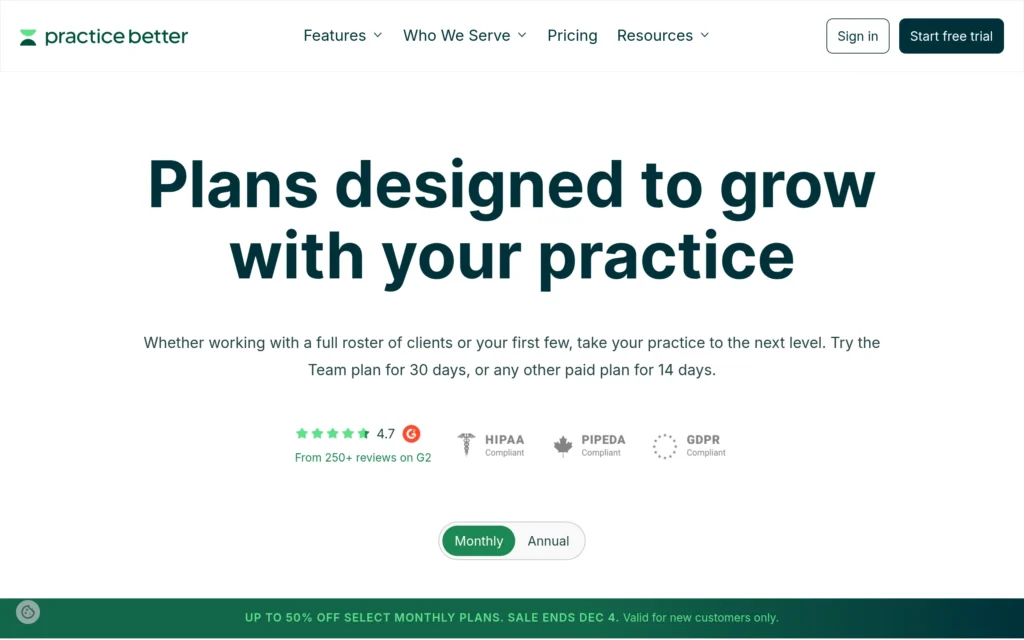
Professional is the tier our practice actually needs. It costs $69 a month for up to 300 active clients and 5 GB of storage, adding fixed-date programs and courses, client protocols, PDF branding, deposits and payment plans, and integrations including That Clean Life for meal planning and Cronometer for food data. Plus costs $99 a month with unlimited clients and storage, all program types, 750 included SMS reminders a month, and 150 included fax pages. Team costs $155 a month for two practitioners, with additional practitioners at $50 a month each. Paid plans carry a 14-day free trial, and Team carries 30 days.
The meal-planning gate is the number to watch. Practice Better sells Nutrition Planning as an add-on at $15 a month per seat, available on all paid plans, for building client meal plans from curated recipes. For our practice, Professional plus Nutrition Planning costs $84 a month, or $1,008 a year. That is $4.20 per active client per month across 20 clients. A nutritionist who budgets on the $69 headline and discovers the add-on later has underpriced the plan by $180 a year.
On AI, the same honesty applies. The AI Charting Assistant, covering AI dictation and AI summaries for session notes, is listed as an add-on with tiered monthly pricing, and the pricing comparison we checked prints no dollar figure for those tiers. Treat the AI note cost as unconfirmed until you see it inside a trial account. The platform underneath is complete; the AI price is the part the vendor has not printed.
Practice Better’s limit is the add-on stack. SMS reminders and fax pages on Professional need purchased credits, and e-prescribing carries monthly and onboarding fees. None of that makes the platform poor value. The $69 headline is a floor; price the whole stack in the trial.
Healthie: the EHR with AI charting on higher plans
Healthie is a HIPAA-compliant EHR and practice platform built for health and wellness providers, dietitians included. The chain runs deeper on the clinical side: scheduling, intake forms, charting, telehealth, a client portal, payments, and insurance paperwork such as CMS 1500 forms, with client journaling and nutrient tracking in the same chart. For a dietitian who bills insurance, that depth is the product.
Essentials is the entry tier, and it fits our practice on day one. It costs $49.99 a month billed monthly, or $45 a month billed annually, for up to 250 active clients. That is $540 a year on annual billing, or $2.25 per active client per month. Essentials includes scheduling, payment processing, charting, telehealth, the client portal, SMS appointment reminders, CMS 1500 creation, and free outbound fax, with a dedicated inbound e-fax line as a $9.99 monthly add-on. A 14-day trial covers the plans.
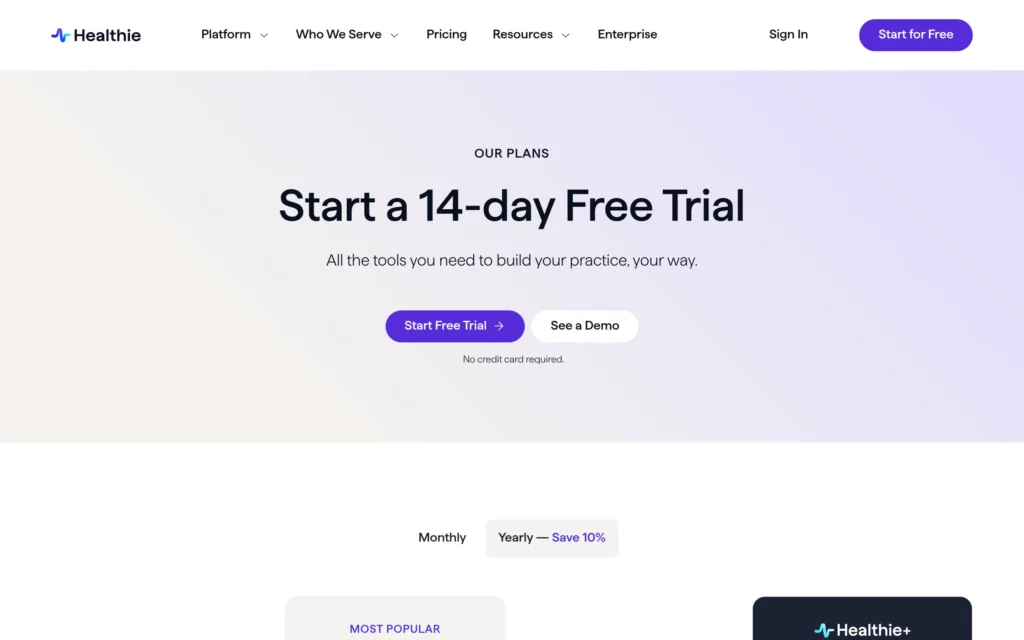
Plus is where the AI lives. Plus costs $129.99 a month billed monthly, or $115 a month billed annually, with unlimited clients, group telehealth, online programs, and a dedicated e-fax line. Healthie’s AI Charting suite, covering AI Scribe note drafting, encounter summaries, scribe tasks, and instant transcripts, is an add-on available on Plus and above at $35 a month, including 40 hours of AI Scribe time, with a 7-day free trial. Plus with AI Charting therefore costs $1,800 a year on annual billing. Essentials cannot buy the AI at any price, because the add-on starts at Plus.
Group costs $149.99 a month, including one provider seat and one support seat, with additional provider licenses at $50 a month each, and annual billing saves 10%. Enterprise uses custom pricing. Group matters only when a second provider joins.
Two cautions belong in the buying decision. First, insurance billing has its own costs: the pricing page lists the ClaimMD integration starting at $30 a month, so a practice billing claims should budget that line separately. Second, the AI Scribe’s 40 included hours are a meter. A practitioner running long sessions all week should test a real week of notes inside the 7-day trial before annual billing locks the figure in.
Healthie’s limit is scope in the other direction. It is an EHR first: charting, claims, and programs are deep, while meal-plan generation is not its headline job. A nutritionist whose pain is meal plans, not claims, is paying EHR prices for a diary-and-plans problem.
NutriAdmin: meal plans priced by new clients
NutriAdmin is practice software built specifically for nutritionists and dietitians. The chain is the nutrition workflow itself: a new client completes questionnaires, the practitioner builds a meal plan with nutrition analysis, the client follows it through a portal, and reminders and appointment slots keep the follow-ups moving. Client records, recipes, reports, and payments sit in one account.
Its pricing meter is different from the other platforms. NutriAdmin charges by new clients per month, not by total client list. Basic costs $34.99 a month billed monthly, or $29.16 a month billed yearly, for 10 new clients a month and one user. Our practice adds 8 new clients a month, so Basic fits the intake volume with room to spare. Past client records stay stored and editable at no extra cost; only new records count against the monthly allowance, and unused allowance does not roll over.
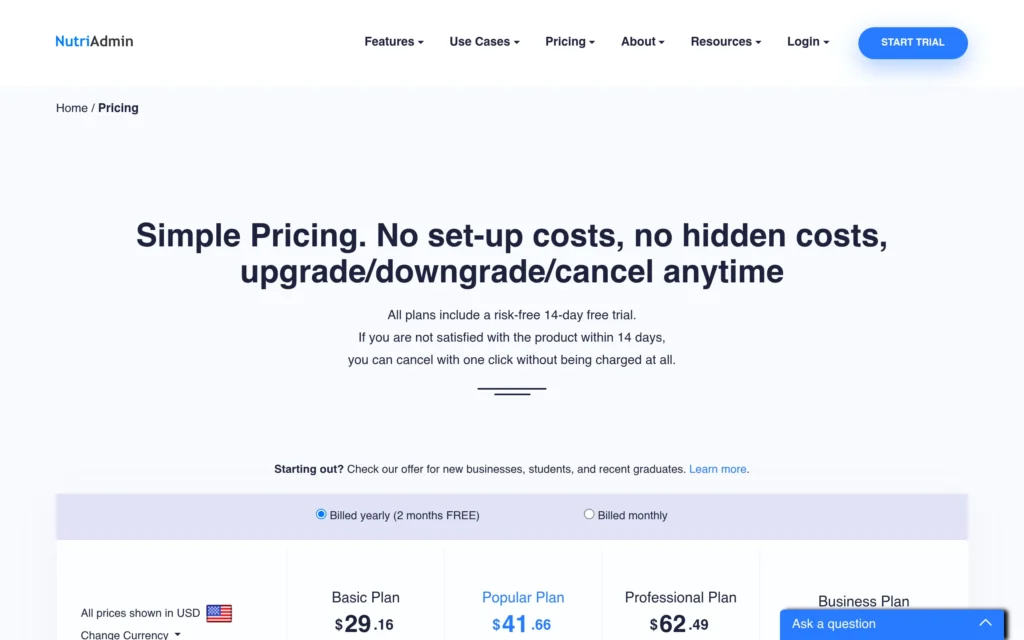
Popular is the tier that unlocks the automation. It costs $49.99 a month billed monthly, or $41.66 a month billed yearly, for 20 new clients a month. Popular adds the recipes database, recipe import from URLs, auto-generated meal plans, and online Stripe payments, with Stripe’s own processing fees applying. At about $500 a year on yearly billing, Popular costs $5.21 per new client across 96 new clients a year. Professional costs $74.99 a month, or $62.49 billed yearly, for 40 new clients a month. The Business plan, for practices with multiple nutritionists, is priced by a calculator on the pricing page rather than a printed figure.
Every plan carries a 14-day free trial, and yearly billing includes two months free. A separate starter page offers a free plan for students and new businesses, limited to 3 clients in total, which suits setup and training rather than a running practice.
The add-ons need the same honesty as the other platforms. HIPAA-compliant telehealth and AI recipes powered by ChatGPT are listed as add-ons, and the pricing page we checked prints no price for either. The auto-generated meal plans on Popular are included in the plan price; the AI recipe generator is not. Confirm both add-on figures inside the trial before building a client offer around them.
NutriAdmin’s limit is the meter itself. A practice whose intake spikes to 25 new clients in a launch month outgrows Popular’s 20 and lands on Professional at about $750 a year. Price the plan at your busiest intake month, not your average one, and the meter stops being a surprise.
Cronometer Pro: verified diaries, priced per client seat
Cronometer Pro is the practitioner tier of the Cronometer nutrition tracker. The chain is review, not planning: clients log food in the app, and the practitioner sees the diary, nutrient reports, and charts in a professional web workspace. Cronometer sources its food data from more than 10 verified sources, including the USDA, which is the reason dietitians use it to check whether a client’s intake actually meets the plan.
The pricing is a seat formula. Pro costs $39.99 a month for up to 10 clients, and each subsequent client costs $2.50 a month. Billing is dynamic, so the monthly figure follows the client count, and any client on your list, including pending invitations, counts toward billable space. At 20 clients, Pro costs $64.99 a month, or $780 a year. That is $3.25 per active client per month. A free 30-day trial is included on sign-up.
Clients do not pay for their side. While a client is listed on your Pro account, they receive free access to Cronometer Gold, and if you remove them their data stays intact on their personal account while the app reverts to the free version. Annual rates exist, but Cronometer’s FAQ directs organisations to contact the company for them, so no published annual figure exists to budget on.
On AI, honesty matters most here. Cronometer’s professional FAQ names no AI assistant. Nothing in Pro drafts your notes, generates a meal plan, or writes a client message. What $780 a year buys is trustworthy intake data and review tools, which protect the quality of advice you have already sold. That is a fair price for that job. It is the wrong purchase if the buying reason was AI meal planning, because that job belongs to NutriAdmin or Practice Better in this comparison.
Cronometer’s limit is scope. It does not schedule appointments, send invoices, or hold your full client record, though its API connects with platforms including Practice Better. Pair it with one practice platform, or accept that the business side of the practice lives somewhere else.
Canva: handouts and posts that fill the diary
Canva is a design tool, and in a nutrition practice it does the quiet marketing work: meal-plan documents clients actually read, handouts for common questions, workshop slides, and the social posts that bring the next client in. Its AI features help draft and resize that material, and its template library means a handout starts from a designed page instead of a blank one.
The free plan costs US$0 and covers basic design work for one person. Pro costs US$18 a month billed monthly, or US$144 a year billed yearly, for one person, unlocking premium templates and stock, brand kits, background removal and other AI tools, and more storage. Business costs US$25 a month per person billed monthly, or US$250 a year per person billed yearly, adding collaboration and team admin tools. Prices exclude applicable tax, and the pricing page we checked carried a 50% discount on the first three months of monthly Pro and Business plans. Our maths uses the printed list prices, because a three-month promo is not a yearly budget.
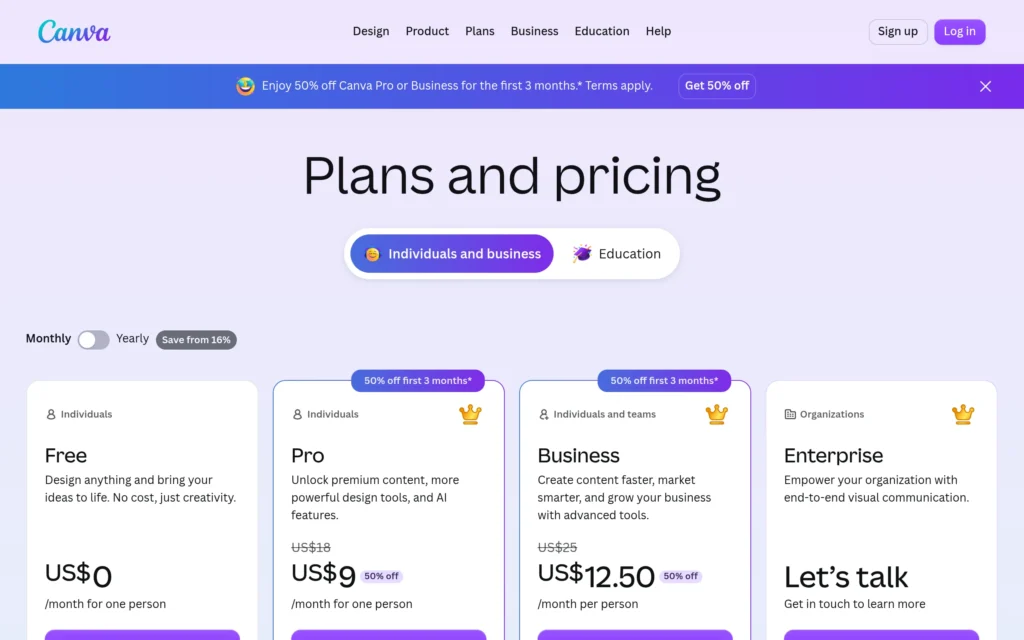
For our solo practice, Pro at $144 a year is the design layer, and it is the cheapest line in this comparison. Spread across 96 new clients a year, it costs $1.50 per new client. The question is never whether Canva is expensive. The question is whether the handouts and posts it produces bring in clients worth more than $144.
Two cautions apply. First, Canva is not a clinical tool: it holds no client records, checks no nutrient data, and should never store identifiable client health detail in a design file. Second, AI use is metered by plan, with heavier AI use sitting on higher tiers and an optional AI add-on sold separately. Check current allowances before assuming Pro covers heavy AI production.
Canva’s limit is scope. It makes the practice look professional and keeps content flowing, but the advice, the records, and the billing all live in the platform beside it. Price it as marketing, and it earns its place quickly.
The maths: what five tools really cost a solo practice
Start with the platform, because every practice needs exactly one. NutriAdmin Popular costs about $500 a year and covers records, questionnaires, auto-generated meal plans, and payments at 8 new clients a month. Practice Better Professional with Nutrition Planning costs $1,008 a year and covers scheduling, telehealth, charting, billing, and meal plans at 20 active clients. Healthie Essentials costs $540 a year for the EHR core, while Healthie Plus with AI Charting costs $1,800 a year. Those three overlap on client records, so buying two means paying twice to hold the same list.
Per active client per month, across 20 clients, the platforms run $2.08 for NutriAdmin Popular, $4.20 for Practice Better Professional with meal planning, $2.25 for Healthie Essentials, and $7.50 for Healthie Plus with AI Charting. Cronometer Pro runs $3.25 per client at 20 seats, and Canva Pro runs $0.60 per client. The per-client view is the honest one for a solo practice, because software is a fixed cost spread over however many clients actually stay.
Now add the gates the headlines hide. Practice Better Starter at $300 a year billed annually looks like the platform price until its 10-client ceiling meets a 20-client practice. Healthie Essentials at $540 looks like the AI price until you read that AI Charting needs Plus plus $35 a month. NutriAdmin Basic at about $350 a year looks like the meal-plan price until auto-generated plans turn out to start on Popular.
The stack test shows the real saving. Buying Practice Better Professional with Nutrition Planning at $1,008, Healthie Plus with AI Charting at $1,800, NutriAdmin Popular at $500, Cronometer Pro at $780, and Canva Pro at $144 together costs $4,232 a year. Running NutriAdmin Popular, Cronometer Pro, and Canva Pro instead costs $1,424 a year, and covers records, meal plans, diary review, and design in three logins. The difference is $2,808 a year, which is the price of two extra practice platforms holding the same clients. Add Practice Better or Healthie only when telehealth depth, programs, or insurance billing outgrow the lean stack.
Growth changes the order as seat prices, intake meters, and client ceilings move. Price tools at next year’s workload.
Five traps that catch nutritionists
First, the add-on wearing the plan’s clothes. Practice Better’s meal planning costs $15 a month per seat on top of the plan, and its AI Charting Assistant is a tiered add-on with no printed figure. The feature in the headline and the price in the headline are rarely the same line. Find the add-on before you compare prices.
Second, the AI that needs the higher plan. Healthie Essentials at $45 a month billed annually is a complete EHR, but AI Charting is available only on Plus and above, at $35 a month with 40 included Scribe hours. Budget on the cheapest setup that includes the AI you are buying for, not the cheapest plan on the page.
Third, the meter behind the plan name. NutriAdmin charges by new clients per month, and unused allowance does not roll over. A quiet month wastes allowance you paid for, and a launch month pushes you into the next tier. Count last quarter’s intake honestly, including the spike, before choosing between Basic, Popular, and Professional.
Fourth, the seat formula. Cronometer Pro starts at $39.99 a month, but every client past 10 adds $2.50, and pending invitations count toward billable space. At 20 clients the real figure is $64.99 a month. Clear stale invitations and departed clients from the list, because the meter charges for names, not activity.
Fifth, the privacy gap. Food diaries and session notes hold health detail, and each platform draws its compliance line differently. Healthie describes itself as HIPAA-compliant, NutriAdmin describes HIPAA-compliant cloud storage with telehealth as an add-on, and Practice Better lists HIPAA, PIPEDA, and GDPR compliance across its plans. Settle consent and data terms in your client agreement before the first diary is shared, and keep identifiable client detail out of design tools entirely.
What to buy first
Buy one practice platform first, and let your intake decide the rest. A solo nutritionist whose pain is meal plans and intake paperwork should start with NutriAdmin’s 14-day trial, run two real new clients through Popular, and watch whether the auto-generated plans survive contact with real dietary restrictions. Budget on about $500 a year, or about $750 if your busiest month passes 20 new clients.
A practitioner whose pain is charting time should trial Healthie Plus with AI Charting through a real week of sessions, and check the 40 Scribe hours against actual session length. A practitioner who needs telehealth, programs, and billing depth in one system should trial Practice Better Professional, pricing the Nutrition Planning add-on into the decision from day one. Our guide to ai tools for therapists in private practice covers the adjacent case where session notes, rather than meal plans, decide the platform.
Add Cronometer Pro when diary review becomes weekly work; at $780 a year for 20 clients it is a data-quality decision, not a platform decision. Add Canva Pro when handouts and posts start bringing clients in. Whichever platform wins your trial, the discipline is the same: one system for client records, priced at next year’s workload, with consent settled before the first diary is shared.
Our free AI Cost Calculator takes the prices above and turns them into a monthly and yearly figure for your own client count, intake rate, and add-ons, so you can test the meters and plan gates before any trial starts. Run your real numbers there, then trial the cheapest setup that survives your busiest month.
Pros and cons
Practice Better. Pros: scheduling, telehealth, charting, billing, journals, and a client portal in one platform; a free Sprout plan for testing; Professional covers 300 clients with programs and PDF branding; integrations include That Clean Life and Cronometer. Cons: Starter stops at 10 clients; meal planning costs $15 a month per seat extra; the AI Charting Assistant’s tiered price is not printed; SMS and fax on Professional need purchased credits.
Healthie. Pros: HIPAA-compliant EHR with scheduling, charting, telehealth, and insurance paperwork; Essentials covers 250 clients for $540 a year billed annually; AI Charting drafts notes, summaries, and tasks inside the chart; annual billing saves 10%. Cons: AI Charting needs Plus plus $35 a month, $1,800 a year in total; claim submission carries its own integration cost; no free plan; meal-plan generation is not its headline job.
NutriAdmin. Pros: built for nutritionists, with questionnaires, meal plans, nutrition analysis, and a client portal; Popular includes auto-generated meal plans and a recipes database for about $500 a year; yearly billing includes two months free; a 14-day trial on every plan. Cons: pricing meters new clients per month and unused allowance does not roll over; AI recipes and HIPAA telehealth are add-ons with no printed price; one user on the solo plans; a launch month can force the next tier.
Cronometer Pro. Pros: food data from more than 10 verified sources including the USDA; clients receive free Gold access while listed; dynamic billing follows client count; a 30-day trial; API links with platforms including Practice Better. Cons: every client past 10 adds $2.50 a month, and pending invitations count; no published annual rate; the professional FAQ names no AI assistant; no scheduling, invoicing, or meal-plan generation.
Canva. Pros: a free plan for basic design; Pro at $144 a year unlocks premium templates, brand kits, and AI design tools; handouts, documents, and social posts from one library; the cheapest line in this comparison. Cons: not a clinical tool and no place for identifiable client detail; AI use is metered by plan; Business pricing is per person; prices exclude tax and promo discounts are temporary.
Our verdict
NutriAdmin Popular is the best first buy for a solo nutritionist whose week is intake forms and meal plans: about $500 a year for records, questionnaires, auto-generated meal plans, and payments at 8 new clients a month. Add Cronometer Pro at $780 a year when diary review becomes weekly work, and Canva Pro at $144 a year when handouts and posts start filling the diary. That three-tool stack costs $1,424 a year and leaves no job duplicated.
Practice Better Professional with Nutrition Planning earns its $1,008 a year when telehealth, programs, and billing depth matter more than meal-plan automation. Healthie earns its $1,800 a year with AI Charting when insurance billing and AI-drafted notes are the deciding work. Whichever platform wins your trial, buy one, price the add-ons before the headline, and settle consent before the first diary is shared.
Frequently asked questions
What is the cheapest AI tool for a solo nutritionist?
NutriAdmin Basic costs $29.16 a month billed yearly for 10 new clients a month, and its Popular plan at $41.66 a month billed yearly adds auto-generated meal plans. Practice Better’s free Sprout plan covers 3 clients. Canva’s free plan covers basic design, with Pro at US$144 a year. Cronometer Pro starts at $39.99 a month for up to 10 clients.
Does Practice Better include meal planning in its plans?
Meal planning is an add-on. Practice Better sells Nutrition Planning at $15 a month per seat on all paid plans, for building client meal plans from curated recipes. Professional costs $69 a month for up to 300 clients, so Professional with meal planning costs $84 a month, or $1,008 a year. Its AI Charting Assistant is also an add-on, with tiered pricing and no printed figure.
Can Healthie Essentials use AI Charting?
No. Healthie’s AI Charting suite is available on Plus plans and above as an add-on at $35 a month, including 40 hours of AI Scribe time, with a 7-day free trial. Essentials costs $45 a month billed annually for up to 250 clients. Plus costs $115 a month billed annually, so Plus with AI Charting costs $1,800 a year.
How does NutriAdmin pricing work?
NutriAdmin charges by new clients per month. Basic covers 10 new clients a month at $29.16 a month billed yearly, Popular covers 20 at $41.66, and Professional covers 40 at $62.49. Past records stay editable at no extra cost, and unused new-client allowance does not roll over. Every plan includes a 14-day free trial.
How much does Cronometer Pro cost at 20 clients?
Cronometer Pro costs $39.99 a month for up to 10 clients, plus $2.50 a month for each additional client. At 20 clients that is $64.99 a month, or $780 a year. Clients receive free Gold access while listed on your account, pending invitations count toward billable space, and a 30-day trial is included.
Price note — updated 27 November 2026: Prices in this post were checked on 27 November 2026. When you are reading this, the price may be lower or higher, plans may have changed, and trial terms may differ. Check the official pricing page before you buy, and confirm any add-on price or unprinted fee with the vendor in writing.
Sources
- Practice Better pricing comparison: https://help.practicebetter.io/hc/en-us/articles/41860197371291-Practice-Better-Pricing-Plans-and-Features-Comparison
- Healthie pricing: https://www.gethealthie.com/healthie-pricing
- Healthie AI Charting: https://help.gethealthie.com/article/1397-ai-charting-by-healthie
- NutriAdmin pricing: https://nutriadmin.com/pricing
- Cronometer Pro FAQ: https://cronometer.com/blog/cronometer-pro-faq/
- Canva pricing: https://www.canva.com/pricing
Pros
- Practice Better: scheduling, telehealth, charting, billing, journals, and a client portal in one platform; a free Sprout plan for testing; Professional covers 300 clients with programs and PDF branding; integrations include That Clean Life and Cronometer.
- Healthie: HIPAA-compliant EHR with scheduling, charting, telehealth, and insurance paperwork; Essentials covers 250 clients for $540 a year billed annually; AI Charting drafts notes, summaries, and tasks inside the chart; annual billing saves 10%.
- NutriAdmin: built for nutritionists, with questionnaires, meal plans, nutrition analysis, and a client portal; Popular includes auto-generated meal plans and a recipes database for about $500 a year; yearly billing includes two months free; a 14-day trial on every plan.
- Cronometer Pro: food data from more than 10 verified sources including the USDA; clients receive free Gold access while listed; dynamic billing follows client count; a 30-day trial; API links with platforms including Practice Better.
- Canva: a free plan for basic design; Pro at $144 a year unlocks premium templates, brand kits, and AI design tools; handouts, documents, and social posts from one library; the cheapest line in this comparison.
Cons
- Practice Better: Starter stops at 10 clients; meal planning costs $15 a month per seat extra; the AI Charting Assistant's tiered price is not printed; SMS and fax on Professional need purchased credits.
- Healthie: AI Charting needs Plus plus $35 a month, $1,800 a year in total; claim submission carries its own integration cost; no free plan; meal-plan generation is not its headline job.
- NutriAdmin: pricing meters new clients per month and unused allowance does not roll over; AI recipes and HIPAA telehealth are add-ons with no printed price; one user on the solo plans; a launch month can force the next tier.
- Cronometer Pro: every client past 10 adds $2.50 a month, and pending invitations count; no published annual rate; the professional FAQ names no AI assistant; no scheduling, invoicing, or meal-plan generation.
- Canva: not a clinical tool and no place for identifiable client detail; AI use is metered by plan; Business pricing is per person; prices exclude tax and promo discounts are temporary.
NutriAdmin Popular is the best first buy for a solo nutritionist whose week is intake forms and meal plans: about $500 a year for records, questionnaires, auto-generated meal plans, and payments at 8 new clients a month. Add Cronometer Pro at $780 a year when diary review becomes weekly work, and Canva Pro at $144 a year when handouts and posts start filling the diary. That three-tool stack costs $1,424 a year and leaves no job duplicated.Practice Better Professional with Nutrition Planning earns its $1,008 a year when telehealth, programs, and billing depth matter more than meal-plan automation. Healthie earns its $1,800 a year with AI Charting when insurance billing and AI-drafted notes are the deciding work. Whichever platform wins your trial, buy one, price the add-ons before the headline, and settle consent before the first diary is shared.