

For a solo consultant with four active clients and 16 client meetings a month, start with Bonsai Essentials at $228 a year for proposals, contracts, time tracking, and invoicing, add Otter Pro at about $100 a year for meeting notes, and add Perplexity Pro at $200 a year for sourced research. That lean stack costs $528 a year. Notion's full AI needs the Business plan at $240 a year, because the cheaper Plus plan includes only a trial of Notion AI. Harvest Teams starts at $108 a year per seat, but its time tracking overlaps Bonsai's.
A consultant rarely loses money in the meeting. The leak starts around it: the proposal rewritten at midnight, the research tab still open at dawn, the billable hour nobody logged because the call ran long and the notes went into a notebook.
That is the work the best ai tools for consultants are meant to absorb. The honest version is narrower than the badges suggest. One tool puts AI inside your documents and client pages, but only on its Business plan. One records every client meeting and turns it into searchable notes. One tracks time and invoices it, with no AI badge on its pricing page. One runs proposals, contracts, time, and billing in a single account. One answers research questions with sources you can check.
We compared five tools for the same solo consultant and checked every price on the vendor’s own page on 26 November 2026. No roundup prices, and no tool here pays us anything. Where a vendor prints a starting price instead of a final one, or describes a limit without a number, we say so instead of filling the gap with a guess.
Quick Answer
For a solo consultant with four active clients and 16 client meetings a month, start with Bonsai Essentials at $228 a year for proposals, contracts, time tracking, and invoicing, add Otter Pro at about $100 a year for meeting notes, and add Perplexity Pro at $200 a year for sourced research. That lean stack costs $528 a year. Notion’s full AI needs the Business plan at $240 a year, because the cheaper Plus plan includes only a trial of Notion AI. Harvest Teams starts at $108 a year per seat, but its time tracking overlaps Bonsai’s.
In this article
- How we compared the best ai tools for consultants
- The five tools at a glance
- Notion: AI inside your documents, gated to Business
- Otter.ai: meeting notes priced by the minute
- Harvest: time tracking and invoicing, priced from a floor
- Bonsai: proposals to payment in one account
- Perplexity: research answers with sources
- The maths: what five tools really cost a solo consultant
- Five traps that catch consultants
- What to buy first
- Pros and cons
- Our verdict
- Frequently asked questions
How we compared the best ai tools for consultants
Every price in this guide is for the same imaginary practice: one solo consultant, four active clients, and four one-hour meetings per client each month. That is 16 meetings a month, 960 meeting minutes a month, and 192 meetings a year. Where a vendor charges per seat, per minute, or per project, we run that same workload through the formula.
We judged each tool on five things: year-one cost for one seat; whether the AI is real and which plan unlocks it; whether proposals, time, invoices, and client records live in one system; how price moves when a fifth client arrives; and which fees or limits stay unprinted.
One honesty note before the numbers. These five tools do three different jobs. Notion and Perplexity work on knowledge: documents, answers, and research. Otter works on the meeting itself: capture, transcription, and summaries. Harvest and Bonsai run the business side: time, proposals, contracts, and invoices. You would run one business platform, add capture and research where the work demands it, and never pay for two time trackers at once.
The AI labels also vary in honesty. Notion sells an AI agent and AI meeting notes, but its own pricing page limits Free and Plus to a trial of Notion AI. Otter sells AI meeting workflows on every tier, metered by minutes. Perplexity sells cited research, with Pro limits described as average use rather than a printed number. Harvest and Bonsai name no AI assistant on the pricing pages we checked. We price each tool for the job it actually does, not the badge on the homepage.
One more question runs under every price here, because consultants keep asking it: client confidentiality. A meeting transcript holds a client’s strategy, numbers, and internal doubts. Before any notetaker joins a call, the client should know it is there, what it captures, and how to say no. We flag each tool’s controls where the vendor prints them.
The five tools at a glance
| Tool | Best for | Starting price | Free plan or trial | Year-one cost for one seat |
|---|---|---|---|---|
| Notion | Client documents, proposals, and AI drafting in one workspace | Free; Business $20 a seat a month billed yearly | Free plan; Plus includes a trial of Notion AI | Business $240 a year |
| Otter.ai | Meeting transcription, summaries, and searchable notes | Free; Pro $8.33 a user a month billed annually | Free Basic plan | Pro about $100 a year |
| Harvest | Time tracking, project budgets, and invoicing time | Free; Teams starting from $9 a seat a month billed annually | Free plan; 30-day trial | Teams starting from $108 a year |
| Bonsai | Proposals, contracts, time, invoices, and client portal | Basic $9 a user a month billed annually | 7-day free trial | Essentials $228 a year |
| Perplexity | Research questions answered with cited sources | Free; Pro $20 a month or $200 a year | Free plan | Pro $200 a year |
The table hides the two numbers that decide most real bills. The first is the gate: Notion’s AI sits on Business, Bonsai’s invoicing sits on Essentials, and Otter’s minutes sit inside a monthly cap. The second is overlap: Harvest and Bonsai both track time, and Notion and Bonsai both hold client documents, so buying all five means paying twice for the same hour of work. The sections below price both.
Notion: AI inside your documents, gated to Business
Notion is a workspace of pages, databases, and client-facing documents. For a consultant, the chain is familiar: discovery notes become a proposal page, the proposal becomes a project hub, and the project hub holds deliverables, decisions, and the final report. Notion AI sits inside that chain, drafting, summarising, and answering questions across your pages.
The pricing page splits the AI story in two. Free costs $0 per seat a month, and Plus costs $10 per seat a month on yearly billing. Both include only a trial of Notion AI. The page’s own feature table marks the AI credits on Free and Plus as a limited trial. A consultant who buys Plus expecting daily AI drafting has bought a taste, not the tool.
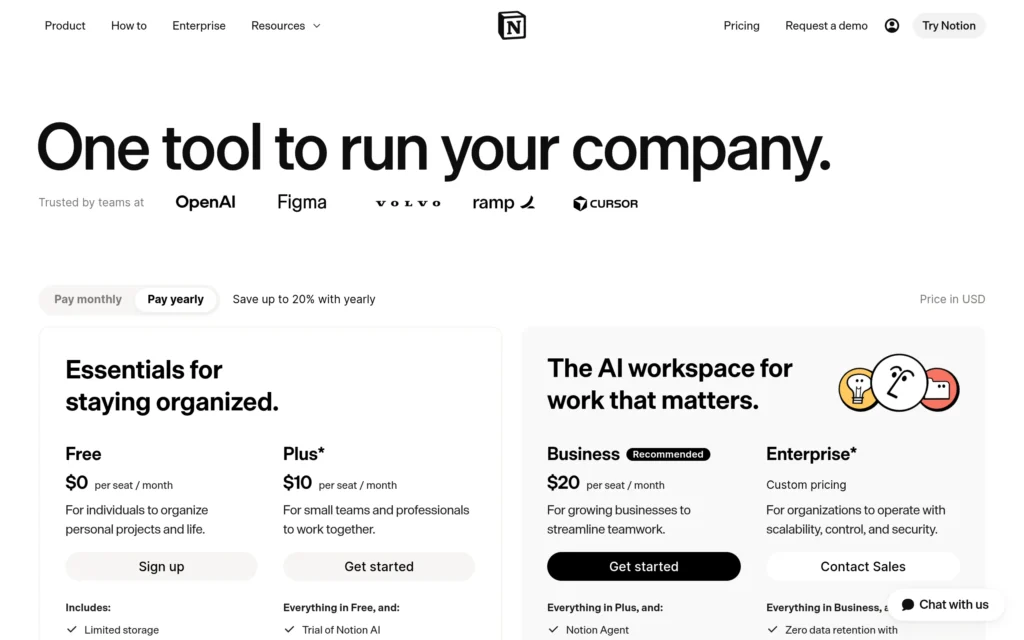
Business is where the AI becomes real. The page lists Business at $20 per seat a month on yearly billing, with Notion Agent included. The feature table gives Business 1,500 standard AI credits and 500 select credits per seat a month. Enterprise uses custom pricing and adds zero data retention with AI providers. For one seat, Business costs $240 a year, or $1.25 per meeting across 192 meetings.
That gate is the whole buying decision. Plus at $120 a year is a fine document tool with larger uploads and longer history than Free. It is not an AI purchase. Business at $240 a year is the AI purchase, and it costs exactly double. Compare Notion’s AI price at $240, not at the $120 figure a quick glance at the Plus card suggests.
On confidentiality, Notion states that it will not use your data to train its models unless you opt in, and that AI subprocessors are contractually barred from training on customer data. Zero data retention sits on Enterprise, not Business. A consultant pasting a client’s internal numbers into a Business workspace should know which retention tier they are on before the first paste.
Notion’s limit is scope. It holds documents and drafts them well, but it does not send a proposal for signature, track billable time against a budget, or invoice a client. Pair it with a business platform, or accept that the money side of the practice lives somewhere else.
Otter.ai: meeting notes priced by the minute
Otter.ai is an AI notetaker for Zoom, Microsoft Teams, and Google Meet calls. For a consultant, the chain is short: the meeting is transcribed live, speakers are identified, and AI Chat lets you question the transcript afterwards. The follow-up email you used to reconstruct from memory starts as a summary you correct instead of a blank page you fill.
The free Basic plan is real, and its limits decide quickly. Otter’s pricing page lists Basic as free, with live transcription, speaker identification, AI Chat within and across meetings, and three lifetime audio or video file imports. Otter’s own plan summaries put Basic at 300 transcription minutes a month. Our consultant runs 960 meeting minutes a month, so Basic covers less than a third of the workload.
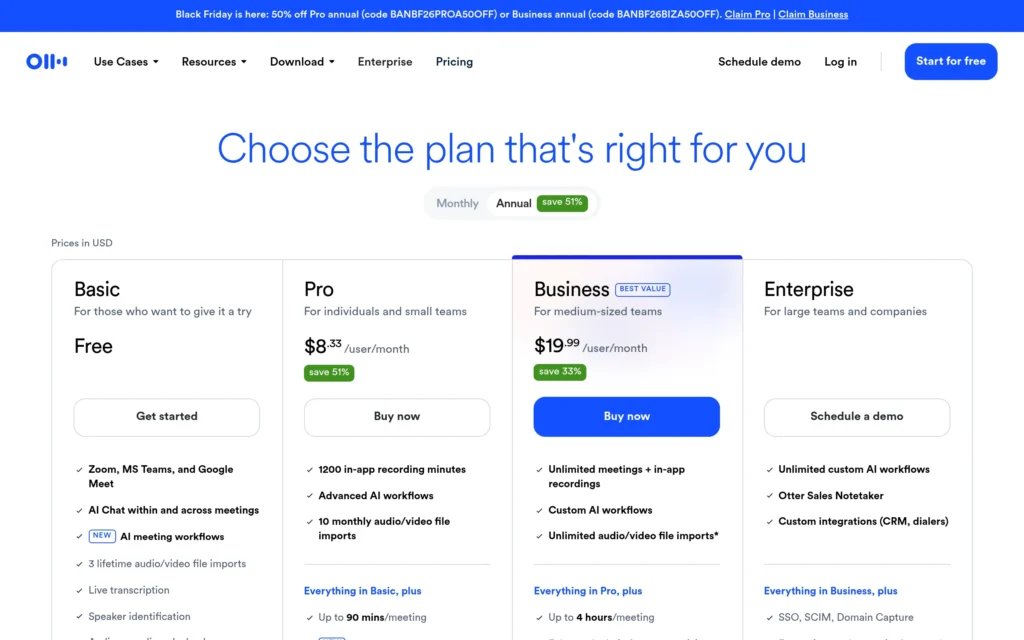
Pro is the tier our consultant actually needs. The pricing page lists Pro at $8.33 per user a month on annual billing, with 1,200 in-app recording minutes, 10 monthly file imports, and meetings up to 90 minutes each. At about $100 a year, Pro costs $0.52 per meeting across 192 meetings. The 960-minute workload fits inside the 1,200-minute cap with room for a long workshop, as long as no single meeting passes 90 minutes.
Business costs $19.99 per user a month on annual billing, with unlimited meetings and in-app recordings, unlimited file imports subject to the page’s footnote, and meetings up to four hours. That is about $240 a year. A consultant running two-hour steering sessions needs Business, because Pro’s 90-minute meeting cap, not its monthly minutes, becomes the binding limit. Enterprise moves to a demo and custom terms, adding SSO and domain capture.
Two cautions belong in the buying decision. First, the pricing page we checked carried a Black Friday banner offering 50% off annual Pro and Business with a code. Our maths uses the printed list prices, because a promo code is not a price you can budget a year on. Second, consent: Otter joins meetings visibly, and your engagement letter should say a notetaker will attend, what it captures, and what happens if a client declines.
Otter’s limit is scope. It captures meetings and makes them searchable, but it does not write proposals, track time, or hold client documents. It is the memory layer, and it earns its place the first week meeting notes stop eating your evenings.
Harvest: time tracking and invoicing, priced from a floor
Harvest tracks time and turns it into invoices. For a consultant billing by the hour or watching a fixed fee against actual hours, the chain is direct: start a timer, assign the time to a client project, and send an invoice built from those entries. Reports show which projects stay inside budget and which quietly eat the margin.
The free plan is generous for one person and tight for our consultant. Harvest lists Free at $0 forever for individual freelancers, with one seat and two projects, plus time tracking, basic reporting, and invoicing. Four active clients means at least four projects, so the free plan’s two-project limit ends the trial before the workflow does.
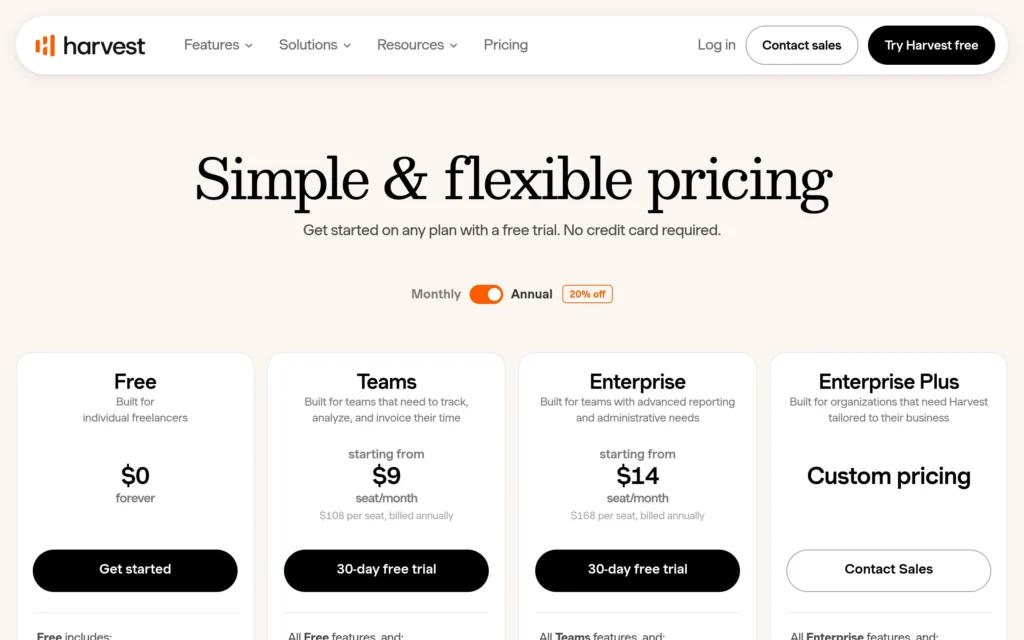
Teams is the first paid tier. The pricing page lists Teams starting from $9 per seat a month, $108 per seat billed annually, with a 30-day free trial and no credit card required. Enterprise starts from $14 per seat a month, $168 billed annually, adding advanced reporting and administrative controls. Enterprise Plus uses custom pricing. For one seat, budget on $108 a year as a floor, or $0.56 per meeting across 192 meetings.
That phrase, starting from, is the most important words on the page. A starting price is a floor, not a quote. Before you build client budgets on Harvest, confirm inside a trial account what your seat, project, and invoicing volume actually cost, and get the renewal figure in writing. Where a vendor prints a floor instead of a final price, treat the missing number as a cost you have not been shown, not a cost of zero.
On AI, honesty matters. Harvest’s pricing page names no AI assistant. Nothing here drafts your proposal, summarises your meeting, or answers a research question. At $108 a year, Harvest buys disciplined time capture and invoicing, which protects revenue a consultant has already earned. That is a fair price for that job. It is the wrong purchase if the buying reason was AI, because that job belongs to Notion, Otter, or Perplexity in this comparison.
Harvest’s limit is overlap. Bonsai, below, also tracks time and invoices it, inside the same account as proposals and contracts. A consultant who buys both pays two subscriptions to record the same hour. Pick one time system and let the other go.
Bonsai: proposals to payment in one account
Bonsai is client and project software built for freelancers, agencies, and consultancies. The chain runs in one login: a lead becomes a proposal, the proposal becomes a contract, the contract becomes a project with tasks and time tracking, and the tracked time becomes an invoice the client pays through a portal. For a solo consultant, that consolidation replaces four separate tools.
The cheapest plan is the trap. Basic costs $9 per user a month billed annually, or $15 billed monthly, with time tracking, task management, a CRM, and unlimited projects and clients. Basic has no invoicing or payments. A consultant who buys Basic to send invoices has bought a time tracker and a project list, and still needs a way to get paid.
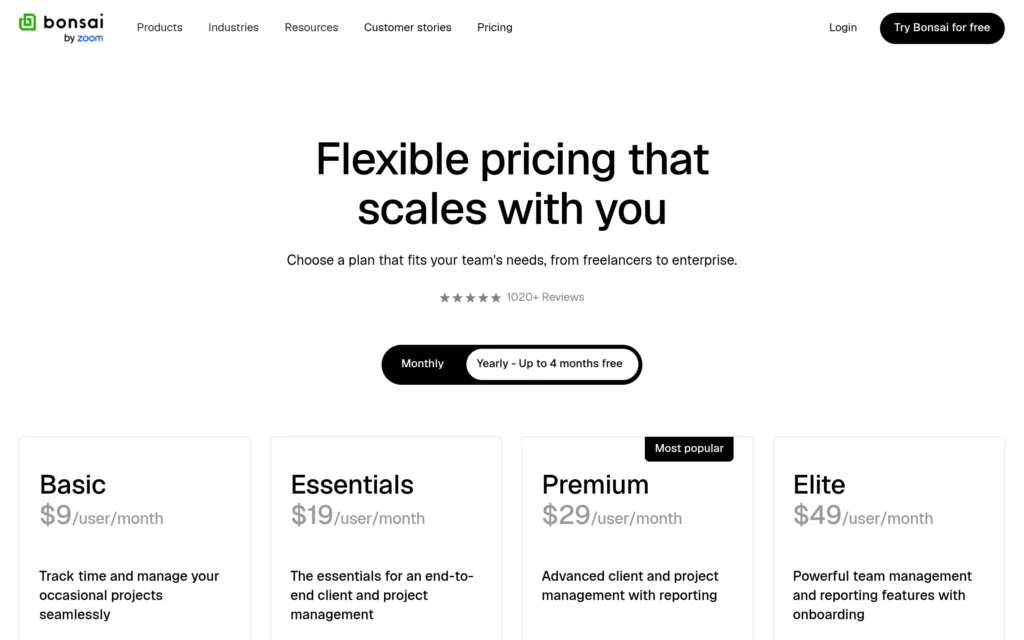
Essentials is the real starting line. It costs $19 per user a month billed annually, or $25 billed monthly, and adds invoices and payments, proposals and contracts, forms, scheduling, a client portal, and expense and income tracking, with 100 GB of storage. At $228 a year on annual billing, Essentials costs $1.19 per meeting across 192 meetings. Premium costs $29 per user a month billed annually, or $39 monthly, adding project insights, workload and Gantt views, a deals pipeline, profit reports, branding removal, and integrations with QuickBooks, Xero, Zapier, Calendly, and Google.
Elite costs $49 per user a month billed annually, or $59 monthly, with custom permissions and timesheet locking, and it requires three users minimum. The smallest Elite account is therefore $1,764 a year, which no solo consultant should budget as a $49 decision. A seven-day free trial gives full access before a plan and card are required. Bonsai states that payment processing fees vary by method and points to its help article for the breakdown, so confirm your card and bank-transfer rates there before you price an engagement.
On AI, the same honesty applies. Bonsai’s pricing page names no AI assistant. Proposals, contracts, and invoices here are templates and workflows, not AI drafting. At $228 a year, Essentials buys the business backbone: the document the client signs, the hours you track, and the invoice that pays you. Pair it with Otter for meeting memory and Perplexity for research, and each tool does one job.
Bonsai’s limit is depth. It is not accounting software, and its QuickBooks and Xero integrations sit on Premium, not Essentials. A consultant whose accountant lives in QuickBooks should price Premium at $348 a year, not Essentials at $228, before comparing Bonsai with anything else.
Perplexity: research answers with sources
Perplexity is an AI answer engine that cites a source for its claims. For a consultant, the chain is research: a market question, a competitor check, or a regulation lookup returns an answer with citations you can open and verify. That checkability is the product. A confident paragraph you cannot trace is worthless in a client deliverable.
The free plan covers casual searching. Perplexity’s help centre lists the free Standard tier with practically unlimited basic searches, a very limited amount of Pro Searches, and basic file uploads. Its comparison table puts free Pro Searches at three a day and Research queries at one a month. A consultant researching daily will feel that ceiling inside the first week.
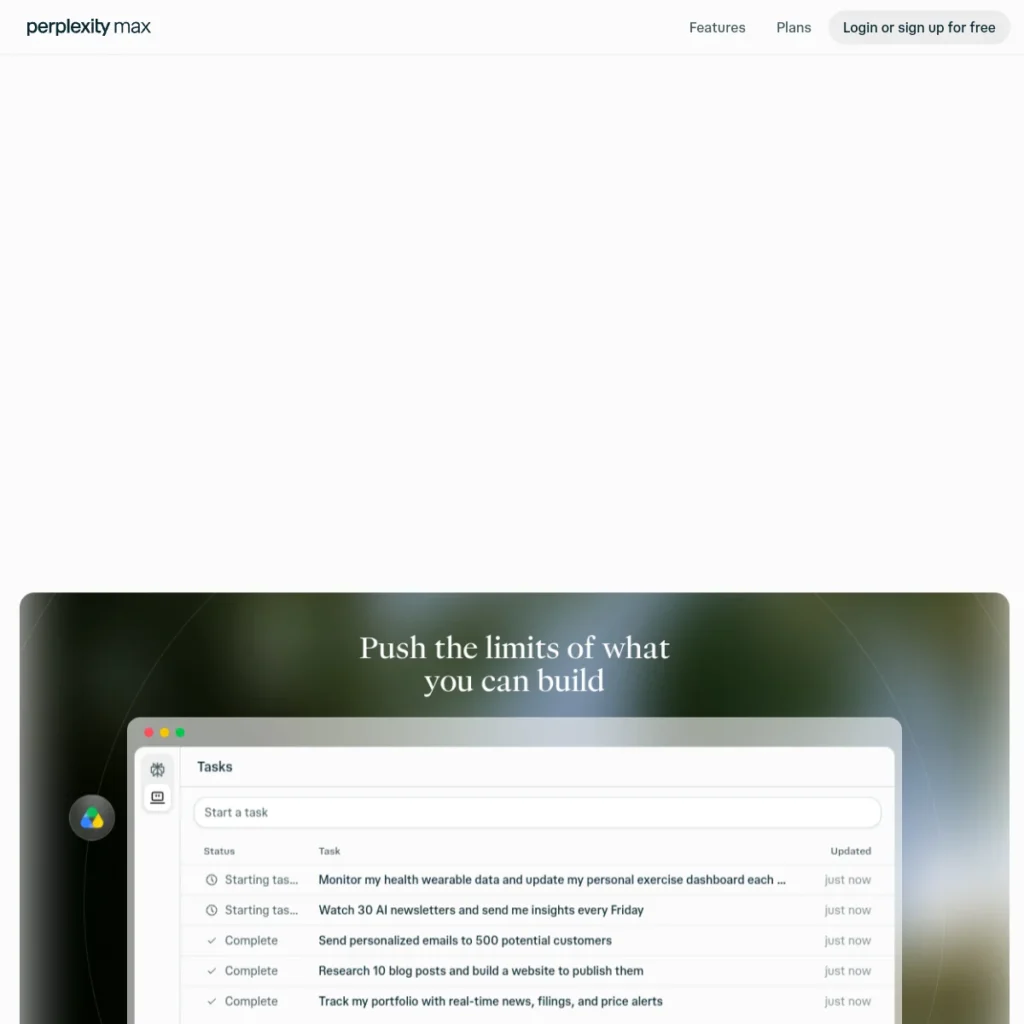
Pro is the working tier. Perplexity lists Pro at $20 a month or $200 a year for an individual. Pro adds extended Pro Search access, advanced AI models, image and video generation, higher upload limits, and a limited number of file and app creation queries every 30 days. At $200 a year, Pro costs $1.04 per meeting across 192 meetings, though its real value sits in the research hours between meetings.
Max costs $200 a month or $2,000 a year, with the highest model access, extended creation limits, early access to new products, and priority support. Annual billing for Max is available only on Perplexity’s website. For a solo consultant, Max is ten times Pro’s price for headroom most practices never touch. Enterprise Pro starts at $40 a month or $400 a year per seat, adding admin controls and a guarantee that data is never used for training.
The limit to understand is how Perplexity describes Pro’s caps. Its comparison table describes Pro limits as weekly or monthly limits for average use, without printing exact counts. Treat that wording honestly: the ceiling exists, the vendor does not publish its height, and heavy research weeks are the test. Run Pro through your busiest research week before committing to the annual price.
Perplexity’s limit is scope. It answers questions and builds research material, but it does not hold your client documents, attend your meetings, or send your invoices. It is the research layer, and its citations still need your judgement before any claim reaches a client.
The maths: what five tools really cost a solo consultant
Start with the business backbone, because every consultant needs exactly one. Bonsai Essentials costs $228 a year and covers proposals, contracts, time tracking, invoicing, and a client portal. Harvest Teams starts from $108 a year and covers time tracking and invoicing. Those two overlap on time and invoices, so buying both means paying at least $336 a year for two records of the same billable hour. Pick the backbone whose depth matches the pain.
Per meeting, across 192 meetings a year, the subscriptions run $1.25 for Notion Business, $0.52 for Otter Pro, $0.56 for Harvest Teams at its starting price, $1.19 for Bonsai Essentials, and $1.04 for Perplexity Pro. The per-meeting view is the honest one for a solo consultant, because software is a fixed cost spread over however many meetings actually happen. A quiet month does not shrink the subscription. It raises the cost hiding inside every meeting.
Now add the gates the headlines hide. Notion Plus at $120 a year looks like the AI price until you read that Plus includes only a trial of Notion AI; the AI price is Business at $240. Bonsai Basic at $108 a year looks like the invoicing price until you read that invoicing starts on Essentials at $228. Otter Basic at $0 looks like the meeting price until 300 monthly minutes meet a 960-minute workload; the meeting price is Pro at about $100.
The stack test shows the real saving. Buying Notion Business at $240, Otter Pro at about $100, Harvest Teams from $108, Bonsai Essentials at $228, and Perplexity Pro at $200 together costs $876 a year, or $4.56 per meeting. Running Bonsai Essentials, Otter Pro, and Perplexity Pro instead costs $528 a year, or $2.75 per meeting, and covers proposals, contracts, time, invoicing, meeting notes, and sourced research in three logins. The difference is $348 a year, which is the price of the duplicate time tracker and the document workspace your proposals already live in. Add Notion Business only when client documents outgrow Bonsai’s portal, and add Harvest only when its reporting beats the time records you already keep.
Growth flips some of the order: seat prices grow with your team, minute caps grow with your meeting load, and project limits grow with your client list. Price each tool at next year’s workload.
Five traps that catch consultants
First, the AI trial wearing a plan’s clothes. Notion Plus at $10 per seat a month includes a trial of Notion AI, while full AI sits on Business at $20. The feature in the headline and the price in the headline are rarely the same tier. Find the gate before you compare prices.
Second, the plan that cannot send an invoice. Bonsai Basic at $9 per user a month billed annually covers time tracking and projects, but invoices and payments start on Essentials at $19. Budget on the cheapest plan that completes the job, not the cheapest plan on the page.
Third, the starting price. Harvest Teams starts from $9 per seat a month, and a floor is not a quote. Confirm your actual seat, project, and invoicing cost inside a trial, and get the renewal figure in writing before client budgets depend on it.
Fourth, the minute cap behind the free plan. Otter Basic is free, and our consultant’s 960 monthly meeting minutes exceed its 300-minute allowance three times over. Count last month’s meeting minutes honestly, including the long workshop, before choosing between Basic, Pro’s 1,200 minutes, and Business.
Fifth, the confidentiality gap. A notetaker changes the room, and a research tool invites pasted client detail. Notion’s zero data retention sits on Enterprise, Perplexity’s no-training guarantee sits on Enterprise Pro, and Otter joins meetings as a visible third presence. Settle consent and data terms in your engagement letter before the first recorded call, and keep client names and figures out of prompts where the work allows.
What to buy first
Buy one business backbone first, and let the meeting and research work decide the rest. A solo consultant whose pain is proposals, contracts, and chasing payment should start with Bonsai’s seven-day trial, run a real proposal through Essentials, and watch whether the client portal survives contact with a paying client. Budget on $228 a year, or $348 if QuickBooks or Xero sync is non-negotiable.
A consultant whose pain is meeting memory should start with Otter Basic, record two real client calls with consent, and move to Pro when the 300-minute cap bites. A consultant whose pain is research should start with Perplexity Free, then test Pro through the busiest research week of the quarter. Our guide to the best ai tools for business coaches covers the adjacent case where session analysis, rather than proposals and research, is the deciding factor.
Add Notion Business when client documents, wikis, and AI drafting inside those documents become weekly work; at $240 a year it is a workspace decision, not an AI add-on. Whichever backbone wins your trial, the discipline is the same: one system for time and invoices, priced at next year’s workload, with consent settled before the first recorded meeting.
Our free AI Cost Calculator takes the prices above and turns them into a monthly and yearly figure for your own seat count, meeting minutes, and client load, so you can test the minute caps and plan gates before any trial starts. Run your real numbers there, then trial the cheapest setup that survives your busiest month.
Pros and cons
Notion. Pros: client documents, databases, and AI drafting in one workspace; Business includes Notion Agent with 1,500 standard and 500 select AI credits per seat a month; a free plan for testing; guests are free of charge. Cons: full AI sits on Business at $240 a year, while Plus at $120 includes only a trial of Notion AI; zero data retention is an Enterprise feature; no proposals for signature, time tracking, or invoicing.
Otter.ai. Pros: a free Basic plan with live transcription and speaker identification; Pro adds 1,200 monthly recording minutes and 90-minute meetings for about $100 a year; Business removes the monthly meeting cap and extends meetings to four hours; AI Chat questions transcripts across meetings. Cons: Basic’s 300 monthly minutes suit light use only; Pro’s 90-minute meeting cap rules out long workshops; Enterprise terms need a demo; a promo banner is not a budget price.
Harvest. Pros: a free plan with time tracking and invoicing for one seat; Teams starts from $108 per seat a year with a 30-day trial and no credit card required; project budgets and profitability reporting protect fixed-fee margins; invoicing builds directly from tracked time. Cons: the free plan stops at two projects; Teams and Enterprise prices are starting prices, not final quotes; the pricing page names no AI assistant; its time tracking overlaps Bonsai’s.
Bonsai. Pros: proposals, contracts, projects, time tracking, invoicing, and a client portal in one account; Essentials at $228 a year covers the full path from proposal to payment; a seven-day trial with full access; Premium adds profit reports and accounting integrations. Cons: Basic at $108 a year has no invoicing or payments; QuickBooks and Xero integrations need Premium at $348 a year; Elite requires three users minimum; payment processing fees need confirming in Bonsai’s help article.
Perplexity. Pros: research answers with citations you can open and verify; Pro at $200 a year adds advanced models and extended search access; a free plan for casual questions; Enterprise Pro adds a no-training guarantee and admin controls. Cons: Pro limits are described as average use without printed counts; Max at $2,000 a year is ten times Pro’s price; free Research queries stop at one a month; citations still need your judgement before a claim reaches a client.
Our verdict
Bonsai Essentials is the best first buy for a solo consultant who wants the business side handled in one login: $228 a year for proposals, contracts, time tracking, invoicing, and a client portal. Add Otter Pro at about $100 a year when meeting notes start eating your evenings, and Perplexity Pro at $200 a year when research becomes daily work. That three-tool stack costs $528 a year and leaves no job duplicated.
Notion Business earns its $240 a year when client documents and AI drafting inside them become the centre of the practice. Harvest earns its starting $108 a year when time reporting, not proposals, is the pain, provided the final price inside your trial matches the floor. Whichever backbone wins your trial, buy one, price the gates before the headline, and settle consent before the first recording.
Frequently asked questions
What is the cheapest AI tool for a solo consultant?
Otter’s free Basic plan is the cheapest way in, with live transcription, speaker identification, and 300 transcription minutes a month. Otter Pro costs $8.33 per user a month billed annually, about $100 a year, with 1,200 monthly minutes. Notion’s full AI needs Business at $20 per seat a month billed yearly. Perplexity Pro costs $200 a year for sourced research.
Does Notion Plus include full Notion AI?
No. Notion’s pricing page lists Plus at $10 per seat a month on yearly billing with a trial of Notion AI. Business at $20 per seat a month includes Notion Agent, with 1,500 standard and 500 select AI credits per seat a month. Enterprise uses custom pricing and adds zero data retention with AI providers.
Can Bonsai Basic send invoices?
No. Bonsai Basic at $9 per user a month billed annually covers time tracking, task management, a CRM, and unlimited projects and clients. Invoices and payments start on Essentials at $19 per user a month billed annually, which also adds proposals, contracts, forms, scheduling, and a client portal. Premium at $29 adds profit reports and QuickBooks and Xero integrations.
Is Harvest Teams really $9 a month?
Harvest lists Teams starting from $9 per seat a month, $108 per seat billed annually, with a 30-day free trial. A starting price is a floor, not a final quote. Confirm what your seat, project, and invoicing volume cost inside a trial account, and get the renewal figure in writing before building client budgets on it.
Do I need client consent to use an AI notetaker?
Yes. Tell clients before the first recorded meeting that a tool will transcribe the conversation, what it captures, and what happens if they decline, and put that in your engagement letter. Otter joins meetings visibly. Notion’s zero data retention sits on Enterprise, and Perplexity’s no-training guarantee sits on Enterprise Pro, so check your data tier before pasting client detail anywhere.
Price note — updated 26 November 2026: Prices in this post were checked on 26 November 2026. When you are reading this, the price may be lower or higher, plans may have changed, and trial terms may differ. Check the official pricing page before you buy, and confirm any starting price or unprinted fee with the vendor in writing.
Sources
- Notion pricing: https://www.notion.com/pricing
- Otter.ai pricing: https://otter.ai/pricing
- Harvest pricing: https://www.getharvest.com/pricing
- Bonsai pricing: https://www.hellobonsai.com/pricing
- Perplexity plans help centre: https://www.perplexity.ai/help-center/en/articles/11187416-which-subscription-plan-is-right-for-you
Pros
- Notion: client documents, databases, and AI drafting in one workspace; Business includes Notion Agent with 1,500 standard and 500 select AI credits per seat a month; a free plan for testing; guests are free of charge.
- Otter.ai: a free Basic plan with live transcription and speaker identification; Pro adds 1,200 monthly recording minutes and 90-minute meetings for about $100 a year; Business removes the monthly meeting cap and extends meetings to four hours; AI Chat questions transcripts across meetings.
- Harvest: a free plan with time tracking and invoicing for one seat; Teams starts from $108 per seat a year with a 30-day trial and no credit card required; project budgets and profitability reporting protect fixed-fee margins; invoicing builds directly from tracked time.
- Bonsai: proposals, contracts, projects, time tracking, invoicing, and a client portal in one account; Essentials at $228 a year covers the full path from proposal to payment; a seven-day trial with full access; Premium adds profit reports and accounting integrations.
- Perplexity: research answers with citations you can open and verify; Pro at $200 a year adds advanced models and extended search access; a free plan for casual questions; Enterprise Pro adds a no-training guarantee and admin controls.
Cons
- Notion: full AI sits on Business at $240 a year, while Plus at $120 includes only a trial of Notion AI; zero data retention is an Enterprise feature; no proposals for signature, time tracking, or invoicing.
- Otter.ai: Basic's 300 monthly minutes suit light use only; Pro's 90-minute meeting cap rules out long workshops; Enterprise terms need a demo; a promo banner is not a budget price.
- Harvest: the free plan stops at two projects; Teams and Enterprise prices are starting prices, not final quotes; the pricing page names no AI assistant; its time tracking overlaps Bonsai's.
- Bonsai: Basic at $108 a year has no invoicing or payments; QuickBooks and Xero integrations need Premium at $348 a year; Elite requires three users minimum; payment processing fees need confirming in Bonsai's help article.
- Perplexity: Pro limits are described as average use without printed counts; Max at $2,000 a year is ten times Pro's price; free Research queries stop at one a month; citations still need your judgement before a claim reaches a client.
Bonsai Essentials is the best first buy for a solo consultant who wants the business side handled in one login: $228 a year for proposals, contracts, time tracking, invoicing, and a client portal. Add Otter Pro at about $100 a year when meeting notes start eating your evenings, and Perplexity Pro at $200 a year when research becomes daily work. That three-tool stack costs $528 a year and leaves no job duplicated. Notion Business earns its $240 a year when client documents and AI drafting inside them become the centre of the practice. Harvest earns its starting $108 a year when time reporting, not proposals, is the pain, provided the final price inside your trial matches the floor. Whichever backbone wins your trial, buy one, price the gates before the headline, and settle consent before the first recording.