

Short on time? Here's the whole guide to the best ai tools for notaries in 30 seconds. For a solo mobile notary or loan signing agent, BlueNotary Notary Pro at $27 a month billed monthly — $297 a year — is the best single buy for remote signings you source yourself: your own clients cost $5 for the first seal when you bill them privately, and the free Basic plan lets you test it first.Snapdocs RON Notary at $20 a month is the pick if you take work from title companies through the Snapdocs network, because the platform is where the orders already are. Proof Pro costs $0 a month and gives you the biggest on-demand notary network in the country, but every meeting through that network costs $25 before you add a seal or a signer.NotaryCentral Business Suite at $11.95 a month plus the e-Journal at $1.95 a month is the operations pick — booking, journal, invoicing, and RON rooms at $1.50 each, the cheapest room fee here. NotaryAssist at $8.99 a month is the bookkeeping pick.
The closing is in forty minutes. Your signer is stuck in traffic, the title company just emailed a revised settlement statement, and the borrower’s ID expired last month — which you only discover when you open the package at the kitchen table. You have one job that looks simple from the outside: watch someone sign, stamp the paper, and write it in your journal. The reality is forty small decisions before the stamp ever touches the page.
Now add the question every notary hears in 2026: can we just do this online? Remote online notarization is legal in most states now, and the borrowers who ask for it are not asking for a gimmick. They are asking to close a refinance from a hotel room, or sign an estate document while caring for a parent three states away. The tools that make that possible are not magic. They are video rooms, identity checks, audit trails, and journals — and they charge you in at least three different ways at once.
The best ai tools for notaries don’t replace the stamp. They decide how much each signing costs you and whether a state audit finds your journal in order. This guide compares five tools by their real, published prices: Snapdocs RON, Proof, NotaryCentral, BlueNotary, and NotaryAssist. Every price was checked on the vendor’s own pricing page on 25 November 2026 — nothing here comes from a roundup. At the end, the maths: a full stack costs a solo signing agent $771.90 a year, the lean version $354.95, and the gap is $417 a year.
Quick Answer
Short on time? Here’s the whole guide to the best ai tools for notaries in 30 seconds. For a solo mobile notary or loan signing agent, BlueNotary Notary Pro at $27 a month billed monthly — $297 a year — is the best single buy for remote signings you source yourself: your own clients cost $5 for the first seal when you bill them privately, and the free Basic plan lets you test it first.
Snapdocs RON Notary at $20 a month is the pick if you take work from title companies through the Snapdocs network, because the platform is where the orders already are. Proof Pro costs $0 a month and gives you the biggest on-demand notary network in the country, but every meeting through that network costs $25 before you add a seal or a signer.
NotaryCentral Business Suite at $11.95 a month plus the e-Journal at $1.95 a month is the operations pick — booking, journal, invoicing, and RON rooms at $1.50 each, the cheapest room fee here. NotaryAssist at $8.99 a month is the bookkeeping pick.
In this article
- Quick Answer
- How we compared them
- Snapdocs RON — the network pick
- Proof — the on-demand network pick
- NotaryCentral — the operations pick
- BlueNotary — the cheapest own-client session
- NotaryAssist — the bookkeeping pick
- The maths: what the stack really costs
- 5 traps that cost notaries real money
- What to buy first
- Pros and Cons
- Our verdict
- Frequently asked questions
How we compared them
Every tool in this guide was judged the same way: on the work a real notary does every week. Taking a loan signing from a title company and a general notary job from a walk-in client. Running a remote signing when the signer cannot be in the room. Keeping a journal that survives a state audit. Getting paid without chasing an invoice for sixty days. And knowing, before you accept the job, exactly what the platform takes out of your fee.
The maths section prices a solo notary — one person, one commission, working mobile and online — doing about twenty signings a month, a mix of loan signings and general notary work. Subscription prices are the stack. Per-session fees are shown separately, because for a notary the per-session fee is the real bill.
| Tool | Starts at | The plan a solo notary actually needs | Best for | Key limit |
|---|---|---|---|---|
| Snapdocs RON | $20/user/mo | Notary, $20/user/mo | Title-company work + RON in one place | $25 per mortgage RON transaction |
| Proof | $0/mo | Pro, $0/mo + transaction fees | On-demand network, 24/7 | $25 per Network meeting before add-ons |
| NotaryCentral | $1.95/mo | Business Suite + e-Journal, $13.90/mo | Booking, journal, invoicing + RON rooms | RON rooms and ID checks are pay-as-you-go |
| BlueNotary | $0 (Basic) | Notary Pro, $27/mo or $297/yr | Cheapest own-client RON sessions | Open-call work pays $5–$10 a seal, no volume promised |
| NotaryAssist | $8.99/mo | $8.99/mo or $95/yr | Bookkeeping for varied notary work | Marketing tools cost $59.99/mo extra |
Snapdocs RON — the network pick
Snapdocs RON is the platform that sits closest to where the loan signings actually come from. Title companies and signing services dispatch work through Snapdocs, and the RON product is the same company’s remote-signing room — so a notary who already takes Snapdocs orders is not learning a new marketplace, just adding the online room to the work they already get.
The Notary plan is $20 per user per month, including one free RON. After that, a remote notarization costs $15 per transaction for a non-mortgage document and $25 for a mortgage document; IPEN is $5 per transaction and a standard eSignature $5. The Team plan is $50 per team per month with unlimited users and three free RONs. Enterprise is custom-priced.
What you’re paying for is a room that handles the three things a remote signing actually needs: automated identity verification with knowledge-based authentication and biometrics, the video session itself, and the electronic journal and audit trail your state will ask about later. It also handles the order side — Snapdocs prepares and tags the documents for lender-driven digital closings — and there are no transaction fees for Snapdocs Notary Connect signings completed on the platform.
For a solo notary, the Notary plan at $20 a month is the honest pick. The maths that matters is per transaction, not per month: twenty signings a month, split evenly between mortgage and general work, costs ten at $25 and nine at $15 after your one free RON — $385 a month in transaction fees, plus the $20 subscription. That is $405 a month before you have earned a dollar. The subscription is the smallest part of this bill.
The catch is the split between the two kinds of orders. On a lender-driven digital closing, Snapdocs does the prep and tagging, and you conduct the session — less work, and usually a lower notary fee. On a scheduling order managed by a title company, you create the transaction, tag the documents, conduct the closing, and upload the scanbacks yourself — more work, and usually a higher fee. Know which kind of order you are accepting before you quote the price.
Who is Snapdocs RON actually best for? A signing agent who already takes orders through Snapdocs and wants the remote room where the work already lives. If you source your own clients and never touch a title-company order, the $25 mortgage transaction fee buys you nothing a cheaper room doesn’t.

Proof — the on-demand network pick
Proof — formerly Notarize — runs the biggest on-demand notary network in the United States. The platform is free to join. The money is in the meetings: a bargain or a trap depending on whose clients you are serving.
The Pro plan is $0 a month plus transaction fees. Pro+ is $199 a month plus transaction fees, and adds API access, custom branding, advanced transaction forms, signing rules, and the option to bring your own in-house notaries. Premium and Enterprise are custom-priced.
The transaction fees are where the maths lives. A notarization through the Notarize Network costs $25 per meeting, plus $15 per additional seal, $10 per additional signer, and $15 per on-demand witness. If you bring your own in-house notary on Pro+, the meeting is $15, with $5 per additional seal and $5 per additional signer. An identity verification (Identify) is $4 per signer, a trusted-referee meeting is $25, and a simple eSignature (Sign) is $4 per transaction.
What you’re paying for is availability and fraud defence. The Network is staffed around the clock, every day of the year, so a signer can get a notarization at 2am without you being awake — on Pro, the Network notary is in the meeting, not you. Proof also runs an eligibility engine that checks the transaction against state law before the meeting starts, and its Defend service watches for fraud signals across transactions.
For a solo notary, Pro at $0 a month is the honest pick — but only if you understand what it is for. Twenty Network meetings a month at $25 each is $500 a month, before a single extra seal or signer. Pro only makes sense as your overflow valve: the client who needs a notarization tonight, the signing you cannot attend, the document that has to be done while you are at another closing.
The catch is the Pro+ trap. The $199-a-month plan looks like the professional tier, and it is — for a growing team that needs the API and custom branding. But the in-house meeting rate of $15 only applies if you have in-house notaries to onboard, and a solo notary has none. Paying $199 a month to unlock a rate you cannot use is the most expensive mistake in this guide. Stay on Pro until you actually hire.
Who is Proof actually best for? A notary business that needs a 24/7 overflow network for clients it cannot serve personally, or a title agency that routes signers to on-demand notaries. If you perform your own signings, the $25 meeting fee is a tax on every job.

NotaryCentral — the operations pick
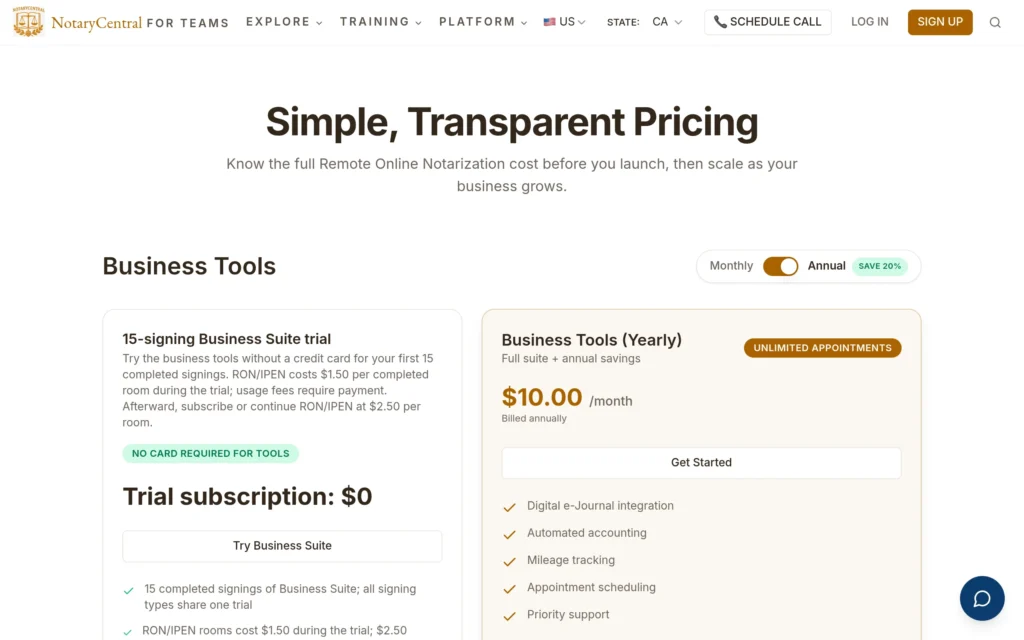
NotaryCentral is the only tool in this guide that tries to be the whole office: the booking page, the journal, the invoicing, the mileage log, and the RON room in one workspace. It is also the cheapest subscription here, and the cheapest RON room by platform fee. The two facts are related — it charges you almost nothing to sit in the room, and makes its money on the subscription instead.
The Business Suite is $11.95 a month, or $119.95 a year — which works out to $10 a month billed annually, a 20% saving. The Digital e-Journal Solo seat is $1.95 a month, or $19.95 a year. Both together cost $13.90 a month, or $139.90 a year. There is a 15-signing Business Suite trial with no credit card required, and the trial covers all signing types.
The RON and IPEN rooms are pay-as-you-go on top of the subscription: $1.50 per completed room during the trial or with a paid subscription, $2.50 per room afterwards without subscribing. Identity verification is $1.50 per signer when required. A digital certificate is a one-time $20 if you buy it from NotaryCentral. There are no extra platform fees for additional documents or seals in a room.
What you’re paying for is the operating system around the signing. Appointment scheduling with a client booking page, automated accounting with an IRS self-employment tax calculator, mileage and expense tracking, invoicing, and a CRM — plus a Chrome extension that syncs Snapdocs and SigningOrder so orders land in the same calendar. The e-Journal carries state-specific validation fields and a ten-plus-year encrypted vault, which is the part a state audit actually reads.
For a solo notary, the Business Suite plus the e-Journal at $13.90 a month is the honest pick. The journal alone at $1.95 a month is the cheapest legal record in this guide, but a journal without the booking and invoicing around it is only half the job. Twenty RON rooms a month at $1.50 is $30, plus $13.90 in subscriptions, is $43.90 a month — the cheapest per-signing platform cost in this guide by a wide margin.
The catch is that the room fee is not the whole RON cost. You still need a digital certificate, and identity verification at $1.50 a signer adds up on multi-signer closings. And the $1.50 room rate only holds while you subscribe or during the trial — let the subscription lapse and the room jumps to $2.50. Still the cheapest room here, but know the tripwire exists.
Who is NotaryCentral actually best for? A mobile notary or small signing team that wants one workspace for booking, journal, invoicing, and RON — and that does enough volume for the $1.50 room fee to matter. If you only need a journal, buy the e-Journal seat alone and skip the Suite.
BlueNotary — the cheapest own-client session
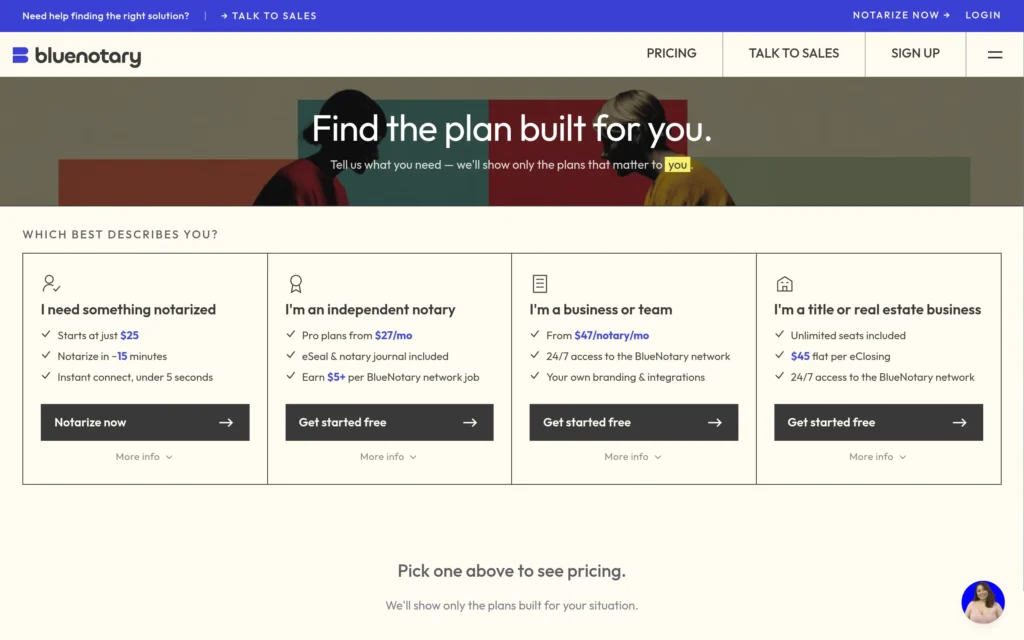
BlueNotary is the quiet value pick in this guide, and the one most notaries have not heard of. It is a remote online notarization platform with a free tier, a cheap Pro plan, and — the figure that matters — a $5 platform fee when you bill your own client privately. That is the lowest own-client session cost of any platform here, and it changes the maths completely for a notary whose clients come to them directly.
The Basic plan is free. Notary Pro is $27 a month billed monthly, $297 a year billed annually (about $24.75 a month), or $648 for three years (about $18 a month). When a Pro member bills the client privately, the platform fee is $5 for the first seal and $0 for additional seals. When BlueNotary bills the signer instead, the standard on-demand notarization is $25 for the first seal and one signer, plus $8 per additional seal, $5 per additional signer, and $10 for an on-demand witness — a witness you bring yourself is free.
What you’re paying for is a self-serve RON room with the two things a solo notary actually needs: a free eSeal and digital certificate on Pro, and an eJournal with ten-year storage on the free Basic plan. The platform is certified for remote online notarization, and it runs open calls — platform-sourced work offered first-come, first-served to Pro members who pass its open-call testing, paying $5 to $10 per completed seal. That is real extra work if you can grab it, and the helpdesk is clear that no volume is guaranteed.
For a solo notary, Notary Pro at $27 a month billed monthly — or $297 a year — is the honest pick. Twenty own-client sessions a month at $5 a seal is $100 in platform fees, plus the $27 subscription, is $127 a month. Compare that with Snapdocs at $405 and Proof at $500 for the same twenty sessions, and the gap is the whole story of this guide. Don’t prepay three years for a platform you haven’t tested for three months.
The catch is the two different fee schedules. BlueNotary’s own pages give two figures for what it keeps when it bills the signer — its pricing-page estimator deducts $10 per notarization on both plans, while its fee schedule says $5 on Pro and $10 on the free plan. Confirm which one applies to your account before you quote a client a price that assumes the lower number. And the open calls are first-come, first-served: the $27 a month buys eligibility, not work.
Who is BlueNotary actually best for? A notary whose clients come directly — general notary work, estate documents, powers of attorney — and who wants the cheapest per-session cost in the guide. If your work comes from title companies through Snapdocs, BlueNotary doesn’t bring you orders.
NotaryAssist — the bookkeeping pick
NotaryAssist is the oldest tool in this guide, and it shows in the best way: it does the unglamorous bookkeeping that keeps a notary business alive, and it does it for less money than anything else here. It is not a RON platform. It will not notarize a document. It will make sure you know what you earned, what you spent, and who still owes you — and for a solo notary, that is half the business.
The plan is $8.99 a month, or $95 a year. A storage-only plan is $50 a year, covering archiving without the full suite. The marketing platform — listings and reviews tools — costs $59.99 a month extra. There is a free trial, though the site does not pin down its length on the pricing page.
What you’re paying for is a Business Center that tracks several kinds of work in one place: loan signings, apostilles, fingerprinting, and general notary work, instead of a separate spreadsheet for each. Appointments import straight from confirmation emails, the calendar syncs with Google and Apple Calendar, driving directions are one tap away on mobile, and receipt scanning plus customer-level insights round out the bookkeeping.
For a solo notary, $8.99 a month — $95 a year — is the honest pick, and it is the cheapest paid subscription in this guide. The annual plan saves $12.88 a year over monthly billing. The maths is simple: at a $100 average signing fee, one signing pays for eleven months of NotaryAssist.
The catch is the marketing add-on. Listings and reviews at $59.99 a month cost almost seven times the base plan, and a notary who wants the full visibility package pays $68.98 a month — more than Snapdocs RON and BlueNotary Pro combined. Buy the bookkeeping. Skip the marketing until your reviews are actually holding back bookings.
Who is NotaryAssist actually best for? A notary who does varied work — loan signings plus apostilles, fingerprinting, and general jobs — and wants one cheap place to track it all. If you only do loan signings from one platform, the platform’s own order tracking may already cover you.

The maths: what the stack really costs
Here’s the part most guides skip: what all of this costs together, for one realistic notary. The scenario is a solo mobile notary and loan signing agent — one person, one commission — doing about twenty signings a month, a mix of loan signings and general notary work, on annual billing where published, at list prices. Subscription prices are the stack; per-session fees are shown separately, because for a notary the per-session fee is the real bill.
| Tool | Full stack | Lean stack | Saving |
|---|---|---|---|
| Snapdocs RON | Notary $240/yr | Notary $240/yr | $0 |
| Proof | Pro $0/yr | Pro $0/yr | $0 |
| NotaryCentral | Suite + Journal $139.90/yr | e-Journal only $19.95/yr | $119.95 |
| BlueNotary | Pro annual $297/yr | Basic $0/yr | $297 |
| NotaryAssist | Annual $95/yr | Annual $95/yr | $0 |
| Total | $771.90/yr | $354.95/yr | $416.95 |
The full stack costs $771.90 a year. The lean stack costs $354.95 a year. The gap is $416.95 a year. Snapdocs, Proof, and NotaryAssist save you nothing between the two stacks, because each has only one priced plan a solo notary can buy. The entire saving comes from two downgrades: BlueNotary Pro to free Basic ($297) and NotaryCentral’s full Suite to the e-Journal alone ($119.95).
The honest middle stack is $474.95 a year: everything from the full stack, but BlueNotary on the free Basic plan instead of Pro. You lose the $5 own-client seal rate and the free eSeal and certificate — but if most of your signings come through Snapdocs orders rather than your own clients, you were not using the $5 rate anyway.
Now the number that actually decides this purchase:
| Platform | 20 own-client RON sessions a month | What you pay |
|---|---|---|
| BlueNotary (Pro, private billing) | 20 × $5 first seal | $100 + $27 subscription = $127/mo |
| NotaryCentral (subscriber) | 20 rooms × $1.50 | $30 + $13.90 subscription = $43.90/mo |
| Snapdocs RON (Notary) | 10 mortgage × $25 + 10 general × $15, minus 1 free RON | $385 + $20 subscription = $405/mo |
| Proof (Pro, Network) | 20 meetings × $25 | $500 + $0 subscription = $500/mo |
Read that table twice. NotaryCentral’s room fee is the cheapest in the guide — $43.90 a month all-in for twenty sessions. BlueNotary is next at $127. Snapdocs and Proof cost three to ten times as much for the same twenty sessions, because their per-transaction fees are priced for title companies and on-demand networks, not for a notary serving their own clients. The platform you pick should follow where your clients come from: your own clients, use NotaryCentral or BlueNotary; title-company orders, use Snapdocs; clients you cannot serve yourself, send them to Proof and pay the $25.
And the break-even: at a $100 average signing fee, the full stack costs about eight signings a year — less than one a month. The lean stack costs about four. If the tools save you one lost signing a month, they have paid for themselves before spring.
5 traps that cost notaries real money
1. Buying the subscription and forgetting the session fee. Snapdocs RON costs $20 a month and sounds cheap until twenty signings cost $400 in transaction fees. Proof costs $0 a month and sounds free until twenty Network meetings cost $500.
2. Paying for a tier you cannot use. Proof Pro+ at $199 a month unlocks a $15 in-house meeting rate — but only if you have in-house notaries, and a solo notary has none. BlueNotary’s three-year plan saves $108 a year, but only if you stay on a platform you haven’t tested for three months.
3. The journal that doesn’t match your state. A journal app is a legal record, not a notebook. NotaryCentral’s e-Journal validates state-specific fields; a generic notes app does not. Check that it validates your state’s fields and stores the record for the ten-plus years your state demands. An audit that finds a missing field costs more than every subscription in this guide combined.
4. Letting the platform keep the client. When Proof’s Network notarizes your client, the Network notary does the work and the client remembers Proof, not you. When BlueNotary bills your signer, the receipt says BlueNotary. The notaries who keep their clients are the ones who bill privately, keep their own booking page, and use the platform as a room — not as a storefront.
5. The free trial that quietly becomes a subscription. NotaryCentral’s 15-signing trial is genuinely free and needs no card — but the room fee jumps from $1.50 to $2.50 when the trial ends without a subscription. Snapdocs includes one free RON, then charges per transaction. Put a calendar reminder on every trial the day you start it.
What to buy first
Don’t buy all five. Buy one, run it on real signings for two weeks, and see what breaks. For most solo notaries, that’s BlueNotary Notary Pro: the $27-a-month plan, or free Basic first to test the room on a low-stakes document. Twenty own-client sessions cost $127 a month all-in, and the $5 seal rate is the cheapest in this guide.
If your work comes from title companies, start with Snapdocs RON instead — the orders are already there. If your problem is the paperwork around the signing rather than the signing itself, start with NotaryCentral’s Business Suite and e-Journal.
Before you commit to a stack, run the numbers for your own practice. Our free AI Cost Calculator adds up the real starting prices of the tools you pick, so you can see the yearly total before you hand over a card.
Pros and Cons
Pros
- Every tool here publishes real prices on its core plans — no quote-only walls except Snapdocs Enterprise and Proof Premium.
- Two genuinely free starting points (Proof Pro at $0 a month and BlueNotary Basic) mean you can test remote notarization on real clients before paying anything.
- The lean stack saves $416.95 a year against the full stack without losing the RON room, the journal, or the bookkeeping.
- NotaryCentral’s $1.50 room fee and BlueNotary’s $5 seal rate make remote signings genuinely cheap for a notary serving their own clients.
Cons
- No single tool does everything: the cheapest room (NotaryCentral) has no on-demand network, the biggest network (Proof) is the most expensive per meeting, and the cheapest bookkeeping does no notarization at all.
- Per-session fees dominate the real bill — the subscriptions are the smallest part of what you pay, and the cheapest subscription can hide the most expensive month.
- Proof’s $25 Network meeting and Snapdocs’ $25 mortgage transaction both bite hardest in your busiest month.
- BlueNotary’s own pages give two different figures for its cut when it bills the signer — confirm which applies to your account before you quote a client.
Our verdict
For most solo notaries, BlueNotary Notary Pro at $27 a month billed monthly — $297 a year — is the buy. It is the cheapest way to notarize your own clients online, at $5 a seal when you bill privately, with a free Basic plan to test first and a free eSeal and digital certificate on Pro. Start on Basic, run three real signings through it, and upgrade when the $5 seal rate starts saving you money.
If your work comes from title companies, Snapdocs RON Notary at $20 a month is the second buy, because the orders already live on Snapdocs — just budget the $15 to $25 per-transaction fees honestly. If the paperwork around the signing is your problem, NotaryCentral Business Suite plus e-Journal at $13.90 a month is the operations pick, with the cheapest RON room in the guide at $1.50. And if bookkeeping is eating your evenings, NotaryAssist at $8.99 a month is the cheapest fix in this guide.
First step: run three real signings through BlueNotary Basic this week, on documents that don’t matter if the video drops. The platform your clients actually complete a signing on, without calling you for help, is the one to keep. If you do loan signings for mortgage closings, see our separate comparison of the tools mortgage brokers use.
Frequently asked questions
What are the best ai tools for notaries for a small practice?
BlueNotary Notary Pro, for most solo notaries. At $27 a month billed monthly it charges $5 for the first seal when you bill your own client privately and the free Basic plan lets you test it first. NotaryCentral is the better pick if you want booking, journal, and invoicing in one workspace.
How much does remote online notarization cost per signing?
It depends on whose client it is. Your own client costs $1.50 a room on NotaryCentral or $5 a seal on BlueNotary Pro. A mortgage transaction on Snapdocs RON costs $25. A meeting through Proof’s on-demand Network costs $25 before extra seals and signers. A standard on-demand notarization on BlueNotary is $25 for one seal and one signer.
Do I need a separate RON platform if I already use Snapdocs?
Not for the orders Snapdocs sends you — Snapdocs RON handles those in the same platform. You need a second platform only if you also serve your own clients directly, because Snapdocs charges $15 to $25 a transaction for your own clients, while NotaryCentral charges $1.50 a room and BlueNotary $5 a seal.
Is remote online notarization legal in my state?
Remote online notarization is authorized in most US states, but the rules differ — some states require specific technology providers, additional registration, or a separate RON commission. Check your Secretary of State’s notary division before your first remote signing, and confirm your platform is approved where you are commissioned.
What is the cheapest notary software?
NotaryAssist at $8.99 a month or $95 a year is the cheapest paid subscription in this guide, and NotaryCentral’s e-Journal alone is $1.95 a month. Proof Pro and BlueNotary Basic both cost $0 a month before transaction fees. At twenty sessions a month, NotaryCentral’s $43.90 all-in is the lowest total.
Price note — updated 25 November 2026: Prices in this post were checked on 25 November 2026. When you are reading this, the price may be lower or higher — always check the official pricing page before you buy. BlueNotary’s own pages give two figures for its cut when it bills the signer ($10 on its pricing-page estimator; $5 for Pro and $10 for free members on its fee schedule) — confirm which applies to your account. NotaryCentral’s $1.50 room rate applies during the trial or with a paid subscription; without one it is $2.50 a room. Proof’s $25 Network meeting excludes additional seals, signers, and witnesses.
Sources: Snapdocs RON pricing — https://www.snapdocs.com/solutions/remote-online-notarization/pricing · Proof pricing — https://www.proof.com/pricing/ · NotaryCentral Business Suite pricing — https://www.notarycentral.org/pricing/business-suite · BlueNotary pricing — https://bluenotary.us/pricing · NotaryAssist pricing — https://notaryassist.com/
Pros
- Every tool here publishes real prices on its core plans — no quote-only walls except Snapdocs Enterprise and Proof Premium.
- Two genuinely free starting points (Proof Pro at $0 a month and BlueNotary Basic) mean you can test remote notarization on real clients before paying anything.
- The lean stack saves $416.95 a year against the full stack without losing the RON room, the journal, or the bookkeeping.
- NotaryCentral's $1.50 room fee and BlueNotary's $5 seal rate make remote signings genuinely cheap for a notary serving their own clients.
Cons
- No single tool does everything: the cheapest room (NotaryCentral) has no on-demand network, the biggest network (Proof) is the most expensive per meeting, and the cheapest bookkeeping does no notarization at all.
- Per-session fees dominate the real bill — the subscriptions are the smallest part of what you pay, and the cheapest subscription can hide the most expensive month.
- Proof's $25 Network meeting and Snapdocs' $25 mortgage transaction both bite hardest in your busiest month.
- BlueNotary's own pages give two different figures for its cut when it bills the signer — confirm which applies to your account before you quote a client.
For most solo notaries, BlueNotary Notary Pro at $27 a month billed monthly — $297 a year — is the buy. It is the cheapest way to notarize your own clients online, at $5 a seal when you bill privately, with a free Basic plan to test first and a free eSeal and digital certificate on Pro. Start on Basic, run three real signings through it, and upgrade when the $5 seal rate starts saving you money.If your work comes from title companies, Snapdocs RON Notary at $20 a month is the second buy, because the orders already live on Snapdocs — just budget the $15 to $25 per-transaction fees honestly. If the paperwork around the signing is your problem, NotaryCentral Business Suite plus e-Journal at $13.90 a month is the operations pick, with the cheapest RON room in the guide at $1.50. And if bookkeeping is eating your evenings, NotaryAssist at $8.99 a month is the cheapest fix in this guide.First step: run three real signings through BlueNotary Basic this week, on documents that don't matter if the video drops. The platform your clients actually complete a signing on, without calling you for help, is the one to keep. If you do loan signings for mortgage closings, see our separate comparison of the tools mortgage brokers use.