

This guide compares the five best notion alternatives by what a real 5-person team actually pays: Superhuman Docs Pro at $12 per Doc Maker a month billed yearly — and only the makers pay — Obsidian Sync Standard at $4 a user a month, Anytype Free at $0, ClickUp Core at $9 a user a month, and Evernote Flexible from $10 a seat a month. Notion itself is not expensive — Plus is $10 a member a month billed yearly — but its free plan caps blocks once you pass 2 members, its AI is a limited trial until you pay $20 a member a month for Business, and there is no true offline mode.If your team wants notes that live on your own devices and work without the internet, take Obsidian or Anytype. If you want documents that behave like apps, take Superhuman Docs. If you want tasks and docs in one place, take ClickUp Core at $9 a user a month. Every price below was checked on the official pricing pages on 21 November 2026.
Quick Answer Box
This guide compares the five best notion alternatives by what a real 5-person team actually pays: Superhuman Docs Pro at $12 per Doc Maker a month billed yearly — and only the makers pay — Obsidian Sync Standard at $4 a user a month, Anytype Free at $0, ClickUp Core at $9 a user a month, and Evernote Flexible from $10 a seat a month. Notion itself is not expensive — Plus is $10 a member a month billed yearly — but its free plan caps blocks once you pass 2 members, its AI is a limited trial until you pay $20 a member a month for Business, and there is no true offline mode.
If your team wants notes that live on your own devices and work without the internet, take Obsidian or Anytype. If you want documents that behave like apps, take Superhuman Docs. If you want tasks and docs in one place, take ClickUp Core at $9 a user a month. Every price below was checked on the official pricing pages on 21 November 2026.
Quick Answer Box / Why Teams Outgrow Notion / The Tools at a Glance / First, What Notion Itself Costs Now / 1. Superhuman Docs — Best for Teams That Want Docs That Behave Like Apps / 2. Obsidian — Best for People Who Want Their Notes on Their Own Devices / 3. Anytype — Best for Teams That Want Private, Offline-First Notes / 4. ClickUp — Best for Teams That Want Tasks and Docs in One Place / 5. Evernote — Best for People Who Capture First and Organise Later
Cost Maths: What a 5-Person Team Actually Pays / The Hidden Costs and Gotchas / Strategic Pivot: Price the Stack Before You Buy It / Pros and Cons / Our Verdict: Notion Alternatives / Frequently Asked Questions / Price Note
Why Teams Outgrow Notion
Notion is the tool most teams try first, and for good reason. It turns a blank page into a wiki, a database, and a task board in one place, and the free plan is generous enough that a solo user may never pay a cent. The trouble starts the month the whole team moves in, which is when Notion’s pricing model shows its teeth.
The first wall is the per-member price. Every person in the workspace is a paid seat, so a 5-person team on Plus pays $600 a year, and a 5-person team on Business pays $1,200.
The second wall is the AI paywall. Notion’s free and Plus plans include only a limited trial of Notion AI. The real agent tools — Notion Agent, AI meeting notes, enterprise search — arrive on Business at $20 a member a month. A team that joined Notion because it looked like the AI workspace discovers the AI part is a second bill.
The third wall is offline. Notion is a cloud tool first. You can choose pages to download for offline use, and recent pages auto-download, but there is no offline-first vault sitting on your own machine.
The fourth wall is the missing workload view. Notion’s databases are powerful, but they are slow to build and there is no built-in view that shows who is overloaded this week, and no time tracking.
The fifth wall is the free plan’s block cap. Once a second member joins a free workspace, the number of blocks you can add is limited.
None of this makes Notion a bad tool. It makes Notion the wrong tool for a team that wants offline notes, honest AI pricing, or a per-maker bill instead of a per-head bill. The five notion alternatives below each remove a different wall. Teams that outgrow a board rather than a wiki face the same choice — our Trello alternatives guide compares five boards the same way.
The Tools at a Glance
| Tool | Best for | Starting paid price (billed yearly) | Free plan | The catch in one line |
|---|---|---|---|---|
| Superhuman Docs | Docs that behave like apps | $12 per Doc Maker a month | Yes — but shared docs are limited | You pay for makers, not editors — but if everyone builds, everyone pays |
| Obsidian | Offline notes on your own devices | $4 a user a month (Sync Standard; the app is $0) | Yes — the whole app, free forever | No real-time co-editing, and sync is a paid add-on |
| Anytype | Private, offline-first notes | $4 a month (Plus; Free is $0) | Yes — local-first, no account needed | No web version, and the team plan is priced per editor in euros |
| ClickUp | Tasks and docs in one place | $9 a user a month | Yes — unlimited members | The docs are a side feature, not the main event |
| Evernote | Capture first, organise later | From $10 a seat a month (Flexible) | Yes — but only 50 notes | The cheap plans are individual, not team plans |
Notion, for comparison, is $0 free, $10 a member a month on Plus billed yearly ($12 monthly), $20 on Business ($24 monthly), and custom-priced on Enterprise. Every alternative below is measured against a tool that costs $10 a member a month for its first paid tier.
First, What Notion Itself Costs Now
Before you leave Notion, price staying. A surprising number of teams switch when a cheaper fix was sitting in the plan they already had.
The free plan costs $0 and covers a trial of Notion AI, basic forms and sites, the Notion Calendar, and databases with subtasks, dependencies, and custom properties. The limits that bite a team are the block storage cap once you pass 2 members, 10 external guests, a 7-day page history, and 5 MB file uploads.
Plus costs $10 a member a month billed yearly, or $12 monthly. It adds unlimited blocks, a 30-day page history, 5 GB file uploads, charts, and custom forms and sites. For a 5-person team that is $50 a month, or $600 a year.
Business costs $20 a member a month billed yearly, or $24 monthly. It adds Notion Agent, AI meeting notes, enterprise search in beta, SAML single sign-on, and private teamspaces. For a 5-person team that is $100 a month, or $1,200 a year. Enterprise is custom pricing.
Two newer charges sit on top: Custom Agents cost $10 per 1,000 Notion credits after a free trial, and the full Notion AI experience is a Business-tier feature, not a Plus one.
So the honest comparison is this: staying on Notion Plus costs a 5-person team $600 a year. The cheapest paid alternative in this guide, Obsidian Sync Standard, costs $240 a year, and Anytype’s free plan costs nothing at all. You are switching because Notion’s $600 tier gives you no true offline mode, no workload view, and only a trial of the AI it advertises — not because the sticker price is high.
1. Superhuman Docs — Best for Teams That Want Docs That Behave Like Apps
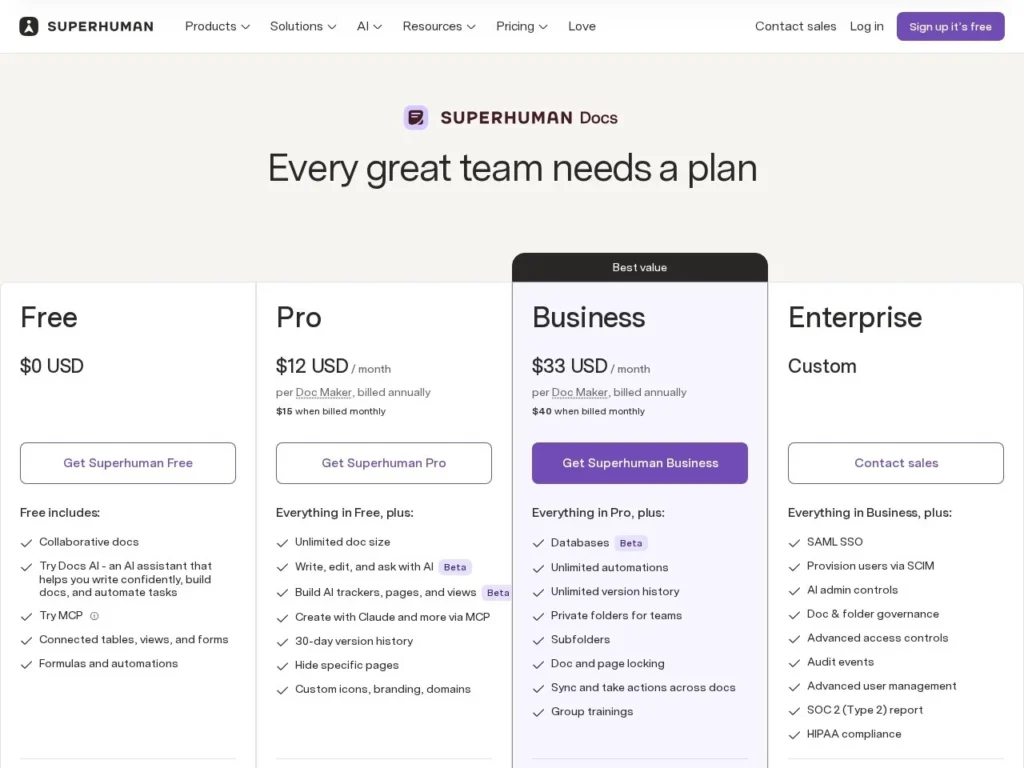
Superhuman Docs is Coda under a new name. On 8 July 2026, Coda became Superhuman Docs, joining Grammarly, Mail, and Go in the Superhuman suite. The product is still the doc that behaves like an app — pages, connected tables, formulas, buttons, and automations in one file — but the prices went up from the old $10 and $30 per Doc Maker to $12 and $33.
The pricing has one idea that changes the whole maths: only Doc Makers pay. A Doc Maker creates docs, templates, and folders. An Editor can edit existing docs, add tables and views, build formulas and buttons, and configure automations — and costs nothing. A team where two people build and three people contribute buys two seats, not five.
The free plan costs $0 and covers collaborative docs, connected tables, views and forms, formulas and automations on a low quota, and trials of Docs AI, MCP, Grammarly, and Go, with a 7-day version history, 1 GB attachments per doc, and limited pages and objects in shared docs.
Pro costs $12 per Doc Maker a month billed yearly, or $15 monthly. It adds unlimited doc size, Docs AI in beta, building AI trackers, pages, and views, creating with Claude and more through MCP, a 30-day version history, hidden pages, custom branding and domains, 5 GB attachments per doc, and Grammarly on annual billing. For a team with two makers, Pro costs $24 a month billed yearly, or $288 a year. For a team where all five people build docs, it costs $60 a month, or $720 a year.
Business costs $33 per Doc Maker a month billed yearly, or $40 monthly, and adds databases in beta, unlimited automations, unlimited version history, private folders, doc and page locking, and Superhuman Mail. Enterprise is custom pricing, with SAML single sign-on, SCIM provisioning, AI admin controls, and audit events.
Superhuman Docs’ real strength is that it replaces the spreadsheet as well as the wiki: a tracker built in a doc, with a table, a formula, and a button that sends a Slack message, is something Notion’s databases can approximate but never quite match. The honest weakness is the beta label on the AI: nobody outside Superhuman knows what Docs AI will cost when the beta ends.
2. Obsidian — Best for People Who Want Their Notes on Their Own Devices
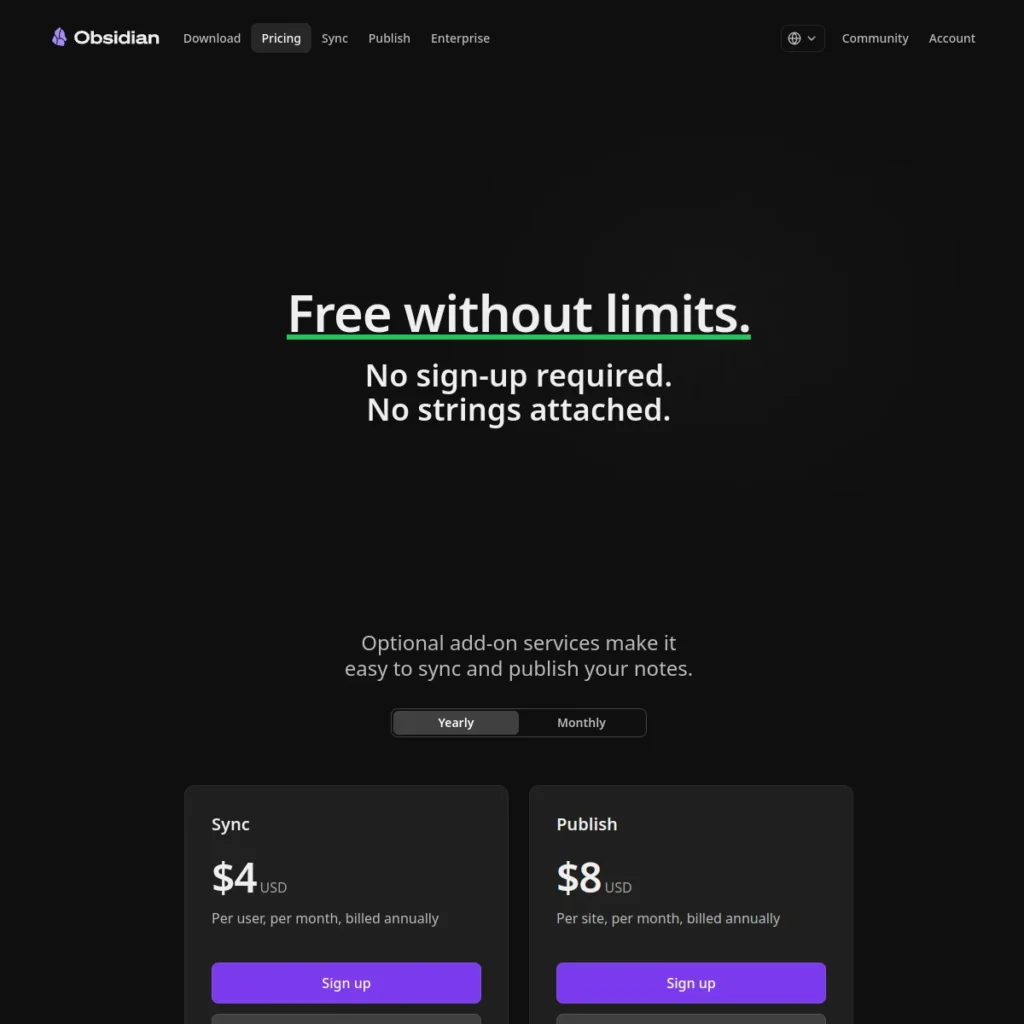
Obsidian is the cheapest tool in this guide in the most literal sense: the app costs nothing, forever, for personal and commercial use, with no account and no telemetry. Your notes are plain Markdown files in a folder on your own device.
The pricing is unusual because everything paid is optional. There is no plan to buy, only add-on services. Sync moves your vault between devices with AES-256 end-to-end encryption, so even Obsidian cannot read your notes. Standard costs $4 a user a month billed yearly, or $5 monthly, and covers 1 synced vault, 1 GB of storage, a 5 MB maximum file size, and 1 month of version history. Plus costs $8 a user a month billed yearly, or $10 monthly, and raises that to 10 synced vaults, 10 GB of storage, a 200 MB maximum file size, and 12 months of version history.
Publish turns a set of notes into a public website, with a custom domain and theme, and costs $8 a site a month billed yearly, or $10 monthly. Catalyst is a $25 one-time payment for early beta access and community badges. The commercial licence costs $50 a user a year — but it is optional, not required, and buys no feature at all. Students, faculty, and nonprofit staff get 40% off Sync and Publish.
For a 5-person team, Sync Standard costs $20 a month billed yearly, or $240 a year — $360 a year less than Notion Plus. Sync Plus costs $40 a month, or $480 a year.
The catch is collaboration. Obsidian syncs shared vaults between people, and every member of a shared vault needs an active Sync subscription, but it is not built for two people typing in the same note at the same time the way Notion is.
3. Anytype — Best for Teams That Want Private, Offline-First Notes
Anytype is the privacy-first answer to Notion. It is local-first, so your notes live on your device before they live anywhere else, and end-to-end encrypted, so nobody — not even Anytype — can read them. Everything is an object — a note, a book, a task, a person — and you build tables, kanban boards, galleries, and a graph out of those objects.
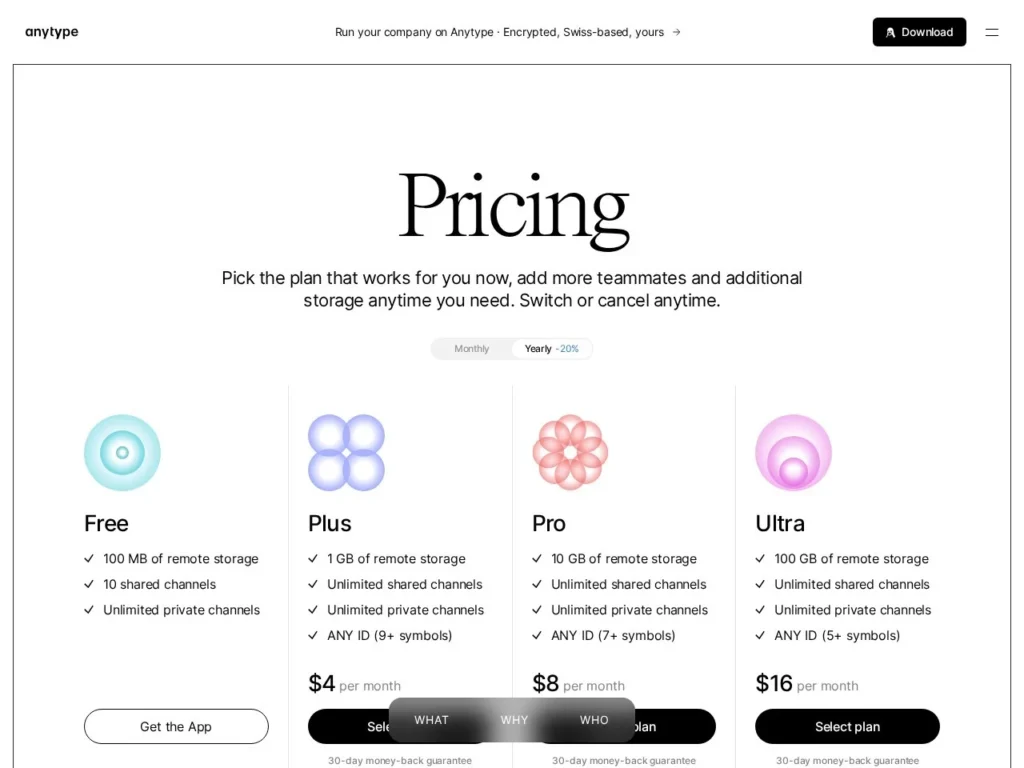
The pricing changed since the older guides were written. The old Builder plan at $99 a year and the Co-Creator plan at $299 one-time are gone. The current plans are subscriptions, and the free plan is the generous one. Free costs $0, with 100 MB of remote storage — and only files count toward storage, not text — 10 shared channels, unlimited private channels, and unlimited local use with offline sync between your own devices.
Plus costs $4 a month billed yearly, or $5 monthly, and raises remote storage to 1 GB, with unlimited shared channels. Pro costs $8 a month billed yearly, or $10 monthly, with 10 GB of remote storage. Ultra costs $16 a month billed yearly, or $20 monthly, with 100 GB. These are per-person memberships: a 5-person team where everyone takes Plus pays $20 a month billed yearly, or $240 a year — the same as Obsidian Sync Standard.
Business is the team plan, priced in euros: €20 per editor a month, or €16 with annual billing, with SSO and email sign-in, central management of all spaces, a knowledge base, projects, CRM and team chat, and a 14-day free trial. Viewers are free — only editors pay.
The catch is the missing web version. There is none: you always work in the app on Mac, Windows, Linux, iOS, or Android. A teammate on a borrowed Chromebook cannot open a link and start typing. There is also no AI assistant on the pricing page.
4. ClickUp — Best for Teams That Want Tasks and Docs in One Place
ClickUp is the only tool in this guide that starts from tasks instead of documents, and that is exactly why some teams prefer it. Notion is a wiki with tasks bolted on; ClickUp is a task tracker with docs bolted on.
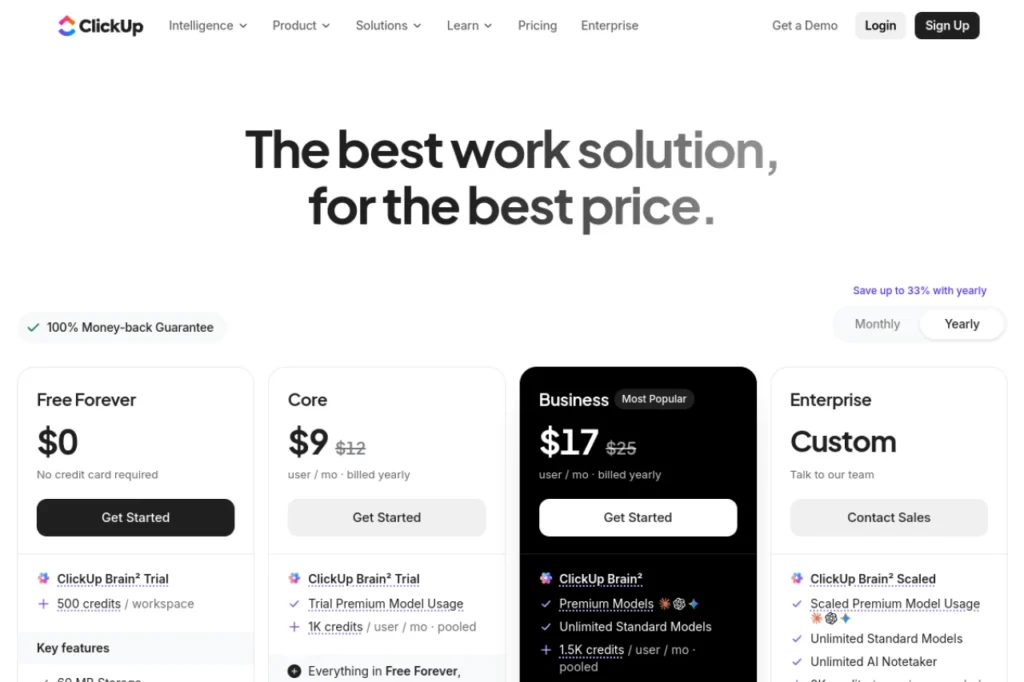
The free plan is called Free Forever, and it earns the name. It costs $0, with unlimited tasks and subtasks, unlimited free members, kanban boards, a calendar view, sprint management, time tracking, collaborative docs, and video calls. The limits are 60 MB of storage, one form, and a cap on automation uses. No other free plan in this guide lets a 5-person team work properly without paying.
Core costs $9 a user a month billed yearly — the page shows a regular price of $12 struck through — or $12 monthly. It adds unlimited storage and spaces, custom fields, unlimited forms and Gantt charts, 1,000 automations a month, goals, and live chat support. Business costs $17 a user a month billed yearly — regular price $25 struck through — or $25 monthly, and adds 10,000 automations a month, advanced dashboards, webhooks, resource management, and timesheets. Enterprise is priced by sales call, and a top MAX tier costs $100 a user a month billed yearly.
For a 5-person team, Core costs $45 a month billed yearly, or $540 a year — $60 a year less than Notion Plus — and it buys unlimited storage, Gantt charts, and 1,000 automations a month. Business costs $85 a month, or $1,020 a year, which only makes sense if your team actually uses resource management and timesheets.
ClickUp’s honest weakness is its interface: more buttons, views, and settings than any small team will ever use, and the first week feels like moving into a house with too many rooms. Guest seats also matter — the free plan gives unlimited guests, but paid plans limit them, with Core giving 5 guest seats for a 1-user workspace plus 2 per additional paid user.
5. Evernote — Best for People Who Capture First and Organise Later
Evernote is the oldest tool in this guide, and the fastest at the one job it was built for: capture something now, find it later.
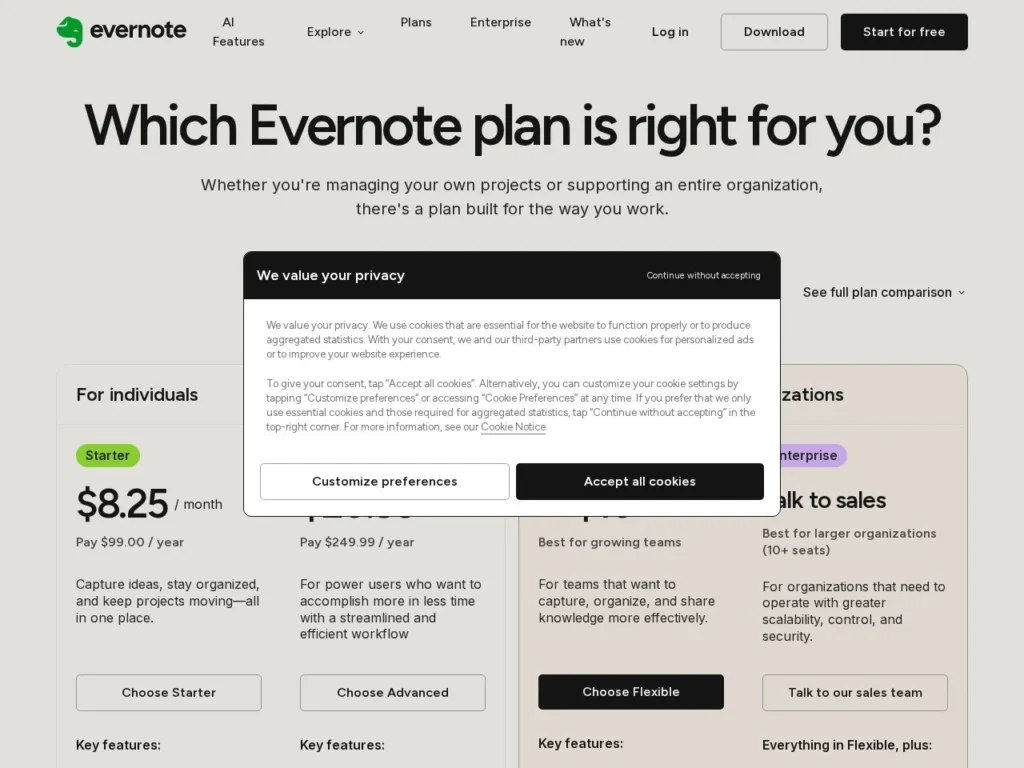
The pricing changed since the older guides were written. The old Personal and Professional plans are retired, and the current plans are Free, Starter, Advanced, Flexible, and a custom-quoted tier for larger organisations. The free plan costs $0, with 50 notes, 1 notebook, 5 spaces, 20 tags, 200 attachments, sync on 1 device, and 1 GB of storage.
Starter costs $8.25 a month billed yearly — you pay $99.00 once a year — or $14.99 monthly. It covers 1,000 notes, 20 notebooks, 3 devices, 5 GB of storage, and the AI features: AI Assistant, semantic search, AI Transcribe, AI Edit, and AI Cleanup. Advanced costs $20.83 a month billed yearly — $249.99 a year — or $24.99 monthly, with unlimited notes, notebooks, attachments, and devices, plus the same AI features and access to connect Evernote to AI tools through MCP.
Here is the trap most buyers miss: Starter and Advanced are flat-rate individual plans, not per-person team plans. Five people on Starter pay 5 times $99 a year — $495 a year — and get five separate accounts with no shared workspace, no central billing, and no admin console. The team plan is Flexible, from $10 a seat a month, with shared spaces, a centralised admin console, and seats that scale up or down. For a 5-person team, Flexible costs $50 a month, or $600 a year — exactly what Notion Plus costs. The pricing page publishes no separate annual rate for Flexible, so there is no yearly discount to claim on the team plan.
Evernote suits consultants, field teams, and anyone whose notes start as paper, photos, and voice.
Cost Maths: What a 5-Person Team Actually Pays
Here is the whole guide in one table, priced for a team of five on annual billing.
| Tool | Plan a 5-person team needs | Monthly cost (billed yearly) | Yearly cost | Monthly-billed cost |
|---|---|---|---|---|
| Notion | Plus | $50 | $600 | $60 a month |
| Notion | Business | $100 | $1,200 | $120 a month |
| Superhuman Docs | Pro (2 makers, 3 editors) | $24 | $288 | $30 a month |
| Superhuman Docs | Pro (5 makers) | $60 | $720 | $75 a month |
| Obsidian | Sync Standard | $20 | $240 | $25 a month |
| Anytype | Free | $0 | $0 | $0 |
| Anytype | Plus (5 members) | $20 | $240 | $25 a month |
| ClickUp | Core | $45 | $540 | $60 a month |
| Evernote | Flexible | $50 | $600 | $50 a month |
Three conclusions fall out of that table. First, the cheapest team here pays nothing: Anytype’s free plan covers a whole 5-person team at $0, and Obsidian’s app is free too — the $240 a year only starts if the team wants Sync. Second, maker billing changes everything: Superhuman Docs Pro costs $288 a year when two people build and three edit, but $720 when all five build. Third, paying monthly instead of yearly adds 20 to 25% to most bills, while Evernote’s Flexible publishes no annual discount at all.
Now add the cost nobody puts in the table: the move itself. Migrating five people off Notion takes an afternoon — exporting pages, rebuilding the databases that do not survive export, re-inviting the team, and re-creating the two or three automations that matter.
The cheapest switch here is Anytype Free at $0, or Obsidian Sync Standard at $240 a year, $360 less than staying on Notion Plus. The most expensive is Superhuman Docs Pro with five makers at $720, $120 more than Notion Plus. Both numbers are small next to the cost of the problem: a team of five losing one hour a week each to hunting for notes loses 260 hours a year — at $25 an hour, $6,500. The tool is not the expensive part.
The Hidden Costs and Gotchas
Ten traps, in the order you will meet them. Every one of them has bitten a real small business.
First, the maker maths. Superhuman Docs charges per Doc Maker, and Anytype Business charges per editor. That is a gift when two people build and three people use — and a trap when everyone on the team builds. Count who creates docs before you buy — five builders pay $720 a year on Superhuman Docs Pro, more than Notion Plus.
Second, Obsidian sync is per person. The app is free, but every member of a shared vault needs an active Sync subscription, so a 5-person team pays $240 a year for Standard, not $0.
Third, Anytype’s free storage counts files only. Text does not count toward the 100 MB, which is generous for notes — but a team that attaches PDFs, photos, and scans to everything will hit the limit fast, and the next step is $4 a month per member.
Fourth, Evernote’s cheap plans are not team plans. Starter at $99 a year and Advanced at $249.99 a year are flat-rate individual plans. Five people on Starter pay $495 a year for five separate accounts with no shared workspace and no admin console. The team plan is Flexible at $10 a seat a month, and it publishes no annual discount to claim on the team plan.
Fifth, the AI that is a trial, not a feature. Notion AI is a limited trial on the Free and Plus plans, and the full agent tools need Business at $20 a member a month, plus $10 per 1,000 credits for Custom Agents. Superhuman Docs’ Docs AI is a beta whose price after beta is unknown. Anytype and Obsidian list no AI assistant at all. If the AI assistant is the reason you are buying, read the cap before you pay.
Sixth, the annual-billing lock-in. Every price in this guide’s table is the annual price. Paying monthly costs 20 to 25% more on most tools, and Evernote Starter nearly doubles: $99 a year against $179.88 paid monthly.
Seventh, the guest-seat maths. Notion’s free plan caps external guests at 10, and guests can only see the pages they are invited to. ClickUp’s paid plans limit guest seats, while its free plan gives unlimited guests. Superhuman Docs’ editors and viewers are free on every plan, and Anytype Business charges only editors, with viewers free.
Eighth, the importer that moves most of the workspace. Notion exports pages as Markdown, HTML, or CSV, and Obsidian and Anytype import Markdown happily — but relational databases, linked views, and permissions do not survive the trip. Superhuman Docs, ClickUp, and Evernote all import from Notion in their own ways, and none moves everything.
Ninth, the offline trap. Only Obsidian and Anytype are truly offline-first, with notes that live on your own devices. Notion lets you download chosen pages, and Superhuman Docs lives in the browser.
Tenth, the tool you already pay for. Before you buy any of these, check what you already own. Google Workspace and Microsoft 365 both include note and document tools your team already pays for, and a team that only needs shared notes may need no new tool at all.
Strategic Pivot: Price the Stack Before You Buy It
Before you pay for any plan in this guide, run the numbers through our free AI Cost Calculator — tick Superhuman Docs, Obsidian, Anytype, ClickUp, or Evernote at your real seat count, add the tools the new system replaces, and see the monthly total before the first bill arrives. The calculator uses the same live prices as this guide, and it takes about ninety seconds.
Pros and Cons
Pros (switching away from Notion): A bill that matches how your team actually works — makers only, or free; notes that live on your own devices and work offline; real task views with assignees and workload.
Cons (switching away from Notion): Migration takes an afternoon and a week of running two tools; relational databases and linked views do not survive the export.
Pros (Superhuman Docs): Only Doc Makers pay, so editors and viewers are free; docs that behave like apps, with tables, formulas, and automations; Docs AI and MCP included in beta on Pro; Grammarly included on annual Pro.
Cons (Superhuman Docs): Five makers cost $720 a year, more than Notion Plus; Docs AI is a beta with unknown pricing after beta.
Pros (Obsidian): The app is free forever, for personal and commercial use; notes are plain Markdown files on your own device; Sync is end-to-end encrypted at $4 a user a month; fully offline.
Cons (Obsidian): No real-time co-editing; every shared-vault member needs a Sync subscription; no built-in AI assistant.
Pros (Anytype): Free plan covers a whole team at $0; local-first and end-to-end encrypted; fully offline; self-hosting needs no membership at all.
Cons (Anytype): No web version — apps only; no AI assistant on the pricing page; the team plan is priced in euros at €20 per editor a month.
Pros (ClickUp): The only free plan that fits a whole team; Core at $540 a year undercuts Notion Plus; Gantt charts and 1,000 automations on Core; tasks, docs, goals, and time tracking in one place.
Cons (ClickUp): The interface overwhelms new users; its docs are simpler than Notion’s databases; guest seats are limited on paid plans.
Pros (Evernote): The fastest capture here — notes, photos, voice, web clips, all searchable; AI features included on paid plans; Flexible gives teams shared spaces and an admin console.
Cons (Evernote): Free plan stops at 50 notes; Starter and Advanced are individual plans, not team plans; Flexible publishes no annual discount.
Our Verdict: Notion Alternatives
For most 5-person teams leaving Notion, take Obsidian Sync Standard at $4 a user a month billed yearly — $240 a year. It is the only switch that costs less than half of Notion Plus while giving you more: notes that live on your own devices, full offline use, and end-to-end encrypted sync.
Take Anytype Free instead if privacy is the point and your team can live in apps rather than a browser. At $0 for the whole team, with local-first notes and end-to-end encryption, it is the cheapest real alternative here — and if the team outgrows the 100 MB of file storage, Plus at $4 a month per member is still the same $240 a year as Obsidian Sync.
Take Superhuman Docs Pro at $12 per Doc Maker a month billed yearly if your team builds trackers, hubs, and internal tools inside documents. With two makers it costs $288 a year, less than half of Notion Plus — but count your makers first, because five makers cost $720 a year.
Take ClickUp Core at $9 a user a month billed yearly — $540 a year — if your complaint about Notion is that the work itself is hard to see. It costs $60 a year less than Notion Plus and adds Gantt charts, 1,000 automations a month, and a workload view Notion does not have.
Take Evernote Flexible from $10 a seat a month — $600 a year for five people — only if your team’s notes start as paper, photos, and voice memos. It costs exactly what Notion Plus costs, and it earns that money on capture and search, not on wikis or databases. Do not buy Starter for a team: five separate Starter accounts are not a team system.
Whatever you pick, do it in this order: trial it with the whole team on the free plan or one month of monthly billing, export one small workspace and check what survived, rebuild your two most important databases or trackers by hand, and only then pay for the year. The tool that gets kept is the one the team still opens in week four.
Frequently Asked Questions
1. Is there a free notion alternative that actually works for a team? Yes, two: Anytype Free covers a whole team at $0, with local-first notes, offline sync, and 100 MB of shared file storage, and ClickUp Free Forever gives unlimited members, unlimited tasks, and collaborative docs.
2. Which Notion alternative works fully offline? Obsidian and Anytype. Both are local-first: your notes live as files on your own device and work with no connection at all. Notion lets you download chosen pages for offline use, and Superhuman Docs lives in the browser, so neither is a true offline tool.
3. What is the cheapest Notion alternative for a 5-person team? Anytype Free at $0, if the team fits in 100 MB of shared file storage. The cheapest paid setup is Obsidian Sync Standard or Anytype Plus, both $240 a year for five people, against $600 a year for Notion Plus.
4. Is Coda still available, or is it Superhuman Docs now? Coda became Superhuman Docs on 8 July 2026, joining Grammarly, Mail, and Go in the Superhuman suite. It is the same product — docs with tables, formulas, buttons, and automations — with the same maker-only billing. The prices rose with the rename: Pro is now $12 per Doc Maker a month billed yearly, and Business is $33.
5. Can I move my Notion pages to another tool? Yes. Notion exports pages as Markdown, HTML, or CSV, and Obsidian and Anytype import Markdown directly. Superhuman Docs, ClickUp, and Evernote all have their own import paths from Notion. What does not move cleanly is the structure: relational databases, linked views, and permissions have to be rebuilt by hand, so export one small workspace first and check what survived.
Price Note
Price note — updated 21 November 2026: Prices in this post were checked on 21 November 2026. When you are reading this, the price may be lower or higher — always check the official pricing page before you buy.
Coda is now Superhuman Docs — the rename happened on 8 July 2026, and the prices rose from the old $10 and $30 per Doc Maker to $12 and $33 billed yearly. Anytype’s old Builder plan at $99 a year and Co-Creator plan at $299 one-time are gone, replaced by Free, Plus at $4 a month, Pro at $8, and Ultra at $16, all billed yearly, plus a Business plan at €20 per editor a month.
Evernote retired Personal and Professional — the current plans are Free, Starter at $99 a year, Advanced at $249.99 a year, and Flexible from $10 a seat a month. Obsidian’s Sync Standard is $4 a user a month billed yearly, and Publish is $8 a site a month billed yearly.
Pros
- Pros (switching away from Notion): A bill that matches how your team actually works — makers only, or free; notes that live on your own devices and work offline; real task views with assignees and workload.
- Pros (Superhuman Docs): Only Doc Makers pay, so editors and viewers are free; docs that behave like apps, with tables, formulas, and automations; Docs AI and MCP included in beta on Pro; Grammarly included on annual Pro.
- Pros (Obsidian): The app is free forever, for personal and commercial use; notes are plain Markdown files on your own device; Sync is end-to-end encrypted at $4 a user a month; fully offline.
- Pros (Anytype): Free plan covers a whole team at $0; local-first and end-to-end encrypted; fully offline; self-hosting needs no membership at all.
- Pros (ClickUp): The only free plan that fits a whole team; Core at $540 a year undercuts Notion Plus; Gantt charts and 1,000 automations on Core; tasks, docs, goals, and time tracking in one place.
- Pros (Evernote): The fastest capture here — notes, photos, voice, web clips, all searchable; AI features included on paid plans; Flexible gives teams shared spaces and an admin console.
Cons
- Cons (switching away from Notion): Migration takes an afternoon and a week of running two tools; relational databases and linked views do not survive the export.
- Cons (Superhuman Docs): Five makers cost $720 a year, more than Notion Plus; Docs AI is a beta with unknown pricing after beta.
- Cons (Obsidian): No real-time co-editing; every shared-vault member needs a Sync subscription; no built-in AI assistant.
- Cons (Anytype): No web version — apps only; no AI assistant on the pricing page; the team plan is priced in euros at €20 per editor a month.
- Cons (ClickUp): The interface overwhelms new users; its docs are simpler than Notion's databases; guest seats are limited on paid plans.
- Cons (Evernote): Free plan stops at 50 notes; Starter and Advanced are individual plans, not team plans; Flexible publishes no annual discount.
For most 5-person teams leaving Notion, take Obsidian Sync Standard at $4 a user a month billed yearly — $240 a year. It is the only switch that costs less than half of Notion Plus while giving you more: notes that live on your own devices, full offline use, and end-to-end encrypted sync.Take Anytype Free instead if privacy is the point and your team can live in apps rather than a browser. At $0 for the whole team, with local-first notes and end-to-end encryption, it is the cheapest real alternative here — and if the team outgrows the 100 MB of file storage, Plus at $4 a month per member is still the same $240 a year as Obsidian Sync.Take Superhuman Docs Pro at $12 per Doc Maker a month billed yearly if your team builds trackers, hubs, and internal tools inside documents. With two makers it costs $288 a year, less than half of Notion Plus — but count your makers first, because five makers cost $720 a year.Take ClickUp Core at $9 a user a month billed yearly — $540 a year — if your complaint about Notion is that the work itself is hard to see. It costs $60 a year less than Notion Plus and adds Gantt charts, 1,000 automations a month, and a workload view Notion does not have.Take Evernote Flexible from $10 a seat a month — $600 a year for five people — only if your team's notes start as paper, photos, and voice memos. It costs exactly what Notion Plus costs, and it earns that money on capture and search, not on wikis or databases. Do not buy Starter for a team: five separate Starter accounts are not a team system.Whatever you pick, do it in this order: trial it with the whole team on the free plan or one month of monthly billing, export one small workspace and check what survived, rebuild your two most important databases or trackers by hand, and only then pay for the year. The tool that gets kept is the one the team still opens in week four.
1 thought on “Notion Alternatives (2026): 5 Compared by Real Price”