
Here is how to build an AI FAQ for your website in one afternoon: pull your 30 most repeated customer questions from your inbox, write one short approved answer for each, upload that document to a builder such as Tidio, Chatbase, or Botpress, set a fallback that hands off to a human, then paste the embed snippet on your site. Start free: Tidio gives every account 50 one-time Lyro AI conversations, and Botpress includes 100 conversations on its Free plan. Paid entry points checked on 28 November 2026 run from $390 a year (Tidio Starter with AI) to $480 a year (Chatbase Hobby at list price).
Quick Answer
Here is how to build an AI FAQ for your website in one afternoon: pull your 30 most repeated customer questions from your inbox, write one short approved answer for each, upload that document to a builder such as Tidio, Chatbase, or Botpress, set a fallback that hands off to a human, then paste the embed snippet on your site. Start free: Tidio gives every account 50 one-time Lyro AI conversations, and Botpress includes 100 conversations on its Free plan. Paid entry points checked on 28 November 2026 run from $390 a year (Tidio Starter with AI) to $480 a year (Chatbase Hobby at list price).
In this article
- Why the FAQ document matters more than the bot
- Step 1: Mine your real questions
- Step 2: Write the answer bank
- Step 3: Pick your builder
- Step 4: Train it only on approved answers
- Step 5: Set fallback and human handoff rules
- Step 6: Embed it and test with awkward questions
- Step 7: Maintain it monthly
- The maths: what 50 to 250 conversations really cost
- Five traps that catch FAQ builders
- Strategic Pivot: price the hour before you buy
- Pros and cons
- Our verdict
- Frequently asked questions
- Sources
Why the FAQ document matters more than the bot
Every small business owner knows the loop. The same five questions land in the inbox every week: delivery times, returns, opening hours, whether you serve their area, and what the final price includes. You type the same answer, slightly worse each time, at 11 p.m.
An AI FAQ for your website breaks that loop, but only if the bot answers from your words, not from its imagination. The builder is the easy part. The document you feed it decides whether customers get your real returns policy or a confident invention.
That is why this guide to how to build an AI FAQ for your website starts with your inbox, not with a pricing page. Get the questions and answers right first, and any of the three builders below will behave. Skip that work, and the most expensive plan will still embarrass you.
Think of it like training a new staff member. You would not hand them the keys and say “figure it out.” You would give them the price list, the returns rules, and a clear line: when unsure, ask me. An AI FAQ needs exactly the same three things.
Step 1: Mine your real questions
Open your last 100 customer emails, chats, and contact-form messages. Tally every question that appears more than twice. Most owners find 20 to 40 repeated questions hiding in plain sight, and the top ten usually cover most of the volume.
Add the questions people ask before they buy: the ones from your Google reviews, your Facebook comments, and your sales calls. Pre-sale questions matter most, because a fast, correct answer at 9 p.m. is often the difference between a sale and a closed tab.
Write each question the way customers actually phrase it, typos and all. “Do u deliver on Sunday?” is worth more than a polished version nobody types. The bot matches meaning, but real phrasing teaches it the range of ways people ask.
For version one of how to build an AI FAQ for your website, stop at 30 to 50 questions. A small, accurate FAQ beats a huge, vague one, and you can add questions monthly from the bot’s own unanswered list. Perfection is the enemy here; coverage of the top questions is the goal.
Step 2: Write the answer bank
Now, for how to build an AI FAQ for your website, write one short answer per question, in a single document. Keep each answer under 60 words. State the fact, state the condition, and end with the next step: “Yes, we deliver on Sundays between 9 a.m. and 2 p.m. Order by 6 p.m. Saturday and choose Sunday delivery at checkout.”
One document, one source of truth. When your delivery hours change, you edit one line and re-upload, instead of hunting through website pages that contradict each other. Contradictions are the number one cause of wrong bot answers.
Include the awkward answers too: what you do not do, areas you do not serve, and the refund you will not give. A bot that knows your boundaries says “we don’t cover that area yet” instead of promising a delivery you cannot make.
Add a short “never answer” list at the end of the document: legal advice, medical advice, competitor prices, and anything about another customer’s order. You will turn that list into fallback rules in Step 5.
Read the document out loud once. If a sentence sounds like a brochure, rewrite it the way you would say it to a customer standing in front of you. The bot will echo your tone, so give it a tone worth echoing.
Step 3: Pick your builder
For how to build an AI FAQ for your website, three builders cover almost every small business case, and all three let you start without a credit card. The table below uses prices read on each vendor’s official pricing page on 28 November 2026.
| Builder | Free start | First paid step | What the meter counts |
|---|---|---|---|
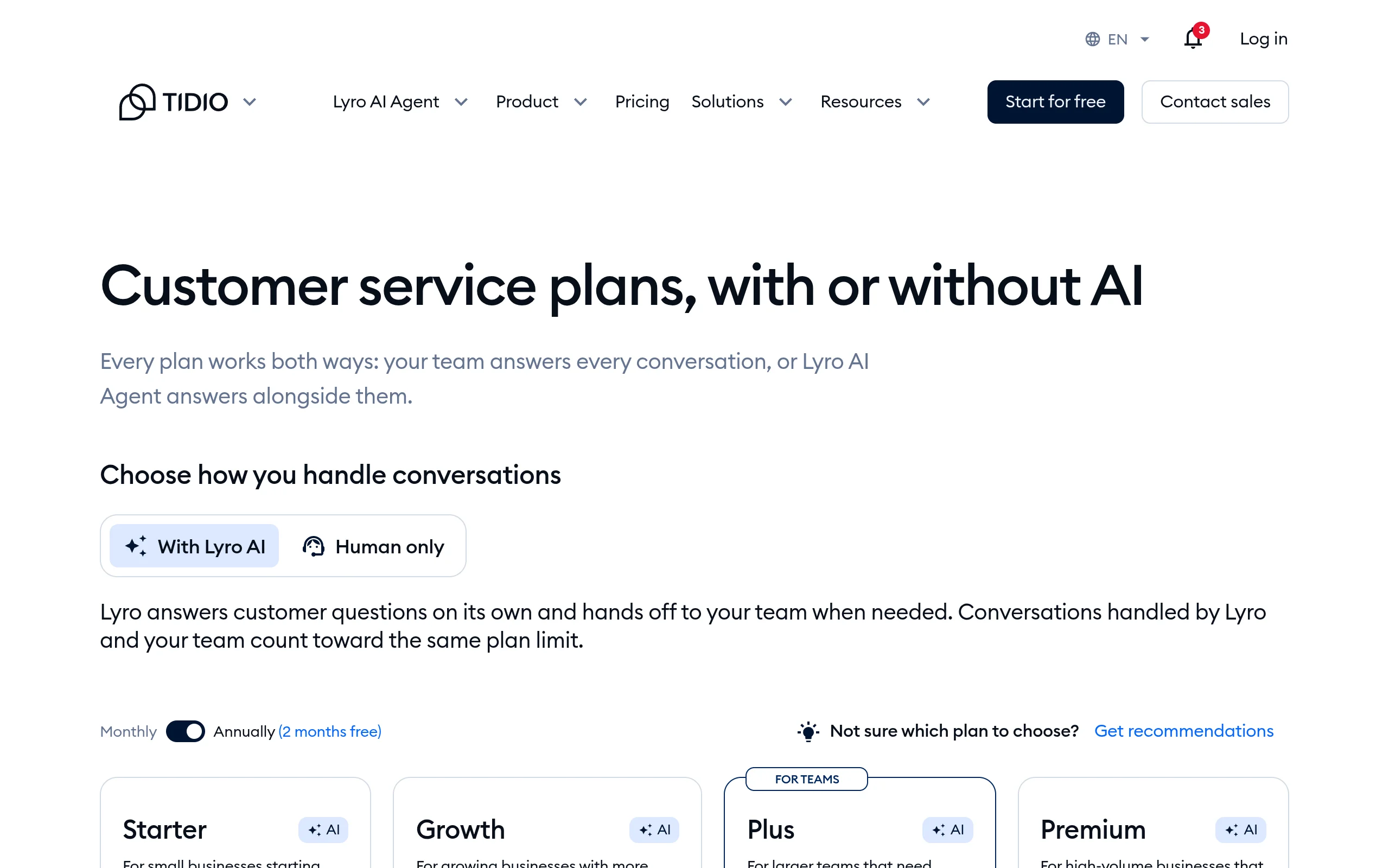
| Tidio (Lyro AI) | Free plan: 50 human conversations a month, plus 50 one-time Lyro AI conversations | Starter with AI: $33 a month billed annually, $390 a year, 50 AI + human conversations | A conversation counts once your team or Lyro replies in it |
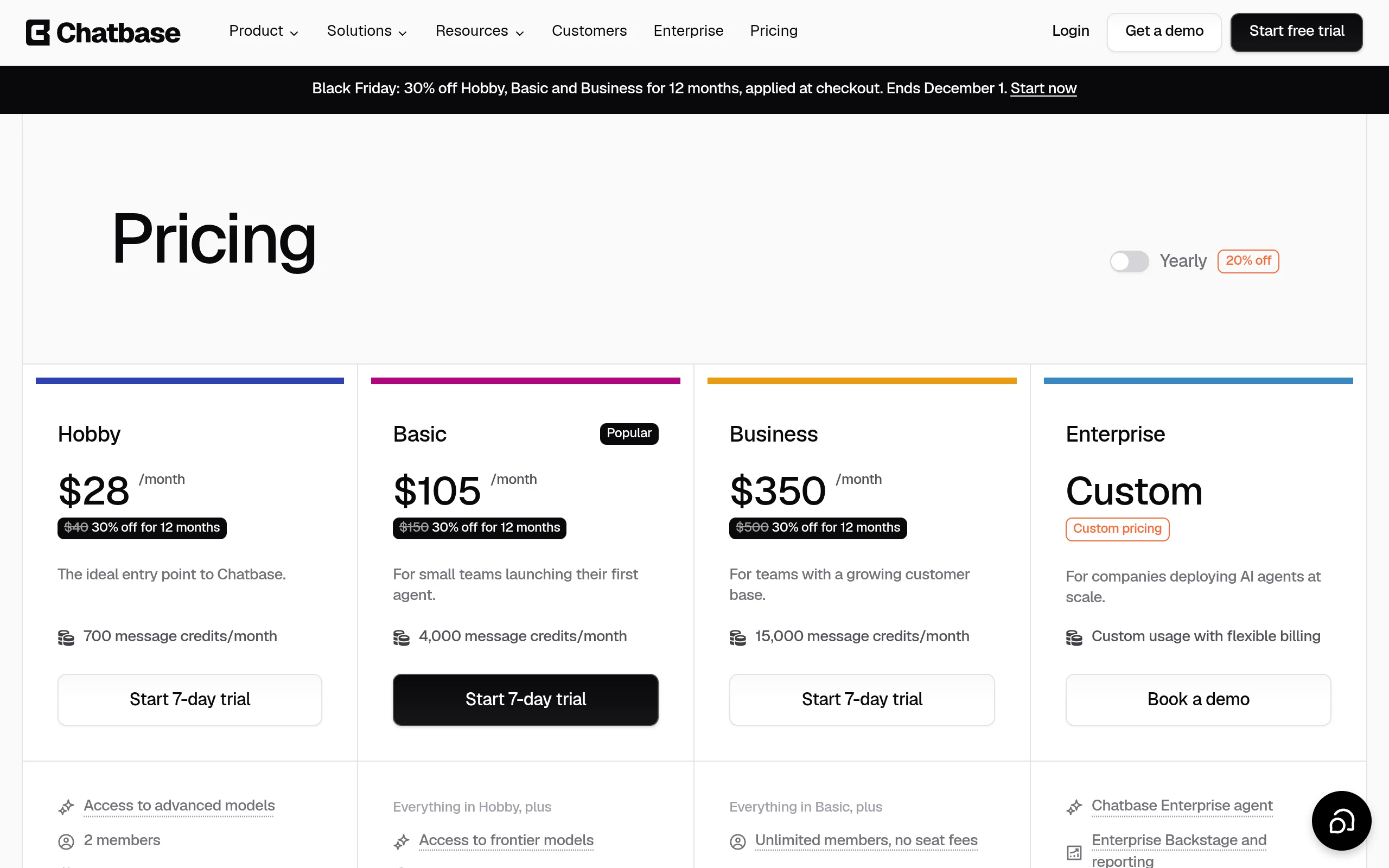
| Chatbase | Free plan listed by Chatbase; paid plans carry a 7-day trial on Chatbase’s own comparison pages | Hobby: $40 a month list price ($28 a month with the 30% off for 12 months shown on the pricing page), 700 message credits a month, 2 members | Message credits; each AI model request costs credits, and actions can multiply them |
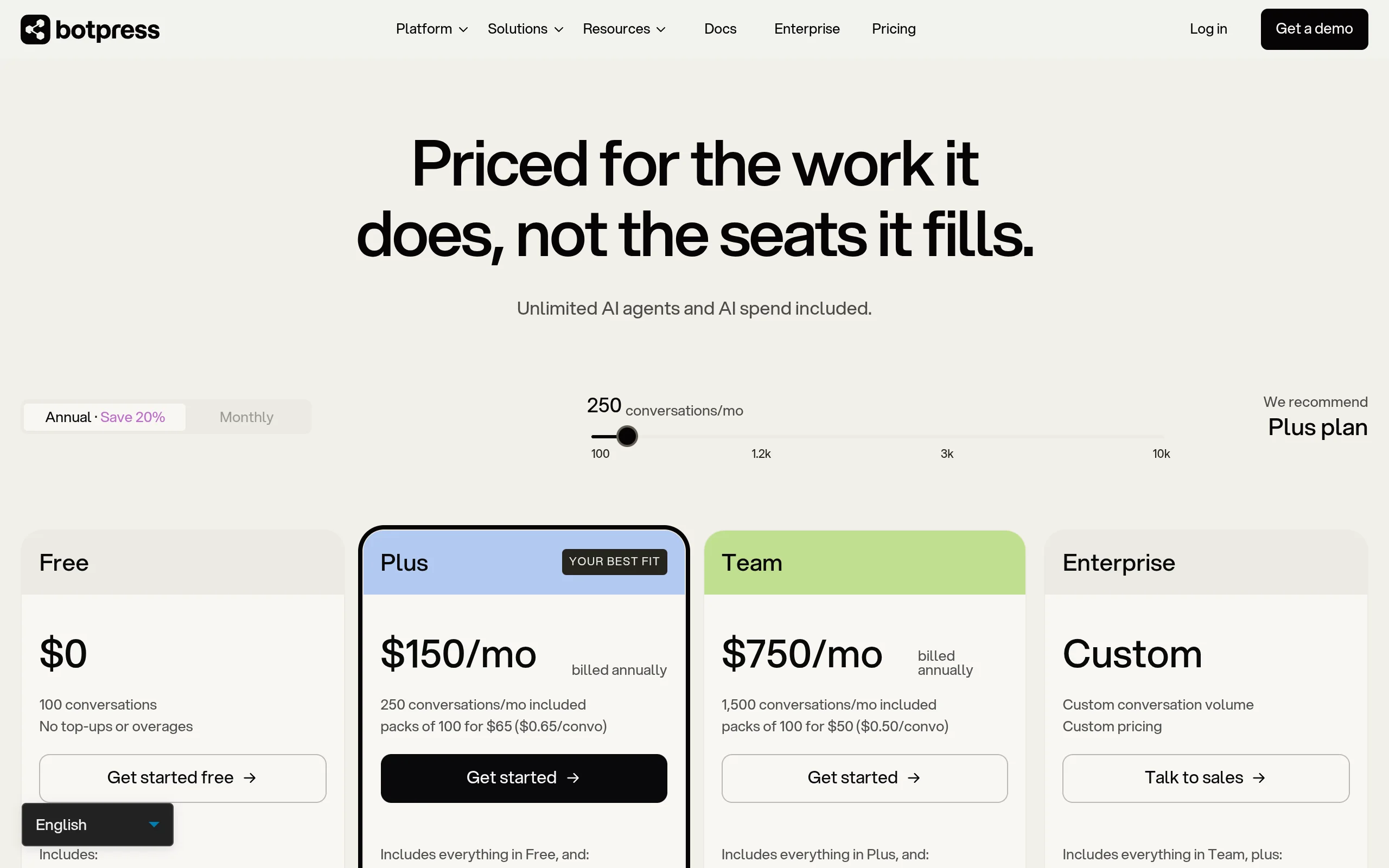
| Botpress | Free plan: 100 conversations, 3 seats, 3 AI agents, hard-capped with no add-ons | Plus: $150 a month billed annually ($1,800 a year), 250 conversations a month, extra packs of 100 for $65 | A conversation is an exchange with at least two messages from the visitor |
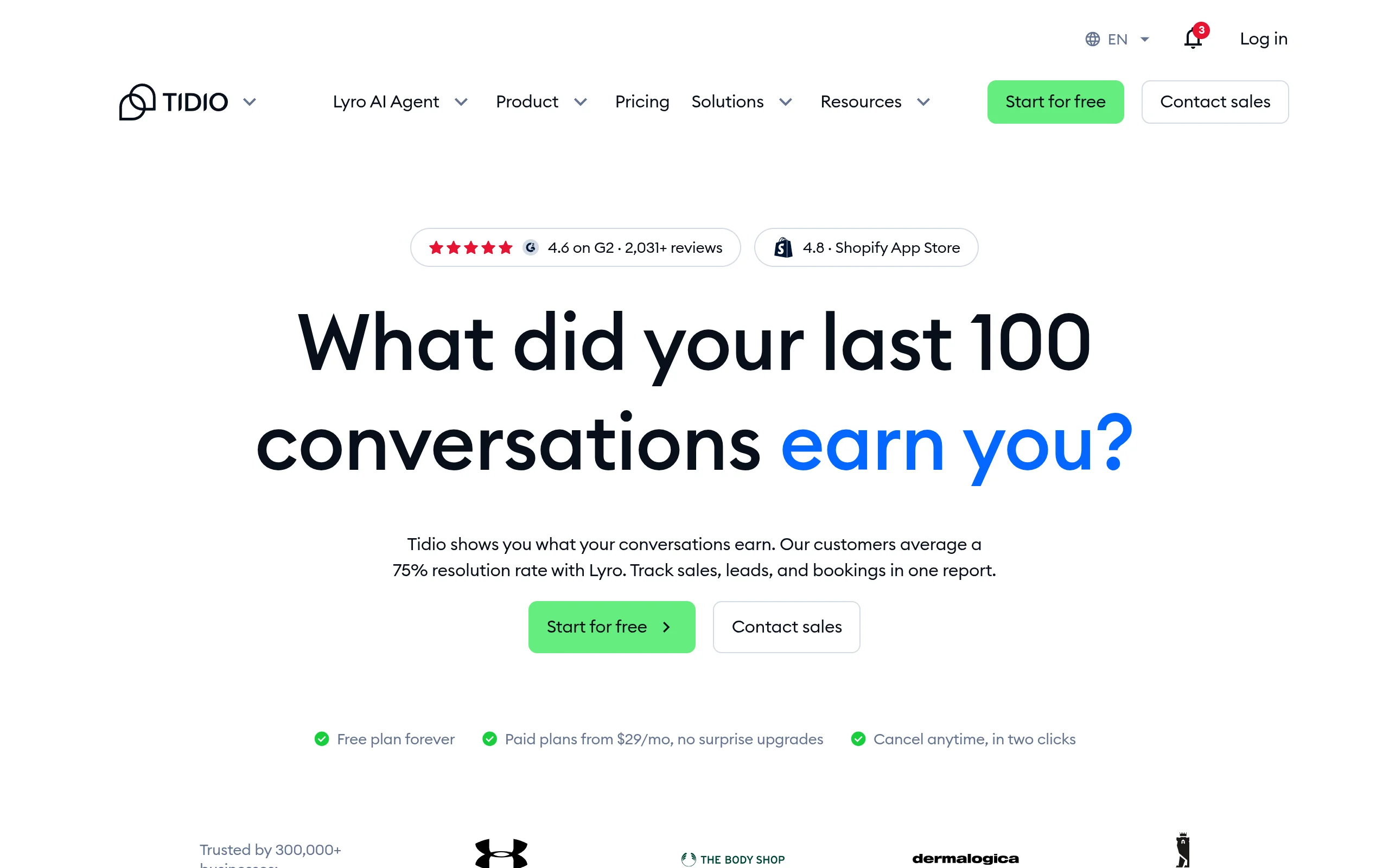
Tidio fits owners who want live chat, ticketing, and the AI in one inbox. Its pricing page lists FAQ upload, an FAQ scraper, and a website scraper as included knowledge tools, which maps neatly onto the answer-bank method in this guide.
Chatbase fits owners who want the agent trained on documents, website pages, and Q&A pairs, with a helpdesk on higher plans. Its meter is the one to watch: credits are spent per AI request, so a chatty conversation with actions enabled can cost more than one credit per reply.
Botpress fits owners who want control: a visual builder, a public Help Center, and the most generous free conversation allowance of the three. The jump from Free to Plus is steep, though, so treat the free plan as a serious pilot, not a forever home.
Our advice: pilot on a free plan first. If your FAQ handles 40 conversations in the pilot month and customers stop emailing the basics, the paid step pays for itself. If the pilot flops, you have spent an afternoon, not a budget.
Step 4: Train it only on approved answers
Upload your answer-bank document first, before you let the builder crawl your website. Your document is the approved version; your website may still carry last year’s delivery page, and the bot will happily quote it.
Then add your key pages: pricing, delivery, returns, and contact. In Tidio that means the FAQ upload and website scraper; in Chatbase, file uploads, website crawling, and Q&A pairs; in Botpress, the knowledge base behind its Help Center. Same idea, three labels.
Turn off anything that lets the bot browse the open web for answers. An AI FAQ should be a closed book: your answers, your pages, nothing else. The moment it improvises from general knowledge, it stops being your FAQ and starts being a liability.
Set the greeting to name the limits honestly: “Hi, I’m the automated assistant for [your business]. I answer questions about delivery, returns, and opening hours. For anything else, I’ll connect you with the team.” Customers forgive a bot that knows its lane.
Step 5: Set fallback and human handoff rules
Every AI FAQ needs a graceful “I don’t know.” Write the fallback yourself: “I don’t have a confirmed answer for that yet. I’ve passed your question to the team, and we’ll reply by email within one working day.” Then make sure a human actually sees that handoff.
Use your “never answer” list from Step 2 as hard rules. Prices you have not published, legal or medical advice, and questions about someone else’s order should route straight to a person, every time, without the bot attempting a reply.
Set a confidence habit: when the bot is unsure, it should ask one clarifying question, then hand off. Two failed guesses in a row is a customer quietly leaving. One honest handoff is a customer who feels looked after.
Decide who owns the inbox during opening hours, and what happens after hours. An FAQ that hands off to nobody is worse than no FAQ at all, because the customer believes help is coming. Put the response-time promise in the fallback text and keep it.
Step 6: Embed it and test with awkward questions
Each builder you use for how to build an AI FAQ for your website gives you a short embed snippet to paste into your site, or a plugin for common platforms. Paste it once, then open your site in a private browser window and check the chat button appears on your home page, a product page, and your contact page, on desktop and on your phone.
Now test like a difficult customer. Ask your top ten questions in sloppy wording. Ask two questions in one message. Ask something your FAQ should refuse, such as a competitor’s price. Ask in another language if your customers do. Write down every wrong or wobbly answer.
Fix failures in the answer bank, not in the chat. If the bot mangled your returns window, the document probably states it two ways. Make the document unambiguous, re-upload, and ask the same question again until the answer is boringly correct.
Test the handoff too. Ask an unanswerable question and confirm the message reaches a human inbox with the conversation attached. A fallback nobody receives is a silent failure, and silent failures are the ones customers screenshot.
Step 7: Maintain it monthly
An AI FAQ is a garden, not a statue. Once a month, read the conversations the bot could not answer and the ones where customers rephrased their question twice. Those transcripts are a free list of the answers your document is missing.
Add the new answers to the bank, re-upload, and note the date. When prices, hours, or policies change, update the document the same day you update the website. The bot cannot know what you forgot to tell it.
Watch the meter while you are there. If conversations climb past your plan’s allowance, you will see it in the usage report before the bill surprises you. Tidio counts a conversation once you or Lyro reply; Botpress counts an exchange with at least two visitor messages; Chatbase spends credits per AI request.
Retire questions nobody asks. A lean FAQ stays accurate, and accuracy is the whole product. Ten correct answers beat fifty drifting ones every single time.
Keep a one-line changelog at the top of the answer bank: the date, what changed, and why. When a customer disputes an answer, the changelog tells you exactly what the bot knew on that day. It takes thirty seconds per edit and settles arguments before they start.
Once a quarter, re-run the awkward test from Step 6 in full. Builders update their models and interfaces, and an answer that was perfect in January can drift by April. The test sheet is your regression check: same questions, same expected answers, no surprises.
The maths: what 50 to 250 conversations really cost
Price the pilot first. Tidio’s Free plan includes 50 human conversations a month and a one-time quota of 50 Lyro AI conversations, so a careful pilot costs $0. Botpress Free includes 100 conversations with 3 seats, also $0, hard-capped with no paid top-ups.
At 50 AI-handled conversations a month, Tidio Starter with AI costs $390 a year billed annually. Chatbase Hobby costs $480 a year at the $40 list price, or $336 for the first 12 months at the $28 promotional price shown on its pricing page on 28 November 2026.
At 250 conversations a month, Botpress Plus costs $1,800 a year billed annually, with extra packs of 100 conversations at $65. Tidio Growth with AI starts at $750 a year billed annually and scales by the conversation quota you choose, up to 1,000.
The honest comparison is not plan against plan; it is plan against your time. If the FAQ deflects 40 repetitive emails a month and each took you five minutes, that is over three hours back. At even a modest value on your hour, the $390 plan is the cheapest staff member you will ever hire.
Start free, measure one month, then buy the smallest plan that covers your real volume. Buying 1,000 conversations for a 60-conversation problem is how small tools become big bills.
Five traps that catch FAQ builders
First, training on the whole website and nothing else. Your site was written to sell, not to answer, and it rarely states the awkward limits. The answer bank exists because marketing pages make poor support documents.
Second, leaving auto-recharge or automatic upgrades switched on without a cap. Chatbase can auto-recharge credits below a threshold you set, and Botpress adds conversation packs automatically at 95% of quota and does not let you turn that off. Know your ceiling before the busy month arrives.
Third, forgetting the meter definitions differ. A “conversation” in Tidio, a “conversation” in Botpress, and a “message credit” in Chatbase are three different units. Compare them at your real volume, not by the headline number.
Fourth, no human owner. The bot hands off at 2 p.m., nobody is watching, and the customer waits until tomorrow. Assign the inbox, set the response promise, and check the handoff weekly.
Fifth, launching without the awkward test. The first person to find the wrong answer should be you, with your test sheet, not a customer with a screenshot. Ten minutes of hostile testing prevents the one-star review.
Strategic Pivot: price the hour before you buy
Before you pick a plan, price the hour the FAQ gives back. Our free AI Cost Calculator lets you enter your monthly conversation volume and the minutes each repetitive reply takes you today, then compares the plan cost against the time saved. Two minutes of arithmetic beats a month of guessing.
If the maths says the FAQ saves you three hours a month, buy the smallest plan that covers your volume and move on. If it says twenty minutes, keep the free plan and spend the money elsewhere. The tool is free either way.
Pros and cons
Tidio
Pros: Free plan with a one-time 50 Lyro AI conversations for a real pilot; FAQ upload, FAQ scraper, and website scraper included; live chat, ticketing, and AI share one inbox; Starter with AI is the cheapest paid step at $390 a year.
Cons: The free Lyro quota does not renew, so the pilot is a one-shot test; AI and human conversations share one plan limit; removing Tidio branding costs an extra $20 a month.
Chatbase
Pros: Trains on files, website crawling, Notion, plain text, and Q&A pairs; message-credit plans scale from 700 credits a month; helpdesk and human handoff with transcript on higher plans; no seat fees on Basic and Business.
Cons: Credits are spent per AI request, so action-heavy chats cost more than they look; the pricing page showed a 30% off for 12 months promotion on 28 November 2026, so budget for the list price at renewal; the entry Hobby plan allows 2 members.
Botpress
Pros: The strongest free start: 100 conversations, 3 seats, and 3 AI agents; a public Help Center for self-serve answers; conversation pricing is predictable, with packs of 100 at $65 on Plus.
Cons: Free is hard-capped with no add-ons, so growth forces the jump to Plus at $1,800 a year; conversation packs auto-add at 95% of quota and cannot be switched off; the builder rewards owners who enjoy configuring flows.
Our verdict
For how to build an AI FAQ for your website, build the answer bank first, pilot free, and let the transcripts decide. For most small businesses, Tidio is the gentlest start: a genuine free pilot, FAQ tools built in, and a $390-a-year first step. Choose Chatbase when document training and a helpdesk matter more than the credit meter, and Botpress when you want builder control and can justify the Plus jump.
Whichever you pick, the document is the product. Thirty accurate answers, an honest fallback, and a human who actually receives the handoff will outperform any plan bought to skip those steps.
Frequently asked questions
How to build an AI FAQ for your website without coding?
Yes. All three builders in this guide work by uploading documents and pasting an embed snippet or installing a plugin. The skill that matters is writing clear answers, not writing code.
How do I stop the AI FAQ from inventing answers?
Train it only on your approved answer bank and key pages, keep web browsing off, and write a fallback that hands off to a human. Then test with questions it should refuse, and fix every failure in the document.
How many questions should my AI FAQ cover at launch?
Start with the 30 to 50 questions your customers actually ask, drawn from your last 100 support messages. Add more monthly from the bot’s unanswered conversations instead of guessing upfront.
What does an AI FAQ cost for a small business?
A pilot can cost $0: Tidio includes a one-time 50 Lyro AI conversations and Botpress Free includes 100 conversations. Paid steps checked on 28 November 2026 start at $390 a year for Tidio Starter with AI and $480 a year for Chatbase Hobby at list price.
Will an AI FAQ replace my support inbox?
No, and it should not. The FAQ handles repetitive questions instantly, while anything unusual, emotional, or outside your answer bank should hand off to a person with the full conversation attached.
Sources
Prices and plan details were read on the official pricing pages of Tidio, Chatbase, and Botpress on 28 November 2026. Plan names, allowances, and meter definitions are stated as those pages showed them; promotional prices are labelled as promotions, and list prices are used for annual budgeting.
Price note — updated 28 November 2026: Prices in this post were checked on 28 November 2026. When you are reading this, the price may be lower or higher, so check the official pricing page before you buy.
Pros
- Tidio: Free plan with a one-time 50 Lyro AI conversations for a real pilot
- Tidio: FAQ upload, FAQ scraper, and website scraper included
- Tidio: live chat, ticketing, and AI share one inbox
- Tidio: Starter with AI is the cheapest paid step at $390 a year
- Chatbase: Trains on files, website crawling, Notion, plain text, and Q&A pairs
- Chatbase: message-credit plans scale from 700 credits a month
- Chatbase: helpdesk and human handoff with transcript on higher plans
- Chatbase: no seat fees on Basic and Business
- Botpress: The strongest free start: 100 conversations, 3 seats, and 3 AI agents
- Botpress: a public Help Center for self-serve answers
- Botpress: conversation pricing is predictable, with packs of 100 at $65 on Plus
Cons
- Tidio: The free Lyro quota does not renew, so the pilot is a one-shot test
- Tidio: AI and human conversations share one plan limit
- Tidio: removing Tidio branding costs an extra $20 a month
- Chatbase: Credits are spent per AI request, so action-heavy chats cost more than they look
- Chatbase: the pricing page showed a 30% off for 12 months promotion on 28 November 2026, so budget for the list price at renewal
- Chatbase: the entry Hobby plan allows 2 members
- Botpress: Free is hard-capped with no add-ons, so growth forces the jump to Plus at $1,800 a year
- Botpress: conversation packs auto-add at 95% of quota and cannot be switched off
- Botpress: the builder rewards owners who enjoy configuring flows
For how to build an AI FAQ for your website, build the answer bank first, pilot free, and let the transcripts decide. For most small businesses, Tidio is the gentlest start: a genuine free pilot, FAQ tools built in, and a $390-a-year first step. Choose Chatbase when document training and a helpdesk matter more than the credit meter, and Botpress when you want builder control and can justify the Plus jump.Whichever you pick, the document is the product. Thirty accurate answers, an honest fallback, and a human who actually receives the handoff will outperform any plan bought to skip those steps.