

ClickUp vs Asana comes down to one trade: do you want one app that does everything and asks you to learn it, or one app that does project management brilliantly and leaves the rest to tools you already own? ClickUp charges $9 per user a month billed annually for Core ($108 a year), or $17 for Business ($204 a year), and its free plan is the most generous in project management — unlimited members, unlimited tasks, docs, sprints, and time tracking for $0. Asana charges $10.99 per user a month billed annually for Starter ($131.88 a year), or $24.99 for Advanced ($299.88 a year), and its free plan stops at two people. For a five-person team, ClickUp Core costs $540 a year and Asana Starter costs $659.40 a year. Pick ClickUp if your team is tech-comfortable and wants automations, chat, docs, and AI in one place. Pick Asana if you want the cleanest board, the fastest setup, and AI included in the cheapest paid plan instead of locked behind a higher tier.
You have two famous names on your shortlist, and they look like the same product. They are not. ClickUp wants to be the only app your team opens all day: tasks, docs, chat, whiteboards, video calls, and an AI layer on top. Asana wants to be the best project board you have ever used, and it is happy to let Slack, Google Docs, and Zoom handle the rest.
That difference is the whole decision. This post compares the two the way a small-business owner actually buys: real prices from the official pricing pages, checked on 18 November 2026, a five-person team costed out to the dollar, and the traps that only show up after you have paid.
Quick Answer Box
ClickUp vs Asana comes down to one trade: do you want one app that does everything and asks you to learn it, or one app that does project management brilliantly and leaves the rest to tools you already own? ClickUp charges $9 per user a month billed annually for Core ($108 a year), or $17 for Business ($204 a year), and its free plan is the most generous in project management — unlimited members, unlimited tasks, docs, sprints, and time tracking for $0.
Asana charges $10.99 per user a month billed annually for Starter ($131.88 a year), or $24.99 for Advanced ($299.88 a year), and its free plan stops at two people. For a five-person team, ClickUp Core costs $540 a year and Asana Starter costs $659.40 a year. Pick ClickUp if your team is tech-comfortable and wants automations, chat, docs, and AI in one place. Pick Asana if you want the cleanest board, the fastest setup, and AI included in the cheapest paid plan instead of locked behind a higher tier.
In This Article
- Quick Answer Box
- The Short Version: What You Are Actually Choosing Between
- How I Compared Them
- ClickUp: The Everything App, at $9 a User
- Asana: The Focused Board, at $10.99 a User
- Head-to-Head Comparison Table
- Cost Maths: What a 5-Person Team Really Pays in Year One
- The Hidden Costs and Gotchas
- Who Is Each Tool Actually Best For?
- Work Out Your Own Number First
- Pros and Cons
- Our Verdict
- Frequently Asked Questions
- Price Note
The Short Version: What You Are Actually Choosing Between
Think of it this way. ClickUp is the Android phone of project management. It does everything, it costs less, and it expects you to enjoy tinkering. Asana is the iPhone. It does fewer things, it does them beautifully, and it never asks you to read a manual.
Zapier tested both hands-on and scored them side by side. Asana wins ease of use, five stars against four. ClickUp wins the free plan, five stars against three, and wins AI, five stars against four. Both score five stars for collaboration and five for integrations.
Here is the sentence that decides it for most small teams. If you already pay for Slack, Loom, Notion, and ChatGPT, Asana slots into your stack and disappears.
How I Compared Them
I judged each tool on five things a small business actually feels: what the free plan really lets you do, what the cheapest paid plan costs for five people, how much AI costs on top, how far automations go before they hit a cap, and how painful the first week is for the least technical person on the team.
Every price in this post was read on the vendor’s own pricing page on 18 November 2026, and the publishing team re-checks them on the day this goes live. Zapier’s comparison was the starting point for the angle, but its ClickUp prices are stale: it still prints the old Unlimited plan at $10 and Business at $19. ClickUp retired those plans around 10 November 2026. The live prices are Core $9 and Business $17, and this post uses those.
ClickUp: The Everything App, at $9 a User
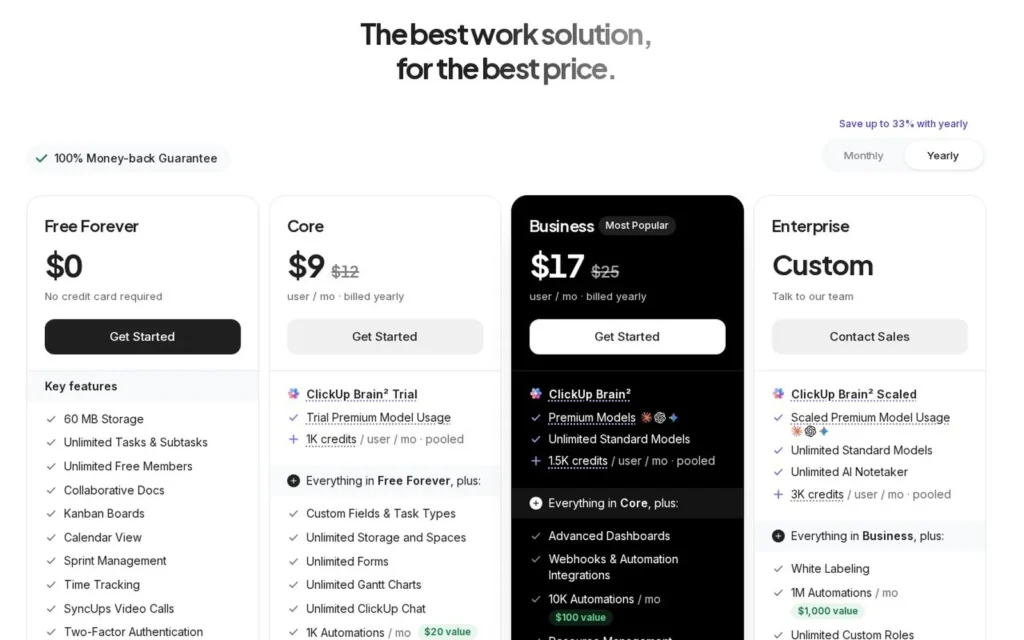
ClickUp’s pitch is simple: one app to replace them all. Tasks, docs, chat, whiteboards, goals, time tracking, video calls, forms, and an AI layer called Brain². If that sounds like a lot, it is. ClickUp is the most feature-dense project tool a small business can buy, and that is both its superpower and its tax.
The free plan is genuinely extraordinary. Free Forever costs $0 and gives you unlimited members, unlimited tasks and subtasks, collaborative docs, Kanban boards, a calendar view, sprint management, time tracking, SyncUps video calls, two-factor authentication, 24/7 support, and one form. The catch is storage: 60MB for the whole workspace. Attach a few PDFs and a handful of photos and you will feel that limit within a month.
Core costs $9 per user a month billed annually, or $12 billed monthly. It adds custom fields and task types, unlimited storage, unlimited spaces, forms, and Gantt charts, plus ClickUp Chat, goals, and 1,000 automations a month. It also includes 1,000 AI credits per user a month, pooled across the workspace. Five people on Core pay $540 a year.
Business costs $17 per user a month billed annually, or $25 billed monthly, and it is the plan most growing teams land on. It adds advanced dashboards, webhooks, 10,000 automations a month, 1,500 AI credits per user, resource management, Google single sign-on, private views and docs, timesheets, and time-in-status reports. Five people on Business pay $1,020 a year.
Enterprise is quote-only. It adds white labelling, 1 million automations a month, advanced single sign-on with SCIM and SAML, audit logs, an enterprise API, and connected search across Google Drive, OneDrive, Gmail, Microsoft Teams, and Slack.
Then there is MAX, the newest tier: $100 per user a month billed annually, or $120 billed monthly. MAX is everything in Enterprise plus the full Max AI engine — unlimited AI fields, an unlimited AI notetaker, unlimited AI image generation, unlimited Autopilot agents, custom skills, a context engine with auto-memory, talk-to-text, and MCP connections. Five people on MAX pay $6,000 a year. That number should make you pause, because it is four times the price of Asana Advanced.
ClickUp Brain², the AI layer, deserves its own paragraph because its pricing has just changed. Brain² is now bundled into the paid plans instead of sold as a separate add-on. Core at $9 per user a month includes only a Brain² trial, with 1,000 AI credits per user a month pooled. Business at $17 includes premium models plus unlimited standard models.
MAX at $100 has the highest premium-model limits plus unlimited AI fields, AI automations, and an unlimited AI notetaker. The older $14 and $33 Brain add-on figures that still circulate in roundups come from before this change, so treat them as history, not as today’s price. The honest way to say it: on ClickUp, unlimited AI starts at Business, not at Core, and you should read the number on ClickUp’s pricing page on the day you buy.
Two billing rules matter more than any feature list. First, you upgrade the whole workspace, not individual people. If one person needs Business, everybody moves to Business. Second, guests are limited on paid plans: Core gives you five guest seats for a one-person workspace plus two for each extra paid user, and Business gives ten plus five.
ClickUp’s views are where the “everything app” promise shows. Beyond list, board, timeline, Gantt, and calendar, you get an activity feed, a map view, a team view that shows what each person is working on, mind maps, and whiteboards as native project views. You can assign multiple people to one task, which Asana still does not allow. Chat is built in, Clip records your screen like Loom, and SyncUps runs video calls like Zoom. Used fully, ClickUp can replace Slack, Loom, Notion, Zoom, and a ChatGPT subscription.

Asana: The Focused Board, at $10.99 a User

Asana does one job and refuses to be distracted by the rest. It is a project management app, full stop. It does not want to be your chat app, your video caller, or your document editor.
The free plan is honest but small. Personal costs $0 forever and gives you unlimited tasks and projects, list, board, and calendar views, unlimited storage with a 100MB limit per file, status updates, time tracking through integrations, and more than 100 free integrations. The limit that matters: two users. A solo founder and one partner can run on it forever. A three-person team cannot use it at all.
Starter costs $10.99 per user a month billed annually, or $13.49 billed monthly. It removes the seat limit and adds timeline and Gantt views, reporting dashboards, forms, custom templates, custom fields, and unlimited free guests. It also includes Asana AI from day one: AI Teammates, Asana Dash, and AI Studio with 50,000 credits per billing account per month. Five people on Starter pay $659.40 a year.
Advanced costs $24.99 per user a month billed annually, or $30.49 billed monthly. It adds AI Meetings, which turn meeting notes into action items, plus unlimited portfolios, goals, resource management, approvals and proofing, native time tracking, forms with branching, and connections to Salesforce, Tableau, and Power BI. AI Studio grows to 75,000 credits a month. Five people on Advanced pay $1,499.40 a year.
Enterprise is quote-only and adds SAML authentication, SCIM user provisioning, universal resource management, capacity planning, service accounts, view-only licences, and guest invitation permissions. AI Studio grows again to 200,000 credits a month, and there is an Enterprise+ tier for the highest security and compliance needs.
The most important pricing fact about Asana is what it does not charge extra for. AI is included in every paid plan. There is no Brain-style add-on, no per-user AI surcharge, no “unlimited starts at” footnote. The AI you get on Starter is real: Smart Projects that build a whole project framework from a name, Smart Goals, Smart Charts, Smart Rules written in plain language, Smart Fields, Smart Chat, Smart Editor, and Smart Summaries.
Asana’s automations are its quiet superpower. Every paid plan includes unlimited automations, built in a flowchart-style designer, and AI Studio can generate a complex multi-step workflow from a sentence you type.
Where Asana goes deeper than ClickUp is the strategy layer. Strategy Maps show how company goals connect to the work below them. Weighted Goals let you decide how much each project contributes toward a target. If your question is “how does this project move the business forward,” Asana has the answer built in, and ClickUp makes you build it yourself.
The trade is focus. Asana has no native chat, no whiteboards, no mind maps, no video calls, and no document editor. It integrates with more than 270 apps directly, and with thousands more through Zapier, so nothing is missing — but everything outside the board lives in another tab, on another bill.

Head-to-Head Comparison Table
| ClickUp | Asana | |
|---|---|---|
| Free plan | $0, unlimited members, unlimited tasks, docs, Kanban, sprints, time tracking, 60MB storage | $0, max 2 users, unlimited tasks and projects, unlimited storage (100MB per file), no automations |
| Cheapest paid plan | Core $9/user/mo annual ($12 monthly) | Starter $10.99/user/mo annual ($13.49 monthly) |
| Mid plan | Business $17/user/mo annual ($25 monthly) | Advanced $24.99/user/mo annual ($30.49 monthly) |
| Top plan | MAX $100/user/mo annual ($120 monthly); Enterprise custom | Enterprise custom (price on application) |
| AI included? | 1,000–1,500 AI credits per user pooled on paid plans; Brain² bundled — Core $9 is a trial only, unlimited standard models from Business $17/user/mo | Yes — AI Teammates, AI Studio, and Smart features included in every paid plan |
| Automations | Free: 100/mo; Core: 1,000/mo; Business: 10,000/mo; Enterprise: 1M/mo | Free: none; every paid plan: unlimited |
| Ease of use (Zapier) | 4 out of 5 — powerful, takes longer to learn | 5 out of 5 — simple, intuitive, obvious on day one |
| Free-plan rating (Zapier) | 5 out of 5 | 3 out of 5 |
| AI rating (Zapier) | 5 out of 5 | 4 out of 5 |
| Support (Zapier) | 5 out of 5 — 24/7 support even on the free plan | 3 out of 5 — 24/7 support only on top enterprise plans |
| Integrations | 1,000+ apps, plus Zapier | 270+ apps, plus Zapier |
| Guests | Core: 5 seats + 2 per extra paid user; Business: 10 + 5; read-only unlimited | Unlimited free guests on paid plans |
| Multiple assignees per task | Yes | No — one assignee per task |
| Native chat, docs, whiteboards, video | Yes — Chat, Docs, Whiteboards, Clip, SyncUps | No — integrations instead |
| Strategy tools | Goals, dashboards | Strategy Maps, Weighted Goals, Portfolios, Goals |
| Trial / guarantee | 30-day satisfaction guarantee | 14-day free trial of the Pro-level experience |
Cost Maths: What a 5-Person Team Really Pays in Year One
Let us cost the decision for a five-person team, because the headline prices hide the real gap. All figures below are annual billing, paid for a full year, before tax.
ClickUp Core: five people at $9 a month is $45 a month, or $540 a year. Asana Starter: five people at $10.99 a month is $54.95 a month, or $659.40 a year. The gap is $119.40 a year, or just under $10 a month. That is the price of one team lunch. It is not the reason to pick either tool.
Step up one tier and the gap widens. ClickUp Business is $1,020 a year for five people. Asana Advanced is $1,499.40 a year. The gap is $479.40 a year, and the two plans are not the same product: Business gives you 10,000 automations and timesheets, while Advanced gives you portfolios, goals, resource management, and native time tracking.
Now add AI, because this is where the two vendors’ philosophies split the bill. On Asana, AI is already in the price: Starter at $659.40 a year includes AI Teammates and 50,000 AI Studio credits a month for the account. On ClickUp, Core at $540 a year includes 1,000 AI credits per user a month pooled, but only a Brain² trial — unlimited standard models start at Business, which costs $1,020 a year for five people.
A five-person team that wants unlimited AI pays $1,020 a year on ClickUp Business, against $659.40 for Asana Starter with AI included. That is a $360.60 difference, and it flips the “ClickUp is cheaper” story on its head the moment your team actually wants the AI.
Monthly billing punishes both, but it punishes ClickUp Business most. Pay monthly and ClickUp Core costs $12 a user, or $720 a year for five — $180 more. Business monthly is $25 a user, or $1,500 a year — $480 more. Asana Starter monthly is $13.49 a user, or $809.40 a year — $150 more. Advanced monthly is $30.49 a user, or $1,829.40 a year — $330 more. The rule is simple: if you pay monthly for a year, you are donating between $150 and $480 to the vendor for the privilege.
The free plans deserve their own line in the maths, because one of them cannot hold your team at all. ClickUp free holds unlimited members, so a five-person team pays $0 until it outgrows 60MB of storage or wants Gantt charts and automations beyond 100 runs a month. Asana free holds two people, so a five-person team cannot use it — the first dollar is $131.88 a year for the third, fourth, and fifth person on Starter, and there is no free on-ramp for the team as a whole.
At a $25-an-hour value for your team’s time, ClickUp Core at $540 a year pays for itself if it saves 21.6 hours a year — under two hours a month. Asana Starter at $659.40 pays for itself at 26.4 hours a year. Asana Advanced at $1,499.40 needs 60 hours a year. These are low bars. The expensive mistake is not the subscription. It is the month your team spends choosing while the work runs on sticky notes and memory.
One more comparison, for the team that wants everything. ClickUp MAX for five people is $6,000 a year. Asana Advanced for five people is $1,499.40 a year. MAX is four times the price, and it buys the deepest AI engine in the category plus enterprise controls. Almost no small business needs it. If a salesperson tells you that you do, ask them to show you the automation or AI workflow that Advanced cannot do, and watch the conversation change.
The Hidden Costs and Gotchas
Every comparison post on this site has this section, because the headline price is never the whole price. Here are the eleven traps in the ClickUp vs Asana decision.
First, Asana’s free plan caps at two users. A three-person team that falls in love with the free plan discovers at signup that it cannot add the third person without paying. Budget for Starter from day one if your team is bigger than two.
Second, Asana Starter’s monthly price is $13.49 against $10.99 annual. That is a 23 percent penalty for paying monthly, and it is the largest percentage jump in this comparison. If cash flow forces monthly billing, know that you are paying $150 a year extra for five people.
Third, ClickUp’s unlimited AI is not on the cheapest plan. Core includes 1,000 AI credits per user a month and only a Brain² trial. Unlimited standard models start at Business, which costs $1,020 a year for five people against $540 for Core. Count it before you compare ClickUp’s $540 against Asana’s $659.40, because the honest ClickUp-with-unlimited-AI number is $1,020.
Fourth, ClickUp upgrades the whole workspace. One person needing Business moves everybody to Business, including the intern who only checks off tasks. Asana has the same per-seat logic, but its AI being included means the upgrade conversation is about features, not about paying for AI on top.
Fifth, ClickUp MAX costs $100 per user a month. It is the most expensive plan in this comparison by a wide margin, and it is easy to land on it by accident: a demo, a salesperson, a “you need the full AI engine” conversation. Five people on MAX pay $6,000 a year. Say the number out loud before you sign.
Sixth, Asana Advanced is a steep jump. Starter is $10.99 and Advanced is $24.99 — more than double. Portfolios, goals, resource management, and native time tracking are all locked behind that jump. If you need time tracking, check whether Asana’s integration-based tracking on Starter is enough before you pay for Advanced.
Seventh, ClickUp’s free storage is 60MB for the whole workspace. That is a few dozen photos. A team that attaches screenshots, PDFs, and client files to tasks will hit the ceiling in weeks, and the fix is a paid plan, not a settings change.
Eighth, Asana’s AI Studio credits are pooled per account, not per user. Starter gives the whole account 50,000 credits a month, and Advanced gives 75,000. A team of twenty shares the same pool as a team of five. Heavy AI users should check the burn rate in the first month, not the sixth.
Ninth, ClickUp’s automations are capped and the cap is pooled. Core gives the workspace 1,000 automation runs a month, and Business gives 10,000. A busy team with a rule on every task can burn 1,000 runs in a week. Asana gives unlimited automations on every paid plan, which is the single biggest structural advantage in this comparison.
Tenth, neither vendor publishes an Enterprise price. Both make you book a sales call for SAML, SCIM, audit logs, and the governance features a bigger company needs. If you are buying for a 50-person team, budget a week for the sales process and get the quote in writing before you promise your boss a number.
Eleventh, the internet is full of stale ClickUp prices. Zapier’s own table still prints the old Unlimited plan at $10 and Business at $19, and old guides print Asana’s retired Basic and Premium tiers. ClickUp retired Unlimited and the old Business plan around 10 November 2026. Trust the live pricing page, not a roundup — including this post, six months from now.
Who Is Each Tool Actually Best For?
Choose Asana if you are focused purely on project management and you want the tool to disappear into the work. Choose it if your team is non-technical and the board has to feel obvious on day one. Choose it if you want AI included in the cheapest paid plan, with no upgrade conversation. Choose it if you want unlimited automations and an AI Studio workflow builder that turns a sentence into a working process.
Choose ClickUp if you want one workspace to replace several subscriptions. Choose it if you need a free plan that holds a whole team, not just two people. Choose it if your team is tech-comfortable and enjoys customising views, fields, and dashboards. Choose it if you need docs, whiteboards, chat, screen recording, and video calls without buying five more tools. Choose it if multiple assignees per task, mind maps, and a map view matter to how your team works.
The team that should pause is the team with a non-technical crew and a big automation habit. Asana is easier to learn and its automations are unlimited, but its free plan cannot hold you and Advanced costs $24.99. ClickUp is cheaper and its free plan is generous, but its automations cap at 1,000 a month on Core and its interface will confuse the people who just want a list with checkboxes.
Work Out Your Own Number First
Before you buy either tool, run your own numbers. Our free AI Cost Calculator adds up the subscriptions you already pay for, the AI add-ons, and the per-seat maths, so you can see whether ClickUp Business really beats Asana Starter with AI included, or whether the tool you already own is cheaper than both. It takes two minutes, and it has saved readers from buying a $1,500-a-year plan to replace a $540-a-year habit.
Use it before you sign anything. The calculator is free, it needs no email address, and it is the same tool we used to check every figure in the cost section above: AI Cost Calculator.
If you would rather compare automation tools more broadly first, our guide to the best AI automation tools covers Zapier, Make, n8n, and Power Automate side by side. And if you are still weighing ClickUp against its other big rival, read ClickUp vs monday.com — the seat-bucket maths there changes the answer for teams of six or more.
Pros and Cons
ClickUp Pros
- The free plan is the most generous in project management: unlimited members, unlimited tasks, docs, Kanban, sprints, and time tracking for $0.
- Core costs $9 a user a month and includes 1,000 automations a month, unlimited storage, and 1,000 AI credits per user.
- One workspace replaces Slack, Loom, Notion, and Zoom, with Chat, Clip, SyncUps, Docs, and Whiteboards built in.
- 24/7 support is included even on the free plan, and Zapier rates ClickUp’s support five stars against Asana’s three.
- Multiple assignees per task, mind maps, a map view, and a team view give it project views Asana does not have.
ClickUp Cons
- The learning curve is real, and the interface can overwhelm a new user.
- Unlimited AI starts at Business $17 a user a month — Core $9 includes only a Brain² trial.
- Automations cap at 1,000 runs a month on Core, and the whole workspace upgrades together.
- Free storage is 60MB for the entire workspace, which a busy team burns through fast.
- MAX costs $100 a user a month, four times Asana Advanced, and it is easy to be steered toward it.
Asana Pros
- The cleanest, most intuitive interface in the category: five stars for ease of use in Zapier’s hands-on testing, against four for ClickUp.
- AI is included in every paid plan, with AI Teammates, AI Studio, and Smart features at no extra charge.
- Unlimited automations on every paid plan, with an AI Studio builder that turns a sentence into a workflow.
- Unlimited free guests on paid plans, so clients and contractors cost nothing extra.
- Strategy Maps, Weighted Goals, Portfolios, and Goals connect daily tasks to the business plan.
Asana Cons
- The free plan stops at two users, so a three-person team cannot use it at all.
- Advanced costs $24.99 a user a month, more than double Starter’s $10.99, and time tracking lives behind that jump.
- No native chat, whiteboards, mind maps, or video calls — everything outside the board is another subscription.
- 24/7 support is reserved for top enterprise plans, and Zapier rates Asana’s support three stars.
- One assignee per task only, and the Enterprise price is unpublished, so bigger teams must book a sales call.
Our Verdict
If you only buy one, buy the one that matches how your team actually works, not the one with the longer feature list. For most small businesses, the ClickUp vs Asana answer is ClickUp Core — most small teams are tech-comfortable, budget-conscious, and tired of paying for five apps that do one job each, and Core gives them 1,000 automations a month, unlimited storage, chat and docs built in, and a free plan that holds the whole team, for $9 a user a month. Five people pay $540 a year. Nobody pays for an empty seat, and nobody pays for a second person to look at a task.
But the honest answer depends on your team, and the AI question changes it. If your team wants AI without paying for a higher tier, buy Asana Starter at $10.99 a user a month — $659.40 a year for five people, with AI Teammates and 50,000 AI Studio credits included, and unlimited automations that ClickUp caps at 1,000. If your team is non-technical and the tool has to feel obvious on day one, buy Asana too, and accept that Advanced at $24.99 is the price of portfolios and native time tracking.
If your team lives in docs, whiteboards, and chat and wants to cancel Slack and Loom, buy ClickUp Business at $17 a user a month and save $479.40 a year against Asana Advanced. If you are a solo founder, start free on ClickUp — unlimited members means the free plan grows with you, while Asana’s free plan stops at two people.
Start free on both. Build one real project — a client onboarding board, a content calendar, a simple job tracker — in each tool, and give it to the people who will use it. For most small teams, that answer points at ClickUp. For teams that want the cleanest board, AI in the price, and automations without a cap, it points at Asana. The most expensive mistake is not picking the wrong board — it is spending another month choosing while the business runs on sticky notes.
Frequently Asked Questions
Is ClickUp really free?
Yes, and more generously than any rival. ClickUp’s Free Forever plan costs $0 and includes unlimited members, unlimited tasks and subtasks, collaborative docs, Kanban boards, a calendar view, sprint management, time tracking, SyncUps video calls, two-factor authentication, and 24/7 support. The limits are 60MB of storage for the whole workspace and one form. Asana’s free plan is also $0, but it stops at two users and includes no automations.
Which is cheaper for a small team, ClickUp or Asana?
ClickUp, on the subscription alone. For five people, ClickUp Core costs $540 a year and Asana Starter costs $659.40 a year, a gap of $119.40. Add AI and the answer flips: Asana includes AI in Starter, while ClickUp’s unlimited AI starts at Business, which costs $1,020 a year for five people. Compare the price with the AI you will actually use, not the headline alone.
Can I use ClickUp or Asana free forever?
ClickUp, yes, for a whole team: unlimited members on the free plan, forever, with no credit card required. Asana, yes, but only for one or two people: the Personal plan is free forever for up to two users, with unlimited tasks, projects, and storage. A three-person team cannot stay on Asana’s free plan.
Which has better AI, ClickUp or Asana?
Zapier rates ClickUp’s AI five stars and Asana’s four, but the two AIs do different jobs. ClickUp Brain² is broader: it works across docs, chat, and whiteboards, answers questions from your whole workspace, takes meeting notes, and lets you pick between GPT, Claude, and Gemini models. Asana AI is deeper inside project management: Smart Projects, Smart Goals, Smart Rules, and AI Teammates that take on real tasks. The practical difference is price. Asana’s AI is included in every paid plan. ClickUp’s unlimited AI starts at Business, which costs $17 a user a month — Core at $9 includes only a Brain² trial.
Can I switch from ClickUp to Asana, or back again?
Yes, both ways, and both vendors offer import tools. ClickUp imports from Asana directly, and Asana imports from ClickUp through its importer and CSV. Expect a weekend of cleanup either way: custom fields, automations, and dashboards do not transfer cleanly, and comments and attachments sometimes arrive out of order. Export a CSV backup of your tasks before you start, run the migration on a copy of one project first, and only move the whole workspace when the test project looks right.
Price Note
Price note — updated 18 November 2026: Prices in this post were checked on 18 November 2026 on clickup.com/pricing, clickup.com/ai, and asana.com/pricing. When you are reading this, the price may be lower or higher, a plan may have been renamed, or a promotion may have changed the number on the page. ClickUp retired its old Unlimited and Business plans around 10 November 2026, so older roundups still print the wrong figures. Check the official pricing page before you buy, and if a figure here differs from the live page, trust the live page.
Related: Trello Alternatives (2026): 5 Compared by Real Price
Pros
- ClickUp's free plan is the most generous in project management — unlimited users, unlimited tasks, docs, Kanban, sprints, and time tracking for $0.
- ClickUp Core costs $9 a user a month and includes 1,000 automations a month, unlimited storage, and 1,000 AI credits per user.
- Asana has the cleanest, most intuitive interface in the category — five stars for ease of use in Zapier's hands-on testing, against four for ClickUp.
- Asana's AI is included in every paid plan, with AI Teammates, AI Studio, and Smart features at no extra charge.
- Both tools are free to start, and both free plans are honest test drives — you can run a real project on either before you pay.
Cons
- ClickUp has a real learning curve, and the interface can overwhelm a new user.
- Unlimited AI starts at Business $17 a user a month — Core $9 includes only a Brain² trial.
- Asana's free plan stops at two users, so a three-person team cannot use it at all.
- Asana Advanced costs $24.99 a user a month, more than double Starter's $10.99, and time tracking lives behind that jump.
- Neither vendor publishes an Enterprise price, and both make you book a sales call for SAML, SCIM, and audit logs.
If you only buy one, buy the one that matches how your team actually works, not the one with the longer feature list. For most small businesses, the ClickUp vs Asana answer is ClickUp Core — most small teams are tech-comfortable, budget-conscious, and tired of paying for five apps that do one job each, and Core gives them 1,000 automations a month, unlimited storage, chat and docs built in, and a free plan that holds the whole team, for $9 a user a month. Five people pay $540 a year. Nobody pays for an empty seat, and nobody pays for a second person to look at a task. But the honest answer depends on your team, and the AI question changes it. If your team wants AI without paying for a higher tier, buy Asana Starter at $10.99 a user a month — $659.40 a year for five people, with AI Teammates and 50,000 AI Studio credits included, and unlimited automations that ClickUp caps at 1,000. If your team is non-technical and the tool has to feel obvious on day one, buy Asana too, and accept that Advanced at $24.99 is the price of portfolios and native time tracking. If your team lives in docs, whiteboards, and chat and wants to cancel Slack and Loom, buy ClickUp Business at $17 a user a month and save $479.40 a year against Asana Advanced. If you are a solo founder, start free on ClickUp — unlimited members means the free plan grows with you, while Asana's free plan stops at two people. Start free on both. Build one real project — a client onboarding board, a content calendar, a simple job tracker — in each tool, and give it to the people who will use it. The tool your team opens without being asked is the right tool. For most small teams, that answer points at ClickUp. For teams that want the cleanest board, AI in the price, and automations without a cap, it points at Asana. Pick one this week, move one project into it, and stop comparing. The most expensive mistake is not picking the wrong board — it is spending another month choosing while the business runs on sticky notes.
2 thoughts on “ClickUp vs Asana (2026): Which One Should You Pick?”