

**For most small businesses, start with VistaCreate Pro.** It costs $10 a month billed annually ($120 a year), covers up to 10 people on that one price, and includes 200,000+ templates, 170 million assets, unlimited Brand Kits, one-click resize and AI image tools. A two-person shop pays $120 a year for both people — Canva charges $500 a year for the same two people on Business.**Pick Adobe Express Premium if you design alone:** $9.99 a month billed monthly, with a 30-day free trial, Adobe Fonts, Adobe Stock photos and 250 Firefly generative credits a month. Pick Snappa if speed matters most: Pro is $10 a month billed annually and the whole tool is built around making one social post in five minutes. Pick Kittl if you sell what you design: Pro is $12 a month billed annually and includes a commercial licence for up to 500,000 copies. Pick PicMonkey if your product photos need editing first: Pro is $12.99 a month, with a 7-day free trial.**The short version:** if two or more people design, start on VistaCreate Pro at $10 a month. If you design alone, start on Adobe Express Premium at $9.99 a month. Our guide to the best AI tools for small business under $50 a month shows how a design tool fits into a whole $50 stack.
5 Canva Alternatives for Small Business (2026): Cheaper Design Tools Compared
It starts the same way for most owners. You open Canva because everyone said it was the easy one, and for a while it is. You make a price list, a Facebook post, a flyer for the counter, and they look good. Then the bill changes — Canva Pro went from $12.99 a month to $18 a month during 2026 — and the second person on your team cannot use your Pro account at all. A two-person shop has to buy Business at $25 per person a month: $500 a year for two people to make social posts.
That is the moment people start searching for Canva alternatives for small business. Not because Canva is a bad tool — it is not — but because of how it charges: the headline price is for one person, and the AI allowance is a second meter you only notice when it runs out.
This guide compares five Canva alternatives for small business on the prices checked on their own official pricing pages on 13 November 2026, with a worked example for a two-person shop so you can see the real yearly cost before you sign up. No affiliate links, no sponsored pick — just the numbers, the billing models, and the traps.
Quick Answer
For most small businesses, start with VistaCreate Pro. It costs $10 a month billed annually ($120 a year), covers up to 10 people on that one price, and includes 200,000+ templates, 170 million assets, unlimited Brand Kits, one-click resize and AI image tools. A two-person shop pays $120 a year for both people — Canva charges $500 a year for the same two people on Business.
Pick Adobe Express Premium if you design alone: $9.99 a month billed monthly, with a 30-day free trial, Adobe Fonts, Adobe Stock photos and 250 Firefly generative credits a month. Pick Snappa if speed matters most: Pro is $10 a month billed annually and the whole tool is built around making one social post in five minutes. Pick Kittl if you sell what you design: Pro is $12 a month billed annually and includes a commercial licence for up to 500,000 copies. Pick PicMonkey if your product photos need editing first: Pro is $12.99 a month, with a 7-day free trial.
The short version: if two or more people design, start on VistaCreate Pro at $10 a month. If you design alone, start on Adobe Express Premium at $9.99 a month. Our guide to the best AI tools for small business under $50 a month shows how a design tool fits into a whole $50 stack.
In this article
- Why owners look for a Canva alternative
- The 5 Canva alternatives for small business, compared at a glance
- Adobe Express — best all-round Canva replacement
- VistaCreate — best value for a small team
- Kittl — best for selling what you design
- Snappa — best for fast social graphics
- PicMonkey — best for product photos
- What a month of designs really costs a two-person shop
- The five traps: how to read a design-tool price
- How to choose in 10 minutes
- Frequently asked questions
- Verdict
Why owners look for a Canva alternative
Canva is a capable tool, and the reasons owners leave it are specific. They are not about the templates — they are about the bill.
The per-person trap. Canva Pro costs $18 a month, or $144 a year, and the plan is for one person only — Canva’s own help pages say so. The moment a second person needs to design, you move to Business at $25 per person a month, or $250 per person a year. Two people cost $500 a year, three people $750 — and nothing about the templates changed.
The price went up twice in two years. Canva Pro was $12.99 a month, and during 2026 it rose to $18 a month on monthly billing — a 39% rise. The yearly price is now $144 a year, or $12 a month billed yearly, while paying month to month costs $216 a year — a $72 gap that is easy to miss because the pricing page leads with the yearly figure.
The AI allowance is a second meter. Every Canva plan carries a monthly AI allowance, and paid users get roughly 10 times the free allowance on Pro. If you use the AI tools heavily, the allowance runs out and Canva sells an AI Pass add-on at $100 per person a month — more than five times the price of Pro itself.
None of that makes Canva a poor tool — it makes it a specific one: the biggest template library here, priced per person, with an AI meter on top. If you design alone, once a week, Canva Pro at $144 a year is fine. If two people design, or you design every day, the five Canva alternatives for small business below cost less.

The 5 Canva alternatives for small business, compared at a glance
The five tools below all make social posts, flyers and menus without a designer, and all cost less than Canva once a second person joins.
| Tool | Best for | Free plan | Cheapest paid plan | AI allowance |
|---|---|---|---|---|
| Adobe Express | All-round replacement, solo designer | $0, core editor and templates | Premium $9.99/mo billed monthly | 250 generative credits a month |
| VistaCreate | Small team, best value | $0, 100,000+ templates | Pro $10/mo billed annually | 100 image generations a month |
| Kittl | Selling designs and merch | $0, personal use only | Pro $12/mo billed annually, per editor | 2,000 AI tokens a month |
| Snappa | Fast social graphics | $0, 3 downloads a month | Pro $10/mo billed annually | None — no AI tools |
| PicMonkey | Product-photo editing | Free editor, basics only | Pro $12.99/mo | AI tools included on Pro |
All five Canva alternatives for small business were checked on their official pricing pages on 13 November 2026. The rest of this guide is what the table cannot show: what each tool does, where it falls short, and which limit you hit first.
1. Adobe Express — best all-round Canva replacement
Adobe Express is the closest thing to Canva without Canva’s per-person trap at the solo level: a browser-based design tool with templates for social posts, flyers, menus, logos and short video, plus Adobe Fonts, Adobe Stock photos, brand kits, background removal and one-click resize.
The price that matters is Premium at $9.99 a month, billed monthly with no annual commitment. That is $119.88 over twelve months, against $216 for twelve months of Canva Pro on monthly billing. Prepaying the year costs $99.99. There is a 30-day free trial, and billing starts when the trial ends.
Premium includes 250 Firefly generative credits a month, all premium templates and assets, brand kits, background removal, one-click resize and social scheduling. Firefly Pro costs $19.99 a month and includes Express Premium plus 4,000 credits a month. For a team, Express for teams costs $7.99 a month per licence, $4.99 in the first year, with a two-seat minimum.
The catch is the AI meter. The free plan includes no generative credits, so the AI tools stop working until you pay, and 250 credits a month is a real limit if you generate images every day. Adobe’s own pages also disagree about storage: the plan table says 10GB on Premium while checkout says 100GB.
The plans, with real prices
All prices below were checked on Adobe’s own pricing page on 13 November 2026. Prices are in US dollars.
| Plan | Price | What you get |
|---|---|---|
| Free | $0/month | Core editor and templates, Adobe Fonts, basic photo editing. No generative credits, no premium templates. |
| Premium | $9.99/month billed monthly, or $99.99 a year prepaid | Everything in Free, plus all premium templates and assets, Adobe Stock photos, brand kits, background removal, one-click resize, social scheduling, 250 generative credits a month, 30-day free trial. |
| Firefly Pro | $19.99/month billed monthly | Everything in Premium, plus 4,000 generative credits a month, Photoshop on web and mobile, 7-day free trial. |
| Teams | $7.99/month per licence, $4.99 in the first year | Everything in Premium, plus an Admin Console, 1TB of cloud storage per user, advanced support, two-seat minimum. |
Pros: the cheapest premium plan here for a solo designer at $9.99 a month with no annual commitment; Adobe Fonts and Adobe Stock included; background removal and one-click resize on the base paid plan; a 30-day free trial; free if you already pay for Creative Cloud. Cons: only 250 generative credits a month, and they do not roll over; no AI at all on the free plan; the storage figure differs between Adobe’s own pages; teams pay per licence, so the bill grows with every seat.
2. VistaCreate — best value for a small team
VistaCreate wins this guide on price, because of one line on its pricing page: Pro covers up to 10 seats for one flat price. It is a browser-based design tool from Vista (the company behind VistaPrint), with templates for social posts, ads, flyers and print, a 170-million-asset library, brand kits, one-click resize, social scheduling and AI tools for images and text.
Pro costs $10 a month billed annually — $120 a year charged upfront — or $13 a month billed monthly. That $120 a year covers up to 10 people, so a two-person shop, a five-person shop and a ten-person shop all pay $120 a year total. Canva Business charges $250 per person a year, so the same five people cost $1,250 a year on Canva — ten times the price.
The free Starter plan is genuinely usable: 100,000+ templates, 1 million photos, videos and vectors, one Brand Kit and 10GB of storage, with no watermark on exports. Pro adds 200,000+ templates, 170 million premium assets, unlimited Brand Kits, unlimited storage, one-click resize, version history, HD downloads, social scheduling and the AI tools — image generation, background removal, object removal and an AI writer. The AI image generator allows up to 100 generations a month, shared across the whole account, and the 14-day Pro trial needs a card.
The weakness is the AI allowance. One hundred generations a month, shared by everyone on the account, runs out fast if three people generate images every day — and extra generations are not sold. Its template library is also smaller than Canva’s, and its video tools are thinner than Adobe’s.
The plans, with real prices
All prices below were checked on VistaCreate’s own pricing page on 13 November 2026. Prices are in US dollars.
| Plan | Price | What you get |
|---|---|---|
| Starter | $0/month | 100,000+ templates, 1 million photos, videos and vectors, 1 Brand Kit, 10GB storage, background remover, 1 seat. |
| Pro | $10/month billed annually ($120 a year), or $13/month billed monthly | Everything in Starter, plus 200,000+ templates, 170 million premium assets, unlimited Brand Kits, unlimited storage, one-click resize, version history, HD downloads, social scheduling, AI image generation (100 a month), AI Writer, object removal, up to 10 seats, 14-day free trial. |
Pros: the best team value here by a wide margin — $120 a year covers up to 10 people; the free plan has no watermark and a real template library; unlimited Brand Kits and storage on Pro; the AI tools are included rather than sold as an add-on. Cons: only 100 AI image generations a month, shared by the whole account, with no way to buy more; the template library is smaller than Canva’s; video tools are thinner than Adobe’s.
3. Kittl — best for selling what you design
Kittl is the odd one out in this guide, and that is why it is here. It is not a general social-post tool like the others — it is a design platform built for people who sell what they make: t-shirts, mugs, posters, packaging, labels and merch. If your shop sells printed products, Kittl is the only tool here whose licence is written for that job.
Pro costs $15 a month billed monthly, or $12 a month billed annually — $144 a year — per editor. That buys unlimited projects, 10GB of storage, the full premium libraries, custom font uploads, high-resolution exports up to 10,800 pixels, PDF and SVG vector exports, and 2,000 AI tokens a month. Most importantly, it buys a commercial licence covering up to 500,000 copies of each design. The free plan is personal use only: you may not sell anything you make on it. Expert costs $35 a month, or $26 a month billed annually, and Max costs $65 a month, or $48 a month billed annually. Tokens do not roll over — whatever is left at the end of the month is gone.
The AI tokens are the meter to watch: every AI action costs tokens, and Pro’s 2,000 tokens buy roughly 100 premium image generations a month. The cheapest models cost no tokens at all. A careless user burns through the allowance in a week, and the only fix is upgrading or topping up on Expert or Max.
Kittl is also priced per editor. Two people designing means two Pro subscriptions: $288 a year. Viewers are always free, so the person who only approves designs costs nothing — but everyone who edits pays. For a shop that only needs social posts, that makes Kittl the most expensive tool here. For a shop that sells printed designs, the commercial licence is the whole point, and no other tool here includes one at this price.
The plans, with real prices
All prices below were checked on Kittl’s own pricing page on 13 November 2026. Prices are in US dollars, per editor.
| Plan | Price | What you get |
|---|---|---|
| Free | $0 | Curated templates and tools, personal use only, low-resolution exports, no commercial licence. |
| Pro | $15/month billed monthly, or $12/month billed annually ($144 a year) | Everything in Free, plus unlimited projects, 10GB storage, full premium libraries, high-resolution and vector exports, custom font uploads, 2,000 AI tokens a month, commercial licence up to 500,000 copies. |
| Expert | $35/month billed monthly, or $26/month billed annually ($312 a year) | Everything in Pro, plus 6,000 AI tokens a month, 200 bonus tokens a day, brand kits, print-on-demand presets. |
| Max | $65/month billed monthly, or $48/month billed annually ($576 a year) | Everything in Expert, plus 12,000 AI tokens a month, 600 bonus tokens a day. |
Pros: the only commercial licence for selling designs in this guide, included on Pro; vector exports and high-resolution output up to 10,800 pixels; unlimited projects on Pro; viewers are free. Cons: priced per editor, so two designers cost $288 a year; the free plan is personal use only — selling on it breaks the licence; AI tokens do not roll over.

4. Snappa — best for fast social graphics
Snappa is the simplest tool in this guide, and that is the whole pitch. It does one job: make a social post, ad or blog graphic in five minutes. There is no video editor, no AI image generator, no print shop, no brand-kit approvals — just templates, stock photos, text and a download button. For an owner who makes three posts a week and hates design software, that simplicity is worth more than a bigger library.
Pro costs $15 a month billed monthly, or $10 a month billed annually — $120 a year — for one user. That buys unlimited downloads, 6,000+ templates, 5 million HD photos and graphics, custom font uploads, background removal and social media integrations. The free Starter plan costs nothing and gives you all the templates and stock assets, but only 3 downloads a month — enough to try the tool, not enough to run a shop’s social media. The Team plan costs $30 a month billed monthly, or $20 a month billed annually, for up to 5 users.
The honest trade is the missing AI: no AI image generation, no AI writer, no AI background tool beyond the plain background remover. Everything starts from a template or a stock photo, so posts look clean but never surprising. The other trade is the free plan: 3 downloads a month means it is a trial in everything but name.
What Snappa does well, it does better than anyone here: the editor opens fast, the templates are sized for every network, and there is no credit meter, no token meter and no premium-asset upsell inside the editor. The price on the plan is the price you pay — and it has not changed since 2017.
The plans, with real prices
All prices below were checked on Snappa’s own pricing page on 13 November 2026. Prices are in US dollars.
| Plan | Price | What you get |
|---|---|---|
| Starter | $0 | All templates, millions of stock photos and graphics, 3 downloads a month, 1 user. |
| Pro | $15/month billed monthly, or $10/month billed annually ($120 a year) | Everything in Starter, plus unlimited downloads, custom font uploads, background removal, social media integrations, 1 user. |
| Team | $30/month billed monthly, or $20/month billed annually ($240 a year) | Everything in Pro, plus up to 5 users, shared templates and folders. |
Pros: the fastest editor here — a post in five minutes; no AI credits, no tokens and no premium-asset upsells, so the price is the price; unlimited downloads on Pro. Cons: no AI tools at all; the free plan allows only 3 downloads a month; no free trial of Pro.
5. PicMonkey — best for product photos
PicMonkey is the photo editor in this guide, and it earns its place because most small shops photograph their own products. A bag shop, a bakery, a salon — the photo is the post, and a bad photo with a good template still looks bad. PicMonkey edits the photo first: cut out the background, fix the light, remove a blemish, add text, then export it as a post or a flyer.
Pro costs $12.99 a month, or $120 a year, and includes premium templates and fonts, stock photos, background removal, brand kits and the full photo-editing toolkit. Basic costs $7.99 a month, or $72 a year, and covers the core editing tools with fewer premium assets. Business starts at $23.00 a month, or $228 a year per user. There is a 7-day free trial of the premium plans, and a limited free editor with the basic tools.
The weakness is that PicMonkey is a photo editor first and a design tool second. Its template library is smaller than Canva’s or VistaCreate’s, and it has no social scheduling, no resize tool and no print service. If your week is mostly designed posts, flyers and menus, you will feel the missing templates within a month. The other thing to check is the price itself: some roundups still list Pro at $22.99 a month, an older figure. The price used here — $12.99 a month, $120 a year — comes from PicMonkey’s own pricing data, so check the live page before you buy.
The plans, with real prices
All prices below were checked on PicMonkey’s own pricing page on 13 November 2026. Prices are in US dollars.
| Plan | Price | What you get |
|---|---|---|
| Basic | $7.99/month, or $72 a year | Core photo editing, basic templates and fonts, cloud storage for your designs. |
| Pro | $12.99/month, or $120 a year | Everything in Basic, plus premium templates and fonts, stock photos, background removal, brand kit, full editing toolkit, 7-day free trial. |
| Business | $23.00/month, or $228 a year per user | Everything in Pro, plus shared brand assets, collaboration tools, multiple seats. |
Pros: the strongest photo editing here — background removal, touch-ups and colour correction built in; a real free editor for the basics; Shutterstock stock photos on Pro. Cons: the smallest template library here; no social scheduling and no one-click resize; the Pro price is quoted differently in older roundups, so confirm it on the live page.
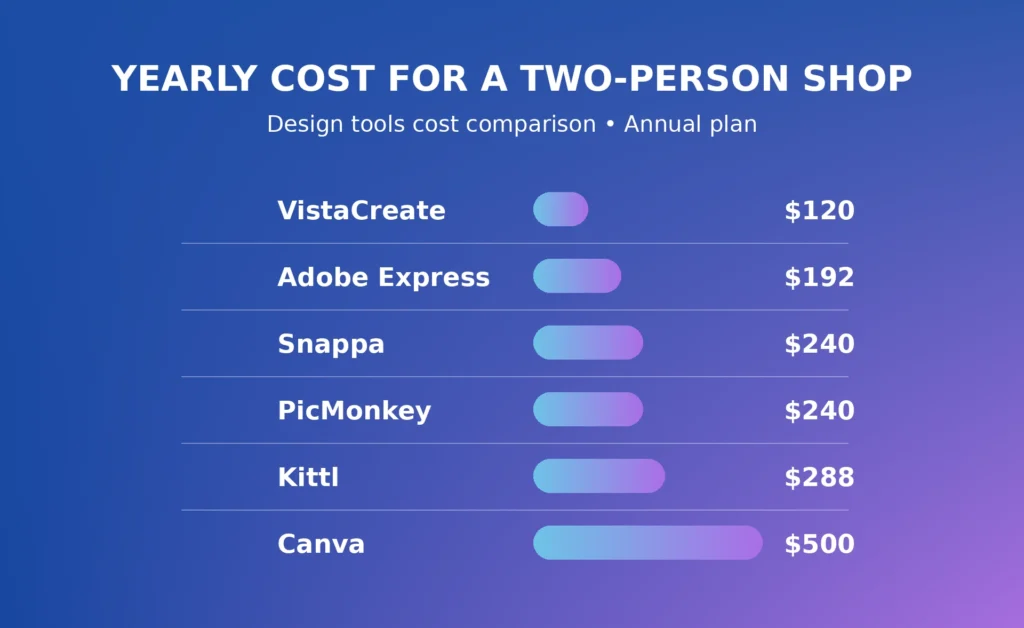
What a month of designs really costs a two-person shop
Headline prices hide the real cost, so here is the same workload — a two-person shop making 20 social posts, 2 flyers and 1 price list a month for a year — priced on each tool from the figures above, on annual billing where it is offered.
| Tool | Cost for 2 people, a year | How the maths works |
|---|---|---|
| VistaCreate Pro | $120 | One flat price covers up to 10 seats |
| Adobe Express Teams | $120 first year, then $192 | $4.99 × 2 × 12 in year one, then $7.99 × 2 × 12 |
| Snappa Team | $240 | $20 a month billed annually, up to 5 users |
| Kittl Pro | $288 | $144 a year per editor × 2 editors |
| PicMonkey Pro | $240 | $120 a year per account × 2 accounts |
| Canva (for comparison) | $500 | Pro covers 1 person only, so 2 people need Business at $250 each |
Two things jump out. VistaCreate is the cheapest here by a factor of four against Canva, because its Pro plan charges once for the whole team instead of once per person. The per-person tools are not expensive for one person — Adobe Express Premium at $99.99 a year prepaid is cheaper than Canva Pro at $144 a year — they only get expensive when the second person joins. Count your designers before you count the price.
PicMonkey is the honest unknown here: its Business plan is $228 a year per user, so two Pro accounts at $240 a year is the safer budget.
The five traps: how to read a design-tool price
Trap 1: the per-person price. Canva Pro at $18 a month looks cheaper than VistaCreate Pro at $10 a month — until the second person joins and Canva becomes $500 a year for two people while VistaCreate stays $120.
Trap 2: the monthly price is not the headline price. VistaCreate shows $10 a month, but that is the annual-billing figure — month to month it is $13. Snappa shows $10, but month to month it is $15. Kittl shows $12, but month to month it is $15. If you only need the tool for a three-month campaign, price the monthly figure, not the annual one.
Trap 3: the AI allowance is a second meter. Adobe Express gives 250 generative credits a month, Kittl gives 2,000 tokens a month, VistaCreate gives 100 image generations a month, and Canva sells a $100-a-month AI Pass on top of Pro. None of these allowances roll over.
Trap 4: the free plan that cannot sell. Kittl’s free plan is personal use only — selling a design made on it breaks the licence. Snappa’s free plan allows 3 downloads a month. Canva’s free plan has no background remover and no resize tool. Read what the free plan cannot do before you build your week on it.
Trap 5: the price from a roundup. Every price here was checked on the vendor’s own page on 13 November 2026, and two tools still carry numbers to verify live: Kittl’s Pro price is quoted as $15 a month in one November read and $19 in three others, and PicMonkey’s Pro is quoted as $22.99 a month in older roundups against $12.99 in the vendor’s own data. If the vendor’s own page does not show the number, it is not confirmed, no matter how many roundups repeat it.
How to choose in 10 minutes
Start with the number of designers, not the price. If two or more people design, open VistaCreate Pro today — $120 a year covers up to 10 seats, and the 14-day free trial will tell you within a week whether the templates fit your shop. If you design alone, open Adobe Express Premium at $9.99 a month and try the 30-day free trial first.
If you sell what you design — t-shirts, mugs, posters, packaging — open Kittl Pro at $12 a month billed annually, and read the commercial licence before you print anything: the free plan does not cover sales. If you make three social posts a week and hate design software, open Snappa Pro at $10 a month billed annually. If your product photos need editing before anything else, open PicMonkey Pro at $12.99 a month, and use the 7-day free trial on your worst photo first.
Whatever you pick, run the same test first: make five real posts for your own shop — not the sample templates — and time yourself. The tool that gets five good posts out in an hour, with your logo, your colours and your prices, is the tool. Our guide to the best AI social media tools for small business covers what happens after the design is done, and our guide to AI tools for small business owners with no tech skills covers the rest of the starter stack.
And if you are still on Canva, do the maths before you move: count the people who design, multiply the per-person price, and compare that total — not the $18 headline — with the totals above. If the answer is one person and you design once a week, staying on Canva Pro is reasonable, and our guide to the best AI website builder for small business is the next step once the brand look is set.
Frequently asked questions
What is the best Canva alternative for small business?
For most small businesses, VistaCreate Pro: $10 a month billed annually covers up to 10 people, with 200,000+ templates, 170 million assets and unlimited Brand Kits. Pick Adobe Express Premium at $9.99 a month if you design alone. The best of these Canva alternatives for small business depends on how many people design and whether you sell what you make.
Is there a free Canva alternative?
Yes — VistaCreate Starter is free with 100,000+ templates and no watermark, Adobe Express Free covers the core editor and templates, and Snappa Starter is free with all templates but only 3 downloads a month. Kittl Free is free too, but personal use only — you cannot sell what you make on it.
Is Adobe Express cheaper than Canva?
Yes, for one person. Adobe Express Premium is $9.99 a month billed monthly, against Canva Pro at $18 — $119.88 against $216 over twelve months. On annual billing, Premium prepaid is $99.99 a year against Canva Pro at $144.
Can I sell designs I make in Kittl?
Yes, on a paid plan. Kittl Pro at $12 a month billed annually includes a commercial licence covering up to 500,000 copies of each design, with high-resolution and vector exports. The free plan is personal use only, so selling anything made on it breaks the licence.
Which Canva alternative is best for social media posts?
Snappa is the fastest: the whole tool is built around making one social post in five minutes, with templates sized for every network, at $10 a month billed annually. VistaCreate is the better pick if you also want social scheduling included.
Can I switch from Canva without losing my designs?
You can move the finished files in an afternoon — export your designs as PNG or PDF — but your editable Canva designs do not transfer to another tool. The layers, fonts and template links stay in Canva. Export what you need first: your logo files, your brand colours and fonts, and your best-performing posts. Run the new tool alongside Canva for two weeks, and only cancel once you have remade your five most-used designs in it.
Verdict
The Canva alternatives for small business question has a clear answer once you count the people who design. If two or more people design, start on VistaCreate Pro at $10 a month billed annually: $120 a year covers up to 10 seats. If you design alone, start on Adobe Express Premium at $9.99 a month, with a 30-day free trial.
If you sell what you design, Kittl Pro at $12 a month billed annually is the only tool here with a commercial licence built in — just remember it is priced per editor. If you make three posts a week and want the fastest editor, Snappa Pro at $10 a month billed annually has no meters to watch. If your product photos come first, PicMonkey Pro at $12.99 a month edits the photo before the post.
For most small businesses comparing Canva alternatives for small business, start on VistaCreate Pro this week, keep Adobe Express Free as the fallback, and run the five-post test before you pay for anything. The only wrong choice is the tool you never open — or the one whose per-person bill you never read.
Check the pricing page before you build your week around a tool — design prices change, and AI allowances change faster.
Price note — updated 13 November 2026: Prices in this post were checked on 13 November 2026. When you are reading this, the price may be lower or higher, and free limits may have changed. Check the official pricing page before you buy: Canva (canva.com/pricing), Adobe Express (adobe.com/express/pricing), VistaCreate (create.vista.com/plans), Kittl (kittl.com/pricing), Snappa (snappa.com/pricing) and PicMonkey (picmonkey.com/pricing).
Pros
- the best team value here by a wide margin — $120 a year covers up to 10 people
- the free plan has no watermark and a real template library
- unlimited Brand Kits and storage on Pro
- the AI tools are included rather than sold as an add-on
Cons
- only 100 AI image generations a month, shared by the whole account, with no way to buy more
- the template library is smaller than Canva's
- video tools are thinner than Adobe's
The Canva alternatives for small business question has a clear answer once you count the people who design. If two or more people design, start on VistaCreate Pro at $10 a month billed annually: $120 a year covers up to 10 seats. If you design alone, start on Adobe Express Premium at $9.99 a month, with a 30-day free trial.If you sell what you design, Kittl Pro at $12 a month billed annually is the only tool here with a commercial licence built in — just remember it is priced per editor. If you make three posts a week and want the fastest editor, Snappa Pro at $10 a month billed annually has no meters to watch. If your product photos come first, PicMonkey Pro at $12.99 a month edits the photo before the post.For most small businesses comparing Canva alternatives for small business, start on VistaCreate Pro this week, keep Adobe Express Free as the fallback, and run the five-post test before you pay for anything. The only wrong choice is the tool you never open — or the one whose per-person bill you never read.Check the pricing page before you build your week around a tool — design prices change, and AI allowances change faster.