

For a business with three people sending about 40 documents a month, SignWell Business is the cheapest complete match at $30 a month on yearly billing, which is $360 a year for three senders and unlimited documents. Zoho Sign Standard ties it at $10 per user per month billed annually, or $360 a year for three users, but each user is capped at 25 envelopes a month. PandaDoc Starter costs $19 per seat per month billed annually ($684 a year for three seats), Dropbox Sign Standard costs $25 per user per month billed yearly ($900 a year for three users), and Docusign Standard takes five seats at $1,800 a year to cover 480 envelopes. Every price was checked on the vendor's official pricing page on 29 November 2026.
Quick Answer
The best ai e-signature software for small business is the one whose meter matches how you actually send contracts. For a business with three people sending about 40 documents a month, SignWell Business is the cheapest complete match at $30 a month on yearly billing, which is $360 a year for three senders and unlimited documents.
Zoho Sign Standard ties it at $10 per user per month billed annually, or $360 a year for three users, but each user is capped at 25 envelopes a month. PandaDoc Starter costs $19 per seat per month billed annually ($684 a year for three seats) and suits teams whose documents also sell. Dropbox Sign Standard costs $25 per user per month billed yearly ($900 a year for three users). Docusign Standard costs $30 per user per month on an annual plan billed monthly, and its 100-envelope yearly cap per user means three seats only cover 300 envelopes a year, so covering 480 takes five seats at $1,800 a year.
Buying all five at those tiers costs $4,104 a year. Starting on SignWell Business alone costs $360 a year, so one right tool saves $3,744 a year. Every price below was checked on the vendor’s official pricing page on 29 November 2026.
In this article
- How we compared the best ai e-signature software for small business
- The five tools at a glance
- SignWell: unlimited documents at one flat team price
- Zoho Sign: the cheapest seat, with an envelope cap to watch
- PandaDoc: signing built into documents that sell
- Dropbox Sign: simple unlimited requests, priced per seat
- Docusign: the famous name, metered by the envelope
- The maths: three senders, 40 documents a month
- Five traps that catch e-signature buyers
- Strategic Pivot: count senders and envelopes before you buy
- Pros and cons
- Our verdict
- Frequently asked questions
- Sources
How we compared the best ai e-signature software for small business
E-signature software usually enters a small business through a familiar annoyance. A client agrees to the work, then the contract sits unsigned in an inbox for four days because printing, signing, and scanning feels like homework. The signature itself takes ten seconds. The chasing takes the week.
Our test business sends client agreements, NDAs, and offer letters every week. Three people send documents: the owner, an operations lead, and a salesperson. Together they send about 40 documents a month, or roughly 480 a year, and they reuse a handful of contract templates.
We compared the same five things for every tool. First, what that business pays each month and each year at published prices. Second, which meter decides the bill: senders, seats, envelopes, or documents. Third, what the free plan or trial really covers. Fourth, which features sit on the entry plan and which wait for a higher tier. Fifth, where AI genuinely helps, such as automatic field detection or an AI assistant, and where the AI label adds nothing to a signature.
One honesty note before the detail. An e-signature tool does not make a bad contract good. What it can do is remove every excuse between “yes” and a signed PDF: a link, a phone-friendly signing page, automatic reminders, and an audit trail. The software question is which tool removes those excuses cheapest at your volume.
The five tools at a glance
| Tool | Best for | Price checked 29 November 2026 | Free route |
|---|---|---|---|
| SignWell | Unlimited documents at one flat team price | Business $30/month yearly billing, 3 senders | Free: 3 documents/month, 1 sender |
| Zoho Sign | Cheapest per-user seat with real AI field detection | Standard $10/user/month billed annually | Free: 5 envelopes/month, 1 user |
| PandaDoc | Proposals and quotes that end in a signature | Starter $19/seat/month billed annually | Free: 5 documents/month |
| Dropbox Sign | Simple unlimited requests for Dropbox-based teams | Standard $25/user/month billed yearly | 30-day free trial |
| Docusign | The name counterparties already trust | Standard $30/user/month, annual plan billed monthly | No free plan listed; 30-day refund on annual plans |
The table hides the real split, which is how each tool meters you. SignWell meters senders and leaves documents unlimited. Zoho Sign meters users and envelopes per user. PandaDoc meters seats and charges usage credits for automated document creation. Dropbox Sign meters seats and leaves requests unlimited. Docusign meters seats and envelopes per user per year.
That split decides the winner. The same 480-document year is comfortably inside one tool’s entry plan and already past the cap on another. Pricing every tool at the same workload is the only fair way to compare them.
SignWell: unlimited documents at one flat team price
SignWell is the flat-price option, built around a simple promise: send as many documents as you like and pay for the people who send them. The Free plan costs $0 with 1 sender, 1 template, and 3 documents a month. Light costs $10 a month on yearly billing, with 1 sender, 5 templates per sender, and unlimited documents. Business costs $30 a month on yearly billing, with 3 senders and unlimited templates and documents. Enterprise uses custom sender pricing for large teams and high-volume API use.
The free plan is a genuine starting point for a solo operator. Three documents a month covers the occasional client agreement, and the free tier still includes the API, an audit trail, and tamper-proof documents. The limit that ends it is volume: the fourth document in a month needs a paid plan.

Light is the solo tier, and its meter is senders, not documents. Each additional sender on Light costs $10 a month, so three senders on Light cost the same $30 a month as Business. Business is the better buy at three senders because it adds unlimited templates, custom branding, conditional field rules, data validation, in-person signing, and 50 SMS credits a month.
The AI story here is practical rather than decorative. SignWell’s pricing page lists an MCP server, which lets an AI assistant prepare and send documents for signature without leaving the chat. That matters if your team already drafts contracts with an AI assistant.
One meter still applies to developers. API documents include 25 free a month, then pay per document, on the plans listed. A business sending everything through the app pays the flat price; a business generating documents through the API should price that usage separately.
For our test business, Business on yearly billing costs $30 a month, which is $360 a year. Three senders match the team exactly, and unlimited documents absorb the 480-document year without counting. The real cost driver is sender count, and it grows by $12 a month per additional sender on Business.
Best for: small teams that send contracts every week and want one predictable bill with no envelope counting. Skip if: you need deep document generation with pricing tables and CRM quotes, because that workflow lives in PandaDoc’s territory, not SignWell’s.
Zoho Sign: the cheapest seat, with an envelope cap to watch
Zoho Sign is the per-user value option, and it is the tool here with the clearest in-plan AI. The Free plan costs US$0 for a single user with 5 envelopes a month. Standard costs US$10 per user per month billed annually, with 25 envelopes per user per month. Professional costs US$16 per user per month billed annually and removes the envelope cap, adding unlimited templates, branding, signer attachments, and reports. A 14-day free trial of the Enterprise plan is available with no credit card required.
Standard is where the AI earns its place. Automatic field addition uses AI-based detection to insert signer fields into a document for you, and an AI assistant powered by Zia is included. Anyone who has dragged signature boxes onto a 12-page agreement by hand knows why that matters.

The cap to watch is 25 envelopes per user per month on Standard. Our test business sends about 40 documents a month across three people, so the team total fits inside three users’ combined 75 envelopes. But the cap is per user, not pooled: if one person sends all 40, that user passes 25 and needs Professional. How your team shares sending decides whether Standard’s price is real.
Credits are the second meter. SMS delivery, recipient identification, WhatsApp delivery, timestamping, and automations consume Zoho Sign credits, which are bought separately. A team that only emails signing links will rarely notice credits. A team verifying signer identity on every contract should price credits before comparing headline prices.
Above Professional, the Enterprise plan adds bulk send, SignForms, in-person signing, qualified electronic signatures, and APIs and webhooks, with 50 complimentary credits per user per month capped at 2,500 per organization. Its current price is not shown in the plan cards we checked, so confirm it on the official pricing page before budgeting for it.
For our test business, Standard costs US$10 times three users, which is $30 a month billed annually, or $360 a year, provided no single sender passes 25 envelopes a month. Professional costs $16 times three, or $576 a year, and removes that condition. The real cost drivers are user count, the per-user envelope cap, and credit-metered extras.
Best for: Zoho-based businesses and price-sensitive teams whose sending is spread across several people. Skip if: one person sends most of your contracts, because that sender will hit the 25-envelope cap and Professional at $576 a year becomes your real price.
PandaDoc: signing built into documents that sell
PandaDoc is the document-workflow option, built for businesses whose contracts start life as proposals and quotes. The Free plan costs $0 for up to 5 documents a month. Starter costs $19 per seat per month billed annually, or $35 billed monthly, with unlimited document uploads and e-signatures. Business costs $49 per seat per month billed annually, or $65 billed monthly. Enterprise is quoted per seat or per document. Prices exclude taxes, and the free trial runs 14 days.
Starter covers the full send-and-sign loop: a drag-and-drop document editor, real-time tracking and notifications, and 24/7 email and chat support. For a business that only needs signatures on PDFs it already has, Starter’s editor is more than the job requires. For a business that builds each proposal from scratch, the editor is the point.
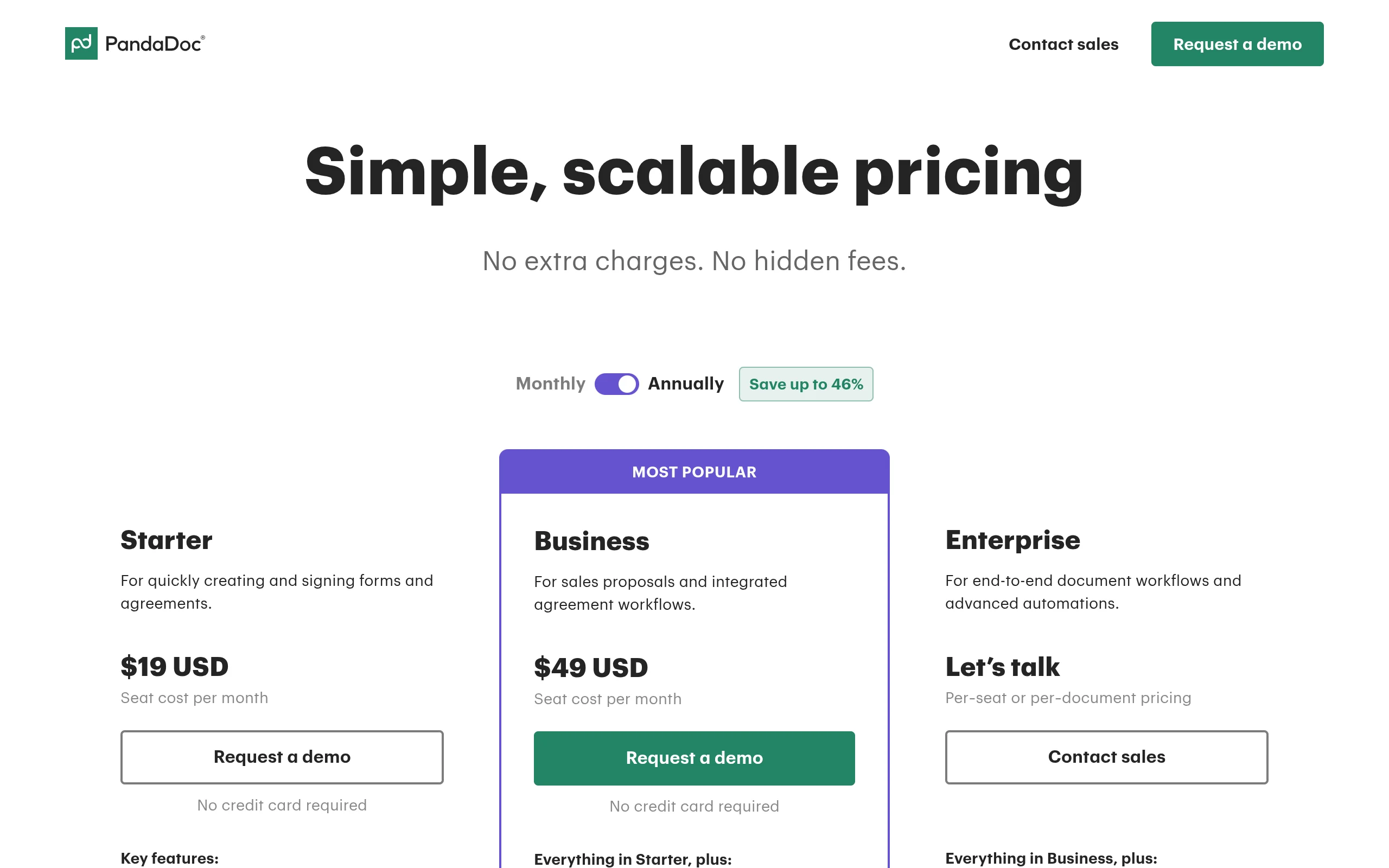
Business is the tier where PandaDoc becomes a sales tool. It adds custom quotes and sales agreements, pricing tables, payment collection, a product catalog, custom branding and a content library, approval workflows, CRM integrations, and deal rooms. If your signed document is also your quote and your payment request, Business replaces two other tools. If it is just a signature, Business is expensive seating.
The meter to understand is usage credits. Documents you send yourself through the app are unlimited on Starter and Business. Documents created through the API, Zapier, Make, web forms, or bulk send consume usage credits. After the included trial credits, credit packs are paid, overage on most automated features is billed at your order-form rate or up to $5 per document, and API document creation pauses when credits run out.
PandaDoc’s AI features sit mostly at the top of the range: smart content and workflow automation are Enterprise features on the pricing page we checked. A small business buying PandaDoc for AI document help should confirm which AI features its tier includes before paying, because the entry plans sell editing and tracking, not AI drafting.
For our test business, Starter costs $19 times three seats, which is $57 a month billed annually, or $684 a year. The 480-document year fits inside unlimited e-signatures, as long as documents are sent through the app rather than generated by automation. The real cost drivers are seat count and usage credits for automated creation.
Best for: sales-led teams whose proposals, quotes, and contracts are one document that ends in a signature and a payment. Skip if: you only need signatures on finished PDFs, because SignWell Business covers that job for $360 a year against PandaDoc Starter’s $684.
Dropbox Sign: simple unlimited requests, priced per seat
Dropbox Sign, formerly HelloSign, is the simplicity option. Its pricing page leads with unlimited signature requests and no hidden fees. Essentials costs $15 USD a month billed yearly, which is $180 billed yearly, for one user. Standard costs $25 USD per user per month billed yearly, starting at $600 USD billed yearly. Premium is a custom quote for large teams. Paid plans start with a free trial, and the page’s FAQ covers a 30-day free trial.
The starting-at figure on Standard is the detail to read twice. Standard is sold for two or more users, so the smallest Standard bill is $600 a year, not $300. A solo operator who needs Standard’s features pays for a second seat from day one.
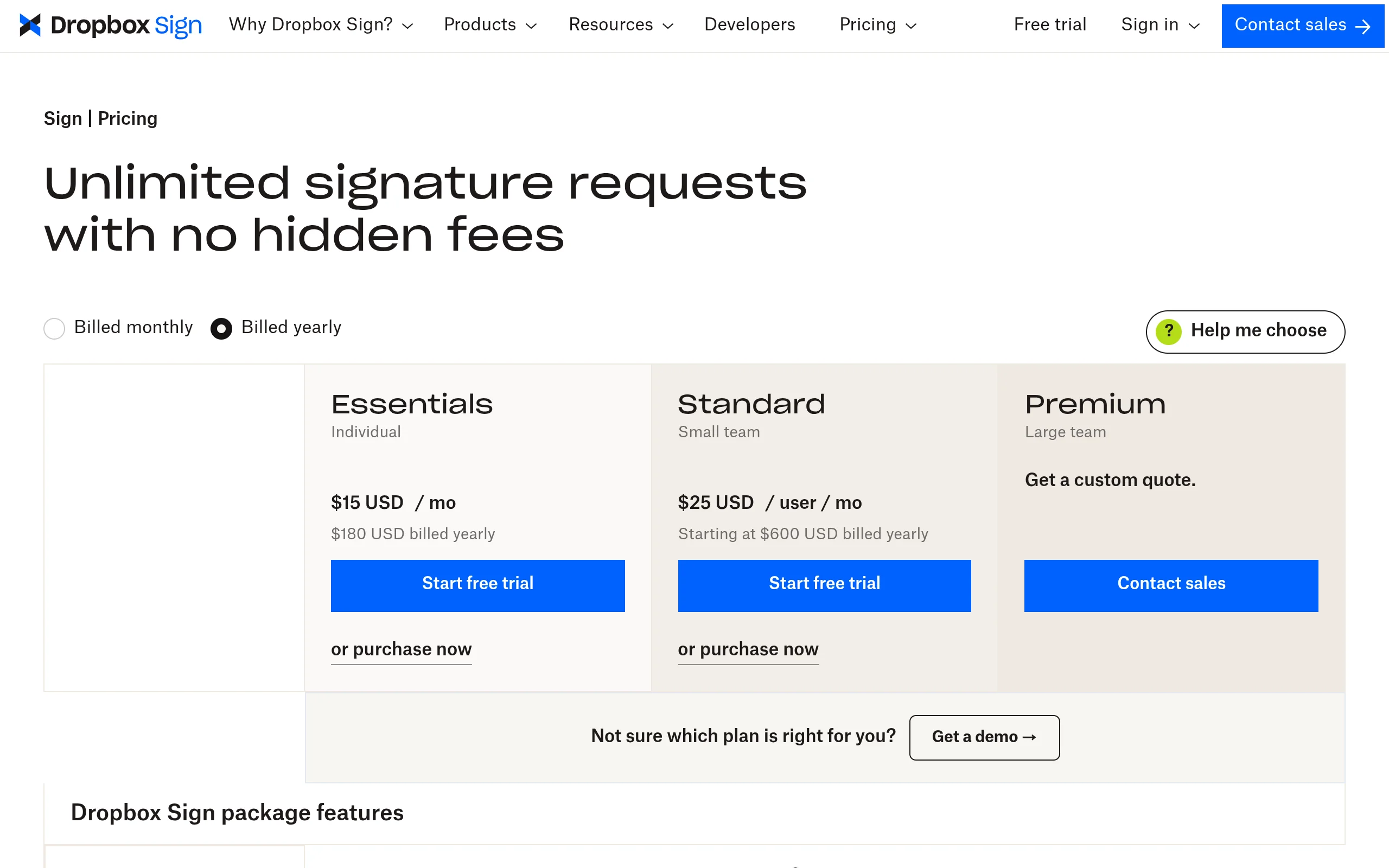
Essentials includes unlimited signature requests, 5 templates, and integrations with Google Drive, Microsoft Word, and HubSpot. That is a complete kit for one person who sends the same few agreements repeatedly. The limits that push a team upward are templates and seats: Essentials is one user with 5 templates, and Standard raises templates to 15 and adds team features for two or more users, with five or more users directed to contact sales.
Dropbox Sign makes no headline AI claim on the pricing page we checked. Its case rests on a clean signing flow, unlimited requests, and fitting the tools a team already uses, including Dropbox itself. For many small businesses that is the right trade: a signature tool’s job is to be invisible, and AI features do not make a signer sign faster.
The developer route is priced separately. Dropbox Sign’s API plans start at $75 USD a month billed yearly for 50 signature requests a month on the API pricing page, with embedded signing on higher API tiers. A business embedding signing into its own product should budget the API ladder, not the app prices in this post.
For our test business, Standard costs $25 times three users, which is $75 a month billed yearly, or $900 a year. Unlimited requests absorb the 480-document year, and 15 templates cover a small contract library. The real cost drivers are seat count and the two-seat minimum that sets the $600 floor.
Best for: teams whose files already live in Dropbox or Google Drive and who want unlimited requests without envelope maths. Skip if: price is your first filter, because SignWell Business covers three senders for $360 a year against Dropbox Sign Standard’s $900.
Docusign: the famous name, metered by the envelope
Docusign is the brand option, and its pricing page is clear about the meter: envelopes. Personal costs $11 a month on an annual plan billed monthly, an annual commitment of $132, with five envelopes a month. Standard costs $30 per user per month on an annual plan billed monthly, an annual commitment of $360 per user. Business Pro costs $45 per user per month, an annual commitment of $540 per user. Additional tax may apply, and annual plans bought on Docusign.com carry a 30-day refund.
The envelope allowance is the number that decides everything. Standard and Business Pro annual plans include up to 100 envelopes per user per year, while monthly plans include up to 10 envelopes per user per month. An envelope counts once it is sent, whether or not it is ever signed, so a contract sent to a client who never responds still spends one of your hundred.
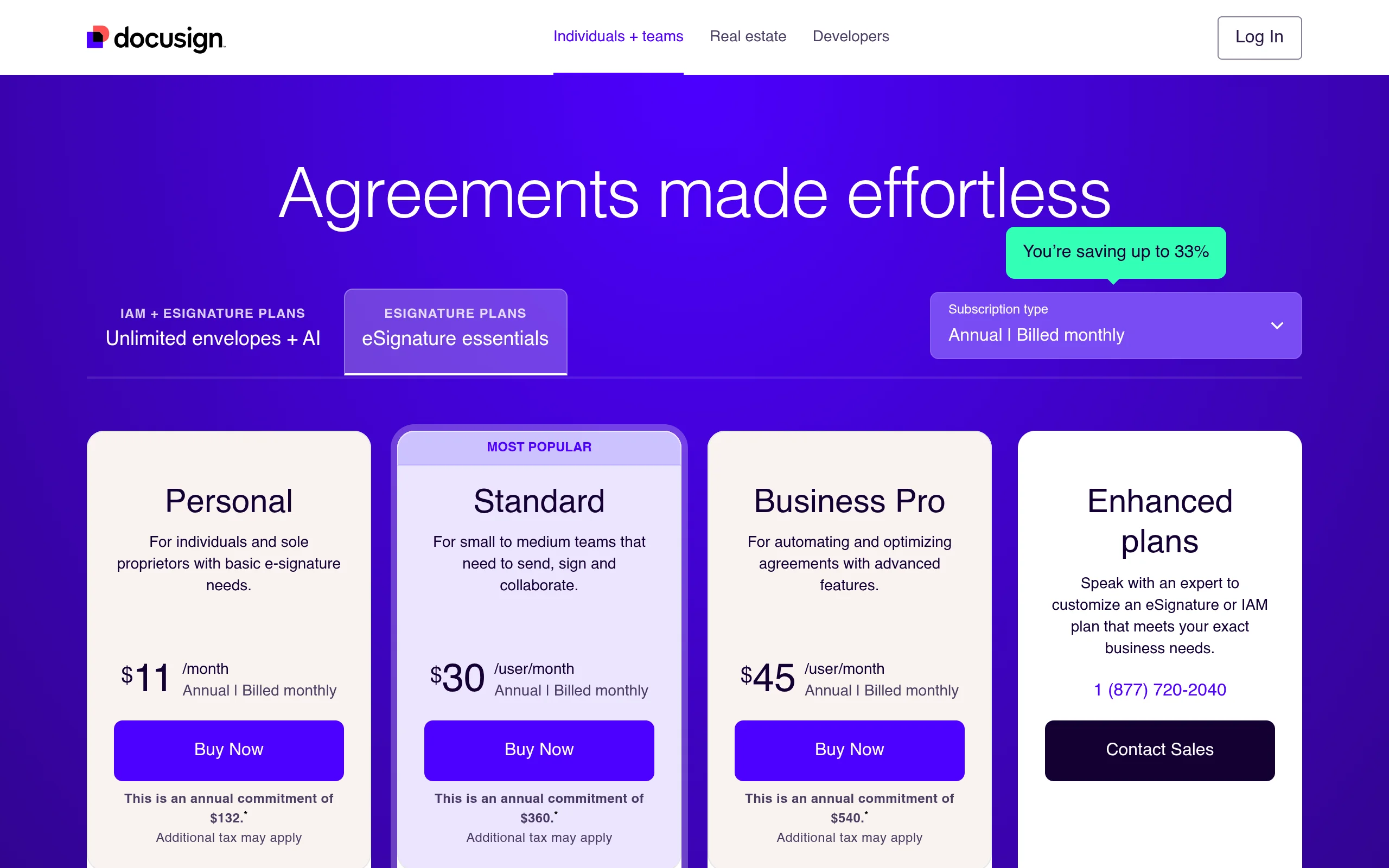
For our test business, that cap changes the price completely. Three Standard seats cost $1,080 a year and include 300 envelopes, but the business sends about 480 documents a year. Covering the full year on published allowances takes five Standard seats at $1,800 a year. Docusign states that extra envelopes are billed pay-as-you-go, but that rate is not published on the pricing page we checked, so get it in writing before relying on overage.
Business Pro does not remove the cap. It costs $45 per user per month and carries the same 100-envelope yearly allowance, adding advanced features such as bulk send and payments during signing. Upgrading tiers buys features here, not sending volume, which is the opposite of how most small businesses expect the ladder to work.
Add-ons are priced per use. Sending by SMS starts at $0.36 per delivery, and verifying recipient identity starts at $2.40 per attempt, on top of a Standard or Business Pro plan. A business verifying identity on every contract should add that cost to its yearly total.
Docusign’s deepest AI sits outside these plans. Its Intelligent Agreement Management platform is an AI-assisted system for storing, managing, and analyzing agreements, sold as its own plans rather than included in eSignature tiers. A small business choosing Docusign for AI agreement analysis is really shopping for IAM, and should price that platform directly.
Best for: businesses whose clients, banks, or procurement teams expect the Docusign name and whose volume stays under 100 envelopes per sender per year. Skip if: you send contracts weekly, because the envelope cap turns a $30 seat into a $1,800 five-seat purchase at our test volume.
The maths: three senders, 40 documents a month
Now price every tool at the same workload: three people sending about 40 documents a month, roughly 480 a year, reusing a small set of contract templates, with reminders and an audit trail required. That workload is where print-sign-scan usually breaks, because three people chasing signatures by email stops being a process.
SignWell Business costs $30 a month on yearly billing, which is $360 a year. Three senders match the team exactly, documents are unlimited, and templates are unlimited, so no add-on is needed. A fourth sender later adds $12 a month.
Zoho Sign Standard costs $10 per user per month billed annually, which is $360 a year for three users. The workload fits only if sending is shared, because each user is capped at 25 envelopes a month. If one person sends most contracts, Professional at $16 per user per month, or $576 a year, is the honest price.
PandaDoc Starter costs $19 per seat per month billed annually, which is $684 a year for three seats. The workload fits inside unlimited e-signatures when documents are sent through the app. Generating documents through the API or bulk send would add usage-credit costs on top.
Dropbox Sign Standard costs $25 per user per month billed yearly, which is $900 a year for three users. Unlimited requests cover the volume, and 15 templates cover the contract library. The two-seat minimum is already satisfied at three users, so no seat is wasted.
Docusign Standard costs $30 per user per month on an annual plan billed monthly. Three seats cost $1,080 a year but include only 300 envelopes against a 480-document year. Covering the year on published allowances takes five seats at $1,800 a year, or three seats plus pay-as-you-go envelopes at a rate the pricing page does not publish.
Add the five scenario prices together, using five Docusign seats, and the full stack costs $4,104 a year. Start on SignWell Business alone and the same workload costs $360 a year. The difference is $3,744 a year, which is the price of buying five answers to one signature problem.
The lean choice is not automatically SignWell for every business. A Zoho-based team may prefer Zoho Sign’s field detection and integrations at the same $360, and a sales team may earn PandaDoc’s extra $324 back in faster proposals. The maths sets the budget; the workflow picks the tool inside it.
Five traps that catch e-signature buyers
The first trap is the envelope cap hiding under a per-user price. Docusign Standard’s $30 seat includes 100 envelopes a year, which is about eight a month. Count your real monthly sends before opening a pricing page, then check which meter you hit first: senders, seats, envelopes, or credits.
The second trap is the minimum seat count. Dropbox Sign Standard starts at $600 a year because it is sold for two or more users. A headline per-user price only counts once you multiply it by the smallest team the vendor will sell you.
The third trap is automation metering. PandaDoc’s unlimited e-signatures cover documents sent through the app, while API, bulk send, and integration-created documents consume usage credits. Zoho Sign’s SMS, identification, and automation features consume credits too. The entry price only counts if your sending method is included in it.
The fourth trap is the feature gate in the tier above. Zoho Sign’s unlimited envelopes start on Professional. Dropbox Sign’s template limit rises from 5 on Essentials to 15 on Standard. Docusign’s bulk send and signing payments sit on Business Pro. Price the tier that includes your workflow, not the tier in the advertisement.
The fifth trap is paying for a brand your signers never asked for. Counterparties care that the signing page works on their phone and that the signed PDF looks official. If your clients have never mentioned Docusign, the $1,440 gap between five Docusign seats and SignWell Business buys nothing they can see.
Strategic Pivot: count senders and envelopes before you buy
Here is the pivot that saves the money. Before choosing any tool in this post, count three numbers: people who send documents, documents sent in a typical month, and templates you reuse. Those three numbers, not a feature checklist, decide which plan you land on and what you pay.
If you send under three documents a month alone, start on SignWell’s free plan and spend nothing. If you send weekly with a small team, SignWell Business and Zoho Sign Standard tie at $360 a year, so choose by workflow: unlimited documents, or AI field detection inside the Zoho suite. If your documents are proposals that end in payment, price PandaDoc Business against the tools it replaces. If a bank or enterprise client requires Docusign by name, buy the seats your envelope count needs and get the overage rate in writing.
Then run the yearly totals through our free AI Cost Calculator before you sign anything. It turns monthly plan prices, seat minimums, and per-envelope costs into one honest yearly figure, which is the number your budget actually feels.
If signing is only one step in a longer contract process, our guide to the best ai contract management tools covers storage, renewals, and obligations after the signature. And if your documents start as sales proposals, our best ai proposal software comparison prices the document-building side of the same workflow.
Pros and cons
SignWell pros: unlimited documents at a flat $360 a year for three senders; a real free plan with API and audit trail included; an MCP server for AI-assistant sending. SignWell cons: API documents are metered after 25 free a month; document generation and pricing tables are not its job.
Zoho Sign pros: the cheapest seat here at $10 per user per month billed annually; AI-based automatic field detection and a Zia AI assistant on Standard; a free plan covering 5 envelopes a month. Zoho Sign cons: Standard caps each user at 25 envelopes a month; SMS, identification, and automations consume paid credits.
PandaDoc pros: proposals, quotes, pricing tables, and payments in the same document as the signature; unlimited e-signatures on Starter at $19 a seat; a free plan covering 5 documents a month. PandaDoc cons: automated document creation consumes usage credits; its headline AI features sit on Enterprise.
Dropbox Sign pros: unlimited signature requests with a clean, simple signing flow; 15 templates and team features on Standard; a 30-day free trial. Dropbox Sign cons: Standard’s two-seat minimum sets a $600 yearly floor; no headline AI feature on the pricing page we checked.
Docusign pros: the name counterparties recognize; published plan prices with a 30-day refund on annual plans; per-use add-ons for SMS delivery and identity verification. Docusign cons: 100 envelopes per user per year makes weekly sending expensive; the pay-as-you-go envelope rate is not published on the pricing page.
Our verdict
For most small businesses at our test workload, SignWell Business is the buy. At $360 a year it covers three senders, unlimited documents, and unlimited templates, and its bill only grows when a new person starts sending. It is the cheapest tool here that still runs the whole send-sign-chase workflow without counting envelopes.
Choose Zoho Sign Standard instead if your business already runs on Zoho apps or your team hates placing signature fields by hand. At the same $360 a year for three users, its AI field detection and Zoho integrations are worth more than SignWell’s unlimited documents, provided no single sender passes 25 envelopes a month. If one person does, budget Professional at $576 a year.
Choose PandaDoc Starter when the document itself does the selling. At $684 a year for three seats it costs $324 more than SignWell, and it earns that back when proposals, quotes, and payment collection live in one document. Choose Dropbox Sign Standard at $900 a year when your team’s files and habits already center on Dropbox and simplicity outranks price.
Choose Docusign when a counterparty requires the name or your volume stays under 100 envelopes per sender per year. At our test volume, covering 480 documents takes five Standard seats at $1,800 a year, so get the pay-as-you-go envelope rate in writing and compare the true total against SignWell before signing an annual commitment.
Frequently asked questions
What is the best ai e-signature software for small business?
For a small business with three senders and about 40 documents a month, SignWell Business is the best value at $30 a month on yearly billing ($360 a year) with unlimited documents. Zoho Sign Standard ties it at $360 a year for three users when sending is shared under its 25-envelope monthly cap per user. PandaDoc Starter suits sales documents, Dropbox Sign suits Dropbox-based teams, and Docusign suits businesses whose counterparties expect the name.
Is there a free e-signature tool for small business?
Yes. SignWell’s free plan covers 3 documents a month for 1 sender, Zoho Sign’s free plan covers 5 envelopes a month for one user, and PandaDoc’s free plan covers 5 documents a month. Each free plan ends at a clear limit, so price the first paid tier before your team depends on the tool.
Are e-signatures legally binding for small business contracts?
E-signature platforms in this post list compliance with frameworks such as ESIGN, UETA, and eIDAS, and they keep audit trails showing who signed and when. That record is what makes a signature defensible if it is ever questioned. This post is general information, not legal advice, so check the requirements for your contract type and location before relying on any tool for regulated documents.
How much does e-signature software cost for a small business?
At a workload of three senders and 40 documents a month, published prices checked on 29 November 2026 run from $360 a year for SignWell Business or Zoho Sign Standard to $1,800 a year for five Docusign Standard seats covering 500 envelopes. PandaDoc Starter costs $684 a year for three seats, and Dropbox Sign Standard costs $900 a year for three users.
Does e-signature software need AI to be useful?
No. A signing link, phone-friendly signing, reminders, and an audit trail solve most small-business signature problems without AI. AI earns its place in document preparation, such as Zoho Sign’s automatic field detection, and in assistant connections such as SignWell’s MCP server. Buy the sending workflow first and treat AI features as a tiebreaker between tools that already fit your volume.
Sources
Prices and plan limits were checked on the vendors’ official pricing pages on 29 November 2026: SignWell pricing, Zoho Sign pricing, PandaDoc pricing, Dropbox Sign pricing, and Docusign pricing. Where a vendor’s page does not publish a rate, such as Docusign’s pay-as-you-go envelope price, this post says so instead of estimating the figure.
Price note — updated 29 November 2026: Prices in this post were checked on 29 November 2026. When you are reading this, the price may be lower or higher, and plan limits may have changed. Check the vendor’s official pricing page before you buy, and get renewal, credit, and overage prices in writing where the page does not list them.
Pros
- SignWell: unlimited documents at a flat $360 a year for three senders; a real free plan with API and audit trail included; an MCP server for AI-assistant sending.
- Zoho Sign: the cheapest seat here at $10 per user per month billed annually; AI-based automatic field detection and a Zia AI assistant on Standard; a free plan covering 5 envelopes a month.
- PandaDoc: proposals, quotes, pricing tables, and payments in the same document as the signature; unlimited e-signatures on Starter at $19 a seat; a free plan covering 5 documents a month.
- Dropbox Sign: unlimited signature requests with a clean, simple signing flow; 15 templates and team features on Standard; a 30-day free trial.
- Docusign: the name counterparties recognize; published plan prices with a 30-day refund on annual plans; per-use add-ons for SMS delivery and identity verification.
Cons
- SignWell: API documents are metered after 25 free a month; document generation and pricing tables are not its job.
- Zoho Sign: Standard caps each user at 25 envelopes a month; SMS, identification, and automations consume paid credits.
- PandaDoc: automated document creation consumes usage credits; its headline AI features sit on Enterprise.
- Dropbox Sign: Standard's two-seat minimum sets a $600 yearly floor; no headline AI feature on the pricing page we checked.
- Docusign: 100 envelopes per user per year makes weekly sending expensive; the pay-as-you-go envelope rate is not published on the pricing page.
For most small businesses at our test workload, SignWell Business is the buy. At $360 a year it covers three senders, unlimited documents, and unlimited templates, and its bill only grows when a new person starts sending. It is the cheapest tool here that still runs the whole send-sign-chase workflow without counting envelopes.Choose Zoho Sign Standard instead if your business already runs on Zoho apps or your team hates placing signature fields by hand. At the same $360 a year for three users, its AI field detection and Zoho integrations are worth more than SignWell's unlimited documents, provided no single sender passes 25 envelopes a month. If one person does, budget Professional at $576 a year.Choose PandaDoc Starter when the document itself does the selling. At $684 a year for three seats it costs $324 more than SignWell, and it earns that back when proposals, quotes, and payment collection live in one document. Choose Dropbox Sign Standard at $900 a year when your team's files and habits already center on Dropbox and simplicity outranks price.Choose Docusign when a counterparty requires the name or your volume stays under 100 envelopes per sender per year. At our test volume, covering 480 documents takes five Standard seats at $1,800 a year, so get the pay-as-you-go envelope rate in writing and compare the true total against SignWell before signing an annual commitment.