
For a small driving school with three instructors, one office manager, and two cars, Bookeo Small at $29.95 a month ($359.40 a year) is the cheapest honest start among the best ai tools for driving schools: it covers online booking, lesson packages, and payments, with room for 1,000 bookings a month. If you want one tool that also teaches, Zutobi Instructor at $99 a month ($1,188 a year) is the only all-in-one built for driving schools, with a video curriculum included. Drive Scout is the most expensive start at $2,650 in year one, because of its five-user minimum and $250 setup fee. Anolla's core plan is free, but its paid modules are priced by usage and the vendor publishes no per-unit figure. Cal.com Teams is the cheapest team scheduling at $12 per user a month billed annually, but it is a scheduler, not a driving-school system.
A driving school owner does not have a software problem. She has a phone problem. The phone rings while an instructor is out with a student, a parent wants to move Tuesday’s lesson to Thursday, a car needs its inspection, and the state wants the hour log filed by Friday. Every one of those jobs lands on the same person, and most schools still handle them with a paper diary and a group chat.
That is the job the best ai tools for driving schools are supposed to do: take the booking, the reminders, the payments, and the paperwork off the owner’s desk, and leave the teaching to the instructors. Some tools on this list were built only for driving schools. Others are general booking tools that happen to fit. The difference matters, because a generic booking page cannot track behind-the-wheel hours or stop two instructors booking the same car.
We compared five tools at the same school size, and we checked every price on the vendor’s own page on 25 November 2026. No roundup prices, no guesses, and no tool here pays us anything. If a price is not published, we say so, and we do not invent one to fill the gap.
Quick Answer
For a small driving school with three instructors, one office manager, and two cars, Bookeo Small at $29.95 a month ($359.40 a year) is the cheapest honest start among the best ai tools for driving schools: it covers online booking, lesson packages, and payments, with room for 1,000 bookings a month.
If you want one tool that also teaches, Zutobi Instructor at $99 a month ($1,188 a year) is the only all-in-one built for driving schools, with a video curriculum included. Drive Scout is the most expensive start at $2,650 in year one, because of its five-user minimum and $250 setup fee. Anolla’s core plan is free, but its paid modules are priced by usage and the vendor publishes no per-unit figure. Cal.com Teams is the cheapest team scheduling at $12 per user a month billed annually, but it is a scheduler, not a driving-school system.
In this article
- How we compared the five tools
- The five tools at a glance
- Zutobi Instructor: the all-in-one with a built-in curriculum
- Drive Scout: the heavyweight for schools with an office team
- Anolla: the free start with usage-based paid modules
- Bookeo: the cheapest honest booking system
- Cal.com: the cheapest team scheduler
- The maths: what five tools really cost a small school
- Five traps that catch driving schools
- What to buy first
- Pros and cons
- Our verdict
- Frequently asked questions
How we compared the five tools
Every price in this guide is for the same imaginary school, so the numbers can be compared fairly. The school has three instructors, one office manager, and two cars. It teaches 200 lessons a month, which is 2,400 lessons a year. A lesson sells for $60, so the school takes in about $12,000 a month before costs. That size is small enough that a five-user minimum hurts, and big enough that a one-student booking limit matters.
We judged each tool on five things. First, can students book themselves online, day and night, without phoning the school? Second, does it stop double-booking of instructors and cars? Third, does it handle lesson packages, payments, and reminders? Fourth, does it track behind-the-wheel hours and the paperwork a state asks for? Fifth, what does year one actually cost, including setup fees and minimums?
The best ai tools for driving schools are not the ones with the longest feature list. They are the ones that fit a school of this size without charging it for seats it does not have or students it has not taught yet. A tool that is cheap for one instructor can be the most expensive tool in this guide once the five-user minimum applies, and a tool that looks free can turn expensive once its paid modules switch on.
The five tools at a glance
| Tool | Best for | Starting price | Free plan or trial | Year-one cost at our school size |
|---|---|---|---|---|
| Zutobi Instructor | A school that wants scheduling plus a built-in curriculum | From $99 a month | 2-week free trial after a demo | $1,188 |
| Drive Scout | A school with an office team running bookings, payments, and payroll | $50 per user a month, 5-user minimum | Demo only, no free trial advertised | $2,650 |
| Anolla | A new school or solo instructor that wants to start free | Free core plan, paid modules usage-based | Free plan | $0 on the free plan |
| Bookeo | A small school that wants cheap, honest booking and packages | $14.95 a month (Solo); Small $29.95 a month | 30-day free trial | $359.40 (Small) |
| Cal.com | A small team that only needs scheduling | Free for 1 user; Teams $12 per user a month billed annually | Free plan; 14-day trial on paid plans | $576 (Teams, 4 users) |
Year one means the first twelve months at our school size: three instructors plus one office manager, two cars, 200 lessons a month. Zutobi’s figure is the base $99 a month; the per-student fee after the first 12 students is not published, so it is not in the number. Anolla’s figure is the free plan; its paid modules are
priced by usage and the vendor publishes no figure, so they are not in the number either. Both gaps are flagged again in the maths section, because a guide that hides them would be lying by omission.
Zutobi Instructor: the all-in-one with a built-in curriculum
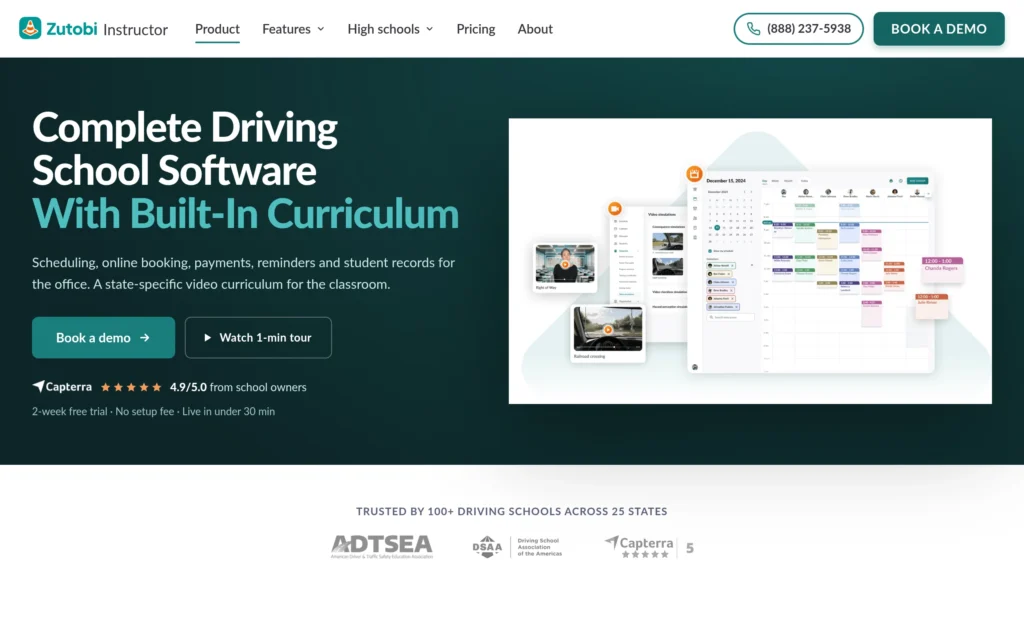
Zutobi is the name most learner drivers already know, because millions of students use its practice-test app. Zutobi Instructor is the other side of that business: the management platform for the school itself. It is the only tool in this guide that combines school management with a classroom curriculum, and that combination is the whole point of it.
Scheduling covers instructor calendars, vehicles, and zones, so the system can stop two instructors booking the same car and cut dead driving time between lessons. Students self-book around the clock. Behind-the-wheel hours are tracked, state forms can be e-signed, and hour logs are kept in the system. Payments run through Stripe or Square. The curriculum is more than 100 state-specific videos, plus simulations and classroom slides, with homework assignments and a Parent-Teen Training Guide as a premium add-on. The school also gets a website builder.
The price is simple to state and hard to finish. It starts at $99 a month per school, and that covers the first 12 active students. After that, each new student costs a one-time fee, with volume discounts as the school grows. The fee itself is not published anywhere on Zutobi’s site. Per-instructor plans are available, and multi-location plans are quote-only. There is no setup fee, billing is month to month with no long-term contract, and a two-week free trial with full access follows a demo. Setup takes under 30 minutes, and migration is free.
That unpublished per-student fee is the one thing to pin down before you sign up. At our school size, 200 lessons a month means far more than 12 active students, so the real bill is $99 a month plus a fee we cannot calculate for you. Ask for the fee in writing for your student volume before the trial ends. Zutobi also says schools can resell the student app and the Parent Guide for up to $60 more per student, which is real revenue if your students want it, but it is optional income, not a discount.
Buy Zutobi Instructor if you teach classroom driver’s ed as well as behind-the-wheel lessons, and you want the teaching material and the scheduling in one place. Skip it if you only need booking and payments, because you would be paying for a curriculum you never open.
Drive Scout: the heavyweight for schools with an office team
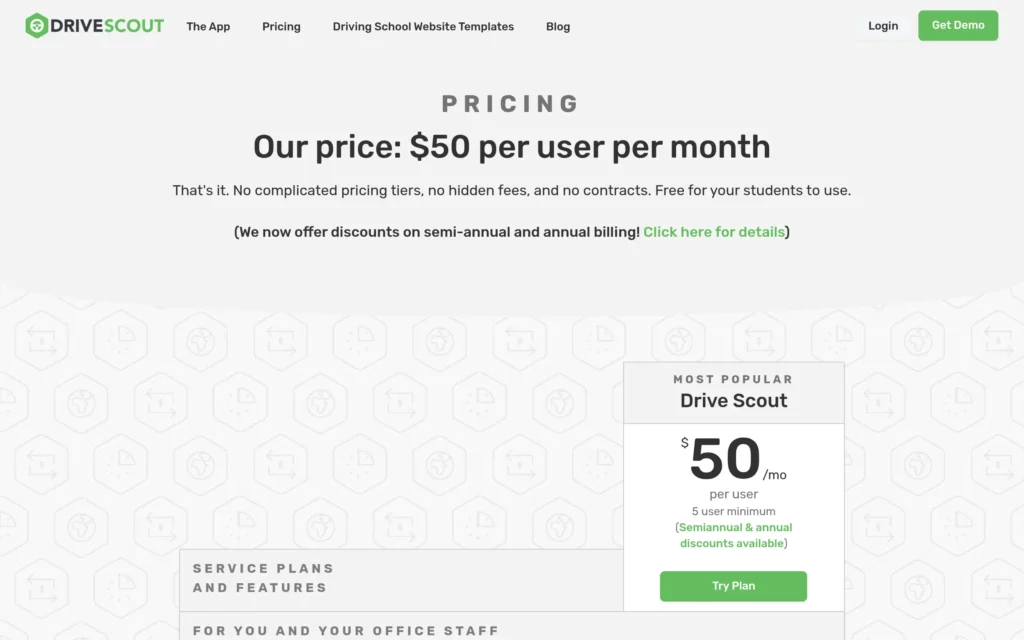
Drive Scout is the oldest-school tool on this list in the best sense: it was built only for driving schools, and it shows in the details. Students book behind-the-wheel lessons online at any hour. The office manages instructors and vehicles in one place, and the system blocks double-bookings of either. Zones cut instructor travel time. Certificates are tracked at lesson-hour milestones, digital records are kept for DMV audits, and payroll reports are included. There is a student and parent portal, and parents can read lesson feedback. Drive Scout describes itself as the exclusive software provider for the Driving School Association of California.
The price is the clearest and the steepest in this guide. It is $50 per user per month, with a five-user minimum, so the lowest possible bill is $250 a month no matter how small the school is. A $250 one-time setup fee covers initial configuration and five training sessions. Semi-annual billing gets 10 percent off, which is $1,350 every six months. Annual billing gets 20 percent off, which is $2,400 a year for five users. Additional users beyond five cost $40 to $50 a month depending on the plan. Students and parents are free. Website templates are a separate service at $100 a month, or $1,000 a year. There is a free demo, and no free trial is advertised.
At our school size, the maths is blunt. The school has four staff, but the minimum charges for five, so year one on annual billing is $2,400 plus the $250 setup fee, which is $2,650. On monthly billing it is $3,000 plus the setup fee, which is $3,250. That is $1,462 more than Zutobi in year one, before either tool’s extras. The five-user minimum is the reason: a four-person school pays for a seat nobody sits in.
Buy Drive Scout if you have five or more staff, an office that runs bookings, payments, cars, and instructor payroll, and you work in a state with heavy paperwork. California schools get the most from it. Skip it if you have fewer than five staff, because the minimum turns a good tool into the most expensive bill in this guide.
Anolla: the free start with usage-based paid modules
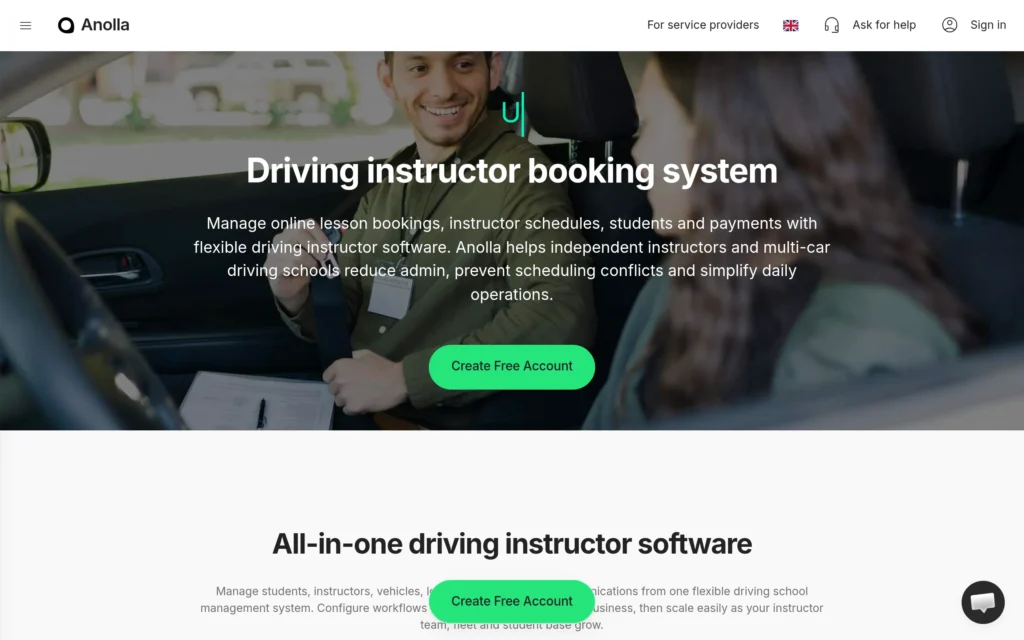
Anolla is the odd one out, and the most interesting for a new school. It is an AI-powered booking system built for driving instructors and driving schools, and its core plan is genuinely free. You create an account, set up a basic calendar, add instructors and cars, take your first lessons, and automate the first bookings without paying anything. That is a real free plan, not a trial with a card behind it.
The paid side works differently from every other tool here. Instead of a monthly price per seat, Anolla charges by usage: the monthly fee is based on the number of active driving instructors and the number of booked driving lessons. Paid modules add unlimited automation, including reminders, waiting lists, and follow-up campaigns, plus advanced accounting and marketing integrations. A dynamic pricing module automates lesson prices by time of day, season, student profile, and vehicle type, so a school can run campaign prices and VIP tariffs without changing prices by hand.
The problem for a buyer is that Anolla publishes no per-unit price for any of this. The vendor’s own page says the fee is based on activity, with no hidden fees and no binding contracts, but it never prints a number. A third-party listing puts a Plus plan at 11.99 euros per user, but that figure is not on Anolla’s own site, so we do not print it as a fact. What we can say is that the free plan costs zero, and the paid modules cost whatever your volume produces, which you only learn inside the product.
Buy Anolla if you are a solo instructor or a brand-new school and you want to start taking online bookings today for nothing, then pay only as lessons grow. Skip it if you need a fixed number for next year’s budget, because Anolla cannot give you one until you are already using it. And do not build a budget on the free plan alone: reminders, waiting lists, and follow-ups are paid modules, and a school that books 200 lessons a month will want all three.
Bookeo: the cheapest honest booking system
Bookeo is not a driving-school tool. It is a general booking system for appointments, classes, and tours, and that is exactly why it is cheap. It does one job, online booking, and it does it without charging for a curriculum, a payroll report, or a DMV audit trail you may never need. For a small school that already teaches well and only needs the diary to run itself, that trade is worth making.
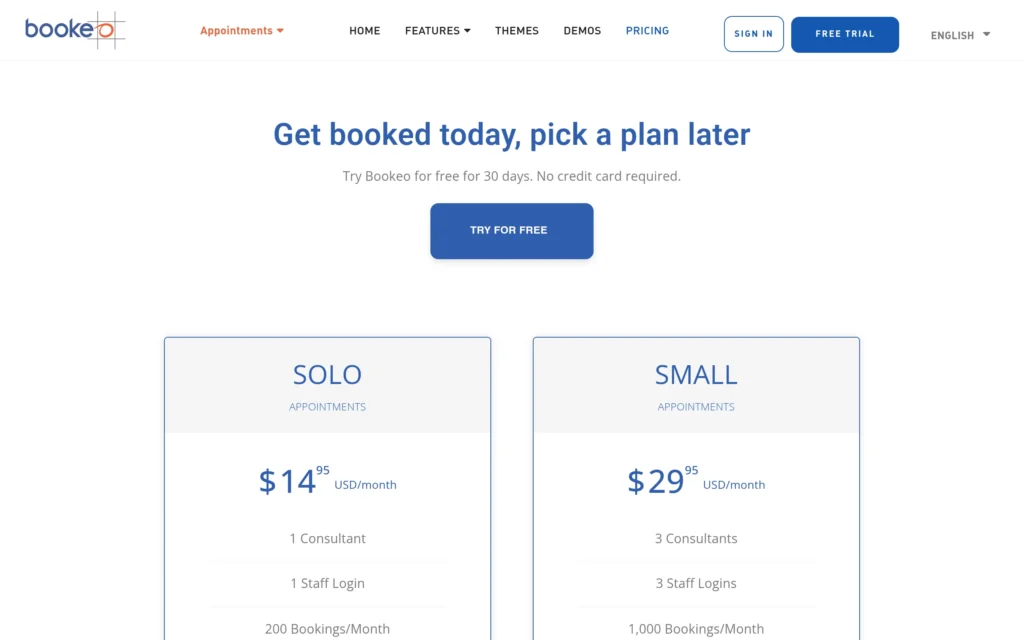
The Appointments plans are priced by staff logins and bookings. Solo is $14.95 a month for one staff login and up to 200 bookings a month. Small is $29.95 a month for three staff logins and 1,000 bookings a month. Standard is $39.95 a month for 20 staff logins and 1,000 bookings a month. Large is $79.95 a month for 40 staff logins and 2,000 bookings a month.
There is no larger published tier on the Appointments pricing page — schools that need more are asked to contact Bookeo. There is no commission and no per-booking fee: you connect your own payment processor and pay its transaction fees directly. A 30-day free trial is included, and there is a 30-day money-back guarantee.
Two things cost extra and both matter to driving schools. Digital waivers, which many schools need for minors and liability forms, start at $9 a month for 200 waivers. SMS credits are also an add-on, and a school that sends reminders by text will buy them. Neither is in the headline price, so add them to your budget if you need them.
At our school size, Small fits exactly: three instructors means three staff logins, and 200 lessons a month sits comfortably inside 1,000 bookings. Year one is $29.95 times 12, which is $359.40. That is the cheapest paid start in this guide by a wide margin, and it is also the most honest price here, because every figure is printed on the vendor’s own page. Bookeo cannot track behind-the-wheel hours, it cannot file state paperwork, and it has no curriculum. What it can do is take bookings, sell lesson packages, and take payments, all day and all night, for less than a dollar a day.
Buy Bookeo if you want the cheapest working system and you are happy to keep hour logs and state forms somewhere else. Skip it if your state paperwork is heavy enough to need a specialist, or if you want reminders, waivers, and packages in one bill without add-ons.
Cal.com: the cheapest team scheduler
Cal.com is the cheapest way to put a team calendar on the internet, and the most limited tool in this guide. It is a scheduling platform, not a driving-school system, and the difference is the whole review. It books time. It does not know what a lesson package is, what a behind-the-wheel hour is, or which car is due an inspection.
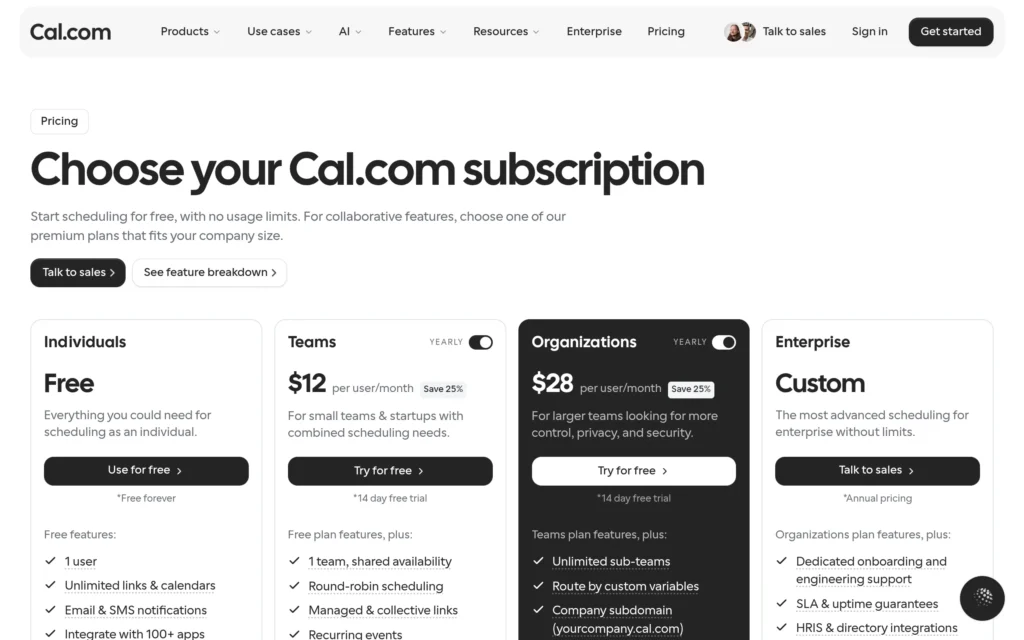
What it does, it does well and cheaply. The Individuals plan is free forever for one user, with unlimited event types, unlimited calendar connections, email and SMS notifications, Stripe and PayPal payments, and more than 100 integrations. The Teams plan is $12 per user a month billed annually, or $16 per user a month billed monthly, and it adds round-robin scheduling, routing forms, collective events, booking analytics, and removal of Cal.com branding. The Organizations plan is $28 per user a month billed annually, or $37 billed monthly, and it adds unlimited sub-teams, a company subdomain, single sign-on, and role-based permissions. Enterprise is quote-only. Paid plans carry a 14-day free trial.
At our school size, four users on Teams billed annually cost $48 a month, which is $576 a year. Paying monthly instead costs $768 a year, so annual billing saves $192. That is the cheapest team price in this guide. But the saving only matters if scheduling is all you need. A school that buys Cal.com still needs something else for packages, hour logs, and state forms, and that something else is where the real bill lives.
Buy Cal.com if you are a solo instructor who only needs a booking link, or a small team that already has its paperwork handled elsewhere and wants the cheapest shared calendar. Skip it if you expect one tool to run the school, because Cal.com will never be that tool.
The maths: what five tools really cost a small school
Here is the whole guide in one table, for our school: three instructors, one office manager, two cars, 200 lessons a month, 2,400 lessons a year, $60 a lesson.
| Stack | What you get | Year-one cost | Cost per lesson |
|---|---|---|---|
| Full stack: all five tools | Zutobi + Drive Scout + Anolla free + Bookeo Small + Cal.com Teams | $4,773.40 | $1.99 |
| Lean stack: Bookeo Small alone | Booking, packages, and payments for a 3-instructor school | $359.40 | $0.15 |
| Honest middle: Zutobi alone | Scheduling, payments, hour logs, and the video curriculum in one tool | $1,188 | $0.50 |
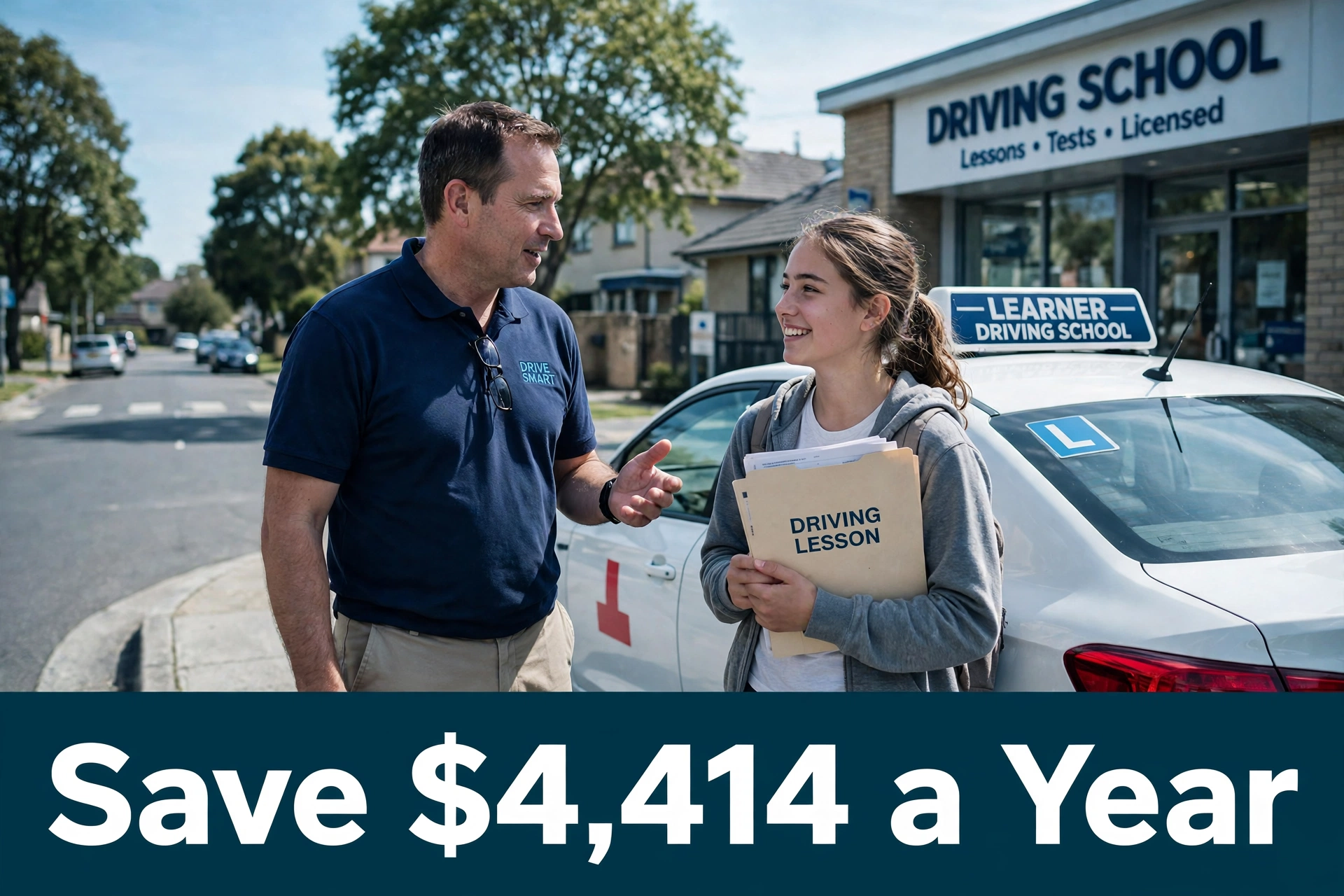
The full stack costs $4,773.40 a year, which is $397.78 a month. The lean stack costs $359.40 a year, which is $29.95 a month. The difference is $4,414 a year, and that is the saving on the cover of this post. It is a real number, worked out from published prices, but read the fine print before you celebrate it. Nobody should buy all five tools. The full stack exists to show what the “buy everything” instinct costs, not as a recommendation.
The honest middle is the number that matters most. Zutobi alone, at $1,188 a year, is about 50 cents a lesson at our volume. It is the only tool here that covers scheduling, payments, hour tracking, and teaching in one bill. If you want one tool and one login, that is the price.
Two gaps sit inside the full-stack number, and we flag them plainly. Zutobi’s per-student fee after the first 12 students is not published, so the $1,188 is a floor, not a ceiling. Anolla’s paid modules are priced by usage with no published figure, so the $0 in the table is the free plan only. If either figure turns out large at your volume, the full-stack total rises, and the $4,414 saving rises with it, because the lean stack does not carry those unknowns.
The break-even test is short. At $60 a lesson, the lean stack pays for itself after 6 lessons. The honest middle pays for itself after 20 lessons. The full stack pays for itself after 80 lessons. A school teaching 200 lessons a month clears the lean stack’s whole year in a single morning, and the full stack’s whole year in under two weeks. The question is never whether the software pays for itself. The question is whether you are paying for five tools when one would do.
Two more comparisons sharpen the choice. Drive Scout’s year one is $2,650, which is $1,462 more than Zutobi’s $1,188, and the gap is almost entirely the five-user minimum: a four-person school pays for a seat nobody sits in. Cal.com’s annual billing saves $192 a year against monthly billing for four users, which is the easiest money in this guide: switch the toggle and keep it.
Five traps that catch driving schools
First, the seat you do not have. Drive Scout’s five-user minimum is the clearest example, but it is not the only one. Any per-user price looks small until the minimum applies. Count your real users, including the office manager, before you compare monthly prices. A $50 tool with a five-user minimum costs $250 a month for a four-person school, while a $99 flat tool costs $99.
Second, the student after the twelfth. Zutobi’s first 12 students are included in the $99, and the fee after that is unpublished. A school with 40 active students is not buying a $99 tool. It is buying a $99 tool plus 28 fees it has not seen yet. Get the per-student fee in writing for your volume before the trial ends, and do the multiplication yourself.
Third, the trial that is really a demo. Drive Scout offers a demo, not a free trial. A demo is a sales call with a screen share. A trial is two weeks of your real diary running on the tool. Do not confuse the two, and do not pay a $250 setup fee before you have run your own lessons through the system.
Fourth, the add-on that doubles the bill. Bookeo’s $29.95 looks unbeatable until you add digital waivers at $9 a month and SMS credits on top. Cal.com’s $12 a user looks unbeatable until you realise it cannot sell a lesson package. Add the extras to the headline price before you compare, or the cheapest tool on the page becomes the most expensive tool in the drawer.
Fifth, the free plan that ends at the reminder. Anolla’s free plan is genuinely free, and genuinely limited. Reminders, waiting lists, and follow-ups are paid modules, and a school teaching 200 lessons a month cannot run without reminders. A no-show costs you $60 and an instructor’s hour. If the free plan cannot send the reminder that prevents the no-show, it is not saving you money. It is costing you lessons.
What to buy first
Buy in this order, and stop as soon as the problem is solved. First, buy the booking. If students cannot book themselves online, every other feature is decoration. Bookeo Small at $29.95 a month solves this for a three-instructor school, and it is where most small schools should start.
Second, buy the reminders. No-shows are the most expensive line in a driving school’s week, because an empty car still costs fuel, insurance, and an instructor’s hour. Whichever tool you pick, make sure automated SMS and email reminders are switched on before your first lesson, and count their cost in the price.
Third, buy the paperwork only when the paperwork hurts. If your state asks for hour logs, e-signed forms, and certificates, Zutobi or Drive Scout earns its price. If your state asks for almost nothing, Bookeo plus a spreadsheet earns its $29.95. Do not buy a curriculum you will never teach, and do not buy payroll reports for a team of three.
If you teach classroom driver’s ed as well as lessons, start with Zutobi instead. The curriculum is the reason to pay $99 a month, and a school that teaches 200 lessons a month will use it every week. If you only teach behind the wheel, start with Bookeo, and add Zutobi later only when the diary, not the marketing, tells you to.
Pros and cons
Zutobi Instructor
Pros: the only all-in-one with a built-in video curriculum; scheduling covers instructors, vehicles, and zones; state forms and hour logs included; no setup fee; free migration. Cons: per-student fee after 12 students is unpublished; multi-location plans are quote-only; the trial follows a demo, not a self-serve signup.
Drive Scout
Pros: built only for driving schools; blocks double-booking of instructors and cars; payroll reports and DMV audit records; student and parent portal; exclusive provider for the Driving School Association of California. Cons: five-user minimum makes it the most expensive start; $250 setup fee; no free trial advertised, demo only; website templates cost extra.
Anolla
Pros: core plan is genuinely free; usage-based pricing grows with lesson volume; dynamic pricing automates lesson prices; no contracts and no hidden fees. Cons: no published price for paid modules, so budgeting is guesswork; reminders and waiting lists are paid, not free; a third-party Plus figure exists but is not on the vendor’s own site.
Bookeo
Pros: cheapest honest price in this guide; no commission or per-booking fee; 1,000 bookings a month on the Small plan; 30-day trial and money-back guarantee. Cons: not built for driving schools, so no hour logs or state forms; waivers and SMS credits cost extra; the Solo plan’s 200-booking cap is too small for a busy school.
Cal.com
Pros: free for one user; Teams at $12 a user a month is the cheapest team scheduling; round-robin and routing forms included; 14-day trial on paid plans. Cons: a scheduler, not a driving-school system; no packages, hour logs, or state paperwork; the cheapest price here buys the least of the job.
Our verdict
The best ai tools for driving schools are the ones that match the size of the school buying them, and at the size in this guide the honest answer is boring: start with Bookeo Small. At $359.40 a year it books lessons, sells packages, and takes payments for 15 cents a lesson, and a school teaching 200 lessons a month recovers the whole year in six lessons. It will not do your state paperwork, and you should know that before you buy it, but most small schools do not need a specialist for paperwork they can already handle.
If you teach classroom driver’s ed, the answer changes. Zutobi Instructor at $1,188 a year is the only tool that teaches as well as it schedules, and 50 cents a lesson is a fair price for a curriculum, hour logs, and state forms in one place. Get the per-student fee in writing first, because the $99 is a floor, not the whole bill.
Drive Scout is the right tool for the wrong size of school in this guide. With five or more staff and heavy state paperwork, especially in California, it earns its $2,650 year one. With four staff, the minimum charges you for a person who does not exist. Anolla is the right start for a new school with no budget at all, as long as you know the free plan ends where reminders begin. Cal.com is the cheapest calendar on the internet, and the least of a driving-school system. Buy it when scheduling is all you need, and never when it is not.
Frequently asked questions
What is the best AI tool for a small driving school?
For a school with up to three instructors, Bookeo Small at $29.95 a month is the cheapest honest start among the best ai tools for driving schools, covering booking, packages, and payments. If you also teach classroom driver’s ed, Zutobi Instructor at $99 a month is the better single tool, because it adds the video curriculum, hour logs, and state forms.
How much does driving school software cost per month?
Published prices in November 2026 run from free to $250 a month. Anolla’s core plan is free. Bookeo starts at $14.95 a month. Cal.com Teams is $12 per user a month billed annually. Zutobi Instructor starts at $99 a month. Drive Scout starts at $250 a month, because of its five-user minimum at $50 per user.
Does Zutobi Instructor charge per student?
Yes, after the first 12 active students. The base price of $99 a month includes 12 students, and each new student costs a one-time fee with volume discounts. Zutobi does not publish the fee, so ask for it in writing for your student volume before your trial ends.
Is there really free driving school software?
Yes, with limits. Anolla’s core plan is free and covers basic booking, instructor and car calendars, and payments. Cal.com is free for one user. Neither free plan covers automated reminders, waiting lists, or state paperwork, which are the features a busy school pays for.
Can a general booking tool run a driving school?
It can run the bookings, and that is often enough. Bookeo handles lesson packages and payments well, and Cal.com handles team scheduling well. Neither tracks behind-the-wheel hours or files state paperwork, so a school with heavy state requirements still needs a specialist tool such as Zutobi Instructor or Drive Scout.
Price note
Price note — updated 25 November 2026: Prices in this post were checked on 25 November 2026 on the vendors’ own pricing pages. When you are reading this, the price may be lower or higher, a plan may have been renamed, or a free trial may have changed. Check the official pricing page before you buy. Two figures are deliberately missing from this post: Zutobi Instructor’s per-student fee after the first 12 students, and Anolla’s paid-module prices, because neither vendor publishes them. Ask both vendors for your volume in writing.
Sources
- Zutobi Instructor pricing and features: https://zutobi.com/us/driving-schools
- Drive Scout pricing: https://www.drivescout.com/pricing
- Anolla driving instructor software: https://anolla.com/en/driving-instructor-software
- Bookeo Appointments pricing: https://www.bookeo.com/appointments/pricing/
- Cal.com pricing: https://cal.com/pricing
Our free AI Cost Calculator
Before you pay for any of these tools, add up what your school actually spends on software today. Our free AI Cost Calculator takes the monthly prices of the tools you already use and shows the real yearly total, so you can see whether a $99 tool replaces three $30 tools or just joins them. It takes two minutes, and it uses your numbers, not ours.
Pros
- Zutobi Instructor: the only all-in-one with a built-in video curriculum; scheduling covers instructors, vehicles, and zones; state forms and hour logs included; no setup fee; free migration.
- Drive Scout: built only for driving schools; blocks double-booking of instructors and cars; payroll reports and DMV audit records; student and parent portal; exclusive provider for the Driving School Association of California.
- Anolla: core plan is genuinely free; usage-based pricing grows with lesson volume; dynamic pricing automates lesson prices; no contracts and no hidden fees.
- Bookeo: cheapest honest price in this guide; no commission or per-booking fee; 1,000 bookings a month on the Small plan; 30-day trial and money-back guarantee.
- Cal.com: free for one user; Teams at $12 a user a month is the cheapest team scheduling; round-robin and routing forms included; 14-day trial on paid plans.
Cons
- Zutobi Instructor: per-student fee after 12 students is unpublished; multi-location plans are quote-only; the trial follows a demo, not a self-serve signup.
- Drive Scout: five-user minimum makes it the most expensive start; $250 setup fee; no free trial advertised, demo only; website templates cost extra.
- Anolla: no published price for paid modules, so budgeting is guesswork; reminders and waiting lists are paid, not free; a third-party Plus figure exists but is not on the vendor's own site.
- Bookeo: not built for driving schools, so no hour logs or state forms; waivers and SMS credits cost extra; the Solo plan's 200-booking cap is too small for a busy school.
- Cal.com: a scheduler, not a driving-school system; no packages, hour logs, or state paperwork; the cheapest price here buys the least of the job.
The best ai tools for driving schools are the ones that match the size of the school buying them, and at the size in this guide the honest answer is boring: start with Bookeo Small. At $359.40 a year it books lessons, sells packages, and takes payments for 15 cents a lesson, and a school teaching 200 lessons a month recovers the whole year in six lessons. It will not do your state paperwork, and you should know that before you buy it, but most small schools do not need a specialist for paperwork they can already handle.If you teach classroom driver's ed, the answer changes. Zutobi Instructor at $1,188 a year is the only tool that teaches as well as it schedules, and 50 cents a lesson is a fair price for a curriculum, hour logs, and state forms in one place. Get the per-student fee in writing first, because the $99 is a floor, not the whole bill.Drive Scout is the right tool for the wrong size of school in this guide. With five or more staff and heavy state paperwork, especially in California, it earns its $2,650 year one. With four staff, the minimum charges you for a person who does not exist. Anolla is the right start for a new school with no budget at all, as long as you know the free plan ends where reminders begin. Cal.com is the cheapest calendar on the internet, and the least of a driving-school system. Buy it when scheduling is all you need, and never when it is not.